2014 MERCEDES-BENZ SPRINTER warning lights
[x] Cancel search: warning lightsPage 102 of 338

Motion detector
G
WARNING
The motion detector sends the invisible infra-
red radiation emitted by LEDs (light emitting
diodes).
These LEDs are classified as class 1M lasers
and can damage the retina if you:
R look directly into the unfiltered laser beam
of the motion detector for an extended
period
R look directly into the laser beam of the
motion detector using optical instruments,
e.g. eyeglasses or a magnifying glass.
There is a risk of injury.
Never look directly into the motion detector.
The cargo compartment lighting is also
switched on by the motion detector in the
cargo compartment of Cargo Vans equipped
with this feature.
If the motion detector detects a movement in
the cargo compartment when the vehicle is
stationary, the cargo compartment lighting
switches on for approximately two minutes.
The cargo compartment lighting can be
switched on by the motion detector within
four seconds if:
R the rear interior light switch (Y page 99) is
set to automatic control.
R the vehicle is stationary, the parking brake
is applied and the brake pedal is not being
depressed
Or
R the selector lever is in position Pon vehi-
cles with automatic transmission and the
brake pedal is not being depressed and
R the vehicle has not been locked from the
outside using the key
The motion detector switches off automati-
cally if no change is detected in the vehicle
for several hours, e.g. if a door is opened, if
the ignition key is turned, etc. This prevents
the battery from becoming discharged. Changing bulbs
Important safety notes
G
DANGER
Xenon bulbs carry a high voltage. You can get
an electric shock if you remove the cover of
the Xenon bulb and touch the electrical con-
tacts. There is a risk of fatal injury.
Never touch the parts or the electrical con-
tacts of the Xenon bulb. Always have work on
the Xenon bulbs carried out at a qualified spe-
cialist workshop. G
WARNING
Bulbs, lamps and connectors can get very hot
when operating. If you change a bulb, you
could burn yourself on these components.
There is a risk of injury.
Allow these components to cool down before
changing a bulb.
! Make sure the bulbs are always securely
installed.
If your vehicle is equipped with Bi-Xenon
bulbs, you can recognize this by the following:
the cone of light from the Xenon bulbs moves
from the top to the bottom and back again
when you start the engine. For this to be
observed, the low-beam headlamps must be
switched on before starting the engine.
The bulbs and lamps are an essential compo-
nent of vehicle safety. You must therefore
make sure that these function correctly at all
times. Have the headlamp setting checked
regularly.
R Always switch off the vehicle's lighting sys-
tem before changing a bulb.
This will prevent a short circuit.
R Do not touch the glass tube of new bulbs
with your bare hands. Always use a clean,
lint-free cloth or only touch the base of the
bulb when installing.
Even minor contamination can burn into
the glass surface and reduce the service life
of the bulbs. 100
Changing bulbsLights and windshield wipers
Page 110 of 338

The detent positions of the combination
switch correspond to the following wiper
speeds:
0W indshield wipers off
II ntermittent wipe
II Normal wipe
III Rapid wipe
i Canada only:
If the windshield wipers are switched on
and you stop the vehicle, the windshield
wiper speed is reduced. For example, if you
have selected level IIand stop the vehicle,
wiping continues with intermittent wipe
while the vehicle is stationary. If intermit-
tent wipe is selected, the intervals become
longer.
Vehicles with a rain and light sensor:
you can use level Ias the universal setting.
The rain and light sensor sets the appropri-
ate wiping frequency automatically,
according to the intensity of the rain. When
you stop the vehicle, levels IIIand IIare
switched down to level Iautomatically.
The windshield wiper will return to the orig-
inal level when you drive faster than
5 mph (8 km/h).
You can adjust the sensitivity of the rain and
light sensor using the on-board computer
(Y page 196).
Information on checking the washer fluid
level can be found in the "Maintenance and
care" (Y page 257) section. Switching the rear window wiper on/
off Combination switch
0043
00C5 Rear window wiper switch
0048 00E2 To wipe with washer fluid
0049 ITo switch on intermittent wiping
004A 0To switch off intermittent wiping
004B 00E2 To wipe with washer fluid
X Turn the key to position 1or 2in the ignition
lock.
X Turn switch 0043to the corresponding posi-
tion
The rear window wiper switches on automat-
ically if you engage reverse gear and the wind-
shield wipers are on. Replacing the wiper blades
G
WARNING
If the windshield wipers begin to move while
you are changing the wiper blades, you could
be trapped by the wiper arm. There is a risk
of injury.
Always switch off the windshield wipers and
ignition before changing the wiper blades.
! Never open the hood if a windshield wiper
arm has been folded away from the wind-
shield.
Never fold a windshield wiper arm without
a wiper blade back onto the windshield/
rear window. 108
Windshield wipersLights and
windshield wipers
Page 132 of 338
If the
0084 symbol in the status bar is shown:
X Press the 00CFor00DB button until the
off
off message in the display panel is shown.
X Press the 0070button.
The preselection time is deactivated. The
time is shown.
Setting the heating level You can set the heating level to a range
between 10 and 30.
The heating level corresponds to a preselec-
tion temperature for the vehicle interior. This
is a guide value and may, depending on the
outside temperature, differ from the actual
vehicle interior temperature.
X Press the 00CFor00DB button until the
00D1 symbol in the menu bar flashes.
X Press the 0070button.
The heating level display flashes.
X Using the 00CFand00DB buttons, set the
desired heating level to a range between 10
and 30.
X Press the 0070button.
The heating level is set and the 0084sym-
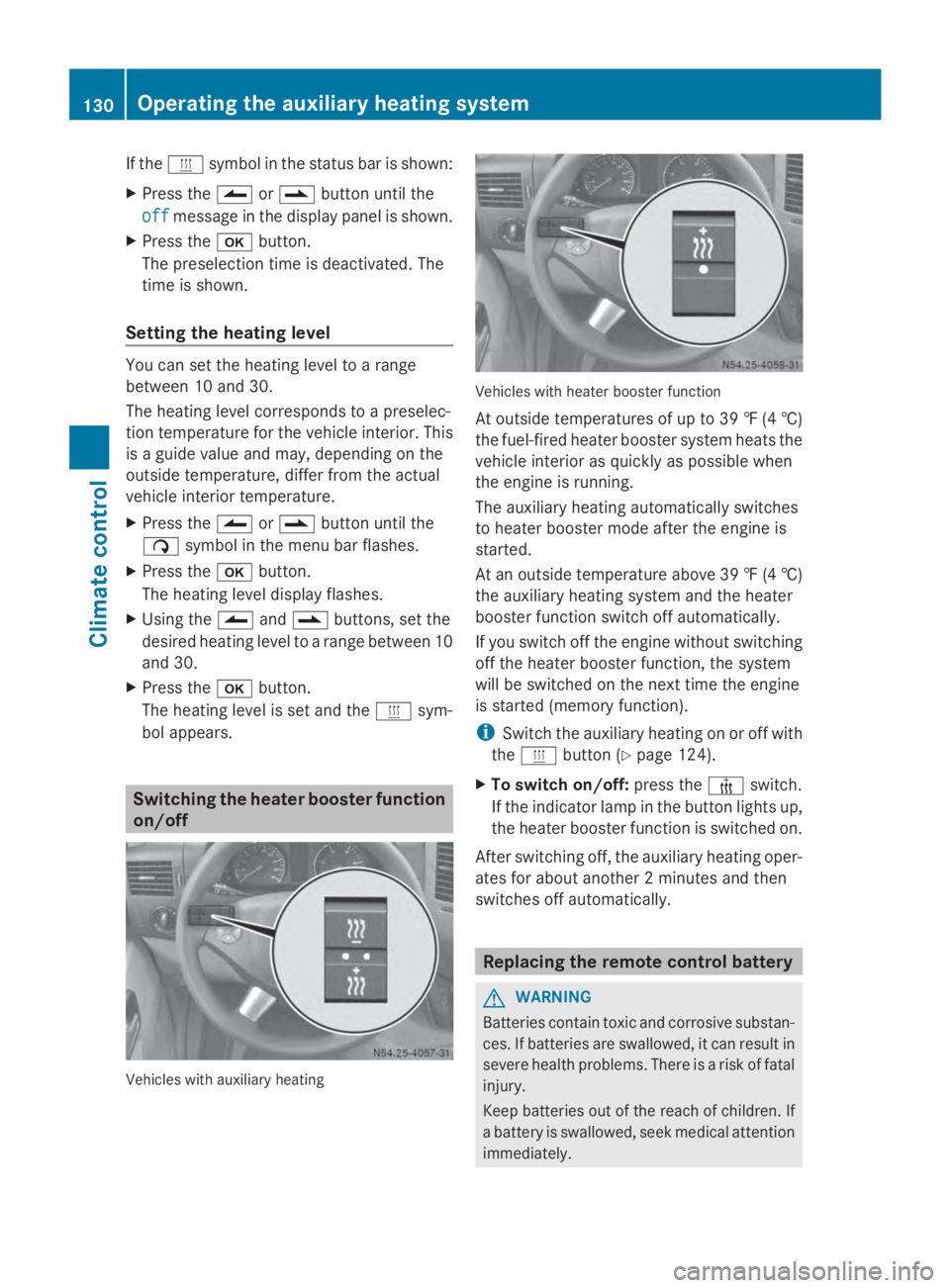
bol appears. Switching the heater booster function
on/off Vehicles with auxiliary heating Vehicles with heater booster function
At outside temperatures of up to 39 ‡
(4†)
the fuel-fired heater booster system heats the
vehicle interior as quickly as possible when
the engine is running.
The auxiliary heating automatically switches
to heater booster mode after the engine is
started.
At an outside temperature above 39 ‡ (4†)
the auxiliary heating system and the heater
booster function switch off automatically.
If you switch off the engine without switching
off the heater booster function, the system
will be switched on the next time the engine
is started (memory function).
i Switch the auxiliary heating on or off with
the 0084 button (Y page 124).
X To switch on/off: press the006Aswitch.
If the indicator lamp in the button lights up,
the heater booster function is switched on.
After switching off, the auxiliary heating oper-
ates for about another 2 minutes and then
switches off automatically. Replacing the remote control battery
G
WARNING
Batteries contain toxic and corrosive substan-
ces. If batteries are swallowed, it can result in
severe health problems. There is a risk of fatal
injury.
Keep batteries out of the reach of children. If
a battery is swallowed, seek medical attention
immediately. 130
Operating the auxiliary heating systemClimate control
Page 141 of 338

X
Before starting the engine, make sure that:
R all the doors are closed.
R all the vehicle occupants are wearing
their seat belts correctly.
R the parking brake is applied.
i If you depress the brake pedal before
starting the engine, the pedal travel is short
and pedal resistance is high.
If you depress the brake pedal again after
starting the engine, pedal travel and resist-
ance will be back to normal again. Gearshift pattern
005D
Park position with parking lock
005E Reverse gear
005C Neutral
005B Drive
X Move the selector lever to position P.
The display in the instrument cluster shows
P:
R on vehicles with steering wheel buttons
(Y page 189)
R on vehicles without steering wheel but-
tons ( Ypage 184)
i You can also start the engine in neutral
N.
X Turn the key to position 2in the ignition
lock.
The 0028 preglow indicator lamp in the
instrument cluster lights up briefly.
X Once the 0028preglow indicator lamp goes
out, turn the key to position 3in the ignition
lock and release it as soon as the engine is
running. i
You can start the engine without preglow
when the engine is warm.
The preglow system is malfunctioning if the
0028 preglow indicator lamp lights up for
approximately 1 minute:
R after the ignition is switched on
R while the engine is running
At extremely low outside temperatures you
may then no longer be able to start the
engine. Have the malfunction rectified at a
qualified specialist workshop.
i Depending on the equipment installed,
the vehicle either automatically locks cen-
trally after switching on the ignition or after
pulling away. The locking knobs in the
doors drop down.
You can open the doors from the inside at
any time.
Automatic door locking can be deactivated
(Y page 71). Driving off
G
WARNING
If the engine speed is above the idling speed
and you engage transmission position Dor
R, the vehicle could pull away suddenly. There
is a risk of an accident.
When engaging transmission position Dor R,
always firmly depress the brake pedal and do
not simultaneously accelerate.
! Only shift into reverse gear Rwhen the
vehicle is stationary. Otherwise, you could
damage the transmission.
X Depress the brake pedal and keep it
depressed.
The selector lever lock is released.
X Move the selector lever to position Dor R.
On vehicles with a reverse warning feature,
when reverse gear is engaged a warning
tone sounds to alert other road users
(Y page 140). Driving
139Driving and parking Z
Page 154 of 338

Parking brake
G
WARNING
If you leave children unsupervised in the vehi-
cle, they could set it in motion by, for example:
R release the parking brake.
R shift the automatic transmission out of the
parking position P.
R start the engine.
In addition, they may operate vehicle equip-
ment and become trapped. There is a risk of
an accident and injury.
When leaving the vehicle, always take the
SmartKey with you and lock the vehicle. Never
leave children unsupervised in the vehicle. G
WARNING
If you must brake the vehicle with the parking
brake, the braking distance is considerably
longer and the wheels could lock. There is an
increased danger of skidding and accidents.
Only use the parking brake to brake the vehi-
cle when the service brake is faulty. Do not
apply the parking brake too firmly. If the
wheels lock, release the parking brake until
the wheels begin turning again. The brake lamps are not illuminated when you
brake the vehicle using the parking brake.
As a rule, you may only apply the parking
brake when the vehicle is stationary. X
To apply the parking brake: pull brake
lever 0043up as far as the last possible
detent.
The 0066 warning lamp in the instrument
cluster lights up if the engine is running.
i On vehicles with a folding brake lever, you
can then press lever 0043down to the stop.
X To release the parking brake: on vehicles
with a folding brake lever, first pull brake
lever 0043up to the stop.
X Raise brake lever 0043slightly and press
release knob 0044.
X Guide brake lever 0043down to the stop.
The 0066 indicator lamp in the instrument
cluster goes out.
Exceptionally, if the service brake fails, the
parking brake can be used to brake the vehi-
cle in an emergency.
X Emergency braking: press and hold
release button 0044and carefully apply brake
lever 0043. Switching off the engine
G
WARNING
The automatic transmission switches to neu-
tral position Nwhen you switch off the engine.
The vehicle may roll away. There is a risk of
an accident.
After switching off the engine, always switch
to parking position P. Prevent the parked vehi-
cle from rolling away by applying the parking
brake.
! If the coolant temperature is very high,
e.g. after driving on hilly roads, leave the
engine running at idle speed for about
two minutes before turning it off.
This allows the coolant temperature to
return to normal.
X Stop the vehicle.
X Shift the automatic transmission to posi-
tion P. 152
ParkingDriving and parking
Page 167 of 338

Blind Spot Assist monitors the area approx-
imately 10 ft (3.0 m) behind your vehicle and
approximately 11.5 ft (3.5 m) to each side of
it. For this purpose, Blind Spot Assist uses
radar sensors in the rear bumper and behind
the protective strips of the B-pillars.
If the lanes are narrow, vehicles driving in the
lane beyond the lane next to your vehicle may
be indicated, especially if the vehicles are not
driving in the middle of their lane. This may
be the case if the vehicles are driving on the
inner side of their lane.
Due to the nature of the system:
R a clear warning situation may not occur.
The yellow indicator lamp on the relevant
side of the vehicle will then light up.
R warnings may be issued in error when driv-
ing close to crash barriers or similar solid
lane borders.
R warnings may be interrupted when driving
alongside particularly long vehicles, for
example trucks, for a prolonged time.
The four sensors of Blind Spot Assist are inte-
grated into the rear bumper and behind the
protective strips of the B-pillars. Make sure
that the bumper and protective stripping are
free of dirt, ice or slush in the vicinity of the
sensors. The radar sensors must not be cov-
ered, for example by cycle racks or overhang-
ing loads. Have the function of the radar sensors
checked at a qualified specialist workshop:
R
after a severe impact
R in the event of damage to the bumper
R in the event of damage to the protective
strips of the B-pillars
Blind Spot Assist may otherwise not work
properly.
Indicator and warning display
Blind Spot Assist is not active at speeds below
approximately 20 mph (30 km/h). Vehicles in
the monitoring range are then not indicated. 0043
Yellow indicator lamp/red warning lamp
If yellow indicator lamp 0043lights up:
R you are driving at less than 20 mph
(30 km/h)
R Blind Spot Assist is deactivated
R Blind Spot Assist is malfunctioning
R there is no clear warning, depending on the
situation
Blind Spot Assist is active from a speed of
20 mph (30 km/h). If a vehicle is detected in
the blind spot monitoring range, red warning
lamp 0043on the corresponding side lights up.
This warning occurs when a vehicle enters the
blind spot monitoring range from behind or
from the side. When you overtake a vehicle,
the warning only occurs if the difference in
speed is less than 14 mph (22 km/h).
Yellow indicator lamp 0043goes out if reverse
gear is engaged. Blind Spot Assist is then
deactivated. Driving systems
165Driving and parking Z
Page 168 of 338

The brightness of the indicator/warning
lamps is adjusted automatically according to
the ambient light.
Collision warning
If a vehicle is detected in the monitoring range
of Blind Spot Assist and you switch on the
corresponding turn signal, a double warning
tone sounds once. Red warning lamp 0043
flashes. If the turn signal remains on,
detected vehicles are indicated by the flash-
ing of red warning lamp 0043. There are no fur-
ther warning tones.
Activating/deactivating Blind Spot Assist
i Blind Spot Assist is activated when you
switch on the ignition.
X Turn the key to position 2in the ignition
lock.
Warning lamps 0043in the exterior mirrors
light up red for approximately
1.5 seconds and then turn yellow.
X To deactivate: press the button in
the center console (Y page 37).
The yellow indicator lamp in exterior mir-
ror 0043first flashes and then lights up con-
tinuously. Blind Spot Assist is deactivated.
X To activate: press the button in the
center console again (Y page 37).
The yellow indicator lamp in exterior mir-
ror 0043flashes initially. If you exceed
19 mph (30 km/h) while driving, the yellow
indicator lamp in exterior mirror 0043goes
out. Blind Spot Assist is activated.
Towing a trailer
If you attach a trailer, make sure that you have
correctly established the electrical connec-
tion. This can be accomplished by checking
the trailer lighting. Blind Spot Assist is then
deactivated. The indicator lamp in the exte-
rior mirrors lights up yellow.
On vehicles with steering wheel buttons, the
message: Blind Spot Assist deacti‐
Blind Spot Assist deacti‐ vated vated
also appears in the multifunction dis-
play.
Lane Keeping Assist General notes
Lane Keeping Assist monitors the area in
front of your vehicle by means of a camera at
the top of the windshield. Lane Keeping Assist
detects lane markings on the road and warns
you before you leave your lane unintention-
ally.
0043
Lane Keeping Assist camera
Lane Keeping Assist supports you from
speeds of approximately 40 mph(60 km/h).
Important safety notes G
WARNING
Lane Keeping Assist may not always clearly
recognize lane markings.
In this case, Lane Keeping Assist may:
R give an unnecessary warning
R not give a warning
There is a risk of an accident.
Always pay particular attention to the traffic
situation and stay in lane, in particular if
warned by Lane Keeping Assist. G
WARNING
The Lane Keeping Assist warning does not
return the vehicle to the original lane. There
is a risk of an accident. 166
Driving systemsDriving and parking
Page 169 of 338
You should always steer, brake or accelerate
yourself, in particular if warned by Lane Keep-
ing Assist.
Lane Keeping Assist may not work properly
or may not work at all if the vehicle is incor-
rectly loaded (Y page 242).
If you fail to adapt your driving style, Lane
Keeping Assist can neither reduce the risk of
accident nor override the laws of physics.
Lane Keeping Assist cannot take into account
road, weather or traffic conditions. Lane
Keeping Assist is only an aid. You are respon-
sible for the distance to the vehicle in front,
for vehicle speed, braking in good time and
for staying in your lane.
Lane Keeping Assist does not keep your vehi-
cle in its lane.
The system may be impaired or may not func-
tion if:
R there is poor visibility, e.g. due to insuffi-
cient illumination of the road, or due to
snow, rain, fog or spray
R there is glare, e.g. from oncoming traffic,
the sun or reflection from other vehicles
(e.g. if the road surface is wet)
R the windshield is dirty, fogged up, damaged
or covered, for instance by a sticker, in the
vicinity of the camera
R no, or several, unclear lane markings are
present for one lane, e.g. in a construction
area
R the lane markings are worn away, dark or
covered up, e.g. by dirt or snow
R the distance to the vehicle in front is too
small and the lane markings thus cannot be
detected
R the lane markings change quickly, e.g.
lanes branch off, cross one another or
merge
R the road is narrow and winding
R there are highly variable shade conditions
on the road
A warning may be given if a front wheel
passes over a lane marking. In addition, a warning tone sounds and the
00B0indicator
lamp in the instrument cluster lights up.
Activating/deactivating Lane Keeping
Assist
Lane Keeping Assist is automatically acti-
vated when you start the engine.
X To deactivate: press the button in
the center console (Y page 37).
On vehicles without steering wheel but-
tons:
OFF OFF flashes briefly in the display and the
00B0 indicator lamp in the instrument clus-
ter flashes and then lights up continuously.
On vehicles with steering wheel but-
tons:
The message: Lane Keeping Assist Lane Keeping Assist
deactivated
deactivated appears in the display and
the 00B0 indicator lamp in the instrument
cluster flashes and then lights up contin-
uously.
Lane Keeping Assist is deactivated.
X To activate: press the button in the
center console again (Y page 37).
On vehicles without steering wheel but-
tons:
ON ON flashes briefly in the display and the
00B0 indicator lamp in the instrument clus-
ter flashes and then goes out.
On vehicles with steering wheel but-
tons:
The message: Lane Keeping Assist Lane Keeping Assist
activated
activated appears in the display and the
00B0 indicator lamp in the instrument clus-
ter flashes and then goes out.
Lane Keeping Assist is activated.
A Lane Keeping Assist warning is suppressed
if:
R a driving safety system intervenes, such as
ABS, BAS or ESP ®
.
R you have set the turn signal and a lane
change is detected. In this case, the warn- Driving systems
167Driving and parking Z