2014 MERCEDES-BENZ SLK ROADSTER interior lights
[x] Cancel search: interior lightsPage 10 of 357
Convenience opening/closing
(air-recirculation mode) ................
.134
Cooling with air dehumidification .. 129
Demisting the windows .................. 133
Demisting the windscreen ............. 133
Indicator lamp ................................ 131
Information on using
THERMOTRONIC automatic cli-
mate control .................................. 128
Notes on using the air-condition-
ing system ..................................... 127
Overview of systems ..................... .126
Problem with the rear window
heating .......................................... 134
Problems with cooling with air
dehumidification ............................ 131
Setting the air distribution ............. 132
Setting the air vents ..................... .135
Setting the airflow ......................... 132
Setting the temperature ................ 131
Switching air-recirculation mode
on/off ............................................ 134
Switching on/off ........................... 129
Switching residual heat on/off ...... 135
Switching the rear window heat-
ing on/off ...................................... 133
Switching the ZONE function on/
off ................................................. .132
THERMOTRONIC (2-zone) auto-
matic climate control ..................... 128
Cockpit
Overview .......................................... 28
see Instrument cluster
Collapsible emergency spare
wheel
see Emergency spare wheel
COMAND display
Cleaning ......................................... 290
Combination switch .......................... 113
Consumption statistics (on-board
computer) .......................................... 204
Convenience closing feature .............. 85
Convenience opening feature
see Side windows
Convenience opening/closing (air-
recirculation mode) ........................... 134
Coolant (engine)
Checking the level ......................... 283 Display message ............................ 234
Important safety notes .................. 348
Temperature (on-board com-
puter) ............................................. 219
Temperature gauge ........................ 200
Warning lamp ................................. 258
Cooling
see Climate control
Copyright ............................................. 26
Cornering light function
Display message ............................ 231
Function/notes ............................ .114
Crash-responsive emergency light-
ing ....................................................... 117
Cruise control
Cruise control lever ....................... 169
Deactivating ................................... 171
Display message ............................ 241
Driving system ............................... 168
Important safety notes .................. 169
LIM indicator lamp ......................... 169
Selecting ........................................ 169
Setting a speed .............................. 170
Storing and maintaining current
speed ............................................. 170
Cup holder
Centre console .............................. 267
Important safety notes .................. 267 D
Dashboard see Instrument cluster
Data
see Technical data
Daytime driving lights
Display message ............................ 233
Function/notes ............................ .111
Switching on/off (on-board com-
puter) ............................................. 214
Dealership
see Qualified specialist workshop
Declarations of conformity ................. 23
Delayed switch-off
Exterior lighting (on-board com-
puter) ............................................. 215
Interior lighting .............................. 216
Diagnostics connection ......................23 Index
7
Page 15 of 357
Display message ............................ 233
Overview ........................................ 114
Setting the dipped-beam head-
lamps for driving on the right/left .. 214
Interior lighting
Automatic control syste m.............. 117
Delayed switch-off (on-board
computer) ...................................... 216
Emergency lighting ........................ 117
Manual control ............................... 117
Overview ........................................ 116
Reading lamp ................................. 116
Setting the ambient lighting
brightness (on-board computer) .... 215
Interior motion sensor
Deactivating ..................................... 70
Function ........................................... 69
Priming ............................................ 70
Switching off .................................... 70 J
Jack Storage location ............................ 295
Using ............................................. 325
Jump starting (engine) ...................... 304K
Key Changing the battery ....................... 75
Checking the battery ....................... 75
Convenience opening feature .......... 85
Display message ............................ 249
Door central locking/unlocking ....... 73
Emergency key element ................... 74
Important safety notes .................... 72
Loss ................................................. 77
Modifying the programming ............. 74
Opening/closing the roo f................ 89
Overview .......................................... 72
Positions (ignition lock) ................. 141
Problem (malfunction) ..................... 77
Starting the engine ........................ 144
Key positions
Key ................................................ 141
KEYLESS GO .................................. 141
KEYLESS-GO
Convenience closing ........................ 85 Display message ............................ 249
Locking ............................................ 73
Removing the Start/Stop button ... 143
Start/Stop button .......................... 141
Starting the engine ........................ 144
Unlocking ......................................... 73
Kickdown
Driving tip s.................................... 153
Manual drive progra m.................... 157 L
Lamps see Warning and indicator lamps
Lane Keeping Assist
Activating/deactivating ................. 212
Display message ............................ 238
Function/information .................... 195
Lap time (RACETIMER) ...................... 219
Licence plate lamp (display mes-
sage) ................................................... 232
Light sensor (display message) ....... 233
Lighting
see Lights
Lights
Activating/deactivating the Intel-
ligent Light System ........................ 214
Activating/deactivating the inte-
rior lighting delayed switch-off ....... 216
Active light function ....................... 114
Automatic headlamp mode ............ 111
Cornering light function ................. 114
Dipped-beam headlamp s............... 111
Driving abroad ............................... 110
Foglamps ....................................... 111
Foglamps (extended range) ........... 115
Hazard warning lamps ................... 113
Headlamp flashe r........................... 113
Headlamp range ............................ 112
Light switch ................................... 110
Main-beam headlamp s................... 113
Misted up headlamp s.................... 116
Motorway mode ............................. 114
Parking lamps ................................ 112
Rear foglamp ................................. 112
Setting the ambient lighting
brightness (on-board computer) .... 215
Side lamps ..................................... 112 12
Index
Page 16 of 357
Switching the daytime driving
lights on/off (on-board com-
puter) ............................................. 214
Switching the exterior lighting
delayed switch-off on/off (on-
board computer) ............................ 215
Switching the surround lighting
on/off (on-board computer) .......... 215
Turn signals ................................... 113
see Interior lighting
see Replacing bulbs
LIM indicator lamp
Cruise control ................................ 169
DISTRONIC PLUS ........................... 173
Variable SPEEDTRONIC ................. 181
Limiting the speed
see SPEEDTRONIC
Locking
see Central locking
Locking (doors)
Automatic ........................................ 80
Emergency locking ........................... 80
From inside (central locking but-
ton) .................................................. 79
Locking centrally
see Central locking
Locking verification signal (on-
board computer) ............................... 217
Luggage cover
see Boot separator
Lumbar support ................................... 99 M
M+S tyres ........................................... 316
MAGIC SKY CONTROL ......................... 92
Main-beam headlamps
Changing bulb s.............................. 119
Display message ............................ 232
Switching on/of f........................... 113
Manual transmission
Engaging reverse gear ................... 151
Gear lever ...................................... 151
Pulling away ................................... 144
Shift recommendation ................... 152
Starting the engine ........................ 144
Matt finish (cleaning instructions) .. 288Media Interface
see Separate operating instructions
Memory card (audio) ......................... 207
Memory function ............................... 106
Mercedes-Benz Service Centre
see Qualified specialist workshop
Message memory (on-board com-
puter) .................................................. 222
Messages
see Display messages
Mirrors
see Exterior mirrors
see Rear-view mirror
see Vanity mirror (in sun visor)
Mobile phone
Frequencies ................................... 340
Installation ..................................... 340
Menu (on-board computer) ............ 208
Notes/placing in the bracket ......... 270
Transmission output (maximum) .... 340
Modifying the programming (key) ..... 74
MOExtended tyres ............................. 296
Motorway mode ................................ 114
MP3
see Separate operating instructions
Multifunction display
Function/note s............................. 202
Permanent display ......................... 213
Multifunction steering wheel
Operating the on-board compute r..2 01
Overview .......................................... 33 N
Navigation Menu (on-board computer) ............ 205
NECK-PRO head restraints
Important safety notes .................... 49
Operation ......................................... 49
Resetting after being triggered ....... .50
Notes on running in a new vehicle .. 140 O
Occupant safety Automatic measures after an acci-
dent ................................................. 51
Children in the vehicle ..................... 51 Index
13
Page 18 of 357
PRE-SAFE® Brake
Activating/deactivating ................. 211
Display message ............................2 30
Function/notes ................................ 66
Warning lamp ................................. 260
Program selector button .................. 154
Protection against theft
ATA (Anti-Theft Alarm system) ......... 68
Immobiliser ...................................... 68
Interior motion sensor ..................... 69
Tow-away protectio n ........................69
Protection of the environment
General notes .................................. 21
Pulling away
Automatic transmission ................. 144
Manual transmission ..................... .144 Q
Qualified specialist workshop ........... 24R
RACETIMER (on-board computer) .... 219
Radar sensor system
Activating/deactivating ................. 217
Display message ............................ 238
Radiator cover ................................... 281
Radio
Selecting a station ......................... 207
Radio-based vehicle components
Declaration of conformity ................ 23
Reading lamp ..................................... 116
Rear foglamp
Display message ............................ 233
Switching on/off ........................... 112
Rear lamps
see Lights
Rear window heating
Problem (fault) ............................... 134
Switching on/off ........................... 133
Rear-view mirror
Anti-dazzle mode (automatic) ....... .104
Dipping (manual) ........................... 103
Refuelling
Fuel gauge ....................................... 30
Important safety notes .................. 158
Notes for AMG vehicles ................. 344 Refuelling process ......................... 159
see Fuel
Releasing the parking lock man-
ually (automatic transmission) ........158
Remote control
Programming (garage door
opener) .......................................... 271
Replacing bulbs
Important safety notes .................. 117
Overview of bulb types .................. 118
Removing/replacing the cover
(front wheel arch) .......................... 118
Reserve (fuel tank)
see Fuel
Reserve fuel
Display message ............................ 237
Warning lamp ................................. 258
Residual heat (climate control) ........135
Restraint system
Display message ............................ 230
Introduction ..................................... 40
Warning lamp ................................. 257
Warning lamp (function) ................... 41
Rev counter ........................................ 201
Reverse gear
Engaging (automatic transmis-
sion) ............................................... 152
Engaging (manual transmission) .... 151
Reversible floor (boot) ......................266
Reversing feature
Side windows ................................... 83
Reversing function
Boot lid ............................................ 81
Reversing lamp
Changing bulbs .............................. 120
Reversing lamp (display message) .. 233
Roof
Display message ............................ 248
Important safety notes .................... 87
Opening/closing (with key) .............. 89
Opening/closing (with roof
switch) ............................................. 88
Overview .......................................... 87
Problem (malfunction) ..................... 94
Relocking ......................................... 89
Roof carrier ........................................ 266 Index
15
Page 72 of 357
The alarm is not switched off, even if you
close the open door that has triggered it, for
example.
i If the alarm stays on for more than
30 seconds, the Mercedes‑ Benz emer-
gency call system automatically sends a
message to the Customer Assistance
Centre. This is done by means of a text
message or a data connection. The emer-
gency call system sends a message or
establishes a data connection provided
that:
R you have subscribed to the
Mercedes ‑Benz emergency call system
R the Mercedes‑Benz emergency call sys-
tem has been activated properly
R the necessary mobile phone network is
available Tow-away protection
Function An audible and visual alarm is triggered if your
vehicle's angle of inclination is altered while
tow-away protection is primed. This can occur if the vehicle is jacked up on one side, for
example.
Priming X
Make sure that:
R the doors are closed
R the boot lid is closed
Only then is the tow-away protection
primed.
X Lock the vehicle with the key or KEYLESS-
GO.
Tow-away protection is primed after
approximately 30 seconds. Switching off X
To switch off: unlock the vehicle with the
key or KEYLESS-GO.
Tow-away protection is switched off auto-
matically.
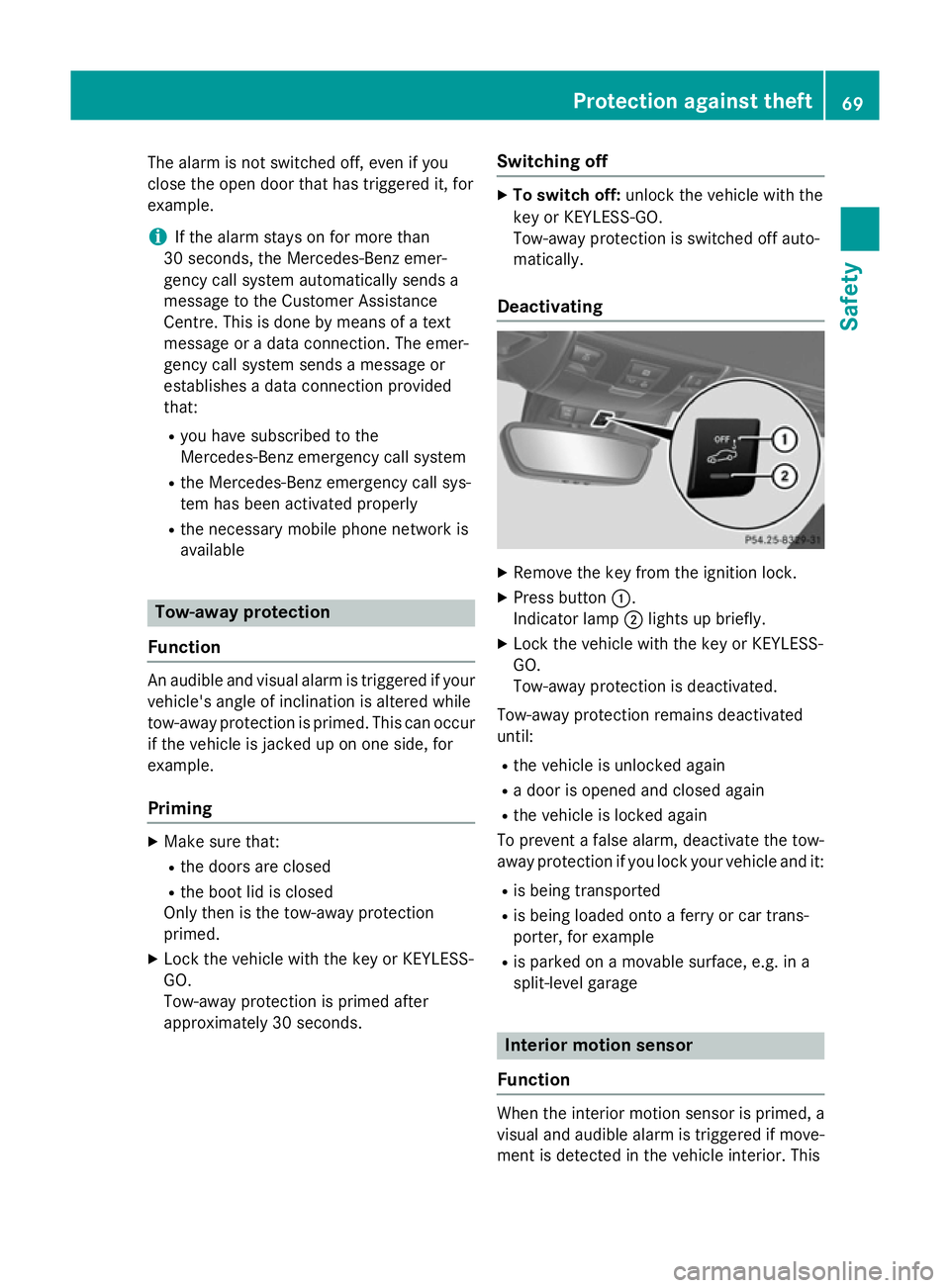
Deactivating X
Remove the key from the ignition lock.
X Press button :.
Indicator lamp ;lights up briefly.
X Lock the vehicle with the key or KEYLESS-
GO.
Tow-away protection is deactivated.
Tow-away protection remains deactivated
until: R the vehicle is unlocked again
R a door is opened and closed again
R the vehicle is locked again
To prevent a false alarm, deactivate the tow-
away protection if you lock your vehicle and it:
R is being transported
R is being loaded onto a ferry or car trans-
porter, for example
R is parked on a movable surface, e.g. in a
split-level garage Interior motion sensor
Function When the interior motion sensor is primed, a
visual and audible alarm is triggered if move-
ment is detected in the vehicle interior. This Protection against theft
69Safety Z
Page 112 of 357
Useful information
............................110
Exterior lighting ................................ 110
Interior lighting ................................. 116
Replacing bulbs ................................. 117
Windscreen wipers ...........................120 109Lights and windscreen wipers
Page 119 of 357
this, or in similar situations, the automatic
main-beam headlamps will not be deactivated or activated regardless. There is a risk of an
accident.
Always carefully observe the traffic conditions
and switch off the main-beam headlamps in
good time.
Adaptive Highbeam Assist cannot take into
account road, weather or traffic conditions.
Adaptive Highbeam Assist is only an aid. You are responsible for adjusting the vehicle's
lighting to the prevailing light, visibility and
traffic conditions.
In particular, the detection of obstacles can
be restricted if there is:
R poor visibility, e.g. due to fog, heavy rain or
snow
R dirt on the sensors or if the sensors are
obscured
Activating Adaptive Highbeam Assist X
To switch on: turn the light switch to Ã.
X Press the combination switch beyond the
pressure point in the direction of arrow :.
The _ indicator lamp in the multifunc-
tion display lights up when it is dark and the light sensor activates the dipped-beam
headlamps.
If you are driving at speeds above 25 km/h:
The headlamp range is set automatically
depending on the distance between the
vehicle and other road users.
If you are driving at speeds above approx-
imately 30 km/h and no other road users
are recognised:
The main-beam headlamps are switched on
automatically. The Kindicator lamp in
the instrument cluster also lights up.
If you are driving at speeds below 25 km/h
or other road users are recognised or the
roads are adequately lit:
The main-beam headlamps are switched off automatically. The Kindicator lamp in
the instrument cluster goes out. The _indicator lamp in the multifunction display
remains lit.
X To switch off: move the combination
switch back to its normal position or move the light switch to another position.
The _ indicator lamp in the multifunc-
tion display goes out. Headlamps misted up on the inside
Certain climatic and physical conditions may
cause moisture to form in the headlamp. This
moisture does not affect the functionality of
the headlamp. Interior lighting
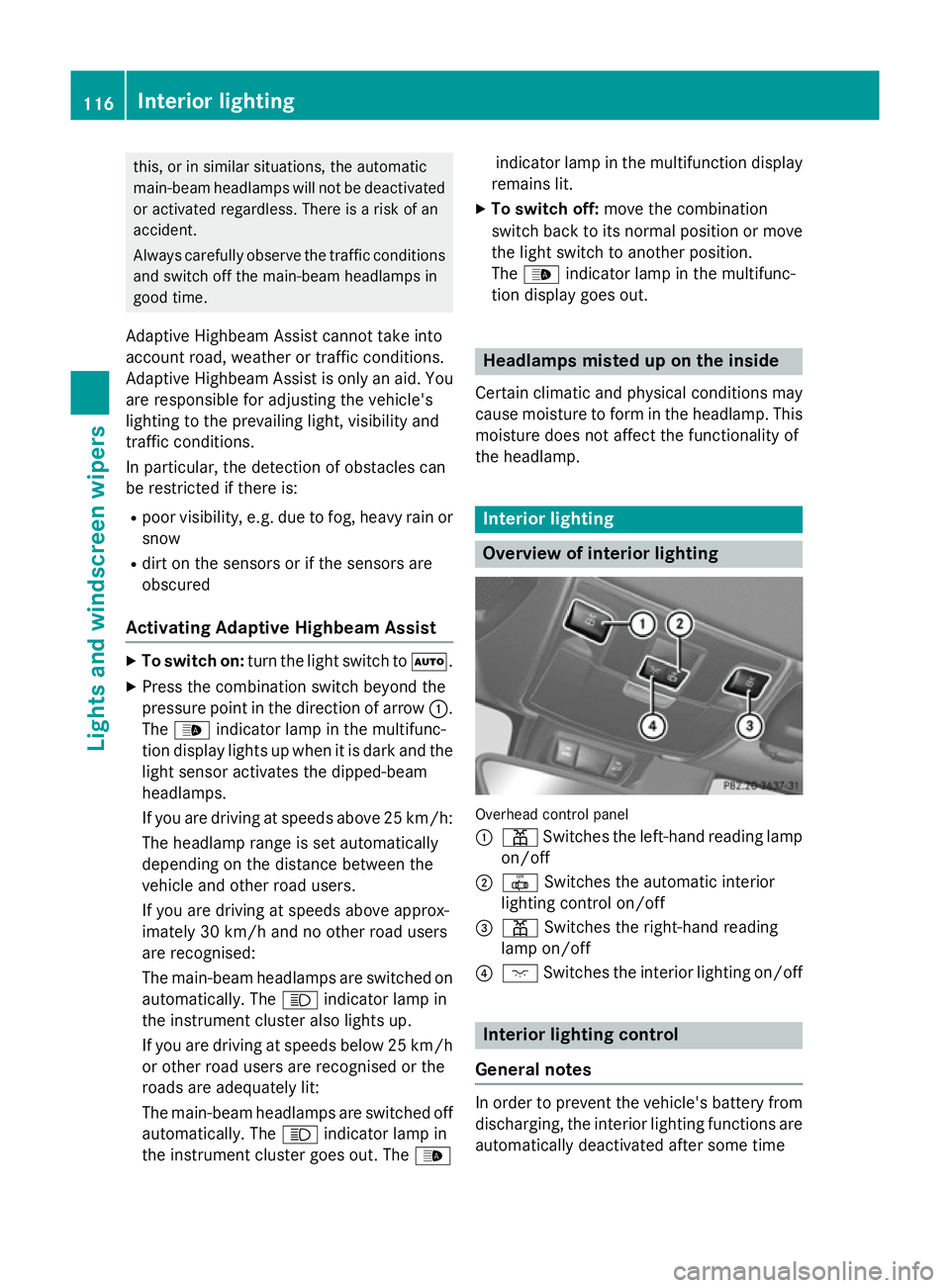
Overview of interior lighting
Overhead control panel
:
p Switches the left-hand reading lamp
on/off
; | Switches the automatic interior
lighting control on/off
= p Switches the right-hand reading
lamp on/off
? c Switches the interior lighting on/off Interior lighting control
General notes In order to prevent the vehicle's battery from
discharging, the interior lighting functions are
automatically deactivated after some time 116
Interior lightingLights and
windscreen wipers
Page 120 of 357
except for when the key is in position
2in the
ignition lock.
The colour and brightness of the ambient
lighting may be set using the on-board com-
puter (Y page 215).
Automatic interior lighting control X
To switch on/off: press the|button.
When the automatic interior lighting con-
trol is activated, the button is flush with the overhead control panel.
The interior lighting automatically switches
on if you:
R unlock the vehicle
R open a door
R remove the key from the ignition lock
The interior lighting is activated for a short
time when the key is removed from the igni-
tion lock. You can activate this delayed
switch-off using the on-board computer
(Y page 216).
Manual interior lighting control X
To switch the interior lighting on/off:
press the cbutton.
X To switch the reading lamps on/off:
press the pbutton. Crash-responsive emergency lighting
The interior lighting is activated automatically
if the vehicle is involved in an accident.
X To switch off the crash-responsive
emergency lighting: press the hazard
warning lamp button.
or X Lock and then unlock the vehicle using the
key. Replacing bulbs
Important safety notes
Xenon bulbs G
DANGER
Xenon bulbs are under high voltage. You can
get an electric shock if you remove the cover
of the xenon bulb and touch the electrical
contacts. There is a risk of fatal injury.
Never touch the parts or the electrical con-
tacts of the xenon bulb. Always have work on the xenon bulbs carried out at a qualified spe- cialist workshop.
If your vehicle is equipped with xenon bulbs,
you can recognise this by the following: the
cone of light from the xenon bulbs moves
from the top to the bottom and back again
when you start the engine. For this to be
observed, the lights must be switched on
before starting the engine.
Bulbs and lamps are an important aspect of
vehicle safety. You must therefore make sure
that these function correctly at all times.
Have the headlamp setting checked regularly.
Other bulbs G
WARNING
Bulbs, lamps and plug connectors can
become very hot during use. When replacing a bulb, you could burn yourself on these com-
ponents. There is a risk of injury.
Allow these components to cool down beforereplacing the bulb.
Do not use a bulb that has been dropped or if
its glass tube has been scratched.
The bulb may explode if:
R you touch it
R it is hot
R you drop it
R you scratch it
Only operate bulbs in enclosed lamps
designed for that purpose. Only fit spare Replacing bulbs
117Lights and windscreen wipers Z