2014 MERCEDES-BENZ SLK-CLASS ROADSTER trunk release
[x] Cancel search: trunk releasePage 10 of 356

Drive program
Automatic ...................................... 152
Display ........................................... 149
Manual .......................................... .152
Manual (vehicles with Sports
package AMG) ............................... 153
SETUP (on-board computer) ..........207
Driver's door
see Doors
Driving abroad
Mercedes-Benz Service .................279
Symmetrical low bea m.................. 108
Driving on flooded roads ..................166
Driving safety systems ABS (Anti-lock Braking System) .......59
ADAPTIVE BRAKE ............................. 65
BAS (Brake Assist System) ..............60
BAS PLUS (Brake Assist System
PLUS) .............................................. .60
Electronic brake force distributio n... 65
ESP ®
(Electronic Stability Program) .61
ETS (Electronic Traction System) .....61
Important safety information ...........59
Overview .......................................... 59
PRE-SAFE ®
Brake ............................ .65
Driving systems
ATTENTION ASSIST ........................ 186
Blind Spot Assist ............................ 187
Cruise control ................................ 167
Display message ............................ 227
DISTRONIC PLUS ........................... 169
Driving Assistance package ...........187
Dynamic handling package ............178
HOLD function ............................... 179
Lane Keeping Assist ......................188
Parking Guidance ........................... 183
PARKTRONIC ................................. 180
Driving tips
Automatic transmission .................150
Brakes ........................................... 164
Break-in period .............................. 138
DISTRONIC PLUS ........................... 177
Downhill gradient ........................... 164
Drinking and driving .......................162
Driving abroad ............................... 108
Driving in winter ............................ .166
Driving on flooded roads ................166Driving on wet roads
......................166
Exhaust check ............................... 163
Fuel ................................................ 162
General .......................................... 162
Hydroplaning ................................. 166
Icy road surfaces ........................... 167
Limited braking efficiency on
salted road s................................... 165
Snow chains .................................. 309
Symmetrical low bea m.................. 108
Wet road surface ........................... 165
DVD audio
Operating (on-board computer) .....198
DVD video
Operating (on-board computer) .....199
Dynamic handling package
Function/notes ............................. 178 E
EASY-ENTRY feature Activating/deactivating .................205
Function/notes ............................. 101
EASY-EXIT feature
Crash-responsive ........................... 102
Function/notes ............................. 101
Switching on/off ........................... 205
EBD (electronic brake force
distribution)
Display message ............................ 213
Function/notes ................................ 65
ECO display
Function/notes ............................. 163
On-board computer .......................196
ECO start/stop function
Automatic engine start ..................144
Automatic engine switch-off ..........144
Deactivating/activating .................145
General information .......................143
Important safety notes ..................143
Introduction ................................... 143
Electronic Stability Program
see ESP ®
(Electronic Stability Program)
Emergency release
Driver's door .................................... 78
Trunk ............................................... 81
Vehicle ............................................. 788
Index
Page 20 of 356
Tire size (data)
............................... 333
Tire size designation, load-bearing
capacity, speed rating .................... 322
Tire tread ....................................... 307
Tire tread (definition) .....................327
Total load limit (definition) .............328
Traction ......................................... 321
Traction (definition) .......................328
Tread wea r..................................... 321
Uniform Tire Quality Grading
Standards ...................................... 320
Uniform Tire Quality Grading
Standards (definition) ....................326
Unladen weight (definition) ............327
Wear indicator (definition) .............328
Wheel rim (definition) ....................326
see Flat tire
Towing
Important safety guidelines ...........300
Installing the towing eye ................301
Removing the towing eye ...............301
With the rear axle raised ................302
Towing away
With both axles on the ground .......302
Tow-starting
Emergency engine starting ............303
Important safety notes ..................300
Installing the towing eye ................301
Removing the towing eye ...............301
Transmission
Selector lever ................................ 149
see Automatic transmission
see Manual transmission
Transporting the vehicle ..................302
Trim pieces (cleaning instructions) .284
Trip computer (on-board computer) 195
Trip odometer Calling up ....................................... 195
Resetting (on-board computer) ......196
Trunk
Emergency release ..........................81
Important safety notes ....................79
Locking separately ...........................81
Opening/closing (manually from
outside) ............................................ 80
Opening (automatically from
outside) ............................................ 80
Overview .......................................... 79Trunk lid
Display message ............................ 236
Opening/closing .............................. 79
Opening dimensions ......................350
Trunk load (maximum) ......................350
Trunk partition Display message ............................ 237
General notes .................................. 88
Opening/closing .............................. 89
Turn signals
Changing bulbs (front) ...................117
Display message ............................ 221
Switching on/off ........................... 110
Type identification plate
see Vehicle identification plate U
Unlocking Emergency unlocking .......................78
From inside the vehicle (central
unlocking button) ............................. 77 V
Vanity mirror (in the sun visor) ........258
Vehicle Correct use ...................................... 25
Data acquisition ............................... 26
Display message ............................ 235
Equipment ....................................... 21
Individual settings ..........................202
Limited Warranty ............................. 25
Loading .......................................... 317
Locking (in an emergency) ...............78
Locking (SmartKey) .......................... 70
Lowering ........................................ 332
Maintenance .................................... 22
Parking for a long period ................ 162
Pulling away ................................... 142
Raising ........................................... 330
Reporting problems .........................25
Securing from rolling away ............329
Towing away .................................. 300
Tow-starting ................................... 300
Transporting .................................. 302
Unlocking (in an emergency) ...........78 18
Index
Page 72 of 356
Useful information
i This Operator's Manual describes all
models and all standard and optional
equipment of your vehicle available at the
time of publication of the Operator's
Manual. Country-specific differences are
possible. Please note that your vehicle may
not be equipped with all features
described. This also applies to safety-
related systems and functions.
i Read the information on qualified
specialist workshops: (Y page 24).SmartKey
Important safety notes
G
WARNING
If children are left unsupervised in the vehicle,
they could:
R open the doors, thus endangering other
people or road users.
R get out and disrupt traffic.
R operate the vehicle's equipment.
Additionally, children could set the vehicle in
motion if, for example, they:
R release the parking brake.
R shift the automatic transmission out of
parking position P.
R shift the manual transmission into neutral.
R starting the engine.
There is a risk of an accident and injury.
When leaving the vehicle, always take the
SmartKey with you and lock the vehicle. Never
leave children or animals unattended in the
vehicle. Always keep the SmartKey out of
reach of children. G
WARNING
If persons, particularly children are subjected
to prolonged exposure to extreme heat or
cold, there is a risk of injury, possibly even fatal. Never leave children unattended in the
vehicle.
G
WARNING
If you attach heavy or large objects to the
SmartKey, the SmartKey could be
unintentionally turned in the ignition lock. This
could cause the engine to be switched off.
There is a risk of an accident.
Do not attach any heavy or large objects to
the SmartKey. Remove any bulky key rings
before inserting the SmartKey into the
ignition lock.
! Keep the SmartKey away from strong
magnetic fields. Otherwise, the remote
control function could be affected.
Strong magnetic fields can occur in the
vicinity of powerful electrical installations.
Do not keep the SmartKey:
R with electronic devices, e.g. a mobile
phone or another SmartKey
R with metallic objects, e.g. coins or metal
foil
R inside metallic objects, e.g. a metal case
This can affect the functionality of the
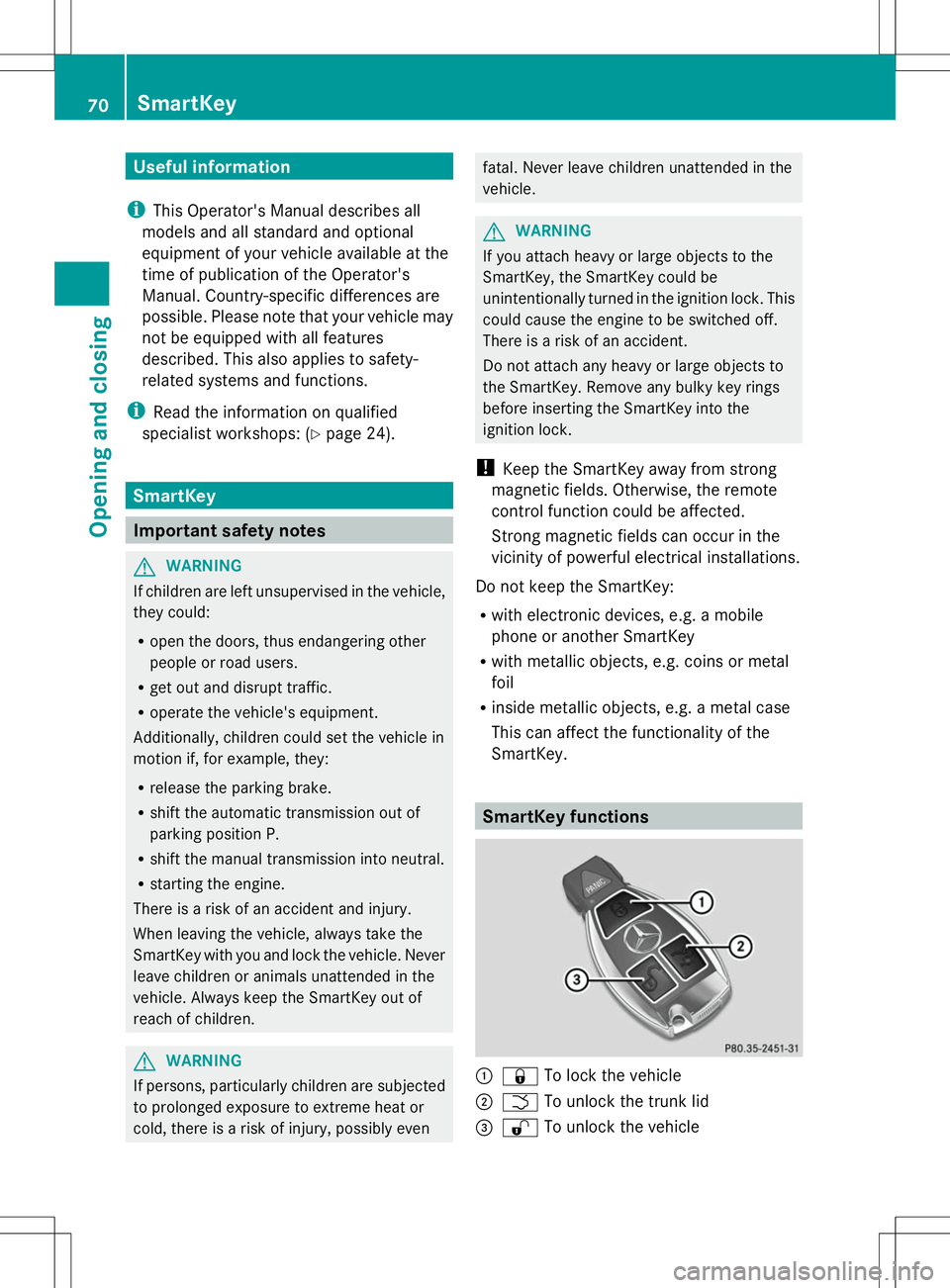
SmartKey. SmartKey functions
:
& To lock the vehicle
; F To unlock the trunk lid
= % To unlock the vehicle 70
SmartKeyOpening and closing
Page 74 of 356
X
To change the setting: press and hold
down the %and& buttons
simultaneously for approximately six
seconds until the battery check lamp
flashes twice (Y page 73).
i If the setting of the locking system is
changed within the signal range of the
vehicle, pressing the &or% button:
R locks or
R unlocks the vehicle
The SmartKey now functions as follows:
X To unlock the driver's door: press the
% button once.
X To unlock centrally: press the%
button twice.
X To lock centrally: press the&button.
The KEYLESS-GO function is changed as
follows:
X To unlock the driver's door: touch the
inner surface of the door handle on the
driver's door.
X To unlock centrally: touch the inner
surface of the front-passenger door handle.
X To lock centrally: touch the outer sensor
surface on one of the door handles.
X To restore the factory settings: press
and hold down the %and& buttons
simultaneously for approximately six
seconds until the battery check lamp
flashes twice (Y page 73). Mechanical key
General notes If the vehicle can no longer be locked or
unlocked with the SmartKey, use the
mechanical key.
If you use the mechanical key to unlock and
open the driver's door or the trunk lid, the
anti-theft alarm system will be triggered
(Y page 67). There are several ways to turn off the alarm:
X
To turn the alarm off with the
SmartKey: press the%or& button
on the SmartKey.
or
X Insert the SmartKey into the ignition lock.
or
X To disarm the alarm with KEYLESS-GO:
press the Start/Stop button in the ignition
lock. The SmartKey must be in the vehicle.
or
X Lock or unlock the vehicle using KEYLESS-
GO. The SmartKey must be outside the
vehicle.
If you unlock the vehicle using the mechanical
key, the fuel filler flap will not be unlocked
automatically.
X To unlock the fuel filler flap: insert the
SmartKey into the ignition lock.
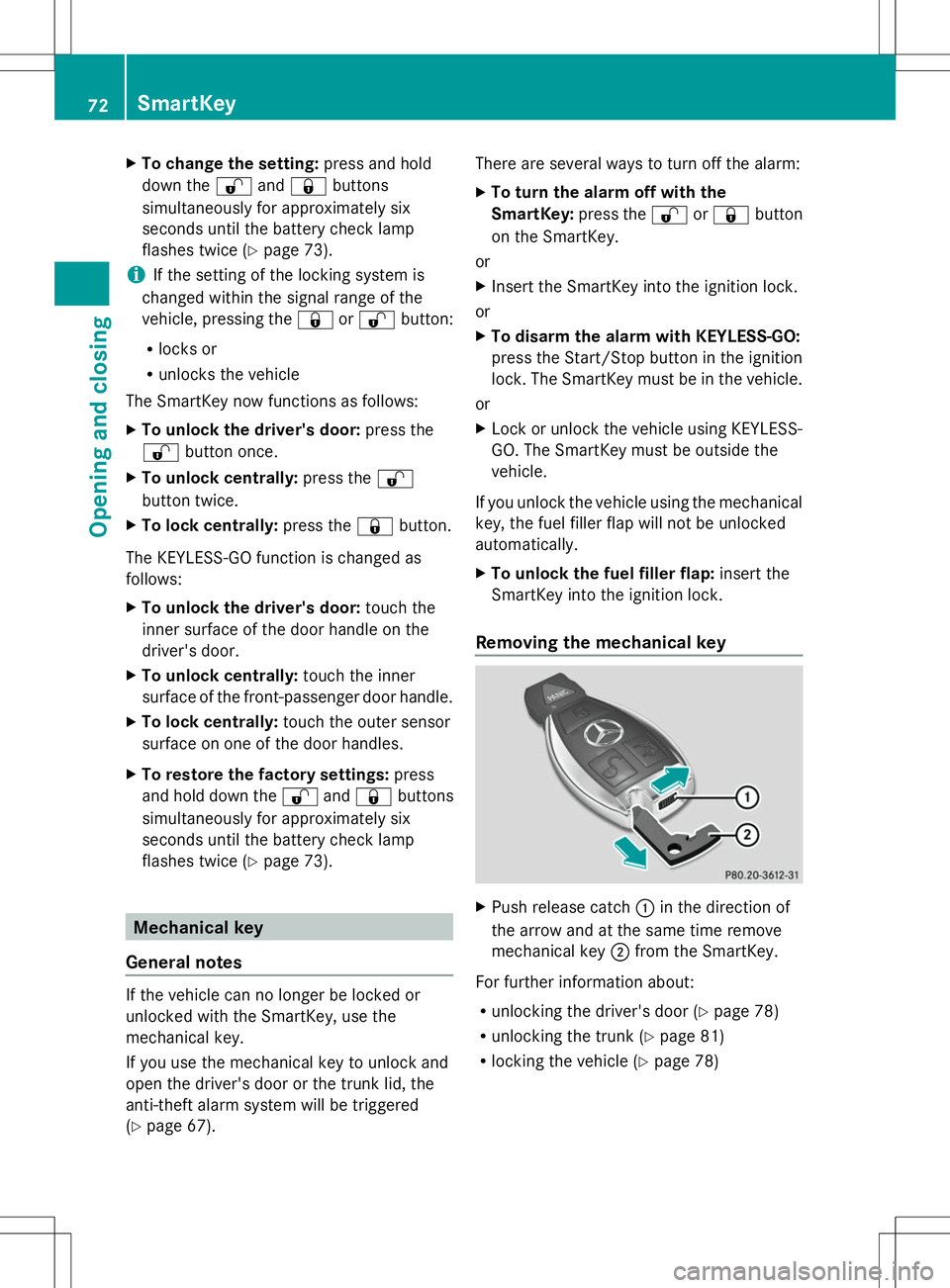
Removing the mechanical key X
Push release catch :in the direction of
the arrow and at the same time remove
mechanical key ;from the SmartKey.
For further information about:
R unlocking the driver's door (Y page 78)
R unlocking the trunk ( Ypage 81)
R locking the vehicle (Y page 78)72
SmartKeyOpening and closing
Page 81 of 356
X
Check whether the locking knob on the
front-passenger door is still visible. If
necessary, press the locking knob down by
hand (Y page 77).
X Close the driver's door.
X Take the mechanical key out of the
SmartKey (Y page 72).
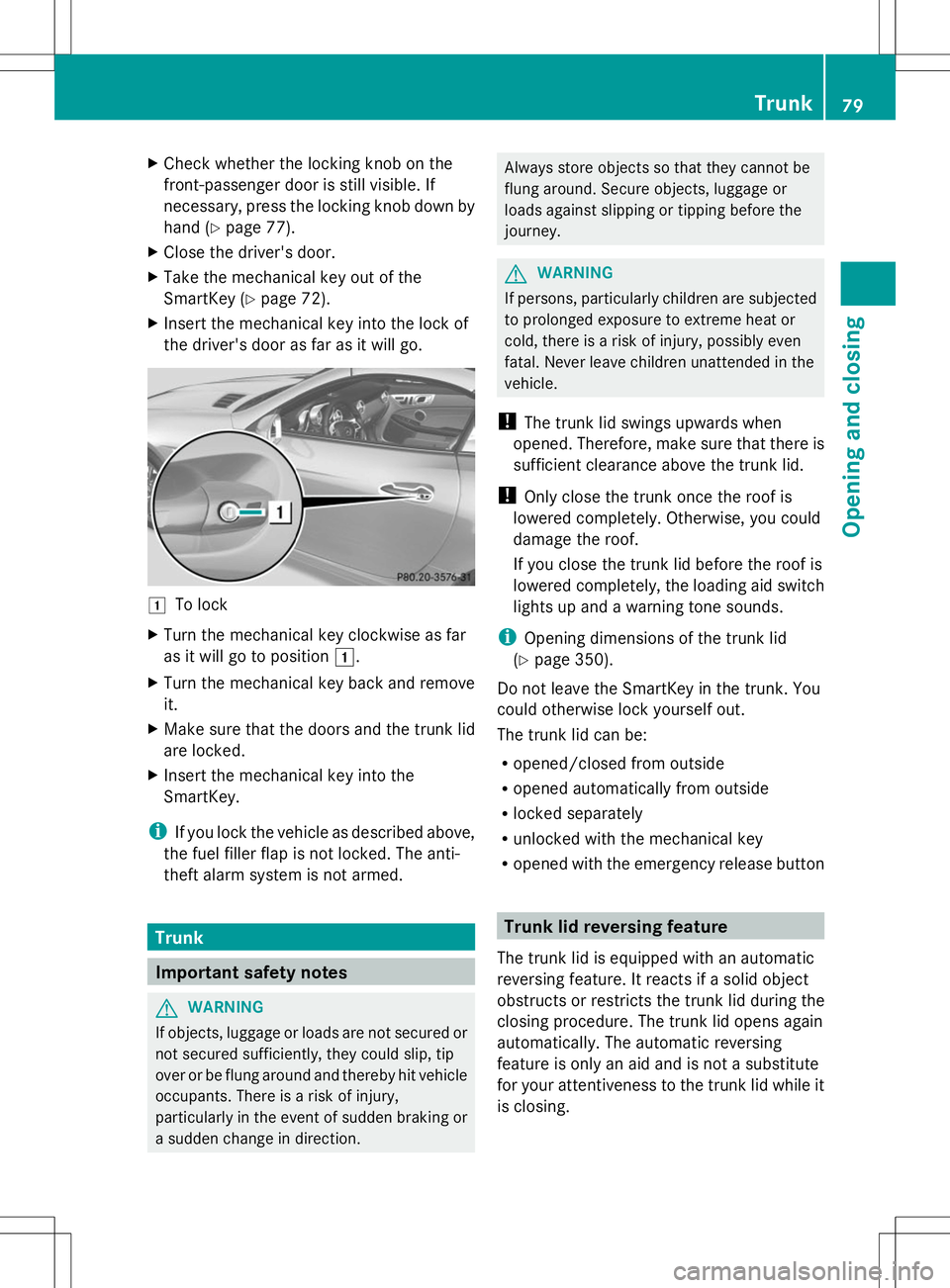
X Insert the mechanical key into the lock of
the driver's door as far as it will go. 1
To lock
X Turn the mechanical key clockwise as far
as it will go to position 1.
X Turn the mechanical key back and remove
it.
X Make sure that the doors and the trunk lid
are locked.
X Insert the mechanical key into the
SmartKey.
i If you lock the vehicle as described above,
the fuel filler flap is not locked. The anti-
theft alarm system is not armed. Trunk
Important safety notes
G
WARNING
If objects, luggage or loads are not secured or
not secured sufficiently, they could slip, tip
over or be flung around and thereby hit vehicle
occupants. There is a risk of injury,
particularly in the event of sudden braking or
a sudden change in direction. Always store objects so that they cannot be
flung around. Secure objects, luggage or
loads against slipping or tipping before the
journey.
G
WARNING
If persons, particularly children are subjected
to prolonged exposure to extreme heat or
cold, there is a risk of injury, possibly even
fatal. Never leave children unattended in the
vehicle.
! The trunk lid swings upwards when
opened. Therefore, make sure that there is
sufficient clearance above the trunk lid.
! Only close the trunk once the roof is
lowered completely. Otherwise, you could
damage the roof.
If you close the trunk lid before the roof is
lowered completely, the loading aid switch
lights up and a warning tone sounds.
i Opening dimensions of the trunk lid
(Y page 350).
Do not leave the SmartKey in the trunk. You
could otherwise lock yourself out.
The trunk lid can be:
R opened/closed from outside
R opened automatically from outside
R locked separately
R unlocked with the mechanical key
R opened with the emergency release button Trunk lid reversing feature
The trunk lid is equipped with an automatic
reversing feature. It reacts if a solid object
obstructs or restricts the trunk lid during the
closing procedure. The trunk lid opens again
automatically. The automatic reversing
feature is only an aid and is not a substitute
for your attentiveness to the trunk lid while it
is closing. Trunk
79Opening and closing Z
Page 83 of 356
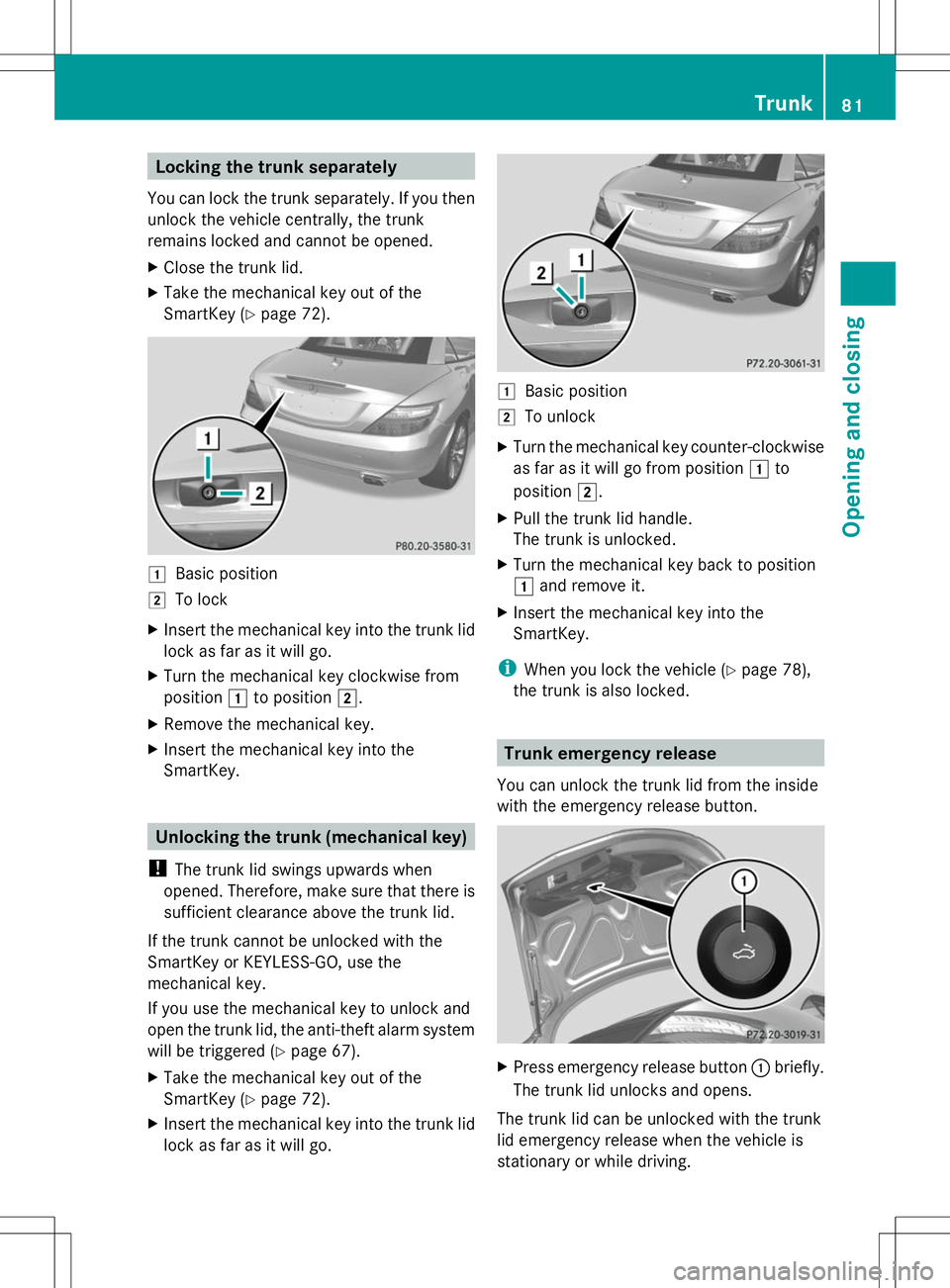
Locking the trunk separately
You can lock the trunk separately. If you then
unlock the vehicle centrally, the trunk
remains locked and cannot be opened.
X Close the trunk lid.
X Take the mechanical key out of the
SmartKey (Y page 72). 1
Basic position
2 To lock
X Insert the mechanical key into the trunk lid
lock as far as it will go.
X Turn the mechanical key clockwise from
position 1to position 2.
X Remove the mechanical key.
X Insert the mechanical key into the
SmartKey. Unlocking the trunk (mechanical key)
! The trunk lid swings upwards when
opened. Therefore, make sure that there is
sufficient clearance above the trunk lid.
If the trunk cannot be unlocked with the
SmartKey or KEYLESS-GO, use the
mechanical key.
If you use the mechanical key to unlock and
open the trunk lid, the anti-theft alarm system
will be triggered ( Ypage 67).
X Take the mechanical key out of the
SmartKey (Y page 72).
X Insert the mechanical key into the trunk lid
lock as far as it will go. 1
Basic position
2 To unlock
X Turn the mechanical key counter-clockwise
as far as it will go from position 1to
position 2.
X Pull the trunk lid handle.
The trunk is unlocked.
X Turn the mechanical key back to position
1 and remove it.
X Insert the mechanical key into the
SmartKey.
i When you lock the vehicle ( Ypage 78),
the trunk is also locked. Trunk emergency release
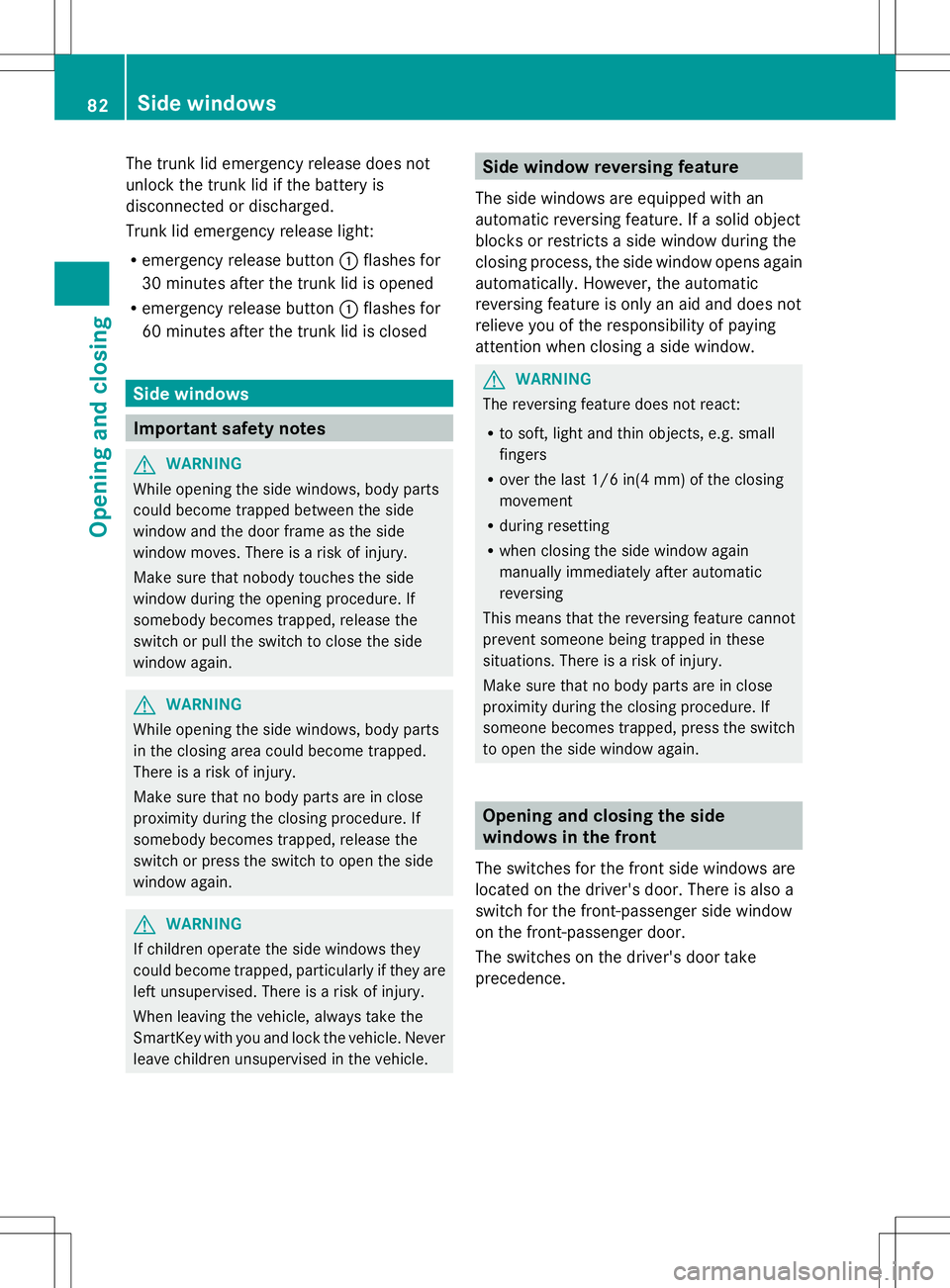
You can unlock the trunk lid from the inside
with the emergency release button. X
Press emergency release button :briefly.
The trunk lid unlocks and opens.
The trunk lid can be unlocked with the trunk
lid emergency release when the vehicle is
stationary or while driving. Trunk
81Opening and closing Z
Page 84 of 356
The trunk lid emergency release does not
unlock the trunk lid if the battery is
disconnected or discharged.
Trunk lid emergency release light:
R emergency release button :flashes for
30 minutes after the trunk lid is opened
R emergency release button :flashes for
60 minutes after the trunk lid is closed Side windows
Important safety notes
G
WARNING
While opening the side windows, body parts
could become trapped between the side
window and the door frame as the side
window moves. There is a risk of injury.
Make sure that nobody touches the side
window during the opening procedure. If
somebody becomes trapped, release the
switch or pull the switch to close the side
window again. G
WARNING
While opening the side windows, body parts
in the closing area could become trapped.
There is a risk of injury.
Make sure that no body parts are in close
proximity during the closing procedure. If
somebody becomes trapped, release the
switch or press the switch to open the side
window again. G
WARNING
If children operate the side windows they
could become trapped, particularly if they are
left unsupervised. There is a risk of injury.
When leaving the vehicle, always take the
SmartKey with you and lock the vehicle. Never
leave children unsupervised in the vehicle. Side window reversing feature
The side windows are equipped with an
automatic reversing feature. If a solid object
blocks or restricts a side window during the
closing process, the side window opens again
automatically. However, the automatic
reversing feature is only an aid and does not
relieve you of the responsibility of paying
attention when closing a side window. G
WARNING
The reversing feature does not react:
R to soft, light and thin objects, e.g. small
fingers
R over the last 1/6 in(4 mm) of the closing
movement
R during resetting
R when closing the side window again
manually immediately after automatic
reversing
This means that the reversing feature cannot
prevent someone being trapped in these
situations. There is a risk of injury.
Make sure that no body parts are in close
proximity during the closing procedure. If
someone becomes trapped, press the switch
to open the side window again. Opening and closing the side
windows in the front
The switches for the front side windows are
located on the driver's door. There is also a
switch for the front-passenger side window
on the front-passenger door.
The switches on the driver's door take
precedence. 82
Side windowsOpening and closing
Page 86 of 356
If someone is trapped:
X
Release the &button immediately.
X Press and hold the %button until the
side windows open again.
You can use the SmartKey to open or close
all side windows simultaneously.
X Close the roof (Y page 87).
X Open the trunk partition (Y page 88).
X Vehicles without KEYLESS-GO: point the
tip of the SmartKey at the door handle on
the driver's door.
X Vehicles with KEYLESS-GO: the
SmartKey must be within 6 ft (2 m) of the
vehicle.
X To open all side windows: press
the % button on the SmartKey until the
side windows are fully opened.
X To interrupt the opening procedure:
release the %button.
X To close all side windows: press the
& button on the SmartKey until the side
windows are fully closed.
X To interrupt the closing procedure:
release the &button.
Convenience closing with KEYLESS-GO G
WARNING
When using the convenience closing feature,
parts of the body could be trapped in the
closing area when a side window is being
closed. There is a risk of injury.
Observe the complete closing procedure
when the convenience closing feature is
operating. Make sure that no body parts are
in close proximity during the closing
procedure.
If someone is trapped:
X Release the recessed sensor surface on the
door handle immediately.
X Pull the door handle immediately and hold
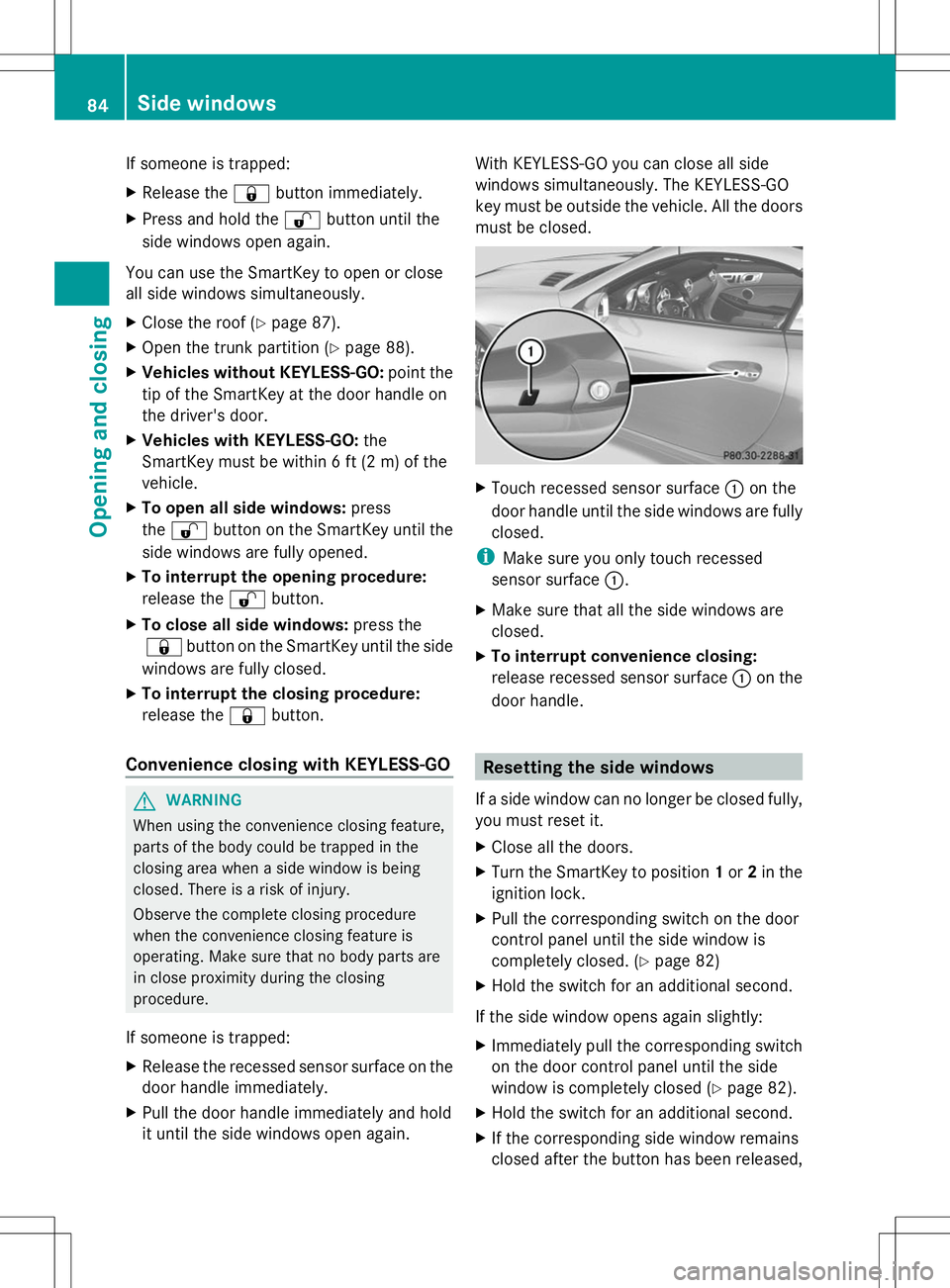
it until the side windows open again. With KEYLESS-GO you can close all side
windows simultaneously. The KEYLESS-GO
key must be outside the vehicle. All the doors
must be closed.
X
Touch recessed sensor surface :on the
door handle until the side windows are fully
closed.
i Make sure you only touch recessed
sensor surface :.
X Make sure that all the side windows are
closed.
X To interrupt convenience closing:
release recessed sensor surface :on the
door handle. Resetting the side windows
If a side window can no longer be closed fully,
you must reset it.
X Close all the doors.
X Turn the SmartKey to position 1or 2in the
ignition lock.
X Pull the corresponding switch on the door
control panel until the side window is
completely closed. (Y page 82)
X Hold the switch for an additional second.
If the side window opens again slightly:
X Immediately pull the corresponding switch
on the door control panel until the side
window is completely closed (Y page 82).
X Hold the switch for an additional second.
X If the corresponding side window remains
closed after the button has been released, 84
Side windowsOpening and closing