2014 MERCEDES-BENZ M-Class steering
[x] Cancel search: steeringPage 120 of 462

X
Adjust the sea t(Ypage 106).
X On the driver's side, adjust the steering
wheel (Y page 112 )and the exterio rmirrors
(Y page 114).
X Press the Mmemory button and the npress
one of the storage position buttons 1,2or
3 withi nthree seconds.
The settings are stored in the selected
preset position. Atone sounds when the
settings have been completed.
The memory function can still be used if the
SmartKey has been removed. Calling up
astore dsetting
X Press the button for storage position 1,2
or 3.K eep pressing until the seat, steering
wheel and exterior mirror sare in the stored
position.
i The setting procedure is interrupted as
soon as you release the storage position
buttons. 118
Memory functionSeats, steering wheel and mirrors
Page 127 of 462

The hazard warning lamps automatically
switch on if:
R
an air bag is deployed.
R the vehicle decelerates rapidly from a
speed of more than 45mph (70 km/h) and
comes to a standstill.
The hazard warning lamps switch off
automatically if the vehicle reaches a speed
of over 6mph (10km/h) again after a full
brake application.
i The hazard warning lamps still operate if
the ignition is switched off. Headlamp cleaning system
The headlamps are cleaned automatically if
the "Wipe with washer fluid" function is
operated five times (Y page 132) while the
lights are on and the engine is running. When
you switch off the ignition, the automatic
headlamp cleaning system is reset and
counting is resumed from 0. Active light function
The active light function is a system that
moves the headlamps according to the
steering movements of the front wheels. In
this way, relevant areas remain illuminated
while driving. This allows you to recognize
pedestrians, cyclists and animals.
Active: whenthe lights are switched on. Cornering light function
The cornering light function improves the
illumination of the road over a wide angle in
the direction you are turning, enabling better
visibility in tight bends, for example. It can
only be activated when the low-beam
headlamps are switched on.
Active:
R
if you are driving at speeds below
25mph (40 km/h) and switch on the turn
signal or turn the steering wheel
R if you are driving at speeds between
25mph (40 km/h) and45mph (70 km/h)
and turn the steering wheel
Not active: if your speed exceeds
25mph (40 km/h) or if you switch off the turn
signal or turn the steering wheel to the
straight-ahead position.
The cornering light function may remain lit for
a short time, but is automatically switched off
after no more than three minutes. Adaptive Highbeam Assist
Important safety notes G
WARNING
Adaptive Highbeam Assist does not recognize
road users:
R who have no lights, e.g. pedestrians
R who have poor lighting, e.g. cyclists
R whose lighting is blocked, e.g. by a barrier Exterior lighting
125Lights and windshield wipers
Z
Page 159 of 462

G
WARNING
If you switch off the ignitio nwhile driving,
safety-relevant functions are only available
with limitations, or not at all. This could affect,
for example, the power steering and the brake
boosting effect.Y ou will require considerably
more effort to steer and brake. There is a risk
of an accident.
Do not switch off the ignition while driving. G
WARNING
If the parking brake has not been fully
released when driving, the parking brake can:
R overheat and cause a fire
R lose its hold function.
There is a risk of fire and an accident .Release
the parking brake fully before driving off.
! Warm up the engine quickly. Do not use
the engine's full performance until it has
reached operating temperature.
Only shift the automatic transmission to
the desired drive position when the vehicle
is stationary.
Where possible, avoid spinning the drive
wheels when pulling away on slippery
roads. You could otherwise damage the
drive train.
! AMG vehicles: at low engine oil
temperatures below 68 ‡(+20 †), the
maximu mengine speed is restricted in
order to protect the engine .To protec tthe
engine and maintain smooth engine
operation, avoid driving at full throttle when
the engine is cold. Key positions
SmartKey 000E
To remove the SmartKey
0005 Power supply for some consumers, such
as the windshield wipers
0006 Ignition (power supply for all consumers)
and drive position
0007 To start the engine
As soon as the ignition is switched on, all the
indicator lamps in the instrumentc luster light
up. If an indicator lamp does not go out after
starting the engine or lights up while driving,
see (Y page 318).
If the SmartKey is in position 0in the ignition
lock for an extended period of time, it can no
longer be turned in the ignition lock .The
steering is then locked. To unlock, remove the
SmartKey and reinsert it into the ignition lock.
The steering is locked when you remove the
SmartKey from the ignition lock.
X Remove the SmartKey when the engine is
switched off.
The starter battery could otherwise be
discharged.
If you cannot turn the SmartKey in the ignition
lock, the starter battery may not be charged
sufficiently.
X Check the starter battery and recharge if
necessary (Y page 388).
or
X Jump-start the vehicle (Y page 389). Driving
157Driving and parking Z
Page 167 of 462

Automatic transmission
Important safety notes
G
WARNING
If the engine speed is above the idling speed
and you engage transmission position Dor
R, the vehicle could pull away suddenly. There
is a risk of an accident.
When engaging transmission position Dor R,
always firmly depress the brake pedal and do
no tsimultaneously accelerate. G
WARNING
The automatic transmission switches to
neutral position Nwhen you switch off the
engine. The vehicle may roll away. There is a
risk of an accident.
After switching off the engine, always switch
to parking position P. Prevent the parked
vehicle fro mrolling away by applying the
parking brake. DIRECT SELECTl
ever
Overview of transmission positions 0012
Park position with parking lock
000F Reverse gear
0010 Neutral
0011 Drive
The DIRECT SELECT lever is on the righ tofthe
steering column.
i The DIRECT SELECT lever always returns
to its original position. The current transmission position
P,R, Nor Dappears
in the transmission position display
(Y page 165) in the multifunction display.
Transmission position and drive
program display !
If the transmission position display in the
multifunction display is not working, you
should pull away carefully to check whether
the desired transmission position is
engaged. Ideally, you should select
transmission position Dand, in AMG
vehicles, drive program Cor S. Transmission position and drive program display
0002
Transmission position display
0003 Drive program display
The current transmission position and drive
program appearint he multifunction display.
i The arrows in the transmission position
display show how and into which
transmission positions you can change
using the DIRECT SELECT lever.
Engaging parkp osition P !
If the engine speed is to ohigh or the
vehicle is moving, do not shift the
automatic transmission directly from Dto
R, from Rto Dor directly to P.The
automatic transmission could otherwise be
damaged. Automatic transmission
165Driving and parking Z
Page 170 of 462

0003
Neutral
Do not shift the transmission to
N
while driving. Otherwise, the
automatic transmission could be
damaged.
No power is transmitted from the
engine to the drive wheels.
Releasing the brakes will allow you
to move the vehicle freely, e.g .to
push it or tow it.
If ESP ®
is deactivated or faulty:
only shift the transmission to
position Nif the vehicle is in danger
of skidding, e.g. on icy roads.
If you switch off the engine using
the SmartKey or the Start/Stop
button, the automatic transmission
shifts to neutral Nautomatically.
! Rolling in neutral Ncan damage
the drive train. 000B
Drive
The automatic transmission
changes gear automatically. All
forward gears are available.
Changing gear
The automatic transmission shifts to the
individual gears automatically when it is in
transmission position D.This automatic
gearshifting behavior is determined by:
R the position of the accelerator pedal
R the road speed Driving tips
Kickdown Use kickdown for maximum acceleration:
X
Depress the accelerator pedal beyond the
pressure point.
The automatic transmission shifts to a
lower gear depending on the engine speed.
X Ease off the accelerator pedal once the
desired speed is reached.
The automatic transmission shifts back up.
Rocking the vehicle free Shifting the transmission repeatedly between
gears
Dand Rmay help to free the vehicle if
it has become stuck in slush or snow. The
vehicle's engine management system limits
the speed to a maximum of 5 mph (9 km/h)
when shifting back and forth. To shift back
and forth between transmission positions D
and R, move the selector lever up and down
beyond the pressure point.
Towing atrailer X
Drive in the middle of the engine speed
range on uphill gradients.
X Depending on the uphill or downhill
gradient, use left-hand steering wheel
paddle shifter (Y page 169) to select a
lowe rgear, even if cruise control or
DISTRONIC PLUS are activated. 168
Automatic transmissionDriving and parking
Page 171 of 462
Program selector button
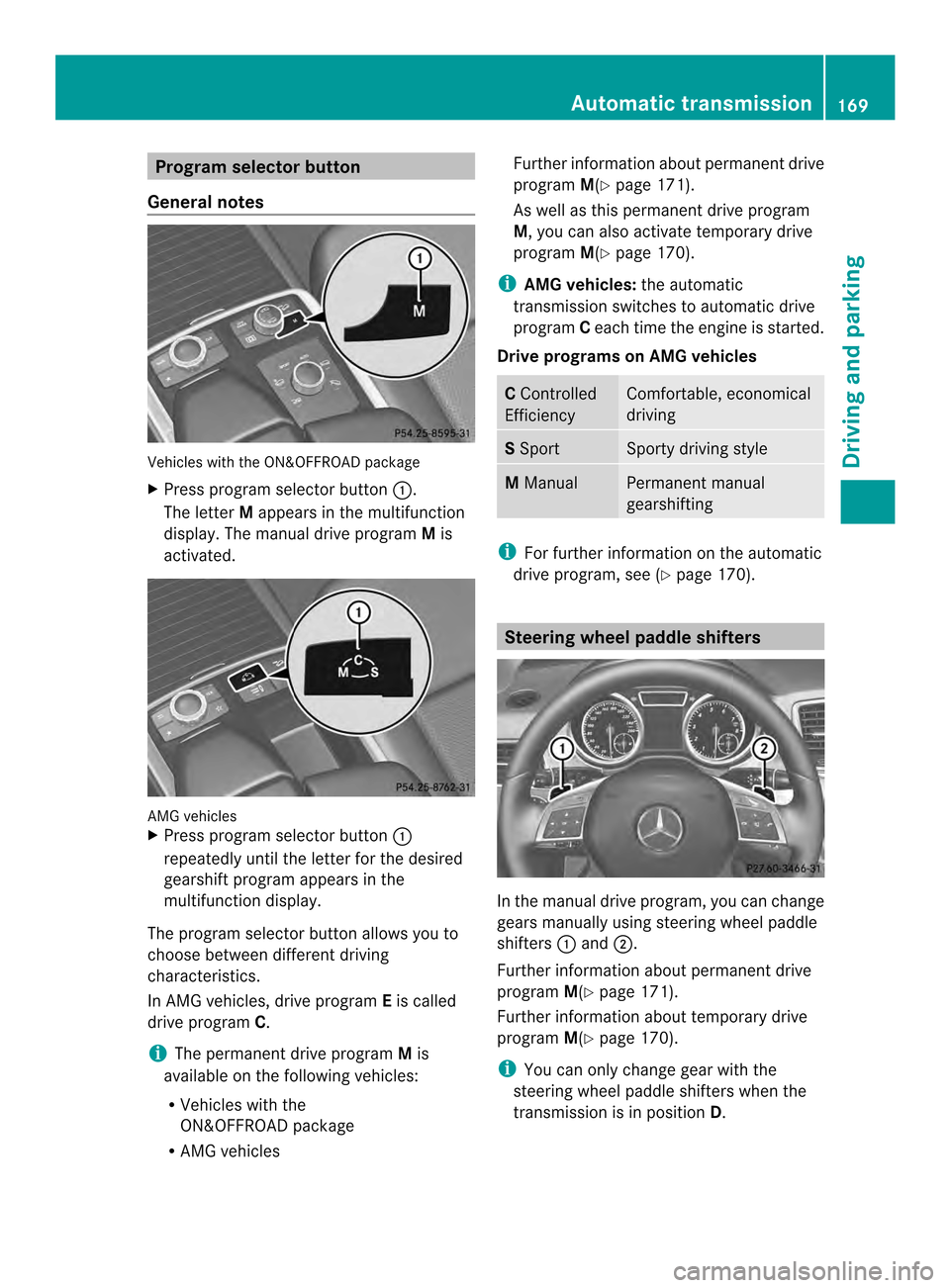
General notes Vehicles with the ON&OFFROAD package
X
Press program selector button 0002.
The letter Mappears in the multifunction
display.T he manual drive program Mis
activated. AMG vehicles
X
Press program selector button 0002
repeatedly until the letter for the desired
gearshift program appears in the
multifunction display.
The program selector button allows you to
choose between different driving
characteristics.
In AMG vehicles, drive program Eis called
drive program C.
i The permanent drive program Mis
available on the following vehicles:
R Vehicles with the
ON&OFFROAD package
R AMG vehicles Further information about permanent drive
program M(Ypage 171).
As well as this permanent drive program
M, you can also activate temporary drive
program M(Ypage 170).
i AMG vehicles: the automatic
transmission switches to automatic drive
program Ceach time the engine is started.
Drive programs on AMG vehicles C
Controlled
Efficiency Comfortable, economical
driving
S
Sport Sporty driving style
M
Manual Permanent manual
gearshifting
i
For further information on the automatic
drive program, see (Y page 170). Steering wheel paddle shifters
In the manual drive program, you can change
gears manually using steering wheel paddle
shifters
0002and 0003.
Further information about permanent drive
program M(Ypage 171).
Further information about temporary drive
program M(Ypage 170).
i You can only change gear with the
steering wheel paddle shifters when the
transmission is in position D. Automatic transmission
169Driving and parking Z
Page 172 of 462

Automatic drive program
Automatic drive program sEand SDrive program
E(drive program Con MAG
vehicles) is characterized by the following:
R comfort-oriented engine and automatic
transmissio nsettings
R optimal fuel consumption resulting from
the automatic transmission shifting up
sooner
R the vehicle pulling away more gently in
forward and reverse gears, unless the
accelerator pedal is depressed fully
R increased sensitivity. This improves driving
stability on slippery road surfaces, for
example
R the automatic transmission shifting up
sooner .This results in the vehicle being
driven at lower engine speeds and the
wheels being less likely to spin
Drive program Sis characterized by the
following:
R sporty engine and transmission settings
R the automatic transmission shifting up
later
R the fuel consumption possibly being higher
as a result of the later automatic
transmission shift points
Manual drive program M General notes
In this drive program, you can briefly change
gear yourself by using the steering wheel
paddle shifters. The transmission must be in
position
D.
All vehicles (except AMG vehicles): you
can activate manual drive program Musing
the steering wheel paddle shifters.
AMG vehicles: you can activate manual drive
program Min automatic drive programs Cand
S.
Vehicles with the
ON&OFFROAD package: if manual drive
program Mis deactivated using the program selector button, you can activate manual
drive program
Musing the steering wheel
paddle shifters.
i As well as temporary drive program M,
you can also activate permanent drive
program M(Ypage 169).
Further information about permanent drive
program M(Ypage 171).
Activating
X Shift the transmission to position D.
X Pull the left or right steering wheel paddle
shifter (Y page 169).
Manual drive program Mis temporarily
activated. The selected gear and Mappear
in the multifunction display.
Shifting gears
If you pull on the left or right steering wheel
paddle shifter, the automatic transmission
switches to manual drive program Mfor a
limited amount of time. Depending on which
paddle shifter is pulled, the automatic
transmission immediately shifts into the next
gear down or up, if permitted.
X To shift up: pull the right-hand steering
wheel paddle shifter (Y page 169).
The automatic transmission shifts up to the
next gear.
i If the maximum engine speed on the
currently engaged gear is reached and you
continue to accelerate, the automatic
transmission automatically shifts up in
order to prevent engine damage.
X To shift down: pull on the left-hand
steering wheel paddle shifter
(Y page 169).
The automatic transmission shifts down to
the next gear.
i If the engine exceeds the maximum
engine speed when shifting down, the
automatic transmission protects against
engine damage by not shifting down.
i Automatic down shifting occurs when
coasting. 170
Automatic transmissionDriving and parking
Page 173 of 462
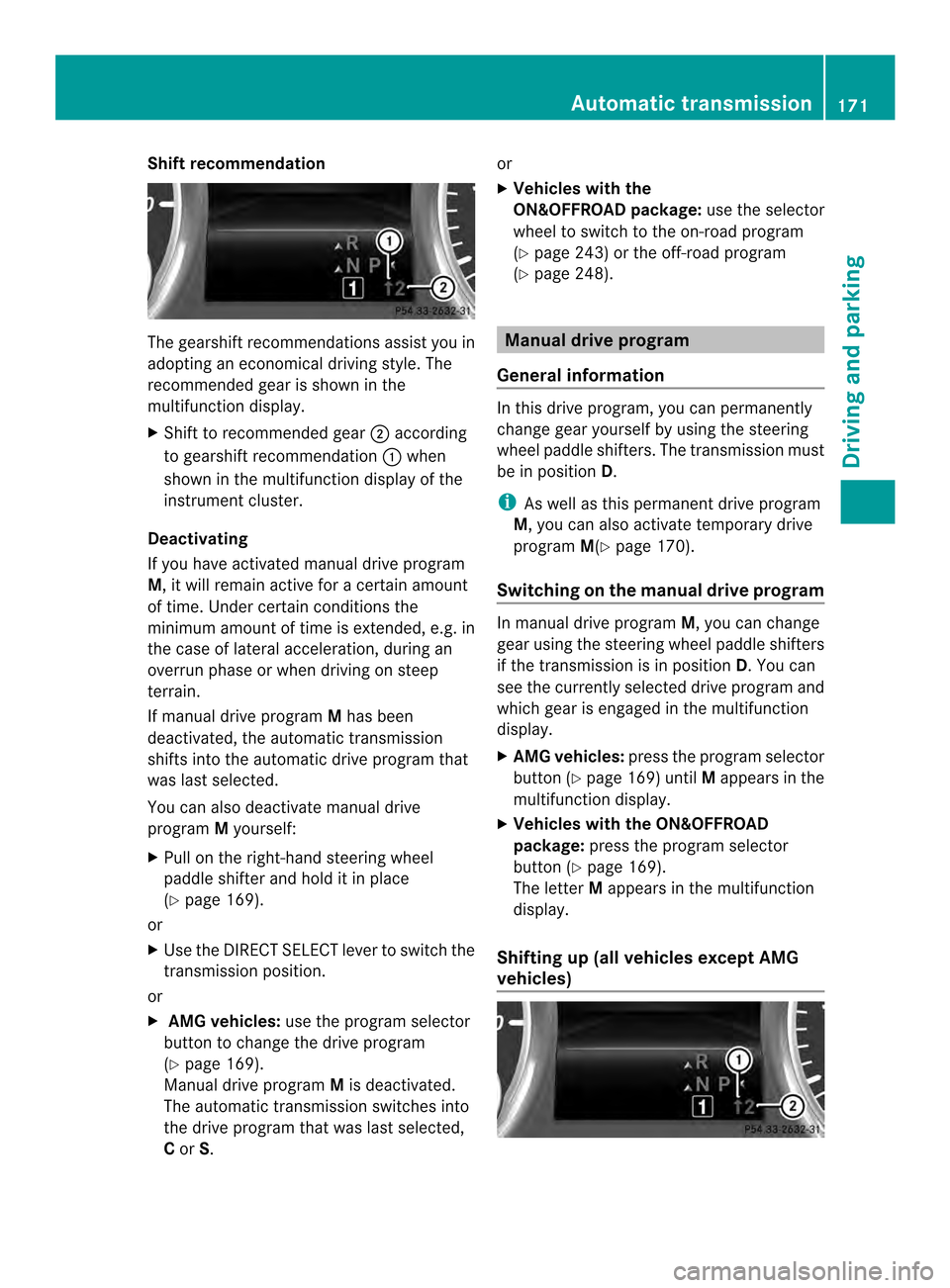
Shift recommendation
The gearshift recommendations assist you in
adopting an economical driving style. The
recommended gear is shown in the
multifunction display.
X Shift to recommended gear 0003according
to gearshift recommendation 0002when
shown in the multifunction display of the
instrument cluster.
Deactivating
If you have activated manual drive program
M, it will remain active for a certain amount
of time. Under certain conditions the
minimum amount of time is extended, e.g. in
the case of lateral acceleration, during an
overrun phase or when driving on steep
terrain.
If manual drive program Mhas been
deactivated, the automatic transmission
shifts into the automatic drive program that
was last selected.
You can also deactivate manual drive
program Myourself:
X Pull on the right-hand steering wheel
paddle shifter and hold it in place
(Y page 169).
or
X Use the DIRECT SELECT lever to switch the
transmission position.
or
X AMG vehicles: use the program selector
button to change the drive program
(Y page 169).
Manual drive program Mis deactivated.
The automatic transmission switches into
the drive program that was last selected,
C or S. or
X
Vehicles with the
ON&OFFROAD package: use the selector
wheel to switch to the on-road program
(Y page 243) or the off-road program
(Y page 248). Manual drive program
General information In this drive program, you can permanently
change gear yourself by using the steering
wheel paddle shifters. The transmission must
be in position
D.
i As well as this permanent drive program
M, you can also activate temporary drive
program M(Ypage 170).
Switching on the manual drive program In manual drive program
M, you can change
gear using the steering wheel paddle shifters
if the transmission is in position D.You can
see the currently selected drive program and
which gear is engaged in the multifunction
display.
X AMG vehicles: press the program selector
button (Y page 169) until Mappears in the
multifunction display.
X Vehicles with the ON&OFFROAD
package: press the program selector
button (Y page 169).
The letter Mappears in the multifunction
display.
Shifting up (all vehicles except AMG
vehicles) Automatic transmission
171Driving and parking Z