2014 MERCEDES-BENZ M-Class keyless
[x] Cancel search: keylessPage 97 of 462
i
The side windows cannot be operated
from the rear when the override feature for
the side windows is activated (Y page 66).Convenience opening
General notes You can ventilate the vehicle before you start
driving. To do this, the SmartKey is used to
carry out the following functions
simultaneously:
R unlock the vehicle
R open the side windows
R open the sliding sunroof or the panorama
roof with power tilt/sliding panel and the
roller sunblinds
R switch on the seat ventilation for the
driver's seat
i The convenience opening feature can
only be operated using the SmartKey. The
SmartKey must be close to the vehicle. For
vehicles without KEYLESS-GO, the
SmartKey must be near the driver's door
handle.
Convenience opening X
Vehicles without KEYLESS-GO: point the
tip of the SmartKey at the door handle on
the driver's door.
X Press and hold the 000Cbutton until the
side windows and the sliding sunroof or the
panorama roof with power tilt/sliding
panel are in the desired position.
If the roller sunblinds of the panorama roof
with power tilt/sliding panel are closed, the
roller sunblinds are opened first.
X Press and hold the 000Cbutton again until
the panorama roof with power tilt/sliding
panel is in the desired position.
X To interrupt convenience opening:
release the 000Cbutton. Convenience closing feature
Important safety notes G
WARNING
When the convenience closing feature is
operating, parts of the body could become
trapped in the closing area of the side window
and the sliding sunroof. There is a risk of
injury.
Observe the complete closing procedure
when the convenience closing feature is
operating. Make sure that no body parts are
in close proximity during the closing
procedure.
When you lock the vehicle, you can
simultaneously:
R close the side windows
R close the sliding sunroof or the panorama
roof with power tilt/sliding panel
On vehicles with a panorama roof with power
tilt/sliding panel, you can then close the
roller sunblinds.
Proceed as follows if someone is trapped:
R Release the 000Bbutton to interrupt the
closing procedure.
R Press and hold the 000Cbutton to open.
Vehicles with KEYLESS-GO:
R Release the sensor surfaces on the exterior
door handle to interrupt the closing
procedure.
R To open, pull the same door handle
immediately and hold it firmly. The door
windows and the sliding sunroof will open
for as long as the door handle is held but
the door is not opened.
i Notes on the automatic reversing feature
for:
R the side window (Y page 94)
R the sliding sunroof (Y page 98) Side windows
95Opening and closing Z
Page 98 of 462
Using the SmartKey
The SmartKey must be in the vicinity of the
vehicle, on vehicles without KEYLESS-GO the
SmartKey must be near the door handle.
X Vehicles without KEYLESS-GO: point the
tip of the SmartKey at the door handle on
the driver's door.
X Press and hold the 000Bbutton until the
side windows and the sliding sunroo forthe
panorama roof with power tilt/sliding
panel are fully closed.
X Make sure that all the side windows and the
sliding sunroof or panorama roof with
power tilt/sliding panel are closed.
On vehicles with a panorama roof with power
tilt/sliding panel:
X Press and hold the 000Bbutton again until
the roller sunblinds of the panorama roof
with power tilt/sliding panel close.
X To interrupt convenience closing:
release the 000Bbutton.
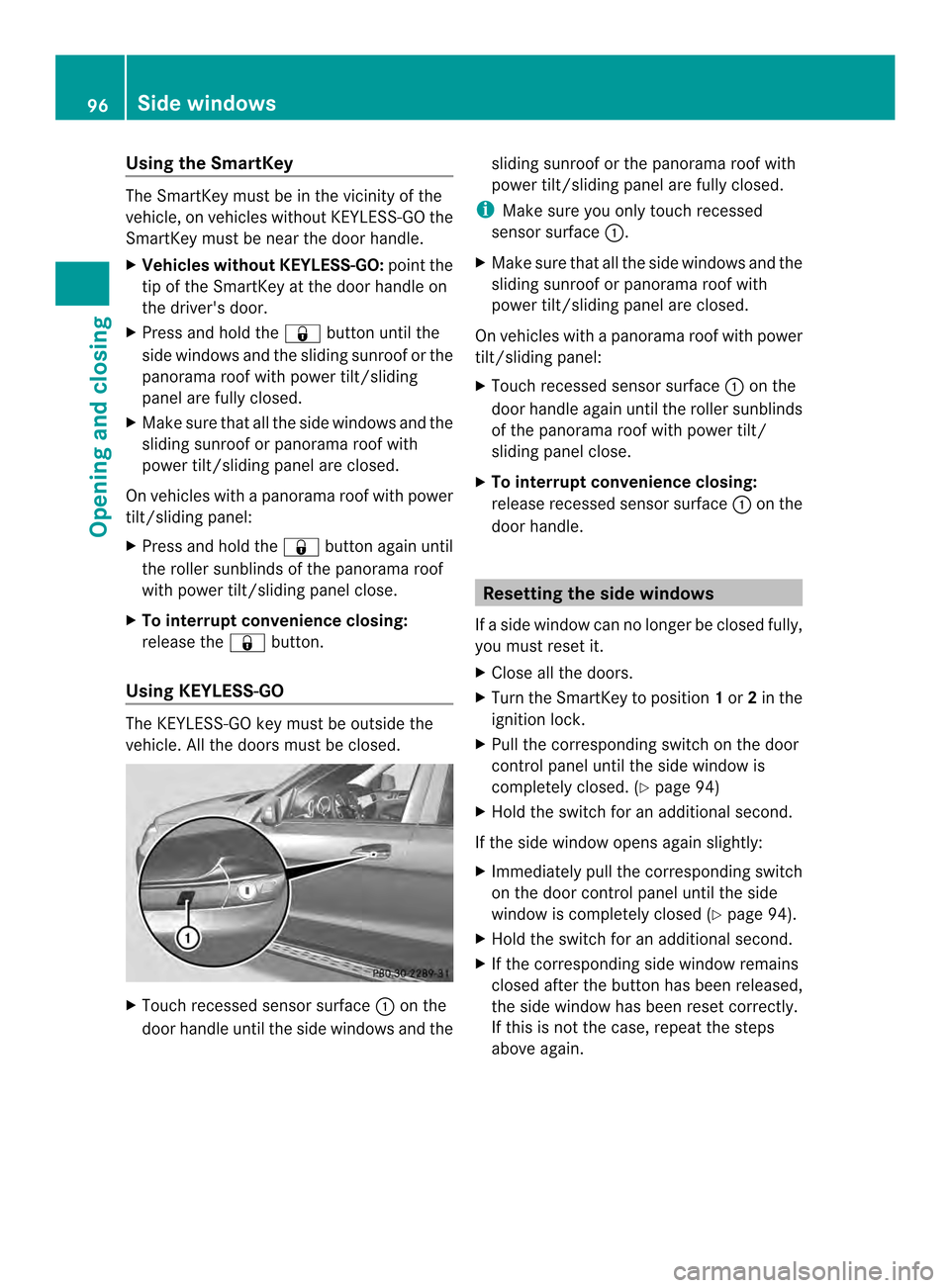
Using KEYLESS-GO The KEYLESS-GO key must be outside the
vehicle. All the doors must be closed. X
Touch recessed sensor surface 0002on the
door handle until the side windows and the sliding sunroof or the panorama roof with
power tilt/sliding panel are fully closed.
i Make sure you only touch recessed
sensor surface 0002.
X Make sure that all the side windows and the
sliding sunroof or panorama roof with
power tilt/sliding panel are closed.
On vehicles with a panorama roof with power
tilt/sliding panel:
X Touch recessed sensor surface 0002on the
door handle again until the roller sunblinds
of the panorama roof with power tilt/
sliding panel close.
X To interrupt convenience closing:
release recessed sensor surface 0002on the
door handle. Resetting the side windows
If a side window can no longer be closed fully,
you must reset it.
X Close all the doors.
X Turn the SmartKey to position 1or 2in the
ignition lock.
X Pull the corresponding switch on the door
control panel until the side window is
completely closed. (Y page 94)
X Hold the switch for an additional second.
If the side window opens again slightly:
X Immediately pull the corresponding switch
on the door control panel until the side
window is completely closed (Y page 94).
X Hold the switch for an additional second.
X If the corresponding side window remains
closed after the button has been released,
the side window has been reset correctly.
If this is not the case, repeat the steps
above again. 96
Side windowsOpening and closing
Page 114 of 462

Adjusting the steering wheel
electrically
0002
To adjust the steering wheel height
0003 To adjust the steering wheel position
(fore-and-aft adjustment)
The steering wheel can also be adjusted when
the SmartKey is removed from the ignition
lock.
i Further related subjects:
R EASY-ENTRY/EXIT feature
(Y page 113)
R Storing settings (Y page 117)Steering wheel heating
Activating/deactivating X
Make sure that the SmartKey is in position
2in the ignition lock.
X To switch on/off: turn the lever in the
direction of arrow 0002or0003.
Indicato rlamp 0023lights up or goes out. Vehicles without KEYLESS-GO
:when you
remove the SmartKey from the ignition lock,
the steering wheel heating is deactivated.
Vehicles with KEYLESS-GO: when you switch
off the ignition and open the driver's door, the
steering wheel heating is deactivated. 112
Steering wheelSeats, steering wheel and mirrors
Page 115 of 462

Problems with the steering wheel heating
Problem Possible causes/consequences and
0001 Solutions
The steering wheel
heating has switched
off prematurely or
cannot be switched on. The on-board voltage is too low because too many electrical
consumers are switched on.
X
Switch off electrical consumers that you do not need, such as
the rear window defroster or interior lighting. EASY-ENTRY/EXIT feature
Important safety notes G
WARNING
When the EASY-ENTRY/EXIT feature adjusts
the steering wheel, you and other vehicle
occupants –particularly childre n–could
become trapped. There is a risk of injury.
While the EASY-ENTRY/EXIT feature is
making adjustments, make sure that no one
has any body parts in the sweep of the
steering wheel.
If somebody becomes trapped:
R press one of the memory function position
buttons, or
R move the switch for steering wheel
adjustmen tinthe opposite direction to that
in which the steering wheel is moving.
The adjustment process is stopped. G
WARNING
If children activate the EASY-ENTRY/EXIT
feature, they can become trapped,
particularly when unattended. There is a risk
of injury.
When leaving the vehicle, always take the
SmartKey with you and lock the vehicle. Never
leave children unsupervised in the vehicle. G
WARNING
If you drive off while the EASY-ENTRY/EXIT
feature is making adjustments, you could lose
control of the vehicle. There is a risk of an
accident. Always wait until the adjustment process is
complete before driving off.
The EASY-ENTRY/EXIT feature makes getting
in and out of your vehicle easier.
You can activate and deactivate the EASY-
ENTRY/EXIT feature in the on-board
computer (Y page 277).
Position of the steering wheel when the
EASY-ENTRY/EXIT featurei s active The steering wheel swings upwards when
you:
R
remove the SmartKey from the ignition lock
R open the driver's door with KEYLESS-GO in
position 1
R open the driver's door and the SmartKey is
in position 0or 1in the ignition lock
i The steering wheel only moves upwards if
it has not already reached the upper end
stop.
Position of the steering wheel for
driving The steering wheel is moved to the last
selected position when:
R
the driver's door is closed
R you insert the SmartKey into the ignition
lock
or
R you press the Start/Stop button once on
vehicles with KEYLESS-GO
When you close the driver's door with the
ignition switched on, the steering wheel is Steering wheel
113Seats, steering wheel and mirrors Z
Page 160 of 462

i
The SmartKey can be turned in the
ignition lock even if it is not the correct
SmartKey for the vehicle. The ignition is not
switched on. The engine cannot be started.
KEYLESS-GO General notes
R
Do not keep the KEYLESS-GO key:
-with electronic devices, e.g. a mobile
phone or another SmartKey
- with metallic objects, e.g. coins or metal
foil
- inside metallic objects, e.g. a metal case
This can impair the functionality of the
KEYLESS-GO key.
Do not keep the KEYLESS-GO key in the
temperature-controlled cup holder
(Y page 344). Otherwise, the KEYLESS-GO
key will not be recognized.
Vehicles with KEYLESS-GO are equipped with
aS martKey featuring an integrated KEYLESS-
GO function and a detachable Start/Stop
button.
The Start/Stop button must be inserted in the
ignition lock and the SmartKey with the
integrated KEYLESS-GO function must be in
the vehicle.
Pressing the Start/Stop button several times
in succession corresponds to the different
key positions in the ignitio nlock. This is only
the case if you are not depressing the brake
pedal.
If you depress the brake pedal and press the
Start/Stop button, the engine starts
immediately.
The Start/Stop button can be removed from
the ignition lock. Then, you can insert the
SmartKey into the ignition lock.
i You do not have to remove the Start/Stop
button from the ignition lock when you
leave the vehicle. You should, however,
always take the SmartKey with you when
leaving the vehicle. As long as the
SmartKey is in the vehicle: R
the vehicle can be started using the
Start/Stop button and
R electrically powered equipment can be
operated.
i The engine can be turned off while the
vehicle is in motion by pressing and holding
the Start/Stop button for approximately
three seconds. This function operates
independently of the ECO start/stop
automatic engine switch-off function.
Key positions with KEYLESS-GO As soon as the ignition is switched on, all the
indicator lamps in the instrument cluster light
up. If an indicator lamp does not go out after
starting the engine or lights up while driving,
see (Y
page 318).
X Insert Start/Stop button 0002into ignition
lock 0003.
i When you insert Start/Stop button 0002
into ignition lock 0003, the system needs
approximately two seconds recognition
time. You can then use Start/Stop
button 0002.
Activating power supply
X If Start/Stop button 0002has not yet been
pressed, this corresponds to the SmartKey
being removed from the ignition.
X Press Start/Stop button 0002once.
The power supply is switched on. You can
now activate the windshield wipers, for
example. 158
DrivingDriving and parking
Page 162 of 462

(Y
page 157) and release it as soon as the
engine is running.
X To start adiesel engine: turn the
SmartKey to position 2in the ignition lock
(Y page 157).
The 000F preglow indicator lamp in the
instrumen tcluster lights up.
X When the 000Fpreglow indicator lamp
goes out, tur nthe SmartKey to position
3(Y page 157) and release it as soon as the
engine is running.
i You can start the engine without preglow
if the engine is warm.
Using KEYLESS-GO to startt he engineX
Depress the brake pedal and keep it
depressed.
X To start agasoline engine: press the
Start/Stop button (Y page 158) once.
The engine starts.
X To start adiesel engine: press the Start/
Stop button (Y page 158) once.
Preglow is activated and the engine starts.
i The Start/Stop button can be used to
star tthe vehicle without inserting the
SmartKey into the ignition lock. The Start/
Stop button must be inserted in the ignition
lock and the SmartKey must be in the
vehicle. This mode for starting the engine
operates independently of the ECO start/
stop automatic engine start function. Pulling away
Automatic transmission G
WARNING
If the engine speed is above the idling speed
and you engage transmission position Dor
R, the vehicle could pull away suddenly. There
is a risk of an accident.
When engaging transmission position Dor R,
always firmly depress the brake pedal and do
not simultaneously accelerate. X
Depress the brake pedal and keep it
depressed.
X Shift the transmission to position Dor
R(Y page 165).
X Release the brake pedal.
X Carefully depress the accelerator pedal.
The electric parking brake (Y page 180) is
automatically released.
The red 0007(USA only) or 000C(Canada
only) indicator lamp in the instrument
cluster goes out.
i It is only possible to shift the transmission
from position Pto the desired position if
you depress the brake pedal. Only then is
the parking lock released. If you do not
depress the brake pedal, you can move the
DIRECT SELECT lever but the parking lock
remains engaged.
i The vehicle locks centrally once you have
pulled away.T he locking knobs in the doors
drop down.
You can open the doors from the inside at
any time.
You can also deactivate the automatic
locking feature (Y page 276).
i Upshifts take place at higher engine
speeds after a cold start. This helps the
catalytic converter to reach its operating
temperature more quickly.
Pulling away with a trailer 160
DrivingDriving and parking
Page 169 of 462

Using the SmartKey:
R
Make sure that the ignition is switched on.
R When the vehicle is stationary, depress the
brake pedal and keep it depressed.
R Shift to neutral N.
R Release the brake pedal.
R If the electric parking brake is engaged,
release it.
R Switch off the ignition and leave the
SmartKey in the ignition lock.
Using KEYLESS-GO:
R Make sure that the ignition is switched on.
R When the vehicle is stationary, depress the
brake pedal and keep it depressed.
R Engage park position P.
R Release the brake pedal.
R Remove the Start/Stop button from the
ignition lock.
R Insert the SmartKey into the ignition lock.
R Switch on the ignition.
R Depress the brake pedal and keep it
depressed.
R Shift to neutral N.
R Release the brake pedal.
R If the electric parking brake is engaged,
release it.
R Switch off the ignition and leave the
SmartKey in the ignition lock.
Engaging drive position D X
When the vehicle is stationary, depress the
brake pedal.
X Push the DIRECT SELECT lever down past
the first point of resistance. Transmission positions
0004
Par
kposition
Do not shift the transmission into
position P(Ypage 179) unless the
vehicle is stationary. The parking
lock should not be used as a brake
when parking .Always apply the
electronic parking brake in
additio nto the parking lock in order
to secure the vehicle.
If the vehicle electronics are
malfunctioning, the transmission
may be locked in position P. Have
the vehicle electronics checked
immediately at a qualified
specialist workshop.
The automatic transmission shifts
to Pautomatically if you:
R remove the SmartKey
R switch off the engine when in R
or Dand open one of the front
doors 0006
Reverse gear
Only shift the transmission to
R
when the vehicle is stationary. Automatic transmission
167Driving and parking Z
Page 177 of 462

vehicle with the SmartKey or with KEYLESS-
GO.
The position of the fuel filler cap is displayed
0012 in the instrument cluster. The arrow
next to the filling pump indicates the side of
the vehicle.
Opening the fuel filler flap 0002
To open the fuel filler flap
0003 To insert the fuel filler cap
0023 Fuel type to be used
0022 Tire pressure table
X Switch the engine off.
X Remove the SmartKey from the ignition
lock.
X KEYLESS-GO: open the driver’s door.
This corresponds to key position 0: "key
removed".
The driver’s door can be closed again.
X Press the fuel filler flap in the direction of
arrow 0002.
The fuel filler flap swings up.
X Turn the fuel filler flap counter-clockwise
and remove it.
X Insert the fuel filler cap into the holder
bracket on the inside of filler flap 0003.
X Completely insert the filler neck of the fuel
pump nozzle into the tank, hook in place
and refuel.
X Only fill the tank until the pump nozzle
switches off. i
Do not add any more fuel after the pump
stops filling for the first time. Otherwise,
fuel may leako ut.
Closing the fuel filler flap X
Replace the cap on the fille rneck and turn
clockwise until it engages audibly.
X Close the fuel filler flap.
i Close the fuel filler flap before locking the
vehicle.
i If you are driving with the fuel filler cap
open, the 0012reserve fuel warning lamp
flashes.
In addition, the 0010Check Engine warning
lamp may light up (Y page 325).
Am essage appears in the multifunction
display (Y page 300).
For further information on warning and
indicator lamps in the instrument cluster,
see (Y page 325). Refueling
175Driving and parking Z