2014 MERCEDES-BENZ M-Class camera
[x] Cancel search: cameraPage 237 of 462

indicator lamp goes out and Blind Spot Assist
is operational.
If a vehicle is detected within the blind spot
monitoring range at speeds above 20 mph
(30 km/h), warning lamp 0002on the
corresponding side lights up red. This warning
is always emitted when a vehicle enters the
blind spot monitoring rang efrom behind or
from the side .When you overtake a vehicle,
the warning only occurs if the difference in
speed is less than 7mph (12 km/h).
The yellow indicator lamp goes out if reverse
gear is engaged. In this event, Blind Spot
Assist is no longer active.
The brightness of the indicator/warning
lamps is adjusted automatically according to
the ambient light.
Collision warning
If a vehicle is detected in the monitoring range
of Blind Spot Assist and you switch on the
corresponding turn signal, a double warning
tone sounds. Red warning lamp 0002flashes. If
the turn signal remains on, vehicles detected
are indicated by the flashing of red warning
lamp 0002.There are no further warning tones.
Switching on Blind Spot Assist X
Make sure that the radar sensor system
(Y page 276) and Blind Spot Assist (Y
page 273) are activated in the on-board
computer.
X Turn the SmartKey to position 2in the
ignition lock.
Warning lamps 0002in the exterior mirrors
light up red for approximately
1.5 seconds and then turn yellow.
Towing atrailer
When you attach a trailer, make sure you have
correctly established the electrical
connection. This can be accomplished by
checking the trailer lighting. In this event,
Blind Spo tAssist is deactivated. The indicator
lamp in the exterior mirrors lights up yellow,
and the Blind Spot Assist Currently Unavailable See Operator's Manual
message appears in the multifunction
display.
i
You can deactivate the indicator lamps in
the exterior mirrors.
To do so, switch off Blind Spot Assist when:
R the SmartKey is in position 2in the
ignition lock
R the engine is not running
R the electrical connection to the trailer
has been established
Lane Keeping Assist General notes
0002
Lane Keeping Assist camera
Lane Keeping Assist monitors the area in
front of your vehicle by means of a Driving systems
235Driving and parking Z
Page 238 of 462

camera
0002at the top of the windshield .Lane
Keeping Assist detects lane markings on the
road and warns you before you leave your
lane unintentionally.
If you select km on the on-board computer in
the Display Unit Speed-/Odometer function (Y
page 274), Lane Keeping Assist
is active starting at aspeed of 60 km/h. If the
miles display unit is selected, the assistance
range begins at 40 mph.
A warning may be given if a front wheel
passes over a lane marking. It will warn you
by means of intermittent vibration in the
steering wheel for up to 1.5 seconds.
Important safety notes G
WARNING
Lane Keeping Assist may not always clearly
recognize lane markings.
In this case, Lane Keeping Assist may:
R give an unnecessary warning
R not give a warning
There is a risk of an accident.
Always pay particular attention to the traffic
situation and stay in lane, in particular if
warned by Lane Keeping Assist. G
WARNING
The Lane Keeping Assist warning does not
retur nthe vehicle to the original lane. There
is a risk of an accident.
You should always steer, brake or accelerate
yourself, in particular if warned by Lane
Keeping Assist.
If you fail to adapt your driving style, Lane
Keeping Assist can neither reduce the risk of
an accident nor override the laws of physics.
Lane Keeping Assist cannot take into account
the road, traffic and weather conditions. Lane
Keeping Assist is merely an aid. You are
responsible for the distance to the vehicle in
front, for vehicle speed, for braking in good
time and for staying in your lane.
The Lane Keeping Assist does not keep the
vehicle in the lane. The system may be impaired or may not
function if:
R
there is poor visibility, e.g. due to
insufficient illumination of the road, or due
to snow, rain, fog or spray
R there is glare, e.g. from oncoming traffic,
the sun or reflections (e.g. when the road
surface is wet)
R the windshield is dirty, fogged up, damaged
or covered, for instance by a sticker, in the
vicinity of the camera
R there are no, several or unclear lane
markings for a lane, e.g. in areas with road
construction work
R the lane markings are worn away, dark or
covered up, e.g. by dirt or snow
R the distance to the vehicle in front is too
small and the lane markings thus cannot be
detected
R the lane markings change quickly, e.g.
lanes branch off, cross one another or
merge
R the road is narrow and winding
R there are strong shadows cast on the lane
Switching on Lane Keeping Assist
X Switch on Active Lane Keeping Assist using
the on-board computer; to do so, select
Standard or
Adaptive (Y
page 273).
If you drive at speeds above 40 mph
(60 km/h) and lane markings are detected,
the lines in the assistance graphics display
(Y page 272) are shown in green. Lane
Keeping Assist is ready for use.
Standard
If Standard is selected, no warning vibration
occurs if:
R you switch on the turn signals. In this event,
the warnings are suppressed for a certain
period of time.
R a driving safety system intervenes, such as
ABS, BAS or ESP ®
. 236
Driving systemsDriving and parking
Page 243 of 462

Active Lane Keeping Assist
General notes
Active Lane Keeping Assis
tmonitors the area
in front of your vehicle by means of
camera 0002at the top of the windshield. Active
Lane Keeping Assist detect slane markings on
the road and warns you before you leave your
lane unintentionally. If you do no treact to the
warning, a lane-correcting application of the
brakes can bring the vehicle back into the
original lane.
If you select km in the
Display Unit Speed-/Odometer: function on the on-board
computer(Y page 274), Active Lane Keeping
Assist is activated starting at a speed of
60 km/h. If the miles display unit is selected,
the assistance range begins at 40 mph.
Important safety notes
If you fail to adapt your driving style, Active
Lane Keeping Assist can neither reduce the
risk of acciden tnor override the laws of
physics. Lane Keeping Assist cannot take into
account the road, traffic and weather
conditions. Lane Keeping Assist is merely an
aid. You are responsible for the distance to
the vehicle in front, for vehicle speed, for
braking in good time and for staying in your
lane.
Active Lane Keeping Assist cannot
continuously keep your vehicle in its lane. G
WARNING
Active Lane Keeping Assist cannot always
clearly detect lane markings. In such cases, Active Lane Keeping Assist
can:
R
give an unnecessary warning and then
make a course-correcting brake application
to the vehicle
R not give a warning or intervene
There is a risk of an accident.
Always pay particular attention to the traffic
situation and keep within the lane, especially
if Active Lane Keeping Assist alerts you.
Terminate the intervention in a non-critical
driving situation.
The system may be impaired or may not
function if:
R there is poor visibility, e.g. due to
insufficient illumination of the road, or due
to snow, rain, fog or spray
R there is glare, e.g. from oncoming traffic,
the sun or reflections (e.g. when the road
surface is wet)
R the windshield is dirty, fogged up, damaged
or covered, for instance by a sticker, in the
vicinity of the camera
R there are no, several or unclear lane
markings for a lane, e.g. in areas with road
construction work
R the lane markings are worn away, dark or
covered up, e.g. by dirt or snow
R the distance to the vehicle in front is too
small and the lane markings thus cannot be
detected
R the lane markings change quickly, e.g.
lanes branch off, cross one another or
merge
R the road is narrow and winding
R there are highly variable shade conditions
on the roadway
R no vehicle is detected in the adjacent lane
and there are broken lane markings
Warning vibration in the steering wheel
A warning may be given if a front wheel
passes over a lane marking. It will warn you Driving systems
241Driving and parking Z
Page 300 of 462

Display messages Possible causes/consequences and
0001 Solutions
0004
Auto
Lamp Function
Inoperative The ligh
tsensor is defective.
X Visit a qualified specialist workshop. 0004
Switch Off Lights The lights are still switched on when you leave the vehicle. A
warning tone also sounds.
X
Turn the light switch to 0006.Adaptive Highbeam
Assist Inoperative Adaptive Highbeam Assist is faulty.
X
Visit a qualified specialist workshop. Adaptive Highbeam
Assist Currently
Unavailable See
Operator's Manual Adaptive Highbeam Assist is deactivated and temporarily
inoperative. Possible causes are:
R
the windshield in the camera's field of vision is dirty.
R visibility is impaired due to heavy rain, snow or fog.
X Clean the windshield.
If the system detects that the camera is fully operational again,
the Adaptive Highbeam Assist Now Available message is
displayed.
Adaptive Highbeam Assist is operational again. Engine
Display messages Possible causes/consequences and
0001 Solutions
000F
Check Coolant
Level See
Operator's Manual The coolant level is too low.
!
Avoid making long journeys with too little coolant in the engine
cooling system. The engine will otherwise be damaged.
X Add coolant, observing the warning notes before doing so
(Y page 367).
X If coolant needs to be added more often than usual, have the
engine coolant system checked at a qualified specialist
workshop. 000E The fan moto
ris faulty.
X At coolant temperatures below 248 ‡ (120 †) drive to the
nearest qualified specialist workshop.
X Avoid subjecting the engine to heavy loads, e.g. driving in
mountainous terrain, and stop-and-go traffic. 298
Display messagesOn-board computer and displays
Page 307 of 462
Display messages Possible causes/consequences and
0001 Solutions
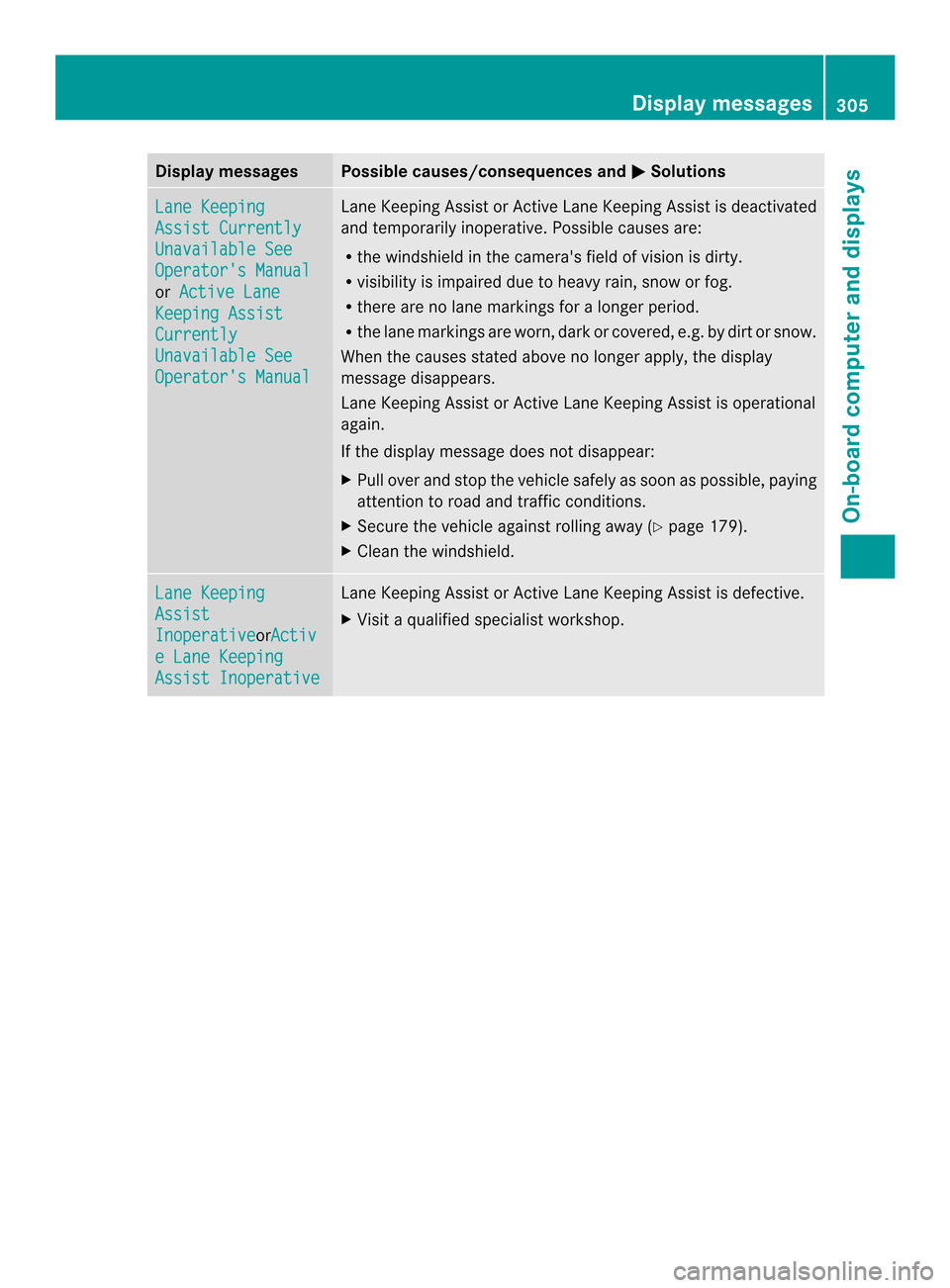
Lane Keeping
Assist Currently
Unavailable See
Operator's Manual
or
Active Lane Keeping Assist
Currently
Unavailable See
Operator's Manual Lane Keeping Assis
torActive Lane Keeping Assist is deactivated
and temporarily inoperative .Possible causes are:
R the windshield in the camera's field of vision is dirty.
R visibility is impaired due to heavy rain, snow or fog.
R there are no lane markings for a longer period.
R the lane markings are worn, dark or covered, e.g. by dirt or snow.
When the causes stated above no longer apply, the display
message disappears.
Lane Keeping Assist or Active Lane Keeping Assist is operational
again.
If the display message does not disappear:
X Pull over and stop the vehicle safely as soon as possible, paying
attention to road and traffic conditions.
X Secure the vehicle against rolling away (Y page 179).
X Clean the windshield. Lane Keeping
Assist
Inoperative orActiv
e Lane Keeping
Assist Inoperative Lane Keeping Assist or Active Lane Keeping Assist is defective.
X
Visit a qualified specialist workshop. Display messages
305On-board computer and displays Z
Page 376 of 462

X
Clean the plastic lenses of the mirror turn
signals in the exterio rmirro rhousing using
a wet sponge and mild cleaning agent, e.g.
Mercedes-Benz car shampoo or cleaning
cloths.
Cleaning the sensors !
If you clean the sensors with a power
washer, make sure that you keep a
distance of at least 11.8in( 30 cm) between
the vehicle and the power washer nozzle.
Information about the correct distance is
available from the equipment
manufacturer. X
Clean sensors 0002of the driving systems
with water, car shampoo and a soft cloth.
Cleaning the rear view camera !
Do not clea nthe camera lens and the area
around the rear view camera with a power
washer. X
Use clear water and a soft cloth to clean
camera lens 0002.
Cleaning the exhaust pipe !
Do not clean the exhaust pipe with acid-
based cleaning agents such as sanitary
cleansers or wheel cleaners.
Impurities combined with the effects of road
grit and corrosive environmental factors may
cause flash rust to form on the surface. You
can restore the original shine of the exhaust
pipe by cleaning it regularly, especially in
winter and after washing.
X Cleant he exhaust pipe with a chrome care
product tested and approved by Mercedes-
Benz.
Cleaning the trailer tow hitch H
Environmental note
Dispose of rags soaked in oil and grease in an
environmentally responsible manner.
! Do not clean the ball coupling with a
power washer. Do not use solvents.
! Observe the note on care provided by the
trailer manufacturer. 374
CareMaintenance and care
Page 377 of 462
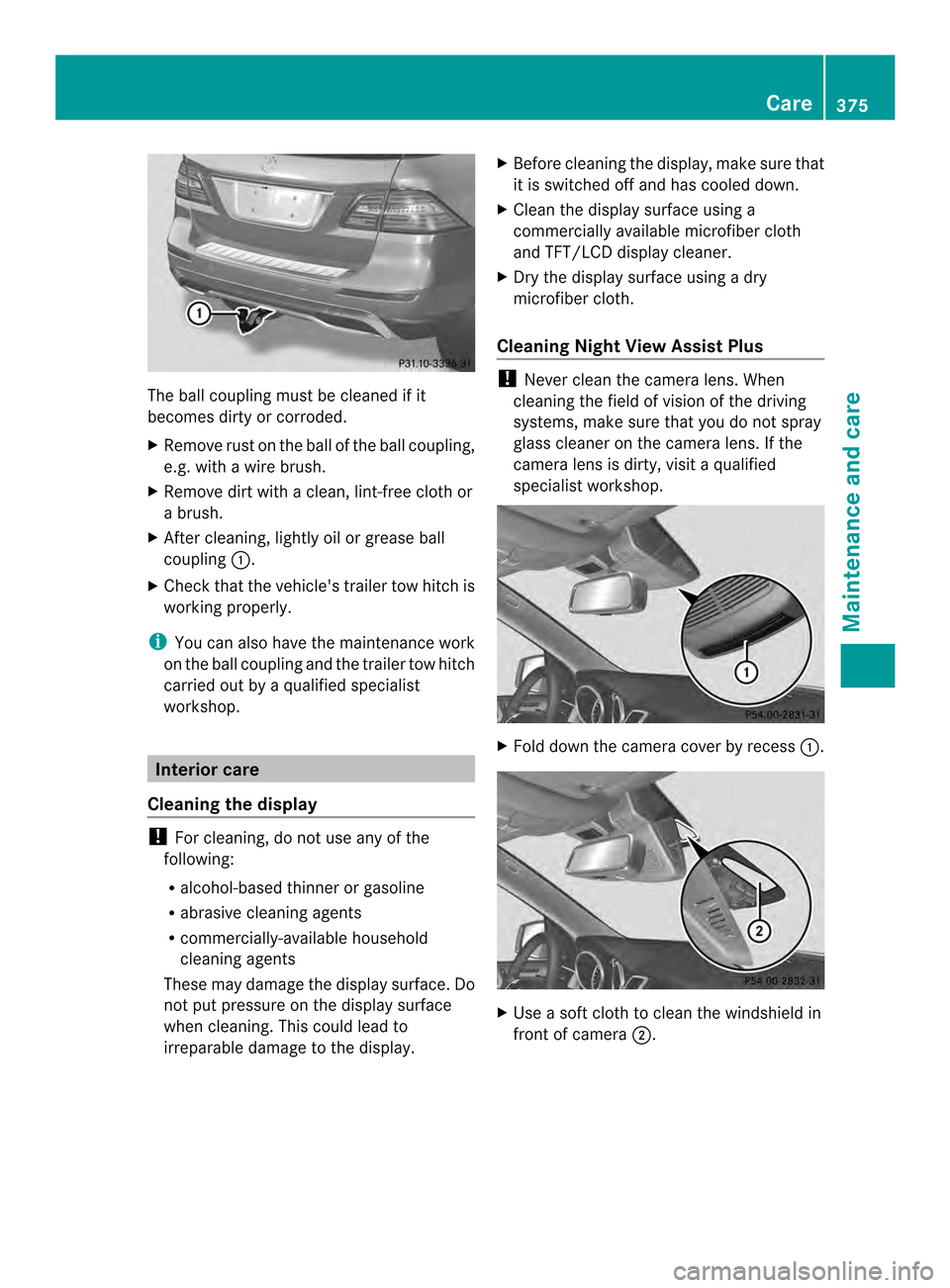
The ball coupling must be cleaned if it
becomes dirty or corroded.
X Remove rust on the ball of the ball coupling,
e.g. with a wire brush.
X Remove dirt with a clean, lint-free cloth or
a brush.
X After cleaning, lightly oil or grease ball
coupling 0002.
X Check that the vehicle's trailer tow hitch is
working properly.
i You can also have the maintenance work
on the ball coupling and the trailer tow hitch
carried out by a qualified specialist
workshop. Interior care
Cleaning the display !
For cleaning, do not use any of the
following:
R alcohol-based thinner or gasoline
R abrasive cleaning agents
R commercially-available household
cleaning agents
These may damage the display surface. Do
not put pressure on the display surface
when cleaning. This could lead to
irreparable damage to the display. X
Before cleaning the display, make sure that
it is switched off and has cooled down.
X Clean the display surface using a
commercially available microfiber cloth
and TFT/LCD display cleaner.
X Dry the display surface using a dry
microfiber cloth.
Cleaning Night View Assist Plus !
Never clean the camera lens. When
cleaning the field of vision of the driving
systems, make sure that you do not spray
glass cleaner on the camera lens. If the
camera lens is dirty, visit a qualified
specialist workshop. X
Fold down the camera cover by recess 0002. X
Use a soft cloth to clean the windshield in
front of camera 0003. Care
375Maintenance and care Z