2014 MERCEDES-BENZ GL stop start
[x] Cancel search: stop startPage 199 of 462
conditions when temperatures are around
the freezing point.
For more information on driving with snow
chains, see (Ypage 407).
For more information on driving with summer
tires, see (Ypage 406).
Observe the notes in the "Winter operation"
section (Ypage 406).
Off-road driving
Important safety notes
GWARNING
If you drive on a steep incline at an angle or
turn when driving on an incline, the vehicle
could slip sideways, tip and rollover. There is
a risk of an accident.
Always drive on a steep incline in the line of
fall (straight up or down) and do not turn the
vehicle.
GWARNING
If the vehicle level is high, the vehicle center
of gravity is raised. This could cause the
vehicle to tip over more easily on uphill or
downhill gradients. There is a risk of an
accident.
Select the lowest possible vehicle level.
When driving off-road, sand, mud and water,
possibly mixed with oil, for example, could get
into the brakes. This could result in a reduced
braking effect or in total brake failure and also
in increased wear and tear. The braking
characteristics change depending on the
material ingressing the brakes. Clean the
brakes after driving off-road. If you detect a
reduced braking effect or grinding noises,
have the brake system checked in a qualified
specialist workshop as soon as possible.
Adapt your driving style to the different
braking characteristics.
Driving off-road increases the likelihood of
damage to the vehicle, which, in turn, can lead
to failure of the mechanical assembly or
systems. Adapt your driving style to suit the
terrain conditions. Drive carefully. Have
damage to the vehicle rectified immediately
at a qualified specialist workshop.
Do not switch to transmission positionN
when driving off-road. You could lose control
of the vehicle if you attempt to brake using
the service brake. If the gradient is too steep,
drive backwards in reverse gear.
General notes
Read this section carefully before driving your
vehicle off-road. Practice by driving over more
gentle off-road terrain first.
Familiarize yourself with the characteristics
of your vehicle and the gear shift operation
before driving through difficult terrain.
The following driving systems are specially
adapted to off-road driving:
ROff-road program 1 and 2 (vehicles with the
ON&OFFROAD package) (Ypage 258)
RLOW RANGE off-road gear (vehicles with
the ON&OFFROAD package)
(Ypage 259)
RDifferential lock (vehicles with the
ON&OFFROAD package) (Ypage 259)
ROff-road ABS (Ypage 68)
RAIRMATIC package (vehicle level)
(Ypage 217)
RDSR (Downhill Speed Regulation)
(Ypage 256)
Observe the following notes:
RStop the vehicle before starting to drive
along an off-road route.
RFor vehicles with the AIRMATIC
package:select a vehicle level that is
suitable for the off-road terrain. To avoid
damaging the vehicle, make sure there is
always sufficient ground clearance.
RCheck that items of luggage and loads are
stowed safely and are well secured
(Ypage 345).
Driving tips197
Driving and parking
Z
Page 210 of 462
Stopping
GWARNING
When leaving the vehicle, even if it is braked
only by DISTRONIC PLUS, it could roll away if:
Rthere is a malfunction in the system or in
the voltage supply.
RDISTRONIC PLUS has been deactivated
with the cruise control lever, e.g. by a
vehicle occupant or from outside the
vehicle.
Rthe electrical system in the engine
compartment, the battery or the fuses have
been tampered with.
Rthe battery is disconnected.
Rthe accelerator pedal has been depressed,
e.g. by a vehicle occupant.
There is a risk of an accident.
If you wish to exit the vehicle, always turn off
DISTRONIC PLUS and secure the vehicle
against rolling away.
If DISTRONIC PLUS detects that the vehicle
in front is stopping, it brakes your vehicle until
it is stationary.
Once your vehicle is stationary, it remains
stationary and you do not need to depress the
brake.
After a time, the electric parking brake
secures the vehicle and relieves the service
brake.
Depending on the specified minimum
distance, your vehicle will come to a standstill
at a sufficient distance behind the vehicle in
front. The specified minimum distance is set
using the control on the cruise control lever.
The electric parking brake automatically
secures the vehicle if DISTRONIC PLUS is
activated and:
Rthe driver's door is open and the driver's
seat belt is unfastened.
Rthe engine is switched off, unless it is
automatically switched off by the ECO
start/stop function.
Ra system malfunction occurs.
Rthe power supply is not sufficient.
On steep uphill or downhill inclines or if there
is a malfunction, the transmission may also
automatically be shifted into positionP.
Setting a speed
Keep in mind that it may take a brief moment
until the vehicle has accelerated or braked to
the speed set.
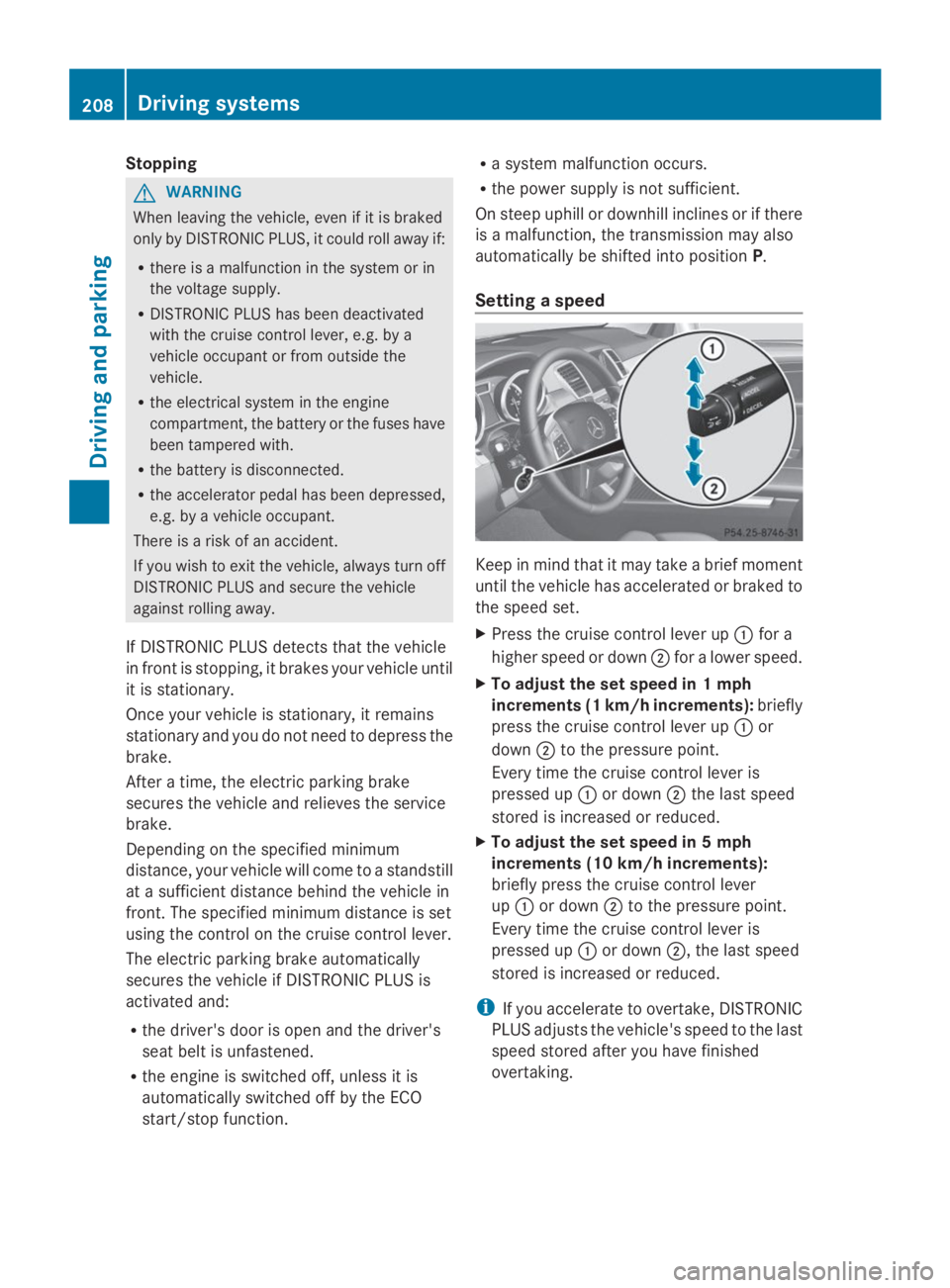
XPress the cruise control lever upCfor a
higher speed or downDfor a lower speed.
XTo adjust the set speed in 1 mph
increments (1 km/h increments):briefly
press the cruise control lever upCor
downDto the pressure point.
Every time the cruise control lever is
pressed upCor downDthe last speed
stored is increased or reduced.
XTo adjust the set speed in 5 mph
increments (10 km/h increments):
briefly press the cruise control lever
upCor downDto the pressure point.
Every time the cruise control lever is
pressed upCor downD, the last speed
stored is increased or reduced.
iIf you accelerate to overtake, DISTRONIC
PLUS adjusts the vehicle's speed to the last
speed stored after you have finished
overtaking.
208Driving systems
Driving and parking
Page 230 of 462
Active Parking Assist will only detect parking
spaces:
Rthat are parallel to the direction of travel
Rthat are at least 59 in (1.5 m) wide
Rthat are at least 51 in (1.3 m) longer than
your vehicle
When driving at speeds below 19 mph
(30 km/h), you will see parking symbol as a
status indicator in the instrument cluster.
When a parking space has been detected, an
arrow towards the right or the left also
appears. By default, Active Parking Assist
only displays parking spaces on the front-
passenger side. Parking spaces on the
driver's side are displayed as soon as the turn
signal on the driver's side is activated. When
parking on the driver's side, this must remain
switched on until you acknowledge the use of
Active Parking Assist by pressing thev
button on the multifunction steering wheel.
A parking space is displayed while you are
driving past it, and until you are
approximately 50 ft (15 m) away from it.
Parking
GWARNING
Active Parking Assist merely aids you by
intervening actively in the steering. If you do
not brake there is a risk of an accident.
Always apply the brakes yourself when
maneuvering and parking.
XStop the vehicle when the parking space
symbol shows the desired parking space in
the instrument cluster.
XShift the transmission to positionR.
TheStart Park Assist? Yes: OK No:Start Park Assist? Yes: OK No:
8message appears in the multifunction
display.
XTo cancel the procedure:press the
8button on the multifunction steering
wheel or pull away.
or
XTo park using Active Parking Assist:
press thevbutton on the multifunction
steering wheel.
ThePark Assist Active AcceleratePark Assist Active Accelerate
and Brake Observe Surroundingsand Brake Observe Surroundings
message appears in the multifunction
display.
XLet go of the multifunction steering wheel.
XBack up the vehicle, being ready to brake
at all times. When backing up, drive at a
speed below approximately 6 mph
(10 km/h). Otherwise Active Parking Assist
will be canceled.
iIn tight parking spaces, you will achieve
the best parking results by backing up as
far as possible. When doing so, also
observe the PARKTRONIC messages.
XStop as soon as PARKTRONIC sounds the
continuous warning tone, if not before.
Maneuvering may be required in tight
parking spaces.
ThePark Assist active Select DPark Assist active Select D
ObserveObservesurroundingssurroundingsmessage appears in
the multifunction display.
XShift the transmission to positionDwhile
the vehicle is stationary.
Active Parking Assist immediately steers in
the other direction.
ThePark Assist active AcceleratePark Assist active Accelerate
and brake Observe surroundingsand brake Observe surroundings
message appears in the multifunction
display.
iYou will achieve the best results by
waiting for the steering procedure to
complete before pulling away.
XDrive forwards and be ready to brake at all
times.
XStop as soon as PARKTRONIC sounds the
continuous warning tone, if not before.
228Driving systems
Driving an d parking
Page 231 of 462
ThePark Assist active Select RPark Assist active Select R
ObserveObservesurroundingssurroundingsmessage appears in
the multifunction display.
As soon as the parking procedure is
complete, thePark Assist switched offPark Assist switched off
message appears and a warning tone sounds.
Active Parking Assist no longer supports you
with steering interventions. When Active
Parking Assist is finished, you must steer
again yourself. PARKTRONIC is still available.
Parking tips:
RThe way your vehicle is positioned in the
parking space after parking is dependent
on various factors. These include the
position and shape of the vehicles parked
in front and behind it and the conditions of
the location. It may be the case that Active
Parking Assist guides you too far into a
parking space, or not far enough into it. In
some cases, it may also lead you across or
onto the curb. If necessary, you should
cancel the parking procedure with Active
Parking Assist.
RYou can also select preselect transmission
positionD. The vehicle redirects and does
not drive as far into the parking space.
Should the gear change occur too soon to
achieve a sensible parking position, the
parking procedure will be aborted.
Exiting a parking space
In order that Active Parking Assist can
support you when you exit the parking space:
Ryou need to have parked using Active
Parking Assist.
Rthe border of the parking space must be
high enough at the front and the rear. A
curb stone is too small, for example.
Rthe border of the parking space must not
be too wide, as the position of the vehicle
must not exceed an angle of 45° to the
starting position as it is maneuvered into
the parking space.
Ra maneuvering distance of at least 3.3 ft
(1.0 m) must be available.
XStart the engine.
XSwitch on the turn signal in the direction
you are pulling away.
XShift the transmission to positionDorR.
TheStart Park Assist? Yes: OK No:Start Park Assist? Yes: OK No:
8message appears in the multifunction
display.
XTo cancel the procedure:press the
8button on the multifunction steering
wheel or pull away.
or
XTo exit a parking space using Active
Parking Assist:press thevbutton on
the multifunction steering wheel.
ThePark Assist active AcceleratePark Assist active Accelerate
and brake Observe surroundingsand brake Observe surroundings
message appears in the multifunction
display.
XLet go of the multifunction steering wheel.
XReverse the vehicle or drive forwards, being
ready to brake at all times. Do not exceed
a maximum speed of approximately
6 mph (10 km/h) when exiting a parking
space. Otherwise Active Parking Assist will
be canceled.
XStop as soon as PARKTRONIC sounds the
continuous warning tone, if not before.
XShift the transmission to positionDorRas
required while the vehicle is stationary.
Active Parking Assist immediately steers in
the other direction.
iYou will achieve the best results by
waiting for the steering procedure to
complete before pulling away.
If you back up after activation, the steering
wheel is moved to the straight-ahead
position.
XDrive forwards or back up the vehicle, being
ready to brake at all times.
XStop as soon as PARKTRONIC sounds the
continuous warning tone, if not before.
XDrive forwards and back up as prompted by
the PARKTRONIC warning displays, several
times if necessary.
Driving systems229
Driving and parking
Z
Page 269 of 462
of the towing vehicle, as the latter is
equipped with an anti-lock brake system.
Doing so will result in a loss of function of
the brake systems of both the vehicle and
the trailer.
XMake sure that the automatic transmission
is set to positionP.
XApply the vehicle's electric parking brake.
XStart the engine.
XVehicles with the AIRMATIC package:
select highway level.
XVehicles with ADS:set ADS toAUTOor
COMF.
XSwitch off the engine.
XClose all doors and the tailgate.
XCouple up the trailer.
XEstablish all electrical connections.
XCheck that the trailer lighting system is
working.
iVehicles with the AIRMATIC package:
with a trailer attached, the vehicle will
always remain at highway level. When
coupling up a trailer, please observe the
following:
RUnless highway level has been set
manually, the vehicle is automatically
lowered to highway level. This is the case
if a speed of 5 mph(8km/h) is reached.
RHigh-speed level is not available.
These restrictions apply to all accessories
powered through a connection to the trailer
power socket of your vehicle, e.g. a bicycle
carrier.
Observe the maximum permissible trailer
dimensions (width and length).
Most U.S. states and all Canadian provinces
require by law:
RSafety chains between the towing vehicle
and the trailer. The chains should be cross-
wound under the trailer drawbar. They must
be fastened to the vehicle's trailer
coupling, not to the bumper or the axle.
Leave enough play in the chains to make
tight cornering possible.
RA separate brake system for certain types
of trailer.
RA safety switch for braked trailers. Check
the specific legal requirements applicable
to your state.
If the trailer detaches from the towing
vehicle, the safety switch applies the
trailer's brakes.
Towing a trailer
There are numerous legal requirements
concerning the towing of a trailer, e.g. speed
restrictions. Make sure that your vehicle/
trailer combination complies with the local
requirements not only in your area of
residence but also at any location to which
you are traveling. The police and local
authorities can provide reliable information.
Please observe the following when towing a
trailer:
RIn order to accumulate driving experience
and accustom yourself to the new handling
characteristics, practice the following at a
location where there is no traffic:
-Cornering
-Stopping
-Backing up
RBefore driving, check:
-the trailer tow hitch
-the safety switch for braked trailers
-the safety chains
-electrical connections
-the lights
-the wheels
RAdjust the exterior mirrors to provide an
unobstructed view of the rear section of the
trailer.
RIf the trailer has electronically controlled
brakes, pull away carefully. Brake manually
using the brake controller and check
whether the brakes function correctly.
Towing a trailer267
Driving an d parking
Z
Page 276 of 462
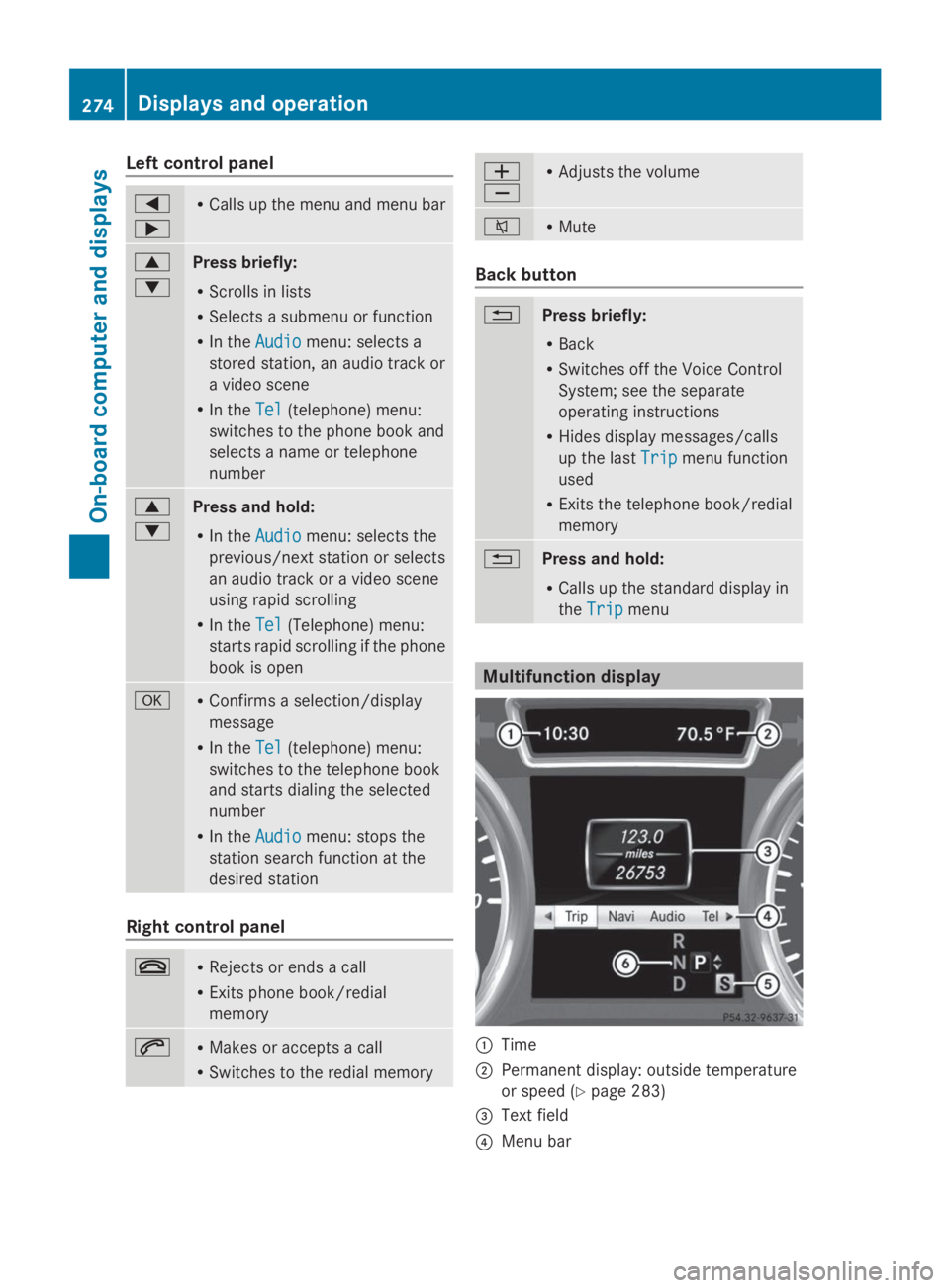
Left control panel
Y
e
RCalls up the menu and menu bar
c
d
Press briefly:
RScrolls in lists
RSelects a submenu or function
RIn theAudioAudiomenu: selects a
stored station, an audio track or
a video scene
RIn theTelTel(telephone) menu:
switches to the phone book and
selects a name or telephone
number
c
d
Press and hold:
RIn theAudioAudiomenu: selects the
previous/next station or selects
an audio track or a video scene
using rapid scrolling
RIn theTelTel(Telephone) menu:
starts rapid scrolling if the phone
book is open
vRConfirms a selection/display
message
RIn theTelTel(telephone) menu:
switches to the telephone book
and starts dialing the selected
number
RIn theAudioAudiomenu: stops the
station search function at the
desired station
Right control panel
vRRejects or ends a call
RExits phone book/redial
memory
aRMakes or accepts a call
RSwitches to the redial memory
Page 282 of 462
Dialing a number from the phone book
XPress theYorebutton on the
steering wheel to select theTelTelmenu.
XPress thec,dorvbutton to
switch to the phone book.
XPress thecordbutton to select the
desired name.
or
XTo begin rapid scrolling:press and hold
thecordbutton for longer than
one second.
Rapid scrolling stops when you release the
button or reach the end of the list.
XIf only one telephone number is stored
for a name:press theaorvbutton
to start dialing.
or
XIf there is more than one number for a
particular name:press theaorv
button to display the numbers.
XPress thecordbutton to select the
number you want to dial.
XPress theaorvbutton to start
dialing.
or
XTo exit the telephone book:press the
vor8button.
Redialing
The on-board computer saves the last names
or numbers dialed in the redial memory.
XPress theYorebutton on the
steering wheel to select theTelTelmenu.
XPress theabutton to switch to the
redial memory.
XPress thecordbutton to select the
desired name or number.
XPress theaorvbutton to start
dialing.
or
XTo exit the redial memory:press the
vor8button.
Assistance menu
Introduction
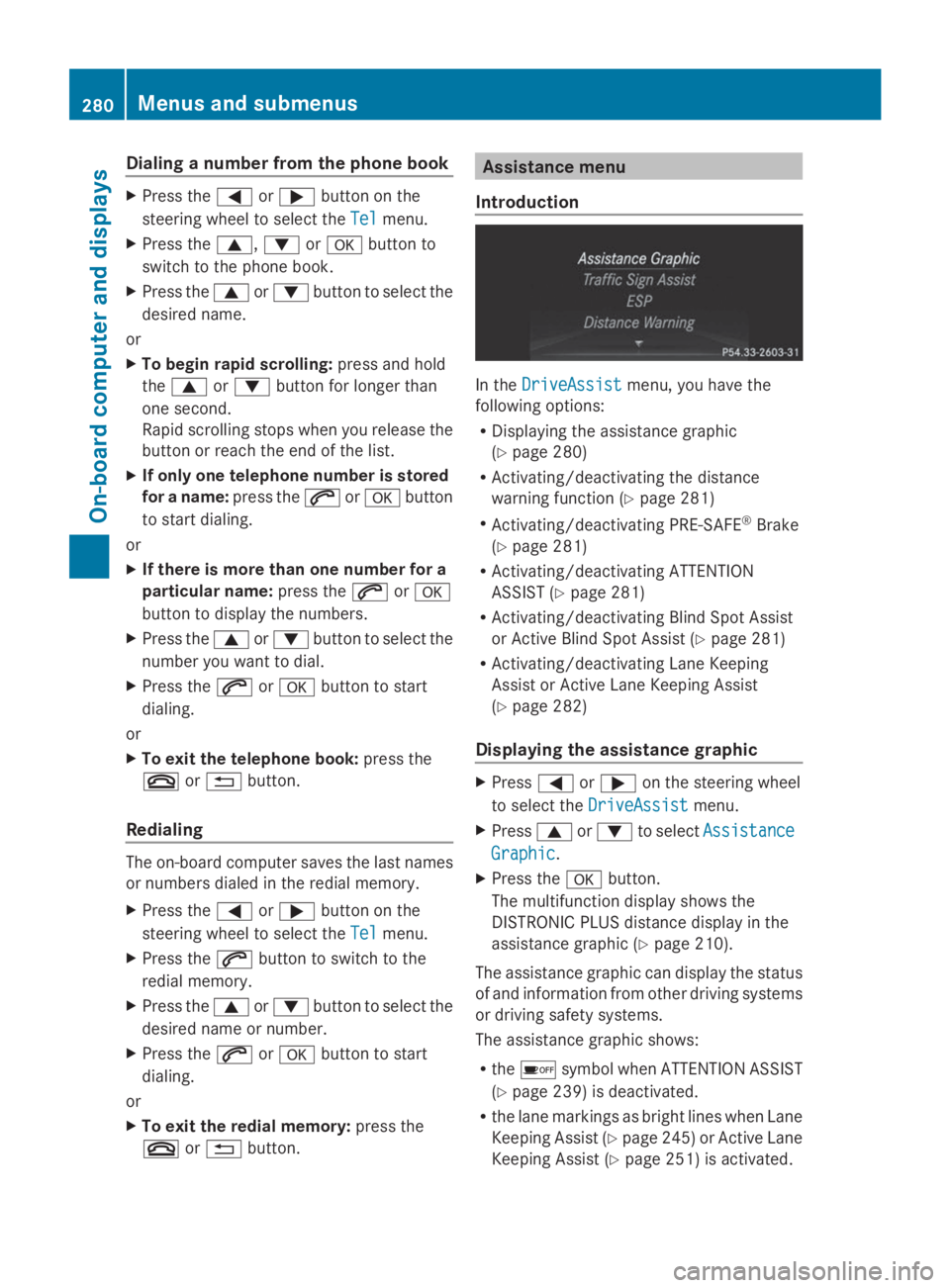
In theDriveAssistDriveAssistmenu, you have the
following options:
RDisplaying the assistance graphic
(Ypage 280)
RActivating/deactivating the distance
warning function (Ypage 281)
RActivating/deactivating PRE-SAFE®Brake
(Ypage 281)
RActivating/deactivating ATTENTION
ASSIST (Ypage 281)
RActivating/deactivating Blind Spot Assist
or Active Blind Spot Assist (Ypage 281)
RActivating/deactivating Lane Keeping
Assist or Active Lane Keeping Assist
(Ypage 282)
Displaying the assistance graphic
XPressYoreon the steering wheel
to select theDriveAssistDriveAssistmenu.
XPresscordto selectAssistanceAssistance
GraphicGraphic.
XPress thevbutton.
The multifunction display shows the
DISTRONIC PLUS distance display in the
assistance graphic (Ypage 210).
The assistance graphic can display the status
of and information from other driving systems
or driving safety systems.
The assistance graphic shows:
Rthe
Page 300 of 462
Display messagesPossible causes/consequences andPPSolutions
PRE-SAFEPRE-SAFE
FunctionsFunctions
Currently LimitedCurrently Limited
See Operator'sSee Operator's
ManualManual
Vehicles without the Active Driving Assistance package: Adaptive
Brake Assist is temporarily inoperative. Possible causes are:
Rfunction is impaired due to heavy rain or snow.
Rthe sensor in the bumper is dirty.
Rthe radar sensor system is temporarily inoperative, e.g. due to
electromagnetic radiation emitted by nearby TV or radio
stations or other sources of electromagnetic radiation.
RAMG vehicles: ESP®is deactivated.
Rthe system is outside the operating temperature range.
Rthe on-board voltage is too low.
When the causes stated above no longer apply, the display
message disappears.
Adaptive Brake Assist is operational again.
If the display message does not disappear:
XPull over and stop the vehicle safely as soon as possible, paying
attention to road and traffic conditions.
XSecure the vehicle against rolling away (Ypage 188).
XClean the bumpers (Ypage 380).
XRestart the engine.
XAMG vehicles: reactivate ESP®(Ypage 73).
298Displaymessages
On-b oard computer and displays