Page 138 of 462

Rear overhead control panel (third row of seats)
: Reading lamp Interior lighting control
General notes In order to prevent the vehicle's battery from
discharging, the interior lighting functions are
automatically deactivated after some time
except for when the SmartKey is in position
2 in the ignition lock.
The color and brightness of the ambient
lighting can be adjusted using the on-board
computer (Y page 283).
Automatic interior lighting control Overhead control panel
:
p To switch the left-hand front reading
lamp on/off
; c To switch the front interior lighting
on
= v To switch the rear interior lighting
on/off ?
| To switch the front interior lighting/
automatic interior lighting control off
A p To switch the right-hand front
reading lamp on/off
B To switch the automatic interior lighting
control on
X To switch on: set the switch to center
position B.
X To switch off: set the switch to the |
position.
The interior lighting automatically switches
on if you:
R unlock the vehicle
R open a door
R remove the SmartKey from the ignition
lock.
The interior light is activated for a short while
when the SmartKey is removed from the
ignition lock. You can activate this delayed
switch-off using the on-board computer
(Y page 284).
Manual interior lighting control Overhead control panel
:
p To switch the left-hand front reading
lamp on/off
; c To switch the front interior lighting
on
= v To switch the rear interior lighting
on/off
? | To switch the front interior lighting/
automatic interior lighting control off 136
Interior lightingLights and windshield wipers
Page 139 of 462

A
p To switch the right-hand front
reading lamp on/off
B To switch the automatic interior lighting
control on
X To switch the front interior lighting on:
set the switch to the cposition.
X To switch the interior lighting off: set the
switch to the |position or (if the door
is closed) to the center position.
X To switch the rear interior lighting on/
off: press the ubutton.
X To switch the reading lamps on/off:
press the pbutton. Crash-responsive emergency lighting
The interior lighting is activated automatically
if the vehicle is involved in an accident.
X To switch off the crash-responsive
emergency lighting: press the hazard
warning lamp button.
or
X Lock and then unlock the vehicle using the
SmartKey. Replacing bulbs
Important safety notes
G
DANGER
Xenon bulbs carry a high voltage. You can get
an electric shock if you remove the cover of
the Xenon bulb and touch the electrical
contacts. There is a risk of fatal injury.
Never touch the parts or the electrical
contacts of the Xenon bulb. Always have work
on the Xenon bulbs carried out at a qualified
specialist workshop.
If your vehicle is equipped with Xenon bulbs,
you can recognize this by the following: the
cone of light from the Xenon bulbs moves
from the top to the bottom and back again
when you start the engine. For this to be observed, the lights must be switched on
before starting the engine. G
WARNING
Bulbs, lamps and connectors can get very hot
when operating. If you change a bulb, you
could burn yourself on these components.
There is a risk of injury.
Allow these components to cool down before
changing a bulb.
Do not use a bulb that has been dropped or if
its glass tube has been scratched.
The bulb may explode if:
R you touch it
R it is hot
R you drop it
R you scratch it
Only operate bulbs in enclosed lamps
designed for that purpose. Only install spare
bulbs of the same type and the specified
voltage.
Marks on the glass tube reduce the service
life of the bulbs. Do not touch the glass tube
with your bare hands. If necessary, clean the
glass tube when cold with alcohol or spirit and
rub it off with a lint-free cloth.
Protect bulbs from moisture during
operation. Do not allow bulbs to come into
contact with liquids.
There are bulbs other than the Xenon bulbs
that you cannot replace. Replace only the
bulbs listed (Y page 138). Have the bulbs that
you cannot replace yourself changed at a
qualified specialist workshop.
If you require assistance changing bulbs,
consult a qualified specialist workshop.
If the new bulb still does not light up, consult
a qualified specialist workshop.
Bulbs and lamps are an important aspect of
vehicle safety. You must therefore make sure
that these function correctly at all times.
Have the headlamp setting checked regularly. Replacing bulbs
137Lights and windshield wipers Z
Page 141 of 462

X
Align housing cover :and turn it
clockwise until it engages.
X Replace the cover in the front wheel
housing (Y page 138).
High-beam headlamps (halogen
headlamps) X
Switch off the lights.
X Open the hood.
X Turn housing cover :counter-clockwise
and pull it out.
X Pull lever =upwards and remove bulb
holder ;.
X Take the bulb out of bulb holder ;.
X Insert the new bulb into bulb holder ;.
X Simultaneously press bulb holder ;and
pull lever =downwards.
X Align housing cover :and turn it
clockwise until it engages. Changing the rear bulbs
Opening and closing the service flap Left-hand service flap
Right-hand service flap
You must open the service flap in the cargo
compartment before you can change the
bulbs in the brake lamp.
X
To open: release service flap :at the top,
e.g. with a screwdriver, and swing it
downward in the direction of the arrow.
X Right side: remove the first-aid kit
beforehand and pull the parcel net down.
X To close: reinsert service flap :. Replacing bulbs
139Lights andwindshield wipers Z
Page 144 of 462
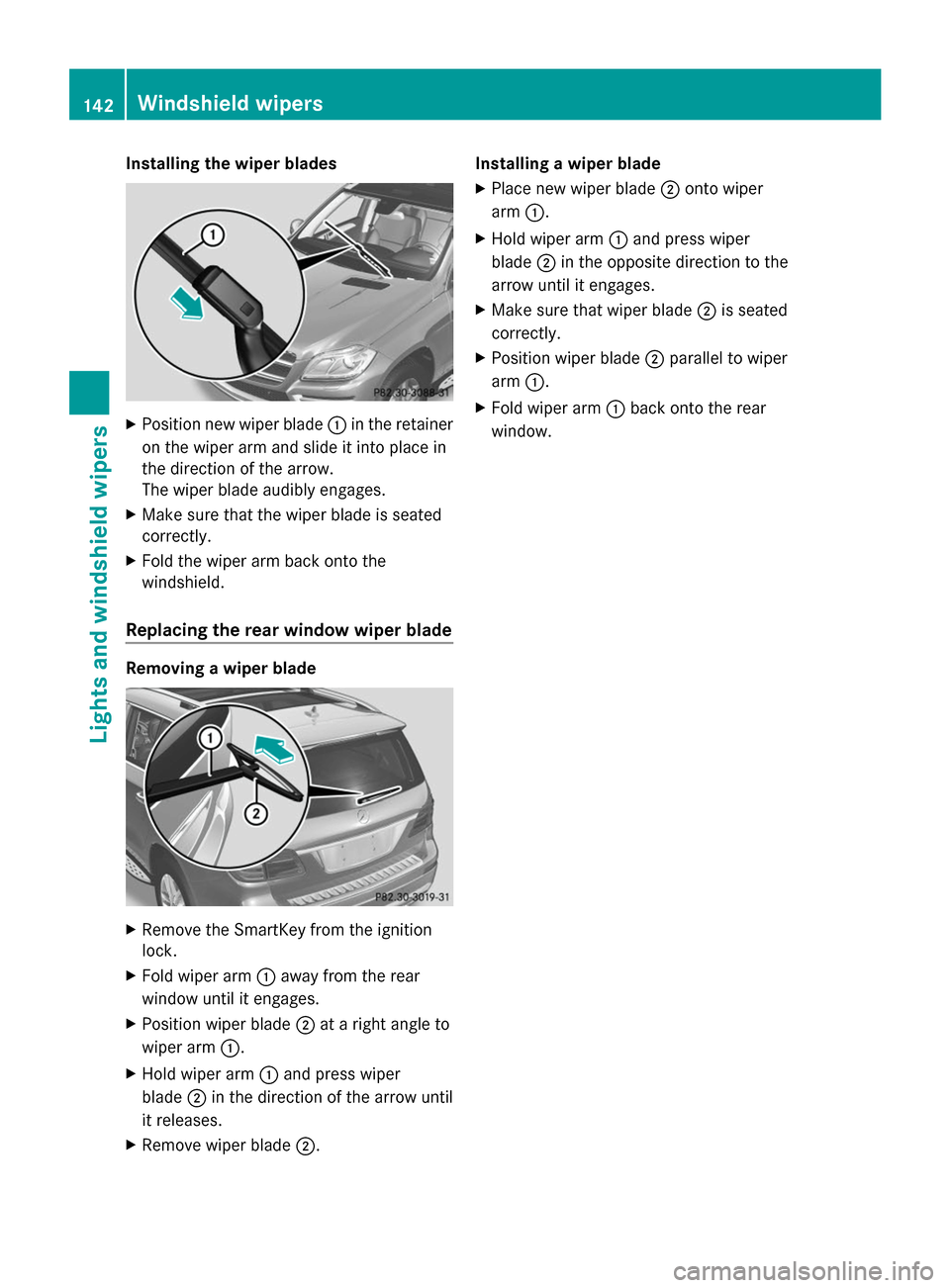
Installing the wiper blades
X
Position new wiper blade :in the retainer
on the wiper arm and slide it into place in
the direction of the arrow.
The wiper blade audibly engages.
X Make sure that the wiper blade is seated
correctly.
X Fold the wiper arm back onto the
windshield.
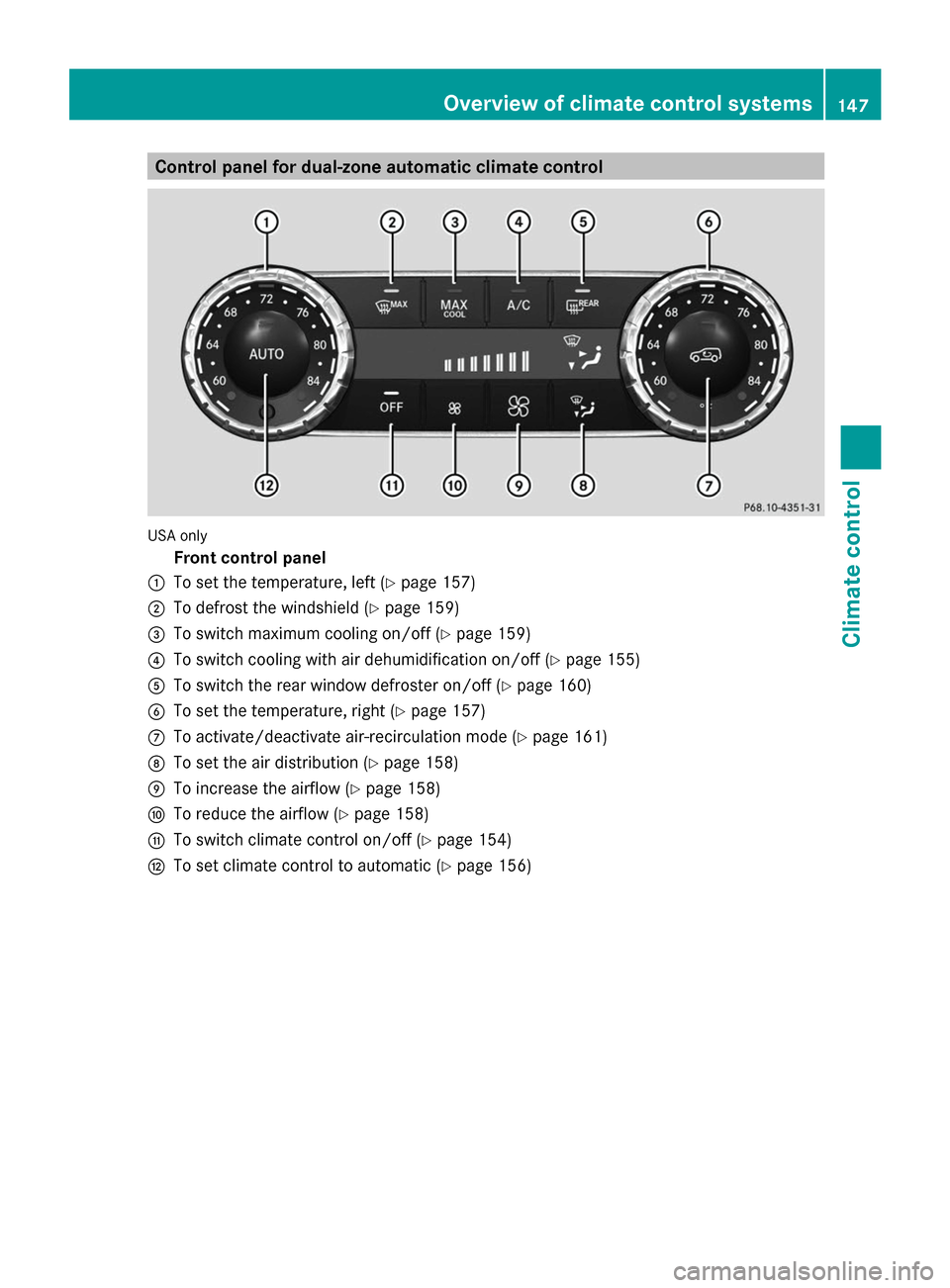
Replacing the rear window wiper blade Removing a wiper blade
X
Remove the SmartKey from the ignition
lock.
X Fold wiper arm :away from the rear
window until it engages.
X Position wiper blade ;at a right angle to
wiper arm :.
X Hold wiper arm :and press wiper
blade ;in the direction of the arrow until
it releases.
X Remove wiper blade ;. Installing a wiper blade
X
Place new wiper blade ;onto wiper
arm :.
X Hold wiper arm :and press wiper
blade ;in the opposite direction to the
arrow until it engages.
X Make sure that wiper blade ;is seated
correctly.
X Position wiper blade ;parallel to wiper
arm :.
X Fold wiper arm :back onto the rear
window. 142
Windshield wipersLights and windshield wipers
Page 149 of 462
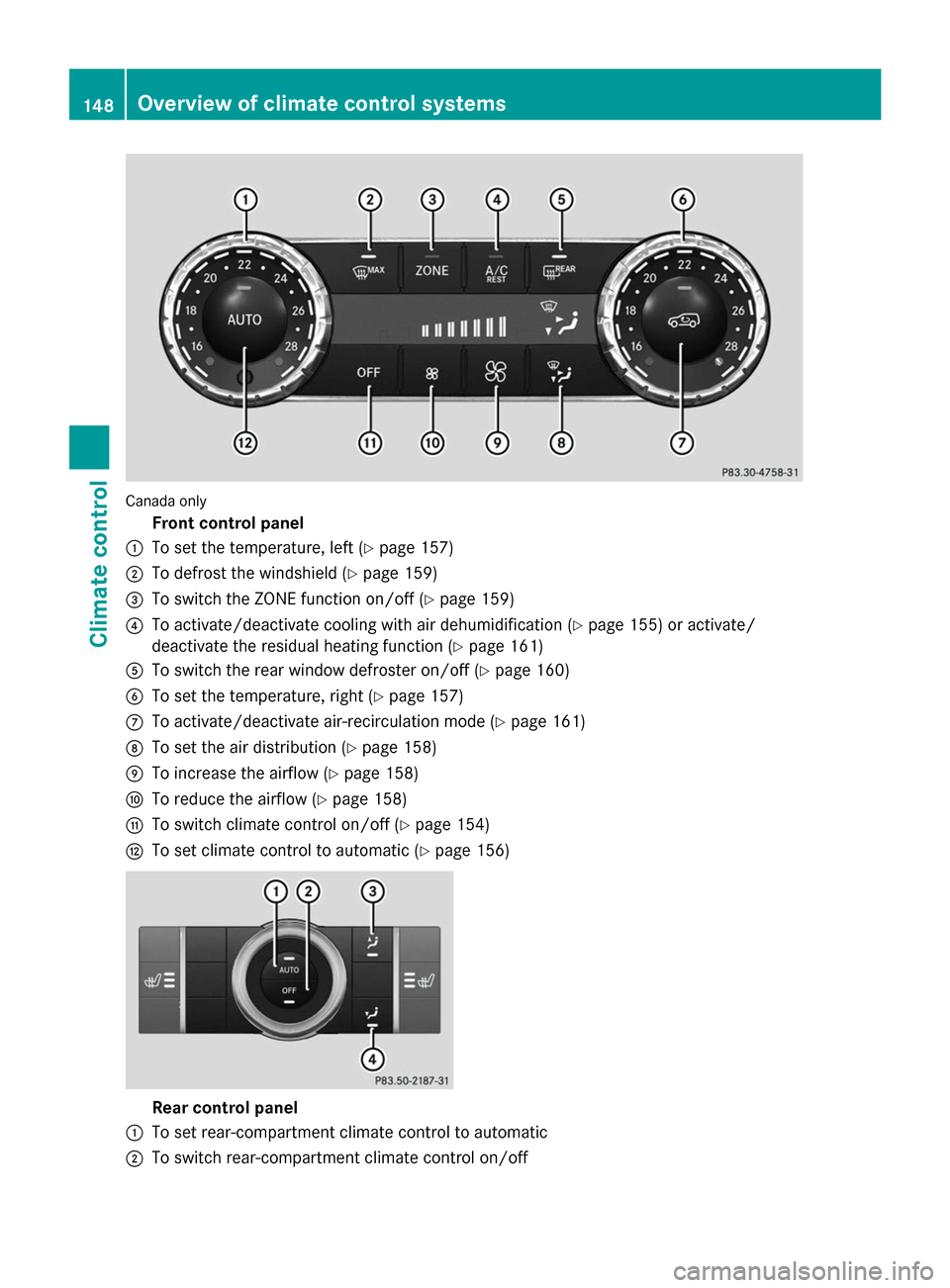
Control panel for dual-zone automatic climate control
USA only
Front control panel
: To set the temperature, left (Y page 157)
; To defrost the windshield (Y page 159)
= To switch maximum cooling on/off (Y page 159)
? To switch cooling with air dehumidification on/off (Y page 155)
A To switch the rear window defroster on/off (Y page 160)
B To set the temperature, right (Y page 157)
C To activate/deactivate air-recirculation mode (Y page 161)
D To set the air distribution (Y page 158)
E To increase the airflow (Y page 158)
F To reduce the airflow (Y page 158)
G To switch climate control on/off (Y page 154)
H To set climate control to automatic (Y page 156) Overview of climate control systems
147Climate control
Page 150 of 462
Canada only
Front control panel
: To set the temperature, left (Y page 157)
; To defrost the windshield (Y page 159)
= To switch the ZONE function on/off (Y page 159)
? To activate/deactivate cooling with air dehumidification (Y page 155) or activate/
deactivate the residual heating function ( Ypage 161)
A To switch the rear window defroster on/off (Y page 160)
B To set the temperature, right (Y page 157)
C To activate/deactivate air-recirculation mode (Y page 161)
D To set the air distribution (Y page 158)
E To increase the airflow (Y page 158)
F To reduce the airflow (Y page 158)
G To switch climate control on/off (Y page 154)
H To set climate control to automatic (Y page 156)Rear control panel
: To set rear-compartment climate control to automatic
; To switch rear-compartment climate control on/off 148
Overview of climate control systemsClimate control
Page 152 of 462

Control panel for 3-zone automatic climate control
USA only
Front control panel
: To set the temperature, left (Y page 157)
; To defrost the windshield (Y page 159)
= To switch maximum cooling on/off (Y page 159)
? To switch cooling with air dehumidification on/off (Y page 155)
A To switch the rear window defroster on/off (Y page 160)
B To set the temperature, right (Y page 157)
C To switch the ZONE function on/off (Y page 159)
D To switch climate control on/off (Y page 154)
E To set the air distribution (Y page 158)
F To increase the airflow (Y page 158)
G To reduce the airflow (Y page 158)
H Display
I To adjust the climate mode settings (Y page 157)
J To activate/deactivate air-recirculation mode (Y page 161)
K To set climate control to automatic (Y page 156)
Rear control panel
L To increase the airflow (Y page 158)
M Setting the temperature (Y page 157)
N To set rear-compartment climate control to automatic (Y page 156)
O To direct the airflow through the rear air vents (Y page 158)
P To direct the airflow through the footwell vents (Y page 158)150
Overview of climate control systemsClimate control
Page 153 of 462
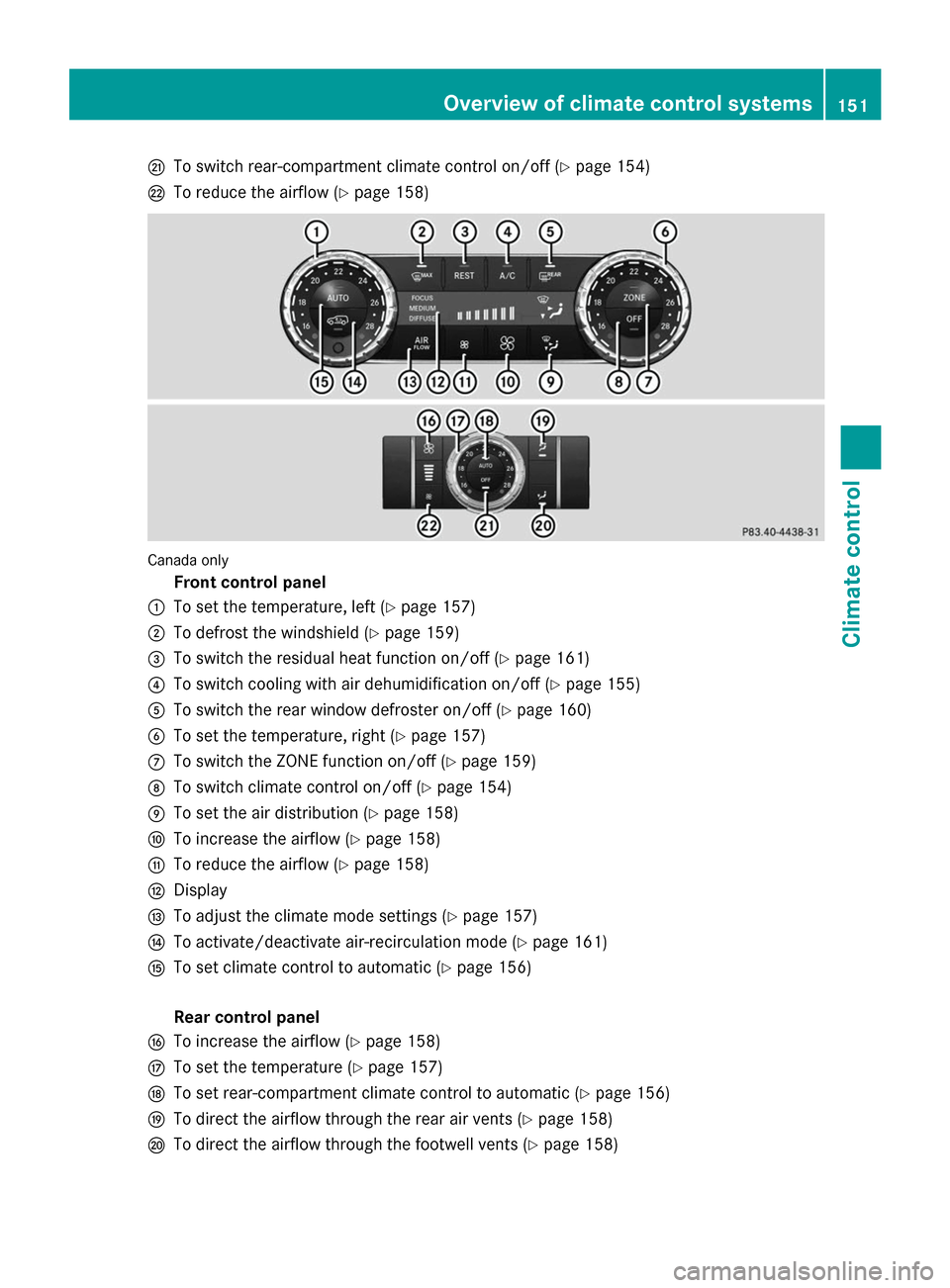
Q
To switch rear-compartment climate control on/off (Y page 154)
R To reduce the airflow (Y page 158)Canada only
Front control panel
: To set the temperature, left (Y page 157)
; To defrost the windshield (Y page 159)
= To switch the residual heat function on/off (Y page 161)
? To switch cooling with air dehumidification on/off (Y page 155)
A To switch the rear window defroster on/off (Y page 160)
B To set the temperature, right (Y page 157)
C To switch the ZONE function on/off (Y page 159)
D To switch climate control on/off (Y page 154)
E To set the air distribution (Y page 158)
F To increase the airflow (Y page 158)
G To reduce the airflow (Y page 158)
H Display
I To adjust the climate mode settings (Y page 157)
J To activate/deactivate air-recirculation mode (Y page 161)
K To set climate control to automatic (Y page 156)
Rear control panel
L To increase the airflow (Y page 158)
M To set the temperature (Y page 157)
N To set rear-compartment climate control to automatic (Y page 156)
O To direct the airflow through the rear air vents (Y page 158)
P To direct the airflow through the footwell vents (Y page 158) Overview of climate control systems
151Climate control