2014 MERCEDES-BENZ GL-Class Comand
[x] Cancel search: ComandPage 39 of 462
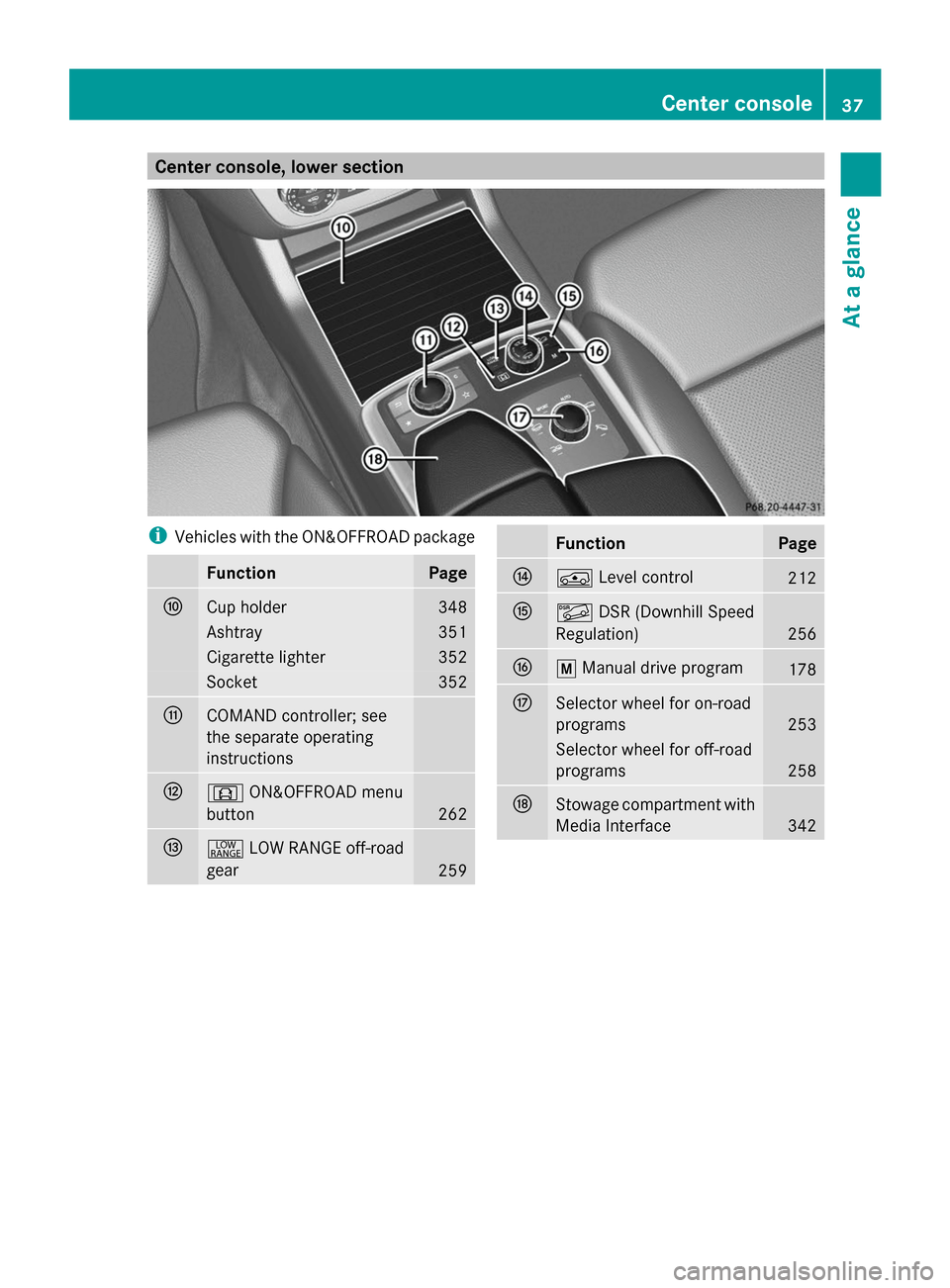
Center console, lower section
i
Vehicles with the ON&OFFROAD package Function Page
F
Cup holder 348
Ashtray 351
Cigarette lighter 352
Socket 352
G
COMAND controller; see
the separate operating
instructions
H
d
ON&OFFROAD menu
button 262
I
+
LOW RANGE off-road
gear 259 Function Page
J
Á
Level control 212
K
Ã
DSR (Downhill Speed
Regulation) 256
L
p
Manual drive program 178
M
Selector wheel for on-road
programs
253
Selector wheel for off-road
programs
258
N
Stowage compartment with
Media Interface
342Center console
37At a glance
Page 40 of 462
i
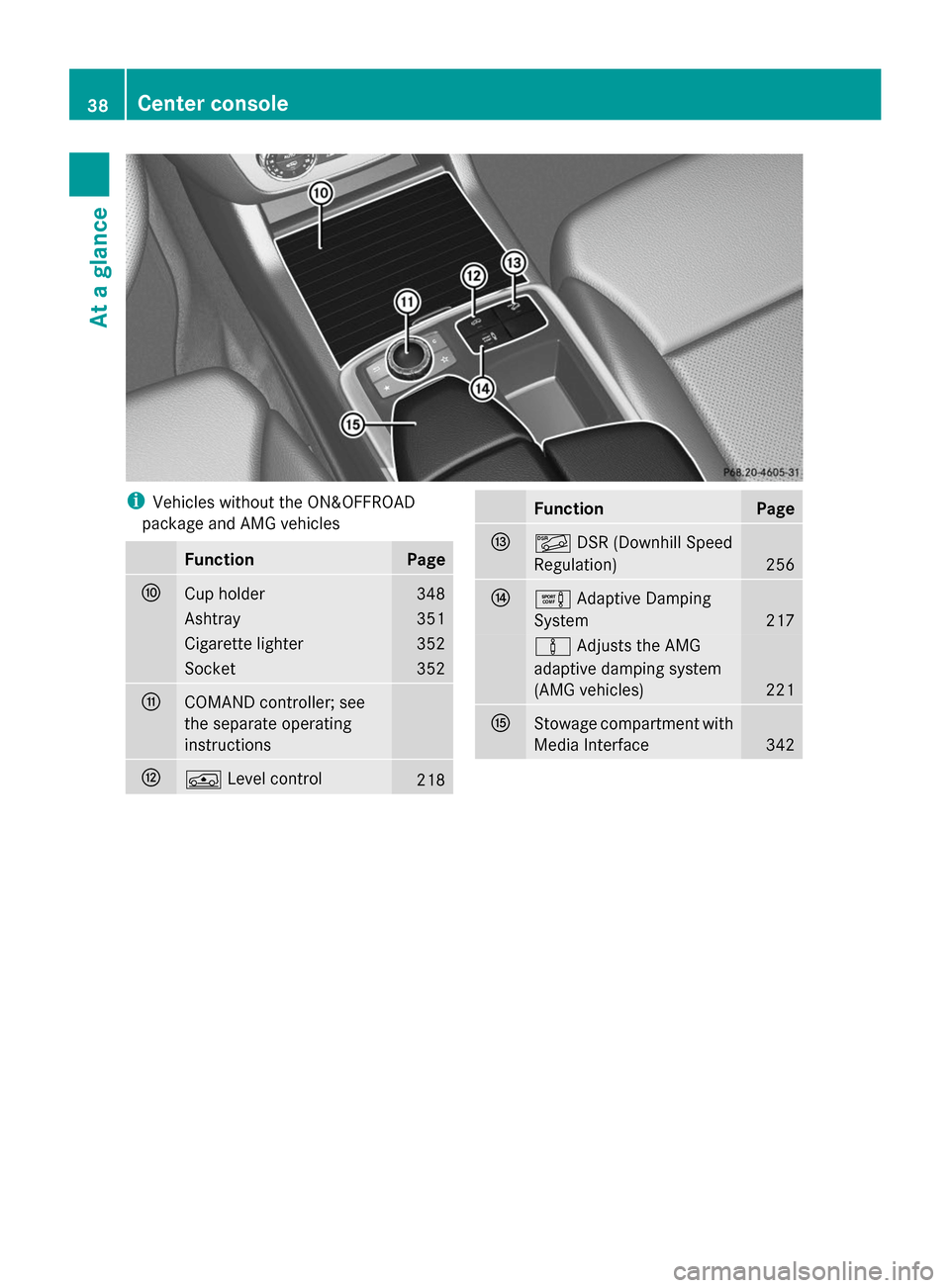
Vehicles without the ON&OFFROAD
package and AMG vehicles Function Page
F
Cup holder 348
Ashtray 351
Cigarette lighter 352
Socket 352
G
COMAND controller; see
the separate operating
instructions
H
Á
Level control 218 Function Page
I
Ã
DSR (Downhill Speed
Regulation) 256
J
e
Adaptive Damping
System 217
à
Adjusts the AMG
adaptive damping system
(AMG vehicles) 221
K
Stowage compartment with
Media Interface
34238
Center consoleAt a glance
Page 41 of 462

Overhead control panel
Function Page
:
p
Switches the left-
hand reading lamp on/off 135
;
c
Switches the front
interior lighting on 136
=
u
Switches the rear
interior lighting on/off 136
?
|
Switches the front
interior lighting/automatic
interior lighting control off 136
A
p
Switches the right-
hand reading lamp on/off 135
B
2
Opens/closes the
sliding sunroof 99
3
Opens/closes the
panorama roof with power
tilt/sliding panel with roller
sunblinds 100 Function Page
C
Eyeglasses compartment 342
D
F
Roadside Assistance
call button (mbrace
system) 358
E
G
SOS button (mbrace
system) 356
F
ï
MB Info call button
(mbrace system) 358
G
Rear-view mirror 122
H
Buttons for the garage door
opener
367
I
Microphone for mbrace
(emergency call system),
telephone and the Voice
Control System
1 1
The Voice Control System is only available in combination with COMAND. Observe the additional operating
instructions. Overhead control panel
39At a glance
Page 118 of 462
i
Further related subjects:
R Cargo compartment enlargement
(folding the second row of seats
forwards) (Y page 344)
R Folding the seats in the third row
forwards/back (Y page 111)
Folding down the seats
The seats can be folded down electrically if
the vehicle is stationary and the respective
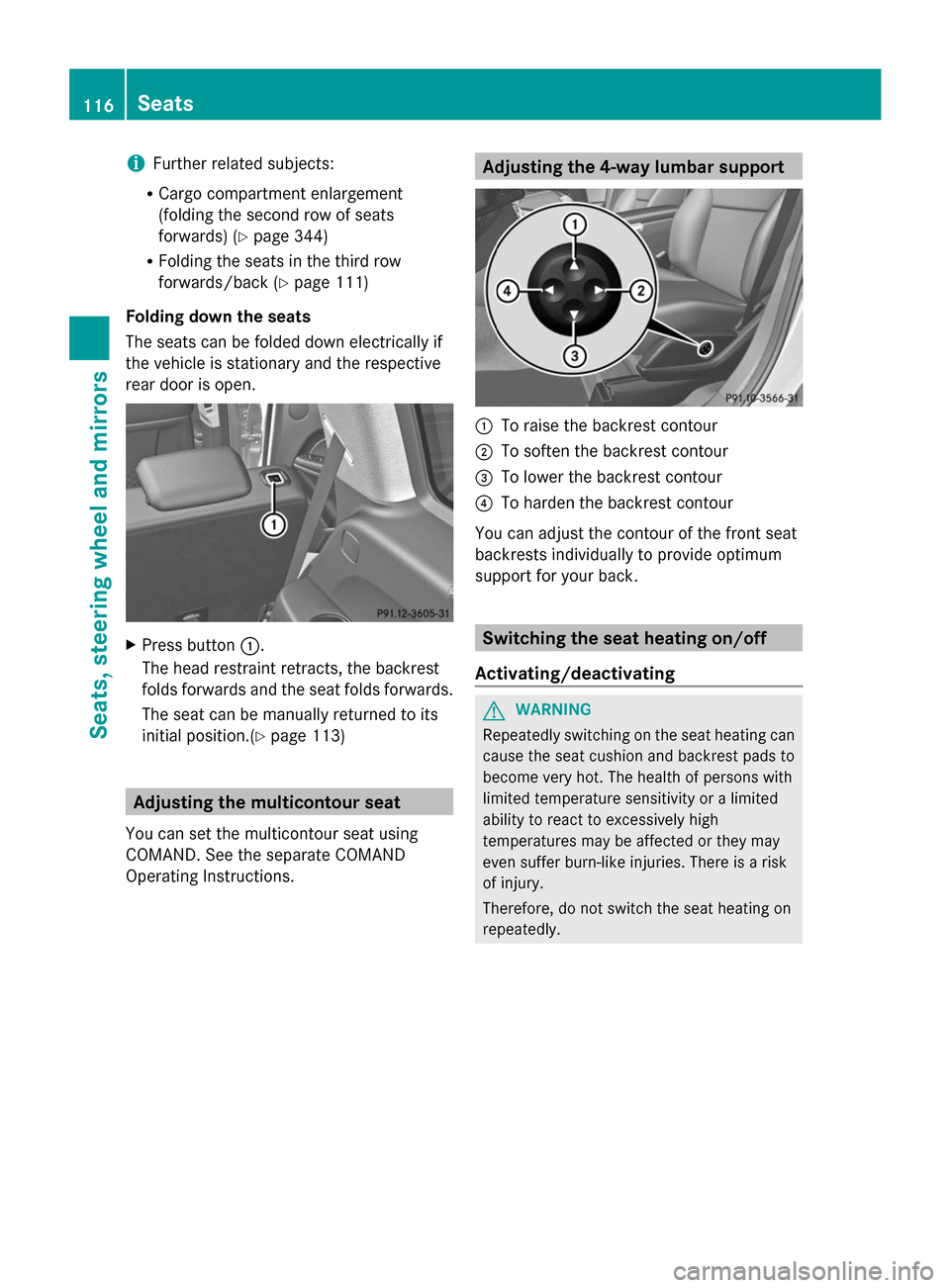
rear door is open. X
Press button :.
The head restraint retracts, the backrest
folds forwards and the seat folds forwards.
The seat can be manually returned to its
initial position.(Y page 113) Adjusting the multicontour seat
You can set the multicontour seat using
COMAND. See the separate COMAND
Operating Instructions. Adjusting the 4-way lumbar support
:
To raise the backrest contour
; To soften the backrest contour
= To lower the backrest contour
? To harden the backrest contour
You can adjust the contour of the front seat
backrests individually to provide optimum
support for your back. Switching the seat heating on/off
Activating/deactivating G
WARNING
Repeatedly switching on the seat heating can
cause the seat cushion and backrest pads to
become very hot. The health of persons with
limited temperature sensitivity or a limited
ability to react to excessively high
temperatures may be affected or they may
even suffer burn-like injuries. There is a risk
of injury.
Therefore, do not switch the seat heating on
repeatedly. 116
SeatsSeats, steering wheel and mirrors
Page 151 of 462

=
To direct the airflow through the rear air vents
? To direct the airflow through the footwell vents Information about using 2-zone
automatic climate control
The following contains notes and
recommendations on optimum use of dual-
zone automatic climate control.
R Activate climate control using the Ãand
¿/Á buttons. The indicator lamps in
the à and¿/Á buttons light up.
R Set the temperature to 72 ‡ (22 †).
R Only use the "Windshield defrosting"
function briefly until the windshield is clear
again.
R Only use air-recirculation mode briefly, e.g.
if there are unpleasant outside odors or
when in a tunnel. The windows could
otherwise fog up, since no fresh air is drawn
into the vehicle in air-recirculation mode.
R Use the ZONE function to adopt the
temperature settings on the driver's side
for the front-passenger side as well. The
indicator lamp above the ábutton goes
out.
R Vehicles with COMAND: if you change the
settings of the climate control system, the
climate status display appears for
approximately three seconds at the bottom
of the screen in the COMAND display. See
also the separate COMAND operating
instructions. You will see the current
settings of the various climate control
functions. Overview of climate control systems
149Climate control
Page 156 of 462
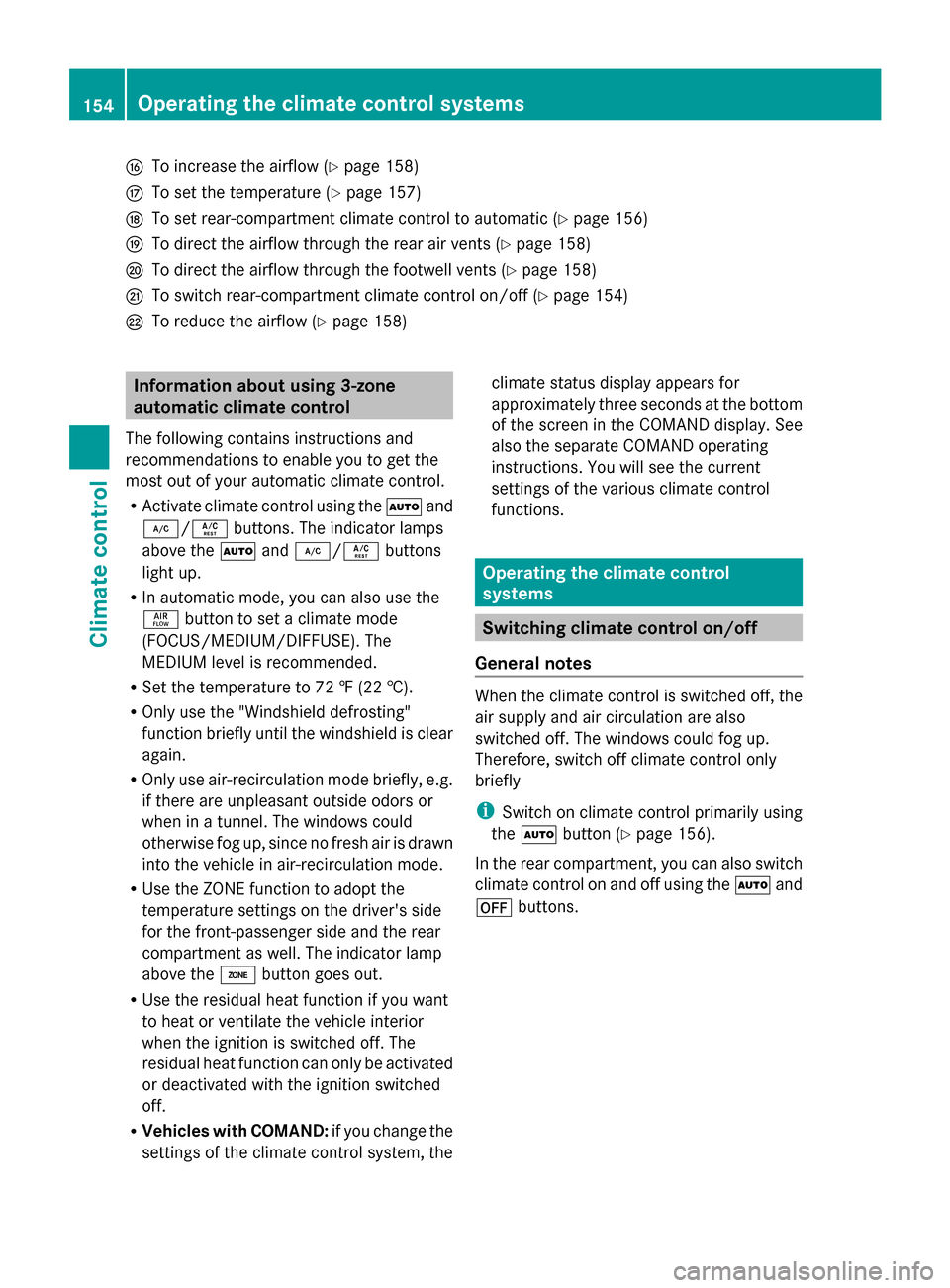
L
To increase the airflow (Y page 158)
M To set the temperature (Y page 157)
N To set rear-compartment climate control to automatic (Y page 156)
O To direct the airflow through the rear air vents (Y page 158)
P To direct the airflow through the footwell vents (Y page 158)
Q To switch rear-compartment climate control on/off (Y page 154)
R To reduce the airflow (Y page 158)Information about using 3-zone
automatic climate control
The following contains instructions and
recommendations to enable you to get the
most out of your automatic climate control.
R Activate climate control using the Ãand
¿/Á buttons. The indicator lamps
above the Ãand¿/Á buttons
light up.
R In automatic mode, you can also use the
ñ button to set a climate mode
(FOCUS/MEDIUM/DIFFUSE). The
MEDIUM level is recommended.
R Set the temperature to 72 ‡ (22 †).
R Only use the "Windshield defrosting"
function briefly until the windshield is clear
again.
R Only use air-recirculation mode briefly, e.g.
if there are unpleasant outside odors or
when in a tunnel. The windows could
otherwise fog up, since no fresh air is drawn
into the vehicle in air-recirculation mode.
R Use the ZONE function to adopt the
temperature settings on the driver's side
for the front-passenger side and the rear
compartment as well. The indicator lamp
above the ábutton goes out.
R Use the residual heat function if you want
to heat or ventilate the vehicle interior
when the ignition is switched off. The
residual heat function can only be activated
or deactivated with the ignition switched
off.
R Vehicles with COMAND: if you change the
settings of the climate control system, the climate status display appears for
approximately three seconds at the bottom
of the screen in the COMAND display. See
also the separate COMAND operating
instructions. You will see the current
settings of the various climate control
functions.
Operating the climate control
systems
Switching climate control on/off
General notes When the climate control is switched off, the
air supply and air circulation are also
switched off. The windows could fog up.
Therefore, switch off climate control only
briefly
i
Switch on climate control primarily using
the à button (Y page 156).
In the rear compartment, you can also switch
climate control on and off using the Ãand
^ buttons. 154
Operating the climate control systemsClimate control
Page 232 of 462

Once you have exited the parking space
completely, the steering wheel is moved to
the straight-ahead position. You hear a tone
and the Park Assist Finished Park Assist Finished message
appears in the multifunction display. You will
then have to steer and merge into traffic on
your own. PARKTRONIC is still available. You
can take over the steering, before the vehicle
has exited the parking space completely. This
is useful, for example when you recognize
that it is already possible to pull out of the
parking space.
Canceling Active Parking Assist X
Stop the movement of the multifunction
steering wheel or steer yourself.
Active Parking Assist will be canceled at
once. The Park Assist Canceled
Park Assist Canceled
message appears in the multifunction
display.
or
X Press the PARKTRONIC button on the
center console (Y page 224).
PARKTRONIC is switched off and Active
Parking Assist is immediately canceled.
The Park Assist Canceled
Park Assist Canceled message
appears in the multifunction display.
Active Parking Assist is canceled
automatically if:
R the electric parking brake is engaged
R transmission position Pis selected
R parking using Active Parking Assist is no
longer possible
R you are driving faster than 6 mph
(10 km/h)
R a wheel spins, ESP ®
intervenes or fails. The
÷ warning lamp lights up in the
instrument cluster.
A warning tone sounds. The parking symbol
goes out and the Park Assist Canceled
Park Assist Canceled
message appears in the multifunction
display.
If Active Parking Assist is canceled, you must
steer again yourself. Towing a trailer For vehicles with a trailer tow hitch, the
minimum length for parking spaces is slightly
increased.
If you have attached a trailer to your vehicle,
you should not use Active Parking Assist.
Once the electrical connection is established
between your vehicle and the trailer, Active
Parking Assist is no longer available.
PARKTRONIC is deactivated for the rear area.
Rear view camera
General notes Rear view camera
:is in the handle on the
tailgate.
Rear view camera :is an optical parking and
maneuvering aid. It shows the area behind
your vehicle with guide lines in the COMAND
display.
The area behind the vehicle is displayed as a
mirror image, as in the rear view mirror.
i The text of messages shown in the
COMAND display depends on the language
setting. The following are examples of rear
view camera messages in the COMAND
display.
Important safety notes The rear view camera is only an aid. It is not
a replacement for your attention to your
immediate surroundings. You are always
responsible for safe maneuvering and230
Driving systemsDriving and parking
Page 233 of 462

parking. When maneuvering or parking, make
sure that there are no persons, animals or
objects in the area in which you are
maneuvering.
Under the following circumstances, the rear
view camera will not function, or will function
in a limited manner:
R the tailgate is open
R in heavy rain, snow or fog
R at night or in very dark places
R if the camera is exposed to very bright light
R if the area is lit by fluorescent light or LED
lighting (the display may flicker)
R if there is a sudden change in temperature,
e.g. when driving into a heated garage in
winter
R if the camera lens is dirty or obstructed
R if the rear of your vehicle is damaged. In
this event, have the camera position and
setting checked at a qualified specialist
workshop
Activating/deactivating the rear view
camera X
To activate: make sure that the SmartKey
is in position 2in the ignition lock.
X Make sure that the function "show rear
view camera display" is selected in
COMAND.
X Engage reverse gear.
The area behind the vehicle is shown in the
COMAND display with guide lines. X
To change the function mode for
vehicles with trailer tow hitch: using the
COMAND controller, select symbol :for
the "Reverse parking" function or
symbol ;for "Coupling up a trailer" (see
the separate COMAND operating
instructions).
The symbol of the selected function is
highlighted.
To deactivate: the rear view camera is
deactivated if you:
R shift the transmission to position P
R drive 33 ft (10 m) forwards
R shift the transmission from Rto another
position after 15 seconds
R drive forwards at a speed of over 5 mph
(10 km/h)
Displays in the COMAND display The rear view camera may show a distorted
view of obstacles, show them incorrectly or
not at all. The rear view camera does not show
objects in the following positions:
R
very close to the rear bumper
R under the rear bumper
R in the area immediately above the tailgate
handle
! Objects not at ground level may appear to
be further away than they actually are, e.g.:
R the bumper of a parked vehicle
R the drawbar of a trailer
R the ball coupling of a trailer tow hitch
R the rear section of an HGV
R a slanted post
Use the guidelines only for orientation.
Approach objects no further than the
bottom-most guideline. Driving systems
231Driving and parking Z