2014 MERCEDES-BENZ E-SEDAN cruise control
[x] Cancel search: cruise controlPage 9 of 430
Child seat
LATCH-type (ISOFIX) child seat
anchors ............................................ 63
Top Tether ....................................... 64
Cigarette lighter ................................ 319
Cleaning Mirror turn signal ........................... 345
Climate control
Automatic climate control (3-zone) 147
Controlling automatically ...............150
Cooling with air dehumidification ..149
Defrosting the windows .................153
Defrosting the windshield ..............152
Dual-zone automatic climate
control ........................................... 145
Important safety notes ..................144
Indicator lamp ................................ 150
Information about using dual-zone
automatic climate control ..............146
Information on using dual-zone
automatic climate control ..............148
Maximum cooling .......................... 153
Overview of systems ......................144
Problems with cooling with air
dehumidification ............................ 150
Problem with the rear window
defroster ........................................ 154
Rear control panel .........................147
Refrigerant ..................................... 425
Refrigerant filling capacity .............425
Setting the air distribution .............151
Setting the airflow .........................152
Setting the air vents ......................155
Setting the climate mode .............. .150
Setting the temperature ................151
Setting the temperature with 3-
zone automatic climate control .....151
Setting the temperature with dual-
zone automatic climate control .....151
Switching air-recirculation mode
on/off ............................................ 154
Switching on/off ........................... 148
Switching residual heat on/off ......154
Switching the rear window
defroster on/off ............................ 153
Switching the ZONE function on/
off .................................................. 152
Coat hooks ......................................... 309Cockpit
Overview .......................................... 30
see Instrument cluster
Collapsible spare wheel
Inflating ......................................... 412
see Emergency spare wheel
COLLISION PREVENTION ASSIST
Activating/deactivating the
distance warning function .............. 247
Display message ............................ 261
Operation/notes .............................. 70
COMAND
see separate operating instructions
COMAND display
Cleaning ......................................... 347
Combination switch ..........................131
Combined cargo cover and net ........308
Consumption statistics (on-board
computer) .......................................... 241
Convenience box ............................... 309
Convenience closing feature ..............99
Convenience opening feature ............99
Coolant (engine) Checking the level .........................339
Display message ............................ 269
Filling capacity ............................... 424
Important safety notes ..................423
Temperature (on-board computer) .253
Temperature gauge ........................ 238
Warning lamp ................................. 293
Cooling
see Climate control
Copyright ............................................. 28
Cornering light function Display message ............................ 266
Function/notes ............................. 133
Crash-responsive emergency
lighting ............................................... 136
Cruise control Activation conditions .....................190
Cruise control lever .......................190
Deactivating ................................... 191
Display message ............................ 279
Driving system ............................... 189
Function/notes ............................. 189
Important safety notes ..................189 Index
7ProCarManuals.com
Page 11 of 430
Driving abroad
Mercedes-Benz Service .................341
Symmetrical low bea m.................. 128
Driving on flooded roads ..................188
Driving safety system BAS PLUS with Cross-Traffic Assist .68
Driving safety systems
ABS (Anti-lock Braking System) .......67
ADAPTIVE BRAKE ............................. 75
Adaptive Brake Assist ......................71
BAS (Brake Assist System) ..............68
COLLISION PREVENTION ASSIST ....70
Distance warning function ...............70
Electronic brake force distribution ...75
ESP ®
(Electronic Stability Program) .72
ETS/4ETS (Electronic Traction
System) ........................................... 72
Important safety information ...........67
Overview .......................................... 67
PRE-SAFE ®
Brake ............................ .76
STEER CONTROL ............................. 78
Driving systems
360°camera .................................. 220
Active Blind Spot Assist .................230
Active Driving Assistance package 230
Active Lane Keeping Assist ............233
Active Parking Assist .....................212
AIRMATIC ...................................... 204
AMG adaptive sport suspension
system ........................................... 206
ATTENTION ASSIST ........................225
Blind Spot Assist ............................ 226
Cruise control ................................ 189
Display message ............................ 273
DISTRONIC PLUS ........................... 191
DISTRONIC PLUS with Steering
Assist ............................................. 200
HOLD function ............................... 202
Lane Keeping Assist ......................228
Lane Tracking package ..................226
PARKTRONIC ................................. 208
RACE START (AMG vehicles) ..........203
Rear view camera .......................... 217
Driving tips
AMG ceramic brakes .....................187
Automatic transmission .................170
Brakes ........................................... 186Break-in period
.............................. 158
Downhill gradient ........................... 186
Drinking and driving .......................184
Driving abroad ............................... 128
Driving in winter ............................ .188
Driving on flooded roads ................188
Driving on wet roads ......................188
Exhaust check ............................... 184
Fuel ................................................ 184
General .......................................... 184
Hydroplaning ................................. 188
Icy road surfaces ........................... 189
Limited braking efficiency on
salted road s................................... 186
Snow chains .................................. 375
Symmetrical low bea m.................. 128
Wet road surface ........................... 186
DVD audio
Operating (on-board computer) .....244
DVD video
Operating (on-board computer) .....245 E
EASY-ENTRY feature Activating/deactivating .................252
Function/notes ............................. 121
EASY-EXIT feature
Crash-responsive ........................... 122
Function/notes ............................. 121
Switching on/off ........................... 252
EASY-PACK cargo compartment
management system ........................311
EASY-PACK folding floor Important safety notes ..................313
EASY-PACK folding luggage-
compartment floor
Opening and closing ......................313
EASY-PACK load-securing kit
Components and storage ..............311
Inserting the brackets into the
loading rai l..................................... 311
EASY-PACK rear sill protector ..........314
EASY-PACK trunk box .......................309
EBD (electronic brake force
distribution)
Display message ............................ 260
Function/notes ................................ 75 Index
9ProCarManuals.com
Page 19 of 430
Refrigerant (air-conditioning
system)
.......................................... 425
Washer fluid .................................. .424
Service work
see ASSYST PLUS
Settings
Factory (on-board computer) .........253
On-board computer .......................249
Setting the air distribution ...............151
Setting the airflow ............................152
SETUP (on-board computer) .............254
Side impact air bag .............................45
Side marker lamp (display
message) ............................................ 268
Side windows Cleaning ......................................... 345
Convenience closing feature ............99
Convenience opening feature ..........99
Important safety information ...........98
Opening/closing .............................. 99
Problem (malfunction) ...................102
Resetting ....................................... 101
Skibag ................................................ 301
Sliding sunroof Important safety notes ..................102
Opening/closing ............................ 103
Problem (malfunction) ...................106
Resetting ....................................... 104
see Panorama roof with power
tilt/sliding panel
SmartKey
Changing the battery .......................85
Changing the programming .............83
Checking the battery .......................85
Convenience closing feature .......... 100
Convenience opening feature ..........99
Display message ............................ 284
Door central locking/unlocking .......82
Important safety notes ....................82
Loss ................................................. 87
Mechanical key ................................ 84
Overview .......................................... 82
Positions (ignition lock) .................159
Problem (malfunction) .....................87
Starting the engine ........................161
Snow chains ...................................... 375Sockets
Center console .............................. 320
General notes ................................ 320
Luggage compartment ...................320
Rear compartment .........................320
Spare wheel
Stowing .......................................... 412
Specialist workshop ............................ 26
Special seat belt retractor .................. 63
Speed, controlling see Cruise control
Speedometer
Digital ............................................ 242
In the Instrument cluster .................31
Segments ...................................... 239
Selecting the unit of measurement 249
see Instrument cluster
SPORT handling mode
Activating/deactivating (AMG
vehicles) .......................................... 74
Warning lamp ................................. 290
SRS
see SRS (Supplemental Restraint
System)
SRS (Supplemental Restraint
System)
Display message ............................ 262
Introduction ..................................... 41
Warning lamp ................................. 291
Warning lamp (function) ................... 41
Standing lamps
Display message ............................ 268
Switching on/off ........................... 131
Start/stop function
see ECO start/stop function
Starting (engine) ................................ 161
STEER CONTROL .................................. 78
Steering (display message) ..............283
Steering Assist (DISTRONIC PLUS) Activating/deactivating .................248
Display message ............................ 279
Steering wheel
Adjusting (electrically) ...................119
Button overview ............................... 33
Buttons (on-board computer) ......... 239
Cleaning ......................................... 347
Important safety notes ..................119 Index
17ProCarManuals.com
Page 32 of 430
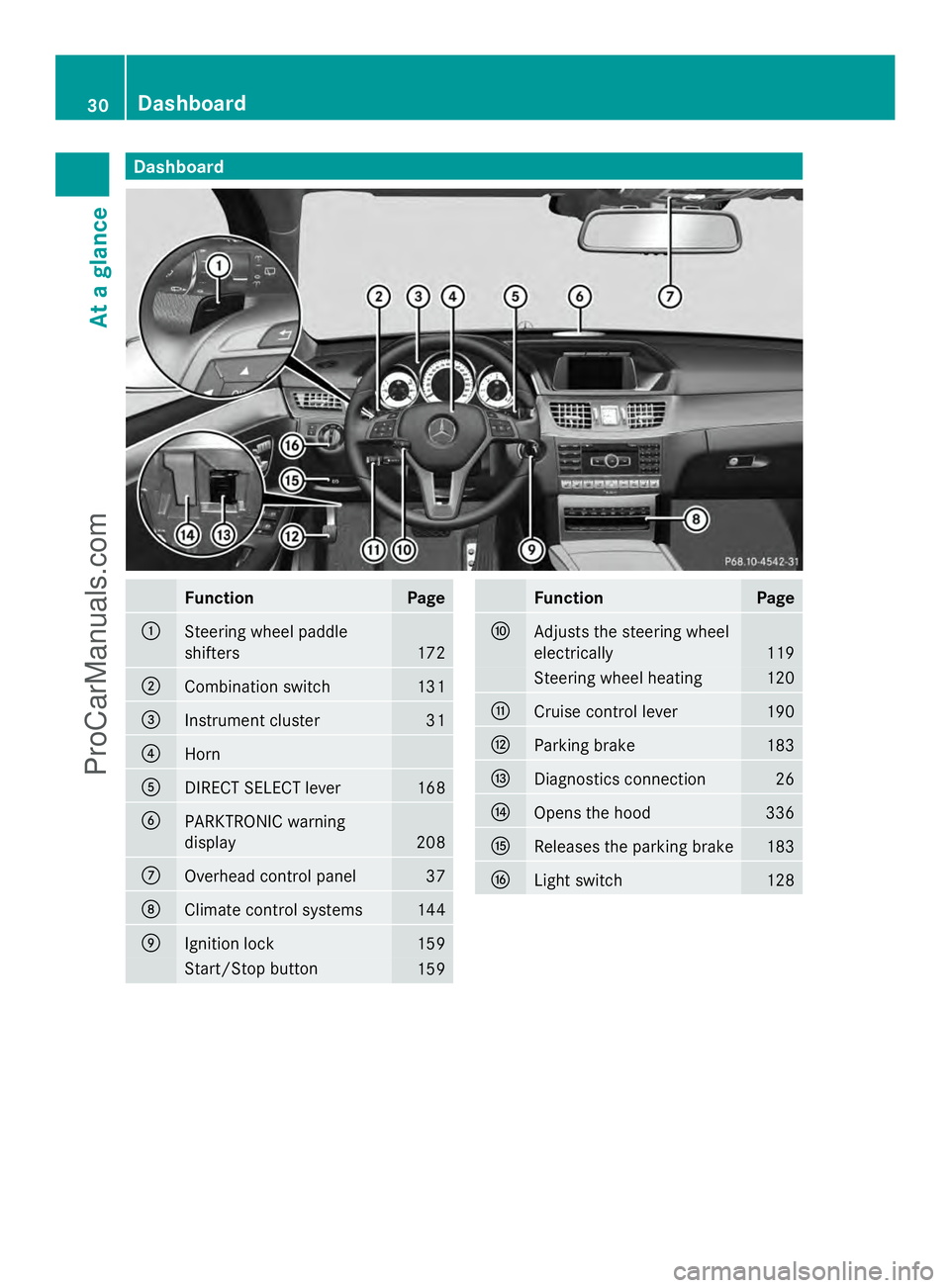
Dashboard
Function Page
:
Steering wheel paddle
shifters
172
;
Combination switch 131
=
Instrument cluster 31
?
Horn
A
DIRECT SELECT lever 168
B
PARKTRONIC warning
display
208
C
Overhead control panel 37
D
Climate control systems 144
E
Ignition lock 159
Start/Stop button
159 Function Page
F
Adjusts the steering wheel
electrically
119
Steering wheel heating 120
G
Cruise control lever 190
H
Parking brake 183
I
Diagnostics connection 26
J
Opens the hood 336
K
Releases the parking brake 183
L
Light switch 12830
Dashboa
rdAt a glance
ProCarManuals.com
Page 191 of 430
values are required by law and must
therefore always be accurate.
Observe the notes in the "Winter operation"
section (Y page 374).
Driving with summer tires Observe the notes in the "Winter operation"
section (Y page 374).
Slippery road surfaces G
WARNING
If you shift down on a slippery road surface in
an attempt to increase the engine's braking
effect, the drive wheels could lose their grip.
There is an increased danger of skidding and
accidents.
Do not shift down for additional engine
braking on a slippery road surface.
If the vehicle threatens to skid or cannot be
stopped when moving at low speed:
X Shift the transmission to position N.
Drive particularly carefully on slippery road
surfaces. Avoid sudden acceleration, steering
and braking maneuvers. Do not use the cruise
control or DISTRONIC PLUS.
i For more information on driving with
snow chains, see (Y page 375).
The outside temperature indicator is not
designed to serve as an ice-warning device
and is therefore unsuitable for that purpose.
Changes in the outside temperature are
displayed after a short delay.
Indicated temperatures just above the
freezing point do not guarantee that the road
surface is free of ice. The road may still be icy,
especially in wooded areas or on bridges. The
vehicle could skid if you fail to adapt your
driving style. Always adapt your driving style
and drive at a speed to suit the prevailing
weather conditions.
You should pay special attention to road
conditions when temperatures are around
freezing point. Driving systems
Cruise control
General notes Cruise control maintains a constant road
speed for you. It brakes automatically in order
to avoid exceeding the set speed. On long and
steep downhill gradients, especially if the
vehicle is laden, you must shift to a lower gear
in time. By doing so, you will make use of the
braking effect of the engine. This relieves the
load on the brake system and prevents the
brakes from overheating and wearing too
quickly.
Use cruise control only if road and traffic
conditions make it appropriate to maintain a
steady speed for a prolonged period. You can
store any road speed above 20 mph
(30 km/h).
Important safety notes If you fail to adapt your driving style, cruise
control can neither reduce the risk of an
accident nor override the laws of physics.
Cruise control cannot take into account the
road, traffic and weather conditions. Cruise
control is only an aid. You are responsible for
the distance to the vehicle in front, for vehicle
speed, for braking in good time and for
staying in your lane.
Do not use cruise control:
R
in road and traffic conditions which do not
allow you to maintain a constant speed e.g.
in heavy traffic or on winding roads
R on slippery road surfaces. Braking or
accelerating could cause the drive wheels
to lose traction and the vehicle could then
skid
R when there is poor visibility, e.g. due to fog,
heavy rain or snow
If there is a change of drivers, advise the new
driver of the speed stored. Driving systems
189Driving and parking Z
ProCarManuals.com
Page 192 of 430
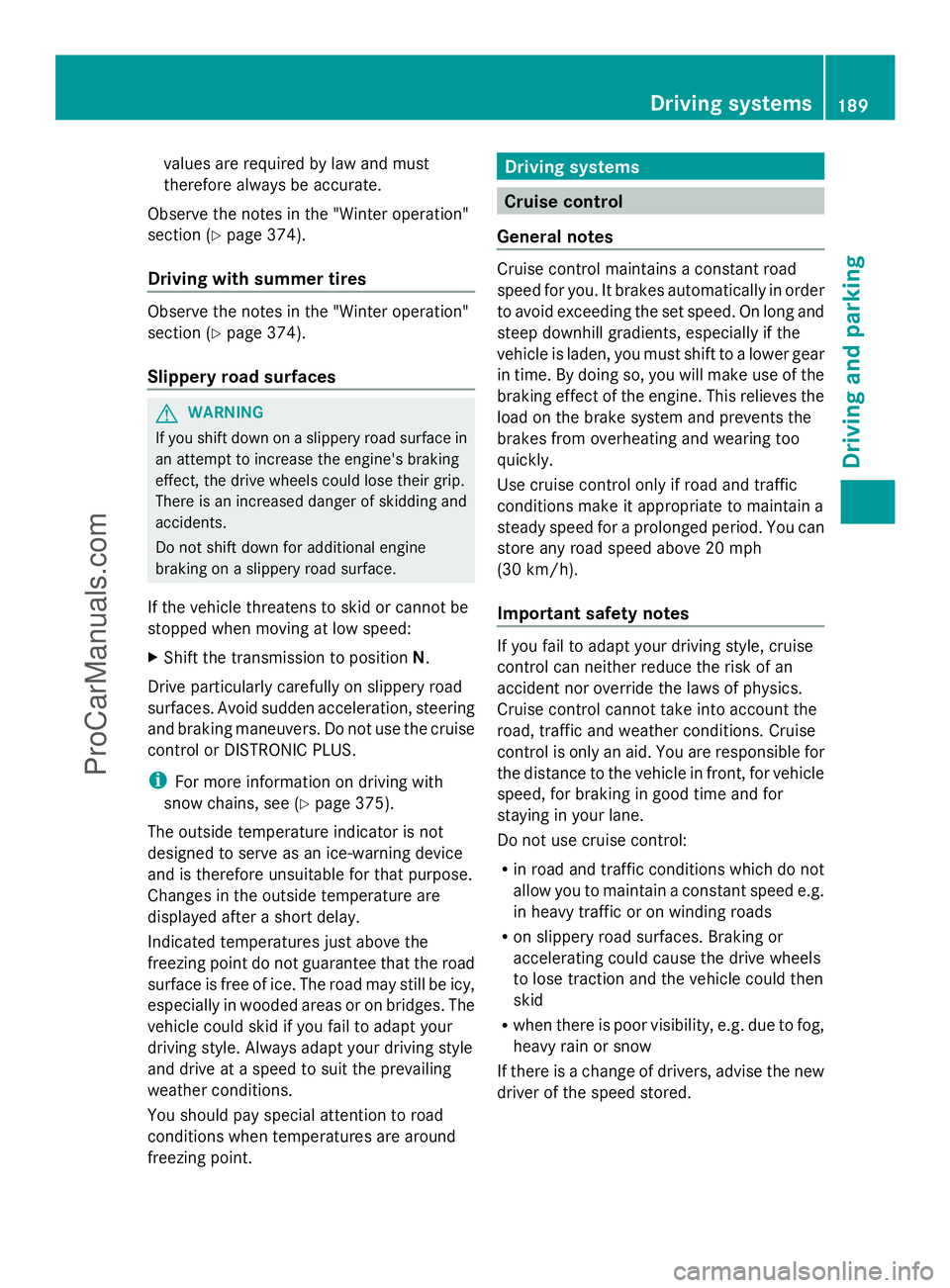
Cruise control lever
:
To activate or increase speed
; To activate or reduce speed
= To deactivate cruise control
? To activate at the current speed/last
stored speed
When you activate cruise control, the stored
speed is shown in the multifunction display
for five seconds.
Activation conditions To activate cruise control, all of the following
activation conditions must be fulfilled:
R the parking brake must be released.
R you are driving faster than 20 mph
(30 km/h).
R ESP ®
must be active, but not intervening.
R the transmission must be in position D.
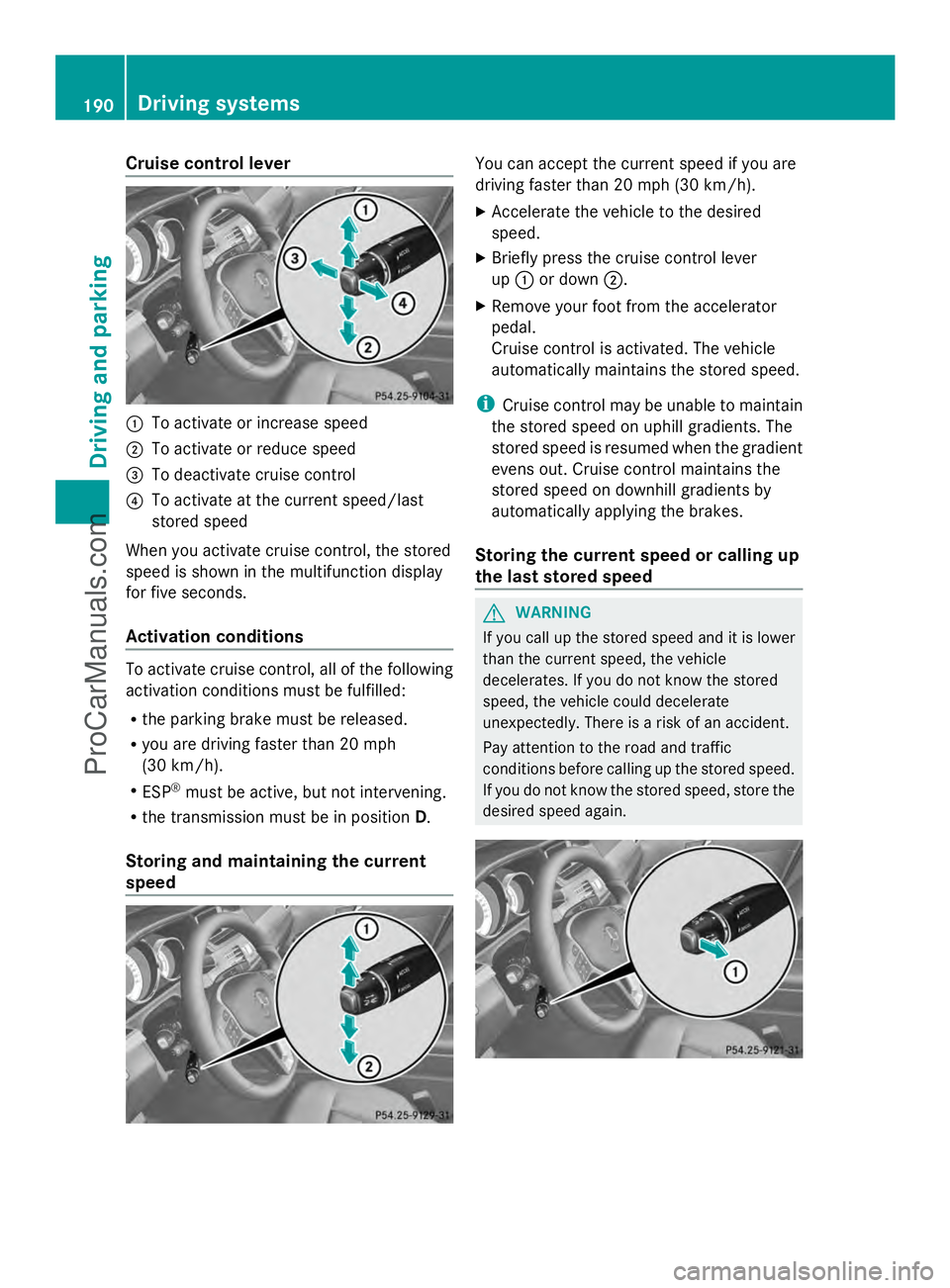
Storing and maintaining the current
speed You can accept the current speed if you are
driving faster than 20 mph (30 km/h).
X
Accelerate the vehicle to the desired
speed.
X Briefly press the cruise control lever
up : or down ;.
X Remove your foot from the accelerator
pedal.
Cruise control is activated. The vehicle
automatically maintains the stored speed.
i Cruise control may be unable to maintain
the stored speed on uphill gradients. The
stored speed is resumed when the gradient
evens out. Cruise control maintains the
stored speed on downhill gradients by
automatically applying the brakes.
Storing the current speed or calling up
the last stored speed G
WARNING
If you call up the stored speed and it is lower
than the current speed, the vehicle
decelerates. If you do not know the stored
speed, the vehicle could decelerate
unexpectedly. There is a risk of an accident.
Pay attention to the road and traffic
conditions before calling up the stored speed.
If you do not know the stored speed, store the
desired speed again. 190
Driving systemsDriving and parking
ProCarManuals.com
Page 193 of 430
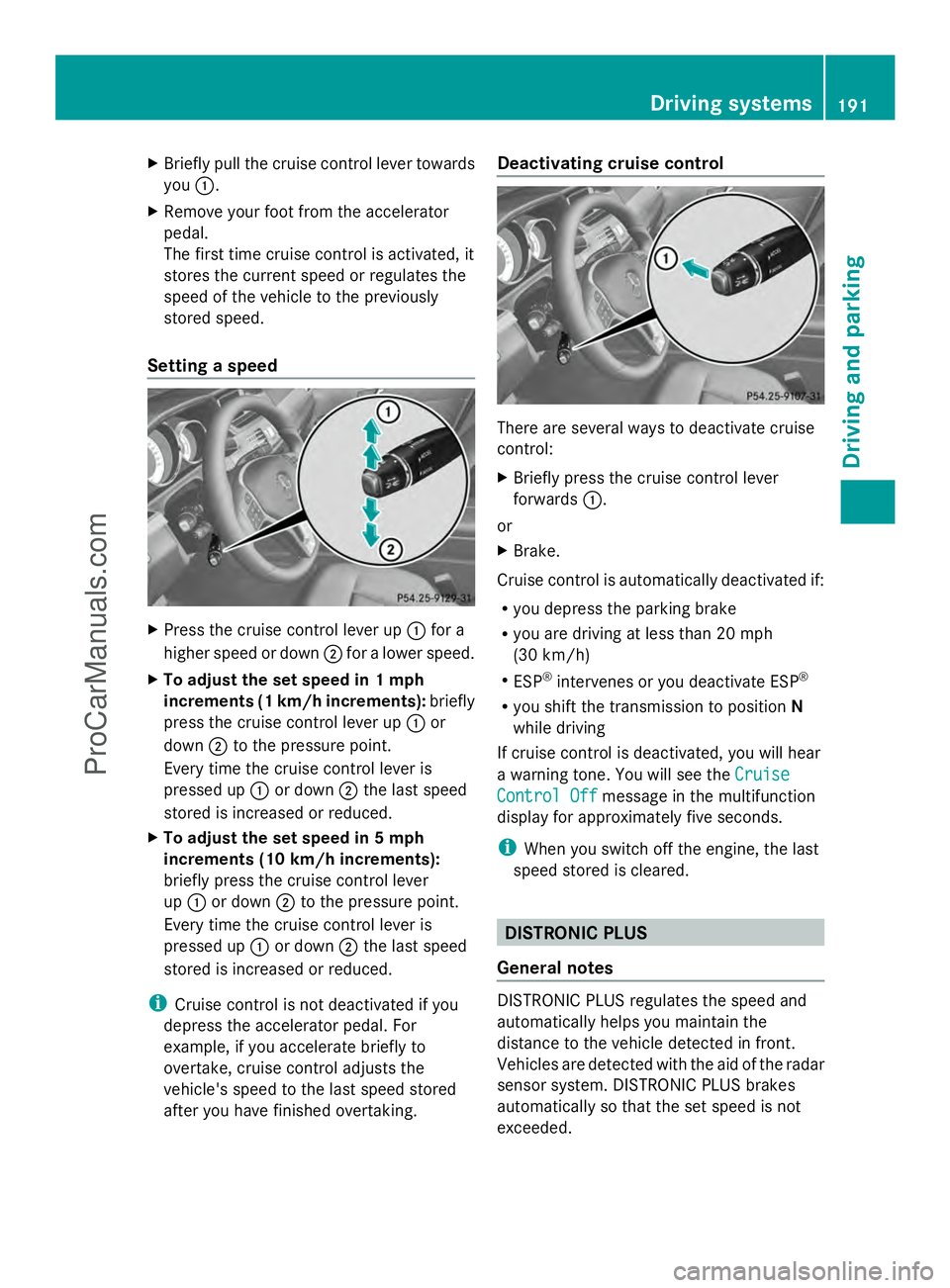
X
Briefly pull the cruise control lever towards
you :.
X Remove your foot from the accelerator
pedal.
The first time cruise control is activated, it
stores the current speed or regulates the
speed of the vehicle to the previously
stored speed.
Setting a speed X
Press the cruise control lever up :for a
higher speed or down ;for a lower speed.
X To adjust the set speed in 1 mph
increments (1 km/h increments): briefly
press the cruise control lever up :or
down ;to the pressure point.
Every time the cruise control lever is
pressed up :or down ;the last speed
stored is increased or reduced.
X To adjust the set speed in 5 mph
increments (10 km/h increments):
briefly press the cruise control lever
up : or down ;to the pressure point.
Every time the cruise control lever is
pressed up :or down ;the last speed
stored is increased or reduced.
i Cruise control is not deactivated if you
depress the accelerator pedal. For
example, if you accelerate briefly to
overtake, cruise control adjusts the
vehicle's speed to the last speed stored
after you have finished overtaking. Deactivating cruise control
There are several ways to deactivate cruise
control:
X
Briefly press the cruise control lever
forwards :.
or
X Brake.
Cruise control is automatically deactivated if:
R you depress the parking brake
R you are driving at less than 20 mph
(30 km/h)
R ESP ®
intervenes or you deactivate ESP ®
R you shift the transmission to position N
while driving
If cruise control is deactivated, you will hear
a warning tone. You will see the Cruise Cruise
Control Off
Control Off message in the multifunction
display for approximately five seconds.
i When you switch off the engine, the last
speed stored is cleared. DISTRONIC PLUS
General notes DISTRONIC PLUS regulates the speed and
automatically helps you maintain the
distance to the vehicle detected in front.
Vehicles are detected with the aid of the radar
sensor system. DISTRONIC PLUS brakes
automatically so that the set speed is not
exceeded. Driving systems
191Driving and parking Z
ProCarManuals.com
Page 195 of 430
G
WARNING
DISTRONIC PLUS brakes your vehicle with up
to 50% of the maximum possible deceleration.
If this braking force is insufficient, DISTRONIC
PLUS warns you visually and audibly. There is
a risk of an accident.
In such cases, apply the brakes yourself and
try to take evasive action.
! If DISTRONIC PLUS or the HOLD function
is activated, the vehicle brakes
automatically in certain situations. To
prevent damage to the vehicle, deactivate
DISTRONIC PLUS and the HOLD function in
the following or other similar situations:
R when towing the vehicle
R in the car wash
If you fail to adapt your driving style,
DISTRONIC PLUS can neither reduce the risk
of accident nor override the laws of physics.
DISTRONIC PLUS cannot take into account
the road, traffic and weather conditions.
DISTRONIC PLUS is only an aid. You are
responsible for the distance to the vehicle in
front, for vehicle speed, for braking in good
time and for staying in your lane.
Do not use DISTRONIC PLUS:
R in road and traffic conditions which do not
allow you to maintain a constant speed e.g.
in heavy traffic or on winding roads
R on slippery road surfaces. Braking or
accelerating could cause the drive wheels
to lose traction and the vehicle could then
skid
R when there is poor visibility, e.g. due to fog,
heavy rain or snow
DISTRONIC PLUS may not detect narrow
vehicles driving in front, e.g. motorcycles, or
vehicles driving on a different line.
In particular, the detection of obstacles can
be impaired if:
R dirt on the sensors or anything else
covering the sensors
R snow or heavy rain R
interference by other radar sources
R strong radar reflections, for example, in
parking garages
If DISTRONIC PLUS no longer detects a
vehicle in front, DISTRONIC PLUS may
unexpectedly accelerate the vehicle to the
stored speed.
This speed may:
R be too high if you are driving in a filter lane
or an exit lane
R be so high in the right lane that you pass
vehicles driving on the left (left-hand drive
countries)
R be so high in the left lane that you pass
vehicles driving on the right (right-hand
drive countries)
If there is a change of drivers, advise the new
driver of the speed stored.
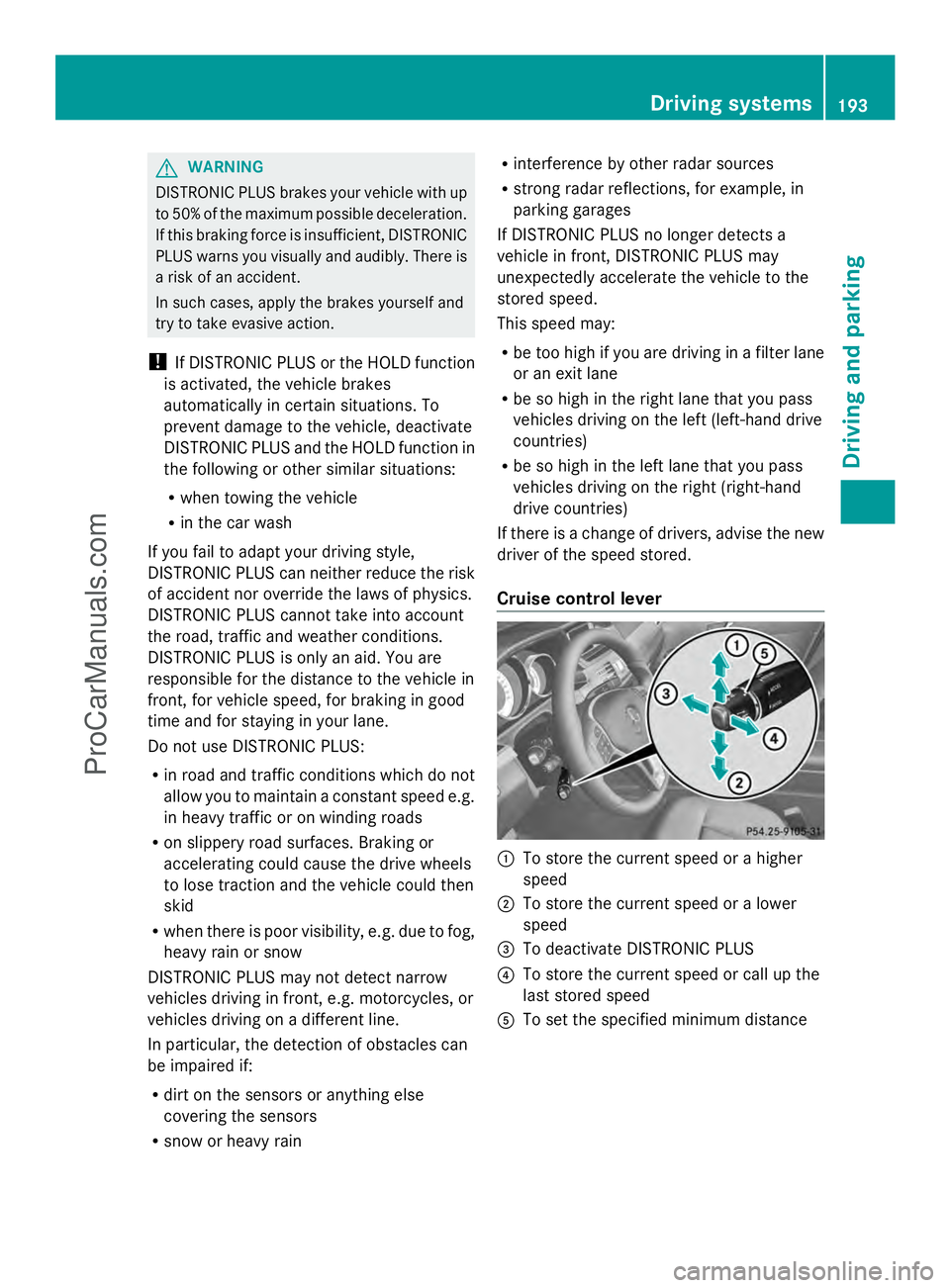
Cruise control lever :
To store the current speed or a higher
speed
; To store the current speed or a lower
speed
= To deactivate DISTRONIC PLUS
? To store the current speed or call up the
last stored speed
A To set the specified minimum distance Driving systems
193Driving and parking Z
ProCarManuals.com