2014 MERCEDES-BENZ C-Class SEDAN flat tire
[x] Cancel search: flat tirePage 7 of 362

Authorized Mercedes-Benz Center
see Qualified specialist workshop
Authorized workshops
see Qualified specialist workshop
AUTO lights
Display message ............................ 232
see Lights
Automatic engine start (ECO start/
stop function) .................................... 151
Automatic engine switch-off (ECO
start/stop function) ..........................151
Automatic headlamp mode ..............115
Automatic transmission Automatic drive program ...............157
Changing gea r............................... 156
Display message ............................ 244
Driving tips .................................... 156
Emergency running mode ..............161
Kickdow n....................................... 156
Manual drive program ....................159
Overview ........................................ 154
Problem (malfunction) ...................161
Progra mselecto rbutton ................ 156
Pulling away ................................... 150
Releasing the parking lock
manually ........................................ 161
Selector leve r................................ 154
Shift range s................................... 158
Starting the engine ........................149
Steering wheel paddle shifters ......157
Transmission position displa y........ 155
Transmissio npositions .................. 155
Automatic transmission
emergency mode ............................... 161 B
Backup lamp Changing bulbs .............................. 124
Display message ............................ 232
Bag hook ............................................ 266
BAS (Brake Assist System) .................66
BAS PLUS (Brake Assist System
PLUS) .................................................... 66
Battery (SmartKey) Checking .......................................... 79
Important safety notes ....................78
Replacing ......................................... 79Battery (vehicle)
Charging ........................................ 304
Display message ............................ 235
Important safety notes ..................302
Jump starting ................................. 306
Blin dSpot Assist
Activating/deactivating .................214
Display message ............................ 238
Notes/function .............................. 193
see Active Blind Spot Assist
Brake Assist
see BAS (Brake Assist System)
Brake fluid
Display message ............................ 225
Notes ............................................. 355
Brake lamps
Changing bulbs .............................. 124
Display message ............................ 231
Brakes
ABS .................................................. 65
BAS .................................................. 66
BAS PLUS ........................................ 66
Brake fluid (notes) .........................355
Display message ............................ 223
Driving tips .................................... 168
High-performance brake system ....170
Important safety notes ..................168
Maintenance .................................. 169
Parking brake ................................ 165
Warning lamp ................................. 250
Breakdown
see Flat tire
see Towing away/tow-starting
Bulbs
see Replacing bulbs C
California Important notice for retail
customers and lessees ....................23
Calling up a malfunction
see Display messages
Car
see Vehicle
Care
Carpets .......................................... 297
Car wash ........................................ 292 Index
5
Page 12 of 362

Eyeglasses compartment
.................263 F
Fille rcap
see Fuel filler flap
First-aid kit ......................................... 300
Flat tire MOExtended run-fla tsystem ......... 301
Preparing the vehicle .....................301
see Emergency spare wheel
Floormats ........................................... 284
Fog lamps Switching on/off ........................... 115
Front fog lamps
Display message ............................ 231
Switching on/off ........................... 115
Fuel
Additives ........................................ 353
Consumption statistics ..................207
Displaying the current
consumption .................................. 208
Displaying the range ......................208
Driving tips .................................... 166
Flexible fuel vehicles ......................354
Fuel gauge ....................................... 31
Grade (gasoline) ............................ 353
Important safety notes ..................352
Notes for AMG vehicles .................353
Premium-grade unleaded gasoline .353
Problem (malfunction) ...................164
Refueling ........................................ 162
Tank content/reserve fuel .............352
Fuel filler flap
Emergency release ........................163
Opening/closing ............................ 162
Fuel level
Calling up the range (on-board
computer) ...................................... 208
Fuel tank
Capacity ........................................ 352
Problem (malfunction) ...................164
Fuse allocation chart (vehicle tool
kit) ...................................................... 300
Fuses Allocation chart ............................. 310
Before changing ............................. 310
Dashboard fuse box .......................311Fuse box in the engine
compartment
................................. 311
Fuse box in the trunk .....................312
Important safety notes ..................310 G
Garage door opener Clearing the memory .....................284
Important safety notes ..................281
Opening/closing the garage door ..283
Programming (button in the rear-
view mirror) ................................... 282
Gear indicator (on-board computer) 219
Gear or selector lever (cleaning
guidelines) ......................................... 296
Genuine parts ...................................... 21
Glove box ........................................... 263 H
Handbrake see Parking brake
Hazard warning lamps ......................117
Headlamps Adding fluid to cleaning system .....291
Cleaning system (function) ............117
Cleaning system (notes) ................357
Fogging up ..................................... 119
see Automatic headlamp mode
Head restraints
Adjusting ....................................... 101
Adjusting (electrically). ..................102
Adjusting (manually). .....................102
Adjusting (rear) .............................. 102
Installing/removing (rear) ..............103
Luxury ............................................ 102
see NECK-PRO head restraints/
NECK-PRO luxury head restraints
Heating
see Climate control
High-beam headlamps
Changing bulbs .............................. 122
Display message ............................ 231
Switching on/off ........................... 117
Hill start assist .................................. 15010
Index
Page 14 of 362

Switching the exterio
rlighting
delayed switch-off on/off (on-
board computer )............................ 216
Switching the surround lighting
on/off (on-board computer) ..........216
Turn signals ................................... 116
see Interior lighting
see Replacing bulbs
Light sensor (display message) .......232
Loading guidelines ............................262
Locking see Centra llocking
Locking (doors)
Automatic ........................................ 83
Emergency locking ........................... 83
From inside (central locking
button) ............................................. 82
Locking centrally
see Centra llocking
Locking verification signal (on-
board computer) ............................... 217
Low-beam headlamps Changing bulbs .............................. 122
Display message ............................ 230
Setting for driving abroad
(symmetrical) ................................. 114
Switching on/off ........................... 115
Lumbar support
Adjusting ....................................... 103
Adjusting the 4-way lumbar
support .......................................... 103
Luxury head restraints .....................102 M
M+S tires ............................................ 316
Malfunction message see Display messages
Matte finish (cleaning instructions) 294
mbrace Call priority .................................... 277
Display message ............................ 225
Downloading destinations
(COMAND) ..................................... 277
Downloading route s....................... 280
Emergency call .............................. 274
General notes ................................ 273
Geo fencing ................................... 281Locating
astolen vehicl e............... 279
MB info call button ........................276
Remote vehicle locking ..................278
Roadside Assistance button ..........276
Search &Send ............................... 278
Self-test ......................................... 274
Speed alert .................................... 280
System .......................................... 274
Triggering the vehicle alarm ........... 281
Vehicle remote malfunction
diagnosi s....................................... 279
Vehicle remote unlocking ..............278
Mechanical key
Function/notes ................................ 78
Locking vehicle ................................ 83
Unlocking the driver's door ..............83
Memory card (audio) .........................211
Memory function ............................... 110
Message memory (on-board
computer) .......................................... 222
Messages see Display messages
Mirrors
see Exterior mirrors
see Rear-view mirror
see Vanity mirror (in the sun visor)
Mobile phone
Menu (on-board computer) ............211
Modifying the programming
(SmartKey) ........................................... 77
MOExtended run-flat system ...........301
Mounting wheels Lowering the vehicle ......................342
Mounting anew wheel ................... 341
Preparing the vehicle .....................338
Raising the vehicle .........................339
Removing awheel .......................... 341
Securing the vehicle against
rolling away ................................... 339
MP3
Operation ....................................... 211
see separate operating instructions
Multifunction display
Function/notes ............................. 206
Permanent displa y......................... 216
Multifunction steering wheel
Operating the on-board computer .205
Overview .......................................... 3312
Index
Page 20 of 362

Average weight of the vehicle
occupants (definition)
....................335
Bar (definition) ............................... 335
Changing awheel .......................... 338
Characteristics .............................. 335
Checking ........................................ 315
Definition of terms .........................335
Direction of rotatio n...................... 338
Display message ............................ 242
Distributio nofthe vehicle
occupants (definition) ....................337
DOT, Tire Identification Number
(TIN) .............................................. .334
DOT (Department of
Transportation) (definition) ............335
GAWR (Gross Axle Weight Rating)
(definition) ..................................... 336
GVW (Gross Vehicle Weight)
(definition) ..................................... 336
GVWR (Gross Vehicle Weight
Rating) (definition) .........................336
Important safety notes ..................314
Increased vehicle weight due to
optional equipment (definition) ......335
Kilopascal (kPa) (definition) ...........336
Labeling (overview )........................ 331
Load bearing index (definition) ......337
Load index ..................................... 334
Load index (definition) ...................336
M+S tires ....................................... 316
Maximum loaded vehicle weight
(definition) ..................................... 336
Maximum load on a tire (definition) 336
Maximum permissible tire
pressure (definition) ....................... 336
Maximum tire loa d......................... 329
Maximum tire load (definition) .......336
MOExtended tires ..........................301
Optional equipment weight
(definition) ..................................... 337
PSI (pounds per square inch)
(definition) ..................................... 336
Replacing ....................................... 338
Service life ..................................... 316
Sidewall (definition) .......................337
Speed rating (definition) ................336
Storing ........................................... 338Structure and characteristics
(definition)
..................................... 335
Summer tires ................................. 316
Temperature .................................. 331
TIN (Tire Identification Number)
(definition) ..................................... 337
Tire bea d(definition) ...................... 337
Tire pressure (definition) ................337
Tire pressures (recommended )...... 335
Tire size (data) ............................... 342
Tire size designation, load-bearing
capacity, speed rating .................... 332
Tire tread ....................................... 315
Tire tread (definition) .....................337
Total load limit (definition) .............337
Traction ......................................... 330
Traction (definition) .......................337
Trea dwear ..................................... 330
Uniform Tire Quality Grading
Standard s...................................... 330
Uniform Tire Quality Grading
Standard s(definition) .................... 335
Unladen weight (definition) ............336
Wea rindicato r(definition) .............337
Whee lrim (definition ).................... 335
see Flat tire
Top Tether ............................................ 63
Towing Important safety guidelines ...........308
Installing the towing eye ................309
Removing the towing eye. ..............309
With the rear axle raised ................309
Towing away
With both axles on the ground .......309
Tow-starting
Emergency engine starting ............310
Important safety notes ..................308
Transfer case ..................................... 161
Transmission see Automatic transmission
Transporting the vehicle ..................310
Trim pieces (cleaning instructions) .296
Trip computer (on-board computer) 207
Trip odometer Calling up ....................................... 207
Resetting (on-board computer) ......208 18
Index
Page 168 of 362

X
To apply: depress parking brake 0003firmly.
Whe nthe engine is running, the 000B(USA
only) or 0005(Canada only) indicator lamp
lights up in the instrumentc luster.
X To release: depress the brake pedal and
keep it depressed.
X Pull release handle 0002.
When the ignition is switched on or the
engine is running, the 000B(USA only) or
0005 (Canada only) indicator lamp goes out
in the instrument cluster. Parking the vehicle for
along period
If you leave the vehicle parked for longer than
four weeks, the battery may be damaged by
exhaustive discharging.
X Connecting a trickle charger.
i You can obtain information about trickle
chargers from a qualified specialist
workshop.
If you leave the vehicle parked for longer than
six weeks, the vehicle may suffer damage as
a result of lack of use.
X Visit a qualified specialist workshop and
seek advice. Driving tips
General driving tips
Important safety notes G
WARNING
If you switch off the ignitio nwhile driving,
safety-relevant functions are only available
with limitations, or not at all. This could affect,
for example, the power steering and the brake
boosting effect.Y ou will require considerably
more effort to steer and brake. There is a risk
of an accident.
Do not switch off the ignition while driving. G
WARNING
If you operate mobile communication
equipment while driving, you will be
distracted from traffic conditions. You could
also lose control of the vehicle. There is a risk
of an accident.
Only operate this equipment when the vehicle
is stationary.
Observe the legal requirements for the
country in which you are driving. Some
jurisdictions prohibit the driver from using a
mobile phone while driving a vehicle.
If you make a call while driving, always use
hands-free mode. Only operate the telephone
when the traffic situation permits. If you are
unsure, pull over to a safe location and stop
before operating the telephone.
Bear in mind that at a speed of only 30 mph
(approximately 50 km/h), the vehicle covers
a distance of 44 ft (approximately 14 m) per
second.
Drive sensibly –save fuel Observe the following tips to save fuel:
X
The tires should always be inflated to the
recommended tire pressure.
X Remove unnecessary loads.
X Remove roof racks whe nthey are not
needed. 166
Driving tipsDriving and parking
Page 191 of 362

Use Parking Guidance for parking spaces:
R that are parallel to the direction of travel
R that are on straight roads, not bends
R that are on the same level as the road, i.e.
not on the pavement, for example. Parking
Guidance may not detect flat curbs
Parking tips:
R On narrow roads, drive as close to the
parking space as possible.
R Parking spaces that are littered, overgrown
or partially occupied by trailer drawbars
might be identified incorrectly or not at all.
R Snowfall or heavy rain may lead to a parking
space being measured inaccurately.
R Pay attention to the PARKTRONIC
(Y page 186) warning messages during the
parking procedure.
R When transporting a load which protrudes
from your vehicle, you must not use Parking
Guidance.
R Never use Parking Guidance with snow
chains or an emergency spare wheel
mounted.
R Make sure that the tire pressures are
always correct.T his hasadirec teffect on
the steering instructions.
R The way you rvehicle is positioned in the
parking space after parkin gis dependent
on various factors. These include the
position and shape of the vehicles parked
in front and behind it and the conditions of
the location. In some cases, Parking
Guidance may guide you too far or not far
enough into a parking space. In some
cases, it may also lead you across or onto
the curb. If necessary, cancel the parking
procedure with Parking Guidance.
! If unavoidable, you should drive over
obstacles such as curbs slowly and not at
a sharp angle. Otherwise, you may damage
the wheels or tires. Detecting parking spaces 0002
Detected parking space on the left
0003 Parking symbol
0022 Detected parking space on the right
Parking Guidance is automatically activated
when you drive forwards. The system is
operational at speeds of up to approximately
22 mph (35 km/h). While in operation, the
system independently locates and measures
parking spaces on both sides of the vehicle.
When driving at speeds below 19 mph
(30 km/h), you will see parking symbol 0003as
a status indicator in the instrument cluster.
When a parking space has been detected, an
arrow towards the right 0022or the left 0002also
appears. Parking Guidance only displays
parking spaces on the front-passenger side
as standard. Parking spaces on the driver's
side are displayed as soon as the turn signal
on the driver's side is activated. To park on
the driver's side, you must leave the driver's
side turn signal switched on until you have
engaged reverse gear.
Parking Guidance will only detect parking
spaces:
R that are parallel to the direction of travel
R that are at least 5 ft (1.5 m) wide
R that are at least 4.3 ft (1.3 m) longer than
your vehicle
Ap arking space is displayed while you are
driving past it, and until you are
approximately 50 ft (15 m) away from it. Driving systems
189Driving and parking Z
Page 244 of 362
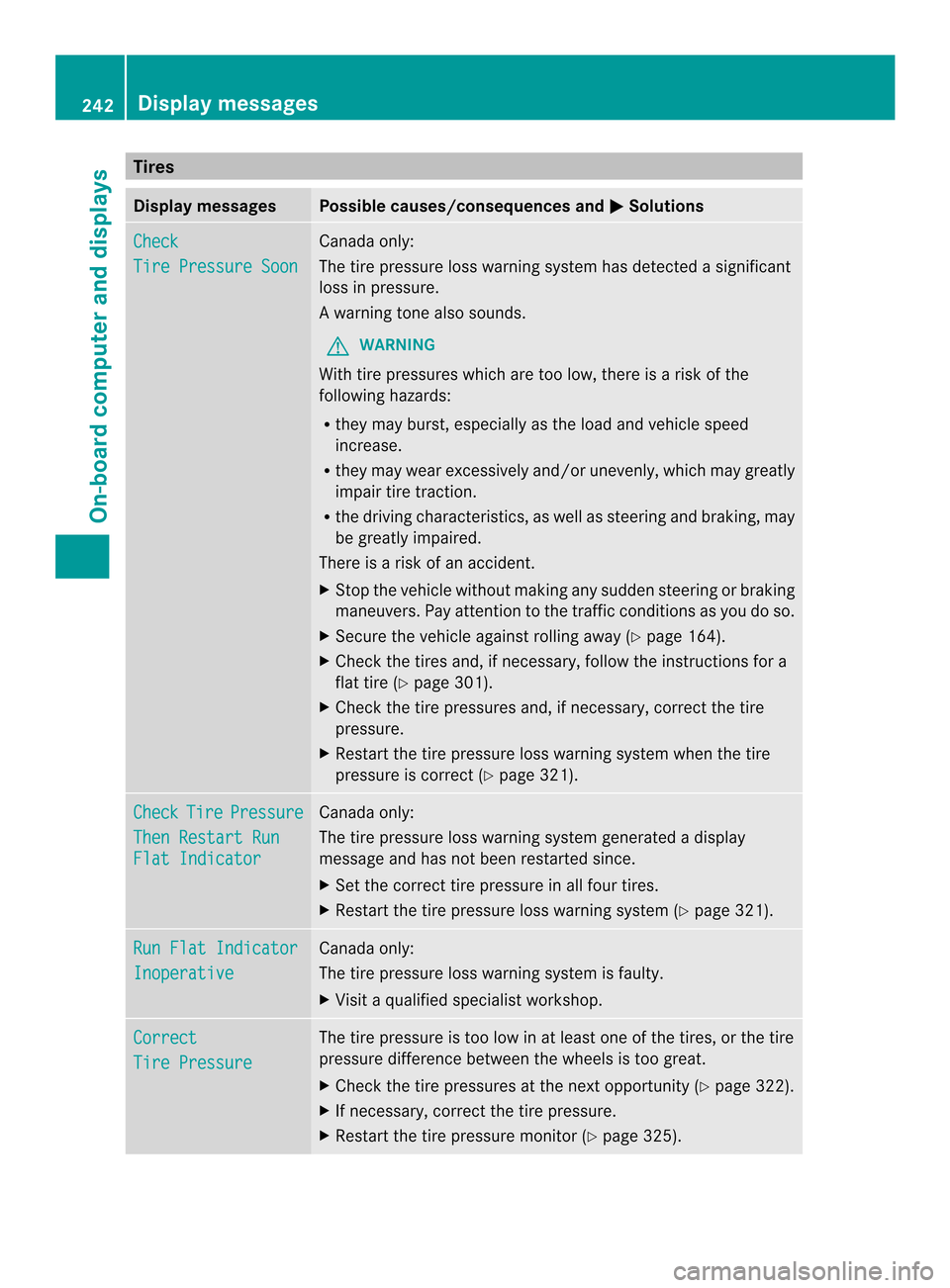
Tires
Display messages Possible causes/consequences and
0001 Solutions
Check
Tire Pressure Soon Canada only:
The tire pressure loss warnin
gsystem has detected a significant
loss in pressure.
Aw arning tone also sounds.
G WARNING
With tire pressures which are too low, there is a ris kofthe
following hazards:
R they may burst, especially as the load and vehicle speed
increase.
R they may wear excessively and/or unevenly, which may greatly
impair tire traction.
R the driving characteristics, as well as steering and braking, may
be greatly impaired.
There is a risk of an accident.
X Stop the vehicle without making any sudden steering or braking
maneuvers. Pay attention to the traffic conditions as you do so.
X Secure the vehicle against rolling away (Y page 164).
X Check the tires and, if necessary, follow the instructions for a
flat tire (Y page 301).
X Check the tire pressures and, if necessary, correct the tire
pressure.
X Restart the tire pressure loss warning system when the tire
pressure is correct (Y page 321).Check Tire Pressure
Then Restart Run
Flat Indicator Canada only:
The tire pressure loss warning system generated a display
message and has not been restarted since.
X
Set the correct tire pressure in all four tires.
X Restart the tire pressure loss warning system (Y page 321).Run Flat Indicator
Inoperative Canada only:
The tire pressure loss warning system is faulty.
X
Visit a qualified specialist workshop. Correct
Tire Pressure The tire pressure is too low in at least one of the tires, or the tire
pressure difference between the wheels is too great.
X
Check the tire pressures at the next opportunity (Y page 322).
X If necessary, correct the tire pressure.
X Restart the tire pressure monitor (Y page 325).242
Display messagesOn-board computer and displays
Page 245 of 362

Display messages Possible causes/consequences and
0001 Solutions
Check
Tires The tire pressure in one or more tires has dropped significantly.
The wheel position is displayed in the multifunction display.
Aw
arning tone also sounds.
G WARNING
With tire pressures which are too low, there is a ris kofthe
following hazards:
R they may burst, especially as the load and vehicle speed
increase.
R they may wear excessively and/or unevenly, which may greatly
impair tire traction.
R the driving characteristics, as well as steering and braking, may
be greatly impaired.
There is a risk of an accident.
X Stop the vehicle without making any sudden steering or braking
maneuvers. Pay attention to the traffic conditions as you do so.
X Secure the vehicle against rolling away (Y page 164).
X Check the tires and, if necessary, follow the instructions for a
flat tire (Y page 301).
X Check the tire pressure (Y page 322).
X If necessary, correct the tire pressure. Warning
Tire Malfunction The tire pressure in one or more tires has dropped suddenly. The
wheel position is shown in the multifunction display.
G WARNING
If you drive with a flat tire, there is a risk of the following hazards:
R a flat tire affects the ability to steer or brake the vehicle.
R you could lose control of the vehicle.
R continued driving with a flat tire will cause excessive heat build-
up and possibly a fire.
There is a risk of an accident.
X Stop the vehicle without making any sudden steering or braking
maneuvers. Pay attention to the traffic conditions as you do so.
X Secure the vehicle against rolling away (Y page 164).
X Check the tires and, if necessary, follow the instructions for a
flat tire (Y page 301). Display messages
243On-board computer and displays Z