2014 MERCEDES-BENZ B-CLASS HATCHBACK cruise control
[x] Cancel search: cruise controlPage 199 of 405

Selecting the drive program
DISTRONIC Plus supports a sporty driving
style when you select the Sor Mdrive pro-
gram (Y page 174). Acceleration behind the
vehicle in front or to the set speed is then
noticeably more dynamic. If you have selec-
ted the E(AMG vehicles: C) drive program, the
vehicle accelerates more gently. This setting
is recommended in stop-and-start traffic.
Changing lanes
If you change to the overtaking lane,
DISTRONIC PLUS supports you if:
R you are driving faster than 70 km/h
R DISTRONIC PLUS is maintaining the dis-
tance to a vehicle in front
R you switch on the respective turn signal
R DISTRONIC PLUS does not detect a danger
of collision
If these conditions are met, your vehicle is
accelerated. Acceleration will be interrupted
if changing lanes takes too long or if the dis-
tance between your vehicle and the vehicle in front becomes too small.
Stopping G
WARNING
When leaving the vehicle, even if it is braked
only by DISTRONIC PLUS, it could roll away if:
R there is a malfunction in the system or in
the voltage supply.
R DISTRONIC PLUS has been deactivated
with the cruise control lever, e.g. by a vehi-
cle occupant or from outside the vehicle.
R the electrical system in the engine com-
partment, the battery or the fuses have
been tampered with.
R the battery is disconnected.
R the accelerator pedal has been depressed,
e.g. by a vehicle occupant.
There is a risk of an accident.
If you wish to exit the vehicle, always turn off
DISTRONIC PLUS and secure the vehicle
against rolling away. For further information on deactivating
DISTRONIC PLUS (Y page 198).
If DISTRONIC PLUS detects that the vehicle in front is stopping, it brakes your vehicle until it is stationary.
Once your vehicle is stationary, it remains
stationary and you do not need to depress the
brake.
i After a short period, the vehicle is secured
by the electric parking brake, thus relieving
the service brake.
i Depending on the specified minimum dis-
tance, your vehicle will come to a standstill
at a sufficient distance behind the vehicle in
front. The specified minimum distance is
set using the control on the cruise control
lever.
When the HOLD function is activated, the
transmission is shifted automatically to posi- tion Pif:
R the driver's seat belt is not fastened and the
driver's door is open
R the engine is switched off, unless it is auto-
matically switched off by the ECO start/
stop function
The electric parking brake secures the vehicle
automatically if DISTRONIC PLUS is activated
when the vehicle is stationary and:
R a system fault occurs
R the power supply is insufficient
If a malfunction in the electric parking brake
occurs, then the transmission may also be
shifted into position Pautomatically. 196
Driving systemsDriving and parking
Page 200 of 405

Setting a speed
Bear in mind that it may take a brief moment
until the vehicle has accelerated or braked tothe set speed.
X Press the cruise control lever up :for a
higher speed or down ;for a lower speed.
X Keep the cruise control lever pressed until
the desired speed is reached.
X Release the cruise control lever.
The new speed is stored. DISTRONIC PLUS
is activated and adjusts the vehicle's speed to the new speed stored.
X To adjust the set speed in 1 km/h incre-
ments: briefly press the cruise control
lever up :or down ;to the pressure
point.
The last stored speed increases or decrea- ses in 1 km/h increments.
X To adjust the set speed in 10 km/h
increments: press the cruise control lever
briefly up :or down ;beyond the pres-
sure point.
The last stored speed increases or decrea- ses in 10 km/h increments.
i DISTRONIC PLUS is not deactivated if you
depress the accelerator pedal. If you accel-
erate to overtake, DISTRONIC PLUS
adjusts the vehicle's speed to the last
speed stored after you have finished over-
taking. Setting the specified minimum distance You can set the specified minimum distance
for DISTRONIC PLUS by varying the time span between one and two seconds. With this func-
tion, you can set the minimum distance that
DISTRONIC PLUS maintains to the vehicle in
front, dependent on vehicle speed. You can
see this distance in the multifunction display
(Y page 198).
i Make sure that you maintain the mini-
mum distance to the vehicle in front as
required by law. Adjust the distance to the
vehicle in front if necessary. X
To increase: turn control=in direc-
tion ;.
DISTRONIC PLUS then maintains a greater distance between your vehicle and the
vehicle in front.
X To decrease: turn control=in direc-
tion :.
DISTRONIC PLUS then maintains a shorter
distance between your vehicle and the
vehicle in front. Driving systems
197Driving and parking Z
Page 201 of 405
Deactivating DISTRONIC PLUS
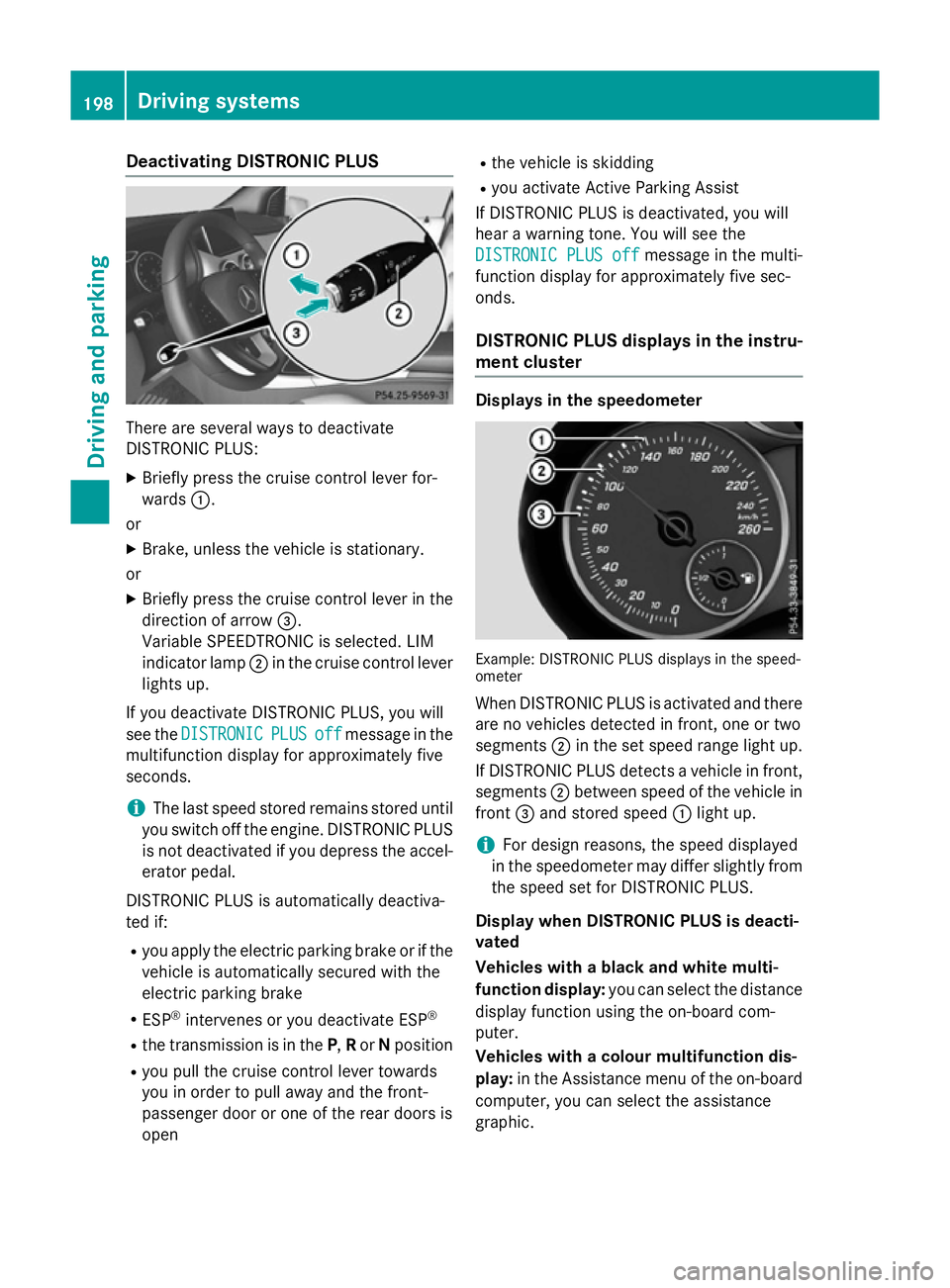
There are several ways to deactivate
DISTRONIC PLUS:
X Briefly press the cruise control lever for-
wards :.
or X Brake, unless the vehicle is stationary.
or X Briefly press the cruise control lever in the
direction of arrow =.
Variable SPEEDTRONIC is selected. LIM
indicator lamp ;in the cruise control lever
lights up.
If you deactivate DISTRONIC PLUS, you will
see the DISTRONIC
DISTRONIC PLUS PLUSoff
offmessage in the
multifunction display for approximately five
seconds.
i The last speed stored remains stored until
you switch off the engine. DISTRONIC PLUS
is not deactivated if you depress the accel-
erator pedal.
DISTRONIC PLUS is automatically deactiva-
ted if:
R you apply the electric parking brake or if the
vehicle is automatically secured with the
electric parking brake
R ESP ®
intervenes or you deactivate ESP ®
R the transmission is in the P,Ror Nposition
R you pull the cruise control lever towards
you in order to pull away and the front-
passenger door or one of the rear doors is
open R
the vehicle is skidding
R you activate Active Parking Assist
If DISTRONIC PLUS is deactivated, you will
hear a warning tone. You will see the
DISTRONIC PLUS off
DISTRONIC PLUS off message in the multi-
function display for approximately five sec-
onds.
DISTRONIC PLUS displays in the instru-
ment cluster Displays in the speedometer
Example: DISTRONIC PLUS displays in the speed-
ometer
When DISTRONIC PLUS is activated and there
are no vehicles detected in front, one or two
segments ;in the set speed range light up.
If DISTRONIC PLUS detects a vehicle in front, segments ;between speed of the vehicle in
front =and stored speed :light up.
i For design reasons, the speed displayed
in the speedometer may differ slightly from the speed set for DISTRONIC PLUS.
Display when DISTRONIC PLUS is deacti-
vated
Vehicles with a black and white multi-
function display: you can select the distance
display function using the on-board com-
puter.
Vehicles with a colour multifunction dis-
play: in the Assistance menu of the on-board
computer, you can select the assistance
graphic. 198
Driving syste
msDriving and parking
Page 202 of 405

Assistance graphic
: Vehicle in front, if detected
; Distance indicator: current distance to
the vehicle in front
= Specified minimum distance to the vehi-
cle in front; adjustable
? Own vehicle
X Vehicles with a colour multifunction
display: select the Assistance graphic
Assistance graphic
function using the on-board computer
(Y page 243). Distance display in vehicles with a black and white
multifunction display
: Vehicle in front, if detected
; Distance indicator: current distance to
the vehicle in front
= Specified minimum distance to the vehi-
cle in front; adjustable
? Own vehicle
X Vehicles with a black and white multi-
function display: select theDistance
Distance
display
display function using the on-board com-
puter (Y page 242). Display when DISTRONIC PLUS is activa-
ted
You will initially see the stored speed for
about five seconds when you activate
DISTRONIC PLUS. Assistance graphic
: Vehicle in front, if detected
; Specified minimum distance to the vehi-
cle in front; adjustable
= Own vehicle
? DISTRONIC PLUS active (text only
appears when the cruise control lever is
actuated)
X Vehicles with a colour multifunction
display: select the Assistance graphic Assistance graphic
function using the on-board computer
(Y page 243). Distance display in vehicles with a black and white
multifunction display
: DISTRONIC PLUS activated
; Own vehicle
= Specified minimum distance to the vehi-
cle in front; adjustable
? Vehicle in front, if detected Driving systems
199Driving and parking Z
Page 229 of 405
The maximum permissible speed for vehicle/
trailer combinations depends on the type of
trailer. Before beginning the journey, check
the trailer's documents to see what the max- imum permitted speed is. Observe the legally
prescribed maximum speed in the relevant
country.
For certain Mercedes-Benz vehicles, the max-
imum permissible rear axle load is increased
when towing a trailer. See the "Technical
data" section to find out whether this applies to your vehicle. If you utilise any of the added
maximum rear axle load when towing a trailer, the vehicle/trailer combination may not
exceed a maximum speed of 100 km/h for
reasons concerning the operating permit.
This also applies in countries in which the
permissible maximum speed for vehicle/
trailer combinations is above 100 km/h.
When towing a trailer, your vehicle's handling
characteristics will be different in comparison to when driving without a trailer and it will
consume more fuel.
Change into a lower gear in good time on long
and steep downhill gradients. For vehicles
with automatic transmission, you need to
have selected manual drive program M
(Y page 175).
This also applies if you have activated cruise
control, SPEEDTRONIC or DISTRONIC PLUS.
This will use the braking effect of the engine,
so less braking will be required to maintain
vehicle speed. This relieves the load on the
brake system and prevents the brakes from
overheating and wearing too quickly. If you
need additional braking, depress the brake
pedal repeatedly rather than continuously.
Briefly depressing the accelerator pedal on
downhill gradients while the manual drive
program Mis temporarily activated (vehicles
with automatic transmission): the automatic
transmission may switch back to the last
active automatic drive program Eor S. The
automatic transmission may shift to a higher
gear. This can reduce the engine's braking
effect. Driving tips If the trailer swings from side to side:
X Do not accelerate.
X Do not countersteer.
X Brake if necessary.
R Maintain a greater distance to the vehicle in
front than when driving without a trailer.
R Avoid braking abruptly. If possible, brake
gently at first to allow the trailer to run on.
Then, increase the braking force rapidly.
R The values given for gradient-climbing
capabilities from a standstill refer to sea
level. When driving in mountainous areas,
note that the power output of the engine,
and consequently the vehicle's gradient-
climbing capability, decrease with increas-
ing altitude. Folding out the ball coupling
G
WARNING
If the ball coupling is not correctly engaged,
the trailer can detach. There is a risk of an
accident.
Always engage the ball coupling as described. G
WARNING
If you release the ball coupling or it does not
engage correctly when folding in, it will swing out. Within pivoting range of the ball coupling,
there is an increased risk of an accident and
injury.
Only release the ball coupling if the pivoting
range is unobstructed. Always make sure that the ball coupling engages when folding in.
Before you can tow a trailer with your vehicle, you must fold out the ball coupling.
The release wheel is located behind the left-
hand side trim panel in the boot. 226
Towing a trailerDriving and parking
Page 238 of 405

Multifunction display
Black and white multifunction display Colour multifunction display
:
Permanent display: outside temperature
or speed (Y page 246)
; Time
= Text field
? Menu bar
A Drive program (Y page 170)
B Transmission position (Y page 170)Overview X
To display menu bar ?: press the=
or ; button on the steering wheel.
Menu bar ?disappears after a few sec-
onds.
Text field =shows the selected menu or
submenu as well as display messages.
Vehicles with manual transmission: the
indicators in the lower part of the multifunc-
tion display differ from those shown here.
The following menu illustrations differ in vehi- cles with black and white and colour multi-
function display. The examples given in this
Owner's Manual apply to vehicles equipped
with colour multifunction display.
i You can set the time using Audio 20 or
COMAND Online; see the separate operat-
ing instructions.
Further displays The following messages may appear in the
multifunction display:
Z
Gearshift recommendation for man-
ual transmission (Y page 169) or for
automatic transmission (shifting
manually) (Y page 175)
XjY Active Parking Assist (Y page 206)
¯ Cruise control (Y page 188)
È SPEEDTRONIC (Y page 191)
_ Adaptive Highbeam Assist
(Ypage 126)
è ECO start/stop function
(Ypage 164)
ë HOLD function (Y page 201)
120
120
km/h! km/h! Maximum permissible speed excee-
ded (only for certain countries) Displays and operation
235On-board computer and displays Z
Page 249 of 405

Instrument cluster
Unit of measurement for distance
The
Display unit Speed-/odometer:
Display unit Speed-/odometer:
function allows you to choose whether cer-
tain displays appear in kilometres or miles in
the multifunction display.
X Press the =or; button on the steer-
ing wheel to select the Settings Settingsmenu.
X Press the :or9 button to select the
Instrument cluster
Instrument cluster submenu.
X Press ato confirm.
X Press the :or9 button to select the
Display unit Speed-/odometer
Display unit Speed-/odometer func-
tion.
You will see the selected setting: km
km or
miles
miles.
X Press the abutton to save the setting.
The selected unit of measurement for dis-
tance applies to:
R digital speedometer in the Trip Tripmenu
R total distance recorder and the trip meter
R trip computer
R current fuel consumption and approximate
range
R navigation instructions in the Navi
Navi menu
R Cruise control
R SPEEDTRONIC
R DISTRONIC PLUS
R ASSYST PLUS service interval display
Switching the additional speedometer
on/off
United Kingdom: this function is unavailable.
The Dig.
Dig. speedo speedo [km/h]
[km/h]orDig.
Dig. speedo
speedo
[mph]
[mph] function allows you to choose whether
the multifunction display in the status area
shows the speed in km/h
km/h or inmph mphinstead of
the outside temperature.
X Press the =or; button on the steer-
ing wheel to select the Settings
Settingsmenu.
X Press the :or9 button to select the
Instrument cluster
Instrument cluster submenu.
X Press ato confirm. X
Press the :or9 button to select the
Dig. speedo [mph]:
Dig. speedo [mph]: orDig. speedo
Dig. speedo
[km/h]:
[km/h]: function.
You will see the selected setting: on
onoroff
off .
X Press the abutton to save the setting.
Selecting the permanent display function
United Kingdom: this function is unavailable.
You can determine whether the multifunction
display permanently shows the outside tem-
perature or the speed in mph.
X Press the =or; button on the steer-
ing wheel to select the Settings Settingsmenu.
X Press the :or9 button to select the
Instrument cluster
Instrument cluster submenu.
X Press ato confirm.
X Press the :or9 button to select the
Permanent display:
Permanent display: function.
You will see the selected setting: outside
outside
temperature
temperature orDig. speedo [mph]
Dig. speedo [mph].
X Press the abutton to save the setting.
Lights Switching the daytime driving lights
on/off
The
Daytime driving lights
Daytime driving lights function can
only be switched on with the engine turned
off.
X Press the =or; button on the steer-
ing wheel to select the Settings Settingsmenu.
X Press the :or9 button to select the
Lights
Lights submenu.
X Press ato confirm.
X Press the :or9 button to select the
Daytime driving lights
Daytime driving lights function.
Vehicles with black and white multifunction
display: you will see the selected setting: on
on
or off
off .
Vehicles with colour multifunction display:
if the Daytime driving lights Daytime driving lights function
has been switched on, the cone of light and the W symbol in the multifunction dis-
play are shown in orange.
X Press the abutton to save the setting. 246
Menus and submenusOn-board computer and displays
Page 278 of 405

Display messages
Possible causes/consequences and
M
MSolutions DISTRONIC
DISTRONIC
PLUS
PLUSsus‐
sus‐
pended
pended You have depressed the accelerator pedal. DISTRONIC PLUS is no
longer controlling the speed of the vehicle.
X Remove your foot from the accelerator pedal. DISTRONIC PLUS
DISTRONIC PLUS
- - - km/h - - - km/h An activation condition for DISTRONIC PLUS is not fulfilled.
X Check the activation conditions for DISTRONIC PLUS
(Y page 193). DISTRONIC
DISTRONIC
PLUS
PLUSand
and
SPEEDTRONIC inop‐
SPEEDTRONIC inop‐
erative erative DISTRONIC PLUS and SPEEDTRONIC are faulty. A warning tone
also sounds.
X Visit a qualified specialist workshop. Cruise Cruise
control
control and
and
SPEEDTRONIC inop‐
SPEEDTRONIC inop‐
erative erative SPEEDTRONIC and cruise control are malfunctioning.
A warning tone also sounds.
X Visit a qualified specialist workshop. SPEEDTRONIC sus‐
SPEEDTRONIC sus‐
pended pended While depressing the accelerator pedal beyond the pressure point
(kickdown), SPEEDTRONIC cannot be activated.
X If conditions permit, drive faster than 30 km/h and store the
speed. Cruise control Cruise control
- - - km/h - - - km/h A condition for activating cruise control has not been met.
You have tried to store a speed below 30 km/h, for example.
X If conditions permit, drive faster than 30 km/h and store the
speed.
X Check the activation conditions for cruise control (Y page 189).120 km/h! 120 km/h!
Maximum speed Maximum speed
exceeded exceeded Only for certain countries: the maximum speed has been excee-
ded.
In addition, the multifunction display shows
120 km/h! 120 km/h!.
X Drive more slowly. Display
messages
275On-board computer and displays Z