2014 MAZDA MODEL CX-5 remove
[x] Cancel search: removePage 298 of 528
Black plate (298,1)
Connecting with connector cable
1. Open the console lid.
2. Open the auxiliary jack/USB port lid.
3. Pass the connection plug cord through
the cutout of the console and insert the
plug into the auxiliary jack.
WARNING
Do not allow the connection plug cord
to get tangled with the parking brake
or the shift lever:
Allowing the plug cord to become
tangled with the parking brake or
the shift lever is dangerous as it
could interfere with driving, resulting
in an accident.
CAUTION
Do not place objects or apply force to
the auxiliary jack with the plug
connected.
NOTE
lInsert the plug to the auxiliary jack/USB
port securely.
lInsert or pull out the plug with the plug
perpendicular to the auxiliary jack/USB
port hole.
lInsert or remove the plug by holding its
base.
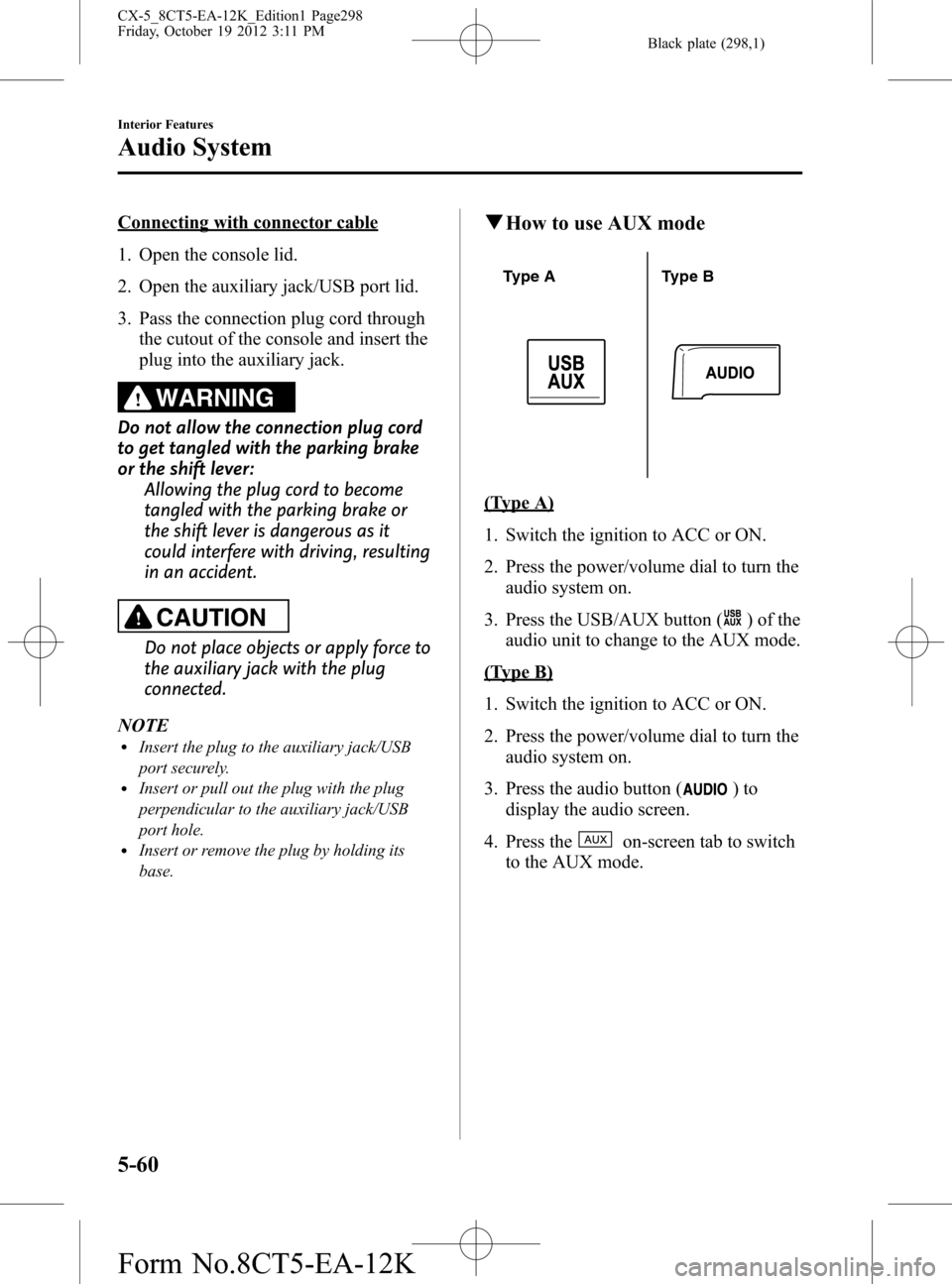
qHow to use AUX mode
Type A Type B
(Type A)
1. Switch the ignition to ACC or ON.
2. Press the power/volume dial to turn the
audio system on.
3. Press the USB/AUX button (
) of the
audio unit to change to the AUX mode.
(Type B)
1. Switch the ignition to ACC or ON.
2. Press the power/volume dial to turn the
audio system on.
3. Press the audio button (
)to
display the audio screen.
4. Press the
on-screen tab to switch
to the AUX mode.
5-60
Interior Features
Audio System
CX-5_8CT5-EA-12K_Edition1 Page298
Friday, October 19 2012 3:11 PM
Form No.8CT5-EA-12K
Page 300 of 528
Black plate (300,1)
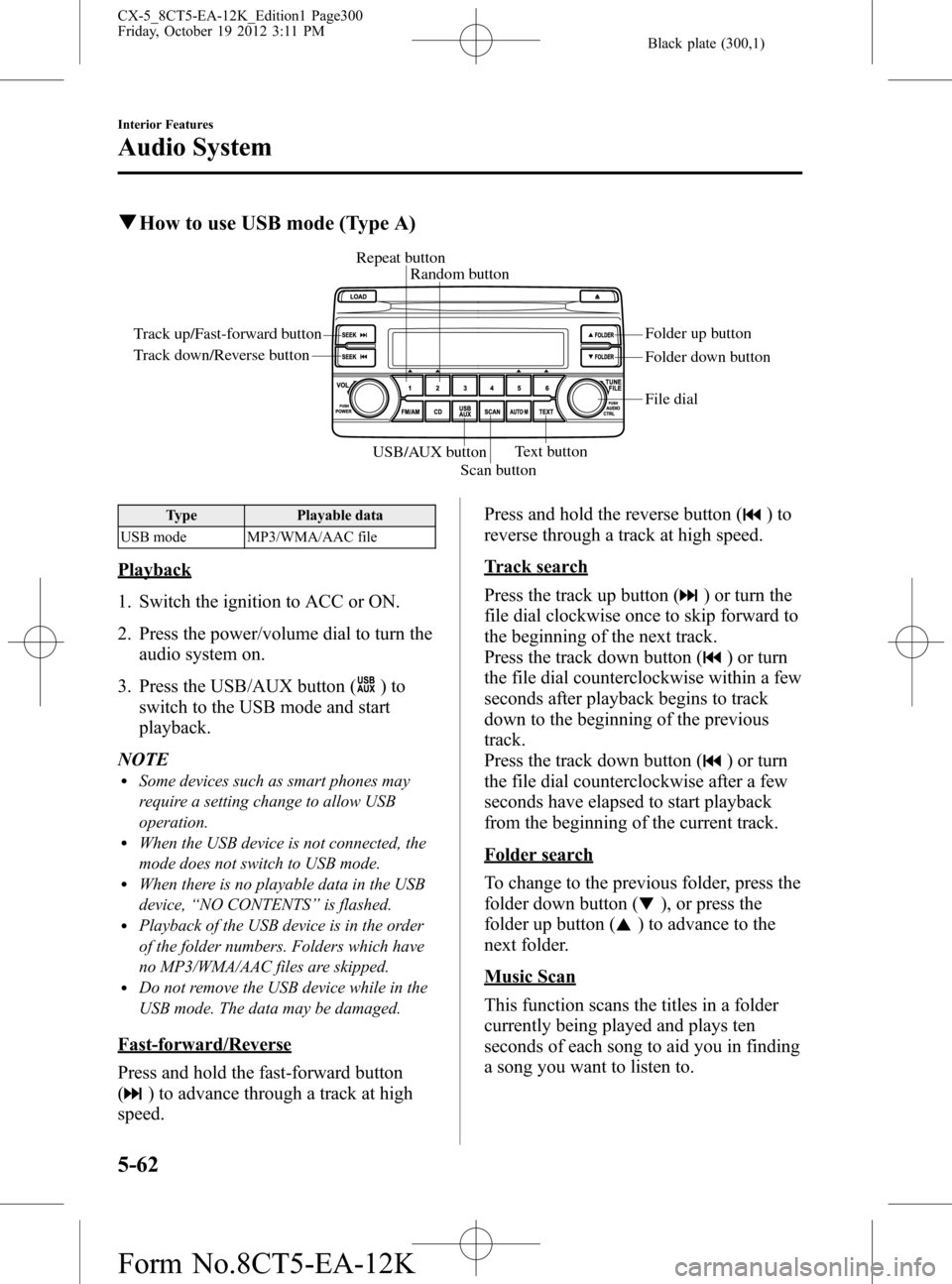
qHow to use USB mode (Type A)
Track up/Fast-forward button
Track down/Reverse buttonRepeat button
Random button
Folder down button Folder up button
Text button
Scan button USB/AUX button
File dial
Type Playable data
USB mode MP3/WMA/AAC file
Playback
1. Switch the ignition to ACC or ON.
2. Press the power/volume dial to turn the
audio system on.
3. Press the USB/AUX button (
)to
switch to the USB mode and start
playback.
NOTE
lSome devices such as smart phones may
require a setting change to allow USB
operation.
lWhen the USB device is not connected, the
mode does not switch to USB mode.
lWhen there is no playable data in the USB
device,“NO CONTENTS”is flashed.
lPlayback of the USB device is in the order
of the folder numbers. Folders which have
no MP3/WMA/AAC files are skipped.
lDo not remove the USB device while in the
USB mode. The data may be damaged.
Fast-forward/Reverse
Press and hold the fast-forward button
(
) to advance through a track at high
speed.Press and hold the reverse button (
)to
reverse through a track at high speed.
Track search
Press the track up button (
) or turn the
file dial clockwise once to skip forward to
the beginning of the next track.
Press the track down button (
) or turn
the file dial counterclockwise within a few
seconds after playback begins to track
down to the beginning of the previous
track.
Press the track down button (
) or turn
the file dial counterclockwise after a few
seconds have elapsed to start playback
from the beginning of the current track.
Folder search
To change to the previous folder, press the
folder down button (
), or press the
folder up button (
) to advance to the
next folder.
Music Scan
This function scans the titles in a folder
currently being played and plays ten
seconds of each song to aid you in finding
a song you want to listen to.
5-62
Interior Features
Audio System
CX-5_8CT5-EA-12K_Edition1 Page300
Friday, October 19 2012 3:11 PM
Form No.8CT5-EA-12K
Page 304 of 528
Black plate (304,1)
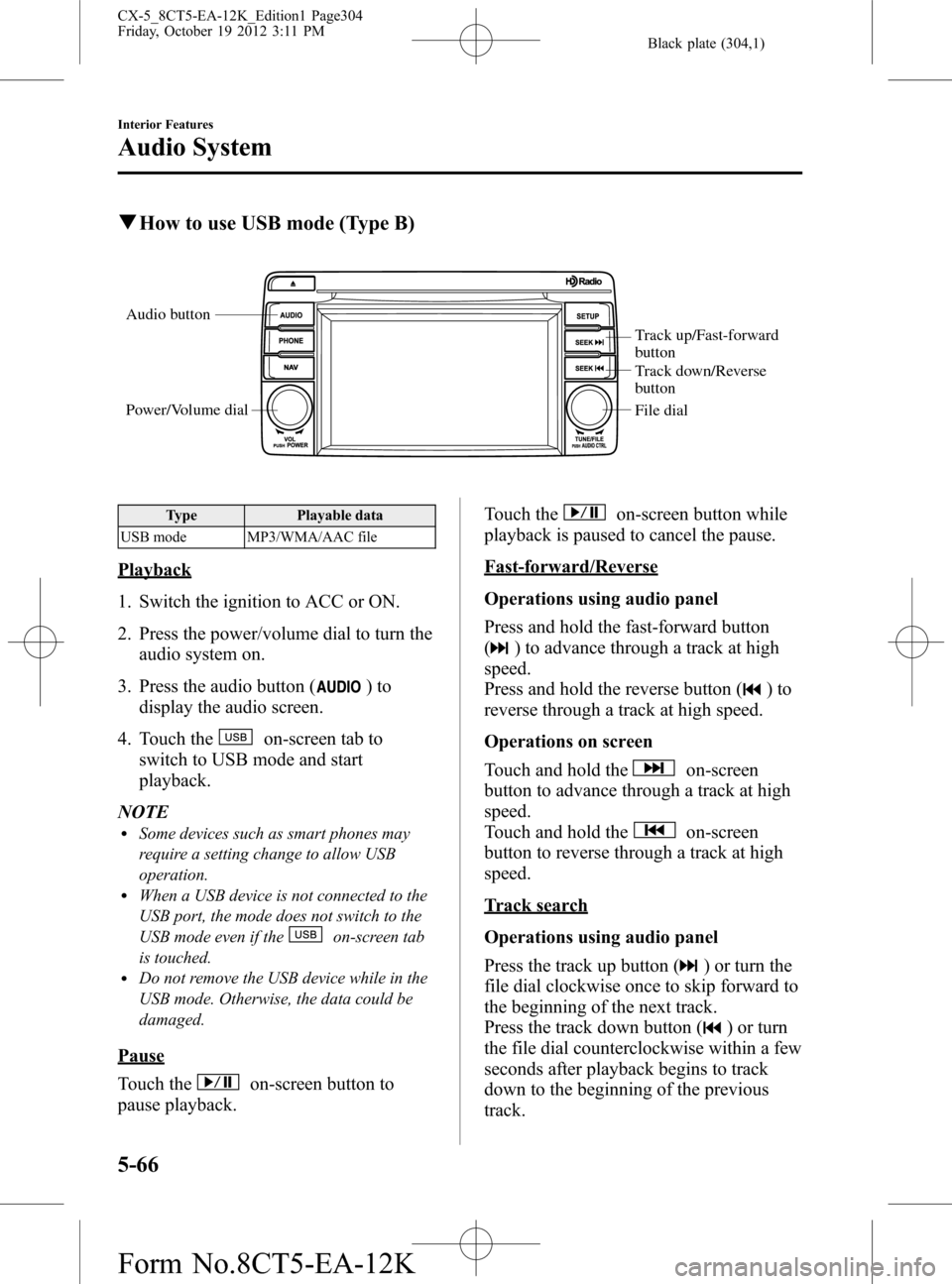
qHow to use USB mode (Type B)
Audio button
Power/Volume dial
Track up/Fast-forward
button
Track down/Reverse
button
File dial
Type Playable data
USB mode MP3/WMA/AAC file
Playback
1. Switch the ignition to ACC or ON.
2. Press the power/volume dial to turn the
audio system on.
3. Press the audio button (
)to
display the audio screen.
4. Touch the
on-screen tab to
switch to USB mode and start
playback.
NOTE
lSome devices such as smart phones may
require a setting change to allow USB
operation.
lWhen a USB device is not connected to the
USB port, the mode does not switch to the
USB mode even if the
on-screen tab
is touched.
lDo not remove the USB device while in the
USB mode. Otherwise, the data could be
damaged.
Pause
Touch the
on-screen button to
pause playback.Touch the
on-screen button while
playback is paused to cancel the pause.
Fast-forward/Reverse
Operations using audio panel
Press and hold the fast-forward button
(
) to advance through a track at high
speed.
Press and hold the reverse button (
)to
reverse through a track at high speed.
Operations on screen
Touch and hold the
on-screen
button to advance through a track at high
speed.
Touch and hold the
on-screen
button to reverse through a track at high
speed.
Track search
Operations using audio panel
Press the track up button (
) or turn the
file dial clockwise once to skip forward to
the beginning of the next track.
Press the track down button (
) or turn
the file dial counterclockwise within a few
seconds after playback begins to track
down to the beginning of the previous
track.
5-66
Interior Features
Audio System
CX-5_8CT5-EA-12K_Edition1 Page304
Friday, October 19 2012 3:11 PM
Form No.8CT5-EA-12K
Page 308 of 528
Black plate (308,1)
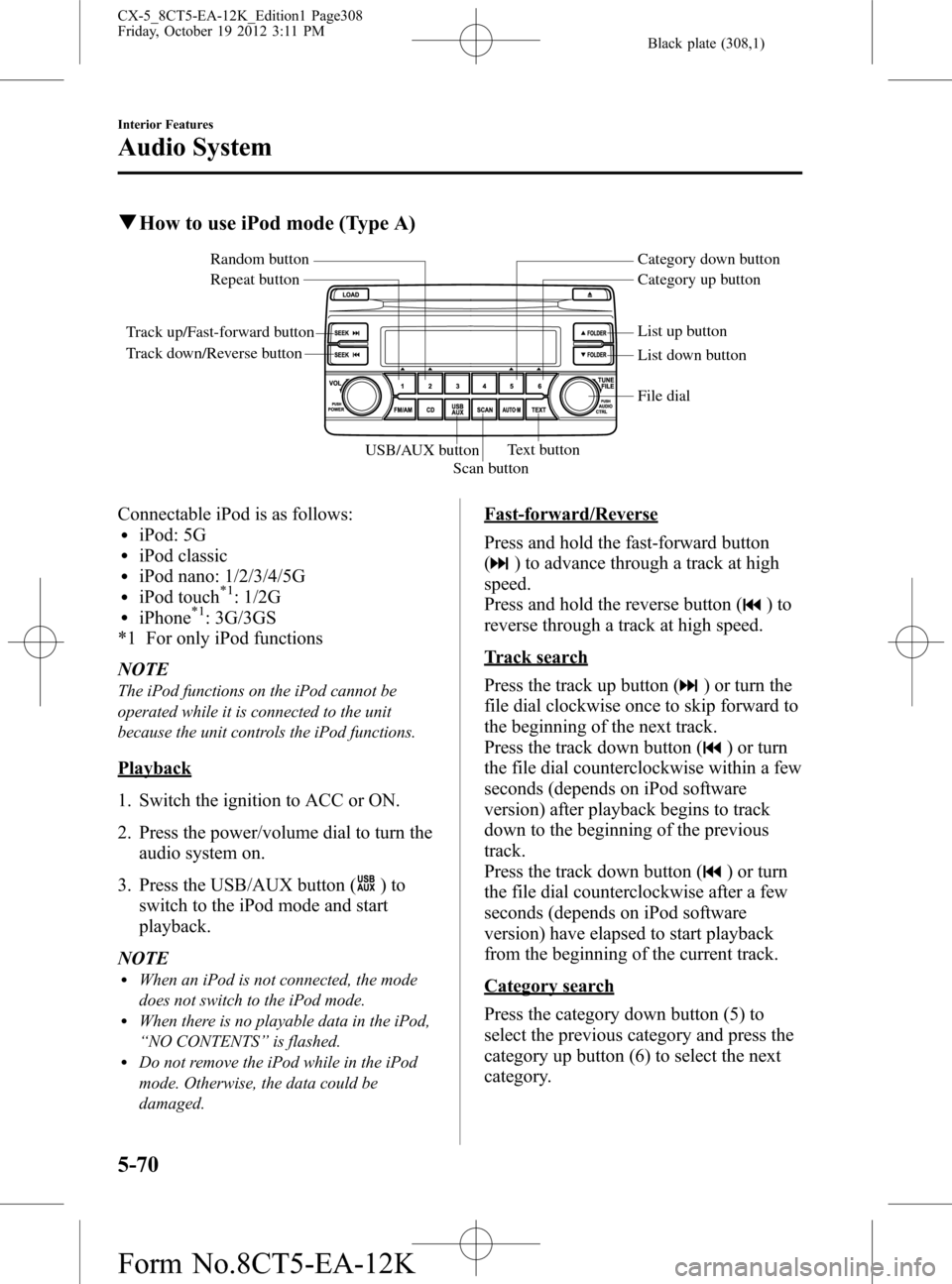
qHow to use iPod mode (Type A)
Track up/Fast-forward button
Track down/Reverse buttonRepeat button Random button Category down button
Category up button
List down button List up button
Text button
Scan button USB/AUX button
File dial
Connectable iPod is as follows:liPod: 5GliPod classicliPod nano: 1/2/3/4/5GliPod touch*1: 1/2GliPhone*1: 3G/3GS
*1 For only iPod functions
NOTE
The iPod functions on the iPod cannot be
operated while it is connected to the unit
because the unit controls the iPod functions.
Playback
1. Switch the ignition to ACC or ON.
2. Press the power/volume dial to turn the
audio system on.
3. Press the USB/AUX button (
)to
switch to the iPod mode and start
playback.
NOTE
lWhen an iPod is not connected, the mode
does not switch to the iPod mode.
lWhen there is no playable data in the iPod,
“NO CONTENTS”is flashed.
lDo not remove the iPod while in the iPod
mode. Otherwise, the data could be
damaged.
Fast-forward/Reverse
Press and hold the fast-forward button
(
) to advance through a track at high
speed.
Press and hold the reverse button (
)to
reverse through a track at high speed.
Track search
Press the track up button (
) or turn the
file dial clockwise once to skip forward to
the beginning of the next track.
Press the track down button (
) or turn
the file dial counterclockwise within a few
seconds (depends on iPod software
version) after playback begins to track
down to the beginning of the previous
track.
Press the track down button (
) or turn
the file dial counterclockwise after a few
seconds (depends on iPod software
version) have elapsed to start playback
from the beginning of the current track.
Category search
Press the category down button (5) to
select the previous category and press the
category up button (6) to select the next
category.
5-70
Interior Features
Audio System
CX-5_8CT5-EA-12K_Edition1 Page308
Friday, October 19 2012 3:11 PM
Form No.8CT5-EA-12K
Page 312 of 528

Black plate (312,1)
qHow to use iPod mode (Type B)
Audio button
Power/Volume dial
Track up/Fast-forward
button
Track down/Reverse
button
File dial
The connectable iPods are as follows:liPod: 5GliPod classicliPod nano: 1/2/3/4/5/6GliPod touch*1: 1/2/3/4GliPhone*1: iPhone/3G/3GS/4/4SliPad*1: 1st/2nd/3rd
*1 Only iPod function
NOTE
The iPod functions on the iPod cannot be
operated while it is connected to the unit
because the unit controls the iPod functions.
Playback
1. Switch the ignition to ACC or ON.
2. Press the power/volume dial to turn the
audio system on.
3. Press the audio button (
)to
display the audio screen.
4. Touch the
on-screen tab to
switch to the iPod mode and start
playback.NOTE
lWhen the iPod is connected to the USB
port, the
on-screen tab changes to
the
on-screen tab.lDo not remove the iPod while in the iPod
mode. Otherwise, the data could be
damaged.
Pause
Touch the
on-screen button to
pause playback. Touch the
on-
screen button while playback is paused to
cancel the pause.
Fast-forward/Reverse
Operations using audio panel
Press and hold the fast-forward button
(
) to advance through a track at high
speed.
Press and hold the reverse button (
)to
reverse through a track at high speed.
Operations on screen
Touch and hold the
on-screen
button to advance through a track at high
speed.
Touch and hold the
on-screen
button to reverse through a track at high
speed.
5-74
Interior Features
Audio System
CX-5_8CT5-EA-12K_Edition1 Page312
Friday, October 19 2012 3:11 PM
Form No.8CT5-EA-12K
Page 324 of 528
![MAZDA MODEL CX-5 2014 Owners Manual (in English) Black plate (324,1)
4.Prompt:“Number, please”
5.Say:[Beep]“XXXXXXXXXXX (Ex.
“5551234”) (Telephone number)”
6.Prompt:“XXXXXXXXXXX. (Ex
“5551234”) (Telephone number (first
choice))”](/manual-img/28/13858/w960_13858-323.png "MAZDA MODEL CX-5 2014 Owners Manual (in English) Black plate (324,1)
4.Prompt:“Number, please”
5.Say:[Beep]“XXXXXXXXXXX (Ex.
“5551234”) (Telephone number)”
6.Prompt:“XXXXXXXXXXX. (Ex
“5551234”) (Telephone number (first
choice))”")
Black plate (324,1)
4.Prompt:“Number, please”
5.Say:[Beep]“XXXXXXXXXXX (Ex.
“5551234”) (Telephone number)”
6.Prompt:“XXXXXXXXXXX. (Ex
“5551234”) (Telephone number (first
choice))”
7.Prompt:“Press the pick-up button to
dial, or continue to add numbers. You
can also say‘Option A’or‘Option B’
to replace the last block of digits with
the displayed alternate, or say‘Go
Back’to delete the last block of digits.”
NOTE
Option A is the second candidate, Option B is
the third, and they may not be presented
depending on the conditions.
8.(Dialing)
Press the pick-up button or say,“Dial”,
then go to Step 9.
(Adding/inputting telephone
number)
Say,“XXXX”(desired telephone
number). Then go to Step 5.
(The last recognized telephone
number is replaced by Option A or
B)
Say,“Option A”or“Option B”. Then
go to Step 6.
(Telephone number correction)
Say,“Go Back”. The prompt replies,
“The last entered numbers have been
removed”. Then go back to Step 4 or
Step 7.
9. The call is made.
NOTE
For the faster operation, the“Dial”command
and a telephone number can be combined.
Ex. In Step 3, say,“Dial 1234567”, then, Steps
4 and 5 can be skipped.
Screen operation
1. Input the telephone number using the
numerical keypad.
2. Touch the
on-screen button to
make the call.
Numeral or symbol entry
Use the numerical keypad.
Long-press the
on-screen button to
input
.
Touch the
on-screen button to delete
the currently input value.
Emergency calls
A call can be made to the emergency
phone number (911: U.S.A/Canada, 066:
Mexico) using the voice input command.
It may not function properly in some areas
in Mexico.
1. Press the pick-up button.
2.Prompt:“Ready”
3.Say:[Beep]“Emergency”
4.Prompt:“Press the Pick-Up button to
dial the Emergency number.”
5. (Dialing) Press the pick-up button or
say“Call.”
6.Prompt:“Dialing XXX (911: U.S.A/C
anada, 066: Mexico).”
5-86
Interior Features
Bluetooth®
CX-5_8CT5-EA-12K_Edition1 Page324
Friday, October 19 2012 3:12 PM
Form No.8CT5-EA-12K
Page 356 of 528

Black plate (356,1)
qGlove Compartment
To open the glove compartment, pull the
latch toward you.
qCenter Console
To open, pull the release latch.
Storage tray
The storage tray can be removed.
Storage tray
qCargo Securing Loops
WARNING
Make sure luggage and cargo is
secured before driving:
Not securing cargo while driving is
dangerous as it could move or be
crushed during sudden braking or a
collision and cause injury.
Use the loops in the luggage compartment
to secure cargo with a rope or net. The
tensile strength of the loops is 196 N (20
kgf, 44 lbf). Do not apply excessive force
to the loops as it will damage them.
5-118
Interior Features
Interior Equipment
CX-5_8CT5-EA-12K_Edition1 Page356
Friday, October 19 2012 3:12 PM
Form No.8CT5-EA-12K
Page 375 of 528
Black plate (375,1)
WARNING
Do not perform maintenance work if you lack sufficient knowledge and experience or
the proper tools and equipment to do the work. Have maintenance work done by a
qualified technician:
Performing maintenance work on a vehicle is dangerous if not done properly. You
can be seriously injured while performing some maintenance procedures.
If you must run the engine while working under the hood, make certain that you
remove all jewelry (especially rings, bracelets, watches, and necklaces) and all
neckties, scarves, and similar loose clothing before getting near the engine or cooling
fan which may turn on unexpectedly:
Working under the hood with the engine running is dangerous. It becomes even
more dangerous when you wear jewelry or loose clothing.
Either can become entangled in moving parts and result in injury.
Switch the ignition to off and make sure the fan is not running before
attempting to work near the cooling fan:
Working near the cooling fan when it is running is dangerous. The fan could
continue running indefinitely even if the engine has stopped and the engine
compartment temperature is high. You could be hit by the fan and seriously injured.
Do not leave items in the engine compartment:
After you have finished checking or doing servicing in the engine compartment, do
not forget and leave items such as tools or rags in the engine compartment.
Tools or other items left in the engine compartment could cause engine damage or a
fire leading to an unexpected accident.
Maintenance and Care
Owner Maintenance
6-17
CX-5_8CT5-EA-12K_Edition1 Page375
Friday, October 19 2012 3:12 PM
Form No.8CT5-EA-12K