Page 250 of 455

Fuse or relay
numberFuse amp
ratingProtected components
1 30A Driver front smart window
2 15A Not used (spare)
3 30A Passenger front smart window
4 10A Demand lamps relay
5 20A Subwoofer
6 5A Radio frequency module
7 7.5A Power mirror switch, Memory seat
switch, Driver seat module
8 10A Not used (spare)
9 10A Power liftgate
10 10A Run/accessory relay
11 10A Instrument panel cluster, Heads-up
display
12 15A Interior lighting, Puddle lamps,
Backlighting
13 15A Right turn/stop lamps and turn
signals
14 15A Left turn/stop lamps and turn signals
15 15A Reverse lamps, High-mounted stop
lamps
16 10A Low beam headlamps (right)
17 10A Low beam headlamps (left)
18 10A Keypad illumination, Brake shift
interlock, Start button LED, Passive
anti-theft system, Powertrain control
module wake-up, Second row power
enable
19 20A Audio amplifier
20 20A Lock/unlock relays – vehicles without
intelligent access
21 10A Not used (spare)
22 20A Horn relay
Fuses249
2014 MKX(mkx)
Owners Guide gf, 2nd Printing, March 2014
USA(fus)
Page 251 of 455

Fuse or relay
numberFuse amp
ratingProtected components
23 15A Steering wheel control, Intelligent
access, Headlamp switch
24 15A Power tilt/telescope steering column,
On-board diagnostics
25 15A Liftgate release
26 5A Global positioning system module
27 20A Intelligent access
28 15A Ignition switch (without intelligent
access), Key inhibit solenoid, Push
button start (with intelligent access)
29 20A Radio, Electronic finish panel, SYNC
module
30 15A Front park lamps
31 5A Not used (spare)
32 15A Moonroof, Power windows (front),
Compass/auto-dimming rear view
mirror
33 10A Not used (spare)
34 10A Reverse sensing system, Rearview
camera, Blind spot monitor, Rear
heated seat module
35 5A Heads-up display
36 10A Heated steering wheel
37 10A Climate control
38 10A Not used (spare)
39 15A High beam headlamps
40 10A Rear park lamps, License plate lamps
41 7.5A Occupant classification sensor,
Restraints control module
42 5A Not used (spare)
43 10A Not used (spare)
44 10A Not used (spare)
250Fuses
2014 MKX(mkx)
Owners Guide gf, 2nd Printing, March 2014
USA(fus)
Page 253 of 455

GENERAL INFORMATION
Have your vehicle serviced regularly to help maintain its roadworthiness
and resale value. There is a large network of Ford authorized dealers
who are there to help you with their professional servicing expertise. We
believe that their specially trained technicians are best qualified to
service your vehicle properly and expertly. They are supported by a wide
range of highly specialized tools developed specifically for servicing your
vehicle.
To help you service your vehicle, we provideScheduled Maintenance
Informationwhich makes tracking routine service easy.
If your vehicle requires professional service, your authorized dealer can
provide the necessary parts and service. Check your warranty
information to find out which parts and services are covered.
Use only recommended fuels, lubricants, fluids and service parts
conforming to specifications. Motorcraft® parts are designed and built to
provide the best performance in your vehicle.
Precautions
•Do not work on a hot engine.
•Make sure that nothing gets caught in moving parts.
•Do not work on a vehicle with the engine running in an enclosed
space, unless you are sure you have enough ventilation.
•Keep all open flames and other burning material (such as cigarettes)
away from the battery and all fuel related parts.
Working with the Engine Off
1. Set the parking brake and shift toP(Park).
2. Turn off the engine and remove the key (if equipped).
3. Block the wheels.
Working with the Engine On
WARNING:To reduce the risk of vehicle damage or personal
burn injuries, do not start your engine with the air cleaner
removed and do not remove it while the engine is running.
1. Set the parking brake and shift to positionP(Park) .
2. Block the wheels.
252Maintenance
2014 MKX(mkx)
Owners Guide gf, 2nd Printing, March 2014
USA(fus)
Page 338 of 455

Speed-restricted Features
Some features of this system may be too difficult to use while your
vehicle is moving so they are restricted from use unless your vehicle is
stationary.
•Screens that are too crowded with information, such as Point of
Interest reviews and ratings, Sirius Travel Link sports scores, movie
times and ski conditions.
•Any action that requires you to use a keyboard is restricted, such as
entering a navigation destination or editing information.
•All lists are limited so the user can view fewer entries (such as phone
contacts or recent phone call entries).
See the following chart for more specific examples:
Restricted Features
Cellular Phone Pairing a Bluetooth phone
Adding phonebook contacts or uploading
phonebook contacts (from a USB)
List entries are limited for phone contacts and
recent phone call entries
System Functionality Editing the keypad code
Enabling Valet Mode
Editing settings while the rear view camera or
Active Park Assist are active
Wi-Fi and Wireless Editing wireless settings
Editing the list of wireless networks
Videos, Photos and
GraphicsPlaying video
Editing the screen’s wallpaper or adding new
wallpaper
Text Messages Composing text messages
Viewing received text messages
Editing preset text messages
Navigation Using the keyboard to enter a destination
Demo navigation route
Adding or Editing Address Book entries or
Avoid Areas
MyLincoln Touch™337
2014 MKX(mkx)
Owners Guide gf, 2nd Printing, March 2014
USA(fus)
Page 357 of 455
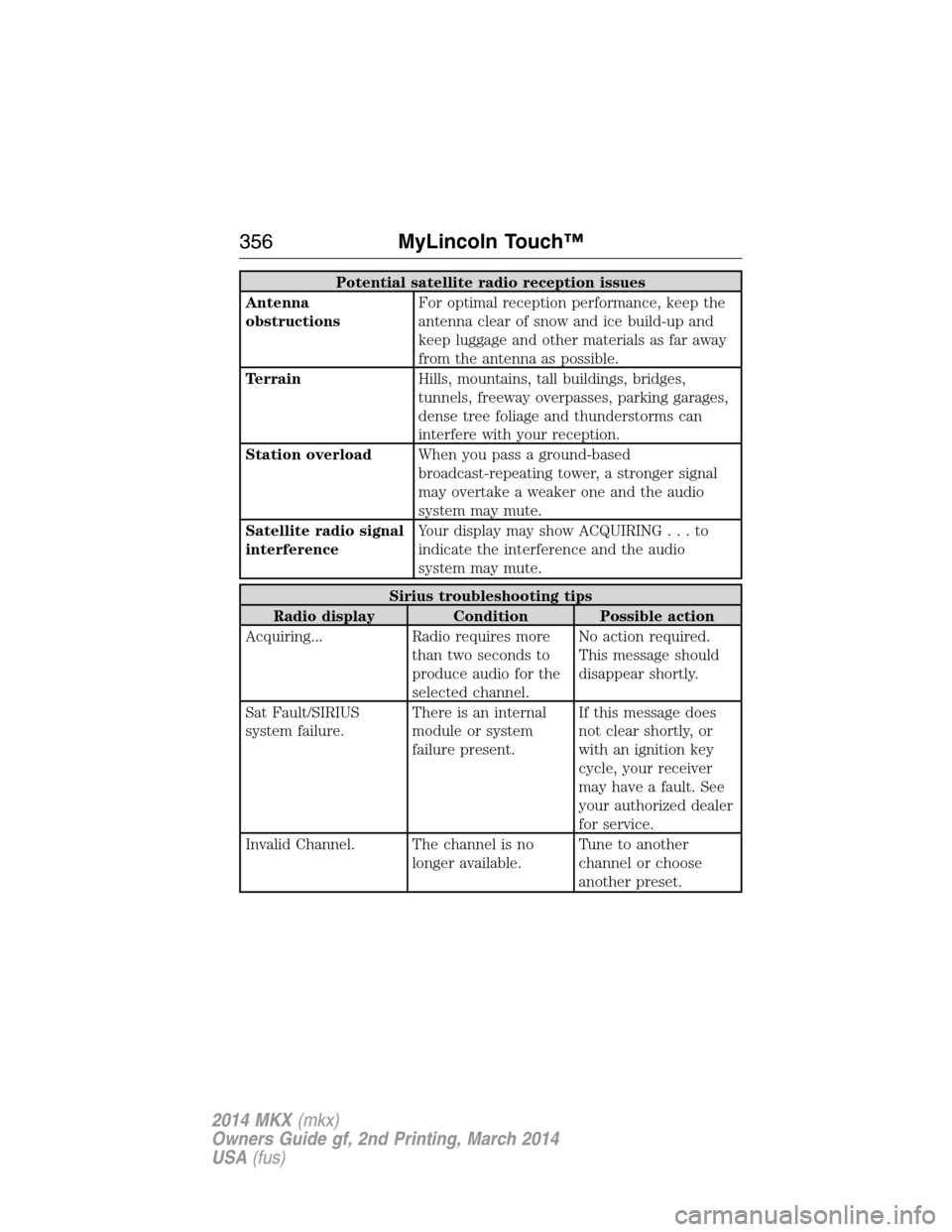
Potential satellite radio reception issues
Antenna
obstructionsFor optimal reception performance, keep the
antenna clear of snow and ice build-up and
keep luggage and other materials as far away
from the antenna as possible.
TerrainHills, mountains, tall buildings, bridges,
tunnels, freeway overpasses, parking garages,
dense tree foliage and thunderstorms can
interfere with your reception.
Station overloadWhen you pass a ground-based
broadcast-repeating tower, a stronger signal
may overtake a weaker one and the audio
system may mute.
Satellite radio signal
interferenceYour display may show ACQUIRING...to
indicate the interference and the audio
system may mute.
Sirius troubleshooting tips
Radio display Condition Possible action
Acquiring... Radio requires more
than two seconds to
produce audio for the
selected channel.No action required.
This message should
disappear shortly.
Sat Fault/SIRIUS
system failure.There is an internal
module or system
failure present.If this message does
not clear shortly, or
with an ignition key
cycle, your receiver
may have a fault. See
your authorized dealer
for service.
Invalid Channel. The channel is no
longer available.Tune to another
channel or choose
another preset.
356MyLincoln Touch™
2014 MKX(mkx)
Owners Guide gf, 2nd Printing, March 2014
USA(fus)
Page 388 of 455

Only the photograph(s), which meets the following conditions, display:
•Compatible file formats are as follows: .jpg, .gif, .png, .bmp.
•Each file must be 1.5 MB or less.
•Recommended dimensions: 800 x 384.
Sound
Press the Settings icon >Sound,then select from the
following:
Sound Settings
Bass DSP*
Midrange Occupancy Mode*
Treble Speed Compensated Volume
Set Balance and Fade
*If equipped.
Vehicle
Press the Settings icon >Vehicle,then select from the
following:
•Ambient Lighting
•Vehicle Health Report
•Door Keypad Code
•Rear View Camera
•Enable Valet Mode.
Ambient Lighting (If Equipped)
When activated, ambient lighting illuminates footwells and cupholders
with a choice of colors. To access and make adjustments:
1. Press the Settings icon >Vehicle>Ambient Lighting.
2. Touch the desired color.
3. Use the scroll bar to increase or decrease the intensity.
To turn the feature on or off, press the power button.
Vehicle Health Report
Turn Automatic Reminders on and off and set the mileage interval at
which you would like to receive the reports. Press?for more information
on these selections.
When done making your selections, pressRun Vehicle Health Report
Nowif you want your report.
MyLincoln Touch™387
2014 MKX(mkx)
Owners Guide gf, 2nd Printing, March 2014
USA(fus)
Page 389 of 455

Door Keypad Code
To change the keypad code for your keyless entry keypad system:
1. Press the Settings icon >Vehicle>Door Keypad Code.
2. Enter your current factory code, then, when prompted, enter your
new code.
Rear View Camera
This menu allows you to access settings for your rear view camera.
Press the Settings icon >Vehicle>Rear View Camera,then select
from the following settings:
•Rear Camera Delay
•Visual Park Aid Alert
•Guidelines.
Enable Valet Mode
Valet mode allows you to lock the system. No information is accessible
until the system is unlocked with the correct PIN.
1. Press the Settings icon >Vehicle>Enable Valet Mode.
2. When prompted, enter a four-digit PIN.
After you press Continue, the system locks until you enter the PIN again.
Note:If the system locks, and you need to reset the PIN, enter 3681 and
the system unlocks.
Settings
Access and adjust system settings, voice features, as well as phone,
navigation and wireless settings.
System
Press the Settings icon >Settings>System,then select from
the following:
System
LanguageSelect to have the touchscreen display in
English, Spanish or French.
DistanceSelect to display units in kilometers or miles.
TemperatureSelect to display units in Celsius or
Fahrenheit.
System Prompt
VolumeAdjust the volume of voice prompts from the
system.
388MyLincoln Touch™
2014 MKX(mkx)
Owners Guide gf, 2nd Printing, March 2014
USA(fus)
Page 390 of 455

System
Touch Screen Button
BeepSelect to have the system beep to confirm
choices made through the touchscreen.
Touch Panel Button
BeepSelect to have the system beep to confirm
button choices made through the climate or
audio system.
Keyboard LayoutHave the touchscreen keyboard display in
QWERTY or ABC format.
Install ApplicationsInstall any downloaded applications or view
the current software licenses.
Master ResetSelect to restore factory defaults. This erases
all personal settings and personal data.
Voice Control
Press the Settings icon >Settings>Voice Control,then
select from the following:
Voice control
Interaction ModeStandard interaction mode provides more
detailed interaction and guidance. Advanced
mode has less audible interaction and more
tone prompts.
Confirmation
PromptsHave the system ask you short questions if it
has not clearly heard or understood your
request.
Note:Even with confirmation prompts turned
off, the system may occasionally ask you to
confirm settings.
Media Candidate
ListsCandidate lists are possible results from your
voice commands. The system simply makes a
best guess at your request with these turned
off.
Phone Candidate
ListsCandidate lists are possible results from your
voice commands. The system simply makes a
best guess at your request with these turned
off.
Voice Control VolumeThis allows you to adjust the system’s voice
volume level.
MyLincoln Touch™389
2014 MKX(mkx)
Owners Guide gf, 2nd Printing, March 2014
USA(fus)