2014 LINCOLN MKS climate control
[x] Cancel search: climate controlPage 341 of 461

INTRODUCTION
WARNING:Driving while distracted can result in loss of vehicle
control, crash and injury. We strongly recommend that you use
extreme caution when using any device that may take your focus off
the road. Your primary responsibility is the safe operation of your
vehicle. We recommend against the use of any hand-held device while
driving and encourage the use of voice-operated systems when possible.
Make sure you are aware of all applicable local laws that may affect the
use of electronic devices while driving.
A. Phone
B. Navigation (or Information if your vehicle is not equipped with
Navigation)
C. Climate
D. Settings
E. Home
F. Information
G. Entertainment
AB
GCDFE
340MyLincoln Touch™
2014 MKS(mks)
Owners Guide gf, 1st Printing, April 2013
USA(fus)
Page 342 of 461

This system uses a four-corner strategy to provide quick access several
vehicle features and settings. The touchscreen provides easy interaction
with your cellular phone, multimedia, climate control and navigation
system. The corners display any active modes within those menus, such
as phone status or the climate temperature.
Note:Some features are not available while your vehicle is moving.
Note:Your system is equipped with a feature that allows you to access
and control audio features for 30 minutes after you switch the ignition
off (and no doors open).
PHONE
Press to select any of the following:
•Making and Receiving Calls
•Quick Dial
•Phonebook
•Call History
•Text Messaging
•Settings
NAVIGATION
Press to select any of the following:
•My Home
•Favorites
•Previous Destinations
•Point of Interest
•Emergency
•Street Address
•Intersection
•City Center
•Map
•Edit Route Cancel Route
CLIMATE
Press to select any of the following:
•Driver Settings
•Recirculated Air
•Auto
•Dual
•Passenger Settings
•A/C
•Defrost
MyLincoln Touch™341
2014 MKS(mks)
Owners Guide gf, 1st Printing, April 2013
USA(fus)
Page 344 of 461

Using the Touch-sensitive Controls on Your System
To turn a feature on and off, just touch the graphic with your finger. To get
the best performance from the touch-sensitive controls, keep in mind:
•Do not press hard on the controls. They are sensitive to light touch.
•
Use your bare finger to touch the center of a touch-control graphic.
Touching off-center of the graphic may affect operation of a nearby control.
•Make sure your hands are clean and dry.
•
Keep metal and other conductive material away from the surface of the
touchscreen as this may cause electronic interference (for example,
inadvertently turning on a feature other than the one you meant to turn on).
Depending on your vehicle and option package, you may also have these
controls on your bezel:
•Power: Switch the media or climate features off and on.
•VOLand fan slider bars: Slide your finger over the rear slider area to
control the volume of playing media or the climate system fan.
•Seek and Tune buttons: Use as you normally would in media modes.
•Eject: Eject a CD from the entertainment system.
•SOURCE:Touch the word repeatedly to see all available media
modes. The screen does not change, but you see the media change in
the lower left status bar.
•SOUND:Touch the word to access the Sound menu where you can
adjust settings such as: Bass, Treble, Midrange, Balance and Fade,
THX Deep note Demo, DSP (Digital Signal Processing), Occupancy
Mode and Speed Compensated Volume. (Your vehicle may not have
all of these sound options.)
•Hazard flasher: Switch the hazard flashers off and on.
Cleaning the Touchscreen Display
Use a clean, soft cloth such as one used for cleaning glasses. If dirt or
fingerprints are still visible, apply a small amount of alcohol to the cloth.
Do not pour or spray alcohol onto the display. Do not use detergent or
any type of solvent to clean the display.
Support
The SYNC support team is available to help you with any questions you
aren’t able to answer on your own.
Monday-Saturday, 8:30 am-8pm EST
In the United States, call: 1–888–270–1055
In Canada, call: 1–800–565–3673
Times are subject to change due to holidays.
MyLincoln Touch™343
2014 MKS(mks)
Owners Guide gf, 1st Printing, April 2013
USA(fus)
Page 350 of 461

Accessing a List of Available Commands
•If you use the touchscreen, press the Settings icon >Help>Voice
Command List.
•If you use the steering wheel control, press the voice icon. After the
tone, speak your command clearly.
Voice command list
“Audio list of commands”
“Bluetooth audio list of commands”
“Browse list of commands”
“CD list of commands”
“Climate control list of commands”
“List of commands”
“Navigation list of commands”
*
“Phone list of commands”
“Radio list of commands”
“SD card list of commands”
“Sirius satellite list of commands”
**
“Travel link list of commands”*
“USB list of commands”
“Voice instructions list of commands”
“Voice settings list of commands”
“Help”
*This command is only available when your vehicle is equipped with the
navigation system, and the navigation system SD card is in the card slot.
**This command is only available when you have an active Sirius satellite
radio subscription.
Voice Settings
Voice settings allow you to customize the level of system interaction,
help and feedback. The system defaults to standard interaction that uses
candidate lists and confirmation prompts as these provide the highest
level of guidance and feedback.
Interaction Mode:Novice mode provides detailed interaction and
guidance while the advanced mode has less audible interaction and more
tone prompts.
MyLincoln Touch™349
2014 MKS(mks)
Owners Guide gf, 1st Printing, April 2013
USA(fus)
Page 405 of 461
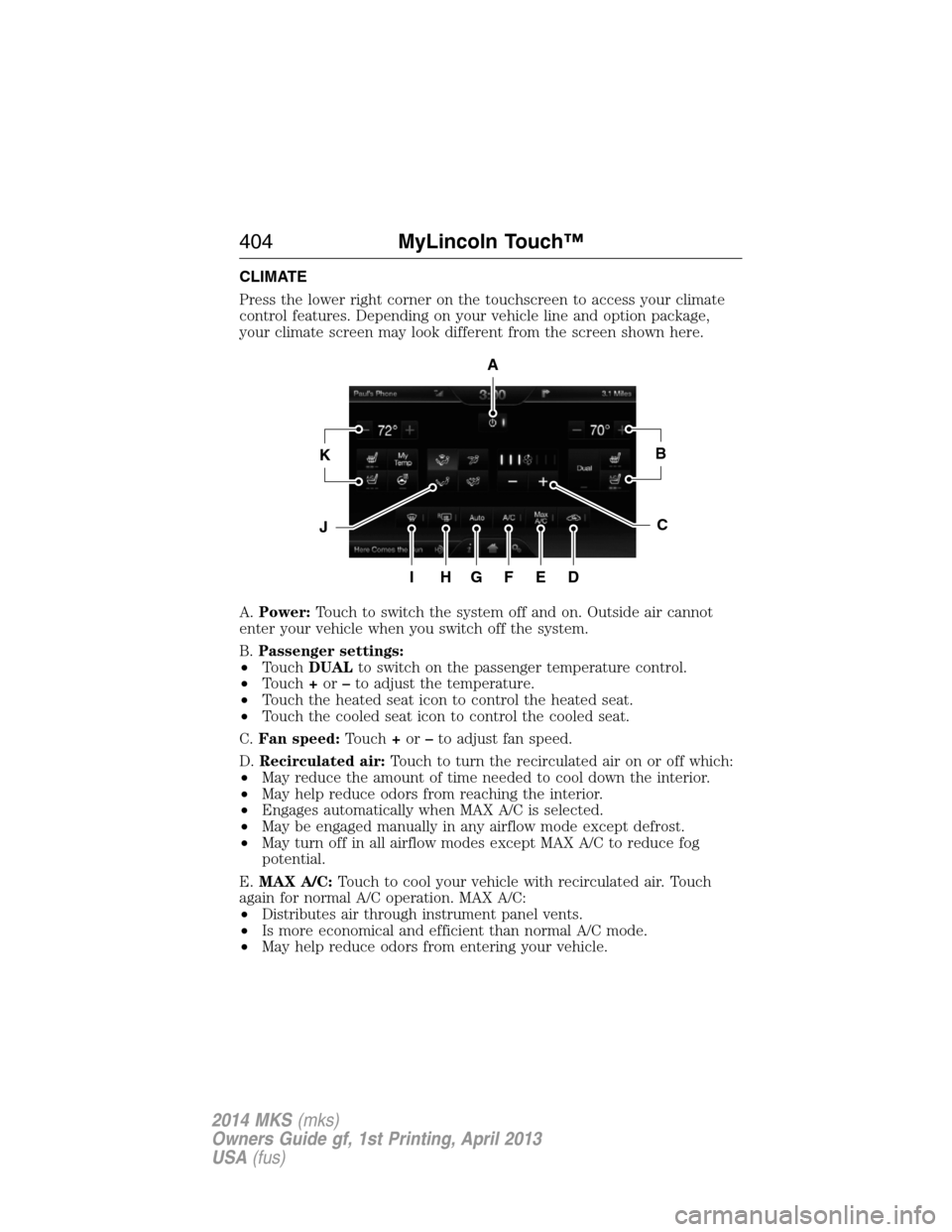
CLIMATE
Press the lower right corner on the touchscreen to access your climate
control features. Depending on your vehicle line and option package,
your climate screen may look different from the screen shown here.
A.Power:Touch to switch the system off and on. Outside air cannot
enter your vehicle when you switch off the system.
B.Passenger settings:
•TouchDUALto switch on the passenger temperature control.
•Touch+or–to adjust the temperature.
•Touch the heated seat icon to control the heated seat.
•Touch the cooled seat icon to control the cooled seat.
C.Fan speed:Touch+or–to adjust fan speed.
D.Recirculated air:Touch to turn the recirculated air on or off which:
•May reduce the amount of time needed to cool down the interior.
•May help reduce odors from reaching the interior.
•Engages automatically when MAX A/C is selected.
•May be engaged manually in any airflow mode except defrost.
•May turn off in all airflow modes except MAX A/C to reduce fog
potential.
E.MAX A/C:Touch to cool your vehicle with recirculated air. Touch
again for normal A/C operation. MAX A/C:
•Distributes air through instrument panel vents.
•Is more economical and efficient than normal A/C mode.
•May help reduce odors from entering your vehicle.
A
KB
JC
IHGFED
404MyLincoln Touch™
2014 MKS(mks)
Owners Guide gf, 1st Printing, April 2013
USA(fus)
Page 407 of 461
Climate Control Voice Commands
The following voice commands are available at the main menu
level of a voice session. For example, press the voice button
and after the prompt, “Say a command”; say any of the
following commands:
Climate control voice commands
“Climate automatic”
“Climate my temperature”
“Climate off”
“Climate on”
“Climate temperature <15.5–29.5> degrees”
“Climate temperature <60–85> degrees”
“Help”
There are additional climate control commands but in order to access
them, you have to say “Climate” first, then when the system is ready to
listen, you may say any of the following commands:
Additional climate control voice commands
“Automatic” “Panel on”
“A/C off” “Rear defrost off”
“A/C on” “Rear defrost on”
“Defrost off” “Recirc off”
“Defrost on” “Recirc on”
“Dual off” “Temperature”
*
“Fan decrease” “Temperature <15.5–29.5>
degrees”
“Fan increase” “Temperature <60–85> degrees”
“Floor on” “Temperature decrease”
“Max A/C off” “Temperature high”
“Max A/C on” “Temperature increase”
“My temp” “Temperature low”
“Off” “Windshield floor on”
“On” “Help”
“Panel floor on”
406MyLincoln Touch™
2014 MKS(mks)
Owners Guide gf, 1st Printing, April 2013
USA(fus)
Page 445 of 461

Other maintenance items1
Every 20000 miles
(32000 km)Replace cabin air filter.
Every 30000 miles
(48000 km)Replace climate-controlled (heated and
cooled) seat filter.
2
Replace engine air filter.
At 100000 miles
(160000 km)Change engine coolant.3
Every 100000 miles
(160000 km)Replace spark plugs.
Inspect accessory drive belt(s).4
Every 150000 miles
(240000 km)Change automatic transmission fluid
Replace accessory drive belt(s) if not replaced
within the last 100000 miles (160000 km).
1These maintenance items can be performed within 3000 miles
(4800 kilometers) of the last oil change. Do not exceed the designated
distance for the interval.
2If your vehicle has climate-controlled (heated and cooled) seats.
3Initial replacement at six years or 100000 miles (160000 kilometers),
then every three years or 50000 miles (80000 kilometers).
4After initial inspection, inspect every other oil change until replaced.
444Scheduled Maintenance
2014 MKS(mks)
Owners Guide gf, 1st Printing, April 2013
USA(fus)
Page 456 of 461

CD player ..........................336, 365
CD voice commands .................366
Cell phone use ............................15
Changing a tire .........................316
Child safety restraints ..........28, 30
Child safety seats
attaching with tether straps ....30
automatic locking mode
(retractor) .................................36
LATCH .......................................28
Child safety seats - booster
seats .............................................22
Cleaning the touchscreen ........343
Cleaning your vehicle ...............287
engine compartment ..............289
instrument panel ....................291
interior .....................................291
plastic parts ............................288
washing ....................................287
waxing .....................................289
wheels ......................................293
wiper blades ............................290
Climate voice commands .........406
Clock ..................................338, 393
Collision Warning System .........215
Console ......................................146
overhead ..................................146
Coolant ......................................267
checking and adding ..............267
refill capacities ........................324
specifications ..........................324
Cross Traffic Alert ....................210
Cruise control ...........................194
Cupholder(s) .............................137
Customer Assistance ................240Ford Extended Service
Plan ..........................................333
Getting roadside assistance ...240
Getting the service you
need .........................................245
Ordering additional owner’s
literature .................................251
Utilizing the
Mediation/Arbitration
Program ...................................249
D
Defrost .......................................123
rear window ............................125
Dipstick
automatic transmission
fluid ..........................................272
engine oil .................................266
Display settings .........................393
Driver alert ................................204
Driving under special
conditions ..................169, 171, 174
sand .........................................172
snow and ice ...........................175
through water .................173, 237
Dual automatic temperature
control (DATC) .........................123
E
Electronic message center .......108
Electronic stability control ......181
Emergencies, roadside
jump-starting ..........................242
running out of fuel .................156
Emergency brake
(see Parking brake) ..................178
Emission control system ..........161
Index455
2014 MKS(mks)
Owners Guide gf, 1st Printing, April 2013
USA(fus)