Page 349 of 652
349
3-2. Using the audio system
3
Interior features
RX350/270_EE
Adjusting sound quality and volume balance
Press to enter iPod menu mode.
Pressing changes sound modes. (→P. 3 7 7 )
■About iPod
●“Made for iPod” and “Made for iPhone” mean that an electronic accessory has
been designed to connect specifically to iPod, or iPhone, respectively, and has
been certified by the developer to meet Apple performance standards.
●Apple is not responsible for the operation of this device or its compliance with
safety and regulatory standards. Please note that the use of this accessory with
iPod or iPhone may affect wireless performance.
●iPhone, iPod, iPod classic, iPod nano and iPod touch are trademarks of Apple
Inc., registered in the U.S. and other countries.
STEP1
STEP2
RX350_270_EE_48D77E.book 349 ページ 2014年1月24日 金曜日 午前10時4分
Page 350 of 652

350
3-2. Using the audio system
RX350/270_EE
■iPod functions
●When an iPod is connected and the audio source is changed to iPod mode, the
iPod will resume play from the same point in which it was last used.
●Depending on the iPod that is connected to the system, certain functions may
not be available. If a function is unavailable due to a malfunction (as opposed to
a system specification), disconnecting the device and reconnecting it once
again may resolve the problem.
●While connected to the system, the iPod cannot be operated with its own con-
trols. It is necessary to use the controls of the vehicle's audio system instead.
●When the battery level of an iPod is very low, the iPod may not operate. If so,
charge the iPod before use.
●Supported models (→P. 3 5 1 )
■iPod problems
To resolve most problems encountered when using your iPod, disconnect your iPod
from the vehicle iPod connection and reset it.
For instructions on how to reset your iPod, refer to your iPod Owner’s Manual.
■Display
→P. 3 3 4
■Error messages
“ERROR”: This indicates a problem in the iPod or its connection.
“NO MUSIC”: This indicates that there is no music data in the iPod.
“EMPTY”: This indicates that some available songs are not found in a selected
playlist.
“UPDATE”: This indicates that the version of the iPod is not compatible.
Upgrade your iPod software to the latest version.
RX350_270_EE_48D77E.book 350 ページ 2014年1月24日 金曜日 午前10時4分
Page 356 of 652

356
3-2. Using the audio system
RX350/270_EE
Repeat play
■Repeating a file
Press .
To cancel, press again.
■Repeating all the files in a folder
Press and hold until you hear a beep.
To cancel, press again.
Switching the display
Press .
Each time the button is pressed, the display changes in the following order:
Elapsed time → Folder name → File name → Album title (MP3 only) →
Tr a c k t i t l e → Artist name
■USB memory functions
●Depending on the USB memory that is connected to the system, the device
itself may not be operable and certain functions may not be available. If the
device is inoperable or a function is unavailable due to a malfunction (as
opposed to a system specification), disconnecting the device and reconnecting
it once again may resolve the problem.
●If the USB memory still does not begin operation after being disconnected and
reconnected, format the memory.
■Display
→P. 3 3 4
■Error messages
“ERROR”: This indicates a problem in the USB memory or its connection.
“NO MUSIC”: This indicates that no MP3/WMA files are included in the USB
memory.
RX350_270_EE_48D77E.book 356 ページ 2014年1月24日 金曜日 午前10時4分
Page 359 of 652

359
3-2. Using the audio system
3
Interior features
RX350/270_EE
●MP3 and WMA playback
• When a device containing MP3 or WMA files is connected, all files in the
USB memory device are checked. Once the file check is finished, the first
MP3 or WMA file is played. To make the file check finish more quickly, we
recommend that you do not include any files other than MP3 or WMA files
or create any unnecessary folders.
• When the USB device is connected and the audio source is changed to USB
memory mode, the USB device will start playing the first file in the first folder.
If the same device is removed and reinserted (and the contents have not been
changed), the USB device will resume play from the same point in which it
was last used.
●Extensions
If the file extensions .mp3 and .wma are used for files other than MP3 and WMA
files, they will be skipped (not played).
●Playback
• To play MP3 files with steady sound quality, we recommend a fixed bit rate
of at least 128 kbps and a sampling frequency of 44.1 kHz.
• There is a wide variety of freeware and other encoding software for MP3
and WMA files on the market, and depending on the status of the encoding
and the file format, poor sound quality or noise at the start of playback may
result. In some cases, playback may not be possible at all.
• Microsoft, Windows, and Windows Media are registered trademarks of
Microsoft Corporation in the U.S.A. and other countries.
CAUTION
■Caution while driving
Do not connect USB memories or operate the controls.
RX350_270_EE_48D77E.book 359 ページ 2014年1月24日 金曜日 午前10時4分
Page 368 of 652
368
3-2. Using the audio system
RX350/270_EE
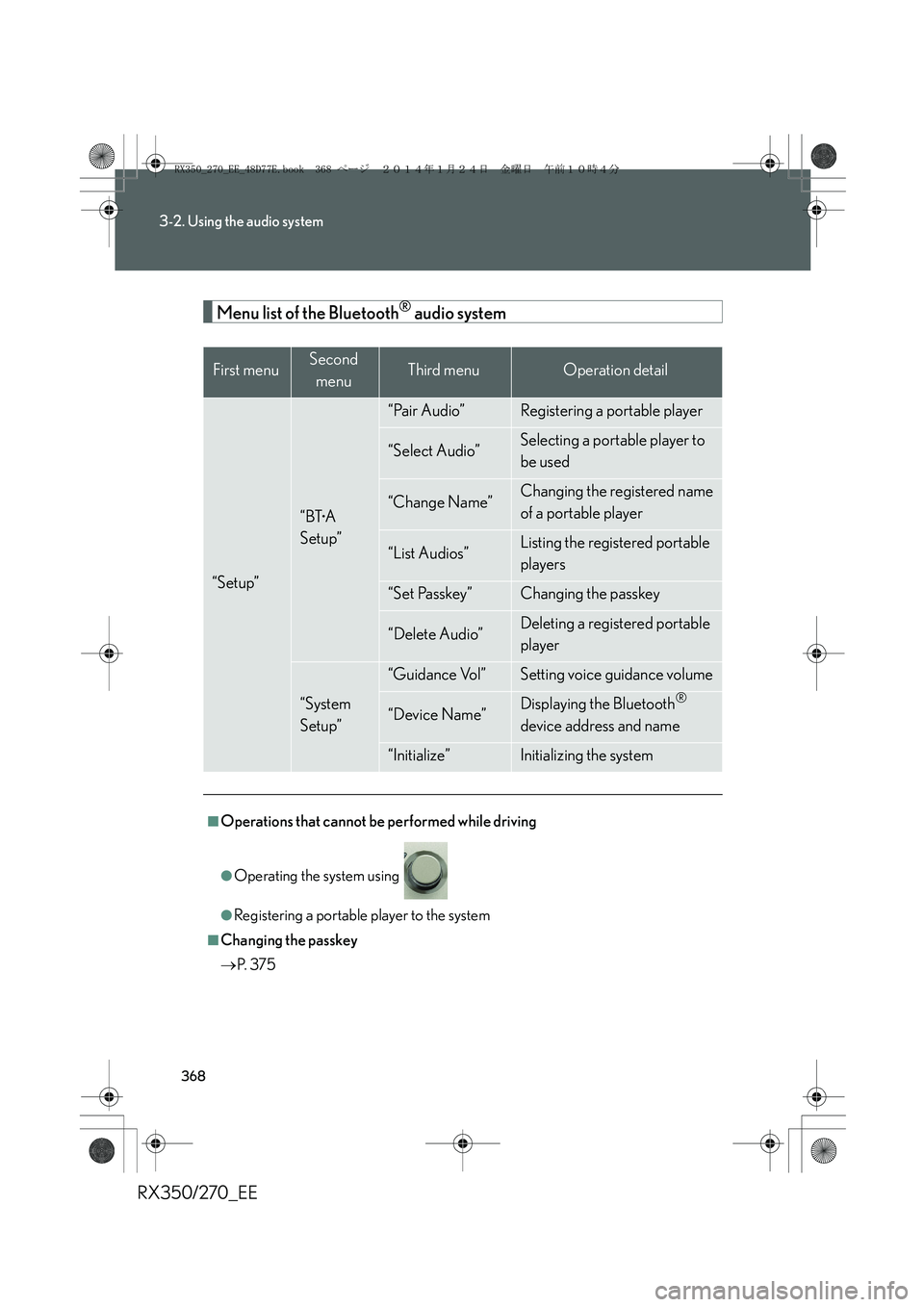
Menu list of the Bluetooth® audio system
First menuSecond
menuThird menuOperation detail
“Setup”
“BT•A
Setup”
“Pair Audio”Registering a portable player
“Select Audio”Selecting a portable player to
be used
“Change Name”Changing the registered name
of a portable player
“List Audios”Listing the registered portable
players
“Set Passkey”Changing the passkey
“Delete Audio”Deleting a registered portable
player
“System
Setup”
“Guidance Vol”Setting voice guidance volume
“Device Name”Displaying the Bluetooth®
device address and name
“Initialize”Initializing the system
■Operations that cannot be performed while driving
●Operating the system using
●Registering a portable player to the system
■Changing the passkey
→P. 3 7 5
RX350_270_EE_48D77E.book 368 ページ 2014年1月24日 金曜日 午前10時4分
Page 370 of 652
370
3-2. Using the audio system
RX350/270_EE
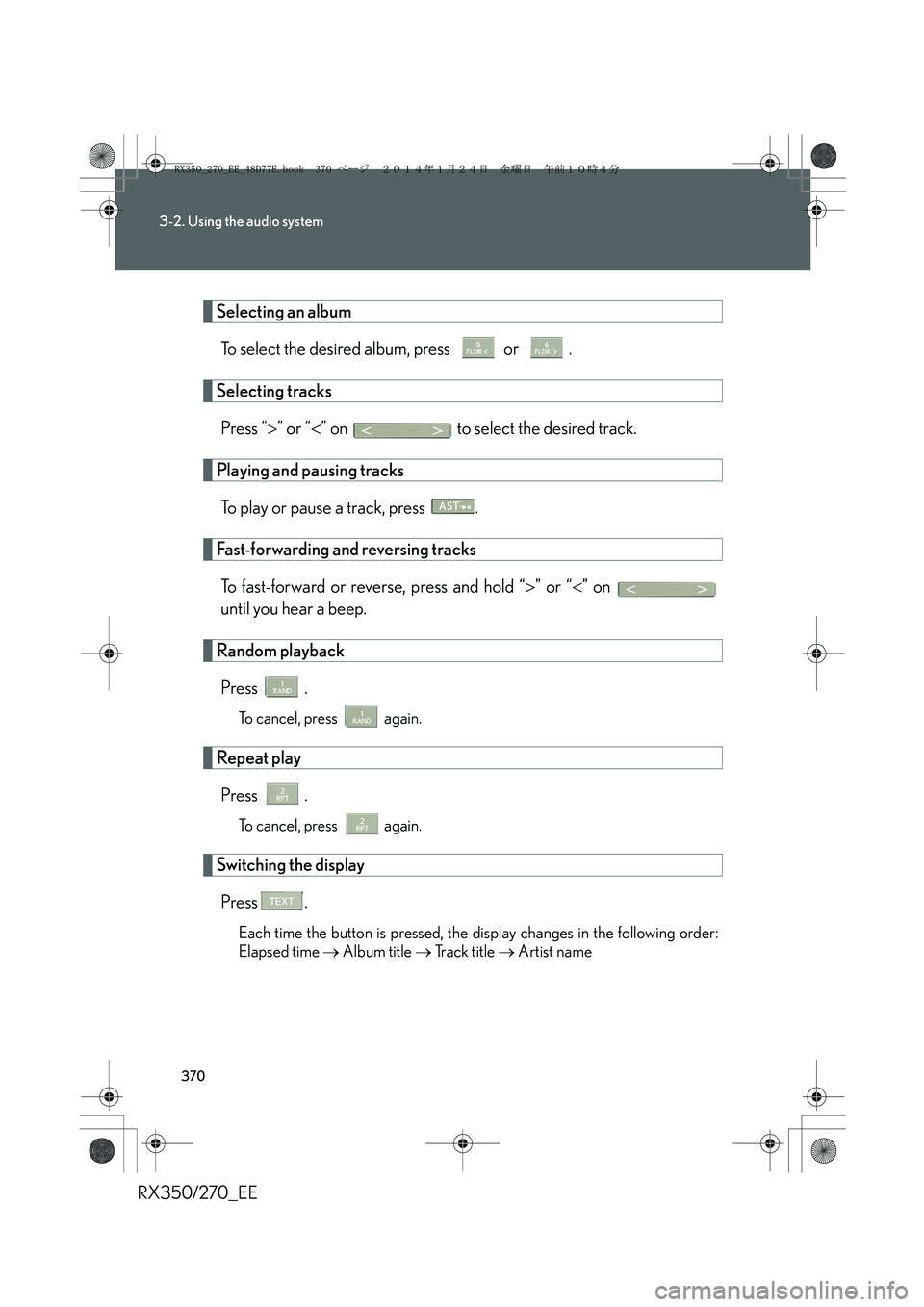
Selecting an album
To select the desired album, press or .
Selecting tracks
Press “>” or “<” on to select the desired track.
Playing and pausing tracks
To play or pause a track, press .
Fast-forwarding and reversing tracks
To fast-forward or reverse, press and hold “>” or “<” on
until you hear a beep.
Random playback
Press .
To cancel, press again.
Repeat play
Press .
To cancel, press again.
Switching the display
Press .
Each time the button is pressed, the display changes in the following order:
Elapsed time → Album title → Track title → Artist name
RX350_270_EE_48D77E.book 370 ページ 2014年1月24日 金曜日 午前10時4分
Page 372 of 652
372
3-2. Using the audio system
RX350/270_EE
Setting up a Bluetooth® enabled portable player
Registering a portable player in the Bluetooth® audio system allows the
system to function. The following functions can be used for registered por-
table players:
■Functions and operation procedures
To enter the menu for each function, follow the steps below.
Press to select “BT•A MENU” or press the off-hook
switch and select “Setup” using .
Select “BT•A Setup” using .
Select one of the following items using :
●Registering a portable player
“Pair Audio”
●Selecting a portable player to be used
“Select Audio”
●Changing the registered name of a portable player
“Change Name”
●Listing the registered portable players
“List Audios”
●Changing the passkey
“Set Passkey”
●Deleting a registered portable player
“Delete Audio”
STEP1
STEP2
STEP3
RX350_270_EE_48D77E.book 372 ページ 2014年1月24日 金曜日 午前10時4分
Page 374 of 652
374
3-2. Using the audio system
RX350/270_EE
Changing the registered name of a portable player
Select “Change Name” using .
Select the desired portable player name to be changed using
.
Select “Record Name” using , and say the new name after
the beep.
The name to be registered will be repeated aloud.
Select “Confirm” using .
Listing the registered portable players
Select “List Audios” using . The list of registered portable players
will be read aloud.
When listing is complete, the system returns to “BT•A Setup”.
STEP1
STEP2
STEP3
STEP4
RX350_270_EE_48D77E.book 374 ページ 2014年1月24日 金曜日 午前10時4分