Page 378 of 652
378
3-2. Using the audio system
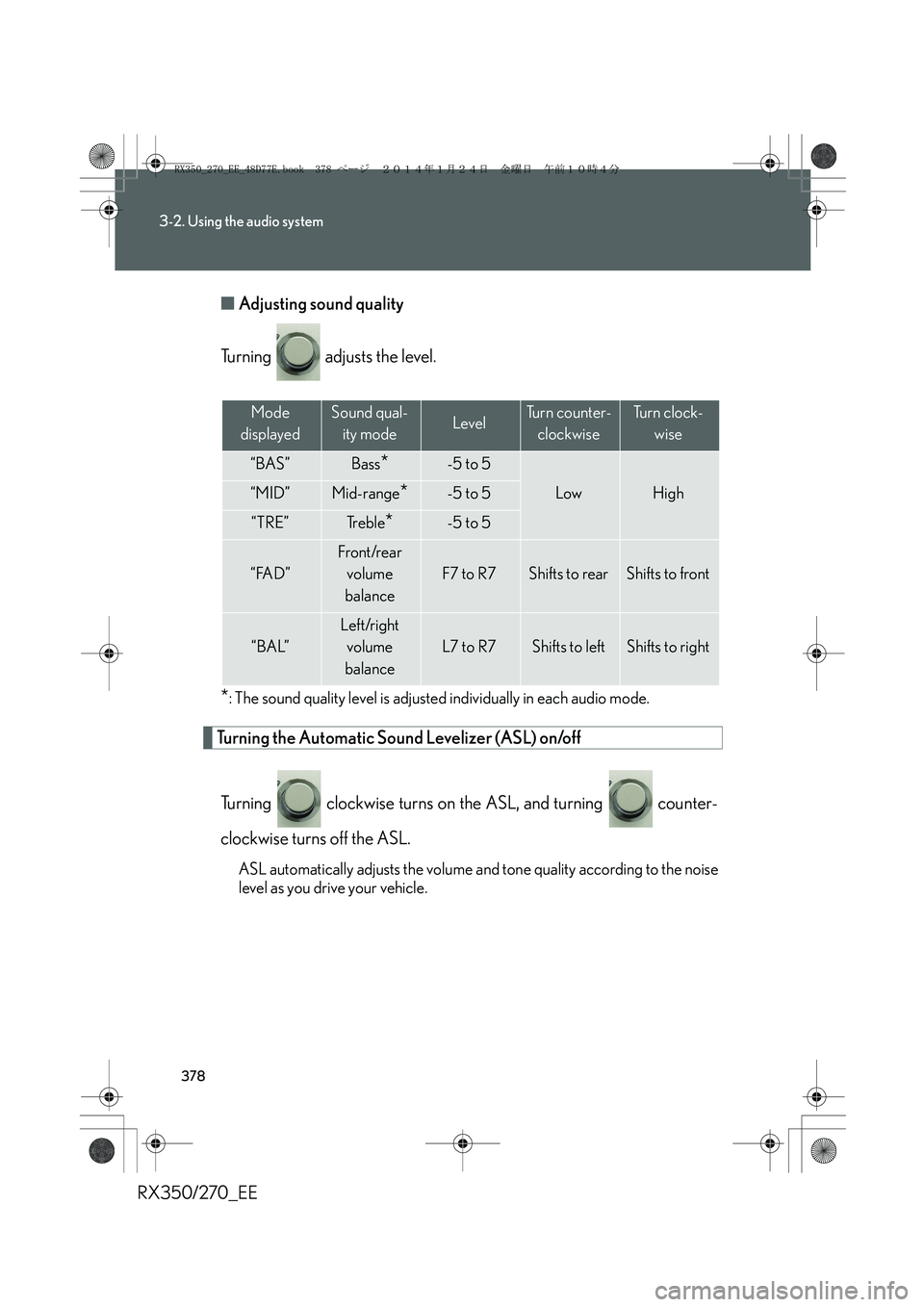
RX350/270_EE■Adjusting sound quality
Turning adjusts the level.
*: The sound quality level is adjusted individually in each audio mode.
Turning the Automatic Sound Levelizer (ASL) on/off
Turning clockwise turns on the ASL, and turning counter-
clockwise turns off the ASL.
ASL automatically adjusts the volume and tone quality according to the noise
level as you drive your vehicle.
Mode
displayedSound qual-
ity modeLevelTurn counter-
clockwiseTu r n c l o c k -
wise
“BAS”Bass*-5 to 5
LowHigh“MID”Mid-range*-5 to 5
“TRE”Tr e b l e*-5 to 5
“FAD”
Front/rear
volume
balance
F7 to R7Shifts to rearShifts to front
“BAL”
Left/right
volume
balance
L7 to R7Shifts to leftShifts to right
RX350_270_EE_48D77E.book 378 ページ 2014年1月24日 金曜日 午前10時4分
Page 379 of 652
379
3-2. Using the audio system
3
Interior features
RX350/270_EE
Using the AUX port
■Operating portable audio devices connected to the audio system
The volume can be adjusted using the vehicle's audio controls. All other adjust-
ments must be made on the portable audio device itself.
■When using a portable audio device connected to the power outlet
Noise may occur during playback. Use the power source of the portable audio
device.
This port can be used to connect a portable audio device and listen to it
through the vehicle’s speakers.
Pull up the lever to release the
lock, and lift the armrest.
Open the cover and connect
the portable audio device.
Press .STEP1
STEP2
AUX port
STEP3
RX350_270_EE_48D77E.book 379 ページ 2014年1月24日 金曜日 午前10時4分
Page 395 of 652
395
3-2. Using the audio system
3
Interior features
RX350/270_EE
“Setup”
“Security”
“Set PIN”Setting a PIN code
“Phbk Lock”Locking the phone book
“Phbk Unlock”Unlocking the phone book
“Phone
Setup”
“Pair Phone”Registering a mobile phone
“Select Phone”Selecting a mobile phone to be
used
“Change Name”Changing the registered name
of a mobile phone
“List Phones”Listing the registered mobile
phones
“Set Passkey”Changing the passkey
“Delete Phone”Deleting a registered mobile
phone
“System
Setup”
“Guidance Vol”Setting voice guidance volume
“Device Name”Displaying the Bluetooth®
device address and name
“Initialize”Initializing the system
First menuSecond
menuThird menuOperation detail
RX350_270_EE_48D77E.book 395 ページ 2014年1月24日 金曜日 午前10時4分
Page 405 of 652
405
3-2. Using the audio system
3
Interior features
RX350/270_EE
Security and system setup
To enter the menu of each setting, follow the steps below.
■Security setting items and operation procedures
Press the off-hook switch and select “Setup” using .
Select “Security” using .
Select one of the following items using :
●Setting or changing the PIN (Personal Identification Number)
“Set PIN”
●Locking the phone book
“Phbk Lock”
●Unlocking the phone book
“Phbk Unlock”
STEP1
STEP2
STEP3
RX350_270_EE_48D77E.book 405 ページ 2014年1月24日 金曜日 午前10時4分
Page 408 of 652
408
3-2. Using the audio system
RX350/270_EE
Locking or unlocking the phone book
Select “Phbk Lock” or “Phbk Unlock” using .
Input a new PIN using and select “Confirm” using .
Input the code 1 digit at a time.
Setting voice guidance volume
Select “Guidance Vol” using .
Change the voice guidance volume.
To decrease the volume: Turn counterclockwise.
To increase the volume: Turn clockwise.
STEP1
STEP2
STEP1
STEP2
RX350_270_EE_48D77E.book 408 ページ 2014年1月24日 金曜日 午前10時4分
Page 410 of 652
410
3-2. Using the audio system
RX350/270_EE
■Initialization
●The following data in the system can be initialized:
• Phone book
• Outgoing and incoming call history
• Speed dials
• Registered mobile phone data
•Security code
• Registered Bluetooth
® enabled portable player data
• Passkeys for the mobile phones
• Passkey for the Bluetooth
® audio players
•Guidance volume
• Receiver volume
• Ring tone volume
●Once the initialization has been completed, the data cannot be restored to its
original state.
■When the phone book is locked
The following functions cannot be used:
●Dialing by inputting a name
●Speed dialing
●Dialing a number stored in the call history memory
●Using the phone book
RX350_270_EE_48D77E.book 410 ページ 2014年1月24日 金曜日 午前10時4分
Page 419 of 652
419
3-3. Using the interior lights
3
Interior features
RX350/270_EE
■Illuminated entry system
The lights automatically turn on/off according to “ENGINE START STOP” switch
mode, the presence of the electronic key, whether the doors are locked/unlocked,
and whether the doors are open/closed.
■To prevent battery discharge
When the “ENGINE START STOP” switch is turned off, the lights will go off auto-
matically after 20 minutes.
●Personal lights
●Interior lights
●Door courtesy lights
●Scuff lights (if equipped)
●Footwell lights
■Customization
Settings (e.g. the time elapsed before the lights turn off) can be changed.
(Customizable features →P. 6 2 2 )
Interior lights and personal lights
RX350_270_EE_48D77E.book 419 ページ 2014年1月24日 金曜日 午前10時4分
Page 421 of 652
421
3-4. Using the storage features
3
Interior features
RX350/270_EE
Glove box
The glove box can be opened by pressing the lock release button and
locked and unlocked using the mechanical key.
Opens
Locks
Unlocks
■Power back door main switch (vehicles with a power back door)
The power back door main switch is located in the glove box. (→P. 6 2 )
CAUTION
■Caution while driving
Keep the glove box closed. In the event of sudden braking or sudden swerving, an
accident may occur due to an occupant being struck by the open glove box or the
items stored inside.
Glove box
RX350_270_EE_48D77E.book 421 ページ 2014年1月24日 金曜日 午前10時4分