Page 169 of 956

1692-1. Driving procedures
2
When driving
LX570_OM_OM60L21U_(U) CAUTION ●
When stopped on an inclined surface, use the brake pedal and parking brake to
prevent the vehicle from rolling backwa rd or forward and causing an accident.●
Do not adjust the position of the steering wheel, the seat, or the inside or outside
rear view mirrors while driving.
Doing so may result in a loss of vehicle control that can cause accidents that may
result in death or serious injury. ●
Always check that all passengers’ arms, heads or other parts of their bodies are
not outside the vehicle, as this may result in death or serious injury. ●
Do not drive in excess of the speed limit. Even if the legal speed limit permits it, do
not drive over 85 mph (140 km/h) unless your vehicle has high-speed capability
tires. Driving over 85 mph (140 km/h) may result in tire failure, loss of control and
possible injury. Be sure to consult a tire dealer to determine whether the tires on
your vehicle are high-speed capability tires or not before driving at such speeds. ●
When crossing rivers, turn off height co ntrol after putting the vehicle height in
high mode, and drive at 18 mph (30 km/h) or less. Otherwise the vehicle height
may change due to the automatic leveling function, resulting in an accident.
( P. 3 1 8 )■
When driving on slippery road surfaces ●
Sudden braking, acceleration and steering may cause tire slippage and reduce
your ability to control the vehi cle, resulting in an accident.●
Sudden acceleration, engine braking due to shift changing, or changes in engine
speed could cause the vehicle to skid, resulting in an accident. ●
After driving through a pudd le, lightly depress the brak e pedal to make sure that
the brakes are functioning properly. Wet brake pads may prevent the brakes from
functioning properly. If the brakes on on ly one side are wet and not functioning
properly, steering control may be af fected, resulting in an accident.
Page 318 of 956
3182-4. Using other driving systems
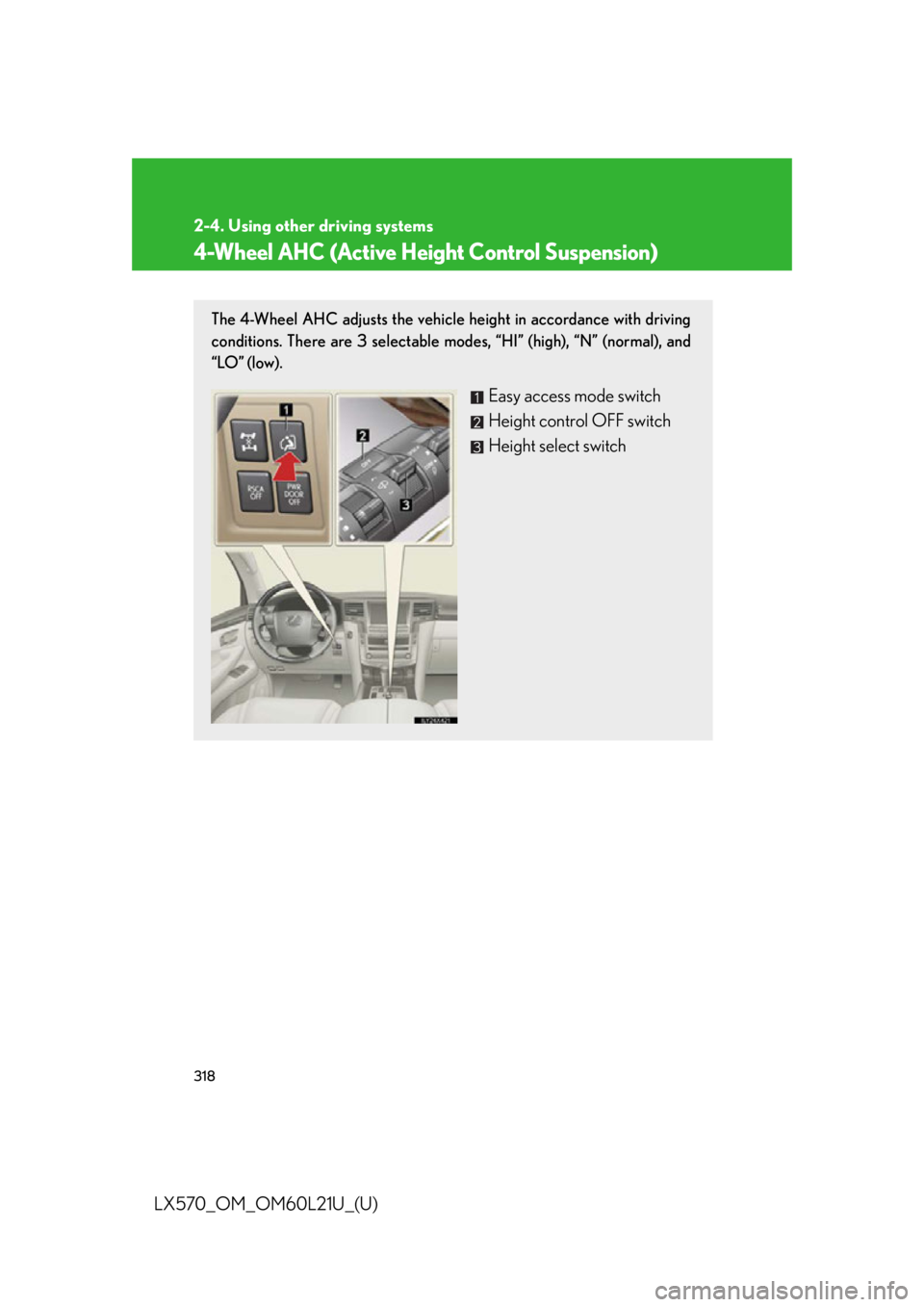
LX570_OM_OM60L21U_(U) 4-Wheel AHC (Active Height Control Suspension) The 4-Wheel AHC adjusts the vehicle height in accordance with driving
conditions. There are 3 selectable modes, “HI” (high), “N” (normal), and
“LO” (low).
Easy access mode switch
Height control OFF switch
Height select switch
Page 319 of 956
3192-4. Using other driving systems
2
When driving
LX570_OM_OM60L21U_(U) Selecting vehicle height
Higher
Lower
Display
Current mode The vehicle is in the “N” (normal)
height mode in the illustration.
and show directions in which it
is possible to adjust the vehicle
height.
Height up
Height down
Height control “OFF” indicator When the height control “OFF”
indicator is displayed, the vehicle
height will not change even if the
height select switch is operated.
Page 320 of 956

3202-4. Using other driving systems
LX570_OM_OM60L21U_(U) Vehicle height modes
Push the height select switch to “ ” to step up one height mode, and pull
to “ ” to step down one height mode. (Ex. When in the low height mode,
push to “ ” once to switch to the normal height mode, and twice to switch
to the high height mode.)
■ “HI” (high) height mode
Vehicle height is about 2.0 in. (50 mm) higher at the front, and about
2.4 in. (60 mm) higher at the rear than the normal mode height.
This mode is suitable when driving on bumpy roads or through water.
High height mode is only available when the vehicle speed is under 18
mph (30 km/h).
■ “N” (normal) height mode
The standard vehicle height. This mode is suitable fo r ordinary driving.
When driving at high sp eeds, the vehicle height is automatically low-
ered by 0.8 in. (20 mm) in the front and 0.6 in. (15 mm) in the rear, to
ensure excellent aerodynamic characteristics and stability.
If the vehicle speed drops, norm al height mode is automatically
resumed.
■ “LO” (low) height mode
Vehicle height is about 2.4 in. (60 mm) lower at the front, and about 1.6
in. (40 mm) lower at the rear than the normal mode height.
This mode allows easy access to the vehicle.
Low height mode is only available when the vehicle is travelling at
7 mph (12 km/h) or less. When the vehicle speed exceeds 7 mph (12
km/h), normal height mode is automatically selected.
Page 321 of 956
3212-4. Using other driving systems
2
When driving
LX570_OM_OM60L21U_(U) Conditions for changing the vehicle height mode
Some modes may not be selectable depending on the vehicle speed
when the four-wheel drive control swit ch is in the “H4” position. Refer to
the following table.
Easy access mode
You can select this mode for easy
access and easy loading of the
vehicle.
If the “ENGINE START STOP” switch is turned to OFF within 30 seconds after
the vehicle stops while this mode is on, the vehicle height is lowered automati-
cally.
When the vehicle begins to lower a beep will sound twice, and while the vehicle
is lowering the indicator light will flash to alert the driver and surrounding people
that the vehicle is lowering. Low mode Normal mode High mode
Under 7 mph (12 km/h) Ye s Ye s Ye s
7 mph (12 km/h) to
18 mph (30 km/h) No Ye s Ye s
18 mph (30 km/h) or over No Ye s No
Page 322 of 956

3222-4. Using other driving systems
LX570_OM_OM60L21U_(U) The indicator light stops blinking, and come s on continuously to indicate that the
shift is completed.
Easy access mode is available if the following conditions have been met:
● The vehicle height mode is in normal mode.
● The vehicle is stopped on a flat surface.
● The shift lever is in “P”.
● The side door and the back door are not opened from the vehicle stopped to
the “ENGINE START STOP” switch is turned to off.
The following method will cancel the vehicle lowering operation and raise the
vehicle again:
● Press the height control OFF switch.
● Push the height select switch to “ ”.
Disabling the height control
When the height control OFF
switch is pressed with the vehicle
stopped. The “OFF” indicator will appear on
the multi-information display, and
the vehicle height will be fixed in
the current mode. Push the switch
again to turn the system back on.■
Operating conditions ●
The engine must be running. ●
Vehicle height control must be turned off. ●
All side doors and the back door must be closed.
Page 323 of 956

3232-4. Using other driving systems
2
When driving
LX570_OM_OM60L21U_(U) ■
Switching vehicle height mode while the engine is stopped●
If the engine is stopped wh ile the vehicle height is being lowered, lowering will
continue. ●
If any luggage is removed from the vehicle or if any occupants leave the vehicle
within approximately 30 seconds of the “ENGINE START STOP” switch being
turned OFF, the vehicle height may be lowered by the auto leveling function. ●
Operating the height select switch will have no effect while the engine is
stopped.■
Automatic change in vehicle height when the four-wheel drive control switch is in
the “L4” position
If the vehicle speed exceeds 2 mph (3 km/h) while driving on an uneven road with
the four-wheel drive control switch in the “L4” position, high mode is automatically
selected. (On even roads, the height mode will not change.) ■
Automatic change in vehicle height when in the high mode ●
If the vehicle speed exceeds 18 mph (30 km/h) with the four-wheel drive con-
trol switch in the “H4” position, no rmal mode is automatically selected.●
If the vehicle speed exceeds 25 mph (40 km/h) with the four-wheel drive con-
trol switch in the “L4” position, the vehicle height is lowered to 1.0 in. (25 mm)
higher than the normal mode height. If the vehicle speed drops to 12 mph (20
km/h) or less, high mode is automatically resumed.■
Extra high mode
If the vehicle becomes stuck or the Crawl Control system requests the vehicle
height be raised, extra high mode may be automatically selected when the vehicle
height is in high mode with the four-wheel drive control switch in the “L4” position.
The vehicle height is raised to 0.8 in. (2 0 mm) higher than the high mode height, or
slightly higher. ●
Extra high mode will change back to high mode when:
• The vehicle speed exceeds 6 mph (10 km/h)
• The four-wheel drive control switch is shifted to “H4”. ●
If you pull the height select switch to “ ” when in extra high mode, normal mode
is selected. ●
Extra high mode cannot be manually selected.
Page 324 of 956

3242-4. Using other driving systems
LX570_OM_OM60L21U_(U) ■
Turning off the height control ●
The system will remain of f until the height control OFF switch is pushed again,
even if the “ENGINE START STOP” switch is turned off. ●
Even if the system is turned off, the system automatically modulated if the vehi-
cle speed exceeds following.
• 18 mph (30 km/h) with high or low mode
• 50 mph (80 km/h) with normal mode■
Automatic leveling function
The vehicle is adjusted to a fixed height for each mode, regardless of the number of
occupants and the luggage load. ●
However the vehicle cannot be raised if the vehicle load exceeds the following
limits:
• Up to 4 occupants
* plus approximately 661 lb. (300 kg) in the normal mode
• Up to 4 occupants
* plus approximately 441 lb. (200 kg) in the high mode
* : average weight 150 lb. (68 kg) per person ●
If the vehicle height cannot be raised when in the normal mode, and “LO”
appears on the display, the vehicle is loaded too heavily. Take extra care when
driving in this condition.
If the vehicle height cannot be raised even after unloading the vehicle, pull the
height select switch to “ ” then push to “ ”. If the vehicle height still cannot be
raised, turn the ignition off then on again, then try once more.■
When the vehicle is st opped during driving
The activation of the automatic leveling function may cause the vehicle height to
change. This is not a malfunction. ■
If the vehicle height does not change
If the vehicle is loaded too heavily, or the undercarriage has come into contact with
the road surface, the vehicle height cannot be raised/lowered.