Page 107 of 612

1072. Instrument cluster
2
Instrument cluster
IS300h_EE(OM53C61E)
*1: These lights turn on when the power switch is turned to ON mode to indicate that a
system check is being performed. They will turn off after the hybrid system is on, or
after a few seconds. There may be a malfunction in a system if the lights do not come
on, or turn off. Have the vehicle inspected by any authorized Lexus dealer or repairer,
or another duly qualified and equipped professional.
*2: The light flashes to indicate that the system is operating.
*3: The light comes on when the system is turned off. The light flashes faster than usual to
indicate that the system is operating.
*4: In order to confirm operation, the BSM outside rear view mirror indicators illuminate
in the following situations:
• When the power switch is turned to ON mode while the BSM main switch is set to
ON.
• When the BSM main switch is set to ON while the power switch is in ON mode.
If the system is functioning correctly, the BSM outside rear view mirror indicators will
turn off after a few seconds.
If the BSM outside rear view mirror indicators do not illuminate or do not turn off,
there may be a malfunction in the system.
If this occurs, have the vehicle inspected by any authorized Lexus dealer or repairer,
or another duly qualified and equipped professional.
*9EV drive mode indicator
(→P. 2 1 4 )*9
(if equipped)
“SPORT S” indicator
(→P. 2 8 3 )
*8Eco drive mode indicator
(→P. 2 8 3 )*9
(if equipped)
“SPORT S+” indicator
(→P. 2 8 3 )
*9Eco drive mode indicator
(→P. 2 8 3 )*8Snow mode indicator
(→P. 2 1 7 )
*8“SPORT” indicator
(→P. 2 8 3 )*9Snow mode indicator
(→P. 2 1 7 )
*9
(if equipped)
“SPORT” indicator
(→P. 2 8 3 )*1, 6“PASSENGER AIR
BAG” indicator
(→P. 5 4 )
IS300h_EE_OM53C61E.book 107 ページ 2014年5月20日 火曜日 午後5時40分
Page 112 of 612
1122. Instrument cluster
IS300h_EE(OM53C61E)
The brightness of the instrument panel lights can be adjusted.
Darker
Brighter
■The meters and display illuminate when
The power switch is in ON mode.
■Instrument panel brightness adjustment
The instrument panel brightness levels when the tail lights are on and off can be adjusted
individually. However, when the surroundings are bright (daytime, etc.), turning on the tail
lights will not change the instrument panel brightness.
Instrument panel light control
1
2
IS300h_EE_OM53C61E.book 112 ページ 2014年5月20日 火曜日 午後5時40分
Page 137 of 612

1373-2. Opening, closing and locking the doors and trunk
3
Operation of each component
IS300h_EE(OM53C61E)
■Operation signals
The emergency flashers flash to indicate that the doors have been locked/unlocked.
(Locked: once; Unlocked: twice)
A buzzer sounds to indicate that the windows and moon roof are operating.
■Security feature
If a door is not opened within approximately 30 seconds after the vehicle is unlocked, the
security feature automatically locks the vehicle again.
■Welcome light illumination control
The front position, tail and license plate lights automatically turn on at night when the
doors are unlocked using the entry function or wireless remote control if the light switch
is in the “AUTO” position.
■When the door cannot be locked by the lock sensor on the upper part of the door han-
dle (vehicles with entry function)
■Door lock buzzer
If an attempt to lock the doors is made when a door is not fully closed, a buzzer sounds
continuously for 5 seconds. Fully close the door to stop the buzzer, and lock the vehicle
once more.
■Setting the alarm (if equipped)
Locking the doors will set the alarm system. (→P. 9 6 )
■If the smart entry & start system or the wireless remote control does not operate prop-
erly
Use the mechanical key to lock and unlock the doors. (→P. 544)
Replace the key battery with a new one if it is depleted. (→P. 4 7 1 ) If the door will not lock even when the topside
sensor area is touched, try touching both the
topside and underside sensor areas at the same
time.
IS300h_EE_OM53C61E.book 137 ページ 2014年5月20日 火曜日 午後5時40分
Page 178 of 612
1783-4. Adjusting the steering wheel and mirrors
IS300h_EE(OM53C61E)
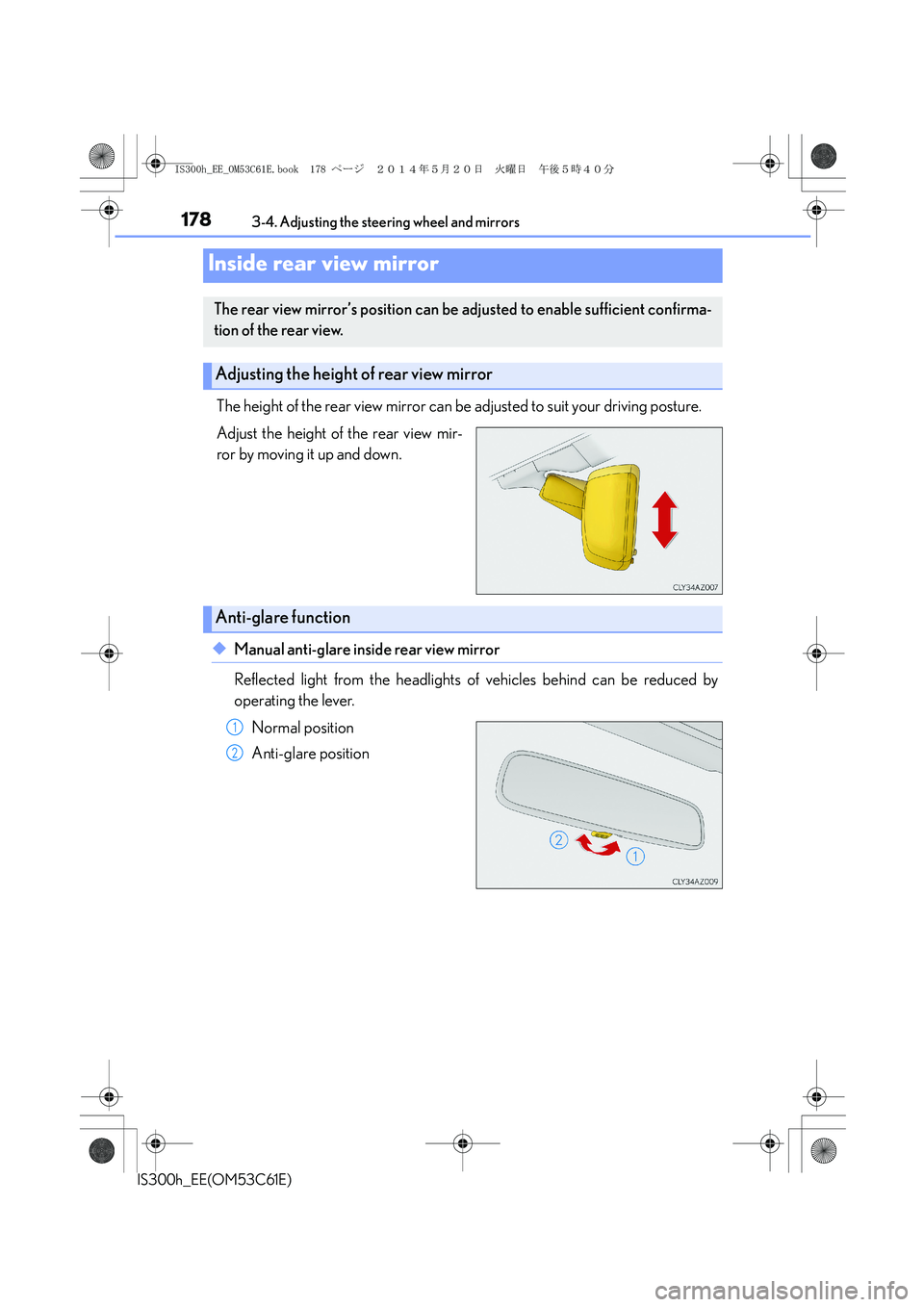
The height of the rear view mirror can be adjusted to suit your driving posture.
Adjust the height of the rear view mir-
ror by moving it up and down.
◆Manual anti-glare inside rear view mirror
Reflected light from the headlights of vehicles behind can be reduced by
operating the lever.
Normal position
Anti-glare position
Inside rear view mirror
The rear view mirror’s position can be adjusted to enable sufficient confirma-
tion of the rear view.
Adjusting the height of rear view mirror
Anti-glare function
1
2
IS300h_EE_OM53C61E.book 178 ページ 2014年5月20日 火曜日 午後5時40分
Page 179 of 612
1793-4. Adjusting the steering wheel and mirrors
3
Operation of each component
IS300h_EE(OM53C61E)
◆Auto anti-glare inside rear view mirror
Responding to the level of brightness of the headlights of vehicles behind, the
reflected light is automatically reduced.
Changing automatic anti-glare func-
tion mode
ON/OFF
When the automatic anti-glare func-
tion is in ON mode, the indicator illu-
minates.
The function will set to ON mode
each time the power switch is turned
to ON mode.
Pressing the button turns the function
to OFF mode. (The indicator also
turns off.)
■To prevent sensor error (vehicles with auto anti-glare inside rear view mirror)
Indicator
To ensure that the sensors operate properly, do
not touch or cover them.
CAUTION
Do not adjust the position of the mirror while driving.
Doing so may lead to mishandling of the vehicle and cause an accident, resulting in
death or serious injury.
IS300h_EE_OM53C61E.book 179 ページ 2014年5月20日 火曜日 午後5時40分
Page 191 of 612

191
4Driving
IS300h_EE(OM53C61E)
4-1. Before driving
Driving the vehicle ...................... 192
Cargo and luggage .................. 200
Trailer towing................................. 201
4-2. Driving procedures
Power (ignition) switch.............209
EV drive mode ............................. 214
Hybrid transmission ................... 216
Turn signal lever .......................... 222
Parking brake............................... 224
ASC
(Active Sound Control) ........225
4-3. Operating the lights and
wipers
Headlight switch ......................... 226
Automatic High Beam ............. 229
Fog light switch............................ 233
Windshield wipers and
washer.......................................... 235
4-4. Refueling
Opening the fuel tank cap........2414-5. Using the driving support
systems
Cruise control ............................. 245
Dynamic radar cruise
control ......................................... 249
LDA
(Lane Departure Alert) .......... 261
Lexus parking
assist-sensor...............................267
Rear view monitor system ....... 274
Driving mode select
switch ........................................... 283
Driving assist systems............... 286
PCS (Pre-Crash Safety
system) ........................................ 292
BSM (Blind Spot Monitor) ..... 299
•The Blind Spot Monitor
function ....................................304
•The Rear Crossing
Traffic Alert function ...........306
4-6. Driving tips
Hybrid vehicle driving tips .....309
Winter driving tips ........................ 311
IS300h_EE_OM53C61E.book 191 ページ 2014年5月20日 火曜日 午後5時40分
Page 206 of 612

2064-1. Before driving
IS300h_EE(OM53C61E)
Your vehicle will handle differently when towing a trailer. In order to avoid acci-
dent, death or serious injury, keep the following in mind when towing:
■Checking connections between trailer and lights
Stop the vehicle and check the operation of the connection between the
trailer and lights after driving for a brief period as well as before starting off.
■Practicing driving with a coupled trailer
●Get the feel for turning, stopping and reversing with the trailer coupled by
practicing in an area with no or light traffic.
●When reversing with a coupled trailer, hold the section of the steering
wheel nearest to you and rotate clockwise to turn the trailer left or counter-
clockwise to turn it right. Always rotate a little at a time to prevent steering
error. Have someone guide you when reversing to lessen the risk of an
accident.
■Increasing vehicle-to-vehicle distance
At a speed of 10 km/h (6 mph), the distance to the vehicle running ahead of
you should be equivalent to or greater than the combined length of your vehi-
cle and trailer. Avoid sudden braking that may cause skidding. Otherwise, the
vehicle may spin out of control. This is especially true when driving on wet or
slippery road surfaces.
■Sudden acceleration/steering input/cornering
Executing sharp turns when towing may result in the trailer colliding with your
vehicle. Decelerate well in advance when approaching turns and take them
slowly and carefully to avoid sudden braking.
■Important points regarding turning
The wheels of the trailer will travel closer to the inside of the curve than the
wheels of the vehicle. To make allowance for this, take the turns wider than you
would normally do.
Guidance
IS300h_EE_OM53C61E.book 206 ページ 2014年5月20日 火曜日 午後5時40分
Page 223 of 612
2234-2. Driving procedures
4
Driving
IS300h_EE(OM53C61E)
■Turn signals can be operated when
The power switch is in ON mode.
■If the indicator flashes faster than usual
Check that a light bulb in the front or rear turn signal lights has not burned out.
■If the turn signals stop flashing before a lane change has been performed
Operate the lever again.
■Customization
The number of times the turn signals flash during a lane change can be changed.
(Customizable feature →P. 5 7 3 )
IS300h_EE_OM53C61E.book 223 ページ 2014年5月20日 火曜日 午後5時40分