2014 Lexus IS300h ATC
[x] Cancel search: ATCPage 266 of 612

2664-5. Using the driving support systems
IS300h_EE(OM53C61E)
NOTICE
■To prevent damage to or incorrect operation of the LDA system
●Do not modify the headlights or attach stickers to the surface of the lights.
●Do not modify the suspension or replace it with non-genuine parts.
●Do not install or place anything on the hood or the grille. Also, do not install a grille
guard (bull bars, kangaroo bar etc.).
●If your windshield needs repairs, contact any authorized Lexus dealer or repairer, or
another duly qualified and equipped professional.
■Camera sensor
Observe the following to ensure that the LDA system functions correctly.
●Keep the windshield clean at all times.
Performance could be affected if the windshield is dirty, or if raindrops, condensation
or ice are adhering to the windshield.
●Do not spill liquid onto the camera sensor
●Do not attach window tinting to the windshield.
●Do not install an antenna in front of the camera lens.
●If the windshield is fogged up, use the windshield defogger to remove fog from the
windshield.
When it is cold, using the heater with air blowing to the feet may allow the upper part
of the windshield to fog up. This will have a negative effect on the images.
●Do not scratch the camera lens, or let it get dirty.
When cleaning the inside of the windshield, be careful not to get any glass cleaner
etc. on the lens. Also, do not touch the lens.
For lens repair, contact any authorized Lexus dealer or repairer, or another duly qual-
ified and equipped professional.
●Do not change the installation position or direction of the camera sensor or remove it.
The direction of the camera sensor is precisely adjusted.
●Do not subject the camera sensor to strong impact or force, and do not disassemble
the camera sensor.
●Do not replace windshield with non-genuine windshield.
Contact any authorized Lexus dealer or repairer, or another duly qualified and
equipped professional.
●Do not attach a sticker or other items to the
windshield near the camera sensor.
IS300h_EE_OM53C61E.book 266 ページ 2014年5月20日 火曜日 午後5時40分
Page 280 of 612

2804-5. Using the driving support systems
IS300h_EE(OM53C61E)
■If you notice any symptoms
If you notice any of the following symptoms, refer to the likely cause and the
solution, and re-check.
If the symptom is not resolved by the solution, have the vehicle inspected by
any authorized Lexus dealer or repairer, or another duly qualified and
equipped professional.
Things you should know
Likely causeSolution
‰The image is difficult to see
• The vehicle is in a dark area
• The temperature around the lens is
either high or low
• The outside temperature is low
• There are water droplets on the cam-
era
• It is raining or humid
• Foreign matter (mud etc.) is adhering to
the camera
• There are scratches on the camera
• Sunlight or headlights are shining
directly into the camera
• The vehicle is under fluorescent lights,
sodium lights, mercury lights etc.
If this happens due to these causes, it
does not indicate a malfunction.
Back up while visually checking the vehi-
cle’s surroundings. (Use the monitor
again once conditions have been
improved.)
To adjust the image on the rear view mon-
itor system screen. (→P. 3 2 9 )
‰The image is blurry
Dirt or foreign matter (such as water
droplets, snow, mud etc.) is adhering to
the camera.Rinse the camera lens with water and
wipe it clean with a soft cloth.
Wash with a mild soap if the dirt is stub-
born.
‰The image is out of alignment
The camera or surrounding area has
received a strong impact.Have the vehicle inspected by any autho-
rized Lexus dealer or repairer, or another
duly qualified and equipped professional.
‰The fixed guide lines are very far out of alignment
• The vehicle is tilted (there is a heavy
load on the vehicle, tire pressure is low
due to a tire puncture, etc.)
• The vehicle is used on an incline.If this happens due to these causes, it
does not indicate a malfunction. Back up
while visually checking the vehicle’s sur-
roundings.
The camera position is out of alignment.Have the vehicle inspected by any autho-
rized Lexus dealer or repairer, or another
duly qualified and equipped professional.
IS300h_EE_OM53C61E.book 280 ページ 2014年5月20日 火曜日 午後5時40分
Page 282 of 612

2824-5. Using the driving support systems
IS300h_EE(OM53C61E)
NOTICE
■How to use the camera
●The rear view monitor system may not operate properly in the following cases.
• If the back of the vehicle is hit, the position and mounting angle of the camera may
change.
• As the camera has a water proof construction, do not detach, disassemble or
modify it. This may cause incorrect operation.
• Do not strongly rub the camera lens. If the camera lens is scratched, it cannot
transmit a clear image.
• Do not allow organic solvent, car wax, window cleaner or glass coat to adhere to
the camera. If this happens, wipe it off as soon as possible.
• If the temperature changes rapidly, such as when hot water is poured on the vehi-
cle in cold weather, the system may not operate normally.
• When washing the vehicle, do not apply intensive bursts of water to the camera or
camera area. Doing so may result in the camera malfunctioning.
• When the camera is used under fluorescent lights, sodium light or mercury light
etc., the lights and the illuminated areas may appear to flicker.
●Do not expose the camera to strong impact as this could cause a malfunction. If this
happens, have the vehicle inspected by any authorized Lexus dealer or repairer, or
another duly qualified and equipped professional as soon as possible.
IS300h_EE_OM53C61E.book 282 ページ 2014年5月20日 火曜日 午後5時40分
Page 298 of 612

2984-5. Using the driving support systems
IS300h_EE(OM53C61E)
CAUTION
■Limitations of the pre-crash safety system
Do not overly rely on the pre-crash safety system. Always drive safely, taking care to
observe your surroundings and checking for any obstacles or other road hazards.
Failure to do so may cause an accident resulting in death or serious injury.
■Handling the radar sensor
Observe the following to ensure the pre-crash safety system can function effectively.
Otherwise, the system may not function correctly and could result in an accident.
●Keep the sensor and grille cover clean at all times.
Clean the sensor and grille cover with a soft cloth so you do not mark or damage
them.
●Do not subject the sensor or surrounding area to a strong impact.
If the sensor moves even slightly off position, the system may malfunction. If the sen-
sor or surrounding area is subject to a strong impact, always have the area inspected
and adjusted by any authorized Lexus dealer or repairer, or another duly qualified
and equipped professional.
●Do not disassemble the sensor.
●Do not attach accessories or stickers to the sensor, grille cover or surrounding area.
●Do not modify or paint the sensor and grille cover.
●Do not replace them with non-genuine parts.
■Cautions regarding the assist contents of the system
By means of alarms and brake control, the pre-crash safety system is intended to assist
the driver in avoiding collisions through the process of LOOK-JUDGE-ACT. There are
limits to the degree of assistance the system can provide, so please keep in mind the
following important points.
●Assisting the driver in watching the road
The pre-crash safety system is only able to detect obstacles directly in front of the
vehicle, and only within a limited range. It is not a mechanism that allows careless or
inattentive driving, and it is not a system that can assist the driver in low-visibility con-
ditions. It is still necessary for the driver to pay close attention to the vehicle’s sur-
roundings.
●Assisting the driver in making correct judgment
When attempting to estimate the possibility of a collision, the only data available to
the pre-crash safety system is that from obstacles it has detected directly in front of
the vehicle. Therefore, it is absolutely necessary for the driver to remain vigilant and
to determine whether or not there is a possibility of collision in any given situation.
●Assisting the driver in taking action
The pre-crash safety system’s braking assist feature is designed to help reduce the
severity of a collision, and so only acts when the system has judged that a collision is
unavoidable. This system by itself is not capable of automatically avoiding a collision
or bringing the vehicle to a stop safely. For this reason, when encountering a danger-
ous situation the driver must take direct and immediate action in order to ensure the
safety of all involved.
IS300h_EE_OM53C61E.book 298 ページ 2014年5月20日 火曜日 午後5時40分
Page 311 of 612

3114-6. Driving tips
4
Driving
IS300h_EE(OM53C61E)
●Use fluids that are appropriate to the prevailing outside temperatures.
•Engine oil
• Engine/power control unit coolant
•Washer fluid
●Have a service technician inspect the condition of the 12-volt battery.
●Have the vehicle fitted with four snow tires or purchase a set of tire chains for
the rear tires.
*
Ensure that all tires are the specified size and brand, and that chains match the size
of the tires.
*: Tire chains cannot be mounted on the 18-inch tires.
Perform the following according to the driving conditions:
●Do not try to forcibly open a window or move a wiper that is frozen. Pour
warm water over the frozen area to melt the ice. Wipe away the water imme-
diately to prevent it from freezing.
●To ensure proper operation of the climate control system fan, remove any
snow that has accumulated on the air inlet vents in front of the windshield.
●Check for and remove any excess ice or snow that may have accumulated on
the exterior lights, vehicle’s roof, chassis, around the tires or on the brakes.
●Remove any snow or mud from the bottom of your shoes before getting in the
vehicle.
Accelerate the vehicle slowly, keep a safe distance between you and the vehicle
ahead, and drive at a reduced speed suitable to road conditions.
Winter driving tips
Carry out the necessary preparations and inspections before driving the vehi-
cle in winter. Always drive the vehicle in a manner appropriate to the prevail-
ing weather conditions.
Preparation for winter
Before driving the vehicle
When driving the vehicle
IS300h_EE_OM53C61E.book 311 ページ 2014年5月20日 火曜日 午後5時40分
Page 342 of 612
3425-5. Playing an audio CD and MP3/WMA/AAC discs
IS300h_EE(OM53C61E)
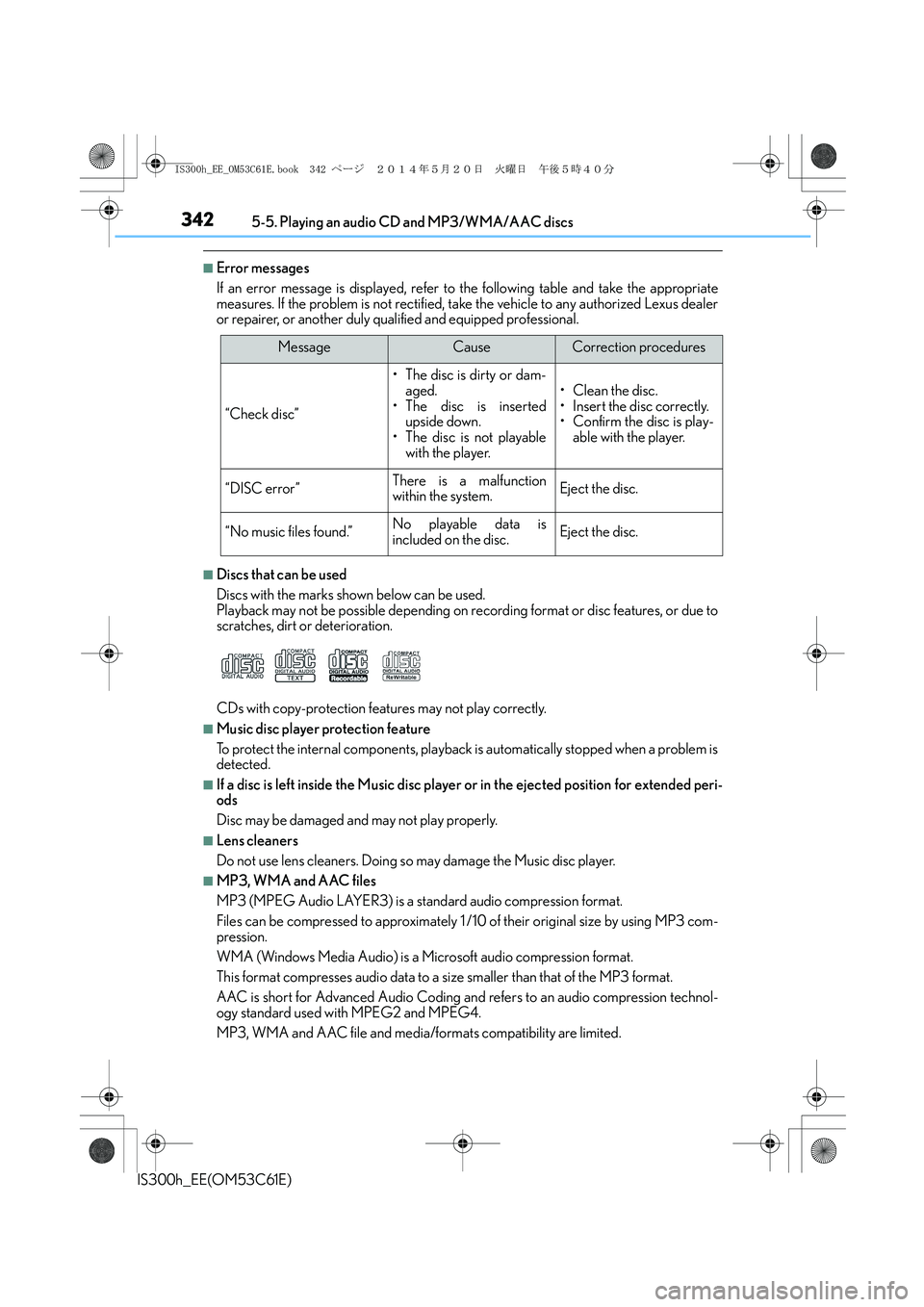
■Error messages
If an error message is displayed, refer to the following table and take the appropriate
measures. If the problem is not rectified, take the vehicle to any authorized Lexus dealer
or repairer, or another duly qualified and equipped professional.
■Discs that can be used
Discs with the marks shown below can be used.
Playback may not be possible depending on recording format or disc features, or due to
scratches, dirt or deterioration.
CDs with copy-protection features may not play correctly.
■Music disc player protection feature
To protect the internal components, playback is automatically stopped when a problem is
detected.
■If a disc is left inside the Music disc player or in the ejected position for extended peri-
ods
Disc may be damaged and may not play properly.
■Lens cleaners
Do not use lens cleaners. Doing so may damage the Music disc player.
■MP3, WMA and AAC files
MP3 (MPEG Audio LAYER3) is a standard audio compression format.
Files can be compressed to approximately 1 /10 of their original size by using MP3 com-
pression.
WMA (Windows Media Audio) is a Microsoft audio compression format.
This format compresses audio data to a size smaller than that of the MP3 format.
AAC is short for Advanced Audio Coding and refers to an audio compression technol-
ogy standard used with MPEG2 and MPEG4.
MP3, WMA and AAC file and media/formats compatibility are limited.
MessageCauseCorrection procedures
“Check disc”
• The disc is dirty or dam-
aged.
• The disc is inserted
upside down.
• The disc is not playable
with the player.
•Clean the disc.
• Insert the disc correctly.
• Confirm the disc is play-
able with the player.
“DISC error”There is a malfunction
within the system.Eject the disc.
“No music files found.”No playable data is
included on the disc.Eject the disc.
IS300h_EE_OM53C61E.book 342 ページ 2014年5月20日 火曜日 午後5時40分
Page 343 of 612

3435-5. Playing an audio CD and MP3/WMA/AAC discs
5
Lexus Display Audio system
IS300h_EE(OM53C61E)
●MP3 file compatibility
• Compatible standards
MP3 (MPEG1 LAYER3, MPEG2 LSF LAYER3)
• Compatible sampling frequencies
MPEG1 LAYER3: 32, 44.1, 48 (kHz)
MPEG2 LSF LAYER3: 16, 22.05, 24 (kHz)
• Compatible bit rates (compatible with VBR)
MPEG1 LAYER3: 32-320 (kbps)
MPEG2 LSF LAYER3: 8-160 (kbps)
• Compatible channel modes: stereo, joint stereo, dual channel and monaural
●WMA file compatibility
• Compatible standards
WMA Ver. 7, 8, 9 (only compatible with Windows Media Audio Standard)
• Compatible sampling frequencies
32, 44.1, 48 (kHz)
• Compatible bit rates (only compatible with 2-channel playback)
Ver. 7, 8: CBR 48-192 (kbps)
Ver. 9: CBR 48-320 (kbps)
●AAC file compatibility
• Compatible standards
MPEG4/AAC-LC
• Compatible sampling frequencies
11.025/12 /16/22.05/24 /32 /44.1 /48 (kHz)
• Compatible bit rates
16-320 (kbps)
• Compatible channel modes: 1 ch and 2 ch
●Compatible media
Media that can be used for MP3, WMA and AAC playback are CD-Rs and CD-
RWs.
Playback in some instances may not be possible if the CD-R or CD-RW is not final-
ized. Playback may not be possible or the audio may jump if the disc is scratched or
marked with fingerprints.
●Compatible disc formats
The following disc formats can be used.
• Disc formats: CD-ROM Mode 1 and Mode 2
CD-ROM XA Mode 2, Form 1 and Form 2
• File formats: ISO9660 Level 1, Level 2, (Romeo, Joliet)
UDF (2.01 or lower)
MP3, WMA and AAC files written in any format other than those listed above may
not play correctly, and their file names and folder names may not be displayed cor-
rectly.
Items related to standards and limitations are as follows.
• Maximum directory hierarchy: 8 levels (including the root)
• Maximum length of folder names/file names: 32 characters
• Maximum number of folders: 192 (including the root)
• Maximum number of files per disc: 255
IS300h_EE_OM53C61E.book 343 ページ 2014年5月20日 火曜日 午後5時40分
Page 413 of 612

413
IS300h_EE(OM53C61E)
6
Interior features
6-3. Using the storage features
List of storage features
Glove box (→P. 414)
Bottle holders (→P. 4 1 5 )Cup holders (if equipped)
(→P. 4 1 5 )
Console box (→P. 4 1 4 )
CAUTION
●Do not leave glasses, lighters or spray cans in the storage spaces, as this may cause
the following when cabin temperature becomes high:
• Glasses may be deformed by heat or cracked if they come into contact with other
stored items.
• Lighters or spray cans may explode. If they come into contact with other stored
items, the lighter may catch fire or the spray can may release gas, causing a fire
hazard.
●When driving or when the storage compartments are not in use, keep the lids closed.
In the event of sudden braking or sudden swerving, an accident may occur due to an
occupant being struck by an open lid or the items stored inside.
1
2
3
4
IS300h_EE_OM53C61E.book 413 ページ 2014年5月20日 火曜日 午後5時40分