Page 404 of 588

404
IS250_EE(OM53C51E)7-1. Maintenance and care
●Working from top to bottom, liberally apply water to the vehicle body, wheel
wells and underside of the vehicle to remove any dirt and dust.
●Wash the vehicle body using a sponge or soft cloth, such as a chamois.
●For hard-to-remove marks, use car wash soap and rinse thoroughly with
water.
●Wipe away any water.
●Wax the vehicle when the waterproof coating deteriorates.
If water does not bead on a clean surface, apply wax when the vehicle body is cool.
■Self-restoring coat
The vehicle body has a self-restoring coating that is resistant to small surface scratches
caused in a car wash etc.
●The coating lasts for 5 to 8 years from when the vehicle is delivered from the plant.
●The restoration time differs depending on the depth of the scratch and outside temper-
ature.
The restoration time may become shorter when the coating is warmed by applying
warm water.
●Deep scratches caused by keys, coins, etc. cannot be restored.
●Do not use wax that contain abrasives.
■Automatic car washes
●Fold the mirrors before washing the vehicle. Start washing from the front of the vehicle.
Make sure to extend the mirrors before driving.
●Brushes used in automatic car washes may scratch the vehicle surface and harm your
vehicle’s paint.
■High pressure car washes
●Do not allow the nozzles of the car wash to come within close proximity of the windows.
●Before using the car wash, check that the fuel filler door on your vehicle is closed prop-
erly.
■When using a car wash (vehicles with entry function)
If the door handle becomes wet while the electronic key is within the effective range, the
door may lock and unlock repeatedly. In that case, follow the following correction proce-
dures to wash the vehicle:
●Place the key in a position 2 m (6 ft.) or more separate from the vehicle while the vehi-
cle is being washed. (Take care to ensure that the key is not stolen.)
●Set the electronic key to battery-saving mode to disable the smart entry & start system.
(→P. 1 3 1 )
Cleaning and protecting the vehicle exterior
Perform the following to protect the vehicle and maintain it in prime condi-
tion:
Page 424 of 588

4247-3. Do-it-yourself maintenance
IS250_EE(OM53C51E)
■Before recharging
When recharging, the battery produces hydrogen gas which is flammable and explosive.
Therefore, observe the following before recharging:
●If recharging with the battery installed on the vehicle, be sure to disconnect the ground
cable.
●Make sure the power switch on the charger is off when connecting and disconnecting
the charger cables to the battery.
■After recharging/reconnecting the battery
The engine may not start. Follow the procedure below to initialize the system.
Shift the shift lever to P.
Open and close any of the doors.
Restart the engine.
●Unlocking the doors using the smart entry & start system may not be possible immedi-
ately after reconnecting the battery. If this happens, use the wireless remote control or
the mechanical key to lock/unlock the doors.
●Start the engine with the engine switch in ACCESSORY mode. The engine may not
start with the engine switch turned off. However, the engine will operate normally from
the second attempt.
●The engine switch mode is recorded by the vehicle. If the battery is disconnected and
reconnected, the vehicle will return the engine switch mode to the status it was in
before the battery was disconnected. Make sure to turn off the engine before discon-
necting the battery. Take extra care when connecting the battery if the engine switch
mode prior to the battery being disconnected is unknown.
If the engine will not start even after multiple attempts at all the methods contact any
authorized Lexus dealer or repairer, or another duly qualified and equipped professional.
1
2
3
Page 442 of 588
4427-3. Do-it-yourself maintenance
IS250_EE(OM53C51E)
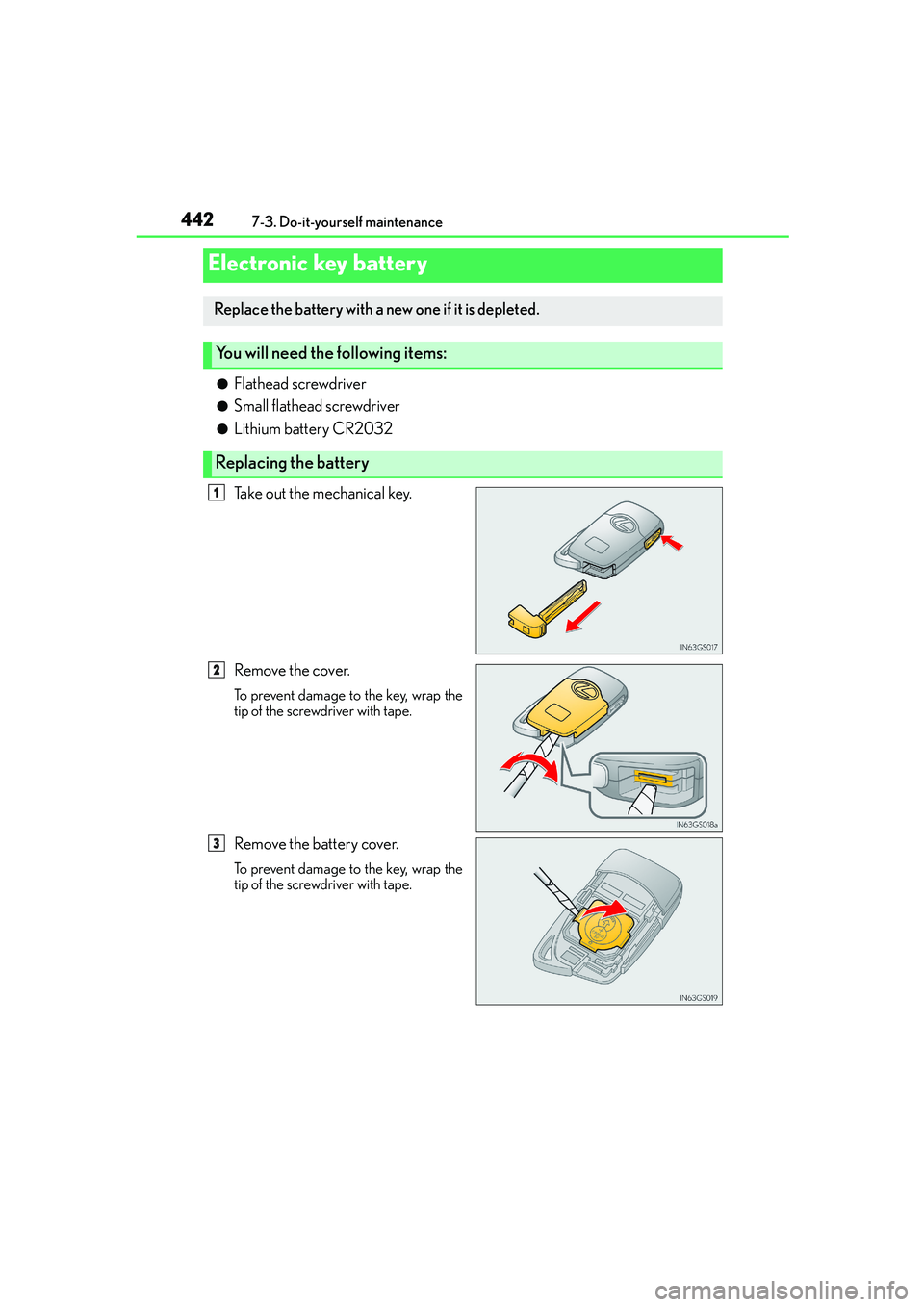
●Flathead screwdriver
●Small flathead screwdriver
●Lithium battery CR2032
Take out the mechanical key.
Remove the cover.
To prevent damage to the key, wrap the
tip of the screwdriver with tape.
Remove the battery cover.
To prevent damage to the key, wrap the
tip of the screwdriver with tape.
Electronic key battery
Replace the battery with a new one if it is depleted.
You will need the following items:
Replacing the battery
1
2
3
Page 443 of 588

4437-3. Do-it-yourself maintenance
7
Maintenance and care
IS250_EE(OM53C51E)
Remove the depleted battery.
Insert a new battery with the “+” termi-
nal facing up.
■Use a CR2032 lithium battery
●Batteries can be purchased at any authorized Lexus dealer or repairer, or another duly
qualified and equipped professional, local electrical appliance shops or camera stores.
●Replace only with the same or equivalent type recommended by the manufacturer.
●Dispose of used batteries according to local laws.
■When the card key battery needs to be replaced (if equipped)
The battery for the card key is available only at Lexus dealers. Your Lexus dealer can
replace the battery for you.
■If the electronic key battery is depleted
The following symptoms may occur:
●The smart entry & start system and wireless remote control will not function properly.
●The operational range will be reduced.
■Certification for the key battery
●Replace only with the same or equivalent type recommended by the manufacturer.
●Dispose of used batteries according to local laws.
4
Page 465 of 588

465
8When trouble arises
IS250_EE(OM53C51E)
8-1. Essential information
Emergency flashers...................466
If your vehicle has to
be stopped in an
emergency ................................. 4678-2. Steps to take in an
emergency
If your vehicle needs to
be towed .....................................468
If you think something is
wrong ............................................ 474
Fuel pump shut off system .......475
If a warning light turns
on or a warning buzzer
sounds........................................... 476
If a warning message is
displayed..................................... 482
If you have a flat tire
(vehicles with a
spare tire) ................................... 496
If you have a flat tire
(vehicles without a
spare tire) ................................... 507
If the engine will not start ..........521
If the shift lever cannot be
shifted from P............................ 523
If the electronic key does
not operate properly ............. 524
If the vehicle battery is
discharged ..................................527
If your vehicle overheats .......... 531
If the vehicle becomes
stuck ............................................. 534
Page 493 of 588

4938-2. Steps to take in an emergency
8
When trouble arises
IS250_EE(OM53C51E)
Once
The electronic key has a low battery.
→Replace the electronic key bat-
tery. (→P. 4 4 2 )
Once
The steering lock could not be
released within 3 seconds of the
engine switch being pressed.
→Press the engine switch while
depressing the brake pedal and
moving the steering wheel left
and right.
Once
Indicates a malfunction in the smart
entry & start system
→Have the vehicle inspected by
any authorized Lexus dealer or
repairer, or another duly quali-
fied and equipped professional.
Once
• When the doors were unlocked
with the mechanical key and then
the engine switch was pressed,
the electronic key could not be
detected in the vehicle.
• The electronic key could not be
detected in the vehicle even after
the engine switch was pressed
two consecutive times.
→Touch the electronic key to the
engine switch while depressing
the brake pedal.
Once
During an engine starting procedure
in the event that the electronic key
was not functioning properly (→P.
525), the engine switch was touched
with the electronic key.
→Press the engine switch within
10 seconds of the buzzer sound-
ing.
Interior
buzzerExteriorbuzzerWarning messageDetails/Actions
(Flashes)
(Flashes)
(Flashes)
Page 521 of 588
5218-2. Steps to take in an emergency
8
When trouble arises
IS250_EE(OM53C51E)
One of the following may be the cause of the problem:
●There may not be sufficient fuel in the vehicle’s tank.
Refuel the vehicle.
●The engine may be flooded.
Try to restart the engine again following correct starting procedures.
(→P. 1 9 2 )
●There may be a malfunction in the engine immobilizer system.
(→P. 77)
One of the following may be the cause of the problem:
●The battery terminal connections may be loose or corroded.
●The battery may be discharged. (→P. 5 2 7 )
The engine starting system may be malfunctioning due to an electrical problem
such as electronic key battery depletion or a blown fuse. However, an interim
measure is available to start the engine. (→P. 522)
If the engine will not start
If the engine will not start even though correct starting procedures are being
followed (→P. 192), consider each of the following points:
The engine will not start even though the starter motor operates nor-
mally.
The starter motor turns over slowly, the interior lights and headlights
are dim, or the horn does not sound or sounds at a low volume.
The starter motor does not turn over
Page 524 of 588
5248-2. Steps to take in an emergency
IS250_EE(OM53C51E)
■Doors
Use the mechanical key (→P. 113) in
order to perform the following oper-
ations:
Locks all the doors
Closes the windows and moon
roof (turn and hold)
*
Unlocks all the doors
Opens the windows and moon
roof (turn and hold)
*
*
: This setting must be customized at any authorized Lexus dealer or repairer, or
another duly qualified and equipped professional.
■Tr u n k
Turn the mechanical key clockwise
to open.
If the electronic key does not operate properly
If communication between the electronic key and vehicle is interrupted (→P.
132) or the electronic key cannot be used because the battery is depleted,
the smart entry & start system and wireless remote control cannot be used. In
such cases, the doors and trunk can be opened and the engine can be started
by following the procedure below.
Locking and unlocking the doors, unlocking the trunk and key linked
functions
1
2
3
4