Page 89 of 890
88
GS450h_OM_OM30D52U_(U)
2. Instrument cluster
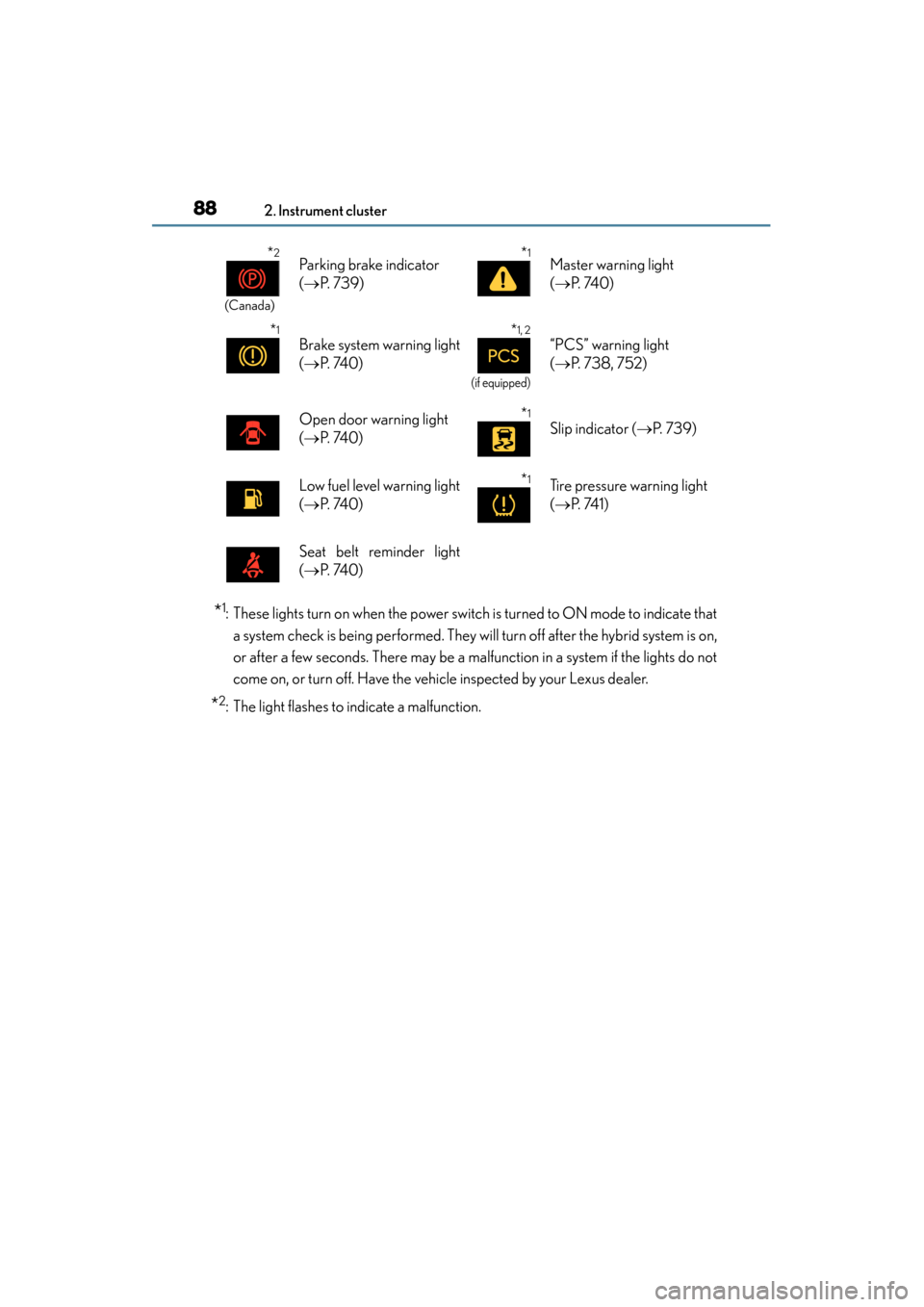
*1: These lights turn on when the power switch is turned to ON mode to indicate thata system check is being performed. They will turn off after the hybrid system is on,
or after a few seconds. There may be a malfunction in a system if the lights do not
come on, or turn off. Have the vehicle inspected by your Lexus dealer.
*2: The light flashes to indicate a malfunction.
*2
(Canada)
Parking brake indicator
(→ P. 7 3 9 )*1Master warning light
(→ P. 74 0 )
*1
Brake system warning light
(→ P. 74 0 )*1, 2
(if equipped)
“PCS” warning light
(→ P. 738, 752)
Open door warning light
(→ P. 74 0 )*1
Slip indicator ( →P. 7 3 9 )
Low fuel level warning light
(→ P. 74 0 )*1Tire pressure warning light
(→ P. 74 1 )
Seat belt reminder light
(→ P. 74 0 )
GS450h_OM_OM30D52U_(U).book Page 88 Monday, July 29, 2013 12:07 PM
Page 91 of 890

90
GS450h_OM_OM30D52U_(U)
2. Instrument cluster
*1: These lights turn on when the power switch is turned to ON mode to indicate thata system check is being performed. They will turn off after the hybrid system is on,
or after a few seconds. There may be a malfunction in a system if the lights do not
come on, or turn off. Have the vehicle inspected by your Lexus dealer.
*2: The light flashes to indicate that the system is operating.
*3: The light comes on when the system is turned off. The light flashes faster thanusual to indicate that the system is operating.
*4: In order to confirm operation, the BSM outside rear view mirror indicators illumi-nate in the following situations:
• When the power switch is turned to ON mode while the BSM main switch is set to ON.
• When the BSM main switch is set to ON while the power switch is in ON mode.
If the system is functioning correctly, the BSM outside rear view mirror indicators
will turn off after a few seconds.
If the BSM outside rear view mirror indicators do not illuminate or do not turn off,
there may be a malfunction with the system.
If this occurs, have the vehicle inspected by your Lexus dealer.
*4
(if equipped)
BSM (Blind Spot Monitor)
outside rear view mirror
indicators ( →P. 3 2 4 )*1“A I R B A G O N /
OFF” indicator
(→ P. 4 9 )
CAUTION
■If a safety system warning light does not come on
Should a safety system light such as the ABS and SRS warning light not come on
when you start the hybrid system, this could mean that these systems are not avail-
able to help protect you in an accident, which could result in death or serious injury.
Have the vehicle inspected by your Lexus dealer immediately if this occurs.
GS450h_OM_OM30D52U_(U).book Page 90 Monday, July 29, 2013 12:07 PM
Page 94 of 890
GS450h_OM_OM30D52U_(U)
932. Instrument cluster
2
Instrument cluster
Switches between odometer and
trip meter displays. When the trip
meter is displayed, pressing and
holding the button will reset the trip
meter.
The brightness of the instrument panel lights can be adjusted.Darker
Brighter
Changing the display
Instrument panel light control
1
2
GS450h_OM_OM30D52U_(U).book Page 93 Monday, July 29, 2013 12:07 PM
Page 95 of 890

94
GS450h_OM_OM30D52U_(U)
2. Instrument cluster
■The meters and display illuminate when
The power switch is in ON mode.
■Instrument panel brightness adjustment
The instrument panel brightness levels when the tail lights are on and off can be
adjusted individually. However, when the surroundings are bright (daytime, etc.),
turning on the tail lights will not change the instrument panel brightness. At this time,
any adjustments made to the instrument panel brightness levels will be applied to
both settings at once.
■Limitation of brightness adjustment
The brightness of the instrument panel lights is automatically adjusted based on the
light sensor detecting how bright the surroundings are. However, if the instrument
panel brightness has been manually set to either the brightest or darkest setting, the
automatic adjustment will not be performed.
■Hybrid System Indicator
●Hybrid System Indicator is displayed when the driving mode is other than the sport
mode.
●By keeping the indicator needle within Eco area, more Eco-friendly driving can be
achieved.
●Charge area indicates regeneration* status. Regenerated energy will be used to
charge the battery.
*: When used in this manual, “regeneration” refers to the conversion of energy cre-
ated by the movement of the vehicle into electrical energy. Charge area
Shows regenerative charging.
Hybrid Eco area
Shows that gasoline engine power is not
being used very often.
The gasoline engine will automatically stop
and restart under various conditions.
Eco area
Shows that the vehicle is being driven in an
Eco-friendly manner.
Po w e r a r e a
Shows that an Eco-friendly driving range is
being exceeded (during full power driving
etc.)
1
2
3
4
GS450h_OM_OM30D52U_(U).book Page 94 Monday, July 29, 2013 12:07 PM
Page 124 of 890

123
GS450h_OM_OM30D52U_(U)3-2. Opening, closing and locking the doors and trunk
3
Operation of each component
Smart access system with push-button start
The following operations can be performed simply by carrying the elec-
tronic key on your person, for example in your pocket. (The driver should
always carry the electronic key.)
■Operation signals
A buzzer sounds and the emergency flashers flash to indicate that the doors have
been locked/unlocked. (Locked: once; Unlocked: twice)
■Security feature
If a door is not opened within approximately 60 seconds after the vehicle is
unlocked, the security feature automatically locks the vehicle again.
■Welcome light illumination control
The side marker, parking, tail and license plate lights automatically turn on at night
when the doors are unlocked using the entry function or wireless remote control if
the light switch is in the “AUTO” position.
Function summary
Locks and unlocks the doors ( →P. 1 2 4 )
Opens the trunk ( →P. 1 2 4 )
Starts the hybrid system ( →P. 193)1
2
3
GS450h_OM_OM30D52U_(U).book Page 123 Monday, July 29, 2013 12:07 PM
Page 138 of 890

GS450h_OM_OM30D52U_(U)
1373-2. Opening, closing and locking the doors and trunk
3
Operation of each component
■Operation signals
Doors:
A buzzer sounds and the emergency flashers flash to indicate that the doors have
been locked/unlocked. (Locked: once; Unlocked: twice)
Tr u n k :
A buzzer sounds to indicate that the trunk has been opened.
Windows and moon roof:
A buzzer sounds to indicate that the windows and moon roof are operating.
■Welcome light illumination control
→P. 1 2 3
■Door lock buzzer
If an attempt to lock the doors is made when a door is not fully closed, a buzzer
sounds continuously for 5 seconds. Fully cl ose the door to stop the buzzer, and lock
the vehicle once more.
■Pa ni c m o d e
■Security feature
→ P. 1 2 3
■Alarm
Using the wireless remote control to lock the doors will set the alarm system.
(→ P. 8 3 )
■Conditions affecting operation
→P. 1 3 0
When is pressed for longer than about
one second, an alarm will sound intermittently
and the vehicle lights will flash to deter any
person from trying to break into or damage
your vehicle.
To stop the alarm, press any button on the
electronic key.
GS450h_OM_OM30D52U_(U).book Page 137 Monday, July 29, 2013 12:07 PM
Page 163 of 890
1623-4. Adjusting the steering wheel and mirrors
GS450h_OM_OM30D52U_(U)
Inside rear view mirror
The height of the rear view mirror can be adjusted to suit your driving pos-
ture.
Adjust the height of the rear view
mirror by moving it up and down.
Responding to the level of brightness of the headlights of vehicles behind,
the reflected light is automatically reduced.
Changing automatic anti-glare
function modeON
OFF
When the automatic anti-glare func-
tion is in ON mode, the indicator illu-
minates.
The function will set to ON mode
each time the power switch is turned
to ON mode.
Pressing the button turns the function
to OFF mode. (The indicator also
turns off.)
The rear view mirror’s position ca n be adjusted to enable sufficient
confirmation of the rear view.
Adjusting the height of rear view mirror
Anti-glare function
Indicator
1
2
GS450h_OM_OM30D52U_(U).book Page 162 Monday, July 29, 2013 12:07 PM
Page 176 of 890

175
GS450h_OM_OM30D52U_(U)
4Driving
4-1. Before driving Driving the vehicle ....................... 176
Cargo and luggage .................... 187
Vehicle load limits .......................190
Trailer towing .................................. 191
Dinghy towing............................... 192
4-2. Driving procedures Power (ignition) switch.............. 193
EV drive mode ........................... 200
Hybrid transmission ..................203
Turn signal lever ......................... 209
Parking brake ..................................211
Brake Hold ..................................... 214
Horn.................................................. 216
4-3. Operating the lights and wipers
Headlight switch .......................... 217
Fog light switch............................ 222
Windshield wipers and washer.................................223
Headlight cleaner switch ....... 230
4-4. Refueling Opening the fuel tank cap ....... 231 4-5. Using the driving support
systems
Cruise control ............................. 236
Dynamic radar cruise control ............................ 240
Dynamic radar cruise control with full-speed range ............. 255
LKA (Lane-Keeping Assist) ............ 271
Intuitive parking assist ............... 281
Rear view monitor system ...... 294
Driving mode select switch ...305
Driving assist systems.............. 308
PCS (Pre-Collision System)........... 315
BSM (Blind Spot Monitor).............. 324
• The Blind Spot Monitor function .................................... 328
• The Rear Cross Traffic Alert function.......................... 331
Lexus night view ......................... 334
4-6. Driving tips Hybrid vehicle driving tips......340
Winter driving tips ..................... 342
GS450h_OM_OM30D52U_(U).book Page 175 Monday, July 29, 2013 12:07 PM