2014 Lexus GS450h USB
[x] Cancel search: USBPage 525 of 890

524
GS450h_OM_OM30D52U_(U)
5-3. Using the audio system
Press to change the audio source. The audio source as follows
each time the button is pressed. If no discs are inserted in the player, or if
the external device is not connected, that mode will be skipped.
FM → SAT → Apps → DVD player → iPod or USB memory →
Bluetooth® audio player → AUX → AM
Press “ ∧” on to increase the volume and “ ∨” to decrease the vol-
ume.
Press and hold the button to continue increasing or decreasing the volume.
■Select a radio station Press to select a frequency band.
Press “ ∧” or “ ∨” on to seek the frequency.
To scan for receivable stations, press and hold until you hear a beep.
■Select a preset station
Press to select a frequency band.
Press “ ∧” or “ ∨” on to select a preset station.
Changing the audio source
Adjusting the volume
Selecting a radio station
1
2
1
2
GS450h_OM_OM30D52U_(U).book Page 524 Monday, July 29, 2013 12:07 PM
Page 527 of 890

526
GS450h_OM_OM30D52U_(U)
5-3. Using the audio system
■MP3 disc or WMA discPress to select the DVD player.
Press “ ∧” or “ ∨” on to select a folder.
Press “ ∧” or “ ∨” on to select a file.
■USB memory
Press to select the USB memory.
Press “ ∧” or “ ∨” on to select a folder.
Press “ ∧” or “ ∨” on to select a file.
■Fast forwarding or rewinding a chapter or file
Press and hold “ ∧” or “ ∨” on .
■Button lock function
To prevent inadvertent operation, some buttons on the rear armrest can be locked.
(→ P. 4 0 8 )
■Rear control panel illumination off function
Control panel illumination on the rear armrest can be turned off. ( →P. 4 0 8 )
■When “ERROR”, “WAIT” or “NO MUSIC” is shown on the display
Refer to the following and take the appropriate measures. If the problem is not recti-
fied, take the vehicle to your Lexus dealer.
“ERROR”: This indicates a trouble either in the disc or inside the player. The disc
may be dirty, damaged, or inserted up-side down.
“WAIT”: Operation is stopped due to a high temperature inside the player. Eject the disc and allow the player to cool down.
“NO MUSIC”: This indicates that an MP3/WMA file is not included in the disc.
Selecting a file
1
2
3
1
2
3
GS450h_OM_OM30D52U_(U).book Page 526 Monday, July 29, 2013 12:07 PM
Page 528 of 890
527
GS450h_OM_OM30D52U_(U)5-3. Using the audio system
5
Interior features
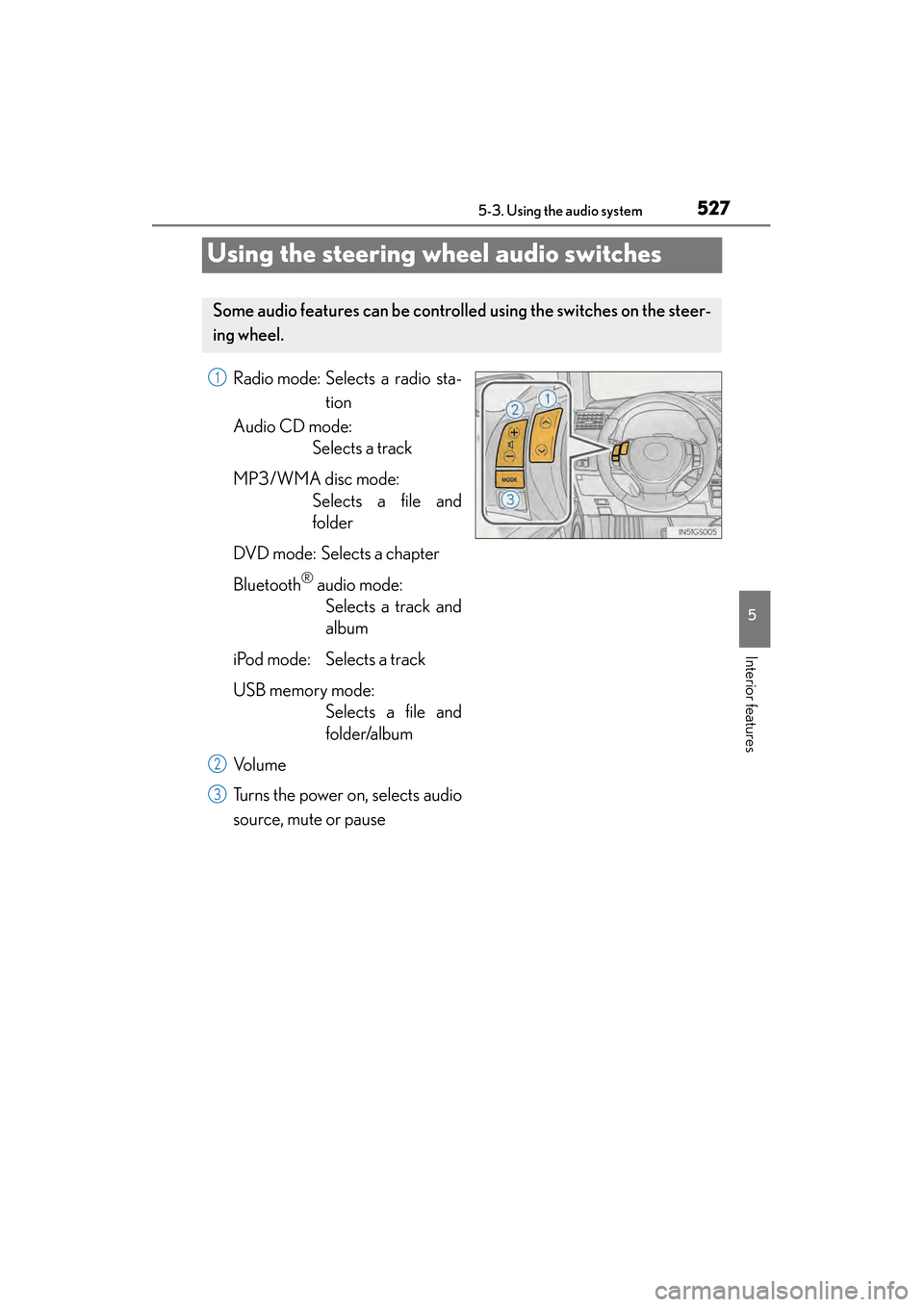
Using the steering wheel audio switches
Radio mode: Selects a radio sta- tion
Audio CD mode: Selects a track
MP3/WMA disc mode: Selects a file and
folder
DVD mode: Selects a chapter
Bluetooth
® audio mode: Selects a track and
album
iPod mode: Selects a track
USB memory mode: Selects a file and
folder/album
Vo l u m e
Turns the power on, selects audio
source, mute or pause
Some audio features can be controll ed using the switches on the steer-
ing wheel.
1
2
3
GS450h_OM_OM30D52U_(U).book Page 527 Monday, July 29, 2013 12:07 PM
Page 530 of 890

GS450h_OM_OM30D52U_(U)
5295-3. Using the audio system
5
Interior features
Press to select the audio CD, MP3/WMA disc, DVD,
Bluetooth
® audio, iPod, or USB memory mode.
Press or to select.
To return to the beginning of the current track, file or chapter, press the
switch once quickly.
Press to select Bluetooth® audio or USB memory mode.
Press and hold or until a beep is heard to select.
Press to select the MP3/W MA disc or USB memory mode.
Press and hold or until a beep is heard to select.
Selecting a track/file or chapter
Selecting an album
Selecting a folder
CAUTION
■To reduce the risk of an accident
Exercise care when operating the audio switches on the steering wheel.
1
2
1
2
1
2
GS450h_OM_OM30D52U_(U).book Page 529 Monday, July 29, 2013 12:07 PM
Page 870 of 890

869Alphabetical index
GS450h_OM_OM30D52U_(U)
Approach warningDynamic radar cruise control......246
Dynamic radar cruise control with full-speed range .................... 262
Armrest .................................................... 620
Ashtrays....................................................... 611
Assist grips .............................................. 625
Audio input................................................521
Audio system............................................. 411 Audio input............................................. 521
AUX port/USB port...........................521, 501, 511
Bluetooth
® audio.............................. 489
CD/DVD player ................................ 457
CD/DVD player information ...... 477
DVD video ........................................... 465
iPod .......................................................... 509
MP3/WMA disc .............................. 459
Optimal use ........................................... 519
Portable music player ....................... 521
Radio ........................................................434
Rear seat audio controls ................523
Steering wheel audio switch ........ 527
USB memory ...................................... 499
Automatic headlight leveling system .................................................... 220
Automatic light control system......... 217
AUX port...................................................521
Auxiliary boxes ...................................... 606
AVS (Adaptive Variable Suspension system)..........................309 Back-up lights
Replacing light bulbs ........................722
Wattage ...................................................817
Battery (12-volt battery) .....................673 If the 12-volt battery is
discharged......................................... 796
Preparing and checking before
winter.................................................... 342
Warning light ....................................... 738
Battery (traction battery) ...................... 76
Blind Spot Monitor (BSM) ................324
Bluetooth®
Audio system .......................................489
Hands-free system (for cellular phone) .......................530
Brake Brake Hold ............................................. 214
Fluid ............................................................ 671
Parking brake ..........................................211
Regenerative braking ..........................74
Warning light ........................... 737, 740
Warning message..............................747
Brake assist ............................................. 308
Brake Hold................................................ 214
Break-in tips ............................................. 177
Brightness control Instrument panel light control ........ 93
BSM (Blind Spot Monitor) ................324 Blind Spot Monitor function......... 328
Rear Cross Traffic Alert function.................................................. 331
B
GS450h_OM_OM30D52U_(U).book Page 869 Monday, July 29, 2013 12:07 PM
Page 885 of 890

884Alphabetical index
GS450h_OM_OM30D52U_(U)
Trip information.........................................97
Trip meters ...................................................91
Trunk............................................................143Internal trunk release lever ............. 146
Jam protection function ................... 145
Luggage security system ................ 144
Open trunk warning message ....755
Power trunk opener
and closer............................................ 143
Smart access system
with push-button start ....................124
Trunk closer switch ............................ 144
Trunk easy closer ................................ 145
Trunk features ..................................... 607
Trunk grip ............................................... 144
Trunk light ............................................... 145
Trunk opener main switch.............. 144
Trunk opener switch ......................... 143
Wireless remote control ................. 136
Trunk light
Trunk light ............................................... 145
Wattage ................................................... 817
Turn signal lights ................................... 209 Replacing light bulbs ................ 717, 721
Turn signal lever ................................ 209
Wattage ................................................... 817
USB port ...........................................501, 511
Utility hook .............................................. 626
Vanity lights Vanity lights ......................................... 609
Wattage ................................................... 817
Vanity mirrors ........................................... 609 VDIM (Vehicle Dynamics
Integrated Management).............. 309
Vehicle data recordings......................... 10
Vehicle Dynamics Integrated Management (VDIM)..................... 309
Vehicle identification number ........ 809
Vehicle proximity notification system ........................................................ 73
Vehicle Stability Control (VSC)..................................................... 308
Ventilators (seat ventilators) ............. 616
Voice command system.....................375
VSC (Vehicle Stability Control) ............ 308
Warning buzzers Approach warning ............... 246, 262
Brake system ........................................737
Downshifting ........................................ 207
Intuitive parking assist........................281
Key reminder ....................................... 770
No-handed driving warning........ 276
Open door ........................................... 754
Open moon roof ............................... 755
Open hood........................................... 754
Open trunk ........................................... 755
Open window ..................................... 755
Pre-collision braking..........................315
Seat belt reminder............................. 740
U
V
W
GS450h_OM_OM30D52U_(U).book Page 884 Monday, July 29, 2013 12:07 PM