Page 793 of 890
7927-2. Steps to take in an emergency
GS450h_OM_OM30D52U_(U)Remove the plug.
Insert the tool and press it down
firmly while turning it counter-
clockwise until it stops.
■Manual operation of the parking brake
The parking brake cannot be set manually.
3
4
CAUTION
■When releasing the parking brake manually
●Shift the shift lever to P, turn the power switch off and chock the tires. Failure to do
so may cause the vehicle to move, resulting in an accident.
●Turn the power switch off and check that the parking brake indicator is off. Failure
to do so may cause the system to operate and turn the inserted parking brake
release tool, resulting in an injury.
GS450h_OM_OM30D52U_(U).book Page 792 Monday, July 29, 2013 12:07 PM
Page 794 of 890

793
GS450h_OM_OM30D52U_(U)
7
When trouble arises
7-2. Steps to take in an emergency
If the electronic key does not operate properly
■Doors
Use the mechanical key
(→ P. 120) in order to perform
the following operations:
Locks all the doors
Closes the windows and moon
roof
* (turn and hold)
Unlocks the door
Turning the key rearward unlocks
the driver’s door. Turning the key
once again within 5 seconds
unlocks the other doors.
Opens the windows and moon
roof
* (turn and hold)
*: This setting must be customized at your Lexus dealer.
If communication between the electronic key and vehicle is inter-
rupted ( →P. 130) or the electronic key cannot be used because the
battery is depleted, the smart access system with push-button start and
wireless remote control cannot be used. In such cases, the doors and
trunk can be opened and the hybrid system can be started by following
the procedure below.
Locking and unlocking the doors, unlocking the trunk and key
linked functions
1
2
3
4
GS450h_OM_OM30D52U_(U).book Page 793 Monday, July 29, 2013 12:07 PM
Page 795 of 890
7947-2. Steps to take in an emergency
GS450h_OM_OM30D52U_(U)
■Tr u n k
Turn the mechanical key clock-
wise to open.
Ensure that the shift lever is in P and depress the brake pedal.
Touch the Lexus emblem side of
the electronic key to the power
switch.
The power switch will turn to ON
mode.
When the smart access system with
push-button start is deactivated in
customization setting, the power
switch will turn to ACCESSORY
mode.
Firmly depress the brake pedal and check that is shown on the
multi-information display.
Press the power switch.
In the event that the hybrid system still cannot be started, contact your
Lexus dealer.
Starting the hybrid system
1
2
3
4
GS450h_OM_OM30D52U_(U).book Page 794 Monday, July 29, 2013 12:07 PM
Page 799 of 890

7987-2. Steps to take in an emergency
GS450h_OM_OM30D52U_(U)
■When recharging or replacing the 12-volt battery
●Make sure that the key is not inside the vehicle when recharging or replacing the
12-volt battery. The key may be locked in the vehicle if the alarm is activated.
(→ P. 8 4 )
●In some cases, it may not be possible to unlock the doors using the smart access
system with push-button start when the 12-volt battery is discharged. Use the wire-
less remote control or the mechanical key to lock or unlock the doors.
●The hybrid system may not start on the first attempt after the 12-volt battery has
recharged but will start normally after the second attempt. This is not a malfunction.
●The power switch mode is memorized by the vehicle. When the 12-volt battery is
reconnected, the system will return to the mode it was in before the 12-volt battery
was discharged. Before disconnecting the 12-volt battery, turn the power switch off.
If you are unsure what mode the power switch was in before the 12-volt battery dis-
charged, be especially careful when reconnecting the 12-volt battery.
CAUTION
■Avoiding 12-volt battery fires or explosions
Observe the following precautions to prevent accidentally igniting the flammable
gas that may be emitted from the 12-volt battery:
●Make sure each jumper cable is connected to the correct terminal and that it is
not unintentionally in contact with any other than the intended terminal.
●Do not allow the other end of the jumper cable connected to the “+” terminal to
come into contact with any other parts or metal surfaces in the area, such as
brackets or unpainted metal.
●Do not allow the + and - clamps of the jumper cables to come into contact with
each other.
●Do not smoke, use matches, cigarette lighters or allow open flame near the 12-
volt battery.
GS450h_OM_OM30D52U_(U).book Page 798 Monday, July 29, 2013 12:07 PM
Page 810 of 890
GS450h_OM_OM30D52U_(U)
8098-1. Specifications
8
Vehicle specifications
■Vehicle identification number
The vehicle identification number (VIN) is the legal identifier for your
vehicle. This is the primary identification number for your Lexus. It is
used in registering the ownership of your vehicle.
This number is stamped on the top left of the instrument panel and in
the engine compartment.
This number is also on the Certifi-
cation Label.
■Engine number
The engine number is stamped
on the engine block as shown.
Vehicle identification
GS450h_OM_OM30D52U_(U).book Page 809 Monday, July 29, 2013 12:07 PM
Page 815 of 890
814
GS450h_OM_OM30D52U_(U)
8-1. Specifications
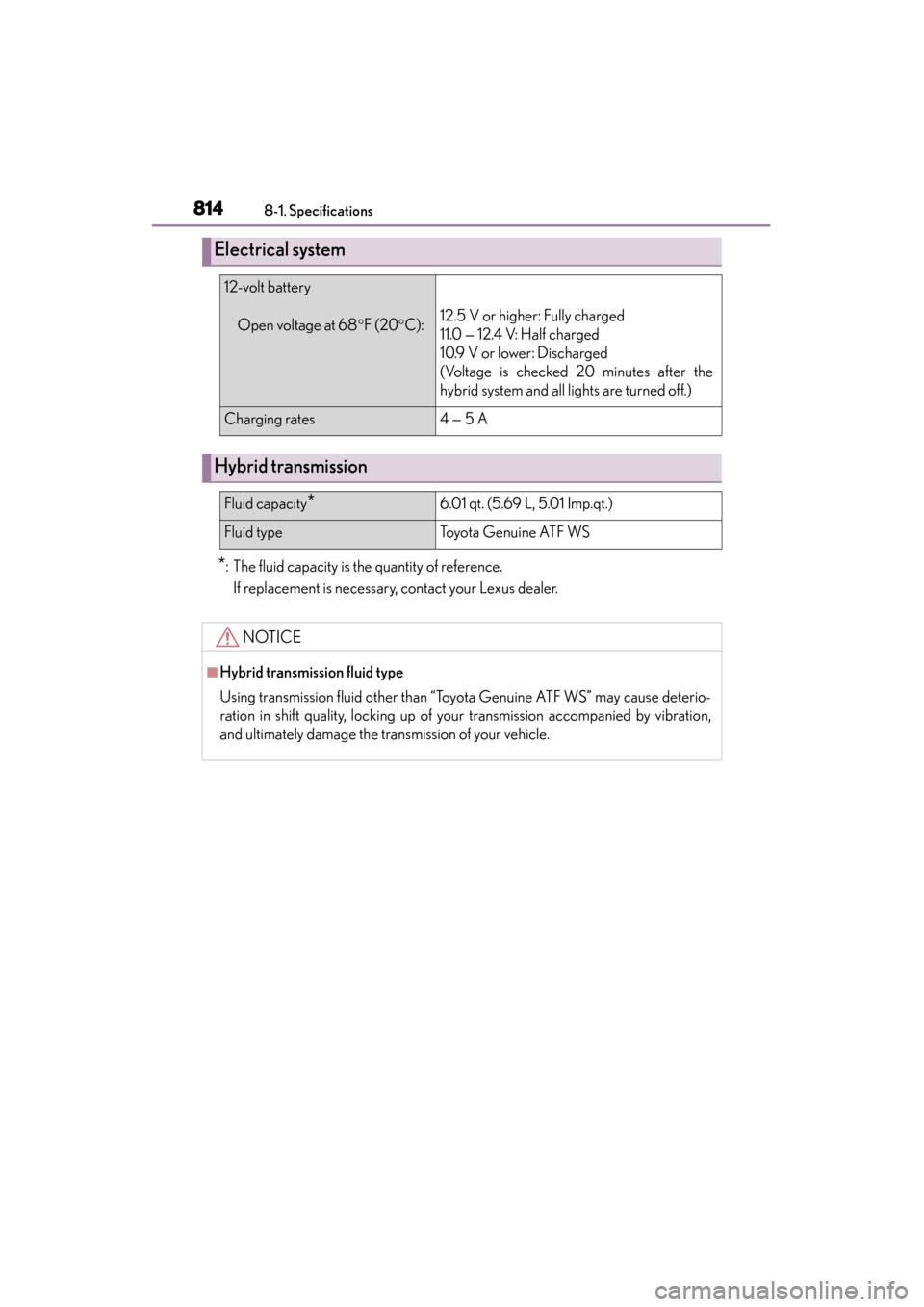
*: The fluid capacity is the quantity of reference.If replacement is necessary, contact your Lexus dealer.
Electrical system
12-volt battery
Open voltage at 68 °F (20 °C):12.5 V or higher: Fully charged
11.0 — 12.4 V: Half charged
10.9 V or lower: Discharged
(Voltage is checked 20 minutes after the
hybrid system and all lights are turned off.)
Charging rates4 — 5 A
Hybrid transmission
Fluid capacity*6.01 qt. (5.69 L, 5.01 Imp.qt.)
Fluid typeTo y o t a G e n u i n e AT F W S
NOTICE
■Hybrid transmission fluid type
Using transmission fluid other than “Toyota Genuine ATF WS” may cause deterio-
ration in shift quality, locking up of your transmission accompanied by vibration,
and ultimately damage the transmission of your vehicle.
GS450h_OM_OM30D52U_(U).book Page 814 Monday, July 29, 2013 12:07 PM
Page 837 of 890
836
GS450h_OM_OM30D52U_(U)
8-2. Customization
Multi-infor-
mation
display
(→ P. 9 6 )“EV driving Indicator”“ON”“OFF”—O—
“Default settings”“OFF”“ON”—O—
Door lock
(→ P. 1 3 9 ,
793)
Unlocking on second
key turn
(Allows all doors to be
unlocked by turning the
mechanical key twice
in the driver’s door)
On
(Driver’s door
unlocked in
one step, all doors
unlocked in two steps)
Off
(All doors
unlocked in one step)
O—O
Speed linked door
locking functionOffOnO—O
Shift position linked
door locking functionOnOffO—O
Shift position linked
door unlocking func-
tion
OnOffO—O
Driver’s door linked
door unlocking func-
tion
OffOnO—O
Locking/unlocking of
the trunk when all
doors are locked/
unlocked
OnOff——O
ItemFunctionDefaultsettingCustomized setting123
GS450h_OM_OM30D52U_(U).book Page 836 Monday, July 29, 2013 12:07 PM
Page 838 of 890
GS450h_OM_OM30D52U_(U)
8378-2. Customization
8
Vehicle specifications
Smart
access
system with
push-button
start
(→ P. 1 2 3 )
and
wireless
remote
control
( → P. 1 3 6 )
Operation signal
(Buzzers)5
Off
O—O
1 to 7
Operation signal
(Emergency flashers)OnOffO—O
Time elapsed before
automatic door lock
function is activated if a
door is not opened
after being unlocked
60
seconds
Off
O—O
30
seconds
120
seconds
Open door reminder
buzzer (When locking
the vehicle)
OnOff——O
Smart
access
system with
push-button
start
( → P. 1 2 3 )
Smart access system
with push-button startOnOffO—O
Select doors to unlockDriver’s
doorAll the doorsO—O
Number of consecu-
tive door lock opera-
tions
2 timesAs many as desired——O
ItemFunctionDefaultsettingCustomized setting123
GS450h_OM_OM30D52U_(U).book Page 837 Monday, July 29, 2013 12:07 PM