Page 295 of 846

294
GS350_OM_OM30D41U_(U)
4-5. Using the driving support systems
■Conditions under which the Blind Spot Monitor function may not function cor-
rectly
●The Blind Spot Monitor function may not detect vehicles correctly in the following
conditions:
• During bad weather such as heavy rain, fog, snow etc.
• When ice or mud etc. is attached to the rear bumper
• When driving on a road surface that is wet due to rain, standing water etc.
• When there is a significant difference in speed between your vehicle and thevehicle that enters the detection area
• When a vehicle is in the detection area from a stop and remains in the detection area as your vehicle accelerates
• When driving up or down consecutive steep inclines, such as hills, a dip in the road etc.
• When multiple vehicles approach with only a small gap between each vehicle
• When vehicle lanes are wide, and the vehicle in the next lane is too far away from your vehicle
• When the vehicle that enters the detection area is traveling at about the same speed as your vehicle
• When there is a significant difference in height between your vehicle and the vehicle that enters the detection area
• Directly after the BSM main switch is set to on
●Instances of the Blind Spot Monitor function unnecessarily detecting a vehicle and/
or object may increase under the following conditions:
• When there is only a short distance between your vehicle and a guardrail, wall etc.
• When there is only a short distance between your vehicle and a following vehi- cle
• When vehicle lanes are narrow and a vehicle driving 2 lanes across from your vehicle enters the detection area
• When items such as a bicycle carrier are installed on the rear of the vehicle
GS350_OM_OM30D41U_(U).book Page 294 Monday, July 29, 2013 2:22 PM
Page 349 of 846

348
GS350_OM_OM30D41U_(U)
5-1. Remote Touch screen
■Voice command system
●Commands that are not displayed in the “Shortcut Menu” screen can be operated
from the “Main Menu” screen.
●If the system does not respond or the confirmation screen does not disappear,
press and try again.
●Voice guidance can be canceled by setting voice prompts to off. Use this setting
when it is desirable to say a command immediately after pressing and hearing
a beep.
■If a voice command cannot be recognized
●If a voice command cannot be recognized within 6 seconds, voice guidance will
say “Pardon?” (“Command not recognized.” will be displayed on the screen) and
voice command reception will restart.
●If a voice command cannot be recognized 2 consecutive times, the voice com-
mand guidance system will say “Paused. To restart voice recognition, push the talk
switch. To cancel voice recognition, push and hold the talk switch.” Then voice rec-
ognition will be suspended.
■When selecting “Voice Prompts”
●The voice recognition prompt can be set to on or off. This setting can also be
changed on the “Voice Settings” screen. (→P. 3 3 6 )
●Voice recognition will be temporarily suspended. Press again.
GS350_OM_OM30D41U_(U).book Page 348 Monday, July 29, 2013 2:22 PM
Page 419 of 846

418
GS350_OM_OM30D41U_(U)
5-3. Using the audio system
■If the satellite radio does not operate normally
If a problem occurs with the XM
® tuner, a message will appear on the screen. Refer
to the table below to identify the problem, and take the suggested corrective action.
Contact the XM
® Listener Care Center at 1-877-515-3987 (U.S.A.) or
1-877- 438-9677 (Canada).
Ck Antenna
The XM® antenna is not connected. Check whether the
XM® antenna cable is attached securely.
There is a short-circuit in the antenna or the surrounding
antenna cable. See a Lexus certified dealer.
Ch Unauth
You have not subscribed to XM® Satellite Radio. The
radio is being updated with the latest encryption code.
Contact XM
® Satellite Radio for subscription informa-
tion. When a contract is canceled, you can choose “CH
000” and all free-to-air channels.
The premium channel you selected is not authorized.
Wait for about 2 seconds until the radio returns to the
previous channel or “CH 001”. If it does not change
automatically, select another channel. To listen to the
premium channel, contact XM
® Satellite Radio.
No Signal
The XM® signal is too weak at the current location. Wait
until your vehicle reaches a location with a stronger sig-
nal.
LoadingThe unit is acquiring audio or program information. Wait
until the unit has received the information.
Ch Off AirThe channel you selected is not broadcasting any pro-
gramming. Select another channel.
-----
There is no song/program title or artist name/feature
associated with the channel at that time. No action is
required.
Ch Unavail
The channel you selected is no longer available. Wait for
about 2 seconds until the radio returns to the previous
channel or “CH 001”. If it does not change automatically,
select another channel.
GS350_OM_OM30D41U_(U).book Page 418 Monday, July 29, 2013 2:22 PM
Page 506 of 846
GS350_OM_OM30D41U_(U)
5055-4. Using the hands-free phone system (for cellular phone)
5
Interior features
When this screen is displayed,
operate the Bluetooth
® device.
On the Bluetooth® device screen,
select the system displayed on the sys-
tem screen, and register the
Bluetooth
® device.
For details about operating the
Bluetooth
® device, see the manual
that comes with it.
A passcode is not required for SSP
(Secure Simple Pairing) compatible
Bluetooth
® phones. Depending on
the type of Bluetooth® phone being
connected, a message confirming
registration may be displayed on the
Bluetooth
® phone’s screen. Respond
and operate the Bluetooth® phone
according to the confirmation mes-
sage.
If you want to cancel it, select “Can-
cel”.
If a completion message is displayed,
registration is complete.
If an error message is displayed, follow
the guidance on the screen to try
again.
3
GS350_OM_OM30D41U_(U).book Page 505 Monday, July 29, 2013 2:22 PM
Page 551 of 846
550
GS350_OM_OM30D41U_(U)
5-4. Using the hands-free phone system (for cellular phone)
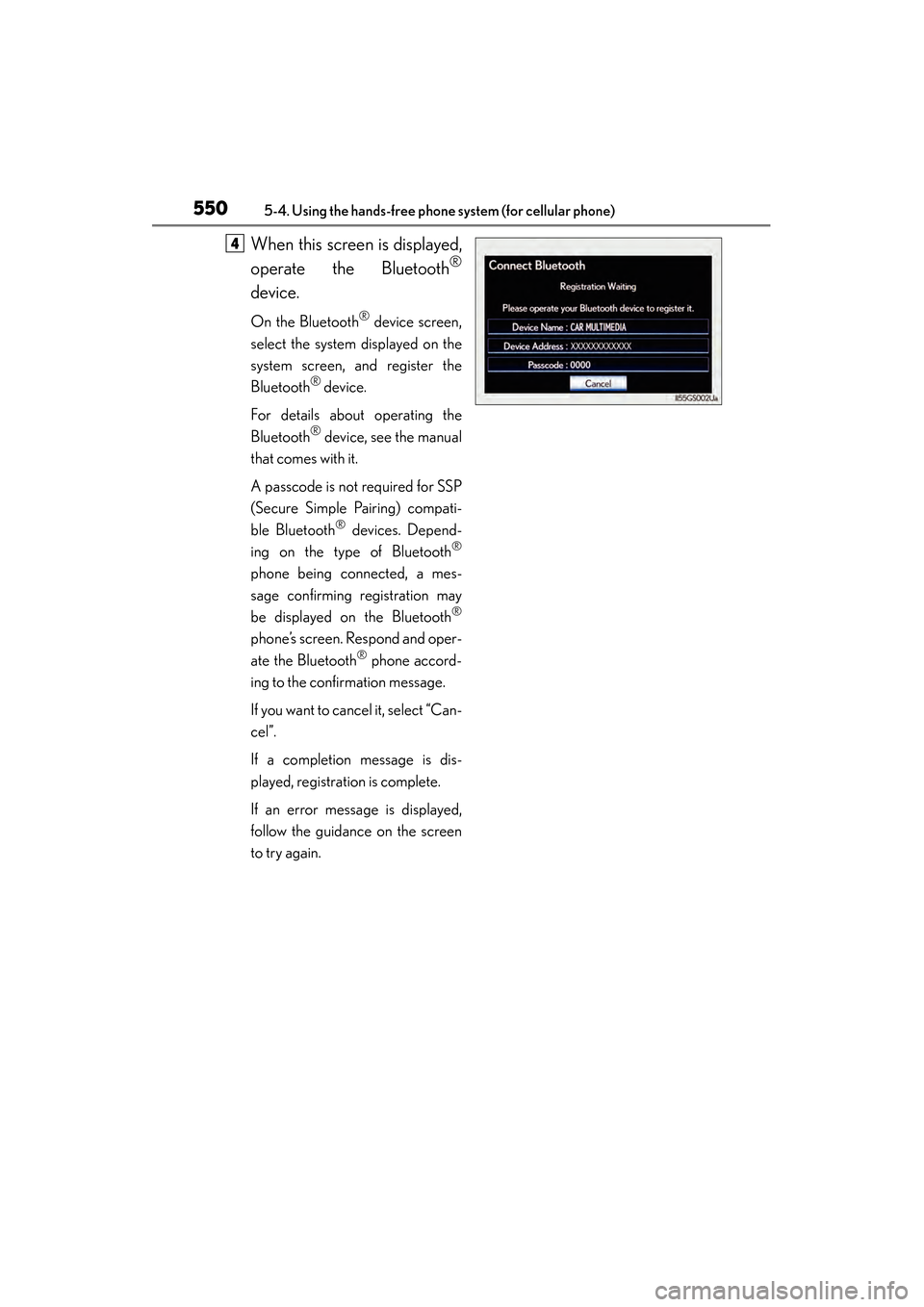
When this screen is displayed,
operate the Bluetooth
®
device.
On the Bluetooth® device screen,
select the system displayed on the
system screen, and register the
Bluetooth
® device.
For details about operating the
Bluetooth
® device, see the manual
that comes with it.
A passcode is not required for SSP
(Secure Simple Pairing) compati-
ble Bluetooth
® devices. Depend-
ing on the type of Bluetooth®
phone being connected, a mes-
sage confirming registration may
be displayed on the Bluetooth
®
phone’s screen. Respond and oper-
ate the Bluetooth
® phone accord-
ing to the confirmation message.
If you want to cancel it, select “Can-
cel”.
If a completion message is dis-
played, registration is complete.
If an error message is displayed,
follow the guidance on the screen
to try again.
4
GS350_OM_OM30D41U_(U).book Page 550 Monday, July 29, 2013 2:22 PM
Page 555 of 846
554
GS350_OM_OM30D41U_(U)
5-4. Using the hands-free phone system (for cellular phone)
■Editing the “Device Name”
If you change a device name, the name registered in your cellular phone is not
changed.
■About “Device Address”
The address peculiar to the system. It cannot be changed. If you have registered two
Bluetooth
® phones with the same device name and you cannot distinguish one from
the other, refer to this address.
■“My Phone Number”:
The phone number of the Bluetooth
® phone is displayed on the screen. Depending
on the type of phone, the phone number may not be displayed.
■“Profiles”:
The compatibility profile of the Bluetooth
® device is displayed on the screen.
■“Connect Portable Player from”:
There are 2 portable player connection settings available; “Vehicle” and “Portable
Player”.
■When you delete a Bluetooth® phone
The phonebook data will be deleted at the same time.
GS350_OM_OM30D41U_(U).book Page 554 Monday, July 29, 2013 2:22 PM
Page 558 of 846
GS350_OM_OM30D41U_(U)
5575-4. Using the hands-free phone system (for cellular phone)
5
Interior features
You can confirm and change the Bluetooth® settings.
Changing the device connection status
Changing the name of the connected device.
Changing the passcode that you registered your Bluetooth
® device in
the system
The address peculiar to the system
You cannot change this address. If the same device name is displayed on the
screen of your device, refer to it.
The compatibility profile of the Bluetooth® device
To display the screen above, follow the steps below. Display the “Bluetooth
*” screen. (→P. 548)
Select “Detailed Bluetooth* Settings” on the “Bluetooth
*” screen.
*: Bluetooth is a registered trademark of Bluetooth SIG, Inc.
Detailed Bluetooth settings
XPa g e 1XPa g e 2
1
2
3
4
5
1
2
GS350_OM_OM30D41U_(U).book Page 557 Monday, July 29, 2013 2:22 PM
Page 572 of 846
571
GS350_OM_OM30D41U_(U)5-6. Using the storage features
5
Interior features
Trunk features
Raise the hooks when needed.
The cargo hooks are provided for
securing loose items.
Pull the strap when using the hook.
Cargo hooks
Luggage hook
First-aid kit storage net
GS350_OM_OM30D41U_(U).book Page 571 Monday, July 29, 2013 2:22 PM