Page 509 of 846

508
GS350_OM_OM30D41U_(U)
5-4. Using the hands-free phone system (for cellular phone)
■Reconnecting to the Bluetooth® phone
If the system cannot connect due to poor signal strength with the engine switch in
ACCESSORY or IGNITION ON mode, the system will automatically attempt to
reconnect.
If the phone is turned off, the system will not attempt to reconnect. In this case, it must
be connected manually, or the phone must be re-selected or re-entered.
■Connecting the phone while Bluetooth® audio is playing
●Bluetooth® audio will stop temporarily.
●It may take time to connect.
■Connecting the phone while another Bluetooth® device is connected
When another Bluetooth
® device is currently connected, a confirmation message
will be displayed. To disconnect the Bluetooth® device, select “Yes”.
■Connecting the phone while 5 Bluetooth® devices have already been registered
When 5 Bluetooth
® devices have already been registered, a registered device
needs to be deleted. Select “Yes” to delete one or more.
Select the device to be deleted, then select “Remove”, and “Yes”.
■If the Bluetooth® phone has a Bluetooth® audio function
When the Bluetooth
® phone to be registered has a Bluetooth® audio function, this
audio function will be registered automatically at the same time and confirmation
message may be displayed. If this screen is displayed, select “Yes” to connect the
audio function or select “No” to cancel the connection.
GS350_OM_OM30D41U_(U).book Page 508 Monday, July 29, 2013 2:22 PM
Page 510 of 846
GS350_OM_OM30D41U_(U)
5095-4. Using the hands-free phone system (for cellular phone)
5
Interior features
Once the Bluetooth® phone is registered, you can make a call using the
following procedure:
■Dialing
Display the “Phone” screen. ( →P. 503)
Input the phone number.
To delete the inputted phone num-
ber, select .
Select or press on the steering wheel.
Depending on the type of Bluetooth® phone being connected, it may be nec-
essary to perform additional steps on the phone.
■Dialing from the phonebook
You can dial a number from the phonebook data imported from your
cellular phone. The system has one phonebook for each phone. Up to
1000 entries may be stored in each phonebook. ( →P. 5 2 6 )
Display the “Phone” screen. ( →P. 503)
Select “Contacts” on the “Phone” screen.
Choose the desired data to
call from the list.
Making a call
1
2
3
1
2
3
GS350_OM_OM30D41U_(U).book Page 509 Monday, July 29, 2013 2:22 PM
Page 511 of 846
510
GS350_OM_OM30D41U_(U)
5-4. Using the hands-free phone system (for cellular phone)
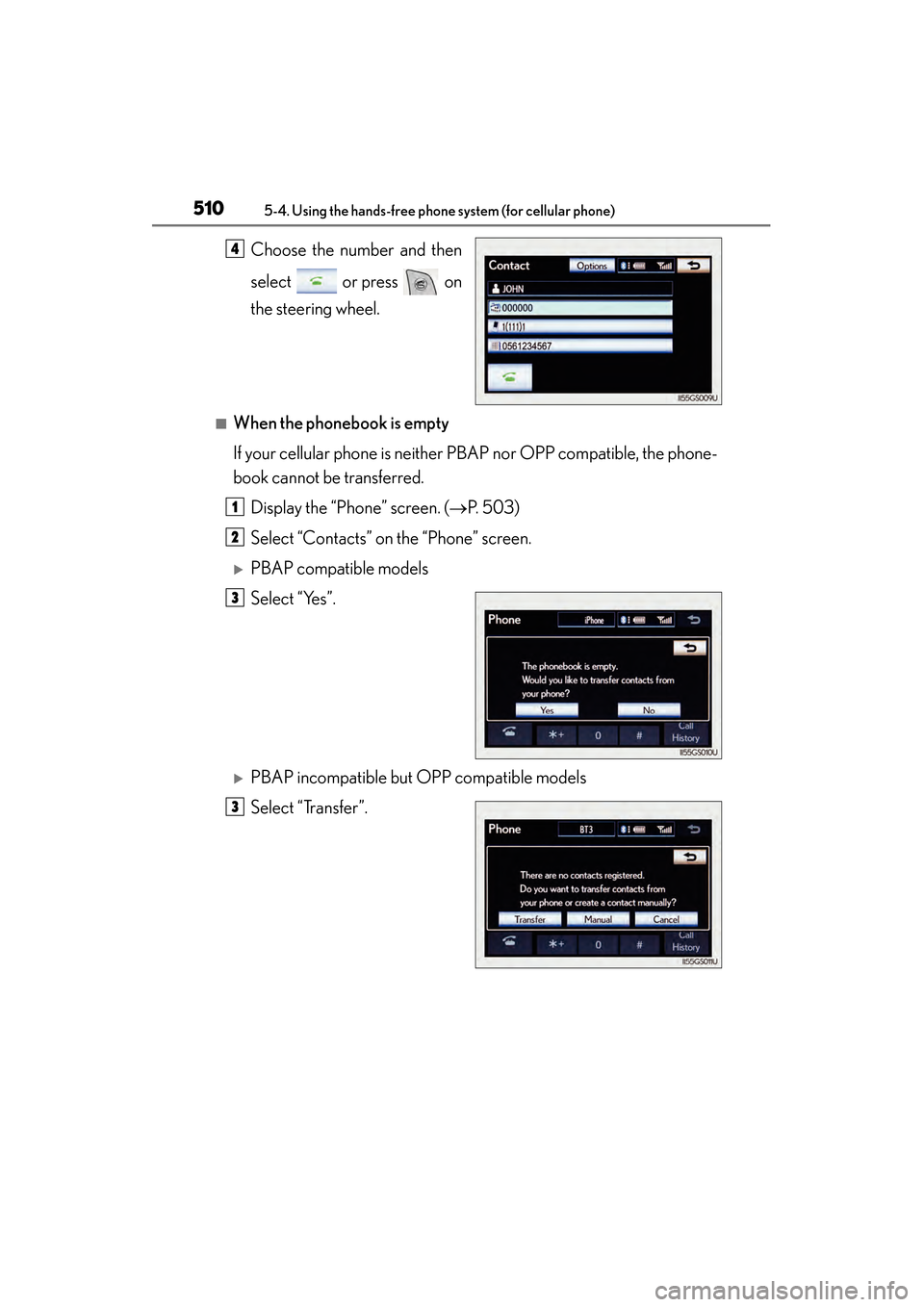
Choose the number and then
select or press on
the steering wheel.
■When the phonebook is empty
If your cellular phone is neither PBAP nor OPP compatible, the phone-
book cannot be transferred.Display the “Phone” screen. ( →P. 503)
Select “Contacts” on the “Phone” screen.
XPBAP compatible models
Select “Yes”.
XPBAP incompatible but OPP compatible models
Select “Transfer”.
4
1
2
3
3
GS350_OM_OM30D41U_(U).book Page 510 Monday, July 29, 2013 2:22 PM
Page 512 of 846
GS350_OM_OM30D41U_(U)
5115-4. Using the hands-free phone system (for cellular phone)
5
Interior features
Transfer the phonebook data
to the system using the
Bluetooth
® phone.
This screen appears while transfer-
ring. To cancel this function, select
“Cancel”.
Depending on the type of
Bluetooth
® phone:
• It may be necessary to perform additional steps on the phone
when transferring phonebook
data.
• The registered image on the phonebook may not appear
when phonebook data is trans-
ferred.
• OBEX authentication may be required when transferring
phonebook data. Enter “1234”
into the Bluetooth
® phone.
When the data transfer from a
PBAP incompatible but OPP
compatible model is complete,
“Done” will appear on the
screen. Select “Done”.
4
5
GS350_OM_OM30D41U_(U).book Page 511 Monday, July 29, 2013 2:22 PM
Page 513 of 846
512
GS350_OM_OM30D41U_(U)
5-4. Using the hands-free phone system (for cellular phone)
■Calling using speed dial
You can make a call using numbers registered from the phonebook.
(→P. 5 2 6 )
Display the “Phone” screen. ( →P. 503)
Select “Speed Dials” on the “Phone” screen.
Select the desired tab and
choose the desired number to
make a call.
1
2
3
GS350_OM_OM30D41U_(U).book Page 512 Monday, July 29, 2013 2:22 PM
Page 514 of 846
GS350_OM_OM30D41U_(U)
5135-4. Using the hands-free phone system (for cellular phone)
5
Interior features
■Dialing from history
You can call using the call history which has the 4 functions below.
“All”: All the numbers below which were memorized
“Missed”: Calls which you missed
“Incoming”: Calls which you received
“Outgoing”: Numbers which you called
You can call using the 25 most recently called numbers shown by “All”
tab while driving.Display the “Phone” screen. ( →P. 503)
Select “Call History” on the “Phone” screen.
Select the desired tab and
choose the desired data from
the list.
Select or press on
the steering wheel.
1
2
3
4
GS350_OM_OM30D41U_(U).book Page 513 Monday, July 29, 2013 2:22 PM
Page 515 of 846
514
GS350_OM_OM30D41U_(U)
5-4. Using the hands-free phone system (for cellular phone)
■Calling using voice recognition
You can call by giving a voice command. (
→P. 3 4 0 )
Press .
The “Call ” and “Dial ” operating procedures are
explained here. Other operating procedures are also similar.
●Calling by name
You can call by giving a name registered in the phonebook.
(→ P. 5 2 6 )
Press .
Following the system guid-
ance, wait for the beep and
then after saying “Call” say the
desired name, or the name and
type of phone.
Following the system guidance, wait for the beep and then say “Dial”.
(You can also call by pressing on the steering wheel.)
1
2
3
GS350_OM_OM30D41U_(U).book Page 514 Monday, July 29, 2013 2:22 PM
Page 516 of 846
GS350_OM_OM30D41U_(U)
5155-4. Using the hands-free phone system (for cellular phone)
5
Interior features
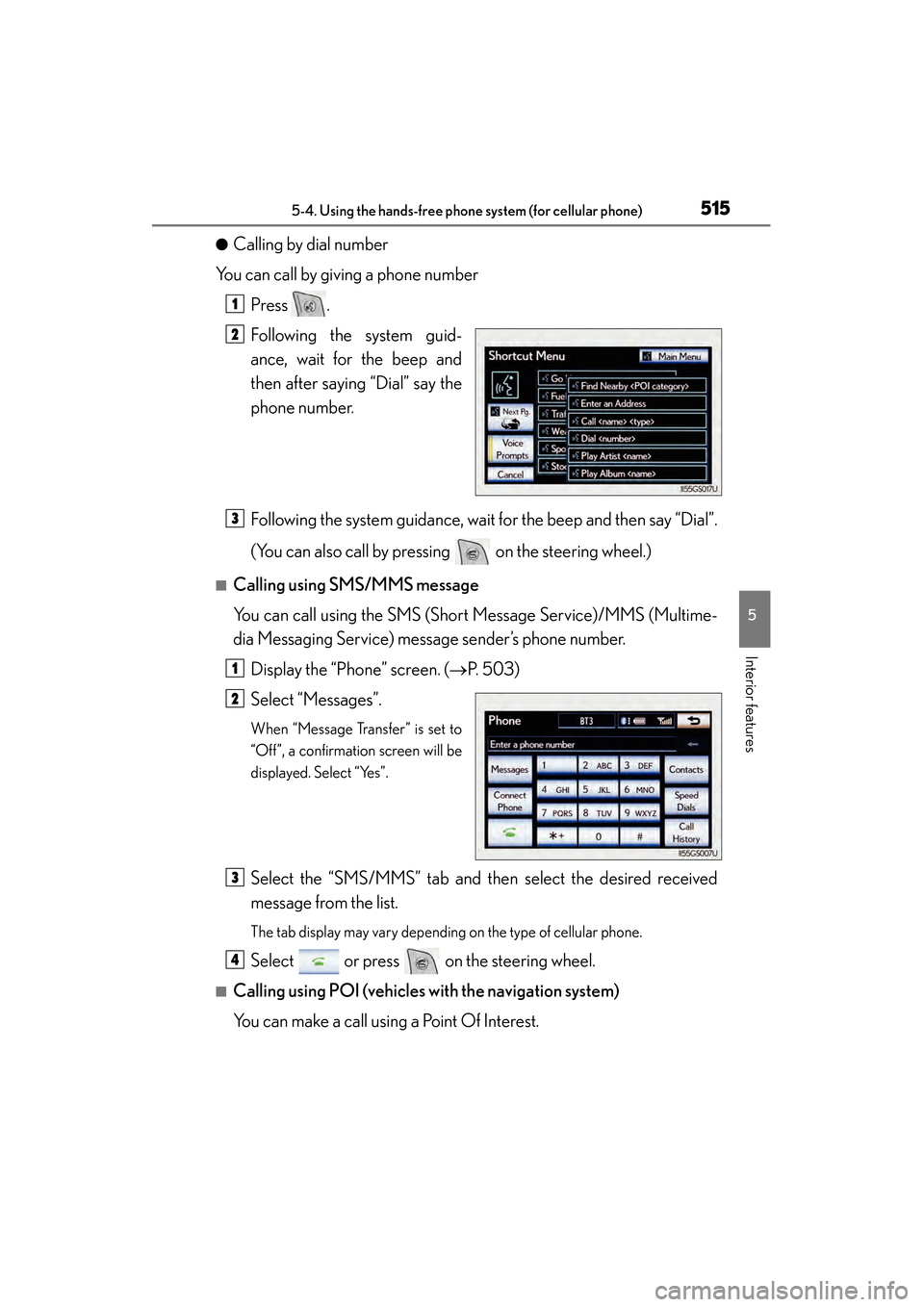
●Calling by dial number
You can call by giving a phone number
Press .
Following the system guid-
ance, wait for the beep and
then after saying “Dial” say the
phone number.
Following the system guidance, wait for the beep and then say “Dial”.
(You can also call by pressing on the steering wheel.)
■Calling using SMS/MMS message
You can call using the SMS (Short Message Service)/MMS (Multime-
dia Messaging Service) message sender’s phone number.Display the “Phone” screen. ( →P. 503)
Select “Messages”.
When “Message Transfer” is set to
“Off”, a confirmation screen will be
displayed. Select “Yes”.
Select the “SMS/MMS” tab and then select the desired received
message from the list.
The tab display may vary depending on the type of cellular phone.
Select or press on the steering wheel.
■Calling using POI (vehicles with the navigation system)
You can make a call using a Point Of Interest.
1
2
3
1
2
3
4
GS350_OM_OM30D41U_(U).book Page 515 Monday, July 29, 2013 2:22 PM