Page 114 of 846

GS350_OM_OM30D41U_(U)
1133-2. Opening, closing and locking the doors and trunk
3
Operation of each component
■When the vehicle is not driven for extended periods
●To prevent theft of the vehicle, do not leave the electronic key within 6 ft. (2 m) of
the vehicle.
●The smart access system with push-button start can be deactivated in advance.
(→ P. 7 9 3 )
■Alarm
Using the smart access system with push-button start to lock the doors will set the
alarm system. ( →P. 7 2 )
■To operate the system properly
●Make sure to carry the electronic key when operating the system. Do not get the
electronic key too close to the vehicle when operating the system from the outside
of the vehicle.
Depending on the position and holding condition of the electronic key, the key
may not be detected correctly and the system may not operate properly. (The
alarm may go off accidentally, or the door lock prevention function may not oper-
ate.)
●Do not leave the electronic key inside the luggage compartment.
The key confinement prevention function may not operate, depending on the loca-
tion of the key (close to a spare tire, the inside edge of the luggage compartment),
conditions (inside a metal bag, close to metallic objects) and the radio waves in the
surrounding area. ( →P. 1 2 5 )
■If the smart access system with push-button start does not operate properly
●Locking and unlocking the doors and opening the trunk: Use the mechanical key.
(→ P. 7 5 4 )
●Starting the engine: →P. 7 5 5
GS350_OM_OM30D41U_(U).book Page 113 Monday, July 29, 2013 2:22 PM
Page 115 of 846

114
GS350_OM_OM30D41U_(U)
3-2. Opening, closing and locking the doors and trunk
■Electronic key battery depletion
●The standard battery life is 1 to 2 years.
●If the battery becomes low, an alarm will sound in the cabin when the engine stops.
(→ P. 7 3 3 )
●As the electronic key always receives radio waves, the battery will become
depleted even if the electronic key is not used. The following symptoms indicate
that the electronic key battery may be depleted. Replace the battery when neces-
sary. ( →P. 6 5 9 )
• The smart access system with push-button start or the wireless remote control does not operate.
• The detection area becomes smaller.
• The LED indicator on the key surface does not turn on.
●To avoid serious deterioration, do not leave the electronic key within 3 ft. (1 m) of
the following electrical appliances that produce a magnetic field:
•TVs
• Personal computers
• Cellular phones, cordless phones and battery chargers
• Recharging cellular phones or cordless phones
• Table lamps
• Induction cookers
■When the electronic key battery is fully depleted
→ P. 6 5 9
■Customization
Settings (e. g. smart access system with push-button start) can be changed.
(Customizable features: → P. 7 9 3 )
■If the smart access system with push-button start has been deactivated in a cus-
tomized setting
●Locking and unlocking the doors and opening the trunk:
Use the wireless remote control or mechanical key. ( →P. 116, 754)
●Starting the engine and changing engine switch modes: →P. 7 5 5
●Stopping the engine: →P. 1 74
GS350_OM_OM30D41U_(U).book Page 114 Monday, July 29, 2013 2:22 PM
Page 116 of 846

GS350_OM_OM30D41U_(U)
1153-2. Opening, closing and locking the doors and trunk
3
Operation of each component
■Certification for the smart access system with push-button start
XFor vehicles sold in the U.S.A.
FCC ID: HYQ23AAB FCC ID: HYQ14FBA
FCC ID: HYQ14CBA
FCC ID: NI4TMLF10-2 FCC ID: NI4TMLF10-50
FCC ID: NI4TMLF10-51
NOTE:
This device complies with part 15 of the FCC Rules. Operation is subject to the fol-
lowing two conditions: (1) This device may not cause harmful interference, and (2)
this device must accept any interference received, including interference that may
cause undesired operation.
FCC WARNING:
Changes or modifications not expressly approved by the party responsible for com-
pliance could void the user’s authority to operate the equipment.
XFor vehicles sold in Canada
NOTE:
This device complies with Industry Canada licence-exempt RSS standard(s). Oper-
ation is subject to the following two condit ions: (1) this device may not cause interfer-
ence, and (2) this device must accept any interference, including interference that
may cause undesired operation of the device.
CAUTION
■Caution regarding interference with electronic devices
●People with implantable cardiac pacemakers, cardiac resynchronization therapy-
pacemakers or implantable cardioverter defibrillators should keep away from the
smart access system with push-button start antennas. (→ P. 1 0 5 )
The radio waves may affect the operation of such devices. If necessary, the entry
function can be disabled. Ask your Lexus dealer for details, such as the frequency
of radio waves and timing of the emitted radio waves. Then, consult your doctor
to see if you should disable the entry function.
●Users of any electrical medical device other than implantable cardiac pacemak-
ers, cardiac resynchronization therapy-pacemakers or implantable cardioverter
defibrillators should consult the manufacturer of the device for information about
its operation under the influence of radio waves.
Radio waves could have unexpected effects on the operation of such medical
devices.
Ask your Lexus dealer for details on disabling the entry function.
GS350_OM_OM30D41U_(U).book Page 115 Monday, July 29, 2013 2:22 PM
Page 117 of 846
116
GS350_OM_OM30D41U_(U)
3-2. Opening, closing and locking the doors and trunk
Wireless remote control
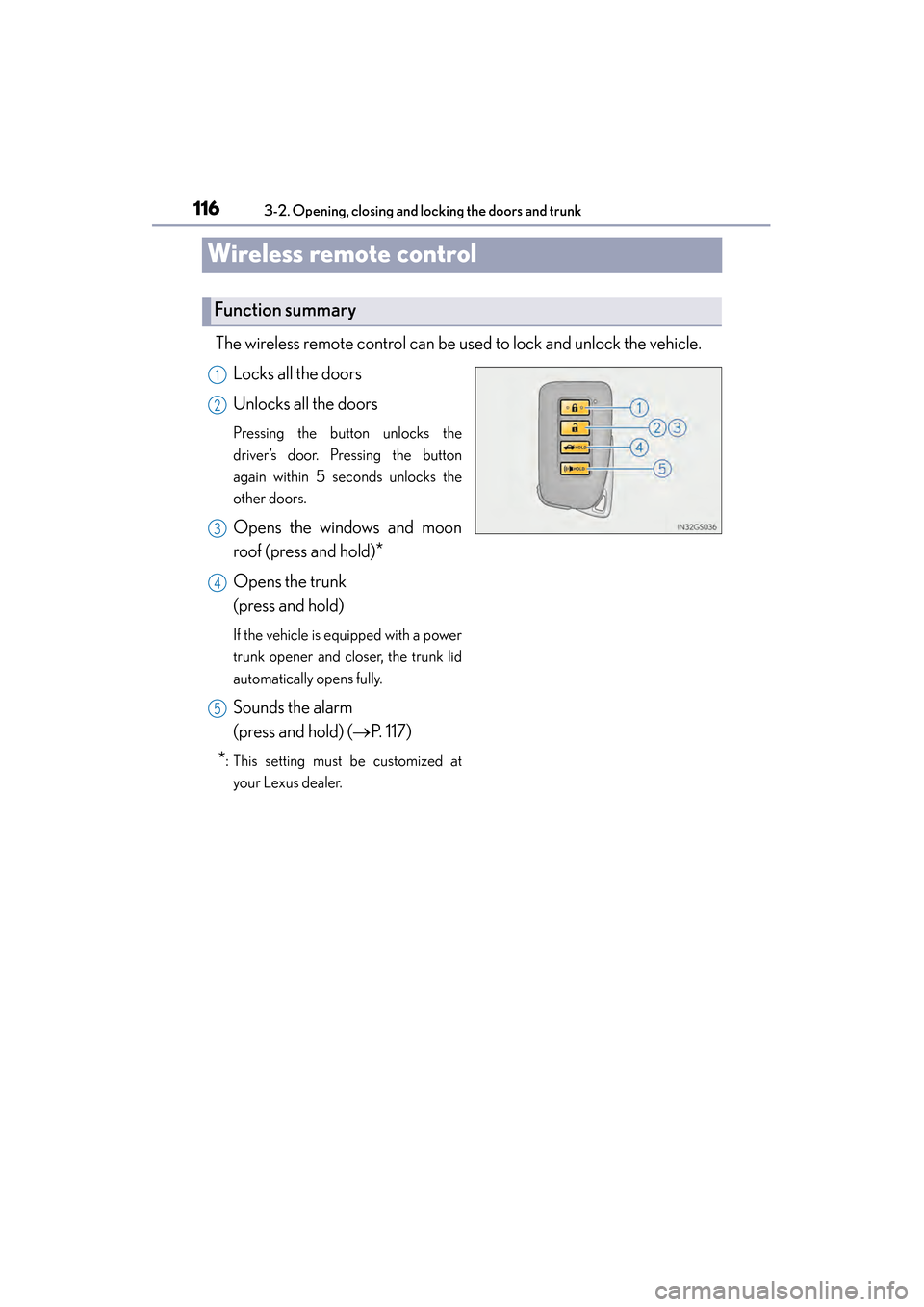
The wireless remote control can be used to lock and unlock the vehicle.
Locks all the doors
Unlocks all the doors
Pressing the button unlocks the
driver’s door. Pressing the button
again within 5 seconds unlocks the
other doors.
Opens the windows and moon
roof (press and hold)
*
Opens the trunk
(press and hold)
If the vehicle is equipped with a power
trunk opener and closer, the trunk lid
automatically opens fully.
Sounds the alarm
(press and hold) ( →P. 117)
*: This setting must be customized at
your Lexus dealer.
Function summary
1
2
3
4
5
GS350_OM_OM30D41U_(U).book Page 116 Monday, July 29, 2013 2:22 PM
Page 118 of 846

GS350_OM_OM30D41U_(U)
1173-2. Opening, closing and locking the doors and trunk
3
Operation of each component
■Operation signals
Doors:
A buzzer sounds and the emergency flashers flash to indicate that the doors have
been locked/unlocked. (Locked: once; Unlocked: twice)
Tr u n k :
A buzzer sounds to indicate that the trunk has been opened.
Windows and moon roof:
A buzzer sounds to indicate that the windows and moon roof are operating.
■Welcome light illumination control
→P. 1 0 3
■Door lock buzzer
If an attempt to lock the doors is made when a door is not fully closed, a buzzer
sounds continuously for 5 seconds. Fully cl ose the door to stop the buzzer, and lock
the vehicle once more.
■Pa ni c m o d e
■Security feature
→ P. 1 0 3
■Alarm
Using the wireless remote control to lock the doors will set the alarm system.
(→ P. 7 2 )
■Conditions affecting operation
→P. 110
When is pressed for longer than about
one second, an alarm will sound intermittently
and the vehicle lights will flash to deter any
person from trying to break into or damage
your vehicle.
To stop the alarm, press any button on the
electronic key.
GS350_OM_OM30D41U_(U).book Page 117 Monday, July 29, 2013 2:22 PM
Page 119 of 846

118
GS350_OM_OM30D41U_(U)
3-2. Opening, closing and locking the doors and trunk
■If the wireless remote control does not operate properly
Locking and unlocking the doors and opening the trunk: Use the mechanical key.
(→ P. 7 5 4 )
■Electronic key battery depletion
→P. 114
■When the electronic key battery is fully depleted
→P. 6 5 9
■Confirmation of the registered key number
The number of keys already registered to the vehicle can be confirmed. Ask your
Lexus dealer for details.
■Customization
Settings (e.g. wireless remote control system) can be changed.
(Customizable features: → P. 7 9 3 )
■Certification for wireless remote control
XFor vehicles sold in the U.S.A.
FCC ID: HYQ23AAB FCC ID: HYQ14FBA
FCC ID: HYQ14CBA
FCC ID: NI4TMLF10-2 FCC ID: NI4TMLF10-50
FCC ID: NI4TMLF10-51
NOTE:
This device complies with part 15 of the FCC Rules. Operation is subject to the fol-
lowing two conditions: (1) This device may not cause harmful interference, and (2)
this device must accept any interference received, including interference that may
cause undesired operation.
FCC WARNING:
Changes or modifications not expressly approved by the party responsible for com-
pliance could void the user’s authority to operate the equipment.
XFor vehicles sold in Canada
NOTE:
This device complies with Industry Canada licence-exempt RSS standard(s). Oper-
ation is subject to the following two condit ions: (1) this device may not cause interfer-
ence, and (2) this device must accept any interference, including interference that
may cause undesired operation of the device.
GS350_OM_OM30D41U_(U).book Page 118 Monday, July 29, 2013 2:22 PM
Page 120 of 846
119
GS350_OM_OM30D41U_(U)3-2. Opening, closing and locking the doors and trunk
3
Operation of each component
Doors
The vehicle can be locked and unlocked using the entry function, wireless
remote control or door lock switches.
◆Entry function
→ P. 1 0 3
◆Wireless remote control
→P. 116
◆Door lock switches
Locks all the doors
Unlocks all the doors
◆Inside lock buttonsLocks the door
Unlocks the door
The front doors can be opened by
pulling the inside handle even if the
lock buttons are in the lock posi-
tion.
Unlocking and locking the doors
1
2
1
2
GS350_OM_OM30D41U_(U).book Page 119 Monday, July 29, 2013 2:22 PM
Page 121 of 846
120
GS350_OM_OM30D41U_(U)
3-2. Opening, closing and locking the doors and trunk
Move the inside lock button to the lock position.
Close the door.
The door cannot be locked if the engine switch is in ACCESSORY or
IGNITION ON mode, or the electronic key is left inside the vehicle.
The key may not be detected correctly and the door may be locked.
The door cannot be opened from
inside the vehicle when the lock is
set. Unlock
Lock
These locks can be set to prevent chil-
dren from opening the rear doors.
Push down on each rear door switch
to lock both rear doors.
Locking the front doors from the outside without a key
Rear door child-protector lock
1
2
1
2
GS350_OM_OM30D41U_(U).book Page 120 Monday, July 29, 2013 2:22 PM