Page 134 of 688

1343-2. Opening, closing and locking the doors and trunk
GS350_250_OM_OM30E16E_(EE)
■Conditions affecting operation
The smart entry & start system uses weak radio waves. In the following situations, the
communication between the electronic key and the vehicle may be affected, pre-
venting the smart entry & start system, wireless remote control and engine immobi-
lizer system from operating properly. (Ways of coping: →P. 6 1 8 )
●When the electronic key battery is depleted
●Near a TV tower, electric power plant, gas station, radio station, large display, air-
port or other facility that generates strong radio waves or electrical noise
●When carrying a portable radio, cellular phone, cordless phone or other wireless
communication device
●When the electronic key is in contact with, or is covered by the following metallic
objects
• Cards to which aluminum foil is attached
• Cigarette boxes that have aluminum foil inside
• Metallic wallets or bags
•Coins
• Hand warmers made of metal
• Media such as CDs and DVDs
●When other wireless keys (that emit radio waves) are being used nearby
●When carrying the electronic key together with the following devices that emit
radio waves
• Another vehicle’s electronic key or a wireless key that emits radio waves
• Personal computers or personal digital assistants (PDAs)
• Digital audio players
• Portable game systems
●If window tint with a metallic content or metallic objects are attached to the rear
window
GS350_250_OM_OM30E16E_(EE).book Page 134 Tuesday, July 8, 201 4 7:11 PM
Page 238 of 688

2384-2. Driving procedures
GS350_250_OM_OM30E16E_(EE)
Stop the vehicle.
Shift the shift lever to P.
Set the parking brake. (→P. 255)
Press the engine switch.
Release the brake pedal and check that “POWER ON” on the multi-
information display is off.
Modes can be changed by pressing the engine switch with brake pedal
released. (The mode changes each time the switch is pressed.)
Off*
The emergency flashers can be used.
The multi-information display will not
be displayed.
ACCESSORY mode
Some electrical components such as
the audio system can be used.
“POWER ON” will be displayed on
the multi-information display.
IGNITION ON mode
All electrical components can be
used.
“POWER ON” will be displayed on
the multi-information display.
*: If the shift lever is in a position other than P when turning off the engine, the
engine switch will be turned to
ACCESSORY mode, not to off.
Stopping the engine
Changing engine switch modes
1
2
3
4
5
GS350_250_OM_OM30E16E_(EE).book Page 238 Tuesday, July 8, 201 4 7:11 PM
Page 343 of 688
3434-5. Using the driving support systems
4
Driving
GS350_250_OM_OM30E16E_(EE)
■The outside rear view mirror indicators visibility
When under strong sunlight, the outside rear view mirror indicator may be difficult to
see.
■Rear Crossing Traffic Alert buzzer hearing
Rear Crossing Traffic Alert function may be difficult to hear over loud noises such as
high audio volume.
■When there is a malfunction in the Blind Spot Monitor
If a system malfunction is detected due to any of the following reasons, warning mes-
sages will be displayed: (→P. 5 5 7 , 5 6 4 )
●There is a malfunction with the sensors
●The sensors have become dirty
●The outside temperature is extremely high or low
●The sensor voltage has become abnormal
■Certification for the Blind Spot Monitor
XFor vehicles sold in Israel
XFor vehicles sold in Russia
type approval number: POCC DE.ML05.H01144
GS350_250_OM_OM30E16E_(EE).book Page 343 Tuesday, July 8, 201 4 7:11 PM
Page 365 of 688
3655-1. Remote Touch screen
5
Interior features
GS350_250_OM_OM30E16E_(EE)
Press the “MENU” button on the Remote Touch to display the “Menu”
screen.
The display may differ depending on the type of the system.
12.3-inch display: When an interruption screen is being displayed on the side dis-
play, the “Menu” screen will be shown on the main display.
“Menu” screen
XFor 8-inch displayXFor 12.3-inch display
SwitchFunction
Select to operate the audio/visual system.*1
Select to display the air conditioning control screen. (→P. 3 7 1 )
Select to display the hands-free operation screen.*1
Select to display the “Information” screen.*1
Select to display the fuel consumption screen. ( →P. 118)
Select to display the “Setup” screen.*1
GS350_250_OM_OM30E16E_(EE).book Page 365 Tuesday, July 8, 201 4 7:11 PM
Page 368 of 688
3685-1. Remote Touch screen
GS350_250_OM_OM30E16E_(EE)
■Split-screen display
Different information can be displayed on the left and right of the
screen. For example, air conditioning system or audio screens can be
displayed and operated while the fuel consumption information screen
is being displayed. The large screen on the left of the display is called
the main display, and the small screen to the right is called the side dis-
play.
GS350_250_OM_OM30E16E_(EE).book Page 368 Tuesday, July 8, 2014 7:11 PM
Page 369 of 688
3695-1. Remote Touch screen
5
Interior features
GS350_250_OM_OM30E16E_(EE)
For details of the functions and operation of the main display, refer to the
respective section.
■Selecting the operation screen
When selecting the side display, move the Remote Touch knob to the
right until is displayed at the boundary between the main display
and the side display, and then move it further to the right. When select-
ing the main display, move the Remote Touch knob to the left until is
displayed at the boundary between the main display and the side dis-
play, and then move it further to the left.
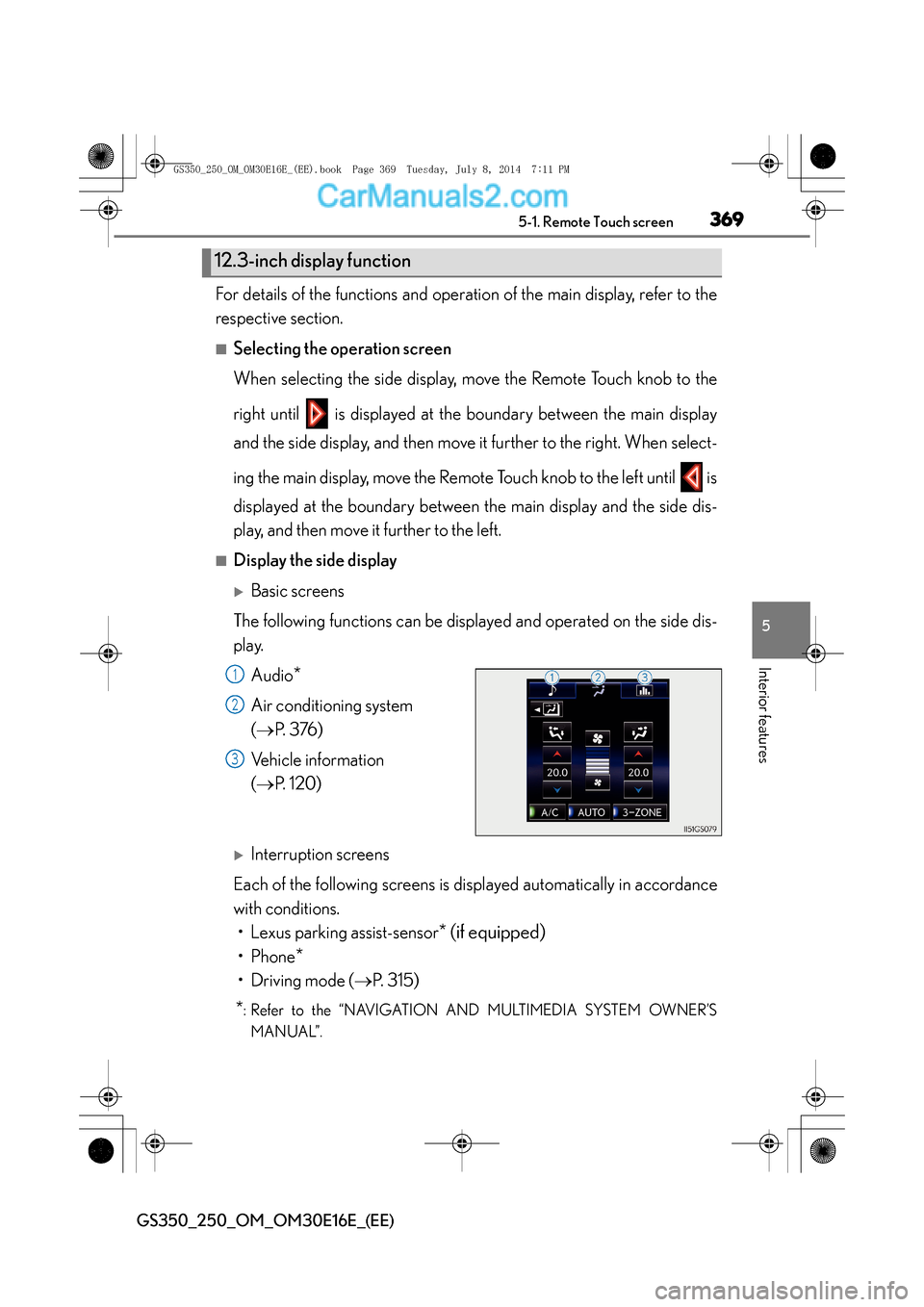
■Display the side display
XBasic screens
The following functions can be displayed and operated on the side dis-
play. Audio
*
Air conditioning system
(→ P. 3 76 )
Vehicle information
( → P. 1 2 0 )
XInterruption screens
Each of the following screens is displayed automatically in accordance
with conditions. • Lexus parking assist-sensor
* (if equipped)
•Phone*
• Driving mode ( →P. 315)
*: Refer to the “NAVIGATION AND MULTIMEDIA SYSTEM OWNER’S
MANUAL”.
12.3-inch display function
1
2
3
GS350_250_OM_OM30E16E_(EE).book Page 369 Tuesday, July 8, 201 4 7:11 PM
Page 442 of 688

4426-1. Maintenance and care
GS350_250_OM_OM30E16E_(EE)
NOTICE
■Cleaning detergents
●Do not use the following types of detergent, as they may discolor the vehicle inte-
rior or cause streaks or damage to painted surfaces:
• Non-seat portions: Organic substances such as benzene or gasoline, alkalineor acidic solutions, dye, and bleach
• Seats: Alkaline or acidic solutions, such as thinner, benzene, and alcohol
●Do not use polish wax or polish cleaner. The instrument panel’s or other interior
part’s painted surface may be damaged.
■Preventing damage to leather surfaces
Observe the following precautions to avoid damage to and deterioration of
leather surfaces:
●Remove any dust or dirt from leather surfaces immediately.
●Do not expose the vehicle to direct sunlight for extended periods of time. Park
the vehicle in the shade, especially during summer.
●Do not place items made of vinyl, plastic, or containing wax on the upholstery, as
they may stick to the leather surface if the vehicle interior heats up significantly.
■Water on the floor
Do not wash the vehicle floor with water.
Vehicle systems such as the audio system may be damaged if water comes into
contact with electrical components such as the audio system above or under the
floor of the vehicle. Water may also cause the body to rust.
GS350_250_OM_OM30E16E_(EE).book Page 442 Tuesday, July 8, 201 4 7:11 PM
Page 509 of 688
509 6-3. Do-it-yourself maintenance
6
Maintenance and care
GS350_250_OM_OM30E16E_(EE)
11DOOR RR30Power window (rear right-hand)
12RAD NO.230Audio system
13AM27. 5Smart entry & start system
14MULTIMEDIA10Navigation system, Remote Touch
15RAD NO.130Audio system
16AIR BAG10SRS airbag system
17OBD7. 5On-board diagnosis system
18ACC7. 5
Body ECU, DCM, head-up display, RR
CTRL, Remote Touch screen, navigation sys-
tem, clock, transmission
FuseAmpereCircuit
GS350_250_OM_OM30E16E_(EE).book Page 509 Tuesday, July 8, 2014 7:11 PM


