Page 296 of 918
ES350_300h_OM_OM33A60U_(U)
2954-5. Using the driving support systems
4
Driving
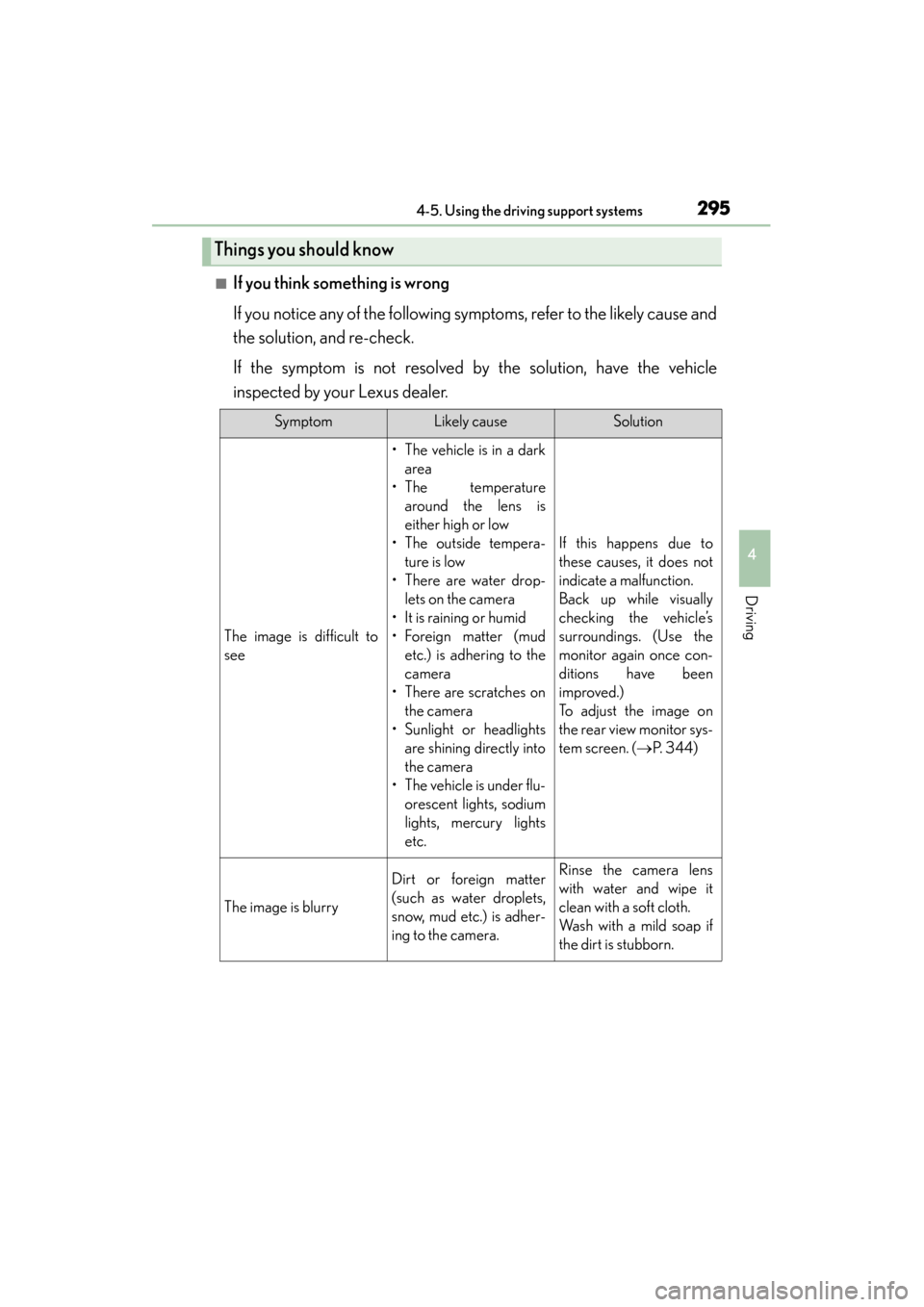
■If you think something is wrong
If you notice any of the following symptoms, refer to the likely cause and
the solution, and re-check.
If the symptom is not resolved by the solution, have the vehicle
inspected by your Lexus dealer.
Things you should know
SymptomLikely causeSolution
The image is difficult to
see
• The vehicle is in a darkarea
• The temperature around the lens is
either high or low
• The outside tempera- ture is low
• There are water drop- lets on the camera
• It is raining or humid
• Foreign matter (mud etc.) is adhering to the
camera
• There are scratches on the camera
• Sunlight or headlights are shining directly into
the camera
• The vehicle is under flu- orescent lights, sodium
lights, mercury lights
etc.
If this happens due to
these causes, it does not
indicate a malfunction.
Back up while visually
checking the vehicle’s
surroundings. (Use the
monitor again once con-
ditions have been
improved.)
To adjust the image on
the rear view monitor sys-
tem screen. ( →P. 3 4 4 )
The image is blurry
Dirt or foreign matter
(such as water droplets,
snow, mud etc.) is adher-
ing to the camera.Rinse the camera lens
with water and wipe it
clean with a soft cloth.
Wash with a mild soap if
the dirt is stubborn.
Page 298 of 918

ES350_300h_OM_OM33A60U_(U)
2974-5. Using the driving support systems
4
Driving
CAUTION
■When using the rear view monitor system
When backing up, be sure to check visually behind and all around the vehicle
before proceeding.
Observe the following precautions to avoid an accident that could result in death
or serious injuries.
●The rear view monitor system is a supplemental device intended to assist the
driver when backing up. Never depend on the rear view monitor system entirely
when backing up. Always make sure your intended path is clear.
Use caution, just as you would when backing up any vehicle.
●Never back up while looking only at the screen.
The image shown on the screen may differ from the actual state, and you could
collide with another vehicle or obstacles if backing up looking only at the screen,
possibly causing an accident. When backing up, be sure to check in front of and
behind the vehicle, both directly and with mirrors.
●Be sure to back up slowly, depressing the brake pedal to control vehicle speed.
●The instructions given are only guidelines.
When and how much to turn the steering wheel will vary according to traffic con-
ditions, road surface conditions, vehicle condition, etc. when parking. It is neces-
sary to be fully aware of this before using the rear view monitor system.
●When parking, be sure to check that the parking space will accommodate your
vehicle before maneuvering into it.
●Do not use system in the following cases:
• On icy or slick road surfaces, or in snow
• When using tire chains or the compact spare tire
• When the trunk lid is not closed completely
• On roads that are not flat or straight, such as curves or slopes.
●In low temperatures, the screen may darken or the image may become faint. The
image could distort when the vehicle is moving, or you may become unable to
see the image on the screen. Be sure to check direct visually and with mirror all
around the vehicle before proceeding.
●If the tire sizes are changed, the position of the fixation guide lines displayed on
the screen may change.
●The camera uses a special lens. The distances between objects and pedestrians
that appear in the image displayed on the screen will differ from the actual dis-
tances. (→P. 2 9 1 )
Page 299 of 918
298
ES350_300h_OM_OM33A60U_(U)
4-5. Using the driving support systems
CAUTION
■When using the rear view monitor system screen
●The position of the fixation guide lines displayed on the screen may change in
accordance with the number of passengers, the amount of cargo etc. Be sure to
check behind and all around the vehicle direct visually and with mirror before
proceeding.
●The vehicle width extension guide lines are wider than the actual width of the
vehicle. When backing up, be sure to check behind and all around the vehicle
direct visually and with mirror before proceeding.
Page 309 of 918

308
ES350_300h_OM_OM33A60U_(U)
4-5. Using the driving support systems
Hill-start assist control (hybrid vehicles)
To engage hill-start assist control,
further depress the brake pedal
when the vehicle is stopped com-
pletely.
A buzzer will sound once to indicate
the system is activated. The slip indica-
tor will also start flashing.
■Hill-start assist control operating conditions
●The system operates in the following situations:
• The shift lever is in a position other than P.
• The parking brake is not applied.
• The accelerator pedal is not depressed.
●Hill-start assist control cannot be operated while the slip indicator light is illumi-
nated.
■Hill-start assist control
●While hill-start assist control is operating, the brakes remain automatically applied
after the driver releases the brake pedal. The stop lights and the high mounted
stoplight turn on.
●Hill-start assist control operates for about 2 seconds after the brake pedal is
released.
●If the slip indicator does not flash and the buzzer does not sound when the brake
pedal is further depressed, slightly reduce the pressure on the brake pedal (do not
allow the vehicle to roll backward) and then firmly depress it again. If the system still
does not operate, check that the operating conditions explained above have been
met.
Assists with starting off and temporarily maintains braking power even
if the foot is removed from the brake pedal when starting off on an
incline or a slippery slope.
Page 316 of 918

ES350_300h_OM_OM33A60U_(U)
3154-5. Using the driving support systems
4
Driving
CAUTION
■Limitations of the pre-collision system
Do not overly rely on the pre-collision system. Always drive safely, taking care to
observe your surroundings and checking for any obstacles or other road hazards.
Failure to do so may cause an accident resulting in death or serious injury.
■When the sensor may not be correctly detecting the vehicle ahead
Apply the brakes as necessary in any of the following situations.
●When water or snow thrown up by the surrounding vehicles hinders the function-
ing of the sensor
●When your vehicle is pointing upwards (caused by a heavy load in the luggage
compartment etc.)
●Vehicles that cut in suddenly
●Vehicles with small rear ends (trailers with no load on board etc.)
●Motorcycles traveling in the same lane
■Handling the radar sensor
Observe the following to ensure the pre-collision system can function effectively.
Otherwise, the system may not function correctly and could result in an accident.
●Keep the sensor and grille cover clean at all times.
Clean the sensor and grille cover with a soft cloth so you do not mark or damage
them.
●Do not subject the sensor or surrounding area to a strong impact.
If the sensor moves even slightly off position, the system may become inaccurate
or malfunction. If the sensor or surrounding area is subject to a strong impact,
always have the area inspected and adjusted by your Lexus dealer.
●Do not disassemble the sensor.
●Do not attach accessories or stickers to the sensor, grille cover or surrounding
area.
●Do not modify or paint the sensor and grille cover.
●Do not replace them with non-genuine parts.
Page 328 of 918

327
ES350_300h_OM_OM33A60U_(U)
4-6. Driving tips
4
Driving
Hybrid vehicle driving tips (hybrid vehicles)
When using Eco drive mode, the torque corresponding to the accelerator
pedal depression amount can be generated more smoothly than it is in
normal conditions. In addition, the operation of the air conditioning system
(heating/cooling) will be minimized, improving the fuel economy.
(→P. 300)
The Eco-friendly driving is possible by keeping the indicate of Hybrid Sys-
tem Indicator within Eco area. ( →P. 9 8 )
Make sure to operate the brakes gently and in good time. A greater
amount of electrical energy can be retained when slowing down.
Repeated acceleration and deceleration, as well as long waits at traffic
lights, will lead to bad fuel consumption. Check traffic reports before leav-
ing and avoid delays as much as possible. When encountering a delay,
gently release the brake pedal to allow the vehicle to move forward
slightly while avoiding overuse of the accelerator pedal. Doing so can help
control excessive gasoline consumption.
For economical and ecological drivin g, pay attention to the following
points:
Using Eco drive mode
Use of Hybrid System Indicator
When braking the vehicle
Delays
Page 329 of 918

328
ES350_300h_OM_OM33A60U_(U)
4-6. Driving tips
Control your speed and keep at a constant speed. Also, before stopping
at a toll booth or similar, allow plenty of time to release the accelerator and
gently apply the brakes. A greater amount of electrical energy can be
retained when slowing down.
Use the air conditioning only when necessary. Doing so can help control
excessive gasoline consumption.
In summer: In high temperatures, use the recirculated air mode. Doing so
will help to reduce the burden on the air conditioner and reduce fuel con-
sumption as well.
In winter: Because the gasoline engine will not automatically cut out until
the gasoline engine and the interior of the vehicle are warm, it will con-
sume fuel. Also, fuel consumption can be improved by avoiding overuse of
the heater.
Make sure to check the tire inflation pressure frequently. Improper tire
inflation pressure can cause poor fuel consumption.
Also, as snow tires can cause large amounts of friction, their use on dry
roads can lead to poor fuel consumption. Use a tire that is appropriate for
the season.
Carrying heavy luggage can lead to poor fuel consumption. Avoid carry-
ing unnecessary luggage. Installing a large roof rack can also cause poor
fuel consumption.
Highway driving
Air conditioning
Checking tire inflation pressure
Luggage
Page 332 of 918

ES350_300h_OM_OM33A60U_(U)
3314-6. Driving tips
4
Driving
Perform the following according to the driving conditions:
●Do not try to forcibly open a window or move a wiper that is frozen.
Pour warm water over the frozen area to melt the ice. Wipe away the
water immediately to prevent it from freezing.
●To ensure proper operation of the climate control system fan, remove
any snow that has accumulated on the air inlet vents in front of the wind-
shield.
●Check for and remove any excess ice or snow that may have accumu-
lated on the exterior lights, vehicle’s roof, chassis, around the tires or on
the brakes.
●Remove any snow or mud from the bottom of your shoes before getting
in the vehicle.
Accelerate the vehicle slowly, keep a safe distance between you and the
vehicle ahead, and drive at a reduced speed suitable to road conditions.
Park the vehicle and move the shift lever to P without setting the parking
brake. The parking brake may freeze up, preventing it from being
released. If necessary, block the wheels to prevent inadvertent sliding or
creeping.
Before driving the vehicle
When driving the vehicle
When parking the vehicle
