Page 97 of 918
96
ES350_300h_OM_OM33A60U_(U)
2. Instrument cluster
Fuel gauge
Displays the quantity of fuel remaining in the tank
Shift position and shift range
Displays the selected shift position or selected shift range (→P. 2 1 8 , 2 2 1 )
Odometer and trip meter display
XOdometer
Displays the total distance the vehicle has been driven
XTr i p m e t e r
Displays the distance the vehicle has been driven since the meter was last reset.
Trip meters “A” and “B” can be used to record and display different distances inde-
pendently.
Switches between odometer and
trip meter displays. When the trip
meter is displayed, pressing and
holding the button will reset the trip
meter.
The brightness of the instrument panel lights can be adjusted. Darker
Brighter
Changing the display
6
7
8
Instrument panel light control
1
2
Page 100 of 918

ES350_300h_OM_OM33A60U_(U)
992. Instrument cluster
2
Instrument cluster
■ECO lamp and SPORT lamp
●When sport mode is selected, SPORT lamp (red) will illuminate.
●When all of the following conditions are satisfied and Eco-friendly driving, ECO
lamp (blue) will illuminate. (ECO lamp will become brighter the more Eco-friendly
driving you perform. Also, while the vehicle is stopped or the acceleration exceeds
Zone of Eco driving, ECO lamp turns off. (→P. 107) However, when Eco drive
mode is selected, while the vehicle is stopped or the acceleration exceeds Zone of
Eco driving, ECO lamp does not turn off.):
• Driving with the shift lever in D
• Either normal mode or Eco drive mode is selected.
• The vehicle speed is approximately 80 mph (130 km/h) or below.
■Tachometer (hybrid vehicles)
Hybrid System Indicator automatically switches to the tachometer when driving
mode is in sport mode.
■Engine speed (hybrid vehicles)
Engine speed is precisely controlled in order to help improve fuel efficiency and
reduce exhaust emissions etc.
There are times when the engine speed that is displayed may differ even when vehi-
cle operation and driving conditions are the same.
■Odometer and trip meter display
→ P. 2 0 5 , 2 1 3
■Customization
Settings (e.g. on/off operation of ECO lamp) can be changed.
(Customizable features →P. 8 6 2 )
NOTICE
■To prevent damage to the engine and its components
●Do not let the indicator needle of the tachometer enter the red zone, which indi-
cates the maximum engine speed.
●The engine may be overheating if the engine coolant temperature gauge is in the
red zone (H). In this case, immediately stop the vehicle in a safe place, and check
the engine after it has cooled completely. ( →P. 821, 824)
Page 143 of 918
142
ES350_300h_OM_OM33A60U_(U)
3-2. Opening, closing and locking the doors and trunk
Doors
The vehicle can be locked and unlocked using the entry function, wireless
remote control or door lock switches.
◆Entry function
→P. 125
◆Wireless remote control
→P. 1 3 9
◆Door lock switch
Locks all the doors
Unlocks all the doors
◆Inside lock buttonsLocks the door
Unlocks the door
The front doors can be opened by
pulling the inside handle even if the
lock buttons are in the lock posi-
tion.
Unlocking and locking the doors
1
2
1
2
Page 159 of 918
158
ES350_300h_OM_OM33A60U_(U)
3-3. Adjusting the seats
■Recall procedureCheck that the shift lever is in P.
Turn the “START STOP ENGINE” <“POWER”> switch to IGNI-
TION ON mode.
Press one of the buttons for the
driving position you want to
recall until the buzzer sounds.
■To stop the position recall operation part-way through
Perform any of the following:
●Press the “SET” button.
●Press button “1”, “2” or “3”.
●Operate any of the seat adjustment switches (only cancels seat position recall).
●Operate the tilt and telescopic steering control switch (only cancels steering wheel
position recall).
■Seat positions that can be memorized ( →P. 1 5 4 )
The adjusted positions other than the position adjusted by lumbar support switch can
be recorded.
1
2
3
Page 175 of 918
174
ES350_300h_OM_OM33A60U_(U)
3-5. Opening, closing the windows and moon roof
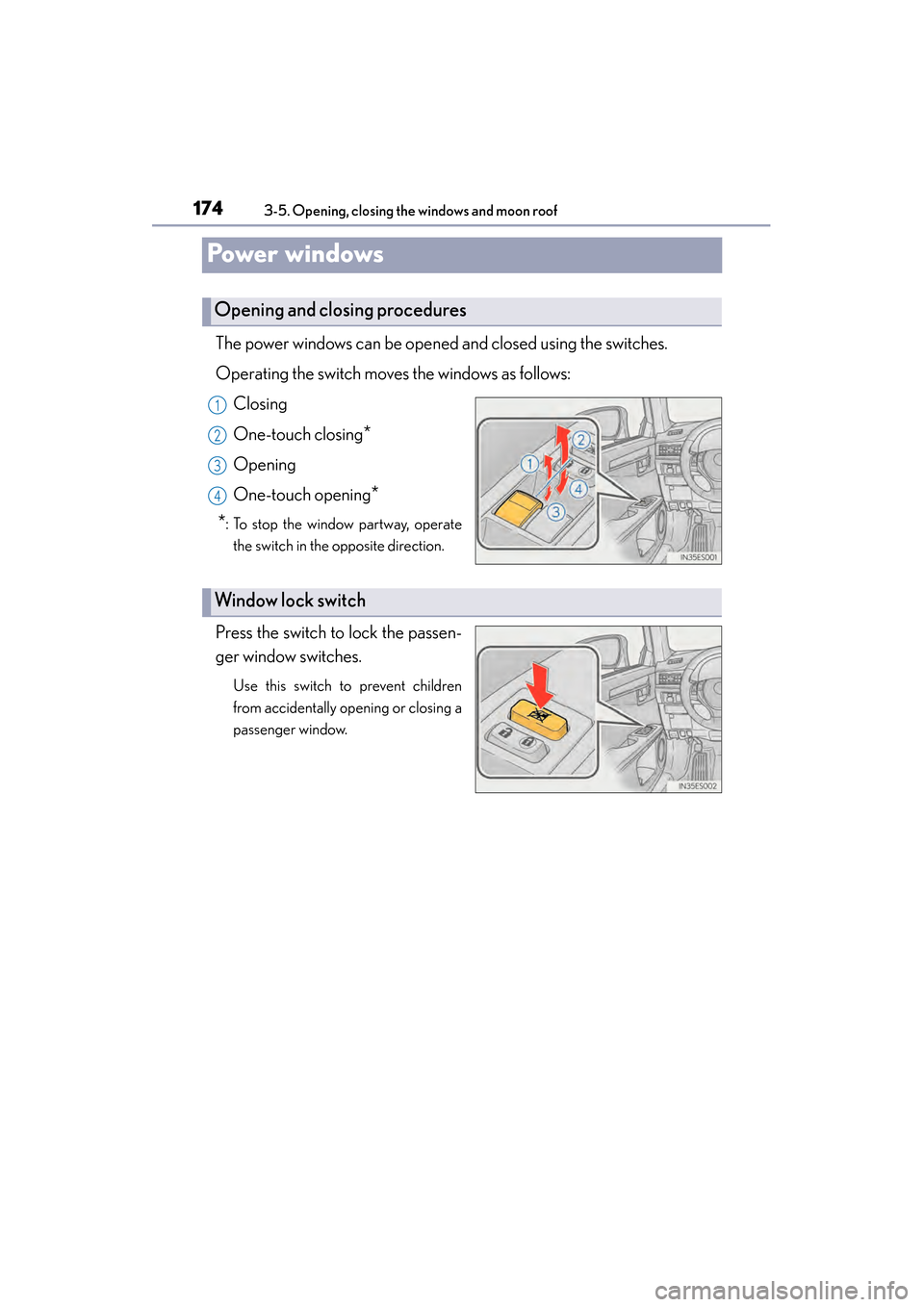
Powe r w i n d ows
The power windows can be opened and closed using the switches.
Operating the switch moves the windows as follows:Closing
One-touch closing
*
Opening
One-touch opening
*
*
: To stop the window partway, operate the switch in the opposite direction.
Press the switch to lock the passen-
ger window switches.
Use this switch to prevent children
from accidentally opening or closing a
passenger window.
Opening and closing procedures
1
2
3
4
Window lock switch
Page 178 of 918
177
ES350_300h_OM_OM33A60U_(U)
3-5. Opening, closing the windows and moon roof
3
Operation of each component
Moon roof
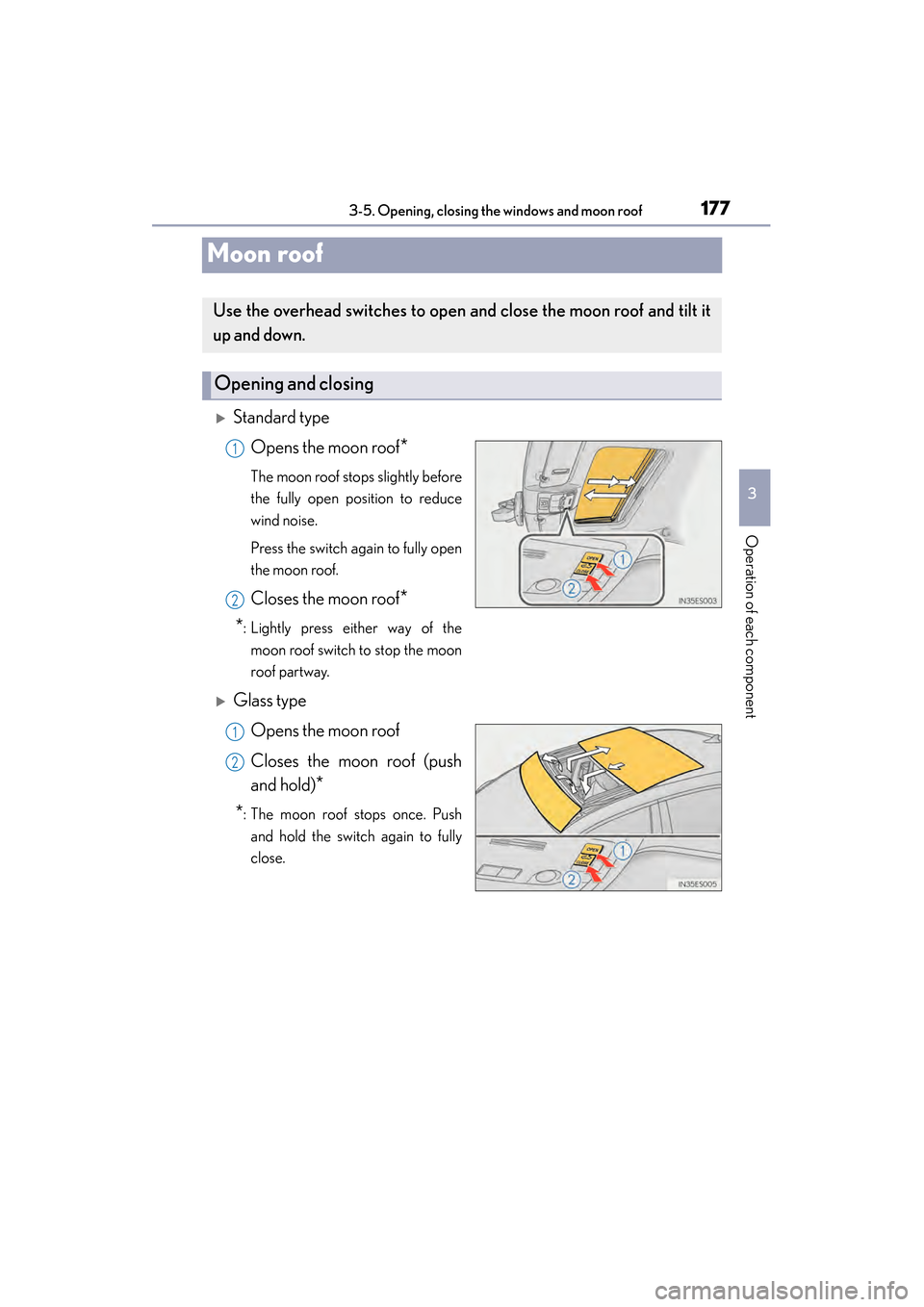
XStandard typeOpens the moon roof
*
The moon roof stops slightly before
the fully open position to reduce
wind noise.
Press the switch again to fully open
the moon roof.
Closes the moon roof*
*
: Lightly press either way of the moon roof switch to stop the moon
roof partway.
XGlass type
Opens the moon roof
Closes the moon roof (push
and hold)
*
*
: The moon roof stops once. Push and hold the switch again to fully
close.
Use the overhead switches to open and close the moon roof and tilt it
up and down.
Opening and closing
1
2
1
2
Page 337 of 918

336
ES350_300h_OM_OM33A60U_(U)
5-1. Lexus Display Audio systemLexus Display Audio system ......................................... 338
Display settings .......................... 343
Setup menu...................................345
Mobile Assistant .......................... 351
5-2. Using the air conditioning system and defogger
Automatic air conditioning system (with the Lexus
Display Audio system) ..........353
Automatic air conditioning system (without a navigation
system or the Lexus
Display Audio system) ..........365
Rear window and outside rear view mirror defoggers........... 378
Windshield wiper de-icer ...... 380 5-3. Using the Lexus
Display Audio system
Audio system (with the Lexus Display Audio system) ..........382
Using the radio............................385
Using the CD player................ 400
Playing an audio CD and MP3/WMA discs ................... 401
Listening to an iPod ...................... 411
Listening to a USB memory ......................... 419
Using the AUX port ................. 429
Listening to Bluetooth
® audio .................... 431
Optimal use of the audio system...................... 446
Using the steering wheel audio switches ..........................448
Hands-free system (for cellular phone)...................451
Using the Bluetooth
®
phone ........................................... 459
Setting the hands-free system .......................................... 478
Bluetooth
® settings ................... 491
Page 338 of 918

337
ES350_300h_OM_OM33A60U_(U)
5Interior features
5-4. Using the audio systemAudio system (without a navigation system or
the Lexus Display
Audio system) .......................... 500
Using the radio ........................... 503
Using the CD player .................. 512
Playing MP3 and WMA discs................................. 521
Operating an iPod ..................... 529
Operating a USB memory.....539
Bluetooth
® audio system ...... 548
Using the Bluetooth
®
audio system.............................. 552
Operating a Bluetooth
®
enabled portable player ....... 557
Setting up a Bluetooth
®
enabled portable player ........ 561
Bluetooth
® audio
system setup ............................. 568
Optimal use of the audio system..............................569
Using the AUX port................... 571
Using the steering wheel audio switches .......................... 573
Hands-free system (for cellular phone) ..................576
Using the hands-free system (for cellular phones) ................581
Making a phone call ................. 589
Setting a cellular phone ...........593
Security and system setup ..... 598
Using the phone book............. 603 5-5. Using the interior lights
Interior lights list ............................ 611• Interior light ..............................612
• Personal lights .........................612
5-6. Using the storage features List of storage features ..............614• Glove box .................................616
• Console box............................. 617
• Cup holders ............................ 618
• Auxiliary box ............................619
Trunk features .............................. 620
5-7. Other interior features Sun visors and vanity mirrors ................... 622
Clock............................................... 623
Power outlets ............................... 624
Heated steering wheel ............ 626
Seat heaters and ventilators ................................... 628
Armrest ..........................................630
Rear sunshade/ rear door sunshades ............... 631
Trunk storage extension .......... 634
Coat hooks ................................... 635
Assist grips.................................... 636
Garage door opener................ 637
Compass ....................................... 644
Safety Connect ........................... 649