Page 306 of 918

ES350_300h_OM_OM33A60U_(U)
3054-5. Using the driving support systems
4
Driving
■When the message is displayed on the multi-information display showing that
TRAC has been disabled even if the VSC OFF switch has not been pressed
TRAC and hill-start assist control (hybrid vehicles) cannot be operated. Contact
your Lexus dealer.
■When the 12-volt battery is disconnected
The steering wheel may move from its straight forward position, but this will be cor-
rected automatically when driving.
■Sounds and vibrations caused by the ABS, brake assist, VSC and TRAC systems
●A sound may be heard from the engine compartment when the brake pedal is
depressed repeatedly, when the engine is started or just after the
vehicle begins to move. This sound does not indicate that a malfunction has
occurred in any of these systems.
●Any of the following conditions may occur when the above systems are operating.
None of these indicates that a malfunction has occurred.
• Vibrations may be felt through the vehicle body and steering.
• A motor sound may be heard after the vehicle comes to a stop.
• The brake pedal may pulsate slightly after the ABS is activated (gasoline vehi-cles).
• The brake pedal may move down slightly after the ABS is activated (gasoline vehicles).
■EPS operation sound
When the steering wheel is operated, a motor sound (whirring sound) may be heard.
This does not indicate a malfunction.
■Automatic reactivation of TRAC and VSC systems
After turing the TRAC and VSC systems off, the systems will be automatically re-
enabled in the following situations:
●When the “START STOP ENGINE” <“POWER”> switch is turned off
●If only the TRAC system is turned off, the TRAC will turn on when vehicle speed
increases.
If both the TRAC and VSC systems are turned off, automatic re-enabling will not
occur when vehicle speed increases.
Page 307 of 918

306
ES350_300h_OM_OM33A60U_(U)
4-5. Using the driving support systems
■Reduced effectiveness of the EPS system
The effectiveness of the EPS system is reduced to prevent the system from overheat-
ing when there is frequent steering input over an extended period of time. The steer-
ing wheel may feel heavy as a result. Should this occur, refrain from excessive
steering input or stop the vehicle and turn the engine off. The effec-
tiveness will improve after a short while.
CAUTION
■The ABS does not operate effectively when
●The limits of tire gripping performance have been exceeded (such as excessively
worn tires on a snow covered road).
●The vehicle hydroplanes while driving at high speed on wet or slick roads.
■Stopping distance when the ABS is operating may exceed that of normal condi-
tions
The ABS is not designed to shorten the vehicle’s stopping distance. Always main-
tain a safe distance from the vehicle in front of you, especially in the following situa-
tions:
●When driving on dirt, gravel or snow-covered roads
●When driving with tire chains
●When driving over bumps in the road
●When driving over roads with potholes or uneven surfaces
■TRAC may not operate effectively when
Directional control and power may not be achievable while driving on slippery
road surfaces, even if the TRAC system is operating.
Drive the vehicle carefully in conditions where stability and power may be lost.
■When the VSC is activated
The slip indicator light flashes. Always drive carefully. Reckless driving may cause
an accident. Exercise particular care when the indicator light flashes.
■When the TRAC/VSC systems are turned off
Be especially careful and drive at a speed appropriate to the road conditions. As
these are the systems to ensure vehicle stability and driving force, do not turn the
TRAC/VSC systems off unless necessary.
Page 308 of 918
ES350_300h_OM_OM33A60U_(U)
3074-5. Using the driving support systems
4
Driving
CAUTION
■Replacing tires
Make sure that all tires are of the specified size, brand, tread pattern and total load
capacity. In addition, make sure that the tires are inflated to the recommended tire
inflation pressure level.
The ABS, TRAC and VSC systems will not function correctly if different tires are
installed on the vehicle.
Contact your Lexus dealer for further information when replacing tires or wheels.
■Handling of tires and the suspension
Using tires with any kind of problem or modifying the suspension will affect the
driving assist systems, and may cause a system to malfunction.
Page 317 of 918
316
ES350_300h_OM_OM33A60U_(U)
4-5. Using the driving support systems
CAUTION
■Cautions regarding the assist contents of the system
By means of alarms and brake control, the pre-collision system is intended to assist
the driver in avoiding collisions through the process of LOOK-JUDGE-ACT.
There are limits to the degree of assistance the system can provide, so please keep
in mind the following important points.
●Assisting the driver in watching the road
The pre-collision system is only able to detect obstacles directly in front of the
vehicle, and only within a limited range. It is not a mechanism that allows careless
or inattentive driving, and it is not a system that can assist the driver in low-visibil-
ity conditions. It is still necessary for the driver to pay close attention to the vehi-
cle’s surroundings.
●Assisting the driver in making correct judgment
When attempting to estimate the possibility of a collision, the only data available
to the pre-collision system is that from obstacles it has detected directly in front of
the vehicle. Therefore, it is absolutely necessary for the driver to remain vigilant
and to determine whether or not there is a possibility of collision in any given situ-
ation.
●Assisting the driver in taking action
The pre-collision system’s braking assist feature is designed to help reduce the
severity of a collision, and so only acts when the system has judged that a collision
is unavoidable. This system by itself is not capable of automatically avoiding a col-
lision or bringing the vehicle to a stop safely. For this reason, when encountering a
dangerous situation the driver must take direct and immediate action in order to
ensure the safety of all involved.
Page 415 of 918
414
ES350_300h_OM_OM33A60U_(U)
5-3. Using the Lexus Display Audio system
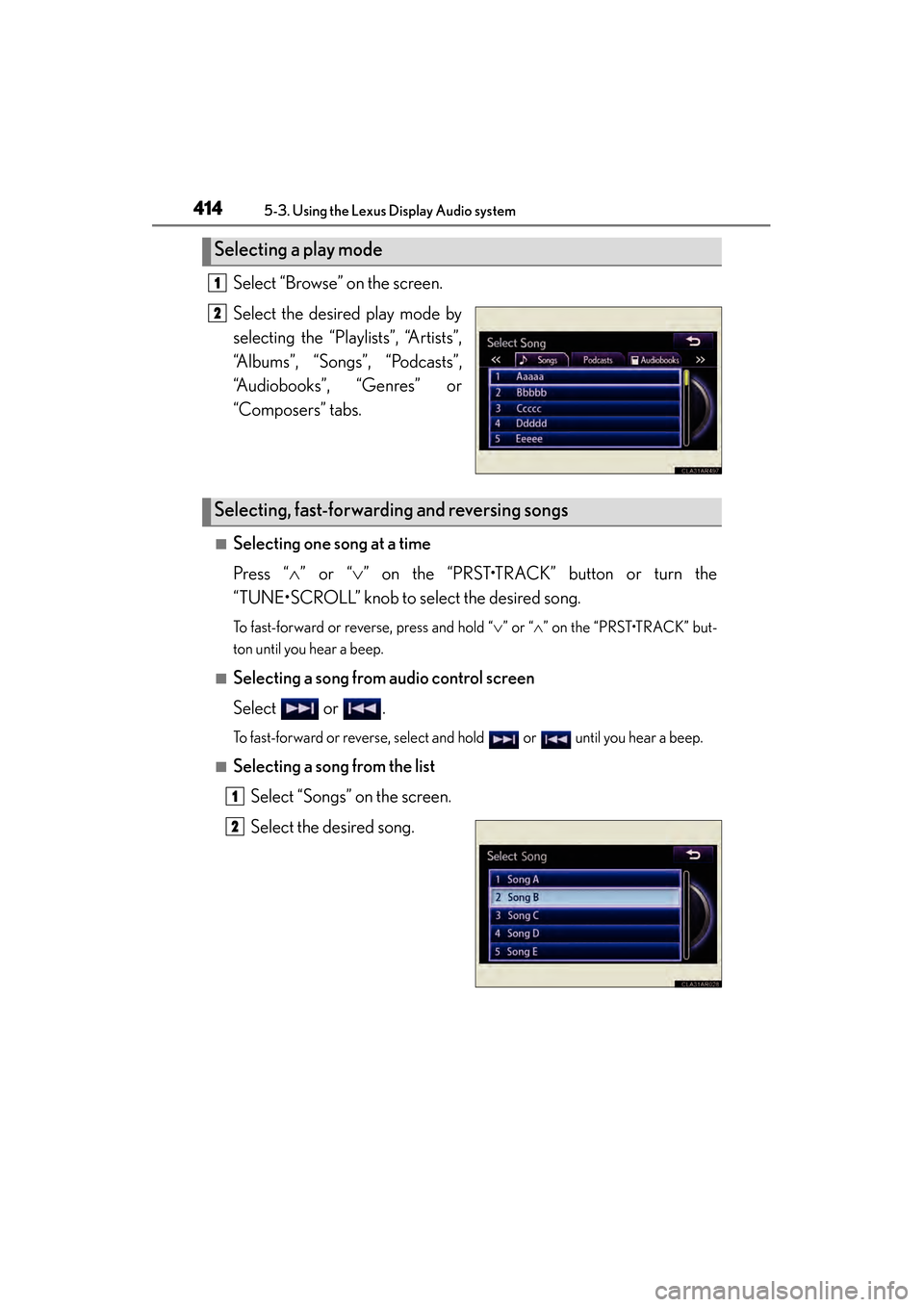
Select “Browse” on the screen.
Select the desired play mode by
selecting the “Playlists”, “Artists”,
“Albums”, “Songs”, “Podcasts”,
“Audiobooks”, “Genres” or
“Composers” tabs.
■Selecting one song at a time
Press “∧” or “ ∨” on the “PRST•TRACK” button or turn the
“TUNE•SCROLL” knob to select the desired song.
To fast-forward or reverse, press and hold “ ∨” or “ ∧” on the “PRST•TRACK” but-
ton until you hear a beep.
■Selecting a song from audio control screen
Select or .
To fast-forward or reverse, select and hold or until you hear a beep.
■Selecting a song from the list
Select “Songs” on the screen.
Select the desired song.
Selecting a play mode
1
2
Selecting, fast-forwarding and reversing songs
1
2
Page 447 of 918
446
ES350_300h_OM_OM33A60U_(U)
5-3. Using the Lexus Display Audio system
Optimal use of the audio system
Select on the audio control
screen to adjust the sound settings.
X“Sound” tabSelect “-” or “+” to adjust
the treble, mid or bass to
a level between -5 to 5.
Select “Front” or “Rear” to
adjust the front/rear audio
balance to a level between
Front 7 and Rear 7.
Select “L” or “R” to adjust the
left/right audio balance to a
level between L7 and R7.
X“DSP” tab
Surround on/off
Automatic sound levelizer (ASL)
on/off
Press the “MEDIA” button or the “AUDIO” button on the Lexus Display
Audio controller.
123
45
67
1
2
Page 693 of 918
692
ES350_300h_OM_OM33A60U_(U)
6-3. Do-it-yourself maintenance
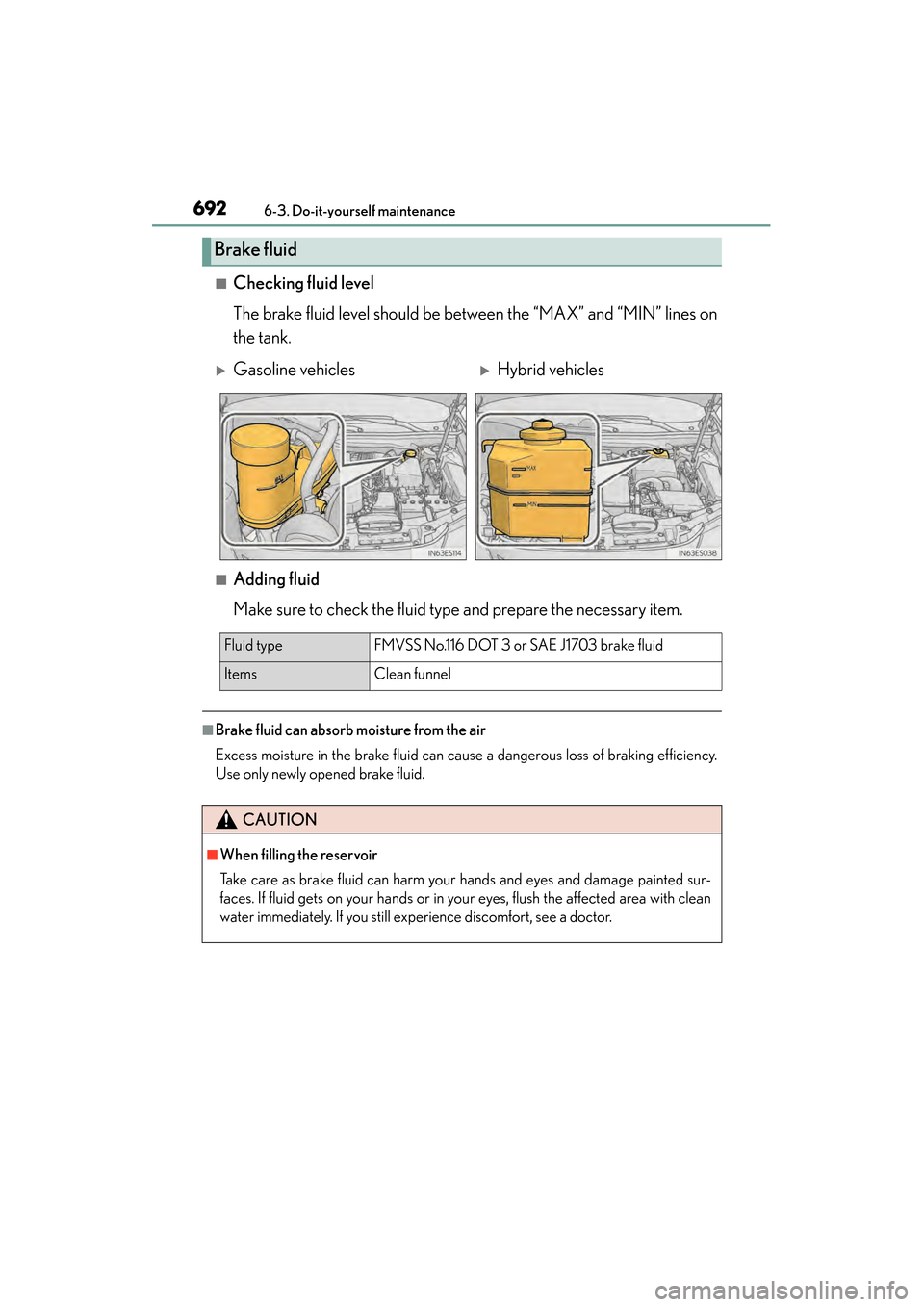
■Checking fluid level
The brake fluid level should be between the “MAX” and “MIN” lines on
the tank.
■Adding fluid
Make sure to check the fluid type and prepare the necessary item.
■Brake fluid can absorb moisture from the air
Excess moisture in the brake fluid can cause a dangerous loss of braking efficiency.
Use only newly opened brake fluid.
Brake fluid
XGasoline vehiclesXHybrid vehicles
Fluid typeFMVSS No.116 DOT 3 or SAE J1703 brake fluid
Items Clean funnel
CAUTION
■When filling the reservoir
Take care as brake fluid can harm your hands and eyes and damage painted sur-
faces. If fluid gets on your hands or in your eyes, flush the affected area with clean
water immediately. If you still experience discomfort, see a doctor.
Page 726 of 918
ES350_300h_OM_OM33A60U_(U)
7256-3. Do-it-yourself maintenance
6
Maintenance and care
FuseAmpereCircuit
1WIP-S5Driver support system, windshield wipers
2FA N50Electric cooling fan
3H-LP CLN30No circuit
4ENG W/PMP*130Cooling system
5PTC HTR NO.250PTC heater
6PTC HTR NO.150PTC heater
7HTR50Air conditioning system
8ALT*2140Charging system
DC/DC*1120Hybrid system
9ABS NO.2*230VSC, ABS
10ST/AM2*230Starting system
ABS NO.1*130VSC, ABS
11H-LP-MAIN30H-LP RH-LO, H-LP LH-LO
12ABS MTR NO.2*150VSC, ABS
13ABS NO.1*250VSC, ABS
ABS MTR NO.1*150VSC, ABS
14R/B NO.2*150IGCT MAIN, INV W/PMP
15EPS80Electric power steering
16S-HORN7. 5S-HORN
17DEICER15Windshield wiper de-icer
18HORN10Horn
19TV15
Multi-information display, audio display,
Remote Touch, audio system, gauges and
meters
20AMP NO.230Audio system
21EFI NO.215
Multiport fuel injection system, sequential
multiport fuel system, electronic controlled
transmission