Page 127 of 508
Features of your vehicle36
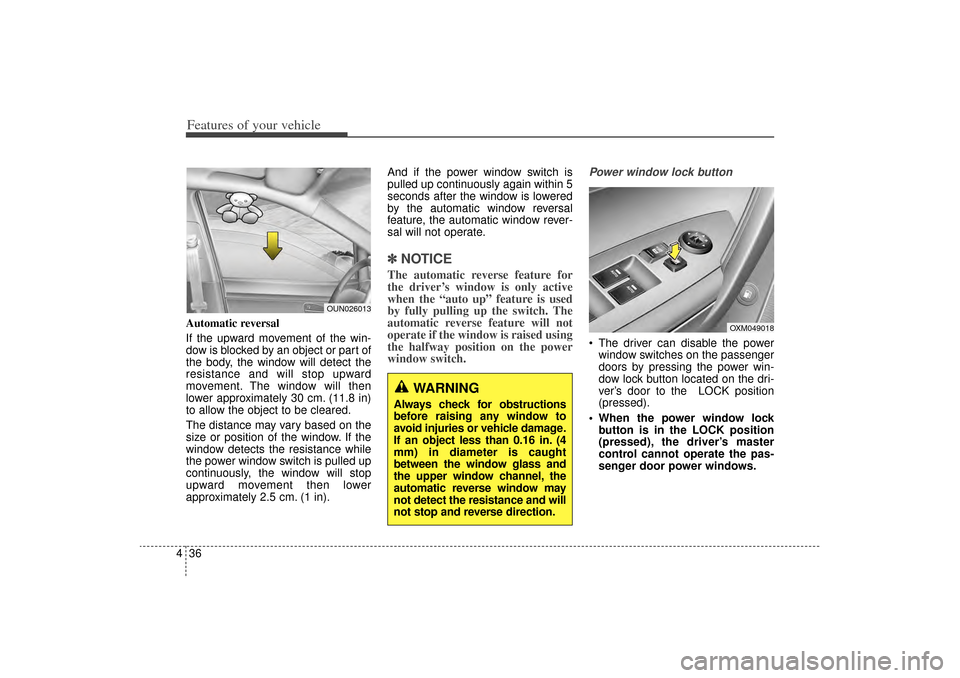
4Automatic reversal
If the upward movement of the win-
dow is blocked by an object or part of
the body, the window will detect the
resistance and will stop upward
movement. The window will then
lower approximately 30 cm. (11.8 in)
to allow the object to be cleared.
The distance may vary based on the
size or position of the window. If the
window detects the resistance while
the power window switch is pulled up
continuously, the window will stop
upward movement then lower
approximately 2.5 cm. (1 in). And if the power window switch is
pulled up continuously again within 5
seconds after the window is lowered
by the automatic window reversal
feature, the automatic window rever-
sal will not operate.
✽ ✽
NOTICEThe automatic reverse feature for
the driver’s window is only active
when the “auto up” feature is used
by fully pulling up the switch. The
automatic reverse feature will not
operate if the window is raised using
the halfway position on the power
window switch.
Power window lock button The driver can disable the power
window switches on the passenger
doors by pressing the power win-
dow lock button located on the dri-
ver’s door to the LOCK position
(pressed).
When the power window lock button is in the LOCK position
(pressed), the driver’s master
control cannot operate the pas-
senger door power windows.
WARNING
Always check for obstructions
before raising any window to
avoid injuries or vehicle damage.
If an object less than 0.16 in. (4
mm) in diameter is caught
between the window glass and
the upper window channel, the
automatic reverse window may
not detect the resistance and will
not stop and reverse direction.
OUN026013
OXM049018
XM(FL) CAN(ENG) 4a(~158).QXP 1/23/2013 3:47 PM Page 36
Page 129 of 508
Features of your vehicle38
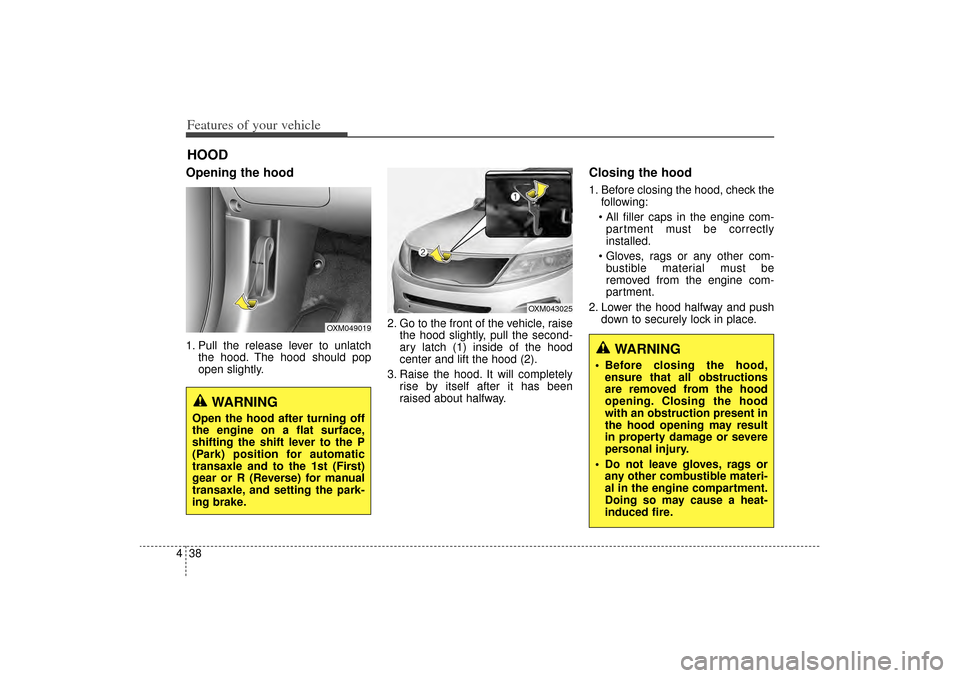
4Opening the hood 1. Pull the release lever to unlatch
the hood. The hood should pop
open slightly. 2. Go to the front of the vehicle, raise
the hood slightly, pull the second-
ary latch (1) inside of the hood
center and lift the hood (2).
3. Raise the hood. It will completely rise by itself after it has been
raised about halfway.
Closing the hood1. Before closing the hood, check thefollowing:
All filler caps in the engine com- partment must be correctly
installed.
Gloves, rags or any other com- bustible material must be
removed from the engine com-
partment.
2. Lower the hood halfway and push down to securely lock in place.
HOOD
OXM049019
OXM043025
WARNING
Open the hood after turning off
the engine on a flat surface,
shifting the shift lever to the P
(Park) position for automatic
transaxle and to the 1st (First)
gear or R (Reverse) for manual
transaxle, and setting the park-
ing brake.
WARNING
Before closing the hood,ensure that all obstructions
are removed from the hood
opening. Closing the hood
with an obstruction present in
the hood opening may result
in property damage or severe
personal injury.
Do not leave gloves, rags or any other combustible materi-
al in the engine compartment.
Doing so may cause a heat-
induced fire.
XM(FL) CAN(ENG) 4a(~158).QXP 1/23/2013 3:47 PM Page 38
Page 134 of 508
443
Features of your vehicle
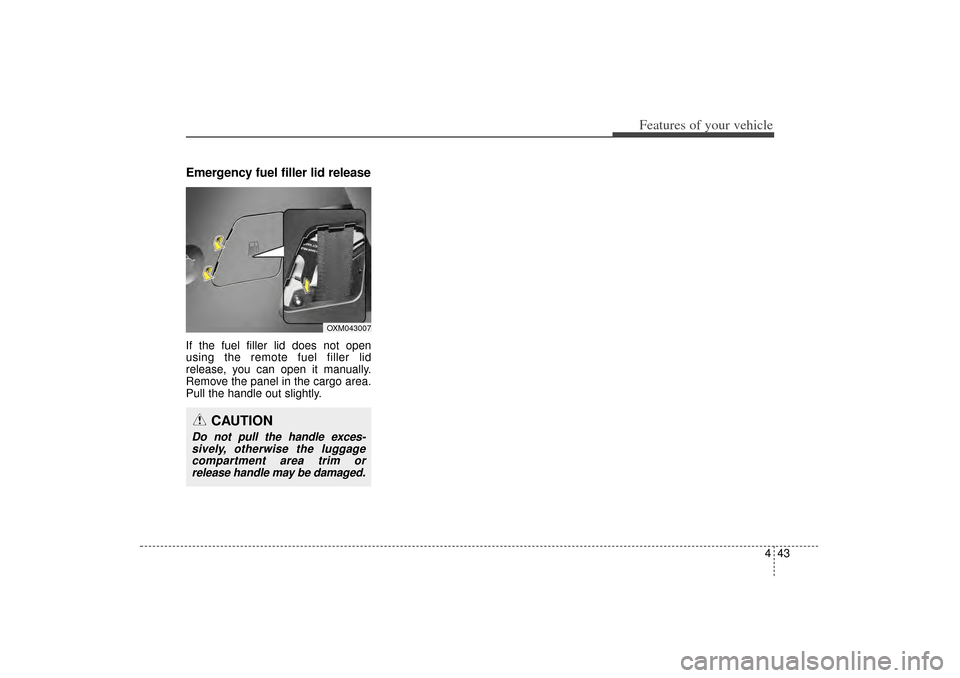
Emergency fuel filler lid releaseIf the fuel filler lid does not open
using the remote fuel filler lid
release, you can open it manually.
Remove the panel in the cargo area.
Pull the handle out slightly.
CAUTION
Do not pull the handle exces-sively, otherwise the luggagecompartment area trim orrelease handle may be damaged.
OXM043007
XM(FL) CAN(ENG) 4a(~158).QXP 1/23/2013 3:48 PM Page 43
Page 139 of 508
Features of your vehicle48
4Resetting the sunroofWhenever the vehicle battery is dis-
connected or discharged, you must
reset your sunroof system as follows:
1.Turn the ignition switch to the ON
position.
2.Close the sunshade and sunroof completely if opened.
3.Release the sunroof control lever.
4.Push the sunroof control lever for- ward in the direction of close (about
10 seconds) until the sunroof moves
a little. Then, release the lever. 5.Push the sunroof control lever for-
ward in the direction of close, until
the sunroof operates as follows
again:
The sunshade and sunroof glass
slide open → The sunroof glass
slide close → The sunshade close
Then, release the lever.
When this is complete, the sunroof
system has been reset.
✽ ✽ NOTICEIf you do not reset the sunroof, it
may not work properly.
XM(FL) CAN(ENG) 4a(~158).QXP 1/23/2013 3:48 PM Page 48
Page 140 of 508

449
Features of your vehicle
Electric power steering (EPS)The power steering uses a motor to
assist you in steering the vehicle. If
the engine is off or if the power steer-
ing system becomes inoperative, the
vehicle may still be steered, but it will
require increased steering effort.
The motor driven power steering is
controlled by a power steering con-
trol unit which senses the steering
wheel torque and vehicle speed to
command the motor.
The steering becomes heavier as
the vehicle’s speed increases and
becomes lighter as the vehicle’s
speed decreases for optimum steer-
ing control.
Should you notice any change in the
effort required to steer during normal
vehicle operation, have the power
steering checked by an authorized
Kia dealer.
✽ ✽NOTICEThe following symptoms may occur
during normal vehicle operation:
• The EPS warning light does not
illuminate.
• The steering gets heavy immedi- ately after turning the ignition
switch on. This happens as the sys-
tem performs the EPS system
diagnostics. When the diagnostics
are completed, the steering wheel
will return to its normal condition.
• A click noise may be heard from the EPS relay after the ignition
switch is turned to the ON or
LOCK (OFF) position.
• A motor noise may be heard when the vehicle is at a stop or at a low
driving speed.
• If the Electric Power Steering System does not operate normally,
the warning light will illuminate on
the instrument cluster. The steer-
ing wheel may become difficult to
control or operate abnormally.
Take your vehicle to an authorized
Kia dealer and have the vehicle
checked as soon as possible. (Continued)
STEERING WHEEL
CAUTION
If the Electric Power Steering
System does not operate nor-mally, the warning light willilluminate on the instrumentcluster. The steering wheelmay require increased steer-ing effort. Take your vehicle toan authorized Kia dealer andhave the vehicle checked assoon as possible.
When you operate the steering wheel in low temperature,noise may occur. If temperaturerises, the noise will likely disap-pear. This is a normal condition.
When the vehicle is stationary, when the steering wheel isturned all the way to the left orright continuously, the steer-ing wheel becomes harder toturn. The power assist is limit-ed to protect the motor fromoverheating.
As time passes, the steeringwheel return to its normalcondition.
XM(FL) CAN(ENG) 4a(~158).QXP 1/23/2013 3:48 PM Page 49
Page 143 of 508
Features of your vehicle52
4
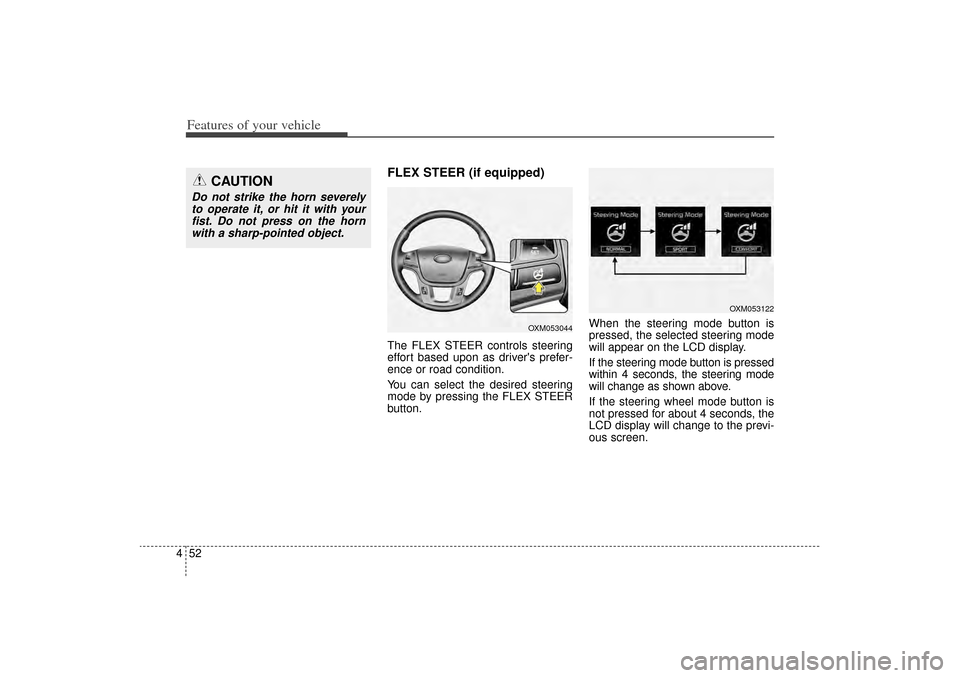
FLEX STEER (if equipped)The FLEX STEER controls steering
effort based upon as driver's prefer-
ence or road condition.
You can select the desired steering
mode by pressing the FLEX STEER
button. When the steering mode button is
pressed, the selected steering mode
will appear on the LCD display.
If the steering mode button is pressed
within 4 seconds, the steering mode
will change as shown above.
If the steering wheel mode button is
not pressed for about 4 seconds, the
LCD display will change to the previ-
ous screen.
CAUTION
Do not strike the horn severely
to operate it, or hit it with yourfist. Do not press on the hornwith a sharp-pointed object.
OXM053044
OXM053122
XM(FL) CAN(ENG) 4a(~158).QXP 1/23/2013 3:48 PM Page 52
Page 144 of 508
453
Features of your vehicle
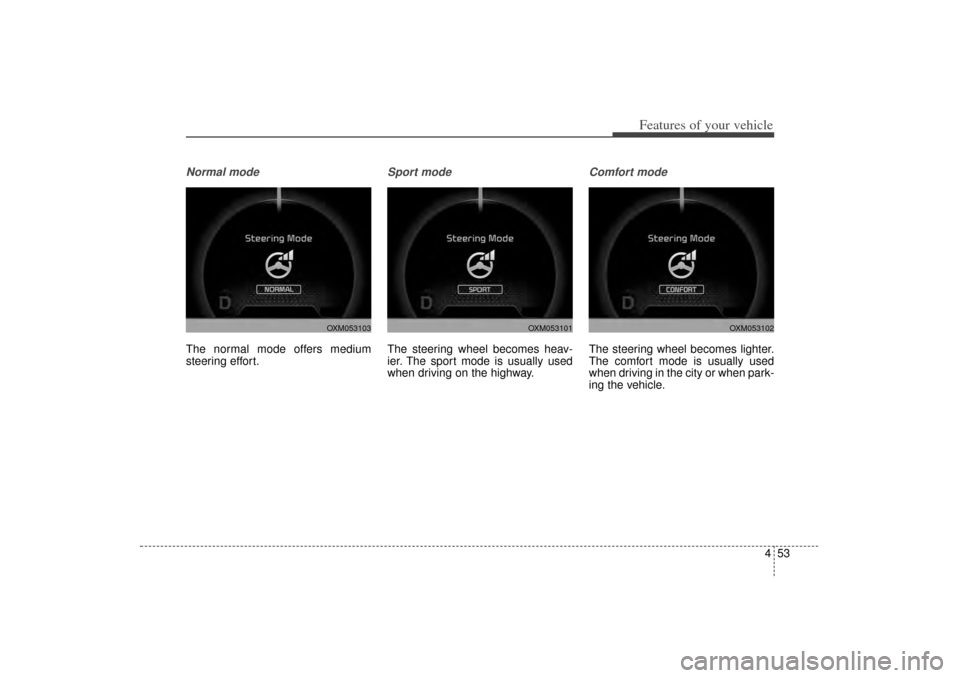
Normal modeThe normal mode offers medium
steering effort.
Sport modeThe steering wheel becomes heav-
ier. The sport mode is usually used
when driving on the highway.
Comfort modeThe steering wheel becomes lighter.
The comfort mode is usually used
when driving in the city or when park-
ing the vehicle.
OXM053103
OXM053101
OXM053102
XM(FL) CAN(ENG) 4a(~158).QXP 1/23/2013 3:48 PM Page 53
Page 149 of 508
Features of your vehicle58
4
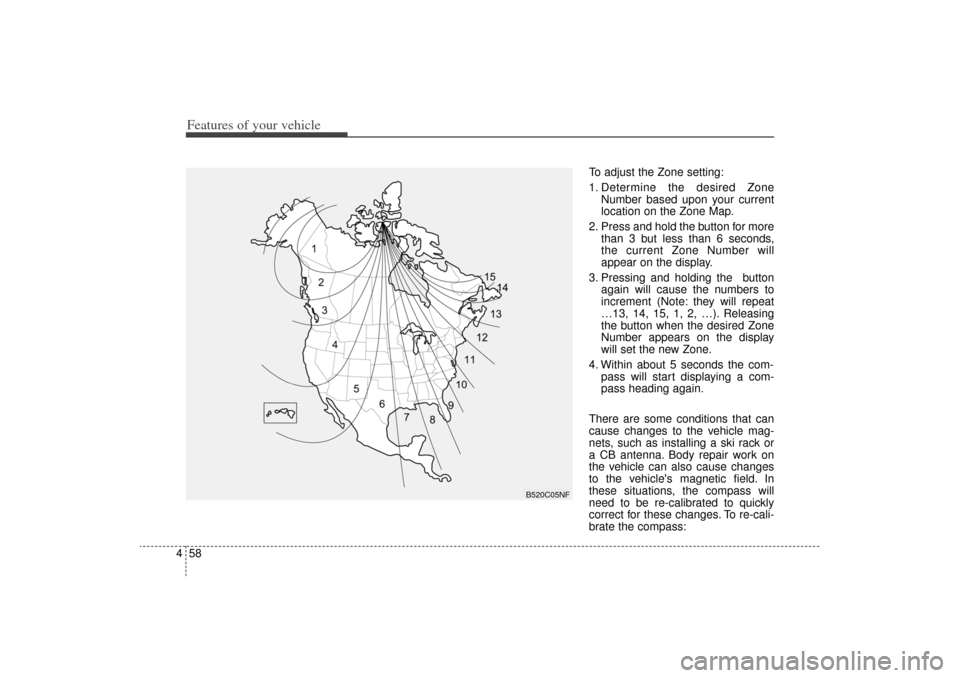
To adjust the Zone setting:
1. Determine the desired Zone
Number based upon your current
location on the Zone Map.
2. Press and hold the button for more than 3 but less than 6 seconds,
the current Zone Number will
appear on the display.
3. Pressing and holding the button again will cause the numbers to
increment (Note: they will repeat
…13, 14, 15, 1, 2, …). Releasing
the button when the desired Zone
Number appears on the display
will set the new Zone.
4. Within about 5 seconds the com- pass will start displaying a com-
pass heading again.
There are some conditions that can
cause changes to the vehicle mag-
nets, such as installing a ski rack or
a CB antenna. Body repair work on
the vehicle can also cause changes
to the vehicle's magnetic field. In
these situations, the compass will
need to be re-calibrated to quickly
correct for these changes. To re-cali-
brate the compass:
B520C05NF
XM(FL) CAN(ENG) 4a(~158).QXP 1/23/2013 3:49 PM Page 58