2014 KIA Sorento change wheel
[x] Cancel search: change wheelPage 227 of 508
Features of your vehicle136
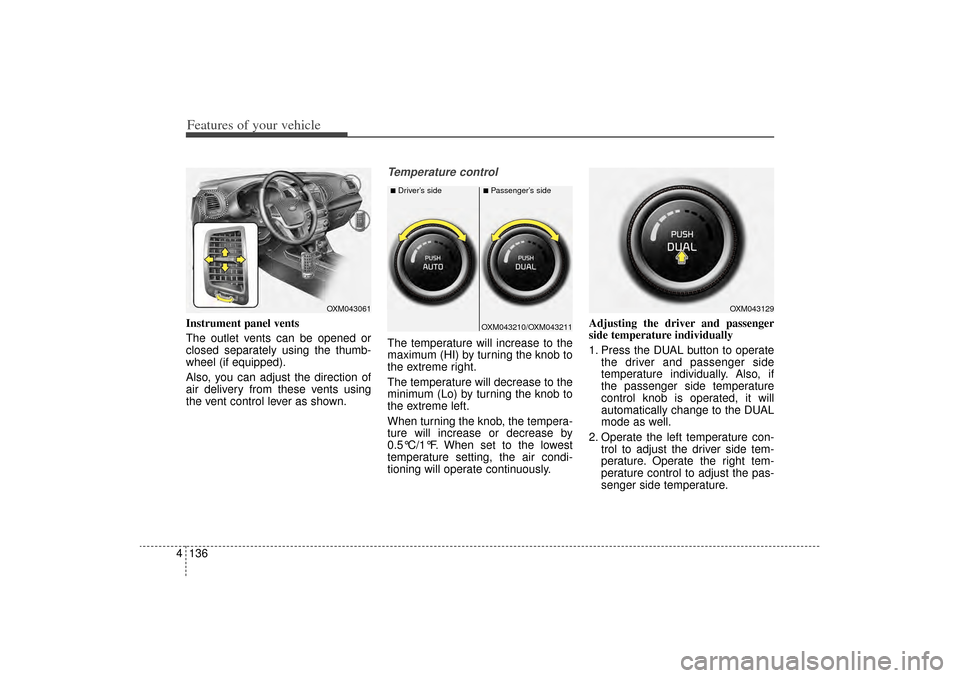
4Instrument panel vents
The outlet vents can be opened or
closed separately using the thumb-
wheel (if equipped).
Also, you can adjust the direction of
air delivery from these vents using
the vent control lever as shown.
Temperature controlThe temperature will increase to the
maximum (HI) by turning the knob to
the extreme right.
The temperature will decrease to the
minimum (Lo) by turning the knob to
the extreme left.
When turning the knob, the tempera-
ture will increase or decrease by
0.5°C/1°F. When set to the lowest
temperature setting, the air condi-
tioning will operate continuously. Adjusting the driver and passenger
side temperature individually
1. Press the DUAL button to operate
the driver and passenger side
temperature individually. Also, if
the passenger side temperature
control knob is operated, it will
automatically change to the DUAL
mode as well.
2. Operate the left temperature con- trol to adjust the driver side tem-
perature. Operate the right tem-
perature control to adjust the pas-
senger side temperature.
OXM043061
OXM043210/OXM043211
■Driver’s side
■Passenger’s side
OXM043129
XM(FL) CAN(ENG) 4a(~158).QXP 1/23/2013 3:55 PM Page 136
Page 251 of 508
Features of your vehicle160
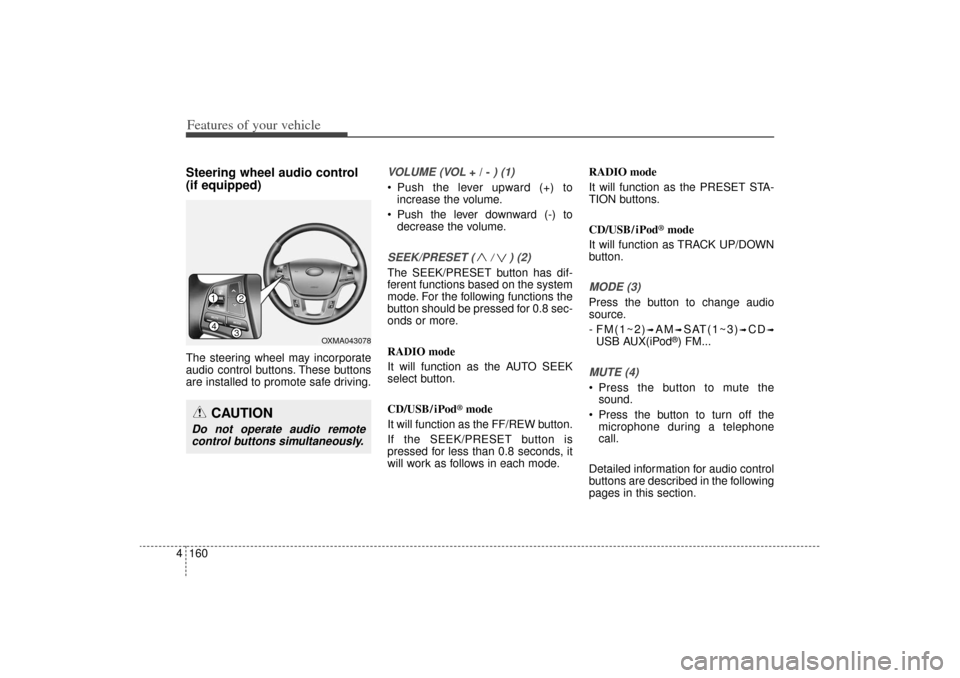
4Steering wheel audio control
(if equipped) The steering wheel may incorporate
audio control buttons. These buttons
are installed to promote safe driving.
VOLUME (VOL
+ / -
) (1)
• Push the lever upward (+) to
increase the volume.
Push the lever downward (-) to decrease the volume.SEEK/PRESET ( / ) (2)The SEEK/PRESET button has dif-
ferent functions based on the system
mode. For the following functions the
button should be pressed for 0.8 sec-
onds or more.
RADIO mode
It will function as the AUTO SEEK
select button.
CD/USB/ iPod
®mode
It will function as the FF/REW button.
If the SEEK/PRESET button is
pressed for less than 0.8 seconds, it
will work as follows in each mode. RADIO mode
It will function as the PRESET STA-
TION buttons.
CD/USB/ iPod
®mode
It will function as TRACK UP/DOWN
button.
MODE (3)Press the button to change audio
source.
- FM(1~2)
➟AM
➟SAT(1~3)
➟CD
➟
USB AUX(iPod
®) FM...
MUTE (4) Press the button to mute the sound.
Press the button to turn off the microphone during a telephone
call.
Detailed information for audio control
buttons are described in the following
pages in this section.
CAUTION
Do not operate audio remote control buttons simultaneously.
14
32
OXMA043078
XM(FL) CAN(ENG) 4b(AUDIO).qxp 1/23/2013 3:42 PM Page 160
Page 320 of 508
515
Driving your vehicle
Good driving practices Never take the vehicle out of gearand coast down a hill. This is
extremely hazardous. Always leave
the vehicle in gear.
Don't "ride" the brakes. This can cause them to overheat and mal-
function. Instead, when you are
driving down a long hill, slow down
and shift to a lower gear. When you
do this, engine braking will help
slow down the vehicle.
Slow down before shifting to a lower gear. This will help avoid
over-revving the engine, which can
cause damage.
Slow down when you encounter cross winds. This gives you much
better control of your vehicle.
Be sure the vehicle is completely stopped before you attempt to shift
into reverse. The transaxle can be
damaged if you do not. To shift into
reverse, depress the clutch, move
the shift lever to neutral, then shift
to the reverse position. Exercise extreme caution when
driving on a slippery surface. Be
especially careful when braking,
accelerating or shifting gears. On a
slippery surface, an abrupt change
in vehicle speed can cause the
drive wheels to lose traction and
the vehicle to go out of control.
WARNING
Always buckle-up! In a colli-sion, an unbelted occupant is
significantly more likely to be
seriously injured or killed than
a properly belted occupant.
Avoid high speeds when cor- nering or turning.
Do not make quick steering wheel movements, such as
sharp lane changes or fast,
sharp turns.
The risk of rollover is greatly increased if you lose control
of your vehicle at highway
speeds.
Loss of control often occurs if two or more wheels drop off
the roadway and the driver
oversteers to reenter the road-
way.
In the event your vehicle leaves the roadway, do not
steer sharply. Instead, slow
down before pulling back into
the travel lanes.
Never exceed posted speed limits.
XM(FL) CAN(ENG) 5.QXP 1/23/2013 3:29 PM Page 15
Page 326 of 508
521
Driving your vehicle
Good driving practices Never move the gear shift leverfrom P (Park) to any other position
with the accelerator pedal
depressed.
Never move the gear shift lever into P (Park) when the vehicle is in
motion.
Be sure the vehicle is completely stopped before you attempt to shift
into R (Reverse) or D (Drive).
Never take the vehicle out of gear and coast down a hill. This may be
extremely hazardous. Always leave
the vehicle in gear when moving.
Do not "ride" the brakes. This can cause them to overheat and mal-
function. Instead, when you are
driving down a long hill, slow down
and shift to a lower gear. When you
do this, engine braking will help
slow down the vehicle.
Slow down before shifting to a lower gear. Otherwise, the lower
gear may not be engaged. Always use the parking brake. Do
not depend on placing the
transaxle in P (Park) to keep the
vehicle from moving.
Exercise extreme caution when driving on a slippery surface. Be
especially careful when braking,
accelerating or shifting gears. On a
slippery surface, an abrupt change
in vehicle speed can cause the
drive wheels to lose traction and
the vehicle to go out of control.
Optimum vehicle performance and economy is obtained by smoothly
depressing and releasing the
accelerator pedal.
WARNING
Always buckle-up! In a colli-sion, an unbelted occupant is
significantly more likely to be
seriously injured or killed than
a properly belted occupant.
Avoid high speeds when cor- nering or turning.
Do not make quick steering wheel movements, such as
sharp lane changes or fast,
sharp turns.
The risk of rollover is greatly increased if you lose control
of your vehicle at highway
speeds.
Loss of control often occurs if two or more wheels drop off
the roadway and the driver
oversteers to reenter the road-
way.
In the event your vehicle leaves the roadway, do not
steer sharply. Instead, slow
down before pulling back into
the travel lanes.
Never exceed posted speed limits.
XM(FL) CAN(ENG) 5.QXP 1/23/2013 3:29 PM Page 21
Page 330 of 508
525
Driving your vehicle
For safe All-wheel drive opera-
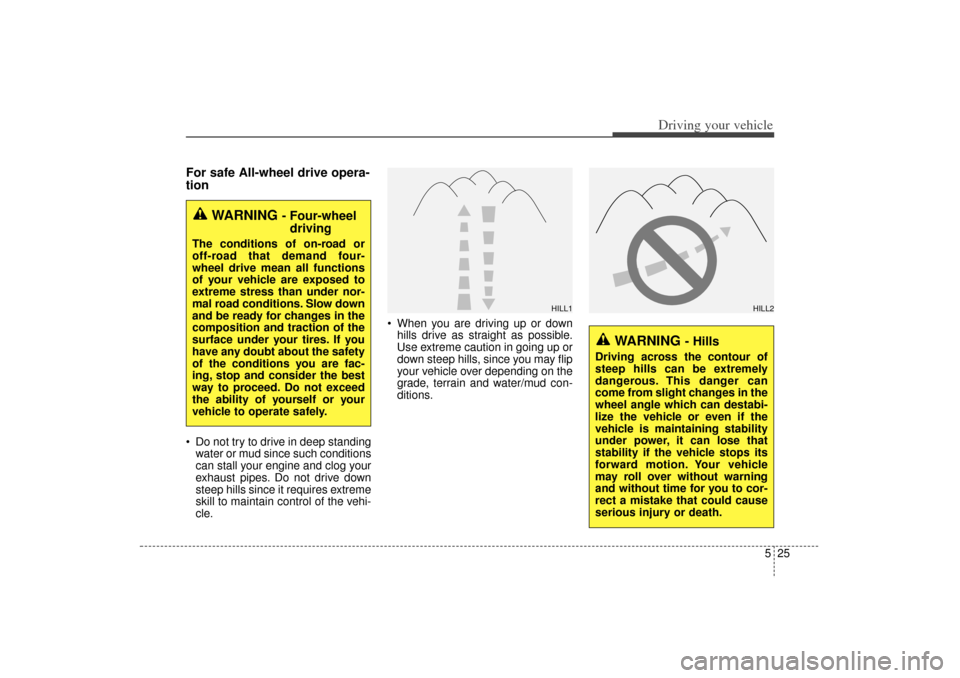
tion Do not try to drive in deep standingwater or mud since such conditions
can stall your engine and clog your
exhaust pipes. Do not drive down
steep hills since it requires extreme
skill to maintain control of the vehi-
cle. When you are driving up or down
hills drive as straight as possible.
Use extreme caution in going up or
down steep hills, since you may flip
your vehicle over depending on the
grade, terrain and water/mud con-
ditions.
WARNING
- Four-wheeldriving
The conditions of on-road or
off-road that demand four-
wheel drive mean all functions
of your vehicle are exposed to
extreme stress than under nor-
mal road conditions. Slow down
and be ready for changes in the
composition and traction of the
surface under your tires. If you
have any doubt about the safety
of the conditions you are fac-
ing, stop and consider the best
way to proceed. Do not exceed
the ability of yourself or your
vehicle to operate safely.
WARNING
- Hills
Driving across the contour of
steep hills can be extremely
dangerous. This danger can
come from slight changes in the
wheel angle which can destabi-
lize the vehicle or even if the
vehicle is maintaining stability
under power, it can lose that
stability if the vehicle stops its
forward motion. Your vehicle
may roll over without warning
and without time for you to cor-
rect a mistake that could cause
serious injury or death.
HILL1
HILL2
XM(FL) CAN(ENG) 5.QXP 1/23/2013 3:29 PM Page 25
Page 332 of 508

527
Driving your vehicle
✽
✽NOTICE• Do not drive in water if the level is
higher than the bottom of the vehi-
cle.
• Check your brake condition once you are out of mud or water. Press
the brake pedal several times as
you move slowly until you feel nor-
mal braking forces return.
• Shorten your scheduled mainte- nance interval if you drive in off-
road conditions such as sand, mud
or water (see “Maintenance under
severe usage conditions” in chap-
ter 7). Always wash your vehicle
thoroughly after off-road use,
especially cleaning the bottom of
the vehicle.
• Since the driving torque is always applied to the 4 wheels the per-
formance of the AWD vehicle is
greatly affected by the condition of
the tires. Be sure to equip the vehi-
cle with four tires of the same size
and type.
• A full time four wheel drive vehi- cle cannot be towed by an ordi-
nary tow truck. Make sure that
the vehicle is placed on a flat bed
truck for moving.
WARNING
- Drivingthrough
water
Drive slowly. If you are driving
too fast in water, the water can
get into the engine compart-
ment and wet the ignition sys-
tem, causing your vehicle to
suddenly stop. If this happens
and your vehicle is in a tilted
position, your vehicle may roll
over.
WARNING
- AWD driving
Avoid high cornering speed.
Do not make quick steering
wheel movements, such as
sharp lane changes or fast,
sharp turns.
The risk of rollover is greatly increased if you lose control
of your vehicle at high speed.
In a collision, an unbelted per- son is significantly more like-
ly to die compared to a person
wearing a seat belt.
Loss of control often occurs if two or more wheels drop off
the roadway and the driver
oversteers to re-enter the
roadway. In the event your
vehicle leaves the roadway, do
not steer sharply. Instead,
slow down before pulling
back into the travel lanes.
XM(FL) CAN(ENG) 5.QXP 1/23/2013 3:30 PM Page 27
Page 345 of 508
Driving your vehicle40
5Vehicle stability management
(VSM)This system provides further
enhancements to vehicle stability
and steering responses when a vehi-
cle is driving on a slippery road or a
vehicle detects changes in coeffi-
cient of friction between right wheels
and left wheels when braking.VSM operationWhen the VSM is in operation, ESC
indicator light ( ) blinks.
When the vehicle stability manage-
ment is operating properly, you can
feel a slight pulsation in the vehicle
and/or abnormal steering responses
(EPS). This is only the effect of brake
and EPS control and indicates noth-
ing unusual. The VSM does not operate when:
Driving on bank road such as gra-
dient or incline
Driving in reverse
ESC OFF indicator light ( ) remains on the instrument cluster
EPS indicator light remains on the instrument cluster
VSM operation offIf you press the ESC OFF button to
turn off the ESC, the VSM will also
cancel and the ESC OFF indicator
light ( ) illuminates.
To turn on the VSM, press the button
again. The ESC OFF indicator light
goes out.
Malfunction indicatorThe VSM can be deactivated even if
you don’t cancel the VSM operation
by pressing the ESC OFF button. It
indicates that a malfunction has
been detected somewhere in the
Electric Power Steering system or
VSM system. If the ESC indicator
light ( ) or EPS warning light
remains on, take your vehicle to an
authorized Kia dealer and have the
system checked.
XM(FL) CAN(ENG) 5.QXP 1/23/2013 3:30 PM Page 40
Page 352 of 508
547
Driving your vehicle
To temporarily accelerate with
the cruise control on:If you want to speed up temporarily
when the cruise control is on,
depress the accelerator pedal.
Increased speed will not interfere
with cruise control operation or
change the set speed.
To return to the set speed, take your
foot off the accelerator.
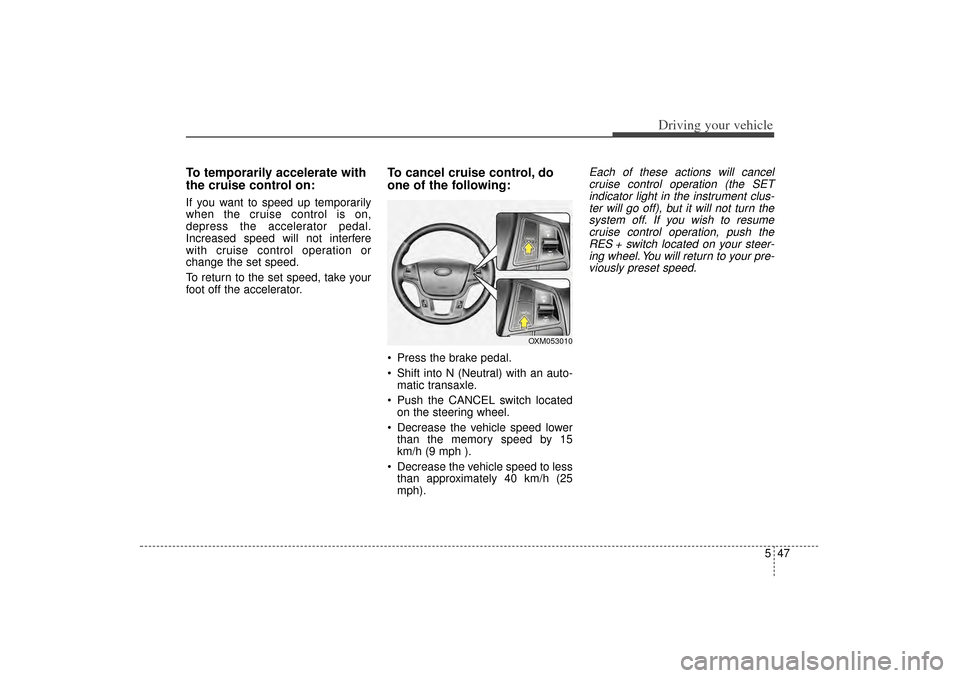
To cancel cruise control, do
one of the following: Press the brake pedal.
Shift into N (Neutral) with an auto-matic transaxle.
Push the CANCEL switch located on the steering wheel.
Decrease the vehicle speed lower than the memory speed by 15
km/h (9 mph ).
Decrease the vehicle speed to less than approximately 40 km/h (25
mph).
Each of these actions will cancelcruise control operation (the SETindicator light in the instrument clus-ter will go off), but it will not turn thesystem off. If you wish to resumecruise control operation, push theRES + switch located on your steer-ing wheel. You will return to your pre-viously preset speed.
OXM053010
XM(FL) CAN(ENG) 5.QXP 1/23/2013 3:30 PM Page 47