Page 308 of 486

565
Driving your vehicle
1. Cruise indicator
2. Cruise set indicator
The cruise control system allows you
to program the vehicle to maintain aconstant speed without depressing
the accelerator pedal. This system is designed to function
above approximately 30 km/h (20mph).CRUISE CONTROL SYSTEM (IF EQUIPPED)
WARNING
If the cruise control is left on, (CRUISE indicator light in the
instrument cluster is illumi-
nated), the cruise control can
be switched on accidentally.
Keep the cruise control sys-
tem off (CRUISE indicatorlight OFF) when the cruise
control is not in use, to avoid
inadvertently setting a speed.
Use the cruise control system only when driving on open
highways in good weather.
Do not use the cruise control when it may not be safe to
keep the vehicle at a constant
speed, for instance, driving in
heavy or varying traffic, or on
slippery (rainy, icy or snow-
covered) or winding roads or
over 6% up-hill or down-hill
roads.
Pay particular attention to the driving conditions whenever
using the cruise control sys-tem.
(Continued)(Continued)
Be careful when drivingdownhill using the cruise con-
trol system, which may
increase the vehicle speed.
OKH052057
Page 313 of 486

Driving your vehicle
70
5
➀ Cruise indicator
➁ SET indicator
➂ Set speed
➃ Vehicle-to-vehicle distance The smart cruise control system
allows you to program the vehicle tomaintain constant speed and dis-
tance detecting the vehicle ahead
without depressing the acceleratorpedal.
✽✽
NOTICE
To activate smart cruise control,
depress the brake pedal at least once
after turning the ignition switch to
the ON position or starting the
engine. This is to check if the brake
switch which is important part to
cancel smart cruise control is in nor-
mal condition.
ADVANCED SMART CRUISE CONTROL SYSTEM (IF EQUIPPED)
WARNING
If the smart cruise control is left on, (cruise indicator light
in the instrument cluster illu-
minated) the smart cruise
control can be activated unin-
tentionally. Keep the smart
cruise control system off(cruise indicator light off)
when the smart cruise controlis not used.
Use the smart cruise control system only when traveling
on open highways in good
weather.
Do not use the smart cruise control when it may not be
safe to keep the car at a con-
stant speed. For instance,
driving in heavy or varying
traffic, or on slippery (rainy,
icy or snow-covered) or wind-
ing roads or steep hills.
Pay particular attention to the driving conditions whenever
using the smart cruise controlsystem.
(Continued)
WARNING
For your safety, please read the
owner's manual before using
the smart cruise control sys-tem.
OKH052062
OKH052063
■ Type A
■Type B
Page 317 of 486
Driving your vehicle
74
5
If the system is cancelled, the warn- ing chime will sound and a message
will appear for a few seconds.
You must adjust the vehicle speed by
depressing the accelerator or brakepedal according to the road condition
ahead and driving condition.
Always check the road conditions.
Do not rely on the warning chime. To resume cruise control set speed:
If any method other than the
CRUISE lever was used to cancel
cruising speed and the system is still
activated, the cruising speed will
automatically resume when you
move the lever up/down (to RES+ or
SET-).
If you move the lever up (to RES+), the speed will resume to the recently
set speed. It will not resume if the
vehicle speed has dropped below
approximately 30km/h (18.6mph).
✽✽
NOTICE
Always check the road conditions
when you move the lever up (to
RES+) to resume speed.
OKH052066
OKH052068L
Page 319 of 486

Driving your vehicle
76
5
■ Type A■Type B
Distance 4 Distance 3
Distance 2 Distance 1 Distance 4 Distance 3
Distance 2 Distance 1
The vehicle will maintain the set speed, when the lane ahead is clear.
The vehicle will slow down or speed up to maintain the selected distance, when there is a vehicle ahead of you in the lane. (A vehicle will appear in
front of your vehicle in the LCD display only when there is an actual vehi-
cle in front of you)
If the vehicle ahead speeds up, your vehicle will travel at a steady cruising speed after accelerating to the selected speed.
OKH052070/OKH052071
CAUTION
The warning chime sounds
and malfunction indicatorblinks if it is hard to maintain the selected distance to thevehicle ahead.
If the warning chime sounds, actively adjust the vehiclespeed by depressing the brake pedal according to theroad condition ahead anddriving condition.
Even if the warning chime is not activated, always payattention to the driving condi-tions to prevent dangeroussituations from occurring.
Page 321 of 486

Driving your vehicle
78
5
Sensor malfunction indicator
If the sensor or cover is
dirty or obscured with
foreign matter such as
snow, the indicator will
illuminate. Clean the
sensor by using a softcloth.SCC (Smart cruise control) mal-function indicator
The warning light illumi-
nates when the vehicle
to vehicle distance con-trol system is not func-
tioning normally.
We recommend have
the system checked by
an authorized Kia deal-
er.
CAUTION
Do not install accessories around the sensor and do notreplace the bumper by your- self. It may interfere with thesensor performance.
Always keep the sensor and bumper clean.
To prevent sensor cover dam- age from occurring, wash thecar with a soft cloth.
Do not damage the sensor or sensor area by a strongimpact. If the sensor movesslightly off position, the smart cruise control system will notoperate correctly.
If this occurs, we recommendthat the system be checked byan authorized Kia dealer.
Use only a genuine Kia sensor cover for your vehicle. Do notpaint anything on the sensorcover.
Page 322 of 486

579
Driving your vehicle
To convert to cruise control mode:
The driver may choose to only use
the cruise control mode (speed con-
trol function) by doing as follows:1.Turn the smart cruise control sys-
tem on (the cruise indicator light
will be on but the system will not be
activated).
2.Push the distance to distance switch for more than 2 seconds.
3.Choose between "Smart cruise control(SCC) mode" and "Cruisecontrol(CC) mode". Limitations of the system
The smart cruise control system may
have limits to its ability to detect dis-
tance to the vehicle ahead due to
road and traffic conditions.
On curves
On curves, the smart cruise control
system may not detect a moving
vehicle in your lane, and then your
vehicle could accelerate to the set
speed. Also, the vehicle speed will
rapidly down when the vehicle
ahead is recognized suddenly.
WARNING
When using the cruise control
mode, you must manuallyaccess the distance to other
vehicles as the system will not
automatically brake to slow
down for other vehicles.
OBH058029OKH052106L
OKH052107L
■ Type A
■Type B
Page 326 of 486
583
Driving your vehicle
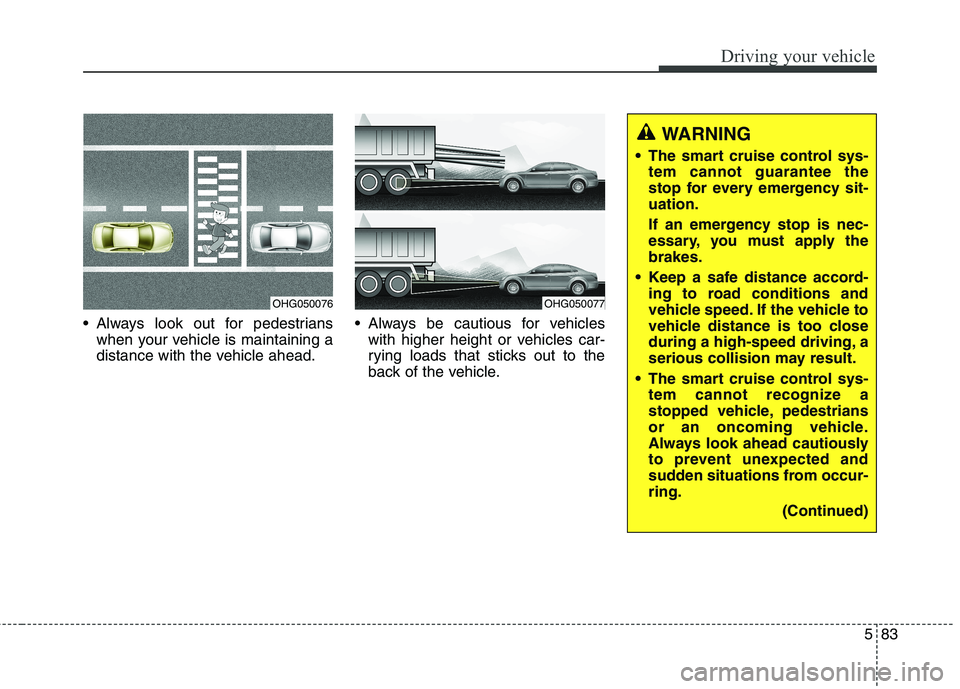
Always look out for pedestrianswhen your vehicle is maintaining a
distance with the vehicle ahead. Always be cautious for vehicles
with higher height or vehicles car-
rying loads that sticks out to the
back of the vehicle.
OHG050076OHG050077
WARNING
The smart cruise control sys- tem cannot guarantee the
stop for every emergency sit-uation.
If an emergency stop is nec-
essary, you must apply thebrakes.
Keep a safe distance accord- ing to road conditions and
vehicle speed. If the vehicle to
vehicle distance is too close
during a high-speed driving, a
serious collision may result.
The smart cruise control sys- tem cannot recognize a
stopped vehicle, pedestrians
or an oncoming vehicle.
Always look ahead cautiously
to prevent unexpected and
sudden situations from occur-ring.
(Continued)
Page 328 of 486

585
Driving your vehicle
This system detects the lane with the sensor at the front windshield and
warns you when your vehicle leaves
the lane.LANE DEPARTURE WARNING SYSTEM (LDWS) (IF EQUIPPED)
OKH052075
OKH052076
WARNING
The LDWS does not make the vehicle change lanes. It is the driver's responsibility to
always check the road condi-tions.
Do not turn the steering wheel suddenly, when the LDWS
warns you that your vehicle is
leaving the lane.
If the sensor can not detect the lane or if the vehicle speed
does not exceed 60km/h, the
LDWS won't warn you even
though the vehicle leaves the
lane.
If your vehicle has window tint or other types of coating and
accessory on the front wind-
shield, the LDWS may not
work properly.
Do not let water or any kind of liquid come in contact with
the LDWS sensor.
(Continued)(Continued)
Do not remove the LDWSparts and do not affect the
sensor by a strong impact.
Do not put objects that reflect light on the dash board.
Always check the road condi- tions because you may not
hear the warning chime
because of audio, and exter-nal conditions.