Page 114 of 486

435
Features of your vehicle
(Continued)
Do not get back into a vehicleonce you have begun refuel-
ing since you can generate
static electricity by touching,
rubbing or sliding against any
item or fabric (polyester, satin,
nylon, etc.) capable of produc-
ing static electricity. Static
electricity discharge can
ignite fuel vapors resulting in
rapid burning. If you must re-
enter the vehicle, you should
once again eliminate poten-
tially dangerous static elec-
tricity discharge by touching a
metal part of the vehicle, away
from the fuel filler neck, noz-
zle or other gasoline source.
(Continued)WARNING - Refueling
dangers
Automotive fuels are flammable
materials. When refueling, please
note the following guidelines
carefully. Failure to follow these
guidelines may result in severe
personal injury, severe burns or
death by fire or explosion.
Read and follow all warnings at the gas station facility.
Before refueling note the loca- tion of the Emergency
Gasoline Shut-Off, if available,
at the gas station facility.
Before touching the fuel noz- zle, you should eliminate
potentially dangerous static
electricity discharge by touch-
ing another metal part of the
vehicle, a safe distance away
from the fuel filler neck, noz-
zle, or other gas source.
(Continued)(Continued)
When using an approvedportable fuel container, be sure to place the container on
the ground prior to refueling.
Static electricity discharge
from the container can ignite
fuel vapors causing a fire.Once refueling has begun,
contact with the vehicleshould be maintained until the
filling is complete.
Use only approved portable
plastic fuel containers designed
to carry and store gasoline.
Do not use cellular phones while refueling. Electric cur-
rent and/or electronic interfer-
ence from cellular phones can
potentially ignite fuel vapors
causing a fire.
(Continued)
Page 115 of 486

Features of your vehicle
36
4
Emergency fuel filler lid release If the fuel filler lid does not open using the remote fuel filler lid
release, you can open it manually by
pulling the handle outward slightly.(Continued)
When refueling, always shut
the engine off. Sparks pro-
duced by electrical compo-nents related to the engine
can ignite fuel vapors causing
a fire. Once refueling is com-
plete, check to make sure thefiller cap and filler door are
securely closed, before start-
ing the engine.
DO NOT use matches or a lighter and DO NOT SMOKE or
leave a lit cigarette in your
vehicle while at a gas station
especially during refueling.
Automotive fuel is highly
flammable and can, when
ignited, result in fire.
If a fire breaks out during refu- eling, leave the vicinity of the
vehicle, and immediately con-
tact the manager of the gasstation and then contact the
local fire department. Follow
any safety instructions they
provide.CAUTION
Make sure to refuel your vehi-
cle according to the "Fuelrequirements" suggested insection 1.
If the fuel filler cap requires replacement, please make surethat you use parts designed for replacement in your vehicle.An incorrect fuel filler cap canresult in a serious malfunction of the fuel system or emissioncontrol system. For moredetailed information, we rec-ommend that you contact an authorized Kia dealer.
Do not spill fuel on the exteri- or surfaces of the vehicle. Anytype of fuel spilled on paintedsurfaces may damage the paint.
After refueling, make sure the fuel cap is installed securelyto prevent fuel spillage in theevent of an accident.
CAUTION
Do not pull the handle exces-sively, otherwise the luggagearea trim or release handle may be damaged.
OKH042031
Page 128 of 486
449
Features of your vehicle
INSTRUMENT CLUSTER
1. Tachometer
2. Speedometer
3. Engine coolant temperature gauge
4. Fuel gauge
5. LCD display
6. Warning and indicator lights
7. Turn signal indicator lightsOKH042940/OKH042941
■■Type A
❈The actual cluster in the vehicle may differ
from the illustration.
For more details, refer to the "Gauges" in
this chapter.
■■ Type B
Page 133 of 486
Features of your vehicle
54
4
Fuel Gauge
This gauge indicates the approxi- mate amount of fuel remaining in thefuel tank.
✽✽
NOTICE
The fuel tank capacity is given in chapter 8.
The fuel gauge is supplemented by a low fuel warning light, which
will illuminate when the fuel tank
is nearly empty.
On inclines or curves, the fuel gauge pointer may fluctuate or the
low fuel warning light may come
on earlier than usual due to the
movement of fuel in the tank.WARNING - Fuel Gauge
Running out of fuel can expose
vehicle occupants to danger.
You must stop and obtain addi-
tional fuel as soon as possibleafter the warning light comes
on or when the gauge indicator
comes close to the “E (Empty)”
level.
CAUTION
Avoid driving with a extremely low fuel level. Running out offuel could cause the engine tomisfire damaging the catalytic converter.
OKH042058
■■ Type A
■■Type B
Page 135 of 486
Features of your vehicle
56
4
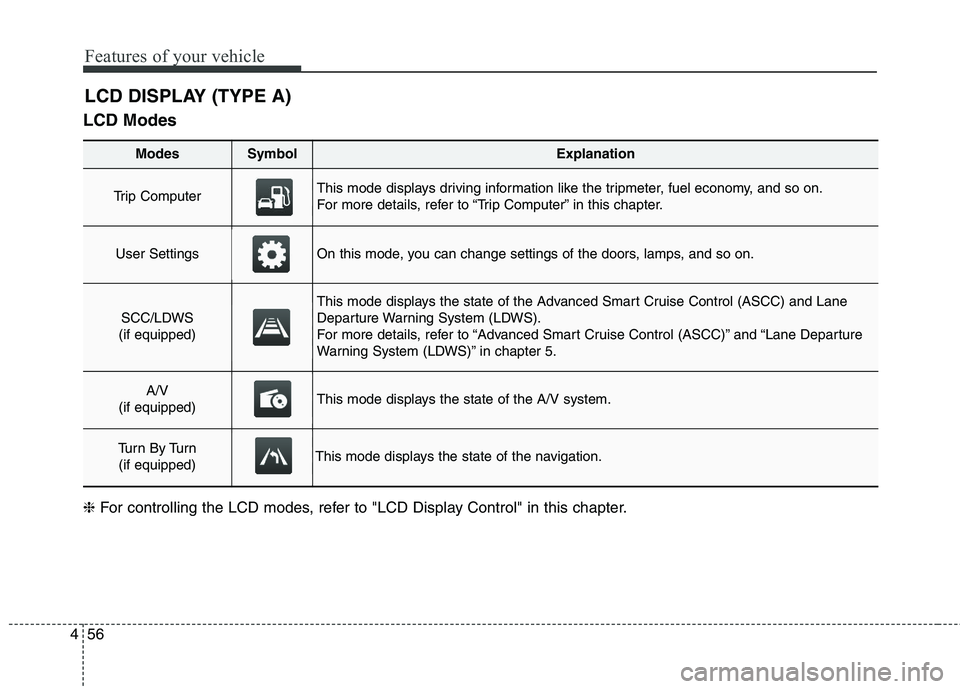
LCD Modes
LCD DISPLAY (TYPE A)
Modes SymbolExplanation
Trip Computer This mode displays driving information like the tripmeter, fuel economy, and so on.
For more details, refer to “Trip Computer” in this chapter.
User SettingsOn this mode, you can change settings of the doors, lamps, and so on.
SCC/LDWS
(if equipped)
This mode displays the state of the Advanced Smart Cruise Control (ASCC) and Lane
Departure Warning System (LDWS).
For more details, refer to “Advanced Smart Cruise Control (ASCC)” and “Lane Departure
Warning System (LDWS)” in chapter 5.
A/V
(if equipped)This mode displays the state of the A/V system.
Tu r n B y Tu r n (if equipped)This mode displays the state of the navigation.
❈ For controlling the LCD modes, refer to "LCD Display Control" in this chapter.
Page 138 of 486

459
Features of your vehicle
Settings
One Touch Turn Lamp
Off:The one touch turn lamp function
will be deactivated.
3, 5, 7 Flashing :
The lane change signals will blink
3, 5, or 7 times when the turn sig-
nal lever is moved slight.
For more details, refer to “Lighting” in
this chapter.
Seat Easy Access
On: The driver’s seat will automatically
move forward or rearward for the
driver to enter or exit the vehicle
comfortably.
Off:
The seat easy access function will
be deactivated.
For more details, refer to “Seat” inchapter 3. Steering Easy Access
On:
The steering wheel will automati-
cally move forward or rearward for
the driver to enter or exit the vehi-
cle comfortably.
Off:
The steering easy access function
will be deactivated.
For more details, refer to “Steering
Wheel” in this chapter.
Welcome Sound
On: The welcome sound operates
when the instrument cluster is
turned on.
Off:
The welcome sound function will
be deactivated. AVG Fuel Eco Reset
Auto Reset:
The average fuel economy will reset automatically when refueling.
Manual Reset:
The average fuel economy will not
reset automatically whenever refu-eling.
For more details, refer to “Trip
Computer” in this chapter.
AVSM (if equipped)
On: The AVSM system will be activat- ed.
Off: The AVSM system will be deacti-
vated.
For more details, refer to “Advanced
Vehicle Safety Management (AVSM)
System” in chapter 5. ❈ AVSM: Advanced Vehicle Safety Management
Page 141 of 486
Features of your vehicle
62
4
MenusExplanation
Cluster Settings
On this mode, you can change settings of the instrument cluster.
AV Information: On / Off
Wallpaper: Default / Cubic / Retro
Driver Alert Guide: On / Off
Number Size: Large / Medium / Small
AVG Fuel Eco Reset: Auto Reset / Manual Reset
Speedometer Unit (if equipped): km / miles
Feeling
(Haptic switch feeling)On this mode, you can adjust the rotating effort of the haptic switch.
Strong / Normal / Mild
❈ For controlling the LCD menus, refer to "LCD Display Control" in this chapter.
Page 145 of 486
Features of your vehicle
66
4
Cluster SettingsAV Information
On:
The LCD display will show AV
information (Radio, CD, USB, AUX,and so on).
Off: The AV information will not be dis-
played on the LCD display.
Wallpaper
Choose the wallpaper theme of the
instrument cluster (Default, Cubic,Retro).
Drive Alert Guidance (if equipped)
On: The LCD display will show traffic
information.
Off:
The traffic information will not be
displayed on the LCD display. Number Size
Choose the size of the number in the speedometer and tachometer
(Large, Medium, Small).
AVG Fuel Eco Reset
Auto Reset:
The average fuel economy will reset automatically when refueling.
Manual Reset: The average fuel economy will not
reset automatically whenever refu-eling.
For more details, refer to “Trip
Computer” in this chapter.
Speedometer Unit (if equipped) Choose the speedometer unit (km, miles).
OKH042909