Page 16 of 479
Safety features of your vehicle
23
Driver’s seat
(1) Seat adjustment, forward / back-ward
(2) Seatback recliner
(3) Seat adjustment, height
(4) Lumbar support
(5) Driver position memory system
(6) Seat warmer switch
(7) Headrest
Front passenger’s seat
(8) Seat adjustment, forward / back- ward
(9) Seatback recliner
(10) Seat warmer switch
(11) Headrest
Rear seat
(12) Seat warmer
(13) Armrest
(14) Headrest
(15) Seat-back folding lever
SEAT
OTF034001L
Page 19 of 479
35
Safety features of your vehicle
Seatback angle
To recline the seatback:
1. Lean forward slightly and lift up theseatback recline lever.
2. Carefully lean back on the seat and adjust the seatback of the
seat to the position you desire.
3. Release the lever and make sure the seatback is locked in place.
(The lever MUST return to its orig-
inal position for the seatback to
lock.)
Seat Cushion height
(for driver's seat)
To change the height of the seat
cushion push the lever upwards or
downwards.
• To lower the seat cushion, push the lever down several times.
To raise the seat cushion, push the lever up several times.
Lumbar support
(for driver’s seat)
Press the front portion of the switch to
increase support, or the rear portion
of the switch to decrease support.
OTF030003
OTF030004OTF030005
Page 21 of 479
37
Safety features of your vehicle
Seatback angle
Push the control switch forward or
backward to move the seatback to
the desired angle. Release the
switch once the seat reaches the
desired position.
Seat cushion height (for driver's side)
Pull the front portion of the control
switch up to raise or down to lower
the front part of the seat cushion. Pull
the rear portion of the control switch
up to raise or down to lower the rear
part of the seat cushion. Release the
switch once the seat reaches the
desired position.
Lumbar support (for driver’s seat, if equipped)
The lumbar support can be adjusted
by pressing the lumbar support
switch on the side of the driver's
seat. Press the front portion of the
switch to increase support, or the
rear portion of the switch to decrease
support.
OTF030007
OTF030008OTF030009
Page 260 of 479
![KIA Optima 2014 3.G Owners Manual Features of your vehicle
190
4
Contacts
Press the key Select
[Contacts]
The list of saved phone book entries
is displayed.
NOTE:
Find a contact in an alphabetical
order, press the key.
Bluetooth®W](/manual-img/2/2952/w960_2952-259.png "KIA Optima 2014 3.G Owners Manual Features of your vehicle
190
4
Contacts
Press the key Select
[Contacts]
The list of saved phone book entries
is displayed.
NOTE:
Find a contact in an alphabetical
order, press the key.
Bluetooth®W")
Features of your vehicle
190
4
Contacts
Press the key Select
[Contacts]
The list of saved phone book entries
is displayed.
NOTE:
Find a contact in an alphabetical
order, press the key.
Bluetooth®Wireless Technology
phone can be downloaded into the
car contacts. Contacts that have
been downloaded to the car cannot
be edited or deleted on the phone.
aged separately for each paired
Bluetooth®Wireless Technology
device (max 5 devices x 1,000 con-
tacts each). Previously downloaded
data is maintained even if the
Bluetooth®Wireless Technology
device has been disconnected.
(However, the contacts and call his-
tory saved to the phone will be
deleted if a paired phone is delet-
ed.)
during Bluetooth streaming audio.
icon will be displayed within the sta-
tus bar.
loading a contact list when the con-
tact download feature has been
turned off within the
Bluetooth®
Wireless Technology device. In
addition, some devices may require
device authorization upon attempt-
ing to download contacts. If down-
loading does not normally occur,
check the
Bluetooth®Wireless
Technology device settings or the
screen state.
not be supported in some mobile
phones. For more information of
supported
Bluetooth®devices and
function support, refer to your
phone’s user manual.
MENU
PHONE
Page 262 of 479

Features of your vehicle
192
4
1) Connect/Disconnect Phone :
Connect/ disconnects currently
selected phone
2) Change Priority : Sets currently selected phone to highest connec-
tion priority
3) Delete : Deletes the currently selected phone
4) Return : Moves to the previous screen
mobile phone supports contacts
downloads, refer to your mobile
phone user’s manual.
phone can be downloadedDownloading Contacts
Press the key Select
[Phone] Select [Contacts Download]
As the contacts are downloaded
from the mobile phone, a download
progress bar is displayed.
the previous corresponding data is
deleted.
in some mobile phones.
while contacts are being down-
loaded.
Auto Download (Contacts)
Press the key Select
[Phone] Select [Auto Download]
This feature is used to automatically
download mobile contacts entries
once a
Bluetooth®Wireless
Technology phone is connected.
✽ ✽ NOTICE
• The Auto Download feature will
download mobile contacts entries
every time the phone is connected.
The download time may differ
depending on the number of saved
contacts entries and the communi-
cation state.
• Before downloading contacts, first check to see that your mobile
phone supports the contacts
download feature.
SETUP SETUP
Page 317 of 479

545
Driving your vehicle
Warning type
If the vehicle detected by sensorsapproaches your vehicle, the warn-
ing chime will sound and the warn-
ing light will blink on the outside
rearview mirror.
If the detected vehicle is out of the sensing range of your vehicle,
move the vehicle away from the
detected object slowly; the warning
will be cancelled.
The system may not operate prop- erly due to other factors or circum-
stances. Always pay attention to
your surrounding. ❈
If your vehicle's left or right side
bumper is blinded by barrier or
vehicles, the system sensing abili-
ty may be deteriorated.
OVI053132
WARNING
The warning light on the out-
side rearview mirror will illu-
minate whenever a vehicle is
detected at the rear side by
the system.
To avoid accidents, do not
focus only on the warning
light and neglect to see the
surrounding of the vehicle.
Drive safely even though the vehicle is equipped with a
Blind Spot Detection System
(BSD). Do not solely rely on
the system but check for your-
self before changing lanes.
The system may not alert the
driver in some conditions so
always check the surround-
ings while driving.
(Continued)
(Continued)
The Blind Spot DetectionSystem (BSD) is not a substi-
tute for proper and safe lane
changing procedures. Always
drive safely and use caution
when changing lanes. The
Blind Spot Detection System
may not detect every object
alongside the vehicle.
Page 356 of 479
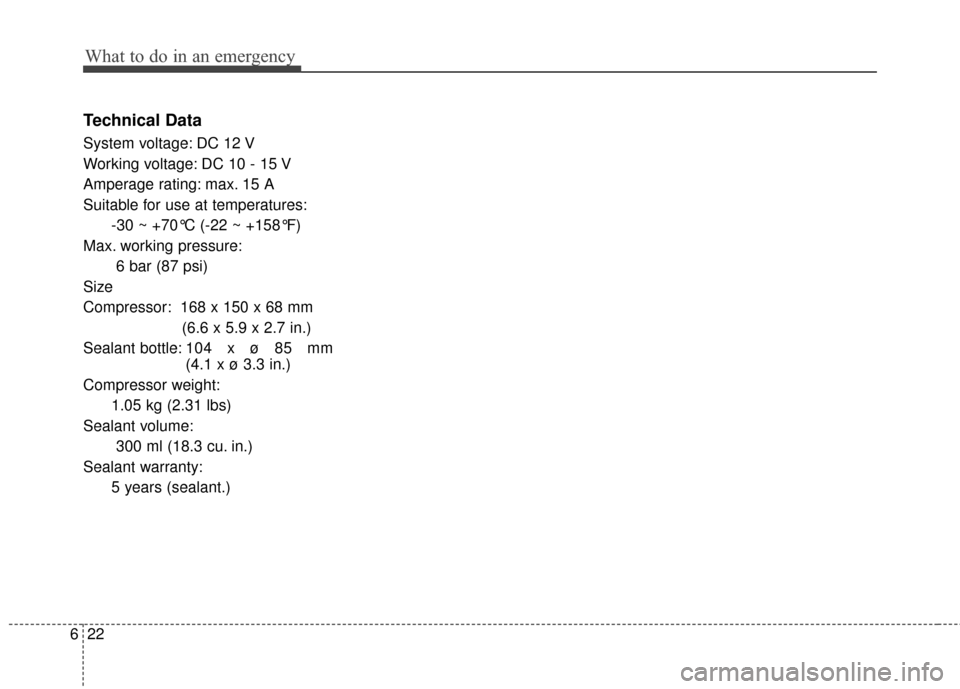
What to do in an emergency
22
6
Technical Data
System voltage: DC 12 V
Working voltage: DC 10 - 15 V
Amperage rating: max. 15 A
Suitable for use at temperatures:
-30 ~ +70°C (-22 ~ +158°F)
Max. working pressure: 6 bar (87 psi)
Size
Compressor: 168 x 150 x 68 mm (6.6 x 5.9 x 2.7 in.)
Sealant bottle: 104 x ø 85 mm
(4.1 x ø 3.3 in.)
Compressor weight: 1.05 kg (2.31 lbs)
Sealant volume: 300 ml (18.3 cu. in.)
Sealant warranty: 5 years (sealant.)
Page 411 of 479

751
Maintenance
Tire replacement
If the tire is worn evenly, a tread wear
indicator will appear as a solid band
across the tread. This shows there is
less than 1.6 mm (1/16 inch) of tread
left on the tire. Replace the tire when
this happens.
Do not wait for the band to appear
across the entire tread before replac-
ing the tire.The ABS works by comparing the
speed of the wheels. Tire size can
affect wheel speed. When replacing
tires, all 4 tires must use the same
size originally supplied with the vehi-
cle. Using tires of a different size can
cause the ABS (Anti-lock Brake
System) and ESC (Electronic
Stability Control) (if equipped) to
work irregularly.
Compact spare tire replacement
A compact spare tire has a shorter
tread life than a regular size tire.
Replace it when you can see the
tread wear indicator bars on the tire.
The replacement compact spare tire
should be the same size and design
tire as the one provided with your
new vehicle and should be mounted
on the same compact spare tire
wheel. The compact spare tire is not
designed to be mounted on a regular
size wheel, and the compact spare
tire wheel is not designed for mount-
ing a regular size tire.
OEN076053
Tread wear indicator