Page 179 of 479

4109
Features of your vehicle
DEFROSTER
If you want to defrost and defog the
front windshield, refer to “Windshield
Defrosting and Defogging” in this
chapter.
Rear window defroster
The defroster heats the window to
remove frost, fog and thin ice from
the interior and exterior of the rear
window, while the engine is running.
To activate the rear window
defroster, press the rear window
defroster button located in the center
facia switch panel. The indicator on
the rear window defroster button illu-
minates when the defroster is on.
If there is heavy accumulation of
snow on the rear window, brush it off
before operating the rear defroster.The rear window defroster automati-
cally turns off after approximately 20
minutes or when the ignition switch is
turned off. To turn off the defroster
manually, press the rear window
defroster button again.
Outside mirror defroster
(if equipped)
If your vehicle is equipped with the
outside rearview mirror defrosters,
they will operate at the same time you
turn on the rear window defroster.
Wiper deicer (if equipped)
If your vehicle is equipped with the
wiper deicer, it will operate at the
same time you turn on the rear win-
dow defroster.
CAUTION - Conductors
To prevent damage to the con-ductors bonded to the insidesurface of the rear window,never use sharp instruments orwindow cleaners containingabrasives to clean the window.
OTF044114L
Page 183 of 479
4113
Features of your vehicle
MAX A/C-Level (B, D) (if equipped)
The MAX A/C mode is used to cool
the inside of the vehicle faster.
In this mode, the air conditioning and
the recirculated air position will be
selected automatically.Instrument panel vents
The outlet vents can be opened or
closed separately using the thumb-
wheel.
Also, you can adjust the direction of
air delivered from these vents using
the vent control lever as shown.
Temperature control
The temperature control knob allows
you to control the temperature of the
air flowing from the ventilation sys-
tem. To change the air temperature in
the passenger compartment, turn
the knob to the right for warm air or
left for cooler air.
OTF044315OTF044316
OTF044317
Page 191 of 479
4121
Features of your vehicle
✽
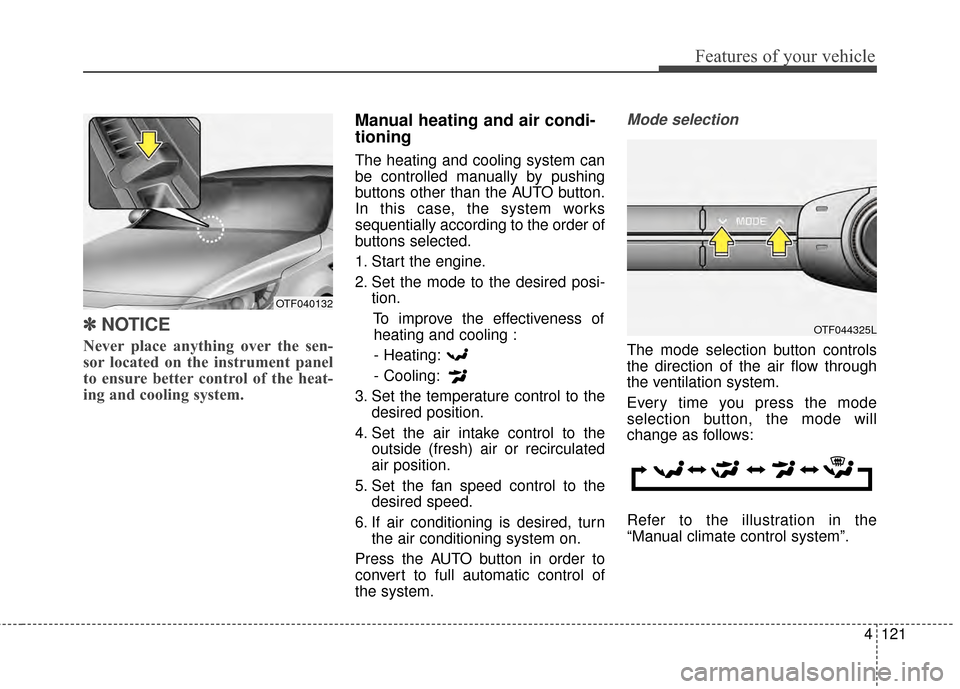
✽NOTICE
Never place anything over the sen-
sor located on the instrument panel
to ensure better control of the heat-
ing and cooling system.
Manual heating and air condi-
tioning
The heating and cooling system can
be controlled manually by pushing
buttons other than the AUTO button.
In this case, the system works
sequentially according to the order of
buttons selected.
1. Start the engine.
2. Set the mode to the desired posi-
tion.
To improve the effectiveness ofheating and cooling :
- Heating:
- Cooling:
3. Set the temperature control to the desired position.
4. Set the air intake control to the outside (fresh) air or recirculated
air position.
5. Set the fan speed control to the desired speed.
6. If air conditioning is desired, turn the air conditioning system on.
Press the AUTO button in order to
convert to full automatic control of
the system.
Mode selection
The mode selection button controls
the direction of the air flow through
the ventilation system.
Every time you press the mode
selection button, the mode will
change as follows:
Refer to the illustration in the
“Manual climate control system”.
OTF044325L
OTF040132
Page 193 of 479
4123
Features of your vehicle
Instrument panel vents
The outlet vents can be opened or
closed separately using the thumb-
wheel.
Also, you can adjust the direction of
air delivered from these vents using
the vent control lever as shown.
Temperature control
The temperature control knob allows
you to control the temperature of the
air flowing from the ventilation sys-
tem. To change the air temperature in
the passenger compartment, turn
the knob to the right for warm air or
left for cooler air.Adjusting the driver and passenger
side temperature individually
1. Press the DUAL button to operate
the driver and passenger side
temperature individually. Pressing
the right temperature control but-
ton will automatically switch to the
DUAL mode as well.
2. Operate the left temperature con- trol to adjust the driver side tem-
perature. Operate the right tem-
perature control to adjust the pas-
senger side temperature.
OTF044329LOTF044316
OTF044328
Page 422 of 479
Maintenance
62
7
✽
✽
NOTICE
The actual fuse/relay panel label
may differ from equipped items.
Instrument panel fuse replace-
ment
1. Turn the ignition switch and all other switches off.
2. Open the fuse panel cover.
CAUTION
When replacing a blown fuse or relay with a new one, makesure the new fuse or relay fitstightly into the clips Theincomplete fastening fuse orrelay may cause the vehiclewiring and electric systemsdamage and a possible fire.
Do not remove fuses, relaysand terminals fastened withbolts or nuts. The fuses, relaysand terminals may be fas-tened incompletely, and it maycause a possible fire. If fuses,relays and terminals fastenedwith bolts or nuts are blown,we recommend that you con-sult with an authorized Kiadealer.
Do not input any other objectsexcept fuses or relays intofuse/relay terminals such as adriver or wiring. It may causecontact failure and systemmalfunction.
OTF074017
Page 426 of 479
Maintenance
66
7
Instrument fuse panel
✽
✽
NOTICE
Not all fuse panel descriptions in
this manual may be applicable to
your vehicle. It is accurate at the
time of printing. When you inspect
the fuse panel in your vehicle, refer
to the fuse panel label.
OTF074084N
OTF070023
Fuse/relay panel description
Inside the fuse/relay panel covers, you can find the fuse/relay label describing fuse/relay name and capacity.
Page 476 of 479

I5
Index
Technical Data . . . . . . . . . . . . . . . . . . . . . . . . . . . . . 6-22
Using the Tire Mobility Kit . . . . . . . . . . . . . . . . . . . 6-20
In case of an emergency while driving . . . . . . . . . . . . . . 6-3 If engine stalls while driving . . . . . . . . . . . . . . . . . . . 6-3
If the engine stalls at a crossroad or crossing . . . . . . 6-3
If you have a flat tire while driving . . . . . . . . . . . . . . 6-3
Instrument cluster . . . . . . . . . . . . . . . . . . . . . . . . . . . . . 4-55 Gauges . . . . . . . . . . . . . . . . . . . . . . . . . . . . . . . . . . . 4-\
57
Instrument Cluster Control. . . . . . . . . . . . . . . . . . . . 4-56
LCD Display Control . . . . . . . . . . . . . . . . . . . . . . . . 4-56
Transaxle Shift Indicator . . . . . . . . . . . . . . . . . . . . . 4-60
Instrument panel overview . . . . . . . . . . . . . . . . . . . . . . . 2-5
Interior features. . . . . . . . . . . . . . . . . . . . . . . . . . . . . . 4-139 Clothes hanger . . . . . . . . . . . . . . . . . . . . . . . . . . . . 4-142
Cup holder . . . . . . . . . . . . . . . . . . . . . . . . . . . . . . . 4-139
Digital clock . . . . . . . . . . . . . . . . . . . . . . . . . . . . . 4-141
Floor mat anchor(s) . . . . . . . . . . . . . . . . . . . . . . . . 4-143
Navigation system . . . . . . . . . . . . . . . . . . . . . . . . . 4-144
Power outlet . . . . . . . . . . . . . . . . . . . . . . . . . . . . . . 4-140
Sunvisor . . . . . . . . . . . . . . . . . . . . . . . . . . . . . . . . . 4-140
Interior light . . . . . . . . . . . . . . . . . . . . . . . . . . . . . . . . 4-105 Automatic turn off function . . . . . . . . . . . . . . . . . . 4-105
Glove box lamp . . . . . . . . . . . . . . . . . . . . . . . . . . . 4-108
Map lamp . . . . . . . . . . . . . . . . . . . . . . . . . . . . . . . 4-105
Room lamp . . . . . . . . . . . . . . . . . . . . . . . . . . . . . . 4-106
Trunk room lamp . . . . . . . . . . . . . . . . . . . . . . . . . . 4-107
Vanity mirror lamp . . . . . . . . . . . . . . . . . . . . . . . . . 4-108
Interior overview. . . . . . . . . . . . . . . . . . . . . . . . . . . . . . . 2-4 Key positions . . . . . . . . . . . . . . . . . . . . . . . . . . . . . . . . . 5-6
Ignition switch position . . . . . . . . . . . . . . . . . . . . . . . 5-6
Illuminated ignition switch . . . . . . . . . . . . . . . . . . . . 5-6
Keys . . . . . . . . . . . . . . . . . . . . . . . . . . . . . . . . . . . . \
. . . . 4-4 Key operations . . . . . . . . . . . . . . . . . . . . . . . . . . . . . . 4-4
Record your key number . . . . . . . . . . . . . . . . . . . . . . 4-4
LCD Display . . . . . . . . . . . . . . . . . . . . . . . . . . . . . . . . . 4-61 LCD Modes . . . . . . . . . . . . . . . . . . . . . . . . . . . . . . . 4-61
Service Mode . . . . . . . . . . . . . . . . . . . . . . . . . . . . . . 4-62
User Settings Mode . . . . . . . . . . . . . . . . . . . . . . . . . 4-64
Warning Messages . . . . . . . . . . . . . . . . . . . . . . . . . . 4-67
Light bulbs . . . . . . . . . . . . . . . . . . . . . . . . . . . . . . . . . . 7-79\
Front light replacement . . . . . . . . . . . . . . . . . . . . . . 7-79
High mounted stop light bulb replacement . . . . . . . 7-88
Interior light bulb replacement. . . . . . . . . . . . . . . . . 7-91
License plate light bulb replacement . . . . . . . . . . . . 7-88
Rear combination light bulb replacement . . . . . . . . 7-85
Side repeater light bulb replacement . . . . . . . . . . . . 7-83
Lighting. . . . . . . . . . . . . . . . . . . . . . . . . . . . . . . . . . . . \
. 4-96 Battery saver function . . . . . . . . . . . . . . . . . . . . . . . 4-96
Daytime running light . . . . . . . . . . . . . . . . . . . . . . . 4-97
Front fog light . . . . . . . . . . . . . . . . . . . . . . . . . . . . 4-101
Headlight escort function . . . . . . . . . . . . . . . . . . . . . 4-96K
L
Page:
< prev 1-8 9-16 17-24


