2014 KIA MOHAVE wheel
[x] Cancel search: wheelPage 180 of 417
4103
Features of your vehicle
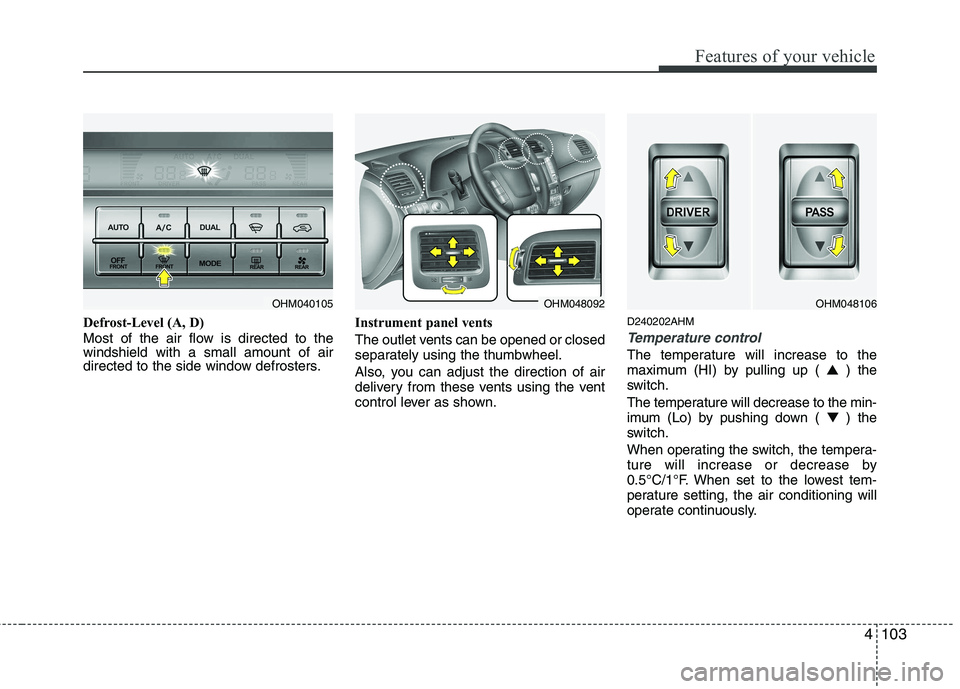
Defrost-Level (A, D)
Most of the air flow is directed to the windshield with a small amount of air
directed to the side window defrosters.Instrument panel vents
The outlet vents can be opened or closed
separately using the thumbwheel.
Also, you can adjust the direction of air
delivery from these vents using the vent
control lever as shown.D240202AHM
Temperature control
The temperature will increase to the
maximum (HI) by pulling up (
▲) the
switch.
The temperature will decrease to the min-
imum (Lo) by pushing down ( ▼) the
switch.
When operating the switch, the tempera-
ture will increase or decrease by
0.5°C/1°F. When set to the lowest tem-
perature setting, the air conditioning will
operate continuously.
OHM040105OHM048092OHM048106
Page 204 of 417
4127
Features of your vehicle
D300200AEN
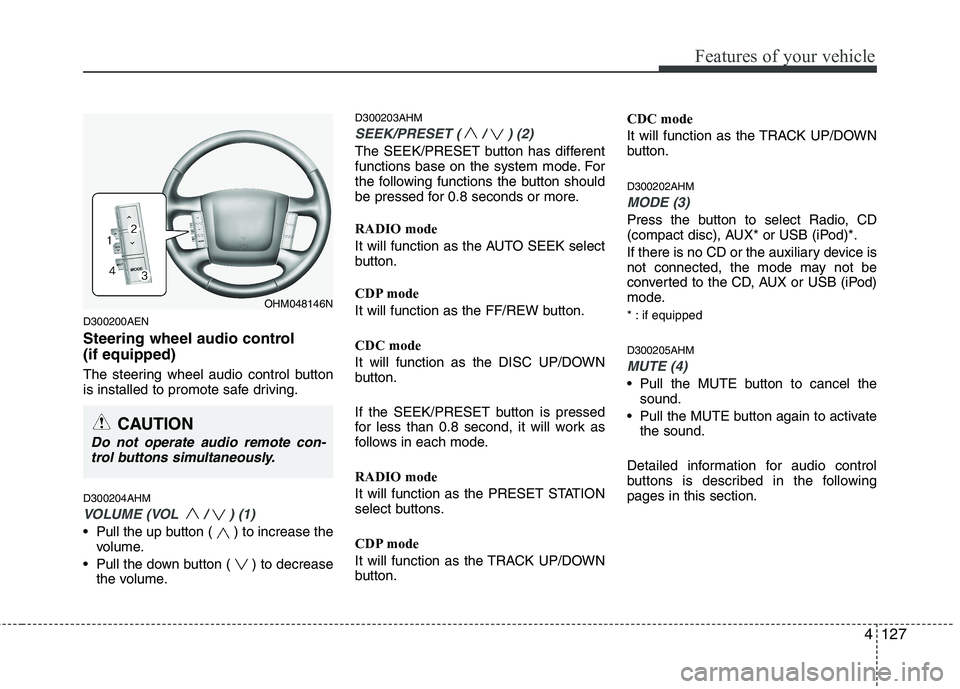
Steering wheel audio control (if equipped)
The steering wheel audio control button
is installed to promote safe driving. D300204AHM
VOLUME (VOL / ) (1)
• Pull the up button ( ) to increase thevolume.
Pull the down button ( ) to decrease the volume. D300203AHM
SEEK/PRESET ( / ) (2)
The SEEK/PRESET button has different
functions base on the system mode. For
the following functions the button should
be pressed for 0.8 seconds or more. RADIO mode
It will function as the AUTO SEEK select
button.
CDP mode
It will function as the FF/REW button. CDC mode
It will function as the DISC UP/DOWN
button.
If the SEEK/PRESET button is pressed
for less than 0.8 second, it will work as
follows in each mode. RADIO mode
It will function as the PRESET STATION
select buttons.
CDP mode
It will function as the TRACK UP/DOWN
button.
CDC mode
It will function as the TRACK UP/DOWN
button. D300202AHM
MODE (3)
Press the button to select Radio, CD
(compact disc), AUX* or USB (iPod)*.
If there is no CD or the auxiliary device is
not connected, the mode may not be
converted to the CD, AUX or USB (iPod)
mode.
* : if equipped D300205AHM
MUTE (4)
Pull the MUTE button to cancel the
sound.
Pull the MUTE button again to activate the sound.
Detailed information for audio control
buttons is described in the followingpages in this section.
OHM048146N
CAUTION
Do not operate audio remote con- trol buttons simultaneously.
Page 240 of 417
![KIA MOHAVE 2014 Owners Manual 4163
Features of your vehicle
The paired phone can be deleted.
1. Press [ENTER(TUNE knob)] button toenter SETUP mode.
2. Select “PHONE”, then “DELETE” in PHONE menu.
3. Select desired phone](/manual-img/2/57960/w960_57960-239.png "KIA MOHAVE 2014 Owners Manual 4163
Features of your vehicle
The paired phone can be deleted.
1. Press [ENTER(TUNE knob)] button toenter SETUP mode.
2. Select “PHONE”, then “DELETE” in PHONE menu.
3. Select desired phone")
4163
Features of your vehicle
The paired phone can be deleted.
1. Press [ENTER(TUNE knob)] button toenter SETUP mode.
2. Select “PHONE”, then “DELETE” in PHONE menu.
3. Select desired phone name from the list shown.
■ Receiving a Phone Call
When receiving a phone call, a ringt one
is audible from speakers and the audio
system changes into telephone mode.
When receiving a phone call, “Incoming”
message and incoming phone number
(if available) are displayed on the audio.
- Press bu t t o n on the steering wheel.
- Press button on the steering wheel.
- Use VOLUME buttons on the steering wheel.
Call):
- Press and hold button on the steer- ing wheel until the audio system trans-
fers a call to the phone. ■
Talking on the Phone
When talking on the phone, “Active Calls”
message and the other party’s phone
number (if available) are displayed on the
audio.
- Press [MUTE] button on the audio.
- Press button on the steering wheel.
■ Making a Phone Call
A Call Back can be made by pressing button on the steering wheel.
- This is the same function as using the
button solely on the cellular phone.
✽✽NOTICE
Some phone models require pressing button twice to make a call.
✽
✽ NOTICE
In the following situations, you or the
other party may have difficulty hearing each other:
1. Speaking at the same time, your voice may not reach the other party. (This isnot a malfunction.) Speak alternately
with the other party on the phone.
2. Keep the Bluetooth ®
volume to a low
level. High-level volume may result indistortion and echo. 3. When driving on a rough road.
4. When driving at high speeds.
5. When the window is open.
6. When the air conditioning vents are
facing the microphone.
7. When the sound of the air condition-
ing fan is loud.
■Using the head unit as Bluetooth ®
wireless technology
music
This audio system supports A2DP (Audio
Advanced Distribution Profile) and
AVRCP(Audio Video Remote ControlProfile).
Both profiles are available for listening to
the MP3 music via Bluetooth cellular phone
supporting above Bluetooth profiles.
To play MP3 music from the Bluetooth
cellular phone, press the [AUX] button
until “MP3 Play” is displayed on the LCD.
Then try playing music by phone.
When playing music from the Bluetooth
cellular phone, the head unit displays MP3 MODE.
Page 242 of 417

5
Before driving / 5-3
Key positions / 5-4
ENGINE START/STOP button / 5-6
Starting the engine / 5-8
Automatic transmission / 5-12
Four wheel drive (4WD) / 5-18
Brake system / 5-28
Locking differential / 5-40
Air leveling system / 5-41
Cruise control system / 5-44
Economical operation / 5-48
Special driving conditions / 5-50
Winter driving / 5-54
Trailer Towing / 5-58
Vehicle weight / 5-66
Driving your vehicle
Page 245 of 417

Driving your vehicle
4
5
E030100AHM
Illuminated ignition switch
Whenever a front door is opened, the
ignition switch will illuminate for your con-
venience, provided the ignition switch is
not in the ON position. The light will go off
immediately when the ignition switch is
turned on. It will also go off after about 30seconds when the door is closed. Ignition switch position
E030201AUN
LOCK
The steering wheel locks to protect
against theft. The ignition key can be
removed only in the LOCK position.
When turning the ignition switch to the
LOCK position, push the key inward at
the ACC position and turn the key towardthe LOCK position.
OEN056001OUN036002
WARNING
When you intend to park or stop the vehicle with the engine on, be careful not to depress the accel-
erator pedal for a long period of
time. It may overheat the engine
or exhaust system and cause fire.
When you make a sudden stop or turn the steering wheel rapidly,
loose objects may drop on the
floor and it could interfere with
the operation of the foot pedals,
possibly causing an accident.
Keep all things in the vehicle
safely stored.
If you do not focus on driving, it may cause an accident. Be care-
ful when operating what may dis-
turb driving such as audio or
heater. It is the responsibility of
the driver to always drive safely.
KEY POSITIONS (IF EQUIPPED)
Page 246 of 417

55
Driving your vehicle
E030202AHM
ACC (Accessory)
The steering wheel is unlocked and elec-
trical accessories are operative.
✽✽NOTICE
If difficulty is experienced turning the
ignition switch to the ACC position, turn
the key while turning the steering wheel
right and left to release the tension.
E030203AUN
ON
The warning lights can be checked
before the engine is started. This is the
normal running position after the engine
is started.
Do not leave the ignition switch ON if the engine is not running to prevent battery
discharge.
E030204APB
START
Turn the ignition switch to the START
position to start the engine. The engine
will crank until you release the key; then
it returns to the ON position. The brake
warning light can be checked in this posi-tion. E030205AHM
WARNING - Ignition
switch
Never turn the ignition switch to LOCK or ACC while the vehicle is
moving. This would result in loss
of directional control and braking
function, which could cause anaccident.
The anti-theft steering column lock is not a substitute for the parking
brake. Before leaving the driver’s
seat, always make sure the shift
lever is engaged in P (Park), set the
parking brake fully and shut the
engine off. Unexpected and sud-
den vehicle movement may occurif these precautions are not taken.
(Continued)
(Continued)
Never reach for the ignition switch,or any other controls through the
steering wheel while the vehicle is
in motion. The presence of yourhand or arm in this area could
cause a loss of vehicle control, an
accident and serious bodily injuryor death.
Do not place any movable objects around the driver’s seat as they
may move while driving, interferewith the driver and lead to an acci-dent.
Page 247 of 417

Driving your vehicle
6
5
Illuminated ENGINE START/STOP
button E030100AHM
Whenever the front door is opened, the
ENGINE START/STOP button will illumi-
nate for your convenience. The light willgo off after about 30 seconds when the
door is closed. It will also go off immedi-
ately when the theft-alarm system is
armed. ENGINE START/STOP button position E030701AHM
OFF
To turn off the engine (START/RUN posi-
tion) or vehicle power (ON position),
press the ENGINE START/STOP button
with the shift lever in the P (Park) posi-
tion. When you press the ENGINE
START/STOP button without the shift
lever in the P (Park) position, the
ENGINE START/STOP button will not
changed to the OFF position but to the
ACC position.
Also, the steering wheel locks when the
ENGINE START/STOP button is in the
OFF position to protect you against theft.
It locks when the door is opened or when
you pull out the smart key from the smart
key holder.
If the steering wheel is not locked prop-
erly when you open the driver's door, the
warning chime will sound. Try locking the
steering wheel again. If the problem is
not solved, have it checked by an author-
ized Kia dealer.In addition, if the ENGINE START/STOP
button is in the OFF position after the dri-
ver's door is opened, the steering wheel
will not lock and the warning chime will
sound. In such a situation, close the door.
Then the steering wheel will lock and the
warning chime will stop.
✽✽
NOTICE
If the steering wheel doesn't unlock
properly, the ENGINE START/STOP
button will not work. Press the ENGINE
START/STOP button while turning the
steering wheel right and left to release
the tension.
ENGINE START/STOP BUTTON (IF EQUIPPED)
OHM058001
CAUTION
You are able to turn off the engine (START/RUN) or vehicle power (ON), only when the vehicle is not in
motion. In an emergency situationwhile the vehicle is in motion, you are able to turn the engine off and to theACC position by pressing the ENGINE
START/STOP button for more than 2 seconds or 3 times successively within 3 seconds. If the vehicle is stillmoving, you can restart the engine
without depressing the brake pedalby pressing the ENGINE START/STOP button with the shift lever in the N(Neutral) position.
Not illuminated
Page 248 of 417

57
Driving your vehicle
E030202AHM
ACC(Accessory)
Press the ENGINE START/STOP button while it is in the OFF position without
depressing the brake pedal.
The steering wheel unlocks and electri-
cal accessories are operational.
If the ENGINE START/STOP button is in
the ACC position for more than 1 hour,
the button is turned off automatically to
prevent battery discharge. E030203AHM
ON
Press the ENGINE START/STOP button
while it is in the ACC position without
depressing the brake pedal.
The warning lights can be checked before
the engine is started. Do not leave the
ENGINE START/STOP button in the ON
position for a long time. The battery may
discharge, because the engine is not run-ning.E030704AHM
START/RUN
To start the engine, depress the brake
pedal and press the ENGINE START/
STOP button with the shift lever in the P
(Park) or the N (Normal) position. For
your safety, start the engine with the shift
lever in the P (Park) position.
✽✽
NOTICE
If you press the ENGINE START/STOP
button without depressing the brake
pedal, the engine will not start and the
button will change in OFF ➔
➔
ACC ➔➔
ON ➔➔
OFF or ACC order.
E030205AHM
✽✽
NOTICE
If you leave the ENGINE START/ STOP
button in the ACC or ON position for a
long time, the battery will discharge.
Orange indicator
Green indicator
Not illuminated
WARNING
Never press the ENGINE START/STOP button while the
vehicle is in motion. This wouldresult in loss of directional con-
trol and braking function, whichcould cause an accident.
The anti-theft steering column lock is not a substitute for the
parking brake. Before leaving the
driver's seat, always make sure
the shift lever is engaged in P
(Park), set the parking brake fully
and shut the engine off.
Unexpected and sudden vehicle
movement may occur if theseprecautions are not taken.
Never reach for the ENGINE START/STOP button or any other
controls through the steering
wheel while the vehicle is in
motion. The presence of yourhand or arm in the area could
cause loss of vehicle control, an
accident and serious bodily
injury or death.
Do not place any movable objects around the driver's seat as they
may move while driving, interferewith the driver and lead to anaccident.