Page 183 of 417
Features of your vehicle
106
4
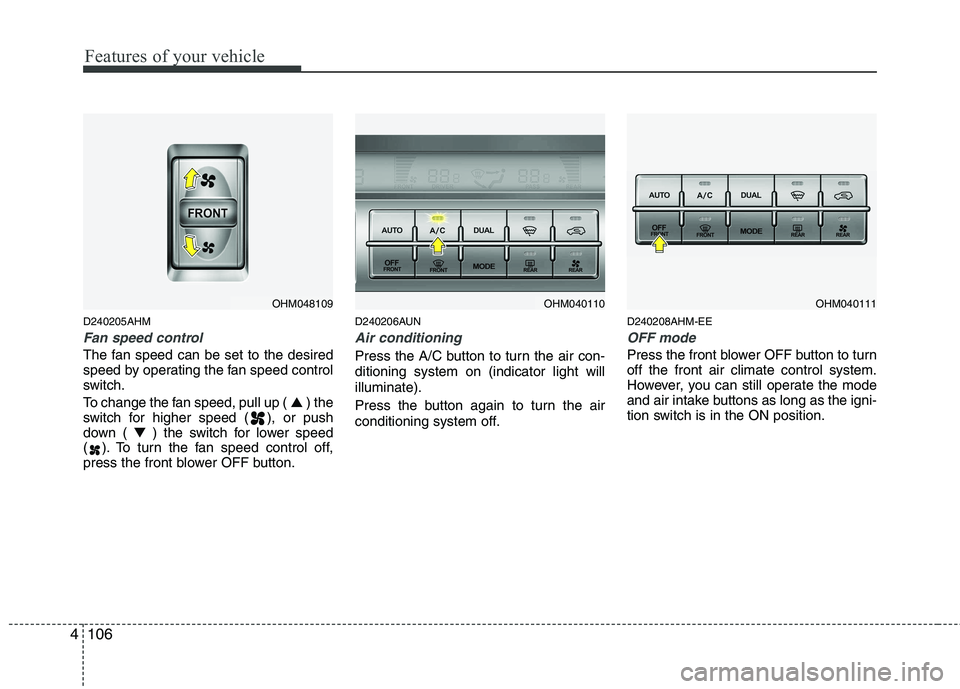
D240205AHM
Fan speed control
The fan speed can be set to the desired
speed by operating the fan speed control
switch.
To change the fan speed, pull up ( ▲) the
switch for higher speed ( ), or push
down ( ▼) the switch for lower speed
( ). To turn the fan speed control off,
press the front blower OFF button. D240206AUN
Air conditioning
Press the A/C button to turn the air con- ditioning system on (indicator light willilluminate).
Press the button again to turn the air
conditioning system off.
D240208AHM-EE
OFF mode
Press the front blower OFF button to turn off the front air climate control system.
However, you can still operate the mode
and air intake buttons as long as the igni-
tion switch is in the ON position.
OHM048109OHM040110OHM040111
Page 184 of 417
4107
Features of your vehicle
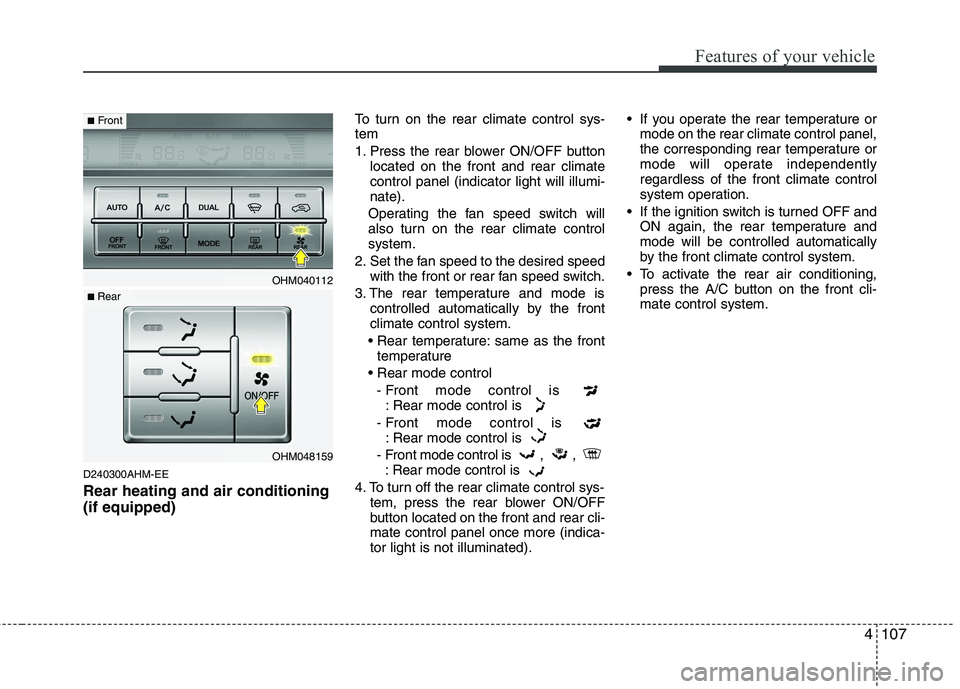
D240300AHM-EE Rear heating and air conditioning (if equipped)To turn on the rear climate control sys- tem
1. Press the rear blower ON/OFF button
located on the front and rear climate control panel (indicator light will illumi-nate).
Operating the fan speed switch will
also turn on the rear climate controlsystem.
2. Set the fan speed to the desired speed with the front or rear fan speed switch.
3. The rear temperature and mode is controlled automatically by the frontclimate control system.
same as the front temperature
- Front mode control is : Rear mode control is
- Front mode control is : Rear mode control is
- Front mode control is , , : Rear mode control is
4. To turn off the rear climate control sys- tem, press the rear blower ON/OFF
button located on the front and rear cli-mate control panel once more (indica-tor light is not illuminated). If you operate the rear temperature or
mode on the rear climate control panel,
the corresponding rear temperature or
mode will operate independentlyregardless of the front climate control
system operation.
If the ignition switch is turned OFF and ON again, the rear temperature andmode will be controlled automatically
by the front climate control system.
To activate the rear air conditioning, press the A/C button on the front cli-mate control system.
OHM040112
OHM048159
■Front
■ Rear
Page 186 of 417
4109
Features of your vehicle
Rear vents
The vent can be adjusted by rotating the
blade.
✽✽NOTICE
If all the vents are closed, it may cause
some noise. Always have more than 2
vents opened.
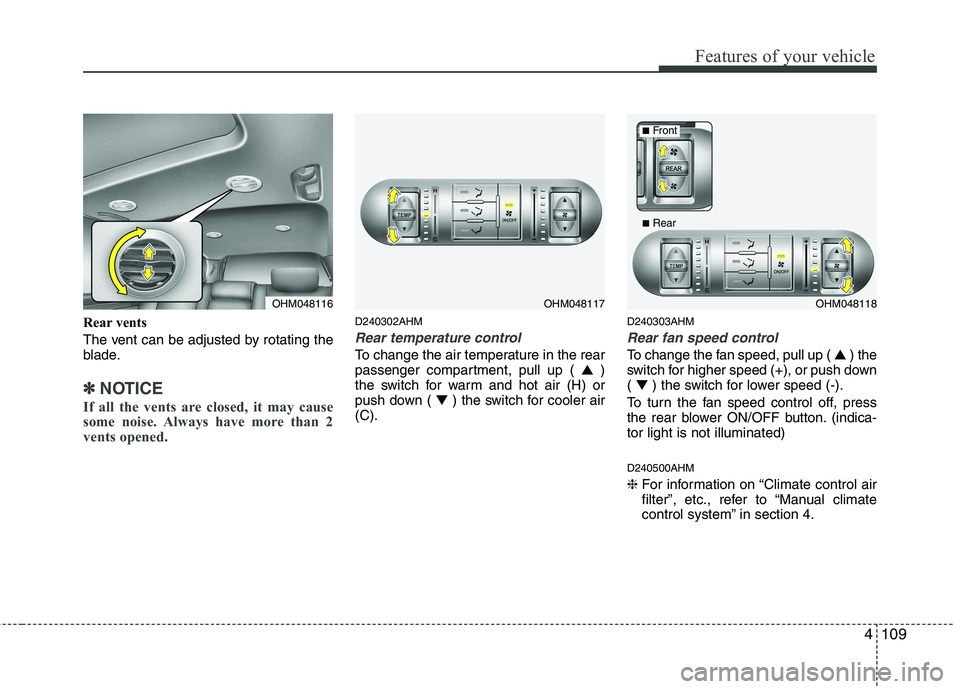
D240302AHM
Rear temperature control
To change the air temperature in the rear
passenger compartment, pull up ( ▲)
the switch for warm and hot air (H) or
push down ( ▼) the switch for cooler air
(C). D240303AHM
Rear fan speed control
To change the fan speed, pull up (
▲) the
switch for higher speed (+), or push down ( ▼ ) the switch for lower speed (-).
To turn the fan speed control off, press
the rear blower ON/OFF button. (indica-tor light is not illuminated) D240500AHM ❈ For information on “Climate control air
filter”, etc., refer to “Manual climate
control system” in section 4.
OHM048117OHM048116OHM048118
■Front
■Rear
Page 187 of 417
Features of your vehicle
110
4
D250000AHM
For maximum defrosting, set the tem-
perature control to the extreme
right/hot position and the fan speedcontrol to the highest speed.
If warm air to the floor is desired while defrosting or defogging, set the modeto the floor-defrost position.
Before driving, clear all snow and ice from the windshield, rear window, out-
side rear view mirrors, and all side win-
dows.
Clear all snow and ice from the hood and air inlet in the cowl grill to improveheater and defroster efficiency and to
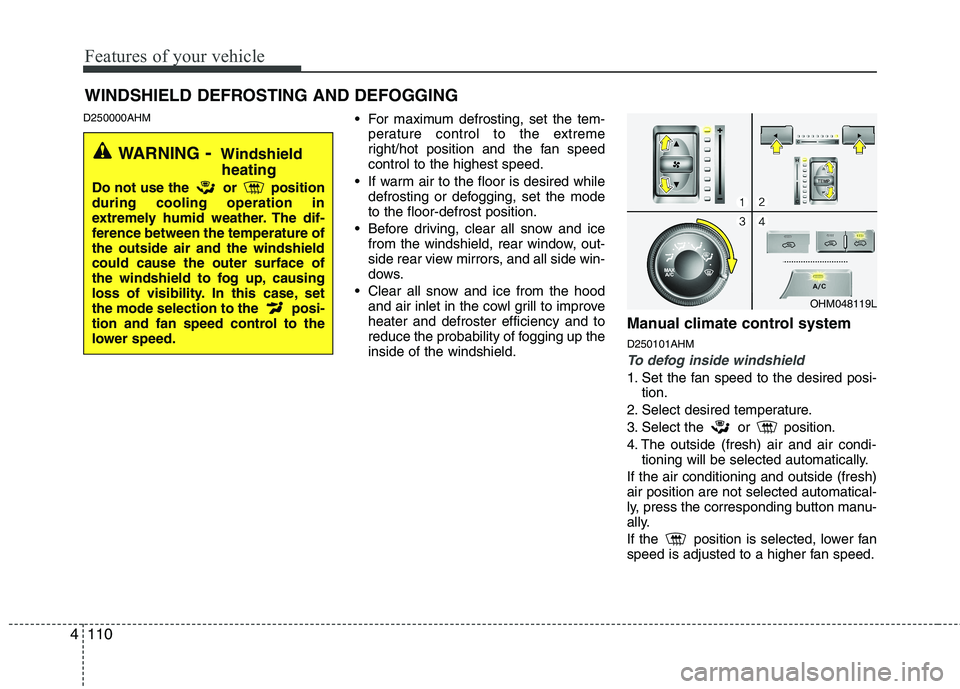
reduce the probability of fogging up theinside of the windshield. Manual climate control system D250101AHM
To defog inside windshield
1. Set the fan speed to the desired posi-
tion.
2. Select desired temperature.
3. Select the or position.
4. The outside (fresh) air and air condi- tioning will be selected automatically.
If the air conditioning and outside (fresh) air position are not selected automatical-
ly, press the corresponding button manu-
ally.
If the position is selected, lower fan
speed is adjusted to a higher fan speed.
WINDSHIELD DEFROSTING AND DEFOGGING
OHM048119L
WARNING - Windshield
heating
Do not use the or position during cooling operation in
extremely humid weather. The dif-
ference between the temperature ofthe outside air and the windshieldcould cause the outer surface of
the windshield to fog up, causing
loss of visibility. In this case, set
the mode selection to the posi-
tion and fan speed control to the
lower speed.
Page 188 of 417
4111
Features of your vehicle
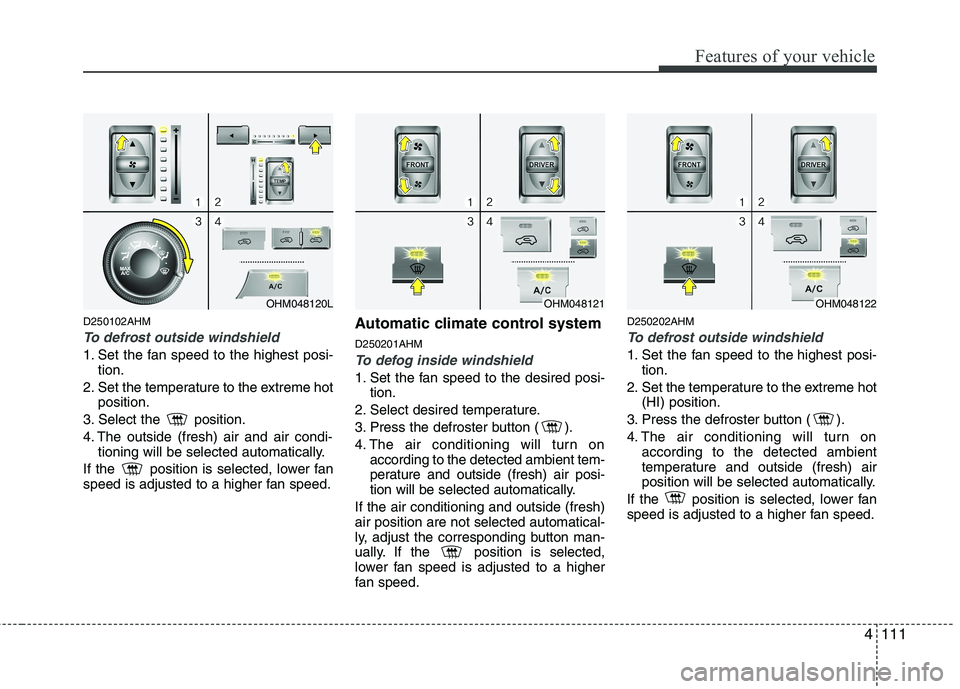
D250102AHM
To defrost outside windshield
1. Set the fan speed to the highest posi-tion.
2. Set the temperature to the extreme hot position.
3. Select the position.
4. The outside (fresh) air and air condi- tioning will be selected automatically.
If the position is selected, lower fan
speed is adjusted to a higher fan speed. Automatic climate control system D250201AHMTo defog inside windshield
1. Set the fan speed to the desired posi-
tion.
2. Select desired temperature.
3. Press the defroster button ( ).
4. The air conditioning will turn on according to the detected ambient tem-
perature and outside (fresh) air posi-
tion will be selected automatically.
If the air conditioning and outside (fresh)air position are not selected automatical-
ly, adjust the corresponding button man-
ually. If the position is selected,
lower fan speed is adjusted to a higher
fan speed. D250202AHM
To defrost outside windshield
1. Set the fan speed to the highest posi-
tion.
2. Set the temperature to the extreme hot (HI) position.
3. Press the defroster button ( ).
4. The air conditioning will turn on according to the detected ambient
temperature and outside (fresh) air
position will be selected automatically.
If the position is selected, lower fan
speed is adjusted to a higher fan speed.
OHM048121OHM048122OHM048120L
Page 189 of 417
Features of your vehicle
112
4
D250300AHM
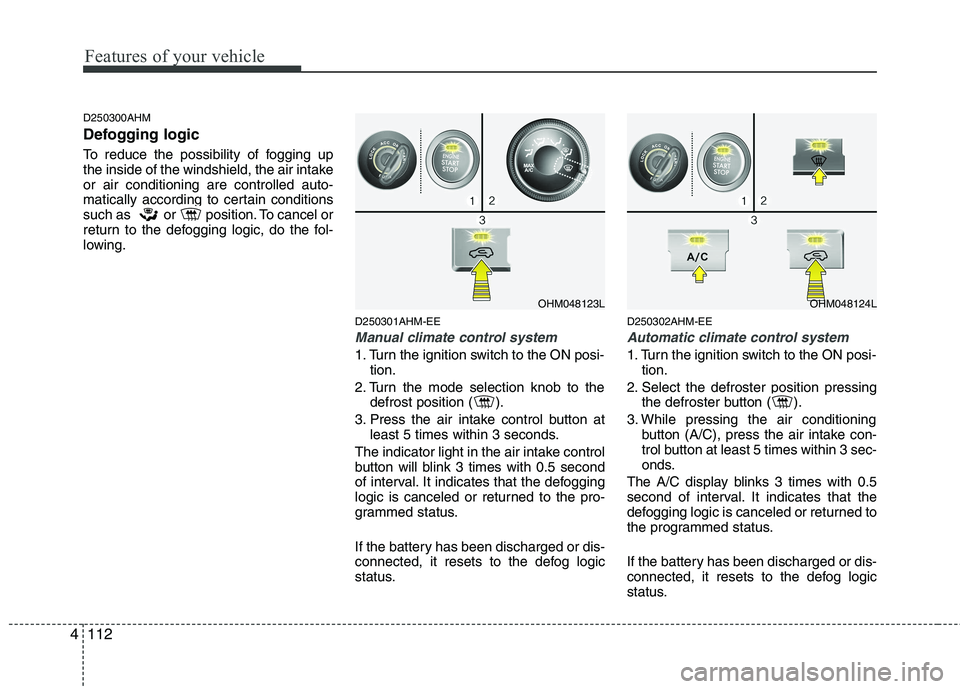
Defogging logic
To reduce the possibility of fogging up
the inside of the windshield, the air intakeor air conditioning are controlled auto-
matically according to certain conditions
such as or position. To cancel or
return to the defogging logic, do the fol-
lowing.
D250301AHM-EE
Manual climate control system
1. Turn the ignition switch to the ON posi-tion.
2. Turn the mode selection knob to the defrost position ( ).
3. Press the air intake control button at least 5 times within 3 seconds.
The indicator light in the air intake control
button will blink 3 times with 0.5 second
of interval. It indicates that the defogging
logic is canceled or returned to the pro-
grammed status.
If the battery has been discharged or dis-
connected, it resets to the defog logic
status. D250302AHM-EE
Automatic climate control system
1. Turn the ignition switch to the ON posi-
tion.
2. Select the defroster position pressing the defroster button ( ).
3. While pressing the air conditioning button (A/C), press the air intake con-
trol button at least 5 times within 3 sec-
onds.
The A/C display blinks 3 times with 0.5
second of interval. It indicates that the
defogging logic is canceled or returned to
the programmed status.
If the battery has been discharged or dis-
connected, it resets to the defog logic
status.
OHM048123LOHM048124L
Page 197 of 417

Features of your vehicle
120
4
Minute (2)
Press the M button to advance the time
displayed by one minute.
Hold the M button to advance the hour
reading more rapildy.
Reset (3)
To clear away minutes, press the R but-
ton. Then the clock will be set precisely
on the hour.
For example, if the R button is pressed
while the time is between 9:01 and 9:29,
the display will reset to 9:00.
9:01 ~ 9:29 display changed to 9:00
9:30 ~ 9:59 display changed to 10:00 D280604AHM
Display conversion
To change the 12 hour format to the 24
hour format, press the R button until the
display blinks.
For example, if the R button is pressed
while the time is 10:15 p.m., the displaywill change to 22:15. D281200AHM-EE Outside thermometer
The current outside temperature is dis-
played in 1°C (1°F) increments. The tem-
perature range is between -40°C ~ 60°C(-40°F~140°F). The outside temperature on the display
may not change immediately like a
general thermometer to prevent the
driver from being inattentive.
For details, refer to the "Climate control system" in section 4.
Temperature
Seconds
1. Turn the ignition switch to the ON posi- tion.
2. Press the H button at least 3 times within 3 seconds while pressing the R
button.
3. The temperature mode will change to the time mode. The time displays in
seconds.
4. If the M button is pressed, the clock’s minute will change and the counting
will start again from the beginning(00).
5. To return to the temperature mode, press the H button at least 3 timeswithin 3 seconds while pressing the R
button.
If the ignition switch turns OFF and ON
again, the temperature mode will be dis-
played.
OHM048138
OHM048139
■ Type A
■ Type B
Page 328 of 417
7
Engine compartment / 7-2
Maintenance services / 7-4
Owner maintenance / 7-6
Scheduled maintenance service / 7-8
Explanation of scheduled maintenance items / 7-15
Engine oil / 7-18
Engine coolant / 7-19
Brake fluid / 7-22
Power steering fluid / 7-23
Washer fluid / 7-24
Parking brake / 7-24
Fuel filter / 7-25
Air cleaner / 7-26
Climate control air filter / 7-27
Wiper blades / 7-29
Battery / 7-32
Tires and wheels / 7-35
Fuses / 7-45
Light bulbs / 7-55
Appearance care / 7-62
Emission control system / 7-68
Maintenance