2014 KIA MOHAVE air conditioning
[x] Cancel search: air conditioningPage 183 of 417
Features of your vehicle
106
4
D240205AHM
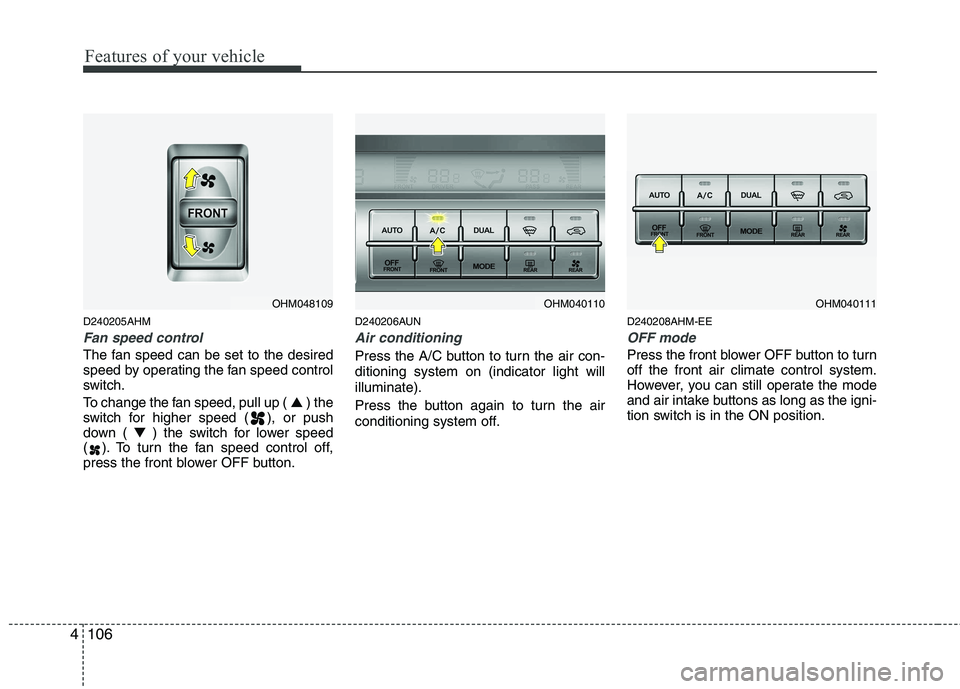
Fan speed control
The fan speed can be set to the desired
speed by operating the fan speed control
switch.
To change the fan speed, pull up ( ▲) the
switch for higher speed ( ), or push
down ( ▼) the switch for lower speed
( ). To turn the fan speed control off,
press the front blower OFF button. D240206AUN
Air conditioning
Press the A/C button to turn the air con- ditioning system on (indicator light willilluminate).
Press the button again to turn the air
conditioning system off.
D240208AHM-EE
OFF mode
Press the front blower OFF button to turn off the front air climate control system.
However, you can still operate the mode
and air intake buttons as long as the igni-
tion switch is in the ON position.
OHM048109OHM040110OHM040111
Page 184 of 417
4107
Features of your vehicle
D240300AHM-EE Rear heating and air conditioning (if equipped)To turn on the rear climate control sys- tem
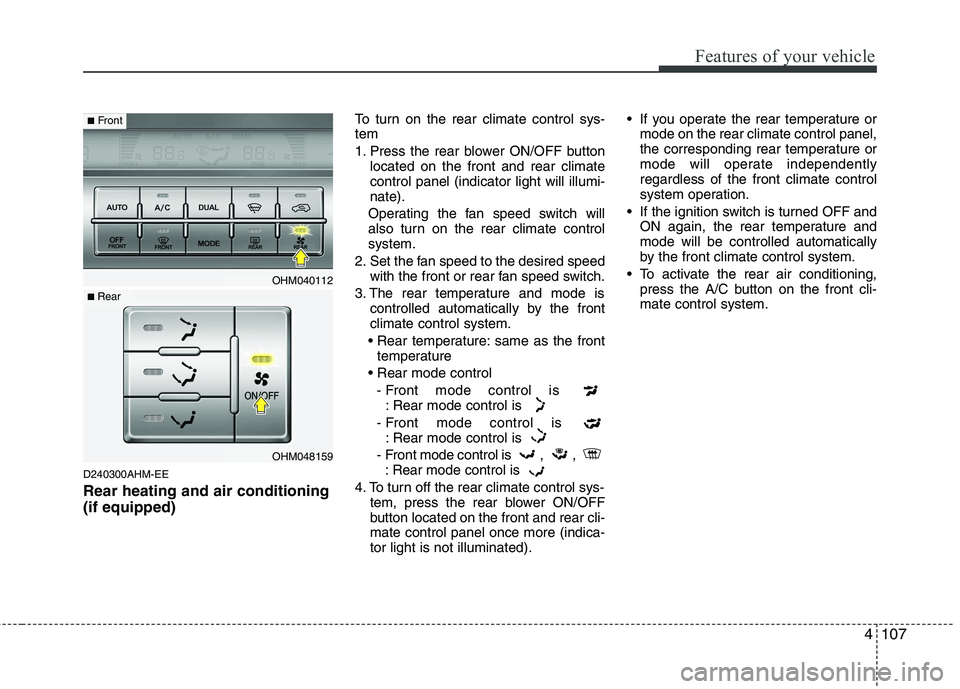
1. Press the rear blower ON/OFF button
located on the front and rear climate control panel (indicator light will illumi-nate).
Operating the fan speed switch will
also turn on the rear climate controlsystem.
2. Set the fan speed to the desired speed with the front or rear fan speed switch.
3. The rear temperature and mode is controlled automatically by the frontclimate control system.
same as the front temperature
- Front mode control is : Rear mode control is
- Front mode control is : Rear mode control is
- Front mode control is , , : Rear mode control is
4. To turn off the rear climate control sys- tem, press the rear blower ON/OFF
button located on the front and rear cli-mate control panel once more (indica-tor light is not illuminated). If you operate the rear temperature or
mode on the rear climate control panel,
the corresponding rear temperature or
mode will operate independentlyregardless of the front climate control
system operation.
If the ignition switch is turned OFF and ON again, the rear temperature andmode will be controlled automatically
by the front climate control system.
To activate the rear air conditioning, press the A/C button on the front cli-mate control system.
OHM040112
OHM048159
■Front
■ Rear
Page 187 of 417
Features of your vehicle
110
4
D250000AHM
For maximum defrosting, set the tem-
perature control to the extreme
right/hot position and the fan speedcontrol to the highest speed.
If warm air to the floor is desired while defrosting or defogging, set the modeto the floor-defrost position.
Before driving, clear all snow and ice from the windshield, rear window, out-
side rear view mirrors, and all side win-
dows.
Clear all snow and ice from the hood and air inlet in the cowl grill to improveheater and defroster efficiency and to
reduce the probability of fogging up theinside of the windshield. Manual climate control system D250101AHM
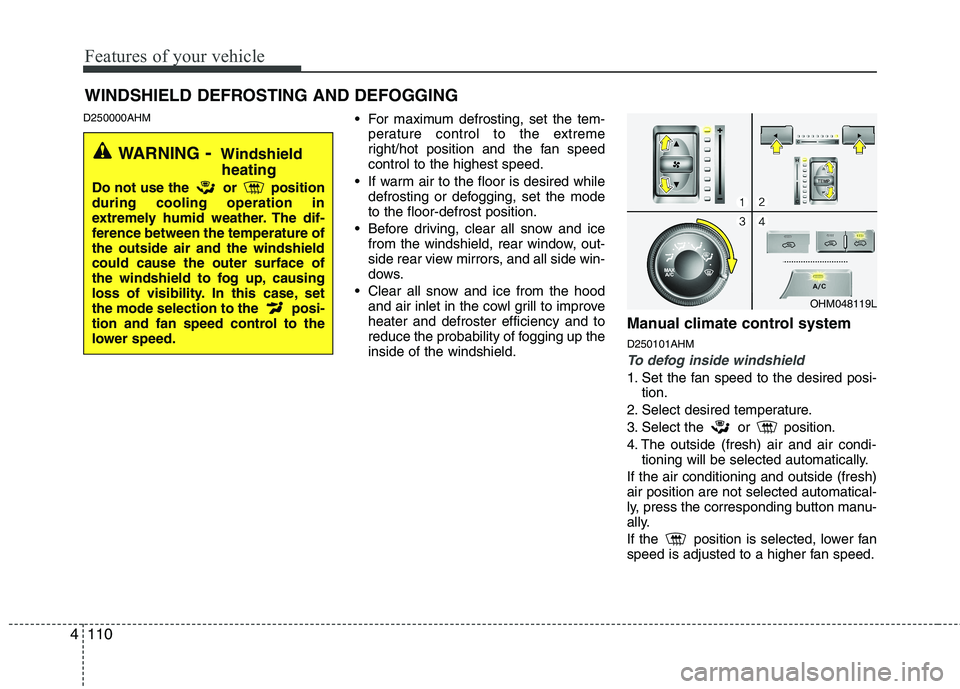
To defog inside windshield
1. Set the fan speed to the desired posi-
tion.
2. Select desired temperature.
3. Select the or position.
4. The outside (fresh) air and air condi- tioning will be selected automatically.
If the air conditioning and outside (fresh) air position are not selected automatical-
ly, press the corresponding button manu-
ally.
If the position is selected, lower fan
speed is adjusted to a higher fan speed.
WINDSHIELD DEFROSTING AND DEFOGGING
OHM048119L
WARNING - Windshield
heating
Do not use the or position during cooling operation in
extremely humid weather. The dif-
ference between the temperature ofthe outside air and the windshieldcould cause the outer surface of
the windshield to fog up, causing
loss of visibility. In this case, set
the mode selection to the posi-
tion and fan speed control to the
lower speed.
Page 188 of 417
4111
Features of your vehicle
D250102AHM
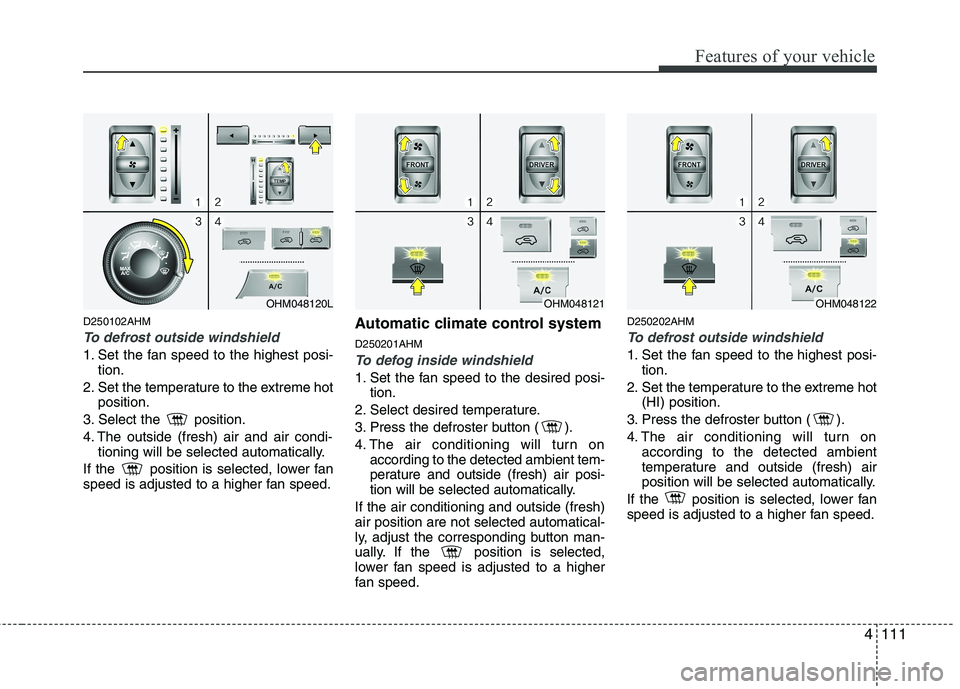
To defrost outside windshield
1. Set the fan speed to the highest posi-tion.
2. Set the temperature to the extreme hot position.
3. Select the position.
4. The outside (fresh) air and air condi- tioning will be selected automatically.
If the position is selected, lower fan
speed is adjusted to a higher fan speed. Automatic climate control system D250201AHMTo defog inside windshield
1. Set the fan speed to the desired posi-
tion.
2. Select desired temperature.
3. Press the defroster button ( ).
4. The air conditioning will turn on according to the detected ambient tem-
perature and outside (fresh) air posi-
tion will be selected automatically.
If the air conditioning and outside (fresh)air position are not selected automatical-
ly, adjust the corresponding button man-
ually. If the position is selected,
lower fan speed is adjusted to a higher
fan speed. D250202AHM
To defrost outside windshield
1. Set the fan speed to the highest posi-
tion.
2. Set the temperature to the extreme hot (HI) position.
3. Press the defroster button ( ).
4. The air conditioning will turn on according to the detected ambient
temperature and outside (fresh) air
position will be selected automatically.
If the position is selected, lower fan
speed is adjusted to a higher fan speed.
OHM048121OHM048122OHM048120L
Page 189 of 417
Features of your vehicle
112
4
D250300AHM
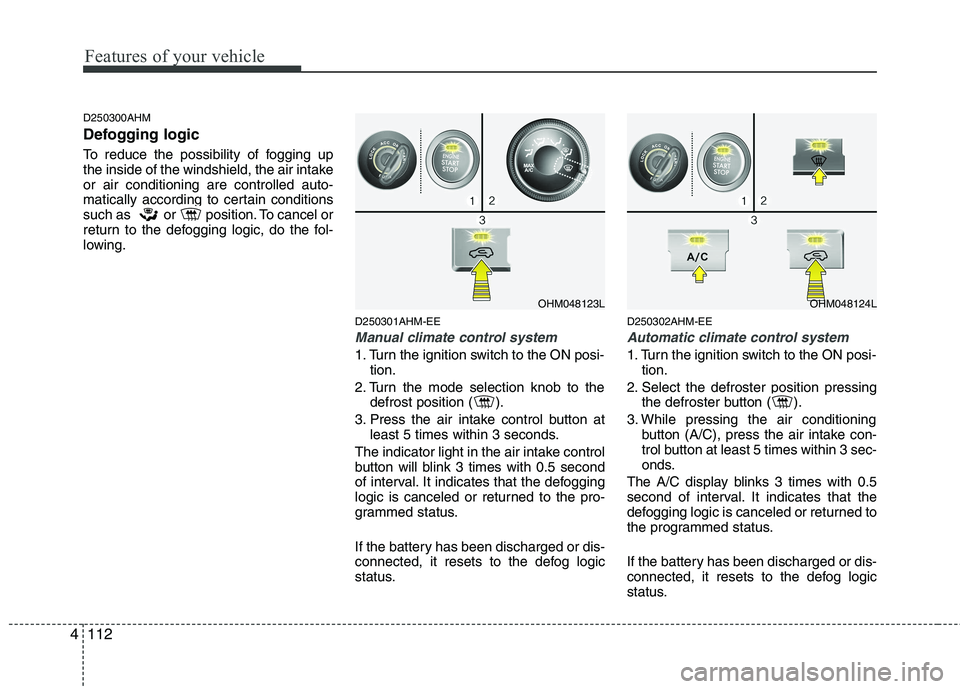
Defogging logic
To reduce the possibility of fogging up
the inside of the windshield, the air intakeor air conditioning are controlled auto-
matically according to certain conditions
such as or position. To cancel or
return to the defogging logic, do the fol-
lowing.
D250301AHM-EE
Manual climate control system
1. Turn the ignition switch to the ON posi-tion.
2. Turn the mode selection knob to the defrost position ( ).
3. Press the air intake control button at least 5 times within 3 seconds.
The indicator light in the air intake control
button will blink 3 times with 0.5 second
of interval. It indicates that the defogging
logic is canceled or returned to the pro-
grammed status.
If the battery has been discharged or dis-
connected, it resets to the defog logic
status. D250302AHM-EE
Automatic climate control system
1. Turn the ignition switch to the ON posi-
tion.
2. Select the defroster position pressing the defroster button ( ).
3. While pressing the air conditioning button (A/C), press the air intake con-
trol button at least 5 times within 3 sec-
onds.
The A/C display blinks 3 times with 0.5
second of interval. It indicates that the
defogging logic is canceled or returned to
the programmed status.
If the battery has been discharged or dis-
connected, it resets to the defog logic
status.
OHM048123LOHM048124L
Page 191 of 417
Features of your vehicle
114
4
For improving the effectiveness of the
cool box, do as follows;
1. Set the temperature to the hot
(extreme right) position for warm air or
to the cold (extreme left) position for
cool air.
Turn on the air conditioning system forcooler air.
2. Set the fan speed to the highest (extreme right) position.
3. Set the mode to the face ( ) posi- tion.
✽✽ NOTICE
If some items in the cool box block the
vent, the warming or cooling effective-
ness of the cool box is reduceD270200BEN
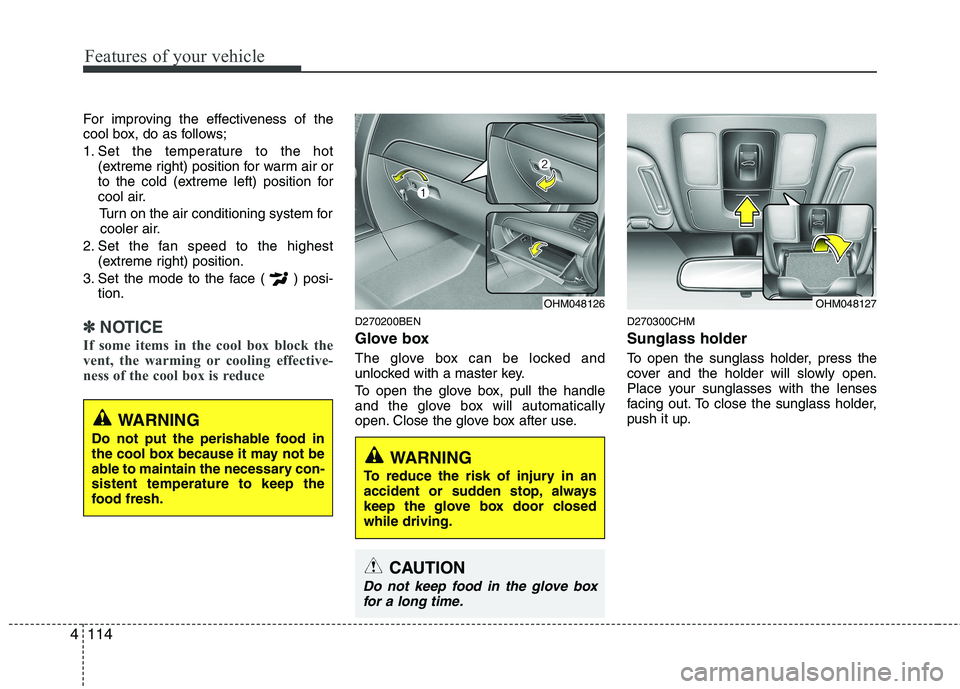
Glove box
The glove box can be locked and
unlocked with a master key.
To open the glove box, pull the handle
and the glove box will automatically
open. Close the glove box after use. D270300CHM Sunglass holder
To open the sunglass holder, press the
cover and the holder will slowly open.
Place your sunglasses with the lenses
facing out. To close the sunglass holder,
push it up.
OHM048127OHM048126
WARNING
To reduce the risk of injury in an
accident or sudden stop, always
keep the glove box door closedwhile driving.
WARNING
Do not put the perishable food in
the cool box because it may not be
able to maintain the necessary con-sistent temperature to keep the
food fresh.
CAUTION
Do not keep food in the glove box for a long time.
Page 240 of 417
![KIA MOHAVE 2014 Owners Manual 4163
Features of your vehicle
The paired phone can be deleted.
1. Press [ENTER(TUNE knob)] button toenter SETUP mode.
2. Select “PHONE”, then “DELETE” in PHONE menu.
3. Select desired phone](/manual-img/2/57960/w960_57960-239.png "KIA MOHAVE 2014 Owners Manual 4163
Features of your vehicle
The paired phone can be deleted.
1. Press [ENTER(TUNE knob)] button toenter SETUP mode.
2. Select “PHONE”, then “DELETE” in PHONE menu.
3. Select desired phone")
4163
Features of your vehicle
The paired phone can be deleted.
1. Press [ENTER(TUNE knob)] button toenter SETUP mode.
2. Select “PHONE”, then “DELETE” in PHONE menu.
3. Select desired phone name from the list shown.
■ Receiving a Phone Call
When receiving a phone call, a ringt one
is audible from speakers and the audio
system changes into telephone mode.
When receiving a phone call, “Incoming”
message and incoming phone number
(if available) are displayed on the audio.
- Press bu t t o n on the steering wheel.
- Press button on the steering wheel.
- Use VOLUME buttons on the steering wheel.
Call):
- Press and hold button on the steer- ing wheel until the audio system trans-
fers a call to the phone. ■
Talking on the Phone
When talking on the phone, “Active Calls”
message and the other party’s phone
number (if available) are displayed on the
audio.
- Press [MUTE] button on the audio.
- Press button on the steering wheel.
■ Making a Phone Call
A Call Back can be made by pressing button on the steering wheel.
- This is the same function as using the
button solely on the cellular phone.
✽✽NOTICE
Some phone models require pressing button twice to make a call.
✽
✽ NOTICE
In the following situations, you or the
other party may have difficulty hearing each other:
1. Speaking at the same time, your voice may not reach the other party. (This isnot a malfunction.) Speak alternately
with the other party on the phone.
2. Keep the Bluetooth ®
volume to a low
level. High-level volume may result indistortion and echo. 3. When driving on a rough road.
4. When driving at high speeds.
5. When the window is open.
6. When the air conditioning vents are
facing the microphone.
7. When the sound of the air condition-
ing fan is loud.
■Using the head unit as Bluetooth ®
wireless technology
music
This audio system supports A2DP (Audio
Advanced Distribution Profile) and
AVRCP(Audio Video Remote ControlProfile).
Both profiles are available for listening to
the MP3 music via Bluetooth cellular phone
supporting above Bluetooth profiles.
To play MP3 music from the Bluetooth
cellular phone, press the [AUX] button
until “MP3 Play” is displayed on the LCD.
Then try playing music by phone.
When playing music from the Bluetooth
cellular phone, the head unit displays MP3 MODE.
Page 290 of 417

549
Driving your vehicle
Remember, your vehicle does notrequire extended warm-up. After the
engine has started, allow the engine to
run for 10 to 20 seconds prior to plac-
ing the vehicle in gear. In very cold
weather, however, give your engine a
slightly longer warm-up period.
Don't "lug" or "over-rev" the engine. Lugging is driving too slowly in a very
high gear resulting in engine bucking. If
this happens, shift to a lower gear.
Over-revving is racing the engine
beyond its safe limit. This can be avoid-
ed by shifting at the recommendedspeed. Use your air conditioning sparingly.
The air conditioning system is operat-
ed by engine power so your fuel econ-
omy is reduced when you use it.
Open windows at high speeds can reduce fuel economy.
Fuel economy is less in crosswinds and headwinds. To help offset some of
this loss, slow down when driving in
these conditions.
Keeping a vehicle in good operating con-
dition is important both for economy and
safety. Therefore, have an authorized Kia
dealer perform scheduled inspections
and maintenance.
WARNING - Engine off
during motion
Never turn the engine off to coast
down hills or anytime the vehicle is
in motion. The power steering and
power brakes will not function
properly without the engine run-
ning. Instead, keep the engine on
and downshift to an appropriate
gear for engine braking effect. In
addition, turning off the ignition
while driving could engage the
steering wheel lock resulting in
loss of vehicle steering which
could cause serious injury ordeath.