Page 189 of 417
Features of your vehicle
112
4
D250300AHM
Defogging logic
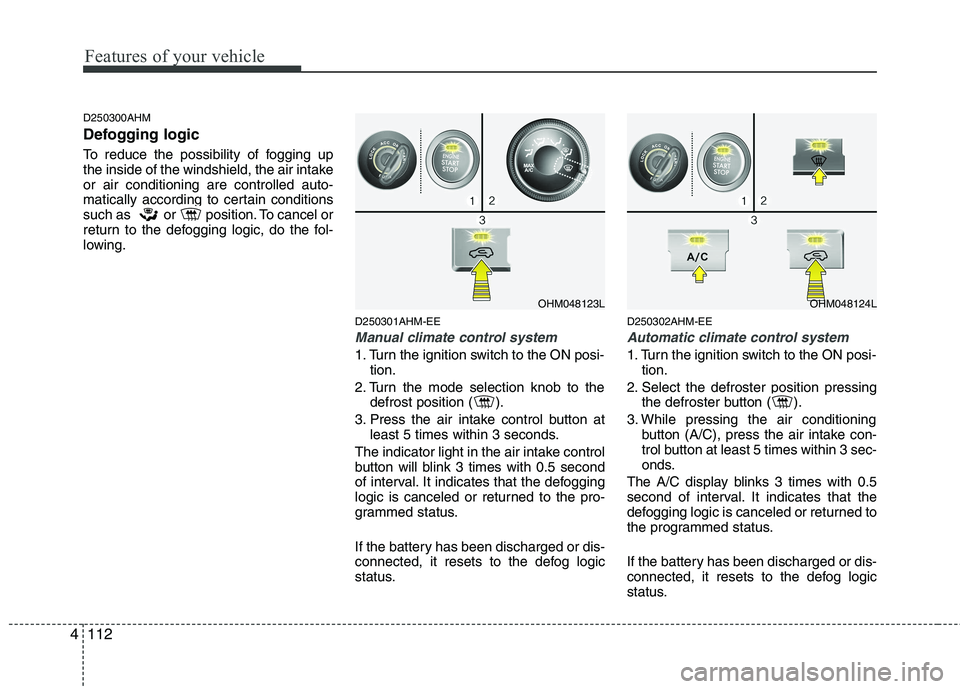
To reduce the possibility of fogging up
the inside of the windshield, the air intakeor air conditioning are controlled auto-
matically according to certain conditions
such as or position. To cancel or
return to the defogging logic, do the fol-
lowing.
D250301AHM-EE
Manual climate control system
1. Turn the ignition switch to the ON posi-tion.
2. Turn the mode selection knob to the defrost position ( ).
3. Press the air intake control button at least 5 times within 3 seconds.
The indicator light in the air intake control
button will blink 3 times with 0.5 second
of interval. It indicates that the defogging
logic is canceled or returned to the pro-
grammed status.
If the battery has been discharged or dis-
connected, it resets to the defog logic
status. D250302AHM-EE
Automatic climate control system
1. Turn the ignition switch to the ON posi-
tion.
2. Select the defroster position pressing the defroster button ( ).
3. While pressing the air conditioning button (A/C), press the air intake con-
trol button at least 5 times within 3 sec-
onds.
The A/C display blinks 3 times with 0.5
second of interval. It indicates that the
defogging logic is canceled or returned to
the programmed status.
If the battery has been discharged or dis-
connected, it resets to the defog logic
status.
OHM048123LOHM048124L
Page 196 of 417

4119
Features of your vehicle
The power outlet is designed to provide
power for mobile telephones or other
devices designed to operate with vehicle
electrical systems. The devices should
draw less than 10 amps with the engine
running.D280600AEN
Digital clock
Whenever the battery terminals or relat-
ed fuses are disconnected, you must
reset the time.
When the ignition switch is in the ACC or
ON position, the clock buttons operate as
follows:D280601BHM
Hour (1)
Press the H button to advance the time
displayed by one hour.
Hold the H button to advance the hour
reading more rapildy.
WARNING
Do not adjust the clock while driv-
ing. You may lose your steering
control and cause an accident that
results in severe personal injury ordeath.
CAUTION
Use the power outlet only when the engine is running and removethe accessory plug after use.Using the accessory plug for pro-
longed periods of time with the engine off could cause the bat-tery to discharge.
Only use 12V electric accessories which are less than 10A in elec-
tric capacity.
Adjust the air-conditioner or heater to the lowest operatinglevel when using the power outlet.
Close the cover when not in use. Some electronic devices can cause electronic interferencewhen plugged into a vehicle’spower outlet. These devices may cause excessive audio static and
malfunctions in other electronicsystems or devices used in yourvehicle.
WARNING
Do not put a finger or a foreign ele-
ment (pin, etc.) into a power outlet
and do not touch with a wet hand.
You may get an electric shock.
OHM048137
OHM048136
■ Type A
■ Type B
Page 197 of 417

Features of your vehicle
120
4
Minute (2)
Press the M button to advance the time
displayed by one minute.
Hold the M button to advance the hour
reading more rapildy.
Reset (3)
To clear away minutes, press the R but-
ton. Then the clock will be set precisely
on the hour.
For example, if the R button is pressed
while the time is between 9:01 and 9:29,
the display will reset to 9:00.
9:01 ~ 9:29 display changed to 9:00
9:30 ~ 9:59 display changed to 10:00 D280604AHM
Display conversion
To change the 12 hour format to the 24
hour format, press the R button until the
display blinks.
For example, if the R button is pressed
while the time is 10:15 p.m., the displaywill change to 22:15. D281200AHM-EE Outside thermometer
The current outside temperature is dis-
played in 1°C (1°F) increments. The tem-
perature range is between -40°C ~ 60°C(-40°F~140°F). The outside temperature on the display
may not change immediately like a
general thermometer to prevent the
driver from being inattentive.
For details, refer to the "Climate control system" in section 4.
Temperature
Seconds
1. Turn the ignition switch to the ON posi- tion.
2. Press the H button at least 3 times within 3 seconds while pressing the R
button.
3. The temperature mode will change to the time mode. The time displays in
seconds.
4. If the M button is pressed, the clock’s minute will change and the counting
will start again from the beginning(00).
5. To return to the temperature mode, press the H button at least 3 timeswithin 3 seconds while pressing the R
button.
If the ignition switch turns OFF and ON
again, the temperature mode will be dis-
played.
OHM048138
OHM048139
■ Type A
■ Type B
Page 204 of 417
4127
Features of your vehicle
D300200AEN
Steering wheel audio control (if equipped)
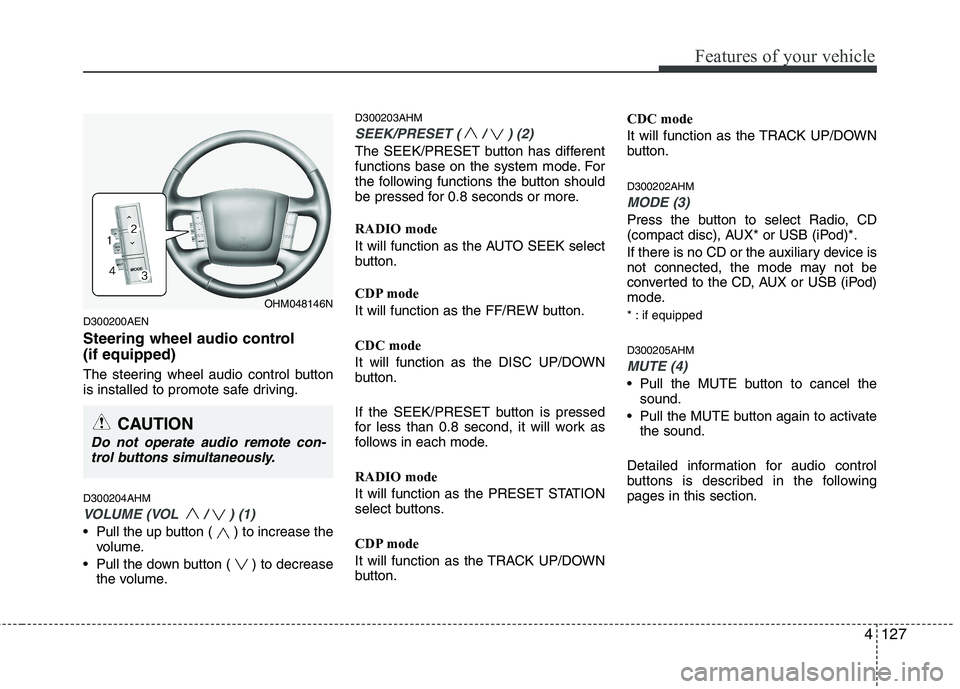
The steering wheel audio control button
is installed to promote safe driving. D300204AHM
VOLUME (VOL / ) (1)
• Pull the up button ( ) to increase thevolume.
Pull the down button ( ) to decrease the volume. D300203AHM
SEEK/PRESET ( / ) (2)
The SEEK/PRESET button has different
functions base on the system mode. For
the following functions the button should
be pressed for 0.8 seconds or more. RADIO mode
It will function as the AUTO SEEK select
button.
CDP mode
It will function as the FF/REW button. CDC mode
It will function as the DISC UP/DOWN
button.
If the SEEK/PRESET button is pressed
for less than 0.8 second, it will work as
follows in each mode. RADIO mode
It will function as the PRESET STATION
select buttons.
CDP mode
It will function as the TRACK UP/DOWN
button.
CDC mode
It will function as the TRACK UP/DOWN
button. D300202AHM
MODE (3)
Press the button to select Radio, CD
(compact disc), AUX* or USB (iPod)*.
If there is no CD or the auxiliary device is
not connected, the mode may not be
converted to the CD, AUX or USB (iPod)
mode.
* : if equipped D300205AHM
MUTE (4)
Pull the MUTE button to cancel the
sound.
Pull the MUTE button again to activate the sound.
Detailed information for audio control
buttons is described in the followingpages in this section.
OHM048146N
CAUTION
Do not operate audio remote con- trol buttons simultaneously.
Page 208 of 417
4131
Features of your vehicle
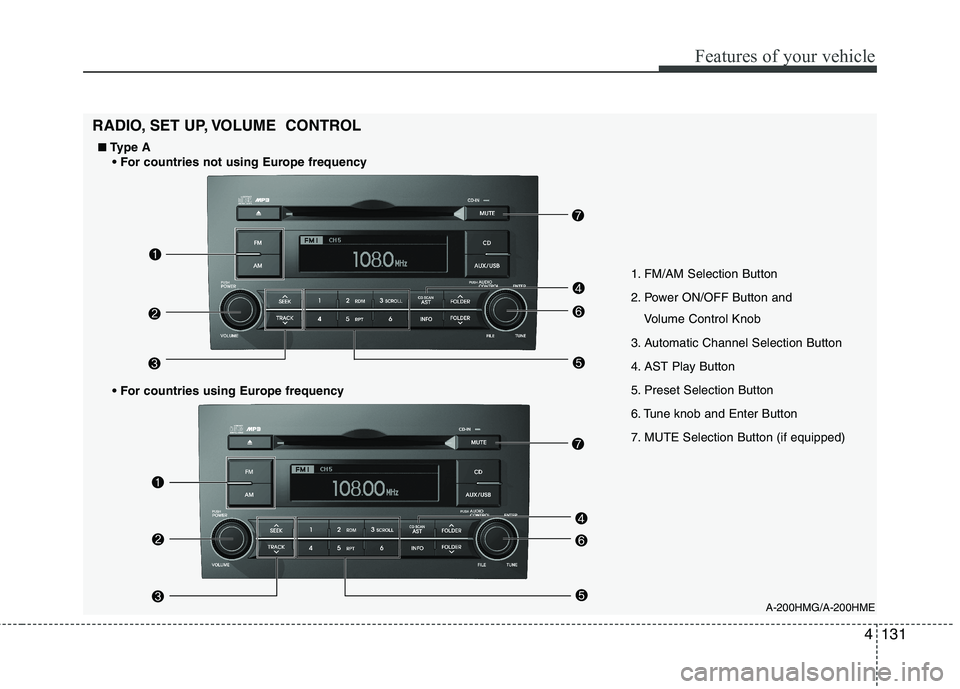
A-200HMG/A-200HME
1. FM/AM Selection Button
2. Power ON/OFF Button and
Volume Control Knob
3. Automatic Channel Selection Button
4. AST Play Button
5. Preset Selection Button
6. Tune knob and Enter Button
7. MUTE Selection Button (if equipped)
RADIO, SET UP, VOLUME CONTROL
■
■ Type A
Page 209 of 417
Features of your vehicle
132
4
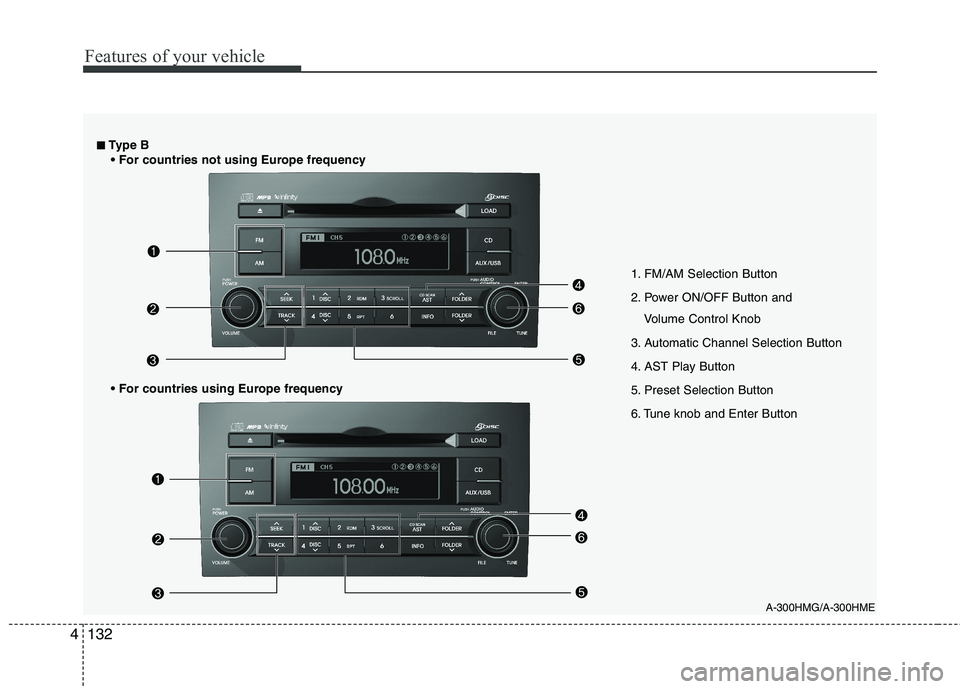
A-300HMG/A-300HME
1. FM/AM Selection Button
2. Power ON/OFF Button and
Volume Control Knob
3. Automatic Channel Selection Button
4. AST Play Button
5. Preset Selection Button
6. Tune knob and Enter Button
■■ Type B
Page 223 of 417
Features of your vehicle
146
4
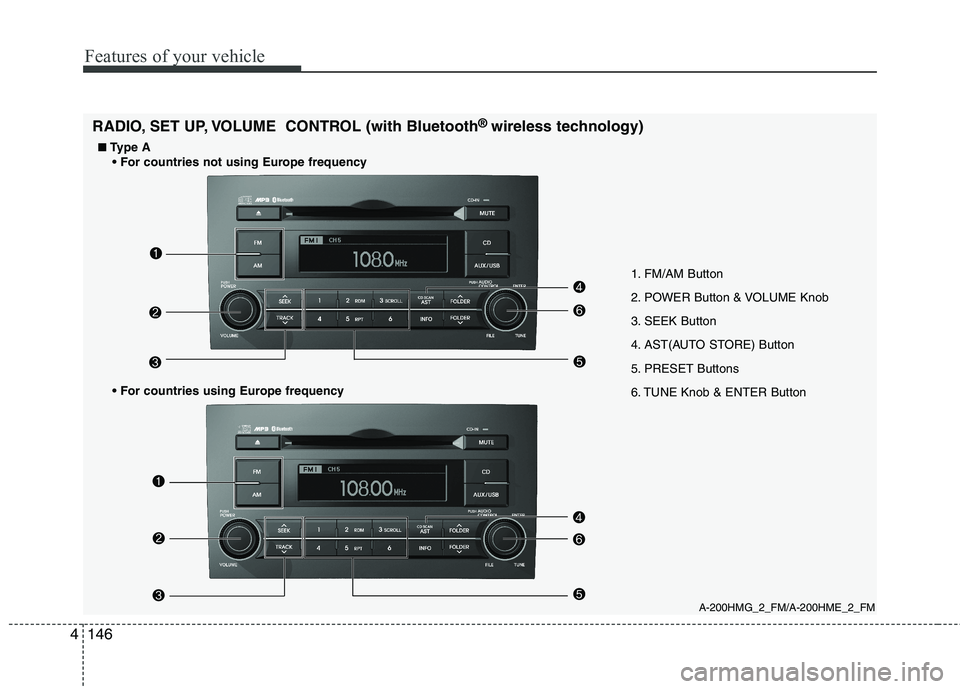
1. FM/AM Button
2. POWER Button & VOLUME Knob
3. SEEK Button
4. AST(AUTO STORE) Button
5. PRESET Buttons
6. TUNE Knob & ENTER Button
A-200HMG_2_FM/A-200HME_2_FM
RADIO, SET UP, VOLUME CONTROL (with Bluetooth
®
wireless technology)
■
■ Type A
Page 224 of 417
4147
Features of your vehicle
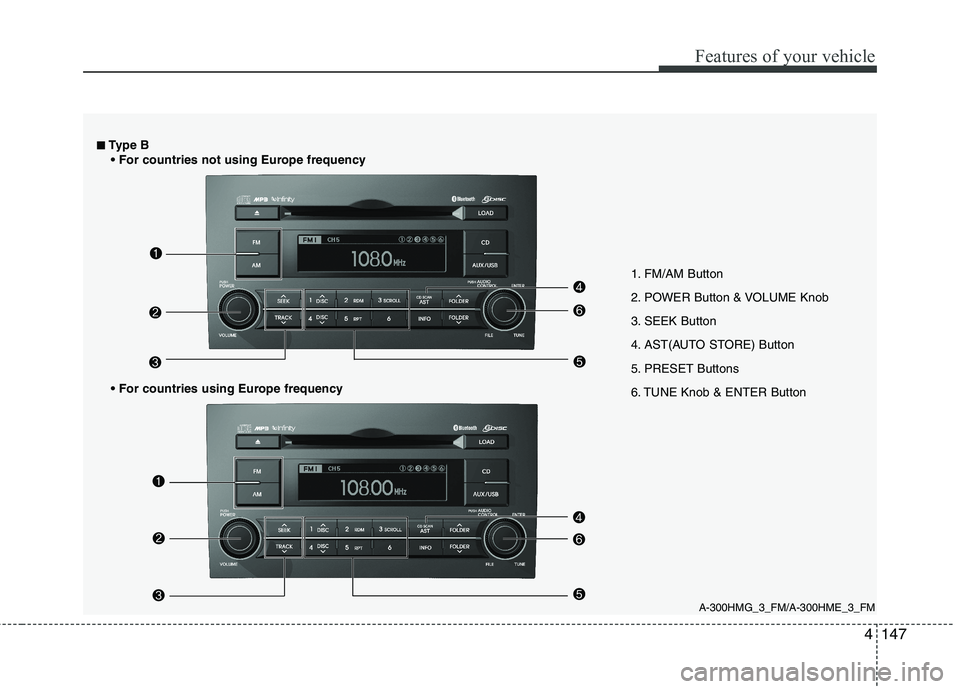
1. FM/AM Button
2. POWER Button & VOLUME Knob
3. SEEK Button
4. AST(AUTO STORE) Button
5. PRESET Buttons
6. TUNE Knob & ENTER Button
A-300HMG_3_FM/A-300HME_3_FM
■
■
Type B