2014 KIA MOHAVE USB
[x] Cancel search: USBPage 231 of 417

Features of your vehicle
154
4
CAUTION IN USING
USB DEVICE
To use an external USB device, make sure the device is not con-nected when starting up the vehi-cle. Connect the device afterstarting up.
If you start the engine when the USB device is connected, it maydamage the USB device. (USBflashdrives are very sensitive to
electric shock.)
If the engine is started up or turned off while the external USBdevice is connected, the externalUSB device may not work.
It may not play inauthentic MP3 or WMA files.
1) It can only play MP3 files with the compression rate between8Kbps~320Kbps.
2) It can only play WMA music files with the compression ratebetween 8Kbps~320Kbps.
Take precautions for static electrici- ty when connecting or disconnect-ing the external USB device.
(Continued)
(Continued) An encrypted MP3 PLAYER is not recognizable.
Depending on the condition of the external USB device, the con-
nected external USB device can be unrecognizable.
When the formatted byte/sector setting of External USB device isnot either 512BYTE or 2048BYTE,
then the device will not be recog- nized.
Use only a USB device formatted to FAT 12/16/32.
USB devices without USB I/F authentication may not be recog-nizable.
Make sure the USB connection terminal does not come in contactwith the human body or other
objects.
If you repeatedly connect or dis- connect the USB device in a shortperiod of time, it may break thedevice.
You may hear a strange noise when connecting or disconnect-ing a USB device.
(Continued)(Continued) If you disconnect the external USB device during playback in USBmode, the external USB device canbe damaged or may malfunction.
Therefore, disconnect the externalUSB device when the audio is turned off or in another mode. (e.g,
Radio or CD)
Depending on the type and capac- ity of the external USB device orthe type of the files stored in thedevice, there is a difference in the
time taken for recognition of thedevice.
Do not use the USB device for pur- poses other than playing musicfiles.
Use of USB accessories such as rechargers or heaters using USBI/F may lower performance orcause trouble.
If you use devices such as a USB hub purchased separately, thevehicle’s audio system may not recognize the USB device. In thatcase, connect the USB device
directly to the multimedia termi- nal of the vehicle.
(Continued)
Page 232 of 417
4155
Features of your vehicle
(Continued)
If the USB device is divided by logical drives, only the music fileson the highest-priority drive arerecognized by car audio.
Devices such as MP3 Player/ Cellular phone/Digital camera canbe unrecognizable by standardUSB I/F can be unrecognizable.
Some non-standard USB devices (METAL COVER TYPE USB) can beunrecognizable.
Some USB flash memory readers (such as CF, SD, microSD, etc.) orexternal-HDD type devices can be unrecognizable.
Music files protected by DRM (DIGITAL RIGHTS MANAGEMENT)are not recognizable.
The data in the USB memory may be lost while using this audio.
Always back up important data ona personal storage device.
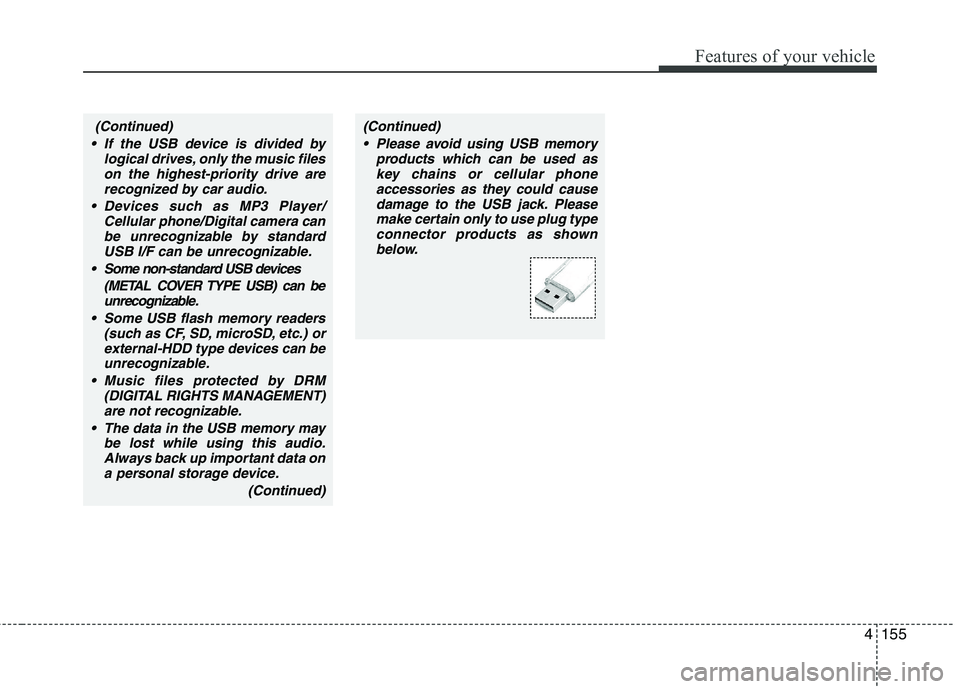
(Continued)(Continued) Please avoid using USB memory products which can be used askey chains or cellular phone
accessories as they could causedamage to the USB jack. Pleasemake certain only to use plug type
connector products as shownbelow.
Page 233 of 417
Features of your vehicle
156
4
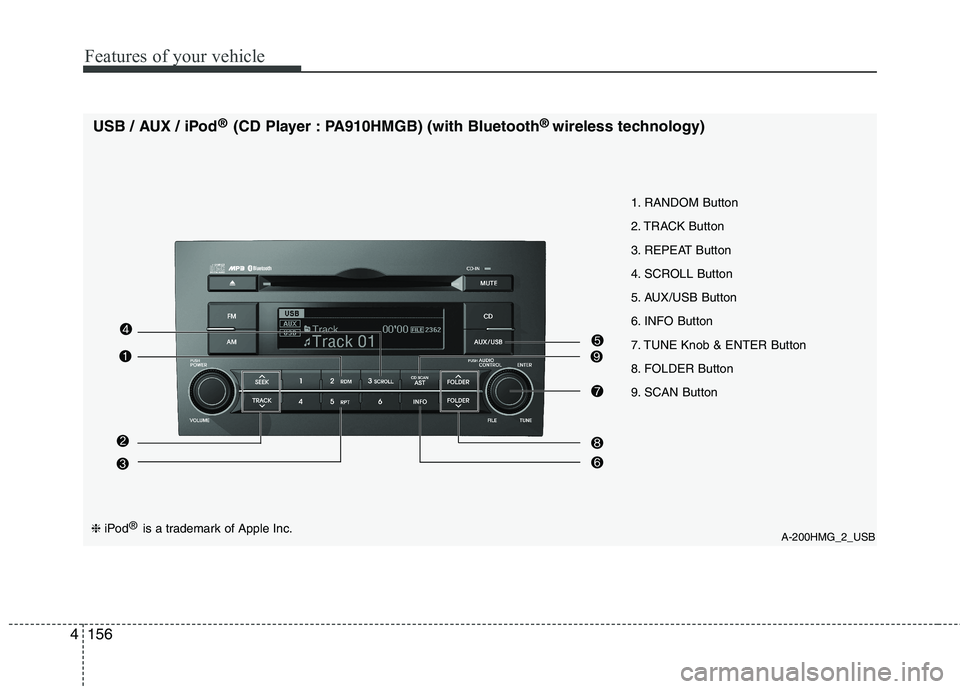
A-200HMG_2_USB
1. RANDOM Button
2. TRACK Button
3. REPEAT Button
4. SCROLL Button
5. AUX/USB Button
6. INFO Button
7. TUNE Knob & ENTER Button
8. FOLDER Button
9. SCAN Button
USB / AUX / iPod
®
(CD Player : PA910HMGB) (with Bluetooth ®
wireless technology)❈ iPod ®
is a trademark of Apple Inc.
Page 234 of 417
4157
Features of your vehicle
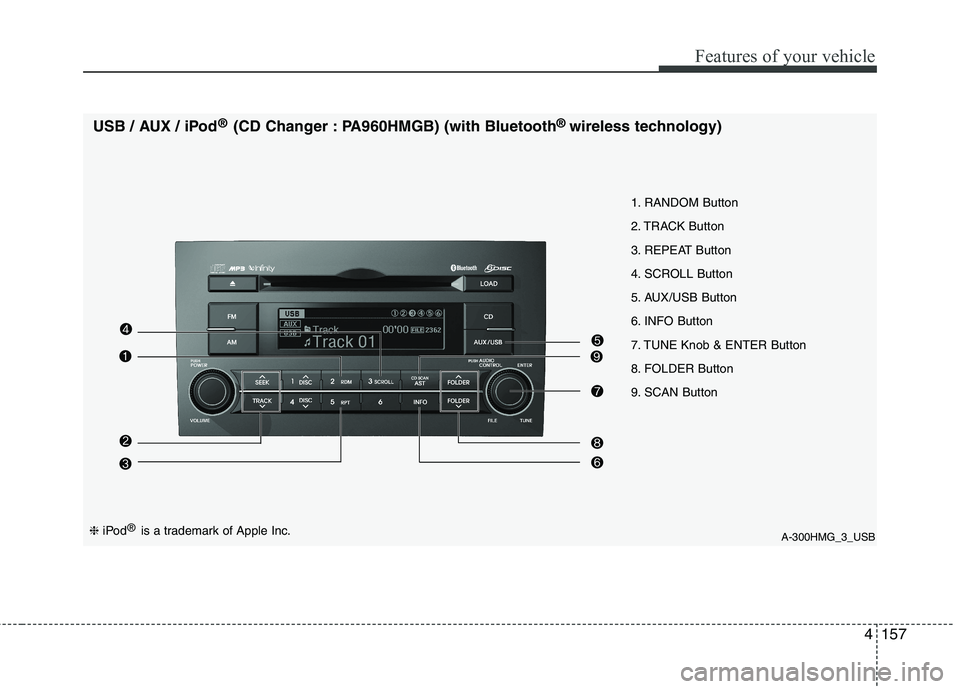
A-300HMG_3_USB
1. RANDOM Button
2. TRACK Button
3. REPEAT Button
4. SCROLL Button
5. AUX/USB Button
6. INFO Button
7. TUNE Knob & ENTER Button
8. FOLDER Button
9. SCAN Button
USB / AUX / iPod
®
(CD Changer : PA960HMGB) (with Bluetooth ®
wireless technology)
❈ iPod ®
is a trademark of Apple Inc.
Page 235 of 417

Features of your vehicle
158
4
Using USB device
1. RANDOM Button
Press this button for less than 0.8 second
to activate 'RDM' mode and more than
0.8 second to activate 'ALL RDM' mode.
RDM : Only files in a folder are played
back in random sequence.
ALL RDM : All files in a USB memory are played back in random sequence.
2. TRACK Button
Press [TRACK ] to return to the beginning of the current file.
Press again within 1 seconds to return
the previous file.
Press and hold [TRACK ] to initiate rewind search.
Press [TRACK ] for less than 0.8 second to advance the next file.
Press and hold [TRACK ] to initiate fast forward search. 3. REPEAT Button
Press this button for less than 0.8 second
to activate 'RPT' mode and more than
0.8 second to activate 'FLD RPT' mode.
RPT : Only a file is played repeatedly.
FLD RPT : Only files in a folder are
played repeatedly.
4. SCROLL Button
File names are scrolled for 5 seconds on
the display.
5. AUX/USB Button
If auxiliary device/USB/ is connected, it turns to USB/AUX mode and toggles
as below when the button is pressed
each time.
AUX/USB : AUX ➟USB ➟AUX...
If no auxiliary device and USB is con- nected, it displays "No Media" for 5
seconds and returns to the previous
mode. 6. INFO(INFORMATION) Button
Displays the information of the current
CD TRACK(FILE) as below when the
button is pressed each time. FILE NAME
➟TITLE ➟ARTIST ➟ALBUM
➟ FOLDER NAME ➟TOTAL FILE...
7. TUNE Knob & ENTER Button
Turn this knob clockwise to display the File name after the current song.
Turn this knob counterclockwise to dis- play the File name before the current song.
To select the displayed song, press the button.
8. FOLDER Button
Folder name/File name(the first song in the folder) is moved up or down from
currently playing folder.
To select the displayed folder, press ENTER(NO.6) button.
9. SCAN Button
Plays back the first 10 seconds of each
song in the USB memory.
Page 236 of 417

4159
Features of your vehicle
Using iPod®
1. RANDOM Button
Press this button for less than 0.8 second
to activate ' ' mode and more than 0.8
second to activate ''mode.
'' : All songs in the current catego-
ry are played in random.
'' : An album in the iPod is selected
in random and is played in the order of
the songs in the album.
2. TRACK Button
Press [TRACK ] to return to the beginning of the current file.
Press again within 1 second to return
the previous file.
Press and hold [TRACK ] to initiate rewind search.
Press [TRACK ] for less than 0.8 second to advance to the next file.
Press and hold [TRACK ] to initiate fast forward search.
3. REPEAT Button
A single song is played repeatedly. 4. SCROLL Button
File names are scrolled for 5 seconds on
the display.
5. AUX/USB Button (iPod)
If iPod is connected, it turns to iPod mode.
6. INFO(INFORMATION) Button
Displays the information of the file cur-
rently played as below when the button is
pressed each time. TITLE
➟
ARTIST ➟ALBUM...
■ Searching for a desired Song / Title
Using the search mode's individual hier-
archy, you can narrow down your search
as shown in the table below. ❈
For example : Searching by Composers
Press [FOLDER ] or turn [ENTER] to activate the Menu Select mode.
Turn [ENTER] to select the Compo- sers, and press ENTER.
Turn [ENTER] to select the Albums, and press ENTER.
Turn [ENTER] to select the Song, and press ENTER. The selected song is
played.
- In the search mode, pressing [FOLDER ] will return to the previ-
ous mode.
- Other search modes scan be adjusted as above. Although, the hierarchy dif-
fers.
Hierarchy 1 Hierarchy 2 Hierarchy 3 Hierarchy 4 Hierarchy 5
Playlist Playlists Songs - -
Artist Artists Albums Songs -
Album Albums Songs - - Song Songs - - -
Genre Genres Artists Albums Songs
Composer Composers Albums Songs -
Page 409 of 417

Index
2
I
Air bags ···········································································3-42
Air bag warning label................................................3-60
Air bag warning light ................................................3-45
Curtain air bag ..........................................................3-52
Driver's and passenger's front air bag ......................3-48
Side impact air bag....................................................3-50
Air cleaner·······································································7-26
Air conditioner compressor label ·····································8-9
Air leveling system (ALS) ··············································5-41
Alarm system ··································································4-12
All wheel drive (AWD), see four wheel drive (4WD) ···5-18
Antenna ·········································································4-126
Anti-lock brake system (ABS)········································5-31
Appearance care······························································7-62 Exterior care ······························································7-62
Interior care ·······························································7-67
Armrest ···········································································3-16
Ashtray ··········································································4-116
Audio system ································································4-126 Antenna ···································································4-126
Aux, USB and iPod ·················································4-128
Steering wheel audio control ··································4-127
Automatic climate control system ··································4-99 Air conditioning ······················································4-106
Automatic heating and air conditioning··················4-101
Manual heating and air conditioning ······················4-102 Automatic transmission ··················································5-12
Shift lock system ·······················································5-15
Sports mode·······························································5-14
Battery ·············································································7-32
Battery saver function ·····················································4-71
Before driving ···································································5-3
Bottle holders, see cup holders ·····································4-117
Brake system ···································································5-28 Anti-lock brake system (ABS) ··································5-31
Downhill brake control (DBC)··································5-37
Electronic stability program (ESP) ···························5-33
Hill-start assist control (HAC) ··································5-36
Parking brake·····························································5-29
Power brakes ·····························································5-28
Brakes fluid ·····································································7-22
Bulb replacement ····························································7-55 Door courtesy lamp bulb replacement ······················7-60
Front fog light bulb replacement ·····················7-55, 7-57
Headlight bulb replacement ·····························7-55, 7-57
High mounted stop light replacement ·······················7-60
Interior light bulb replacement··································7-61
License plate light bulb replacement ························7-60
Position light bulb replacement ·······················7-55, 7-57
Rear combination light bulb replacement ·················7-58
Rear fog light bulb replacement································7-60
A
B
Page 413 of 417
Index
6
I
Speedometer ·····························································4-49
Tachometer ·······························································4-50
Trip computer ···························································4-52
Warning and indicators ············································4-55
Instrument panel illumination ········································4-49
Instrument panel overview ···············································2-3
Interior care ····································································7-67
Interior features ····························································4-116 Ashtray ···································································4-116
Aux, USB and iPod ················································4-128
Cargo security screen ··············································4-122
Cigarette lighter ······················································4-116
Clothes hanger·························································4-121
Cup holder ······························································4-117
Digital clock ···························································4-119
Floor mat anchor(s) ················································4-121
Luggage net (holder) ··············································4-122
Outside thermometer ···············································4-120
Power outlet ···························································4-118
Sunvisor ··································································4-118
Interior light ···································································4-81
Interior light bulb replacement ······································7-61
Interior overview ······························································2-2
Jack and tools ···································································6-7
Jump starting ····································································6-4 Key positions ···································································5-4
Keys ·················································································4-3 Label
Air bag warning label ···············································3-60
Air conditioner compressor label ································8-9
Tire sidewall labeling ···············································7-41
Tire specification and pressure label ··························8-8
Vehicle certification label ···········································8-7
Latch system, see ISOFIX system ·································3-39
License plate light bulb replacement ·····························7-60
Light bulbs ·····································································7-55 Door courtesy lamp bulb replacement ······················7-60
Front fog light bulb replacement ·····················7-55, 7-57
Headlight bulb replacement ·····························7-55, 7-57
High mounted stop light replacement ·······················7-60
Interior light bulb replacement··································7-61
License plate light bulb replacement ························7-60
Position light bulb replacement ·······················7-55, 7-57
Rear combination light bulb replacement ·················7-58
Rear fog light bulb replacement································7-60
Side repeater light bulb replacement·························7-57
Turn signal light bulb replacement ···························7-55
L
K
J