Page 695 of 1206
411
Features of your vehicle
SMART KEY (IF EQUIPPED)
Smart key function
1. Door lock
2. Door unlock
3. Tailgate unlock
With a smart key, you can lock or unlock
a door and tailgate and even start the
engine without inserting the key.
The functions of the buttons on a smart
key are similar to the remote keyless
entry. Refer to the “Remote keyless
entry” in this section. Carrying the smart key, you may lock and
unlock the vehicle doors and tailgate.
Also, you may start the engine. Refer to
the following, for more details.
Locking
1. Carry the smart key.
2. Close all doors.
3. Press the button of the outside door
handle.
4. The hazard warning lights will blink once (the engine bonnet and tailgate
must be closed). Also, the outside
rearview mirror will automatically fold
if the outside rearview mirror folding
switch is in the AUTO position (ifequipped).
5. Make sure that doors are locked by pulling the outside door handle.
✽✽ NOTICE
Page 696 of 1206
Features of your vehicle
12
4
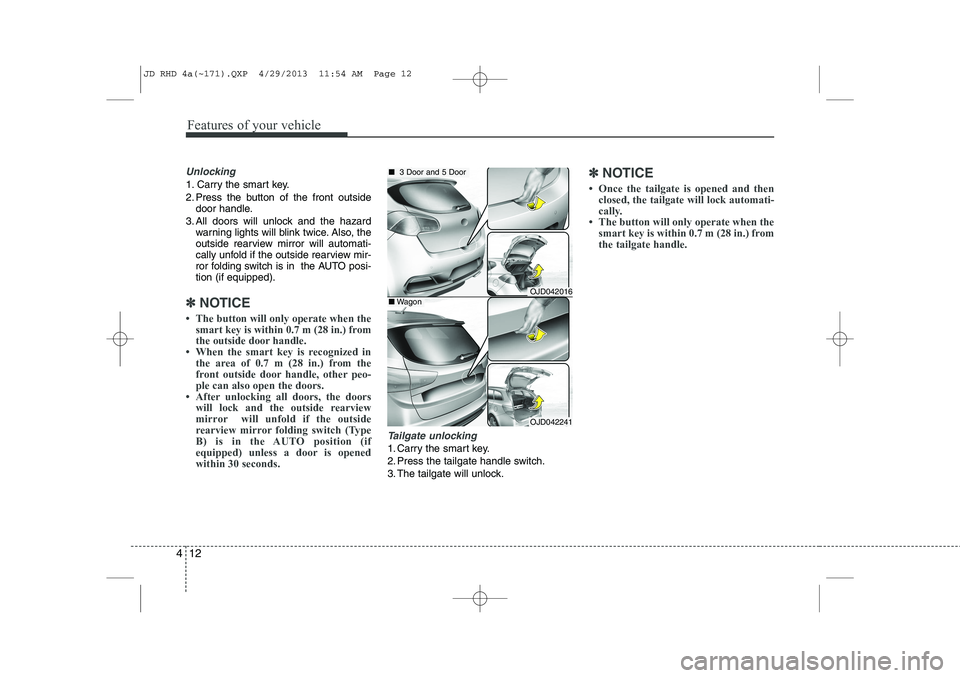
Unlocking
1. Carry the smart key.
2. Press the button of the front outside
door handle.
3. All doors will unlock and the hazard warning lights will blink twice. Also, the
outside rearview mirror will automati-
cally unfold if the outside rearview mir-
ror folding switch is in the AUTO posi-tion (if equipped).
✽✽ NOTICE
Page 698 of 1206

Features of your vehicle
14
4
Vehicles equipped with a theft alarm sys-
tem will have a label attached to the vehi-
cle with the following words:
1. WARNING
2. SECURITY SYSTEM This system is designed to provide pro-
tection from unauthorised entry into the
vehicle. This system is operated in three
stages: the first is the "Armed" stage, the
second is the "Theft-alarm" stage, and
the third is the "Disarmed" stage. If trig-
gered, the system provides an audible
alarm with blinking of the hazard warning
lights.Armed stage
Using the smart key
Park the vehicle and stop the engine.
Arm the system as described below.
1. Turn off the engine.
2. Make sure that all doors, the engine
bonnet and tailgate are closed and latched.
3. Lock the doors by pressing the button of the front outside door handle with
the smart key in your possession.
After completion of the steps above,
the hazard warning lights will operateonce to indicate that the system is
armed. If the tailgate or engine bonnet
remains opened, the hazard warning
lights will not operate and theft-alarm
will not arm. After this, if the tailgateand engine bonnet are closed, the
hazard warning lights will blink once
and the theft-alarm will arm.
THEFT-ALARM SYSTEM (IF EQUIPPED)Armed
stage
Theft-alarm stageDisarmedstage
OJC040170
JD RHD 4a(~171).QXP 4/29/2013 11:54 AM Page 14
Page 699 of 1206

415
Features of your vehicle
Lock the doors by pressing the lockbutton on the smart key.
After completion of the steps above,
the hazard warning lights will operateonce to indicate that the system is
armed. If the tailgate or engine bonnet
remains opened, the hazard warning
lights will not operate and theft-alarm
will not arm. After this, if the tailgateand engine bonnet are closed, the
hazard warning lights will blink once
and the theft-alarm will arm.Using the transmitter
Park the vehicle and stop the engine.
Arm the system as described below.
1. Turn off the engine and remove the ignition key from the ignition switch.
2. Make sure that all doors, the engine bonnet and tailgate are closed andlatched.
3. Lock the doors by pressing the lock button on the transmitter.
After completion of the steps above,
the hazard warning lights will blinkonce to indicate that the system is
armed.
If the tailgate or engine bonnet remains opened, the hazard warning lights will
not operate and theft-alarm will not
arm. After this, if the tailgate andengine bonnet are closed, the hazard
warning lights will blink once and the
theft-alarm will arm.
Do not arm the system until all pas- sengers have left the vehicle. If thesystem is armed whilst a passen-
ger(s) remains in the vehicle, the
alarm may be activated when the
remaining passenger(s) leave the
vehicle. If any door, tailgate orengine bonnet is opened within 30seconds after entering the armed
stage, the system is disarmed to
prevent unnecessary alarm. Theft-alarm stage
The alarm will be activated if any of the
following occurs whilst the system is
armed.
A front or rear door is opened without
using transmitter or smart key.
The tailgate is opened without using transmitter or smart key.
The engine bonnet is opened.The siren will sound and the hazard
warning lights will blink continuously for
27 seconds, unless the system is dis-
armed. To turn off the system, unlock the
doors with the transmitter or smart key.
JD RHD 4a(~171).QXP 4/29/2013 11:54 AM Page 15
Page 700 of 1206
Features of your vehicle
16
4
Disarmed stage
The system will be disarmed when:
Transmitter
- The door unlock button is pressed.
- The engine is started.
- The ignition switch is in the “ON” posi-
tion for 30 seconds or more.
Smart key
- The door unlock button is pressed.
- The button of the front outside door ispressed whilst carrying the smart key.
- The engine is started.
After the doors are unlocked, the hazard
warning lights will blink twice to indicate
that the system is disarmed.
After pressing the unlock button, if anydoor (or tailgate) is not opened within 30
seconds, the system will be rearmed.
✽✽ NOTICE
Page 703 of 1206

419
Features of your vehicle
With central door lock/unlock switch
It is operated by pressing the door lock/
unlock switch.
When you press the central door lockswitch, all vehicle doors will lock and
the indicator light on the switch will illu-
minate.
If any door is opened when the switch is pressed, all doors will not lock.
If any door is unlocked, the indicator of the central door lock switch will go off.
When you press the central door unlock switch, all vehicle doors will
unlock.
✽✽ NOTICE
Once the doors are locked with the
transmitter or smart key, the doors can-not be unlocked with the central doorlock/unlock switch. WARNING - Doors
The doors should always be fully closed and locked whilst the
vehicle is in motion to prevent
accidental opening of the door.
Locked doors will also discour-
age potential intruders when the
vehicle stops or slows down.
Be careful when opening doors and watch for vehicles, motorcy-
cles, bicycles or pedestrians
approaching the vehicle in the
path of the door. Opening a door
when something is approaching
can cause damage or injury.
WARNING - Door lock mal-
function
If a power door lock ever fails to
function whilst you are in the vehi-
cle, try one or more of the follow-ing:
Operate the other door locks and handles.
Lower the driver’s window and use the key to unlock the door
from outside.
Move to the cargo area and open the tailgate.
OJD042014R
JD RHD 4a(~171).QXP 4/29/2013 11:55 AM Page 19
Page 709 of 1206

425
Features of your vehicle
Power windows
The ignition switch must be in the ON
position for power windows to operate.
Each door has a power window switch
that controls the door’s window. The dri-
ver’s door has a master power window
switch that controls all the windows in the
vehicle. Also, the driver has a power win-
dow lock switch which can block the
operation of rear passenger windows.
The power windows can be operated for
approximately 30 seconds after the igni-
tion key is removed or turned to the ACC
or LOCK position. However, if the front
doors are opened, the power windows
cannot be operated even within the 30
seconds period.
✽✽NOTICE
Whilst driving with the rear windows
down or with the sunroof (if equipped)
in an open (or partially open position),
your vehicle may demonstrate a wind
buffeting or pulsation noise. This
noise is a normal occurrence and can be
reduced or eliminated by taking the fol-
lowing actions. If the noise occurs with
one or both of the rear windows down,
partially lower both front windows
approximately one inch. If you experi-
ence the noise with the sunroof open,
slightly reduce the size of the sunroofopening.
Window opening and closing
Type A
To open or close a window, press down
or pull up the front portion of the corre-
sponding switch to the first detent posi-tion (5). Type B - Auto up/down window (if equipped)
Pressing or pulling up the power window
switch momentarily to the second detent
position (6) completely lowers or lifts the
window even when the switch is released.
To stop the window at the desired position
whilst the window is in operation, pull up
or press down and release the switch.
✽✽
NOTICE
If the power window does not operate
normally, the automatic power window
system must be reset as follows:
1. Turn the ignition switch to the ON position.
2. Close the window and continue
pulling up the power window switch
for at least 1 second after the windowis completely closed.
OJD042020ROJD042019R
JD RHD 4a(~171).QXP 4/29/2013 11:55 AM Page 25
Page 712 of 1206
Features of your vehicle
28
4
Opening the bonnet
1. Pull the release lever to unlatch the
bonnet. The bonnet should pop open
slightly. 2. Go to the front of the vehicle, raise the
bonnet slightly, push the secondarylatch inside of the bonnet centre andlift the bonnet. 3. Pull out the support rod.
4. Hold the bonnet opened with the sup-
port rod.
BONNET
OJD042022R
WARNING
Open the bonnet after turning off
the engine on a flat surface, shift-
ing the shift lever to the P(Park)
position for automatic transaxle
and to the 1(First) gear or
R(Reverse) for manual transaxle,
and setting the parking brake.
WARNING - Hot parts
Be very careful not to touch the
support rod when the engine and
parts are hot. You could get burned
or get seriously injured.
OJD042023OJD042024
JD RHD 4a(~171).QXP 4/29/2013 11:55 AM Page 28