2014 KIA CEED lock
[x] Cancel search: lockPage 773 of 1206

489
Features of your vehicle
Engine coolant tempera-ture warning light(if equipped)
The warning light illuminates if the tem-
perature of the engine coolant is above120±3°C (248±5.4°F).
Do not continue driving with an overheat-
ed engine. If your vehicle overheats, refer
to “Overheating” in section 6.
✽✽ NOTICE
If the engine coolant temperature warn- ing light illuminates, it indicates over-heating that may damage the engine.
Glow indicator (Diesel engine)
The indicator light illuminates when the
ignition switch is placed at the ON posi-
tion. The engine can be started after the
preheat indicator light goes off. The illu-
minating time varies with the water tem-
perature, air temperature and batterycondition.
✽✽ NOTICE
If the engine does not start within 10
seconds after the preheating is complet-
ed, turn the ignition key once more to
the LOCK/OFF position for 10 seconds,
and then to the ON position, in order to
preheat again.
Fuel filter warning light (Diesel engine)
This warning light illuminates for 3 sec-
onds after the ignition switch is set to the
ON position and then it will go out. If it
lights up whilst the engine is running, it
indicates that water has accumulated
inside the fuel filter. If this happens,
remove the water from the fuel filter.
For more details, refer to “Fuel filter” in section 7.
CAUTION
If the preheat indicator light contin-ues to illuminate or flash on and off after the engine has warmed up orwhilst driving, we recommend that
the system be checked by an autho- rised Kia dealer.
CAUTION
When the fuel filter warning lightilluminates, engine power (vehiclespeed & idle speed) may decrease. If you keep driving with the warning
light on, you can damage your vehi-cle's engine parts and injection sys- tem of the Common Rail. If thisoccurs, we recommend that the
system be checked by an autho-rised Kia dealer.
JD RHD 4a(~171).QXP 4/29/2013 12:00 PM Page 89
Page 774 of 1206
Features of your vehicle
90
4
LCD DISPLAY WARNINGS AND INDICATORS (INSTRUMENT PANEL DISPLAY)
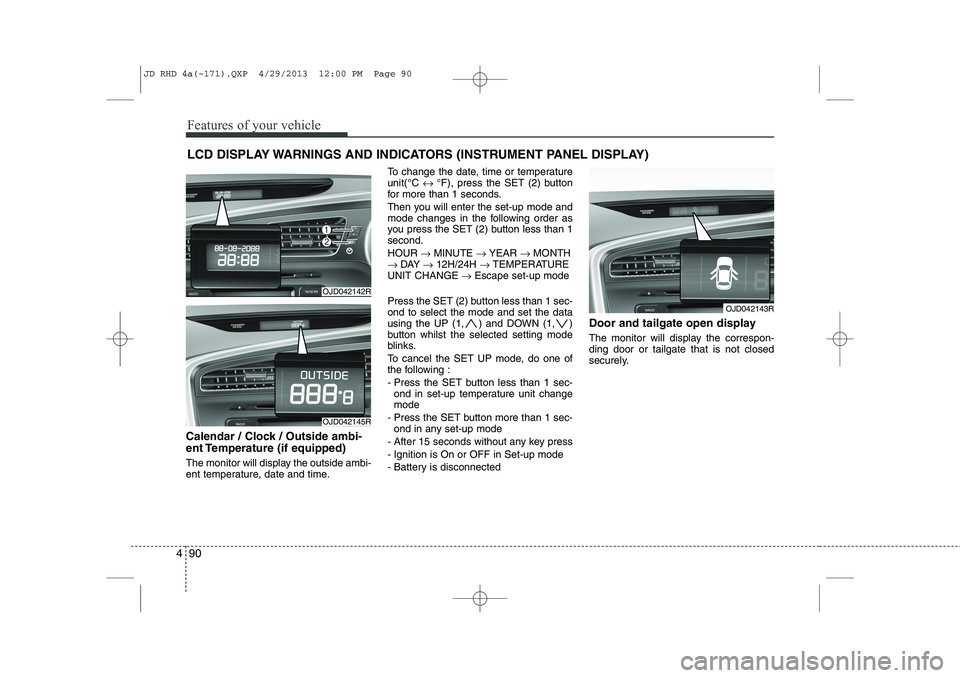
Calendar / Clock / Outside ambi-
ent Temperature (if equipped)
The monitor will display the outside ambi-
ent temperature, date and time. To change the date, time or temperatureunit(°C
↔ °F), press the SET (2) button
for more than 1 seconds.
Then you will enter the set-up mode and
mode changes in the following order as
you press the SET (2) button less than 1second. HOUR → MINUTE → YEAR → MONTH
→ DAY → 12H/24H → TEMPERATURE
UNIT CHANGE → Escape set-up mode
Press the SET (2) button less than 1 sec- ond to select the mode and set the data
using the UP (1, ) and DOWN (1, )
button whilst the selected setting mode
blinks.
To cancel the SET UP mode, do one of
the following :
- Press the SET button less than 1 sec- ond in set-up temperature unit change mode
- Press the SET button more than 1 sec- ond in any set-up mode
- After 15 seconds without any key press
- Ignition is On or OFF in Set-up mode
- Battery is disconnected Door and tailgate open display
The monitor will display the correspon- ding door or tailgate that is not closed
securely.
OJD042142R
OJD042145R
OJD042143R
JD RHD 4a(~171).QXP 4/29/2013 12:00 PM Page 90
Page 778 of 1206

Features of your vehicle
94
4
Non-operational conditions of rear parking assist system
The rear parking assist system may
not operate properly when:
1. Moisture is frozen to the sensor. (It will
operate normally when the moisture has been cleared.)
2. The sensor is covered with foreign matter, such as snow or water, or the
sensor cover is blocked. (It will operate
normally when the material is removed
or the sensor is no longer blocked.)
3. Driving on uneven road surfaces (unpaved roads, gravel, bumps, gradi-ent).
4. Objects generating excessive noise (vehicle horns, loud motorcycle
engines, or truck air brakes) are within
range of the sensor.
5. Heavy rain or water spray exists.
6. Wireless transmitters or mobile phones are within range of the sensor.
7. Trailer towing. The detecting range may decrease when:
1. The sensor is stained with foreign mat-
ter such as snow or water. (The sens-
ing range will return to normal when
removed.)
2. Outside air temperature is extremely hot or cold.
The following objects may not be rec-
ognized by the sensor:
1. Sharp or slim objects such as ropes, chains or small poles.
2. Objects which tend to absorb the sen- sor frequency such as clothes, spongy
material or snow.
3. Undetectable objects smaller than 1 m (40 in.) and narrower than 14 cm (6 in.)
in diameter. Rear parking assist system pre- cautions
The rear parking assist system may
not sound sequentially depending on the speed and shapes of the objectsdetected.
The rear parking assist system may malfunction if the vehicle bumperheight or sensor installation has been
modified or damaged. Any non-factory
installed equipment or accessories
may also interfere with the sensor per-
formance.
The sensor may not recognize objects less than 30 cm (11.8 in.) from the sen-
sor, or it may sense an incorrect dis-
tance. Use caution.
When the sensor is frozen or stained with snow, dirt, or water, the sensor
may be inoperative until the stains are
removed using a soft cloth.
Do not push, scratch or strike the sen- sor. Sensor damage could occur.
JD RHD 4a(~171).QXP 4/29/2013 12:00 PM Page 94
Page 782 of 1206

Features of your vehicle
98
4
Non-operational conditions of parking assist system
Parking assist system may not oper-
ate normally when:
1. Moisture is frozen to the sensor. (It will operate normally when moisture
melts.)
2. Sensor is covered with foreign matter, such as snow or water, or the sensor
cover is blocked. (It will operate nor-
mally when the material is removed or
the sensor is no longer blocked.)
3. Sensor is stained with foreign matter such as snow or water. (Sensing range
will return to normal when removed.)
4.The parking assist button is off.
There is a possibility of parking assist system malfunction when:
1. Driving on uneven road surfaces such as unpaved roads, gravel, bumps, or
gradient.
2. Objects generating excessive noise such as vehicle horns, loud motorcycle
engines, or truck air brakes can inter-
fere with the sensor.
3. Heavy rain or water spray.
4. Wireless transmitters or mobile phones present near the sensor.
5. Sensor is covered with snow.
Detecting range may decrease when:
1. Outside air temperature is extremely hot or cold.
2. Undetectable objects smaller than 1 m and narrower than 14 cm in diameter.
The following objects may not be rec-
ognized by the sensor:
1. Sharp or slim objects such as ropes, chains or small poles.
2. Objects, which tend to absorb sensor frequency such as clothes, spongy
material or snow.
CAUTION
This system can only sense
objects within the range and loca-
tion of the sensors;
It can not detect objects in otherareas where sensors are notinstalled. Also, small or slim
objects, such as poles or objects located between sensors may notbe detected by the sensors.
Always visually check behind thevehicle when backing up.
Be sure to inform any drivers of the vehicle that may be unfamiliarwith the system regarding thesystems capabilities and limita-
tions.
JD RHD 4a(~171).QXP 4/29/2013 12:00 PM Page 98
Page 795 of 1206

4 111
Features of your vehicle
Battery saver function
The purpose of this feature is to pre-vent the battery from being dis-
charged. The system automatically
turns off the parking lights when the
driver removes the ignition key (Smart
key : turns off the engine) and opens
the driver- side door.
With this feature, the parking lights will be turned off automatically if the driver
parks on the side of road at night.
If necessary, to keep the lights on
when the ignition key is removed, per-
form the following :
1) Open the driver-side door.
2) Turn the parking lights OFF and ON again using the light switch on the
steering column. Headlamp delay function (if equipped) The headlamps (and/or taillights) remain
on for same minutes (Type A: 20 minutes,
Type B: 5 minutes) after the ignition key
is removed or turned to the ACC or
LOCK position. However, if the driver’sdoor is opened and closed, the head-
lights are turned off after 15 seconds.
The headlights can be turned off by
pressing the lock button on the transmit-
ter or smart key twice or turning off the
light switch from the headlight or Autolight position.
You can activate or deactivate the head-
lamp delay fuction. Refer to “User setting”in this section.
Headlight (Headlamp) welcome function (if equipped)
When the headlight switch is in the ON or
AUTO position and all doors (and tail-
gate) are closed and locked, if you press
the door unlock button on the transmitter
or smart key, the headlights will come on
for about 15 seconds.
If the headlight switch is in the AUTO
position, the function can only operate atnight.
At this time, if you press the door unlock
button again or door lock button on the
transmitter or smart key, the headlights
will turn off immediately.
You can activate or deactivate the head-
lamp welcome fuction. Refer to “User set-
ting” in this section.
✽✽
NOTICE
There can be turned on front fog light and the fail light when you turn on the
headlight switch ON. In this case we rec-ommend that you the system checked by
an authorised Kia dealer.
LIGHTING
CAUTION
If the driver gets out of the vehicle through other doors (except driver’s door), the battery saver functiondoes not operate and the headlamp
delay function does not turn offautomatically. Therefore, it causes the battery to be discharged. In this case, make sure to turn off the lampbefore getting out of the vehicle.
JD RHD 4a(~171).QXP 4/29/2013 12:01 PM Page 111
Page 807 of 1206

4 123
Features of your vehicle
Interior lamp AUTO cut
When all entrances are closed, if youlock the vehicle by using the transmit-
ter or the smart key, all interior lamp
will be off after a few seconds.
If you do not operate anything in the vehicle after turning off the engine, the
lights will turn off after 20 minutes. Map lamp
Press the lens (1) to turn the map lamp on or off
/OFF (2) : The lamps are off even
if a door is opened. /DOOR (3) :
- The map lamp comes on when a dooris opened. If you close the door, the
lamps go out after approximately 30
seconds.
- The map lamp comes on for approxi- mately 30 seconds when doors are
unlocked with a transmitter or smart
key as long as the doors are notopened.
- The map lamp will stay on for approxi- mately 20 minutes if a door is opened
with the ignition switch in the ACC orLOCK/OFF position.
- The map lamp will stay on continu- ously if the door is opened with the
ignition switch in the ON position.
- The map lamp will go out immediate- ly if the ignition switch is changed tothe ON position or all doors are
locked.
/ON (4) : The map lamp stays on at all times.
✽✽NOTICE
When the lamp is turned on by pressing the lens (1), the lamp does not turn off
even if the switch is in the OFF position(2).
INTERIOR LIGHT
CAUTION
Do not use the interior lights for extended periods when the engine
is not running.
It may cause battery discharge.
WARNING
Do not use the interior lights when
driving in the dark. Accidents could
happen because the view may be
obscured by interior lights.
OGD041104
OJD042091
■ Type A
■Type B
JD RHD 4a(~171).QXP 4/29/2013 12:02 PM Page 123
Page 810 of 1206

Features of your vehicle
126
4
Headlamp welcome
When the headlight(light switch in the
headlight or AUTO position) is on and all
doors (and tailgate) are locked andclosed, the headlight, position light and
tail light will come on for 15 seconds if
any of the below is performed.
Without smart key system
- When the door unlock button is pressed on the transmitter.
With the smart key system - When the door unlock button is pressed on the smart key.
At this time, if you press the door lock but-
ton (on the transmitter or smart key), the
lights will turn off immediately. Interior light
When the interior light switch is in the DOOR position and all doors (and tail-
gate) are locked and closed, the room
lamp will come on for 30 seconds if any
of the below is performed.
Without smart key system
- When the door unlock button is pressed on the transmitter.
With the smart key system - When the door unlock button is pressed on the smart key.
- When the button of the outside door handle is pressed.
At this time, if you press the door lock but-
ton, the lamps will turn off immediately. Puddle lamp (if equipped)
When all doors are locked and closed,
the puddle lamp will come on for 15 sec-
onds if any of the below is performed.
Without smart key system
- When the door unlock button is pressed on the transmitter.
With the smart key system - When the door unlock button is pressed on the smart key.
- When the button of the outside door handle is pressed.
- When the vehicle is approached with the smart key in possession.
At this time, if you press the door lock but-
ton, the lamps will turn off immediately.
WELCOME SYSTEM (IF EQUIPPED)
JD RHD 4a(~171).QXP 4/29/2013 12:03 PM Page 126
Page 818 of 1206

Features of your vehicle
134
4
Operation Tips
To keep dust or unpleasant fumes from
entering the vehicle through the venti-
lation system, temporarily set the air
intake control to the recirculated air
position. Be sure to return the control
to the fresh air position when the irrita-
tion has passed to keep fresh air in the
vehicle. This will help keep the driver
alert and comfortable.
Air for the heating/cooling system is drawn in through the grilles just ahead
of the windscreen. Care should be
taken that these are not blocked by
leaves, snow, ice or other obstructions.
To prevent interior fog on the wind- screen, set the air intake control to the
fresh air position and fan speed to the
desired position, turn on the air condi-tioning system, and adjust the temper-
ature control to desired temperature.Air conditioning (if equipped)
Kia Air Conditioning Systems are filled
with environmentally friendly refrigerant*.
1. Start the engine. Push the air condi- tioning button.
2. Set the mode to the position.
3. Set the air intake control to the outside air or recirculated air position.
4. Adjust the fan speed control and tem- perature control to maintain maximum
comfort.
*: Your vehicle is filled with R-134a or R- 1234yf according to the regulation in
your country at the time of producing.
You can find out which air conditioning
refrigerant is applied to your vehicle at
the label inside of bonnet. Refer to sec-
tion 8 for more detail location of air
conditioning refrigerant label.CAUTION
The refrigerant system should
only be serviced by trained and
certified technicians to insureproper and safe operation.
The refrigerant system should be serviced in a well-ventilated
place.
The air conditioning evaporator (cooling coil) shall never berepaired or replaced with one removed from a used or salvaged
vehicle and new replacementMAC evaporators shall be certi- fied (and labeled) as meeting SAE
Standard J2842.
JD RHD 4a(~171).QXP 4/29/2013 12:04 PM Page 134