Page 735 of 1206
451
Features of your vehicle
Odometer (km or mi.) The odometer indicates the total dis-
tance the vehicle has been driven.
You will also find the odometer useful to
determine when periodic maintenance
should be performed.Trip computer
The trip computer is a microcomputer-
controlled driver information system that
displays information related to driving
when the ignition switch is in the ON
position. All stored driving information
(except odometer, distance to empty and
instant fuel economy) resets if the batteryis disconnected.Press the
▲or ▼ button for less than 1
second to select any mode as follows:
OJD042050OJD042051N Tripmeter B
Instant fuel consumption*
Tripmeter A
Distance to empty*
Average fuel consumption*
Engine coolant temperature gauge
* : if equippedElapsed time*
Average speed*
↔↔
↔
↔
↔
↔
↔
↔
Service*
↔
User setting*
↔
JD RHD 4a(~171).QXP 4/29/2013 11:57 AM Page 51
Page 738 of 1206

Features of your vehicle
54
4
Average speed (km/h or MPH)
This mode calculates the average speed
of the vehicle since the last averagespeed reset.
Even if the vehicle is not in motion, the
average speed keeps going whilst the
engine is running.
Pressing the button for more than 1
second, when the average speed is dis-
played, clears the average speed to zero(---).
Elapsed time
This mode indicates the total time trav-
eled since the last driving time reset.
Even if the vehicle is not in motion, the
driving time keeps going whilst the
engine is running.
The meter’s working range is from 0:00~99:59.
Pressing the button for more than 1
second, when the driving time is being
displayed, clears the driving time to zero(0:00).
Service mode
This mode calculates when you need a
scheduled maintenance service (mileage
or days)
If you want to see the service mode when
other modes are displayed, press the ▲
or ▼ button less than 1 second.
OJD042057OJD042056NOJD042059N
JD RHD 4a(~171).QXP 4/29/2013 11:57 AM Page 54
Page 739 of 1206
455
Features of your vehicle
If you do not have your vehicle serviced according to the scheduled maintenance
service on the LCD display, this LCD dis-
play will show the elapsed mileage or
days.
If you want to reset the maintenance
schedule, when the service required mes-
sage is displayed :
- Press the button more than 5 sec-onds.
- " : Reset" will be shown on the LCD display.
- Press the button again more than 1 second.
If you do not press the button within 5
seconds, " : Reset" will disap pear.If you want to change the interval of the
maintenance service schedule, we rec-
ommend that you consult an authorised
Kia dealer.
✽✽
NOTICE
Page 753 of 1206

469
Features of your vehicle
2. Average speed (km/h or MPH)
This mode calculates the average speed
of the vehicle since the last averagespeed reset.
Even if the vehicle is not in motion, the
average speed keeps going whilst the
engine is running.
Pressing the button for more than 1
second, when the average speed is dis-
played, clears the average speed to zero(---). 3. Elapsed time
This mode indicates the total time trav-
eled since the last driving time reset.
Even if the vehicle is not in motion, the
driving time keeps going whilst the
engine is running.
The meter’s working range is from 0:00~99:59.
Pressing the button for more than 1
second, when the driving time is being
displayed, clears the driving time to zero(0:00).
Lane Departure Warning System(LDWS) Mode (if equipped)
This mode displays the state of the Lane
Departure Warning System (LDWS).
For more details, refer to “Lane departure
warning system” in section 5.
Service mode
This mode calculates when you need a
scheduled maintenance service (mileage
or days)
If you want to see the service mode when
other modes are displayed, press the button less than 1 second.
OJD042180OJD042186R
JD RHD 4a(~171).QXP 4/29/2013 11:58 AM Page 69
Page 754 of 1206
Features of your vehicle
70
4
If you do not have your vehicle serviced according to the scheduled maintenance
service on the LCD display, this LCD dis-
play will show the elapsed mileage or days.
If you want to reset the maintenance
schedule, when the service required mes-
sage is displayed :
- Press the button more than 5 sec-
onds.
- " : Reset" will be shown on the LCD display.
- Press the button again more than 1 second.
If you do not press the button within
5 seconds, " : Reset" will disappear. If you want to change the interval of the
maintenance service schedule, we rec-
ommend that you consult an authorised
Kia dealer.
✽✽
NOTICE
Page 1115 of 1206
Maintenance
54
7
Reset items
Items should be reset after the battery
has been discharged or the battery hasbeen disconnected.
Auto up/down window (See section 4)
Sunroof (See section 4)
Trip computer (See section 4)
Climate control system
(See section 4)
Audio (See section 4)(Continued)
Wear eye protection when check- ing the battery during charging.
Disconnect the battery charger in the following order.
1. Turn off the battery charger
main switch.
2. Unhook the negative clamp from the negative battery ter- minal.
3. Unhook the positive clamp from the positive battery termi-nal.
Before performing maintenance or recharging the battery, turn offall accessories and stop the
engine.
The negative battery cable must be removed first and installed
last when the battery is discon-nected.
JD RHD 7.QXP 4/29/2013 11:34 AM Page 54
Page 1120 of 1206
759
Maintenance
Wheel alignment and tyre balance
The wheels on your vehicle were aligned and balanced carefully at the
factory to give you the longest tyre
life and best overall performance.
In most cases, you will not need to
have your wheels aligned again.
However, if you notice unusual tyre
wear or your vehicle pulling one way
or the other, the alignment may needto be reset.
If you notice your vehicle vibrating
when driving on a smooth road, your
wheels may need to be rebalanced.Tyre replacement
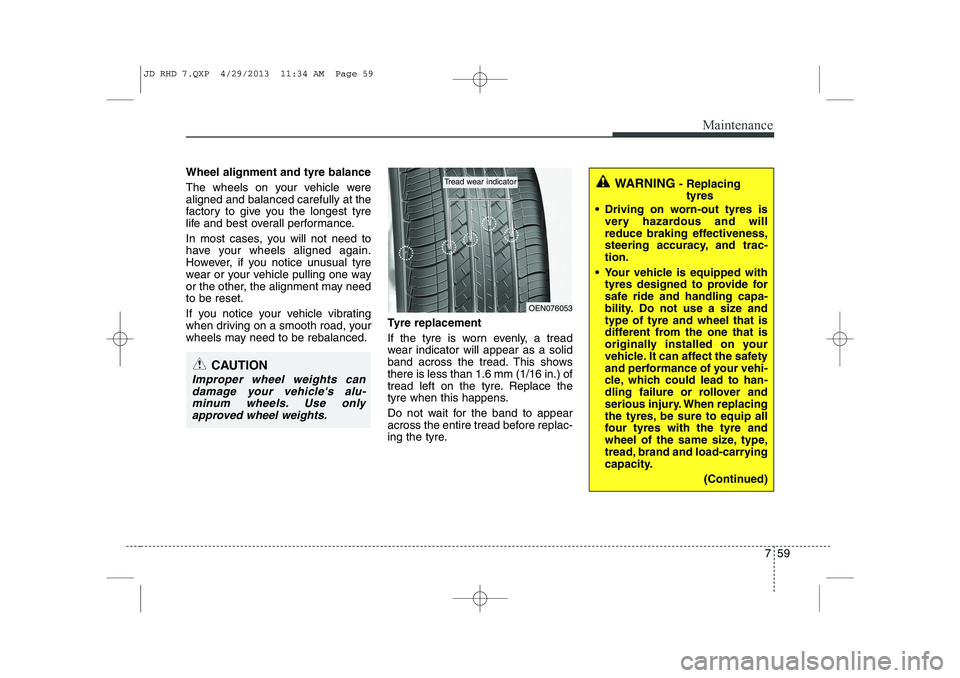
If the tyre is worn evenly, a tread
wear indicator will appear as a solid
band across the tread. This showsthere is less than 1.6 mm (1/16 in.) of
tread left on the tyre. Replace the
tyre when this happens.
Do not wait for the band to appear
across the entire tread before replac-
ing the tyre.
CAUTION
Improper wheel weights can
damage your vehicle's alu-minum wheels. Use only approved wheel weights.
WARNING - Replacing
tyres
Driving on worn-out tyres is very hazardous and will
reduce braking effectiveness,
steering accuracy, and trac-tion.
Your vehicle is equipped with tyres designed to provide for
safe ride and handling capa-
bility. Do not use a size andtype of tyre and wheel that is
different from the one that is
originally installed on your
vehicle. It can affect the safety
and performance of your vehi-
cle, which could lead to han-
dling failure or rollover and
serious injury. When replacing
the tyres, be sure to equip all
four tyres with the tyre and
wheel of the same size, type,
tread, brand and load-carrying
capacity.
(Continued)
OEN076053
Tread wear indicator
JD RHD 7.QXP 4/29/2013 11:34 AM Page 59
Page 1129 of 1206
Maintenance
68
7
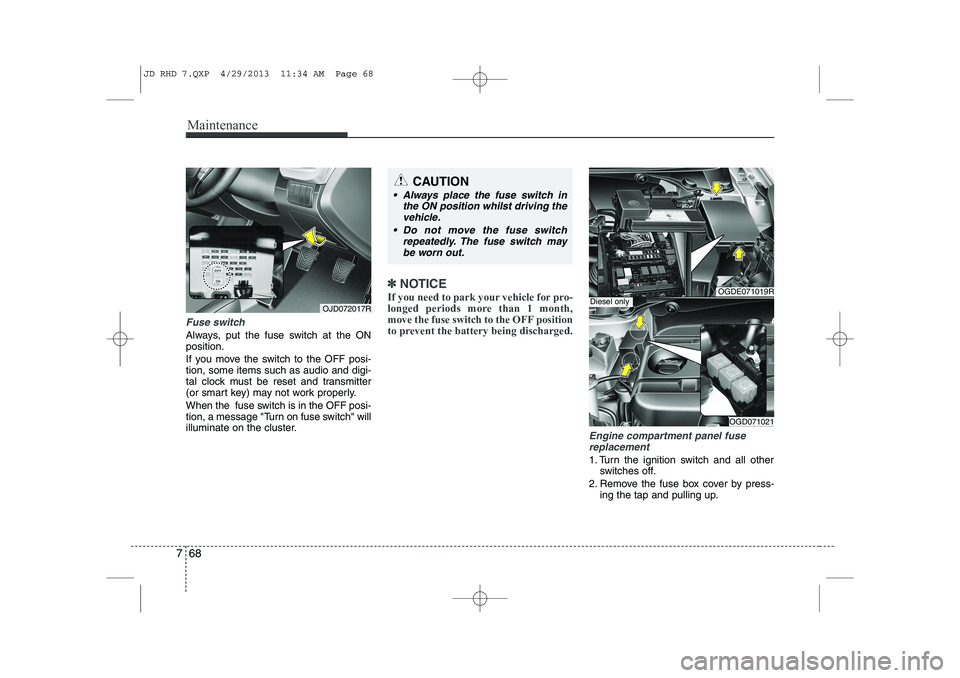
Fuse switch
Always, put the fuse switch at the ON position.
If you move the switch to the OFF posi- tion, some items such as audio and digi-
tal clock must be reset and transmitter
(or smart key) may not work properly.
When the fuse switch is in the OFF posi-
tion, a message "Turn on fuse switch" will
illuminate on the cluster.
✽✽
NOTICE
If you need to park your vehicle for pro-
longed periods more than 1 month,
move the fuse switch to the OFF position
to prevent the battery being discharged.
Engine compartment panel fuse replacement
1. Turn the ignition switch and all other switches off.
2. Remove the fuse box cover by press- ing the tap and pulling up.
OGDE071019R
OGD071021
Diesel onlyOJD072017R
CAUTION
Always place the fuse switch in
the ON position whilst driving the
vehicle.
Do not move the fuse switch repeatedly. The fuse switch maybe worn out.
JD RHD 7.QXP 4/29/2013 11:34 AM Page 68