2014 KIA CEED brake
[x] Cancel search: brakePage 638 of 1206

319
Safety system of your vehicle
To unfold the rear seat
1. To use the rear seat, lift and pull theseatback backward. Pull the seatback
firmly until it clicks into place. Make
sure the seatback is locked in place.
When you return the seatback to its
upright position, always be sure it has
locked into position by pushing on the
top of the seatback.
If you can not see the red line at the
bottom of folding lever, it means the
seatback is locked completely.
2. Return the rear seat belt to the proper position.
3. When the seatback is completely installed, check the seatback folding
lever again.
WARNING
When you return the rear seatback to its upright position after being
folded down:
Be careful not to damage the seat
belt webbing or buckle. Do not
allow the seat belt webbing or
buckle to get caught or pinched in
the rear seat. Ensure that the seat-
back is completely locked into its
upright position by pushing on the
top of the seatback. Otherwise, in
an accident or sudden stop, the
seat could fold down and allow
cargo to enter the passenger com-
partment, which could result in
serious injury or death.
CAUTION - Rear seat belts
When returning the rear seatbacks
to the upright position, remember
to return the rear shoulder belts totheir proper position.
WARNING - Cargo
Cargo should always be secured to
prevent it from being thrown about
the vehicle in a collision and caus-
ing injury to the vehicle occupants.Special care should be taken ofobjects placed in the rear seats,
since those may hit the front seat
occupants in a frontal collision.
WARNING - Cargo loading
Make sure the engine is off, the
automatic transaxle is in P (Park)
or the manual transaxle is in R
(Reverse) or 1st, and the parking
brake is securely applied whenever
loading or unloading cargo. Failure
to take these steps may allow the
vehicle to move if the shift lever is
inadvertently moved to anotherposition.
JD RHD 3.QXP 4/29/2013 11:21 AM Page 19
Page 681 of 1206
Safety system of your vehicle
62
3
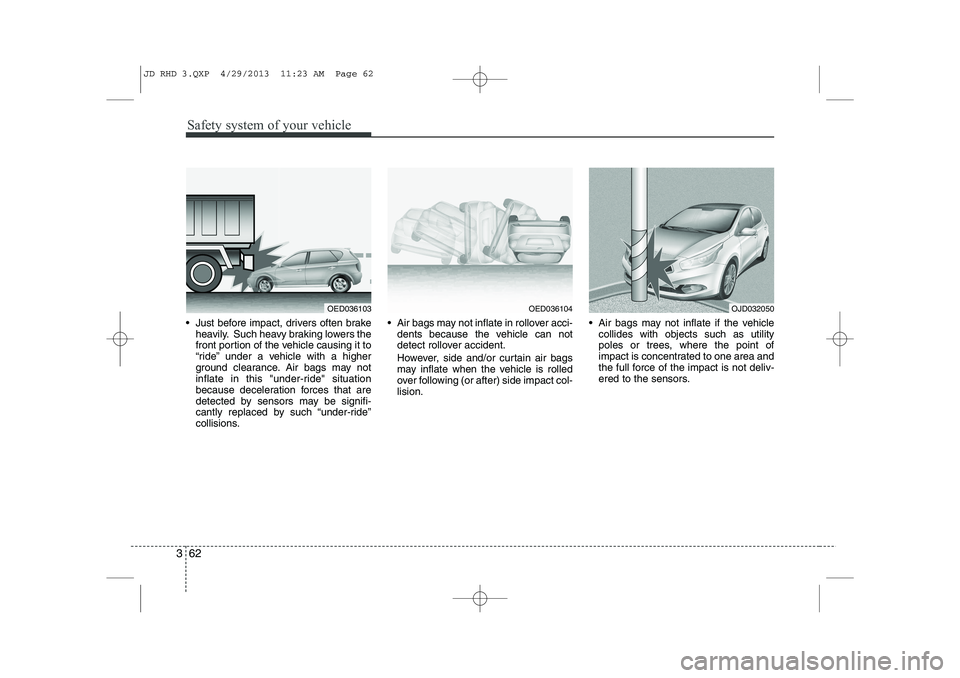
Just before impact, drivers often brake
heavily. Such heavy braking lowers the
front portion of the vehicle causing it to
“ride” under a vehicle with a higher
ground clearance. Air bags may not
inflate in this "under-ride" situation
because deceleration forces that are
detected by sensors may be signifi-
cantly replaced by such “under-ride”
collisions. Air bags may not inflate in rollover acci-
dents because the vehicle can not
detect rollover accident.
However, side and/or curtain air bags
may inflate when the vehicle is rolled
over following (or after) side impact col-lision. Air bags may not inflate if the vehicle
collides with objects such as utility
poles or trees, where the point of
impact is concentrated to one area and
the full force of the impact is not deliv-
ered to the sensors.
OED036103OED036104OJD032050
JD RHD 3.QXP 4/29/2013 11:23 AM Page 62
Page 704 of 1206
Features of your vehicle
20
4
Deadlocks (if equipped)
Some vehicles are equipped with a
deadlock system. Deadlocks preventopening of a door from either inside or
outside the vehicle once the deadlocks
have been activated providing an addi-
tional measure of vehicle security.
To lock the vehicle using the deadlock
function, the doors must be locked by
using the transmitter or smart key. To
unlock the vehicle, the transmitter or
smart key must be used again. Door lock/unlock features
Impact sensing door unlock system
All doors will automatically unlock when
an impact causes the air bags to deploy.
Speed sensing door lock system
(if equipped)
All doors will automatically lock after the
vehicle speed exceeds 15 km/h.
Engine off door unlock system (if equipped)
All doors will automatically unlock: Without smart key system
When the key is removed from the igni-
tion switch. With smart key system
When the engine start/stop button is in the OFF position.
Shift lever door lock/unlock system
All doors will automatically lock when the shift lever is moved out of P (Park).
All doors will automatically unlock when the shift lever is moved into P
(Park).
You can activate or deactivate the auto
door lock/unlock features in the vehicle.
Refer to "User setting" in this section.
WARNING
Do not lock the doors with the
transmitter or the smart key with
anybody left in the vehicle. The pas-
senger in the vehicle cannot unlock
the doors with the door lock button.
For example, if the door is locked
with the transmitter, the passenger
in the vehicle cannot unlock the
door without the transmitter.
WARNING - Unlocked
vehicles
Leaving your vehicle unlocked can
invite theft or possible harm to you
or others from someone hiding in
your vehicle whilst you are gone.
Always remove the ignition key,
engage the parking brake, close all
windows and lock all doors when
leaving your vehicle unattended.
WARNING - Unattended
children
An enclosed vehicle can become
extremely hot, causing death or
severe injury to unattended chil-dren or animals who cannot escape
the vehicle. Furthermore, children
might operate features of the vehi-
cle that could injure them, or they
could encounter other harm, possi-
bly from someone gaining entry to
the vehicle. Never leave children or
animals unattended in your vehicle.
JD RHD 4a(~171).QXP 4/29/2013 11:55 AM Page 20
Page 712 of 1206

Features of your vehicle
28
4
Opening the bonnet
1. Pull the release lever to unlatch the
bonnet. The bonnet should pop open
slightly. 2. Go to the front of the vehicle, raise the
bonnet slightly, push the secondarylatch inside of the bonnet centre andlift the bonnet. 3. Pull out the support rod.
4. Hold the bonnet opened with the sup-
port rod.
BONNET
OJD042022R
WARNING
Open the bonnet after turning off
the engine on a flat surface, shift-
ing the shift lever to the P(Park)
position for automatic transaxle
and to the 1(First) gear or
R(Reverse) for manual transaxle,
and setting the parking brake.
WARNING - Hot parts
Be very careful not to touch the
support rod when the engine and
parts are hot. You could get burned
or get seriously injured.
OJD042023OJD042024
JD RHD 4a(~171).QXP 4/29/2013 11:55 AM Page 28
Page 734 of 1206

Features of your vehicle
50
4
Double clutch transmission (DS mode) shift indicator(if equipped)
The indicator displays which Double clutch
transmission shift lever is selected.
In DS mode, the “SPORTS” indicator dis-
plays in cluster. For more detailed informa-
tion about DS mode, refer to the chapter 5. Speed limiter indicator (if equipped) The indicator illuminates when the speed
limit control system is enabled by move
the lever up on the steering wheel.
The indicator goes off when the lever
up again to deactivate the system.
If there is a problem with the speed limit
control system, the “---” indicator will blink.
If this occurs, we recommend that the
system be checked by an authorised Kia
dealer.
For more details, refer to “Speed limit
control system” in section 5.The speed limiter indicators illuminates
on the LCD display.
OJD052031ROJD042234
* DCT : Double clutch transmission
CAUTION - DCT
When the problem of gear system
occurs, the transaxle indicator
will blink. For your safety, we rec-ommend that you contact anauthorised Kia dealer and havethe system checked.
When the clutch is overheated, the safe protection mode oper-ates. According to the safe protec-tion mode, the transaxle indicator
blinks with buzzer sound. The buzzer beeps 3 times. In this time,the LCD warning about safe pro- tection mode also displays. In this
condition, the driving may not be smoothly. If you ignore this warn- ing, the driving condition is get-
ting worse and the system may have problem. To return the nor-mal driving condition, apply the foot brake and stop the vehicle for
few minutes before driving off.
JD RHD 4a(~171).QXP 4/29/2013 11:57 AM Page 50
Page 749 of 1206

465
Features of your vehicle
Automatic transaxle shift position indicator (if equipped)
The indicator displays which automatic
transaxle shift lever is selected.Double clutch transmission (DS mode) shift indicator (if equipped)
The indicator displays which Double
clutch transmission shift lever is selected.
In DS mode, the “S” indicator displays
with “SPORTS” indicator in cluster. For
more detailed information about DS
mode, refer to the chapter 5.
OJD042235ROJD042238R
CAUTION
- DCT
When the problem of gear system
occurs, the transaxle indicator
will blink. For your safety, we rec- ommend that you contact anauthorised Kia dealer and havethe system checked.
When the clutch is overheated, the safe protection mode oper-ates. According to the safe protec- tion mode, the transaxle indicator
blinks with buzzer sound. The buzzer beeps 3 times. In this time,the LCD warning about safe pro- tection mode also displays. In this
condition, the driving may not be smoothly. If you ignore this warn-ing, the driving condition is get-
ting worse and the system mayhave problem. To return the nor- mal driving condition, apply thefoot brake and stop the vehicle for
few minutes before driving off.
* DCT : Double clutch transmission
JD RHD 4a(~171).QXP 4/29/2013 11:58 AM Page 65
Page 760 of 1206

Features of your vehicle
76
4
Press brake pedal to start engine (for automatic transaxle)
If the engine start/stop button changes to
the ACC position twice by pressing the
button repeatedly without depressing the
brake pedal, the warning illuminates on
the LCD display for about 10 seconds to
indicate that you should depress the
brake pedal to start the engine. Press clutch pedal to start engine (for manual transaxle)
If the engine start/stop button turns to the
ACC position twice by pressing the but-ton repeatedly without depressing the
clutch pedal, the warning illuminates on
the LCD display for about 10 seconds to
indicate that you should depress the
clutch pedal to start the engine.
Shift to "P" position (for Auto transaxle)
If you try to turn off the engine without the
shift lever in the P (Park) position, the
engine start/stop button will turn to the
ACC position. If the button is pressed
once more it will turn to the ON position.
The warning illuminates on the LCD dis-
play for about 10 seconds to indicate that
you should press the engine start/stop
button with the shift lever in the P (Park)
position to turn off the engine.
Also, the warning chime sounds for about
10 seconds. (if equipped)
OJD042070/OJD042202
■
Normal vision
■SupervisionOJD042071/OJD042203
■
Normal vision
■SupervisionOJD042065/OJD042197
■
Normal vision
■Supervision
JD RHD 4a(~171).QXP 4/29/2013 11:59 AM Page 76
Page 762 of 1206

Features of your vehicle
78
4
Check steering wheel lock system (if equipped)
If the steering wheel does not lock nor-
mally when the engine start/stop button
changes to the OFF position, the warning
illuminates for 10 seconds on the LCD
display. Also, the warning chime sounds
for 3 seconds and the engine start/stop
button light blinks for 10 seconds. Check "BRAKE SWITCH" fuse
When the brake switch fuse is discon-
nected, the warning illuminates for 10
seconds on the LCD display.
Replace the fuse with a new one. If that
is not possible you can start the engine
by pressing the engine start/stop button
for 10 seconds in ACC.
Torque reduced due to overheating(for T-GDI engine)
When the engine coolant temperature
exceeds 115°C, this message will be dis-
played and the torque will be reduced to
protect the engine.
OJD042069/OJD042201
■
Normal vision
■SupervisionOJD042076/OJD042208
■
Normal vision
■SupervisionOJD043509
JD RHD 4a(~171).QXP 4/29/2013 12:00 PM Page 78