Page 567 of 678

8. Lower the vehicle by turning the jack screw to the left,and remove the jack.
9. Finish tightening the lug nuts. Push down on the wrench while tightening for increased leverage. Alter-
nate nuts until each nut has been tightened twice.
Refer to “Torque Specifications” in this section for
correct lug nut torque.
10. Remove the jack assembly and wheel blocks.
11. Secure the tire, jack, and tools in their proper loca- tions.
WARNING!
A loose tire or jack thrown forward in a collision or
hard stop, could endanger the occupants of the ve-
hicle. Always stow the jack parts and the spare tire in
the places provided.
Road Tire Installation
1. Mount the road tire on the axle.
2. Install the remaining lug nuts with the cone shapedend of the nut toward the wheel. Lightly tighten the
lug nuts.
WARNING!
To avoid the risk of forcing the vehicle off the jack,
do not tighten the lug nuts fully until the vehicle has
been lowered. Failure to follow this warning may
result in personal injury.
3. Lower the vehicle to the ground by turning the jack handle counterclockwise.
4. Finish tightening the lug nuts. Push down on the wrench while at the end of the handle for increased
leverage. Tighten the lug nuts in a star pattern until
6
WHAT TO DO IN EMERGENCIES 565
Page 582 of 678

ONBOARD DIAGNOSTIC SYSTEM — OBD II
Your vehicle is equipped with a sophisticated onboard
diagnostic system called OBD II. This system monitors
the performance of the emissions, engine, and automatic
transmission control systems. When these systems are
operating properly, your vehicle will provide excellent
performance and fuel economy, as well as engine emis-
sions well within current government regulations.
If any of these systems require service, the OBD II system
will turn on the “Malfunction Indicator Light” (MIL). It
will also store diagnostic codes and other information to
assist your service technician in making repairs. Al-
though your vehicle will usually be drivable and not
need towing, see your authorized dealer for service as
soon as possible.
CAUTION!
•Prolonged driving with the MIL on could cause
further damage to the emission control system. It
could also affect fuel economy and driveability.
The vehicle must be serviced before any emissions
tests can be performed.
• If the MIL is flashing while the engine is running,
severe catalytic converter damage and power loss
will soon occur. Immediate service is required.
Loose Fuel Filler Cap Message
After fuel is added, the vehicle diagnostic system can
determine if the fuel filler cap is possibly loose, improp-
erly installed, or damaged. A “gASCAP” message will be
displayed in the odometer. Tighten the gas cap until a
�clicking� sound is heard. This is an indication that the
gas cap is properly tightened. Press the odometer reset
button to turn the message off. If the problem persists,
580 MAINTAINING YOUR VEHICLE
Page 583 of 678

the message will appear the next time the vehicle is
started. This might indicate a damaged cap. If the prob-
lem is detected twice in a row, the system will turn on the
MIL. Resolving the problem will turn the MIL off.
EMISSIONS INSPECTION AND MAINTENANCE
PROGRAMS
In some localities, it may be a legal requirement to pass
an inspection of your vehicle’s emissions control system.
Failure to pass could prevent vehicle registration.For states that require an Inspection and Mainte-
nance (I/M), this check verifies the “Malfunction
Indicator Light (MIL)” is functioning and is not
on when the engine is running, and that the OBD II
system is ready for testing.
Normally, the OBD II system will be ready. The OBD II
system may notbe ready if your vehicle was recently serviced, recently had a dead battery or a battery replace-
ment. If the OBD II system should be determined not
ready for the I/M test, your vehicle may fail the test.
Your vehicle has a simple ignition actuated test, which
you can use prior to going to the test station. To check if
your vehicle’s OBD II system is ready, you must do the
following:
1. Cycle the ignition switch to the ON position, but do
not crank or start the engine.
NOTE: If you crank or start the engine, you will have to
start this test over.
2. As soon as you cycle the ignition switch to the ON position, you will see the MIL symbol come on as part
of a normal bulb check.
7
MAINTAINING YOUR VEHICLE 581
Page 610 of 678

NOTE:•The holes in the dipstick will be full of fluid if the
actual level is at or above the hole.
• If it is necessary to check the transmission below the
operating temperature, the fluid level should be
between the two COLD (lower) holes on the dipstick
with the fluid at approximately 80° F (27° C). If the
fluid level is correctly established at 80° F (27° C), it
should be between the HOT (upper) reference holes
when the transmission reaches 180° F (82° C). Re-
member it is best to check the level at the normal
operating temperature.
CAUTION!
If the fluid temperature is below 50° F (10° C), it may
not register on the dipstick. Do not add fluid until
(Continued)
CAUTION! (Continued)
the temperature is elevated enough to produce an
accurate reading. Run the engine at idle, in PARK, to
warm the fluid.
8. Reinstall the engine cover and snap it down securely onto the mounting studs.
9. Check for leaks. Release the parking brake.
NOTE: To prevent dirt and water from entering the
transmission after checking or replenishing fluid, make
sure that the dipstick cap is properly reseated. It is
normal for the dipstick cap to spring back slightly from
its fully seated position, as long as its seal remains
engaged in the dipstick tube.
Fluid And Filter Changes
Refer to the “Maintenance Schedule” for the proper
maintenance intervals.
608 MAINTAINING YOUR VEHICLE
Page 620 of 678

CAUTION!(Continued)
•Careless handling and storage of the removable
roof panels may damage the seals, causing water to
leak into the vehicle’s interior.
• The front panel(s) must be positioned properly to
ensure sealing. Improper installation can cause
water to leak into the vehicle’s interior.
Care Of Fabric Top Windows
CAUTION!
Your vehicle’s fabric top has pliable plastic windows
which can be scratched unless special care is taken by
following these directions:
1. Never use a dry cloth to remove dust. Instead, use a
microfiber towel or soft cotton cloth moistened with
cold or warm, clean water, and wipe across the window, not up and down.
MOPAR® Jeep Soft Glass
Window Cleaner or equivalent will safely clean all
plastic windows without scratching. It removes fine
scratches to improve visibility and provides UV pro-
tection to help prevent yellowing.
2. When washing, never use hot water or anything
stronger than a mild soap. Never use solvents such as
alcohol or harsh cleaning agents.
3. Always rinse thoroughly with cold water, then wipe with a soft and slightly moist, clean cloth.
4. When removing frost, snow or ice, never use a scraper
or de-icing chemicals. Use warm water only if you
must clean the window quickly.
5. Debris (sand, mud/dirt, dust, or salt) from off-road driving will have a major impact on zipper operation.
Even normal on-road driving and vehicle washing
will eventually impact window zipper operation. To
618 MAINTAINING YOUR VEHICLE
Page 624 of 678
CavityCartridge Fuse Mini Fuse Description
J18 20 Amp Blue –Powertrain Control Module (PCM) Trans
Range
J19 60 Amp Yellow –Radiator Fan
J20 30 Amp Pink –Front Wiper LO/HI
J21 20 Amp Blue –Front/Rear Washer
J22 –– Spare
M1 –15 Amp Blue Center High-Mounted Stop Light
(CHMSL)/Switch Stop Lamp Feed
M2 –20 Amp Yellow Relay Trailer Lighting (Stoplamp)
M3 –20 Amp Yellow Frt/Rear Axle Locker Relay
M4 –2 Amp Grey Clock Spring
M5 –25 Amp Clear Power Inverter – If Equipped
M6 –20 Amp Yellow Power Outlet #1/Rain Sensor
M7 –20 Amp Yellow Power Outlet #2 (BATT/ACC SELECT)
M8 –20 Amp Yellow Front Heated Seat
622 MAINTAINING YOUR VEHICLE
Page 626 of 678
CavityCartridge Fuse Mini Fuse Description
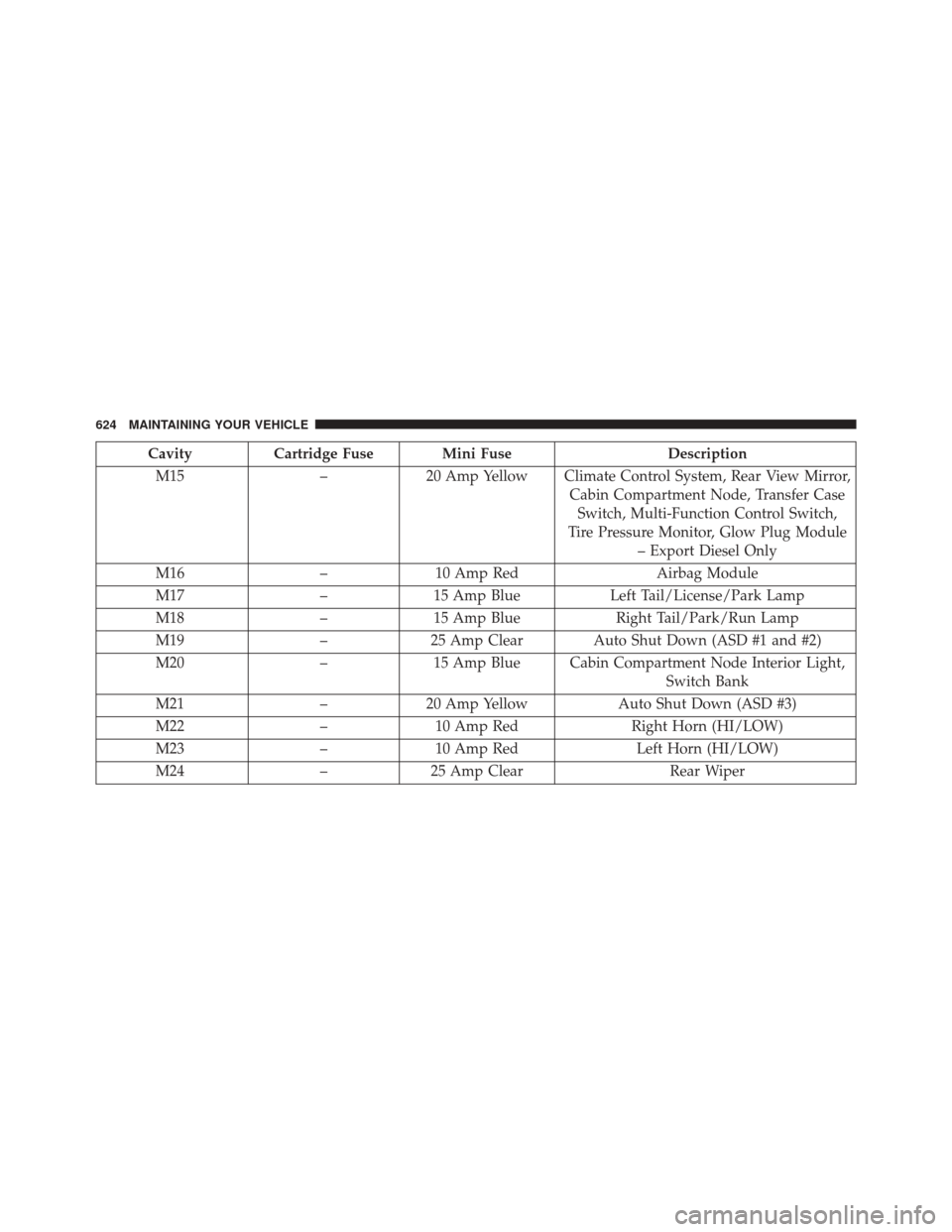
M15 –20 Amp Yellow Climate Control System, Rear View Mirror,
Cabin Compartment Node, Transfer CaseSwitch, Multi-Function Control Switch,
Tire Pressure Monitor, Glow Plug Module – Export Diesel Only
M16 –10 Amp Red Airbag Module
M17 –15 Amp Blue Left Tail/License/Park Lamp
M18 –15 Amp Blue Right Tail/Park/Run Lamp
M19 –25 Amp Clear Auto Shut Down (ASD #1 and #2)
M20 –15 Amp Blue Cabin Compartment Node Interior Light,
Switch Bank
M21 –20 Amp Yellow Auto Shut Down (ASD #3)
M22 –10 Amp Red Right Horn (HI/LOW)
M23 –10 Amp Red Left Horn (HI/LOW)
M24 –25 Amp Clear Rear Wiper
624 MAINTAINING YOUR VEHICLE
Page 633 of 678
Rear Tail, Stop, Turn Signal, And Backup Lamp
1. Remove the two inboard screws attaching the tail lighthousing to the body. DO NOT REMOVE THE OUT-
BOARD SCREWS AT ANY TIME. 2. Separate the housing from the body by pushing the
lamp inboard while pulling the lamp away from the
body.
3. Rotate the appropriate socket 1/4 turn counterclock- wise, then remove it from the housing.
4. Pull the bulb straight from the socket to replace.
Center High-Mounted Stop Lamp (CHMSL)
The stop lamp is mounted on a bracket that extends
upward from the tailgate behind the spare tire. If service
is needed, obtain the LED/Cover Assembly from your
local authorized dealer.
1. Remove the spare tire.
2. Remove the four screws holding the lens/cover in place on the spare tire carrier.
3. Disconnect the wire harness from the back of the LED cover.
Inboard Screw Location
7
MAINTAINING YOUR VEHICLE 631