Page 172 of 212

COLD TYRE INFLATION PRESSURE (bar)
When the tyres are warm, the inflation pressure should be +0.3 bar compared with the prescribed value. However, recheck that
the value is correct with the tyre cold. With snow tyres, add +0.2 bar to the pressure value prescribed for standard tyres.
Ty r e sUnladen/medium load Full load
Full size spare
wheel(*)Space-saver
wheel
Front Rear Front Rear
215/65 R16 98H 2,4 2,2 2,4 2,4
2,4 4,2 215/60 R17 96H / 96V 2,4 2,2 2,4 2,4
225/55 R18 98V 2.4 2.2 2.4 2.4
(*) After using the spare wheel in an emergency, where necessary, align the pressure of the wheel to the recommended value as soon as possible, with reference to
the following table.
SNOW CHAINS78)
Front- and all-wheel drive versions: 7-mm snow chains can be used on 215/65 R16 tyres. Chains cannot be fitted on
215/60 R17 and 225/55 R18 tyres.
Important
The use of snow chains should be in compliance with local regulations of each country. In certain countries, tyres marked with
code M+S (Mud and Snow) are considered as winter equipment; therefore their use is equivalent to that of the snow chains.
The snow chains may be applied only to the front wheel tyres.
Check the tension of the snow chains after the first few metres have been driven.
Using snow chains with tyres with non-original dimensions may damage the vehicle.
Using different size or type (M+S, snow, etc.) tyres between front and rear axle may adversely affect vehicle driveability, with the
risk of losing control of the vehicle and resulting accidents.
WARNING
78)Keep your speed down when snow chains are fitted; do not exceed 50 km/h. Avoid potholes, steps and pavements and avoid driving for
long distances on roads not covered with snow to prevent damaging the vehicle and the road surface.
170
TECHNICAL SPECIFICATIONS
Page 174 of 212
MINIMUM GROUND CLEARANCE/TYPICAL ANGLES
"Minimum ground clearance" (reference A fig. 158)
The clearance value is measured next to the lower edge of the differential. This value also defines those for the "Approach
angle" the "Departure angle" and the "Breakover angle".
Dimensions are expressed in mm and refer to the vehicle equipped with its standard-supplied tyres.
Front wheel drive (FWD) versions: 171 mm
Four wheel drive (4WD) versions: 201 mm
Trailhawk versions with four wheel drive (4WD LOW): 225 mm
158J0A0242C
172
TECHNICAL SPECIFICATIONS
Page 175 of 212
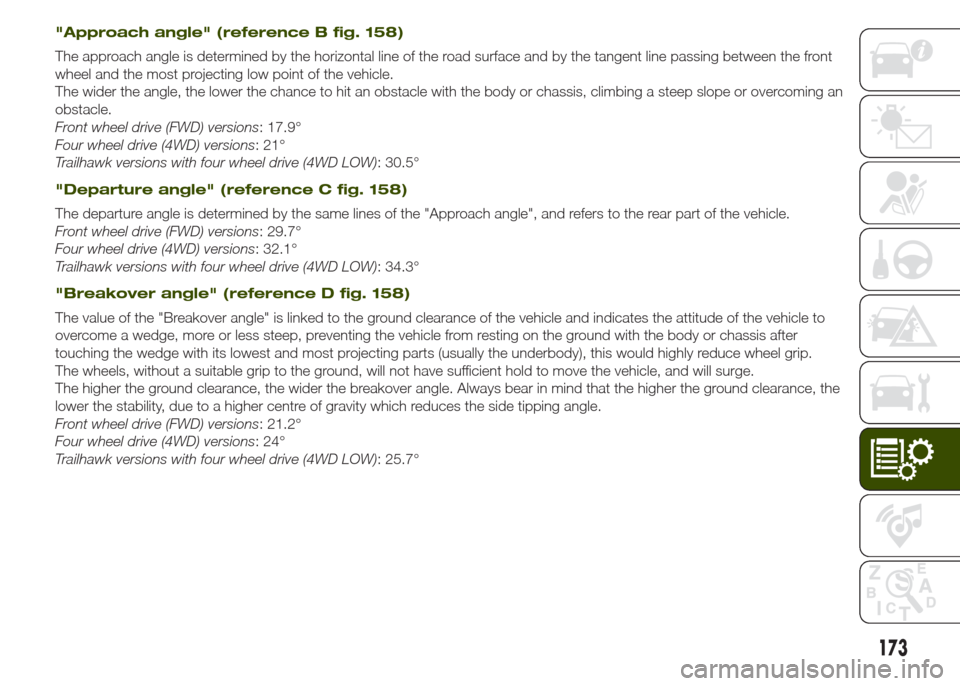
"Approach angle" (reference B fig. 158)
The approach angle is determined by the horizontal line of the road surface and by the tangent line passing between the front
wheel and the most projecting low point of the vehicle.
The wider the angle, the lower the chance to hit an obstacle with the body or chassis, climbing a steep slope or overcoming an
obstacle.
Front wheel drive (FWD) versions: 17.9°
Four wheel drive (4WD) versions: 21°
Trailhawk versions with four wheel drive (4WD LOW): 30.5°
"Departure angle" (reference C fig. 158)
The departure angle is determined by the same lines of the "Approach angle", and refers to the rear part of the vehicle.
Front wheel drive (FWD) versions: 29.7°
Four wheel drive (4WD) versions: 32.1°
Trailhawk versions with four wheel drive (4WD LOW): 34.3°
"Breakover angle" (reference D fig. 158)
The value of the "Breakover angle" is linked to the ground clearance of the vehicle and indicates the attitude of the vehicle to
overcome a wedge, more or less steep, preventing the vehicle from resting on the ground with the body or chassis after
touching the wedge with its lowest and most projecting parts (usually the underbody), this would highly reduce wheel grip.
The wheels, without a suitable grip to the ground, will not have sufficient hold to move the vehicle, and will surge.
The higher the ground clearance, the wider the breakover angle. Always bear in mind that the higher the ground clearance, the
lower the stability, due to a higher centre of gravity which reduces the side tipping angle.
Front wheel drive (FWD) versions: 21.2°
Four wheel drive (4WD) versions: 24°
Trailhawk versions with four wheel drive (4WD LOW): 25.7°
173
Page 178 of 212

FLUIDS AND LUBRICANTS
Your vehicle is equipped with an engine oil that has been thoroughly developed and tested in order to meet the requirements of
the Scheduled Servicing Plan. Constant use of the prescribed lubricants guarantees the fuel consumption and emission
specifications. Lubricant quality is crucial for engine operation and duration.
UseFluid and lubricant specifications for
correct vehicle operationReplacement interval
Lubricant for petrol engines79)The use of SAE 0W-30 ACEA C2 grade totally
synthetic lubricant is recommended. FIAT
9.55535-GS1 classification.According to the Scheduled Servicing Plan
Lubricant for diesel engines
79)The use of SAE 0W-30 ACEA C2 grade totally
synthetic lubricant is recommended. FIAT
9.55535-DS1 classification.According to the Scheduled Servicing Plan
Lubricants and greases for drive
transmissionThe use of SAE 75W grade synthetic lubricant
is recommended. FIAT 9.55550-MZ6
classification.Manual gearbox and differential and twin clutch
automatic transmission
The use of synthetic lubricant is recommended.
FIAT 9.55550-AV5 classification.Automatic transmission
The use of molybdenum disulphide grease for
use at high temperatures is recommended.
NL.G.I. 1-2 consistency. FIAT 9.55580
classification.Wheel side constant velocity joints
The use of specific grease for constant velocity
joints with low friction coefficient is
recommended. NL.G.I. 0-1 consistency FIAT
9.55580 classification.Differential side constant velocity joints
The use of SAE 75W-90 API GL5 grade
synthetic lubricant is recommended.Rear differential (RDM) and idler unit (PTU)
176
TECHNICAL SPECIFICATIONS
Page 187 of 212
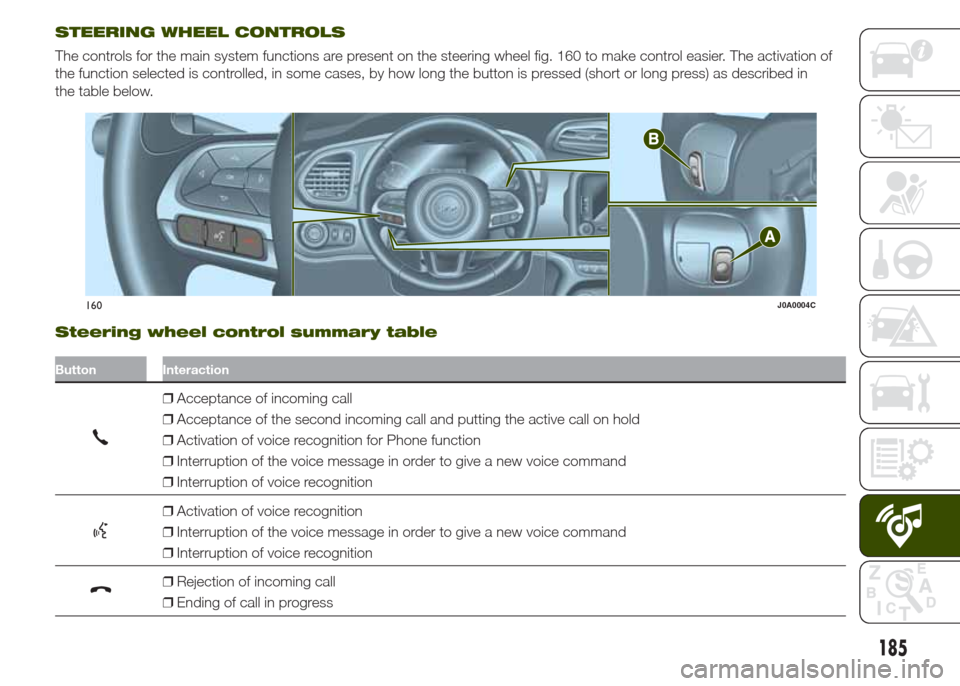
STEERING WHEEL CONTROLS
The controls for the main system functions are present on the steering wheel fig. 160 to make control easier. The activation of
the function selected is controlled, in some cases, by how long the button is pressed (short or long press) as described in
the table below.
Steering wheel control summary table
Button Interaction
❒Acceptance of incoming call
❒Acceptance of the second incoming call and putting the active call on hold
❒Activation of voice recognition for Phone function
❒Interruption of the voice message in order to give a new voice command
❒Interruption of voice recognition
❒Activation of voice recognition
❒Interruption of the voice message in order to give a new voice command
❒Interruption of voice recognition
❒Rejection of incoming call
❒Ending of call in progress
160J0A0004C
185
Page 188 of 212
Controls behind the steering wheel
Buttons Interaction
Button A (steering wheel left side)
Upper button
❒Brief button press: search for next radio station or selection of USB/iPod
next track.
❒Long button press: scan of higher frequencies until released/fast forward
of USB/iPod track.
Central buttonWith each press it scrolls through sources AM, FM, USB/iPod, AUX. Only the available
sources will be selected.
Lower button
❒Brief button press: search for previous radio station or selection of USB/
iPod next track.
❒Long button press: scan of lower frequencies until released/fast forward of
USB/iPod track.
Button B (steering wheel right side)
Upper buttonIncrease volume
❒Brief button press: single volume increase
❒Long button press: fast volume increase
Central button Activation/deactivation of Mute function
Lower buttonDecrease volume
❒Brief button press: single volume decrease
❒Long button press: fast volume decrease
186
MULTIMEDIA
Page 192 of 212

❒"Sound & Display": the system warns
the driver that an obstacle is present
through acoustic (via the speakers
in the vehicle) and visual (on the
instrument panel) warnings.
Front ParkSense Vol.(where provided)
This function can be used to select the
volume of the acoustic warnings
provided by the front Parksense
system.
Rear ParkSense Vol.(where provided)
This function can be used to select the
volume of the acoustic warnings
provided by the rear Parksense system.
ParkSense Vol.(where provided)
This function can be used to select the
volume of the acoustic warnings
provided by the Parksense system.
LaneSense Warning(where provided)
This function can be used to select the
"readiness" of the LaneSense system to
intervene.
LaneSense Strength(where provided)
This function can be used to select the
force to apply to the steering wheel
to put the vehicle back in the lane
through the electric steering system, in
the event of LaneSense system
intervention.
SideSense(where provided)
This function can be used to select the
Side Distance Warning system warning
type.
The options available are:
❒"Off": the system is deactivated;
❒"Sound Only": the system warns the
driver that an obstacle is present
through acoustic warnings only, via the
speakers in the vehicle.
❒"Sound & Display": the system warns
the driver that an obstacle is present
through acoustic (via the speakers
in the vehicle) and visual (on the
instrument panel) warnings.
SideSense Intensity(where provided)
This function can be used to select the
Side Distance Warning system acoustic
warning volume.
Blind Spot Alert(where provided)
This function can be used to select the
type of warning ("Sound Only" or
"Sound & Display") to indicate the
presence of objects in the blind spot of
the door mirror.
Rain sensor(where provided)
This function can be used to activate/
deactivate the automatic operation
of the wipers in the event of rain.
Brakes(where provided)
This function can be used to select the
following submenus:
❒"Brake Service" (where provided):
permits the activation of the procedure
to carry out braking system servicing;
❒"Auto Park Brake" (where provided):
permits the activation/deactivation of
automatic parking brake engagement.
NAVIGATION(Uconnect 5" Radio Nav versions only)
Programming a route
IMPORTANT In the interest of safety
and to reduce distractions while you are
driving, you should always plan a route
before you start driving.
190
MULTIMEDIA
Page 195 of 212

VOICE COMMANDS
NOTE For languages not supported by
the system, voice commands are not
available.
To use the voice commands, press the
button ("Voice" button) or
("Phone" button) on the controls of
the steering wheel and give the
command you want to activate, out
loud.
Phone functions
Thebutton activates the following
functions:
❒Call
❒Dial
❒Redial
❒Call back
❒Last calls
❒Outgoing calls
❒Missed calls
❒Incoming calls
❒Phonebook
❒Search
❒Show SMS
Radio functions
Thebutton activates the following
functions:
❒Tune to XXX-FM
❒Tune to XXX AM
❒Tune to Radio XXX
❒Tune to DAB channel
Media Functions
Thebutton activates the following
functions:
❒Play song...
❒Play album…
❒Play artist…
❒Play genre…
❒Play playlist…
❒Play podcast…
❒Play audiobook…
❒Play track number…
❒Select the media
❒Display
Navigation functions(only versions with Uconnect 5" Radio
Nav and Uconnect 6.5" Radio Nav)
The
button activates the following
functions:
❒Drive Home
❒2D view
❒3D view
❒Clear route
❒Add Favourite
❒Repeat instruction
193