Page 305 of 572

device first, then it will get streamed to the Uconnect®
phone system. Seven devices can be paired to the
Uconnect® phone system, but just one can be selected
and played.
Selecting A Different Audio Device
1. Press the PHONE button to begin.
2. After the�Ready�prompt and following the beep, say
�Setup�, then say �Select Audio Devices.�
3. Say the name of the audio device or ask the Uconnect® phone system to list the audio devices.
Next Track
Use the SEEK UP button, or press the VR button on the
radio and say “Next Track,” to jump to the next music
track on your cellular phone.
Previous Track
Use the SEEK DOWN button, or press the VR button on
the radio and say “Previous Track,” to jump to the
previous music track on your cellular phone.
Browse
Browsing is not available on a Bluetooth® Streaming
Audio (BTSA) device. Only the current song that is
playing will display info.
STEERING WHEEL AUDIO CONTROLS
The remote sound system controls are located on the rear
surface of the steering wheel. Reach behind the wheel to
access the switches.
4
UNDERSTANDING YOUR INSTRUMENT PANEL 303
Page 308 of 572
NOTE:If you experience difficulty in playing a particular
disc, it may be damaged (e.g., scratched, reflective coat-
ing removed, a hair, moisture or dew on the disc)
oversized, or have protection encoding. Try a known
good disc before considering disc player service.
RADIO OPERATION AND MOBILE PHONES
Under certain conditions, the mobile phone being on in
your vehicle can cause erratic or noisy performance from
your radio. This condition may be lessened or eliminated
by relocating the mobile phone antenna. This condition is
not harmful to the radio. If your radio performance does not satisfactorily “clear” by the repositioning of the
antenna, it is recommended that the radio volume be
turned down or off during mobile phone operation when
not using Uconnect® (if equipped).
CLIMATE CONTROLS
The air conditioning and heating system is designed to
make you comfortable in all types of weather.
306 UNDERSTANDING YOUR INSTRUMENT PANEL
Page 472 of 572

6. Once the engine is started, remove the jumper cablesin the reverse sequence:
Disconnecting The Jumper Cables
1. Disconnect the negative (-)end of the jumper cable
from the engine ground of the vehicle with the dis-
charged battery.
2. Disconnect the opposite end of the negative (-)jumper
cable from the negative (-)post of the booster battery.
3. Disconnect the positive (+)end of the jumper cable
from the positive (+)post of the booster battery.
4. Disconnect the opposite end of the positive (+)jumper
cable from the positive (+)post of the vehicle with the
discharged battery.
5. Reinstall the air intake duct. If frequent jump-starting is required to start your vehicle
you should have the battery and charging system in-
spected at your authorized dealer.
CAUTION!
Accessories plugged into the vehicle power outlets
draw power from the vehicle’s battery, even when not
in use (i.e., cellular phones, etc.). Eventually, if
plugged in long enough without engine operation,
the vehicle’s battery will discharge sufficiently to
degrade battery life and/or prevent the engine from
starting.
FREEING A STUCK VEHICLE
If your vehicle becomes stuck in mud, sand or snow, it
can often be moved using a rocking motion. Turn the
steering wheel right and left to clear the area around the
front wheels. Then shift back and forth between DRIVE
470 WHAT TO DO IN EMERGENCIES
Page 522 of 572
CavityCartridge Fuse Mini-FuseDescription
3 10 Amp RedRear Center Brake Light
Switch
4 10 Amp RedIgnition Switch/Occupant
Classification Module
5 15 Amp Lt Blue Battery Feed For Power Tech
6 10 Amp RedPower Mirror/Steering Con-
trol Satellite Radio/Hands- Free Phone
7 30 Amp GreenIgnition Off Draw
8 30 Amp GreenIgnition Off Draw
9 40 Amp Green Power Seats
10 20 Amp YellowPower Locks/Interior Light-
ing
11 15 Amp Lt BluePower Outlet
12 20 Amp Yellow115V AC Inverter – If
Equipped
520 MAINTAINING YOUR VEHICLE
Page 544 of 572

facilities, factory-trained technicians, special tools, and
the latest information to ensure the vehicle is fixed
correctly and in a timely manner.
This is why you should always talk to an authorized
dealer service manager first. Most matters can be re-
solved with this process.
•If for some reason you are still not satisfied, talk to the
general manager or owner of the authorized dealer.
They want to know if you need assistance.
• If an authorized dealer is unable to resolve the con-
cern, you may contact the manufacturer’s customer
center.
Any communication to the manufacturer’s customer cen-
ter should include the following information:
• Owner’s name and address
• Owner’s telephone number (home and office) •
Authorized dealer name
• Vehicle Identification Number (VIN)
• Vehicle delivery date and mileage
Chrysler Group LLC Customer Center
P.O. Box 21–8004
Auburn Hills, MI 48321–8004
Phone: (877) 426–5337
Chrysler Canada Inc. Customer Center
P.O. Box 1621
Windsor, Ontario N9A 4H6
Phone: (800) 465–2001 English / (800) 387–9983 French
542 IF YOU NEED CONSUMER ASSISTANCE
Page 548 of 572

PUBLICATION ORDER FORMS
To order the following manuals, you may use either the
website or the phone numbers listed below. Visa, Mas-
tercard, American Express, and Discover orders are ac-
cepted. If you prefer mailing your payment, please call
for an order form.
NOTE:A street address is required when ordering
manuals (no P.O. Boxes).
Service Manuals
These comprehensive Service Manuals provide the infor-
mation that students and professional technicians need in
diagnosing/troubleshooting, problem solving, maintain-
ing, servicing, and repairing Chrysler Group LLC ve-
hicles. A complete working knowledge of the vehicle,
system, and/or components is written in straightforward
language with illustrations, diagrams, and charts. Diagnostic Procedure Manuals
Diagnostic Procedure Manuals are filled with diagrams,
charts and detailed illustrations. These practical manuals
make it easy for students and technicians to find and fix
problems on computer-controlled vehicle systems and
features. They show exactly how to find and correct
problems the first time, using step-by-step troubleshoot-
ing and drivability procedures, proven diagnostic tests
and a complete list of all tools and equipment.
Owner’s Manuals
These Owner’s Manuals have been prepared with the
assistance of service and engineering specialists to ac-
quaint you with specific Chrysler Group LLC vehicles.
Included are starting, operating, emergency and mainte-
nance procedures as well as specifications, capabilities
and safety tips.
546 IF YOU NEED CONSUMER ASSISTANCE
Page 554 of 572
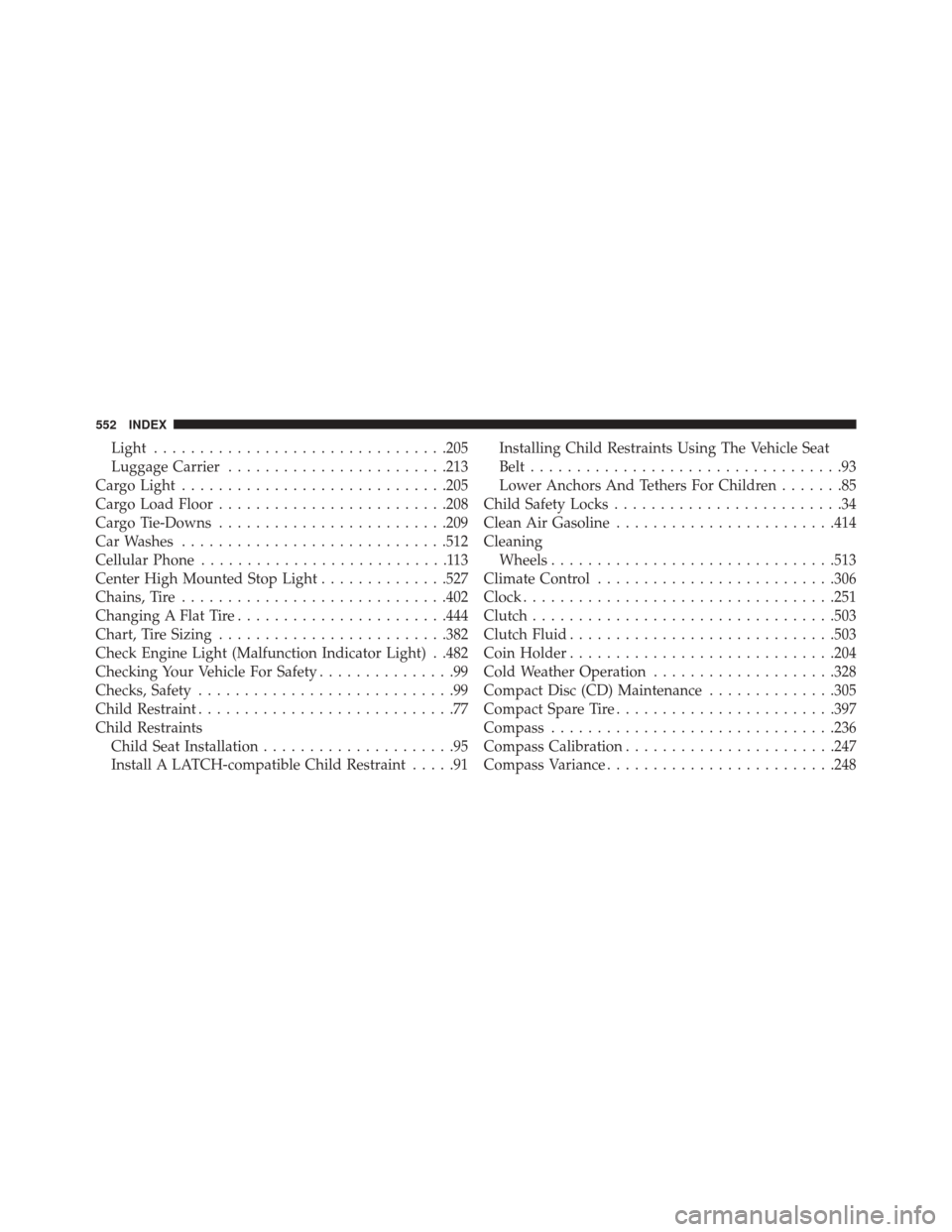
Light............................... .205
Luggage Carrier ....................... .213
Cargo Light ............................ .205
Cargo Load Floor ........................ .208
Cargo Tie-Downs ........................ .209
Car Washes ............................ .512
Cellular Phone ...........................113
Center High Mounted Stop Light ..............527
Chains, Tire ............................ .402
Changing A Flat Tire ...................... .444
Chart, Tire Sizing ........................ .382
Check Engine Light (Malfunction Indicator Light) . .482
Checking Your Vehicle For Safety ...............99
Checks, Safety ............................99
Child Restraint ............................77
Child Restraints Child Seat Installation .....................95
Install A LATCH-compatible Child Restraint .....91Installing Child Restraints Using The Vehicle Seat
Belt
..................................93
Lower Anchors And Tethers For Children .......85
Child Safety Locks .........................34
Clean Air Gasoline ....................... .414
Cleaning Wheels .............................. .513
Climate Control ......................... .306
Clock ................................. .251
Clutch ................................ .503
Clutch Fluid ............................ .503
Coin Holder ............................ .204
Cold Weather Operation ....................328
Compact Disc (CD) Maintenance ..............305
Compact Spare Tire ....................... .397
Compass .............................. .236
Compass Calibration ...................... .247
Compass Variance ........................ .248
552 INDEX
Page 558 of 572

Capacity............................ .527
Clean Air ............................ .414
Ethanol ............................. .415
Filler Cap (Gas Cap) .....................418
Gasoline ............................. .414
Gauge .............................. .222
Light ............................... .223
Materials Added ....................... .416
Methanol ............................ .415
Octane Rating ......................... .414
Requirements ......................... .414
Tank Capacity ......................... .527
Fueling ............................... .418
Fuel System Caution ...................... .419
Fuses ................................. .518
Garage Door Opener (HomeLink®) ............183
Gas Cap (Fuel Filler Cap) ...................418
Gasoline, Clean Air ....................... .414Gasoline (Fuel)
.......................... .414
Gasoline, Reformulated .....................414
Gauges Coolant Temperature .....................227
Fuel ................................ .222
Odometer ............................ .230
Tachometer ........................... .225
Gear Ranges ............................ .335
Gear Select Lever Override ..................472
General Information ...................... .144
Glass Cleaning .......................... .516
Gross Axle Weight Rating ...................424
Gross Vehicle Weight Rating ..................421
GVWR ................................ .421
Hands-Free Phone (Uconnect®) ...............113
Hazard Warning Flasher ....................441
Headlights ............................. .525
Cleaning ............................ .515
556 INDEX

