Page 459 of 690

Brake Service Mode
We recommend having your brakes serviced by your
authorized dealer. You should only make repairs for
which you have the knowledge and the right equipment.
You should only enter Brake Service Mode during brake
service.
When servicing your rear brakes, it may be necessary for
you or your technician push the rear piston into the rear
caliper bore. With the electric parking brake system, this
can only be done after retracting the Electric Parking
Brake actuator. Fortunately, actuator retraction can be
done easily by entering the Brake Service Mode through
the Uconnect® Settings in your vehicle. This menu based
system will guide you through the steps necessary to
retract the EPB actuator in order to perform rear brake
service.Service Mode has requirements that must be met in order
to be activated:
•
The vehicle must be at a standstill.
• The parking brake must be unapplied.
• The transmission must be in Park or Neutral.
While in service mode, the Electric Parking Brake fault
lamp will flash continuously while the ignition switch is
ON.
When brake service work is complete, the following steps
must be followed to reset the parking brake system to
normal operation:
• Ensure the vehicle is at a standstill.
• Press the brake pedal with moderate force.
• Apply the Electric Parking Brake Switch.
5
STARTING AND OPERATING 457
Page 463 of 690

CAUTION!
The ABS is subject to possible detrimental effects of
electronic interference caused by improperly in-
stalled aftermarket radios or telephones.
NOTE: During severe braking conditions, a pulsing sen-
sation may occur and a clicking noise will be heard. This
is normal, indicating that the ABS is functioning.
• Do not “ride” the brakes by resting your foot on the
pedal. This could overheat the brakes and result in
unpredictable braking action, longer stopping dis-
tances, or brake damage.
• When descending mountains or hills, repeated braking
can cause brake fade with loss of braking control.
Avoid repeated heavy braking by downshifting the
transmission or locking out overdrive whenever pos-
sible. •
Engines may idle at higher speeds during warm-up,
which could cause rear wheels to spin and result in
loss of vehicle control. Be especially careful while
driving on slippery roads, in close-quarter maneuver-
ing, parking, or stopping.
• Do not drive too fast for road conditions, especially
when roads are wet or slushy. A wedge of water can
build up between the tire tread and the road. This
hydroplaning action can cause loss of traction, braking
ability, and control.
• After going through deep water or a car wash, brakes
may become wet, resulting in decreased performance
and unpredictable braking action. Dry the brakes by
gentle, intermittent pedal action while driving at very
slow speeds.
5
STARTING AND OPERATING 461
Page 466 of 690

WARNING!(Continued)
rollovers, especially those that involve leaving the
roadway or striking objects or other vehicles. The
capabilities of an ERM-equipped vehicle must never
be exploited in a reckless or dangerous manner,
which could jeopardize the user’s safety or the safety
of others.
Hill Start Assist (HSA)
The HSA system is designed to help the driver accelerate
the vehicle from a complete stop while on an incline.
If the driver releases the brake while stopped on an
incline, HSA will continue to hold the brake pressure for
a short period. If the driver does not apply the throttle
before this time expires, the system will release brake
pressure and the vehicle will roll down the hill as normal.
The system will release brake pressure in proportion to
amount of throttle applied. The following conditions must be met in order for HSA to
activate:
•
The vehicle must be stopped.
• The vehicle must be on a 7% (approximate) grade or
greater hill.
• The gear selection must match vehicle uphill direction
(i.e., vehicle facing uphill is in forward gear; vehicle
backing uphill is in REVERSE gear).
• For vehicles equipped with an automatic transmission,
the HSA will work in REVERSE gear and all forward
gears. The system will not activate if the transmission
is in PARK.
464 STARTING AND OPERATING
Page 468 of 690
WARNING!(Continued)
•HSA is not a parking brake. Always apply the
parking brake fully when leaving your vehicle.
Also, be certain to leave the transmission in PARK.
• Failure to follow these warnings can result in a
collision or serious personal injury.
Disabling And Enabling HSA
If you wish to turn off the HSA system, it can be done
using the Uconnect® Access Settings. Refer to
“Uconnect® Access Settings” in “Understanding Your
Instrument Panel” for further information.
Hill Descent Control (HDC) — If Equipped
HDC is intended for low speed off road driving while in
4WD Low Range. HDC maintains vehicle speed while
descending hills during various driving situations. HDC
controls vehicle speed by actively controlling the brakes.
Hill Descent Control
466 STARTING AND OPERATING
Page 470 of 690

•4th = 2.5 mph (4 km/h)
• 5th = 3.1 mph (5 km/h)
• 6th = 3.7 mph (6 km/h)
• 7th = 4.3 mph (7 km/h)
• 8th = 5.0 mph (8 km/h)
• 9th = 5.6 mph (9 km/h)
NOTE: During HDC the ERS +/- shifter input is used for
HDC target speed selection but will not affect the gear
chosen by the transmission. During HDC the transmis-
sion will shift appropriately for the driver-selected set
speed and corresponding driving conditions.
Driver Override:
The driver may override HDC activation with throttle or
brake application at anytime. Deactivating HDC
HDC will be deactivated but remain available if any of
the following conditions occur:
•
Driver overrides HDC set speed with throttle or brake
application.
• Vehicle speed exceeds 20 mph (32 km/h) but remains
below 40 mph (64 km/h).
• Vehicle is on a downhill grade of insufficient magni-
tude (less than approximately 8%), is on level ground,
or is on an uphill grade.
• Vehicle is shifted to park.
Disabling HDC
HDC will be deactivated and disabled if any of the
following conditions occur:
• The driver presses the HDC switch.
• The driveline is shifted out of 4WD Low Range.
468 STARTING AND OPERATING
Page 473 of 690
Activating SSC
Once SSC is enabled it will activate automatically once
the following conditions are met:
•Driver releases throttle
• Driver releases brake
• Transmission is in any selection other than P
• Vehicle speed is below 20 mph (32 km/h)
The set speed for SSC is selectable by the driver, and can
be adjusted by using the gear shift lever. Additionally, the
SSC set speed is automatically reduced when climbing a
grade and the level of set speed reduction depends on the
magnitude of grade. The following summarizes the SSC
set speeds: 4WD Low Range Set Speeds
•
1st = .6 mph (1 km/h)
• 2nd = 1.2 mph (2 km/h)
• 3rd = 4 mph (3 km/h)
• 4th = 2.5 mph (4 km/h)
• 5th = 3.1 mph (5 km/h)
• 6th = 3.7 mph (6 km/h)
• 7th = 4.3 mph (7 km/h)
• 8th = 5 mph (8 km/h)
• 9th = 5.6 mph (9 km/h)
• REVERSE = .6 mph (1 km/h)
• NEUTRAL = 1.2 mph (2 km/h)
• PARK = SSC remains enabled but not active
5
STARTING AND OPERATING 471
Page 474 of 690

NOTE:
•These SSC default set speeds are dependent on hill
grade. That is the steeper the grade of the hill the
vehicle travels on the lower the values of the set speed
will be for all listed gears, with the minimal value
being .6 mph (1 km/h).
• During SSC the ERS +/- shifter input is used for SSC
target speed selection but will not affect the gear
chosen by the transmission. During SSC the transmis-
sion will shift appropriately for the driver-selected set
speed and corresponding driving conditions.
• SSC performance is influenced by the Terrain Select
mode. This difference may be notable to the driver and
may be perceived as a varying level of aggressiveness.
Driver Override:
The driver may override SSC activation with throttle or
brake application at any time. Deactivating SSC
SSC will be deactivated but remain available if any of the
following conditions occur:
•
Driver overrides SSC set speed with throttle or brake
application.
• Vehicle speed exceeds 20 mph (32 km/h) but remains
below 40 mph (64 km/h).
• Vehicle is shifted to park.
Disabling SSC
SSC will deactivate and be disabled if any of the follow-
ing conditions occur:
• The driver presses the SSC switch.
• The driveline is shifted out of 4WD Low Range.
• The parking brake is applied.
472 STARTING AND OPERATING
Page 537 of 690
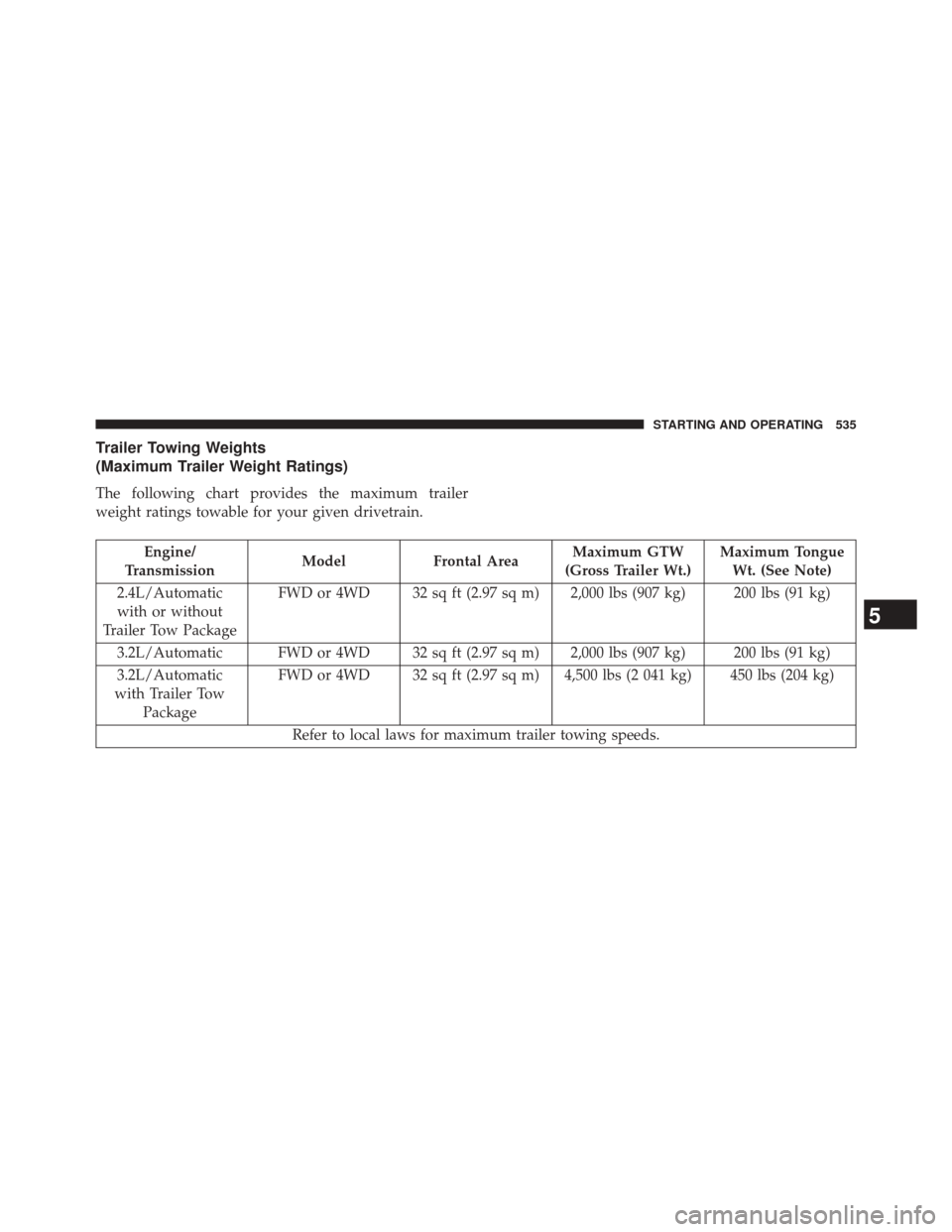
Trailer Towing Weights
(Maximum Trailer Weight Ratings)
The following chart provides the maximum trailer
weight ratings towable for your given drivetrain.
Engine/
Transmission Model
Frontal Area Maximum GTW
(Gross Trailer Wt.) Maximum Tongue
Wt. (See Note)
2.4L/Automatic with or without
Trailer Tow Package FWD or 4WD 32 sq ft (2.97 sq m) 2,000 lbs (907 kg) 200 lbs (91 kg)
3.2L/Automatic FWD or 4WD 32 sq ft (2.97 sq m) 2,000 lbs (907 kg) 200 lbs (91 kg)
3.2L/Automatic
with Trailer Tow Package FWD or 4WD 32 sq ft (2.97 sq m) 4,500 lbs (2 041 kg) 450 lbs (204 kg)
Refer to local laws for maximum trailer towing speeds.
5
STARTING AND OPERATING 535